
- Forums
- Product Forums
- General Purpose MicrocontrollersGeneral Purpose Microcontrollers
- i.MX Forumsi.MX Forums
- QorIQ Processing PlatformsQorIQ Processing Platforms
- Identification and SecurityIdentification and Security
- Power ManagementPower Management
- Wireless ConnectivityWireless Connectivity
- RFID / NFCRFID / NFC
- Advanced AnalogAdvanced Analog
- MCX Microcontrollers
- S32G
- S32K
- S32V
- MPC5xxx
- Other NXP Products
- S12 / MagniV Microcontrollers
- Powertrain and Electrification Analog Drivers
- Sensors
- Vybrid Processors
- Digital Signal Controllers
- 8-bit Microcontrollers
- ColdFire/68K Microcontrollers and Processors
- PowerQUICC Processors
- OSBDM and TBDML
- S32M
- S32Z/E
-
- Solution Forums
- Software Forums
- MCUXpresso Software and ToolsMCUXpresso Software and Tools
- CodeWarriorCodeWarrior
- MQX Software SolutionsMQX Software Solutions
- Model-Based Design Toolbox (MBDT)Model-Based Design Toolbox (MBDT)
- FreeMASTER
- eIQ Machine Learning Software
- Embedded Software and Tools Clinic
- S32 SDK
- S32 Design Studio
- GUI Guider
- Zephyr Project
- Voice Technology
- Application Software Packs
- Secure Provisioning SDK (SPSDK)
- Processor Expert Software
- Generative AI & LLMs
-
- Topics
- Mobile Robotics - Drones and RoversMobile Robotics - Drones and Rovers
- NXP Training ContentNXP Training Content
- University ProgramsUniversity Programs
- Rapid IoT
- NXP Designs
- SafeAssure-Community
- OSS Security & Maintenance
- Using Our Community
-
- Cloud Lab Forums
-
- Knowledge Bases
- ARM Microcontrollers
- i.MX Processors
- Identification and Security
- Model-Based Design Toolbox (MBDT)
- QorIQ Processing Platforms
- S32 Automotive Processing Platform
- Wireless Connectivity
- CodeWarrior
- MCUXpresso Suite of Software and Tools
- MQX Software Solutions
- RFID / NFC
- Advanced Analog
-
- NXP Tech Blogs
- Home
- :
- i.MX论坛
- :
- i.MX RT 交叉 MCU
- :
- J-Link Error when attempting to debug program
J-Link Error when attempting to debug program
J-Link Error when attempting to debug program
Hello,
I am attempting to bring up the EVK-MIMXRT685 evaluation board. I am following the videos/instructions in the "Getting Started with i.MX RT600 Evaluation Kit" pages on the NXP site. I have successfully installed all of the necessary applications as per the instructions.
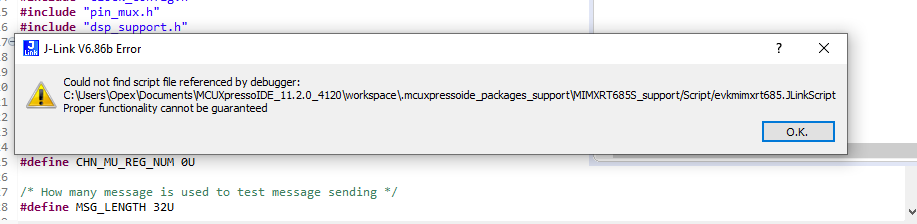
When I attempt to debug the SDK example (dsp_mu_pollng_cm33), I receive an error stating that the evkmimxrt685.JLinkScript file cannot be found by the debugger. The folder listed in the error message is empty.
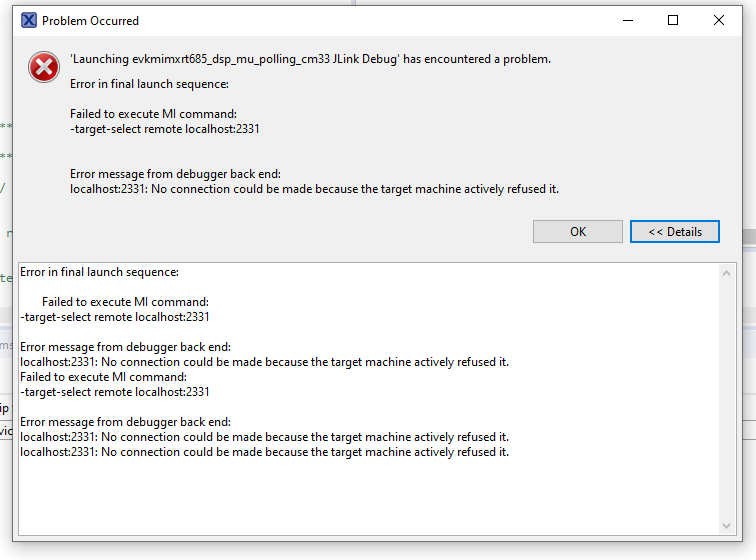
The second error message received states that "No connection could be make because the target machine actively refused it."
After this initial connection failure, I deleted all applications and re-installed them again. However, I receive the same error messages when attempting to debug the program.
Screenshots of the errors are attached.
I am running the MCUXpresso IDE on a Windows 10 VMware virtual machine. I verified that the evaluation board is connected to the guest OS. Previously, I have run MCUXpresso on a Windows 10 VM with a FRDM-K64F evaluation board with no issues.
Can anyone provide an answer or point me in the right direction?
Thanks in advance for your help.

Hi @kerryzhou , same issue have happened to our evaluation board IMXRT1050EVKB when tried to program through J-link , Both the steps mentioned above have tired but no results. still showing the same error. "proper functionality cannot be guarantee.
i am using MCUXpresso IDE v11.3.0_5222. Please give us a solution

 Sabina_Bruce
Hello ,
Hope you are doing well.
Could you please confirm the version of the Jlink you are using on the virtual machine? Have you been able to try it on a different machine that is not running on a VM.
Best Regards,
Sabina
Hello Sabina,
I was able to get up and running by setting the "Enable discovering of SEGGER J-Link IP Probes" in Window > Preferences > MCUXpresso IDE > Debug Options > J-Link Options. This is working in both a VM and a machine not running a VM.
Thanks.
-John
I had followed NXP MIMXRT685-EVK: i.MX RT600 Evaluation Kit Getting Started 3. Build, Run,
and met the same condition that a pop up message box: "J-Link V6.86f Error", Could not find script file referenced by debugger: D:\McuExpressoWorkSpace\.mcuxpressoide_packages_support\MIMXRT685S_support/Script/evkmimxrt685.JLinkScript Proper functionality cannot be guaranteed.
After setting the "Enable discovering of SEGGER J-Link IP Probes" in Window > Preferences > MCUXpresso IDE > Debug Options > J-Link Options, it can's solve the issue.
OS: Windows7 64 bit professional
Ask for application advice sincerely.
Sabina_Bruce
Hi Kenny,
Kindly create a new post with the information, since it was not resolved with the above solution your case may be different and it will help others in future referencing.
Best Regards,
Sabina
I had followed NXP MIMXRT685-EVK: i.MX RT600 Evaluation Kit Getting Started 3. Build, Run,
and met the same condition that a pop up message box: "J-Link V6.86f Error", Could not find script file referenced by debugger: D:\McuExpressoWorkSpace\.mcuxpressoide_packages_support\MIMXRT685S_support/Script/evkmimxrt685.JLinkScript Proper functionality cannot be guaranteed.
After setting the "Enable discovering of SEGGER J-Link IP Probes" in Window > Preferences > MCUXpresso IDE > Debug Options > J-Link Options, it can't solve the issue.
OS: Windows7 64 bit professional
MCUXpresso IDE v11.2.1_4149
JLink_Windows_V686f.exe
Ask for application advice sincerely.

Hello KennyHo,
Still have JLINK debug issues in the RT685 or not?
If yes, please try my following method, double click the .launch file, and do the following modification.
About the .script, you can find it in the SDK demo package, eg:
SDK_2.8.3_EVK-MIMXRT685\boards\evkmimxrt685\driver_examples\gpio\led_output
When you unzip it, you will find it.
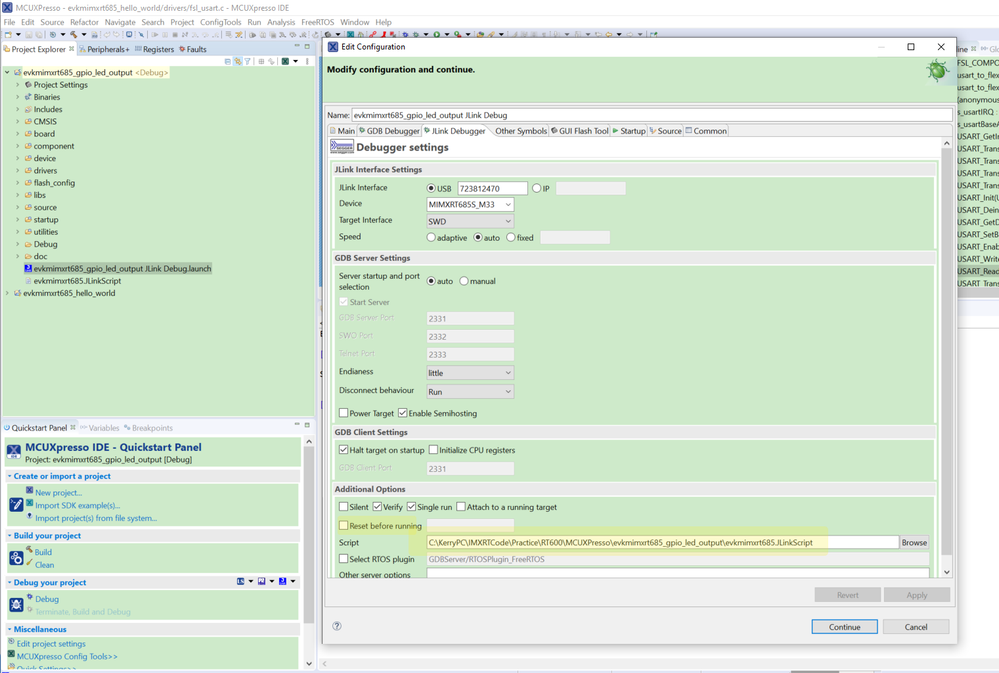
I also meet the same issues like you, and after the above modification, I can enter the debug mode with the JLINK now:
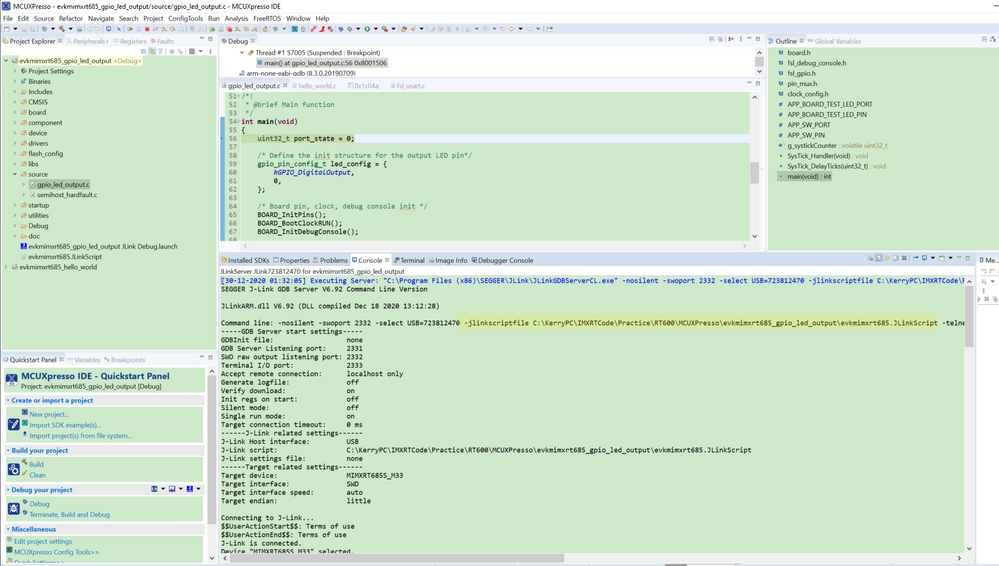
.png)
You can try it like my configuration.
If you still have questions, you can create the new case.
Best Regards,
Kerry
I had followed NXP MIMXRT685-EVK: i.MX RT600 Evaluation Kit Getting Started 3. Build, Run,
and met the same condition that a pop up message box: "J-Link V6.86f Error", Could not find script file referenced by debugger: D:\McuExpressoWorkSpace\.mcuxpressoide_packages_support\MIMXRT685S_support/Script/evkmimxrt685.JLinkScript Proper functionality cannot be guaranteed.
After setting the "Enable discovering of SEGGER J-Link IP Probes" in Window > Preferences > MCUXpresso IDE > Debug Options > J-Link Options, it can't solve the issue.
OS: Windows7 64 bit professional
Ask for application advice sincerely.
Sabina_Bruce
I'm glad to hear that you were able to get this working. Thank you for providing your results as well.
Have a great rest of your week!
Sabina
