
- Forums
- Product Forums
- General Purpose MicrocontrollersGeneral Purpose Microcontrollers
- i.MX Forumsi.MX Forums
- QorIQ Processing PlatformsQorIQ Processing Platforms
- Identification and SecurityIdentification and Security
- Power ManagementPower Management
- Wireless ConnectivityWireless Connectivity
- RFID / NFCRFID / NFC
- Advanced AnalogAdvanced Analog
- Neural Processing UnitsNeural Processing Units
- MCX Microcontrollers
- S32G
- S32K
- S32V
- MPC5xxx
- Other NXP Products
- S12 / MagniV Microcontrollers
- Powertrain and Electrification Analog Drivers
- Sensors
- Vybrid Processors
- Digital Signal Controllers
- 8-bit Microcontrollers
- ColdFire/68K Microcontrollers and Processors
- PowerQUICC Processors
- OSBDM and TBDML
- S32M
- S32Z/E
-
- Solution Forums
- Software Forums
- MCUXpresso Software and ToolsMCUXpresso Software and Tools
- CodeWarriorCodeWarrior
- MQX Software SolutionsMQX Software Solutions
- Model-Based Design Toolbox (MBDT)Model-Based Design Toolbox (MBDT)
- FreeMASTER
- eIQ Machine Learning Software
- Embedded Software and Tools Clinic
- S32 SDK
- S32 Design Studio
- GUI Guider
- Zephyr Project
- Voice Technology
- Application Software Packs
- Secure Provisioning SDK (SPSDK)
- Processor Expert Software
- Generative AI & LLMs
-
- Topics
- Mobile Robotics - Drones and RoversMobile Robotics - Drones and Rovers
- NXP Training ContentNXP Training Content
- University ProgramsUniversity Programs
- Rapid IoT
- NXP Designs
- SafeAssure-Community
- OSS Security & Maintenance
- Using Our Community
-
- Cloud Lab Forums
-
- Knowledge Bases
- ARM Microcontrollers
- i.MX Processors
- Identification and Security
- Model-Based Design Toolbox (MBDT)
- QorIQ Processing Platforms
- S32 Automotive Processing Platform
- Wireless Connectivity
- CodeWarrior
- MCUXpresso Suite of Software and Tools
- MQX Software Solutions
- RFID / NFC
- Advanced Analog
- Neural Processing Units
-
- NXP Tech Blogs
- Home
- :
- i.MX Forums
- :
- i.MX RT Crossover MCUs
- :
- Debugging custom application with the IDE
Debugging custom application with the IDE
- Subscribe to RSS Feed
- Mark Topic as New
- Mark Topic as Read
- Float this Topic for Current User
- Bookmark
- Subscribe
- Mute
- Printer Friendly Page
Debugging custom application with the IDE

- Mark as New
- Bookmark
- Subscribe
- Mute
- Subscribe to RSS Feed
- Permalink
- Report Inappropriate Content
Hi,
I'm trying to debug a custom application built outside of the IDE. I have created a new MCUXpresso IDE project with most of the standard files stripped off. The Run/Debug settings have been changed to use the custom .elf application(which is being built in vs code) instead of the project build output from the IDE. I have provided the link to my source folders under the source section. However, when I try to debug it I see the following messages on the console:
"NXP: MIMXRT1064xxxxA
DAP stride is 1024 bytes (256 words)
XML Error - no license-type XML file 'crt_common.xme' on path.
note - part information contained no product license-type data
can't find a flash driver called ''
Can you please tell me if I'm following the right steps, and what else needs to be done for this to be successful. The main idea is to debug the application and do a routine 'step-through' operation.
Thanks
GS
- Mark as New
- Bookmark
- Subscribe
- Mute
- Subscribe to RSS Feed
- Permalink
- Report Inappropriate Content
Hi Jeremy,
Thanks for getting back. Here are the responses to your questions:
2. The board is the MIMXRT1064-EVK.
3. The debugger is on the onboard CMSIS-DAP probe.
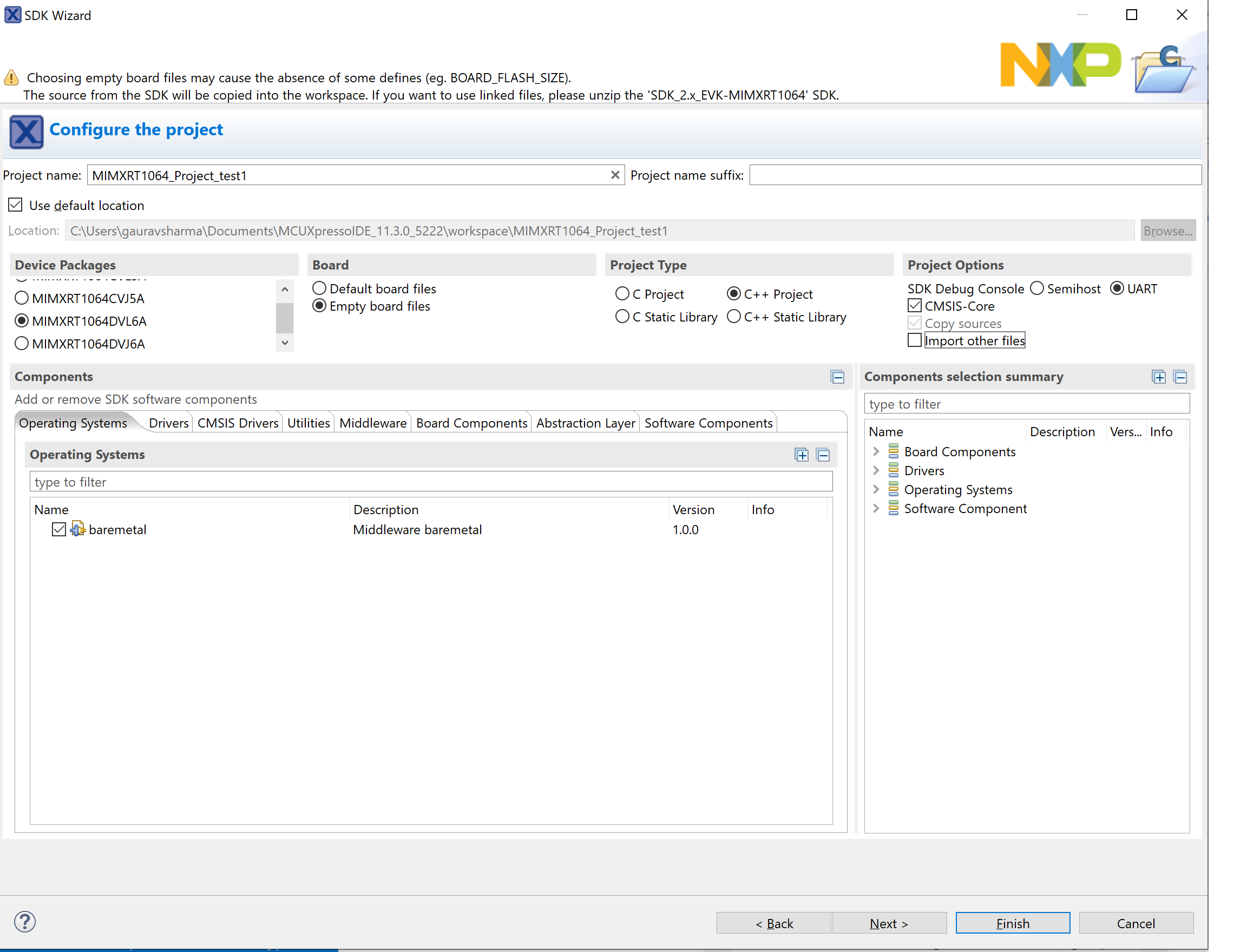
1. Yes, a project created in VS code on Ubuntu. The output is binary, hex and ELF. I use the ELF with the hope to facilitate a debug session in the MCUXpresso IDE. Steps:
a) Create a MCUXpressoIDE C/C++ project with the configuration as in attached pictures - project_config and project_config_advanced_settings.
b) Project Properties -> Run/Debug Settings- Change the application to the custom application (under the Main tab)built outside of the IDE (custom_app.elf). Keep everything else the same(connect scripts and settings etc.)
c) Link the source code folders under 'source', not copy but just link.
2. Change the SW7 settings to 'Serial Download'.
3. Debug the application after it chooses the right debug adapter.
With the above I'm not able to even get the debug session started as it is still looking for the project's .axf file even though I had changed the target to my custom application. I was however able to change the target to mine during one of my poking around experiments but even that lead to a session where it would start debugging, throw some exceptions- show me the disassembly, but couldn't locate the source code path. I explicitly added the path as well but it still couldn't find it. So two questions from here-
i) How do I reliably have it use my custom application file instead of looking for the project's default .axf?
ii)When it does use my custom application how can it use my source code to step through and show me where the issues are occurring?
Thanks for your help,
GS


 jeremyzhou
- Mark as New
- Bookmark
- Subscribe
- Mute
- Subscribe to RSS Feed
- Permalink
- Report Inappropriate Content
Hi,
Thanks for your reply.
From the NXP tech support engineer's view, I'll suggest the customer stop the kind of try, as it's not conventional debug behave and we've not encountered other customers to try this debug action.
From a tech geek's view, I appreciate your exploring spirit, however, I'm not sure whether this method can work out, as it beyond my knowledge scope.
Have a great day,
TIC
-------------------------------------------------------------------------------
Note:
- If this post answers your question, please click the "Mark Correct" button. Thank you!
- We are following threads for 7 weeks after the last post, later replies are ignored
Please open a new thread and refer to the closed one, if you have a related question at a later point in time.
-------------------------------------------------------------------------------
jeremyzhou
- Mark as New
- Bookmark
- Subscribe
- Mute
- Subscribe to RSS Feed
- Permalink
- Report Inappropriate Content
Hi,
Thank you for your interest in NXP Semiconductor products and for the opportunity to serve you.
Before answering your question, I'd like to confirm some queries with you.
1) According to your statement, it seems that you want to debug a project which is created by the VS in the MCUXpresso IDE.
If my understanding is right, I was wondering if you can introduce the testing steps in detail.
2) Which board did you test with?
3) Which debug tool did you use?
Have a great day,
TIC
-------------------------------------------------------------------------------
Note:
- If this post answers your question, please click the "Mark Correct" button. Thank you!
- We are following threads for 7 weeks after the last post, later replies are ignored
Please open a new thread and refer to the closed one, if you have a related question at a later point in time.
-------------------------------------------------------------------------------
