
- Forums
- Product Forums
- General Purpose MicrocontrollersGeneral Purpose Microcontrollers
- i.MX Forumsi.MX Forums
- QorIQ Processing PlatformsQorIQ Processing Platforms
- Identification and SecurityIdentification and Security
- Power ManagementPower Management
- Wireless ConnectivityWireless Connectivity
- RFID / NFCRFID / NFC
- Advanced AnalogAdvanced Analog
- MCX Microcontrollers
- S32G
- S32K
- S32V
- MPC5xxx
- Other NXP Products
- S12 / MagniV Microcontrollers
- Powertrain and Electrification Analog Drivers
- Sensors
- Vybrid Processors
- Digital Signal Controllers
- 8-bit Microcontrollers
- ColdFire/68K Microcontrollers and Processors
- PowerQUICC Processors
- OSBDM and TBDML
- S32M
- S32Z/E
-
- Solution Forums
- Software Forums
- MCUXpresso Software and ToolsMCUXpresso Software and Tools
- CodeWarriorCodeWarrior
- MQX Software SolutionsMQX Software Solutions
- Model-Based Design Toolbox (MBDT)Model-Based Design Toolbox (MBDT)
- FreeMASTER
- eIQ Machine Learning Software
- Embedded Software and Tools Clinic
- S32 SDK
- S32 Design Studio
- GUI Guider
- Zephyr Project
- Voice Technology
- Application Software Packs
- Secure Provisioning SDK (SPSDK)
- Processor Expert Software
- Generative AI & LLMs
-
- Topics
- Mobile Robotics - Drones and RoversMobile Robotics - Drones and Rovers
- NXP Training ContentNXP Training Content
- University ProgramsUniversity Programs
- Rapid IoT
- NXP Designs
- SafeAssure-Community
- OSS Security & Maintenance
- Using Our Community
-
- Cloud Lab Forums
-
- Knowledge Bases
- ARM Microcontrollers
- i.MX Processors
- Identification and Security
- Model-Based Design Toolbox (MBDT)
- QorIQ Processing Platforms
- S32 Automotive Processing Platform
- Wireless Connectivity
- CodeWarrior
- MCUXpresso Suite of Software and Tools
- MQX Software Solutions
- RFID / NFC
- Advanced Analog
-
- NXP Tech Blogs
- Home
- :
- i.MX フォーラム
- :
- i.MX RT クロスオーバーMCU
- :
- Re: Cannot flash RT1170-EVK with OctalSPI Flash enabled
Cannot flash RT1170-EVK with OctalSPI Flash enabled
- RSS フィードを購読する
- トピックを新着としてマーク
- トピックを既読としてマーク
- このトピックを現在のユーザーにフロートします
- ブックマーク
- 購読
- ミュート
- 印刷用ページ
Cannot flash RT1170-EVK with OctalSPI Flash enabled

- 新着としてマーク
- ブックマーク
- 購読
- ミュート
- RSS フィードを購読する
- ハイライト
- 印刷
- 不適切なコンテンツを報告
Dear all,
I modified the RT1170 eval board hardware according to chapter 2.6 in the EVK Board Hardware User's Guide, but now flashing a new firmware to the board (I tried with a simple blinky app) fails and the board does not work anymore.
In addition to modifying the hardware I turned switch SW1-3 and SW2-3 ON according to the EVK board user guide Table 3 (all other jumpers/switches left at factory default) and modified evkmimxrt1170_flexspi_nor_config.c in the SDK as suggested by @kerryzhou in this forum thread
I tried flashing via JTAG using Segger J-Link versions V6.98a and V7.20b, via GDB server on macOS. This worked fine with the QuadSPI flash. Now I do get some errors in the output and even after power-cycling the MCU the new blinky app seems to not run:
[...]
ERROR: Failed to prepare RAMCode using RAM
Error while determining flash info (Bank @ 0x30000000)
[...]
ERROR: Could not start CPU core. (ErrorCode: -1)
[...]
(see attached file for full log output)
I also tried flashing with the onboard DAPLink programmer using J11 USB port but after dropping the bin file on the virtual usb drive a Fail.txt appears: "error: The interface firmware FAILED to initialize the target MCU type: target". Again, after resetting the MCU the app is not run.
I found a blog post about changing the flash chip on the RT1052 eval board and it suggests that one has to modify the device configuration for JLink in order to use the octal flash but am unable to do the same for the RT1170. It seems like JLink does not support the octal flash on the RT1170 eval board out of the box yet (https://wiki.segger.com/i.MXRT117x ).
Is there any help on how to program the OctalSPI flash? Can anyone from NXP share how they programmed the octal flash during testing and help us do the same? I'd prefer to continue using the JLink but if that's not possible I can also use a different debug probe. As I already noted above, the USB flasher integrated on the eval board also does not work with the octal flash (it did work however with the QuadSPI flash).
Best regards, Michael

 kerryzhou
- 新着としてマーク
- ブックマーク
- 購読
- ミュート
- RSS フィードを購読する
- ハイライト
- 印刷
- 不適切なコンテンツを報告
Thanks for your new question post.
Now, let's go it two ways, as I just checked at first, find your issues is mainly from the debug with IDE, and this method we need to get the correct flashloader at first. This is a little difficult, not like the RT1050 switch to the hyperflash, as different IDE, different debugger also use the different flashloader files.
MCUXPresso IDE, CMSIS DAP debugger, need to use the .cfx files, I check the MCUXPressso IDE install path, just MIMXRT1170_SFDP_QSPI.cfx, this is for QSPI flash, not the octal flash, about the octal flash loader .cfx, I still need to check it internally.
MCUXPresso IDE, JLINK debugger, need to use the JLINK driver, to the RT1020, RT1050, RT1060, need to use the JLinkDevices.xml, it will call the .elf file, but to the new RT1170, it needs to use the JLINK related .dll, I think the default one is the QSPI, the octal flash related firmware still be lacked, you can check it with Segger side.
Do you use the IAR project or not? As I have the experience for RT1060 with the octal flash:
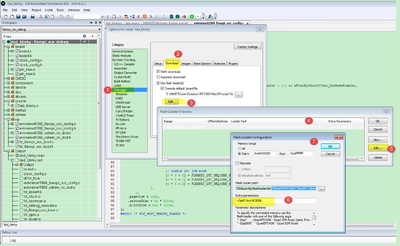
And the XIP header, you still use the previous code which I told you.
Another way, do you mind testing it without debug, I mean use the MCUBootUtility tool, this is very good and easy to use, as I find this tool totally can support the octal flash.
https://github.com/JayHeng/NXP-MCUBootUtility/archive/refs/tags/v3.3.0.zip
the related user manual is:
https://github.com/JayHeng/NXP-MCUBootUtility
You even also can use the Tool attached RT1170 led_blinky code to test it.
Configuration like this:
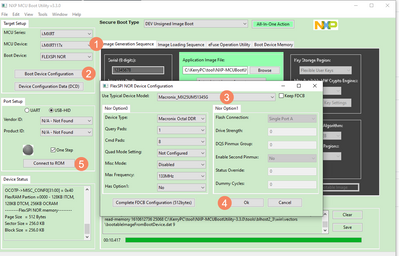
Code use this one:
NXP-MCUBootUtility-3.3.0\apps\NXP_MIMXRT1170-EVK_Rev.A\cm7\led_blinky_0x60002000.srec
Download it, whether you connect and download works or not?
Please help to check it at first, without IDE and the Debugger.
Any updated information, kindly let me know.
Best Regards,
kerry
- 新着としてマーク
- ブックマーク
- 購読
- ミュート
- RSS フィードを購読する
- ハイライト
- 印刷
- 不適切なコンテンツを報告
Hi Kerry,
I contacted Segger about this and indeed the OctalSpi Flash is not supported yet. They do not have any immediate plans to support it but would be willing to do so if someone (NXP?) funds the development.
Regarding the MCUBootUtility: I sadly was not able to make this work either, the tool does not even find the board when I plug it in to Usb. It looks like it searches for a usb-device with vendor-id vid=0x1fc9, product-id 0x0135 but my board has vid=0x1fc9, pid=0x000c according to device manager. Do I need to change any of the jumpers on the eval board in order to make this work? Or is there a setting in the MCUBootUtility where I can override the usb product-id? I could not find this in the manual and am a bit lost at the moment, hopefully you can help here as well!
Best, Michael
kerryzhou
- 新着としてマーク
- ブックマーク
- 購読
- ミュート
- RSS フィードを購読する
- ハイライト
- 印刷
- 不適切なコンテンツを報告
Hi michael_parthei,
Thanks so much for your information.
In fact, even the MCUXpresso driver also in the design phase, I already check it internally.
But to the MCUBootUtlity tool, it should works.
So, I will try to modify my only one RT1170 board.
Do you test this for your company or your own?
If you are testing it for the company, could you please use the company email to create the case, that will have higher service priority than the 3rd part email, then I can put more time and effort into this case.
Thanks a lot for your understanding.
case create flow:
1. Open below SUPPORT site, click blue "Go to Tickets" in the middle.
http://www.nxp.com/support/support:SUPPORTHOME
2.Then you will be requested to Login, if you have no an account, please first Register with your business email.
3.After login, please "Create New Cases" button in the middle, then you can submit your question.
In your case content, you can write assign to me, then I will try to modify the board, and test it, and try to porting the MCUXPresso flashdriver .cfx for you before the internal IDE department can provide it, as I have some octalSPI flash for the RT1050, it should be similar.
Best Regards,
kerry
- 新着としてマーク
- ブックマーク
- 購読
- ミュート
- RSS フィードを購読する
- ハイライト
- 印刷
- 不適切なコンテンツを報告
Hi Kerry!
Most important for me would be just do be able to flash a new image to the board, debugging capabilities are not that important yet. So MCUBootUtility would be fine for now. Or maybe even the onboard programming tool (the USB flash drive that appears on your host computer where one can drag&drop a .bin file for programming). Sadly, the later also did not work in my experiments, hopefully you can make it work!
This is for a product I'm working on but haven't set up a legal company yet, so I'm afraid, I cannot create an account with company email.
Best, Michael
kerryzhou
- 新着としてマーク
- ブックマーク
- 購読
- ミュート
- RSS フィードを購読する
- ハイライト
- 印刷
- 不適切なコンテンツを報告
Ok, now just talk the MCUBootUtility tool, do you use my previous picture configuration, and the tool attached image?
If already do it like that, still can't work, please give me log, and the failed situation picture. I will help you to analyze it.
When I have time, I will also test it, as I just have one MIMXRT1170-EVK board, still need to support for other customers, so I will check your test result at first.
Share me your test log and pictures. can you connect successfully?
Best Regards,
kerry
- 新着としてマーク
- ブックマーク
- 購読
- ミュート
- RSS フィードを購読する
- ハイライト
- 印刷
- 不適切なコンテンツを報告
Hi Kerry,
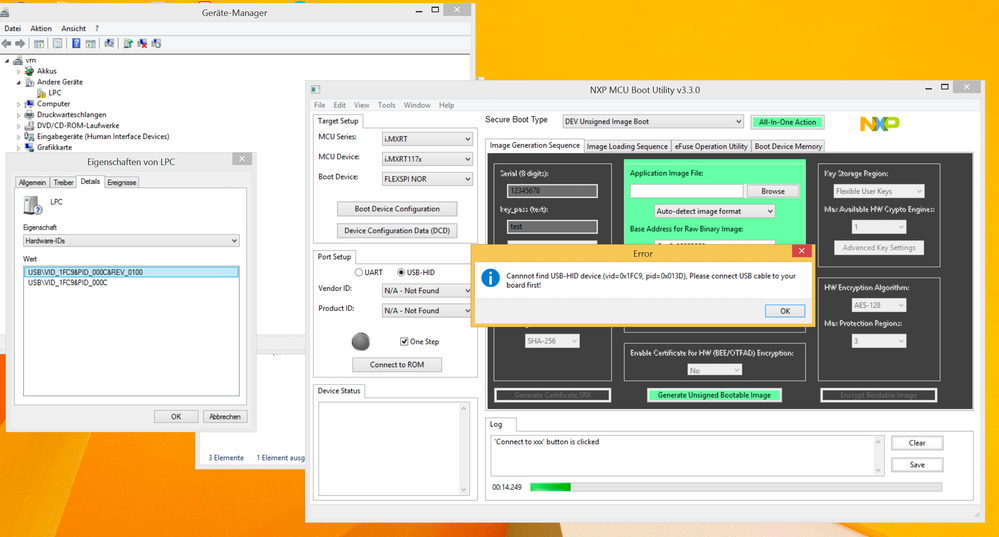
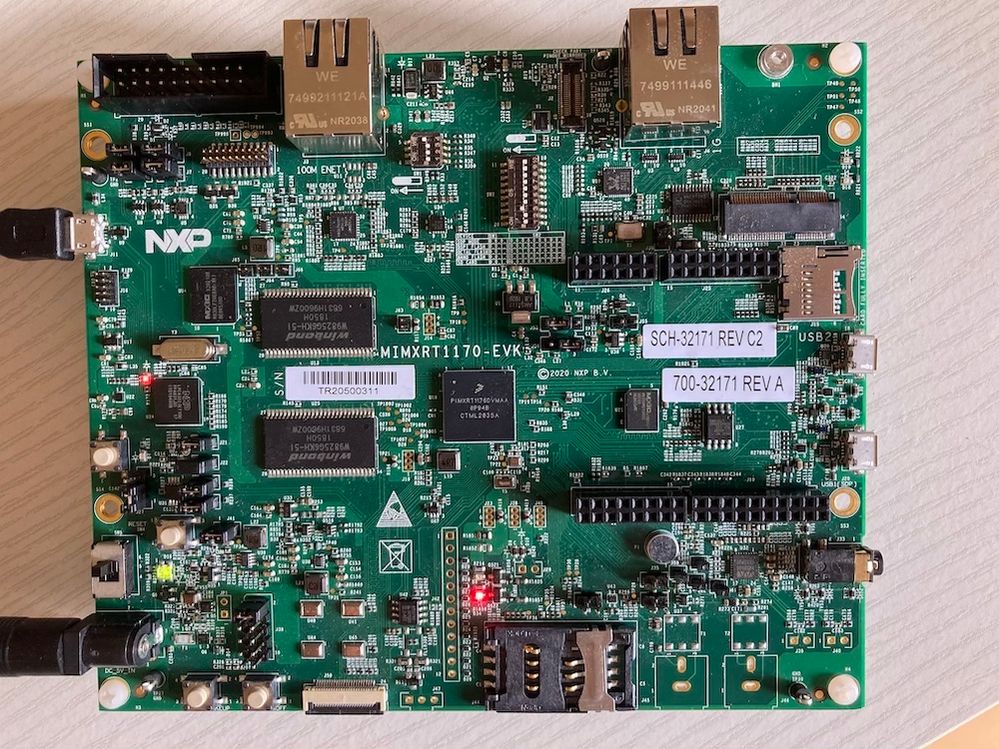
I configured the tool exactly as you described in your previous post. In step (5) ("Connect to ROM") the tool fails to connect to the board, even though I have it connected via USB, it is powered on, and I configured switches SW-1 to Serial downloader mode. As you can see in the screenshot Windows detects the usb device but with vendor-ID 0x1fc9 and product-ID 0x000c but MCUBootUtility looks for product-ID 0x013d and hence fails. Note that I also fitted jumper J22 on the eval board (this is not the default when I bought it), without J22 I get vendor-ID 0xd28, product-ID 0x204 and MCUBootUtility fails in same step with same error message.
Thank you very much for your help!
Best, Michael
kerryzhou
- 新着としてマーク
- ブックマーク
- 購読
- ミュート
- RSS フィードを購読する
- ハイライト
- 印刷
- 不適切なコンテンツを報告
Thanks so much for your cooperation, you are so nice!
Your situation even didn't reach to the flash area.
Your connection has issues, power is OK. USB port, please disconnect your USB cable from J11 to the right side, J20 USB1, then you will can find the USB-HID:
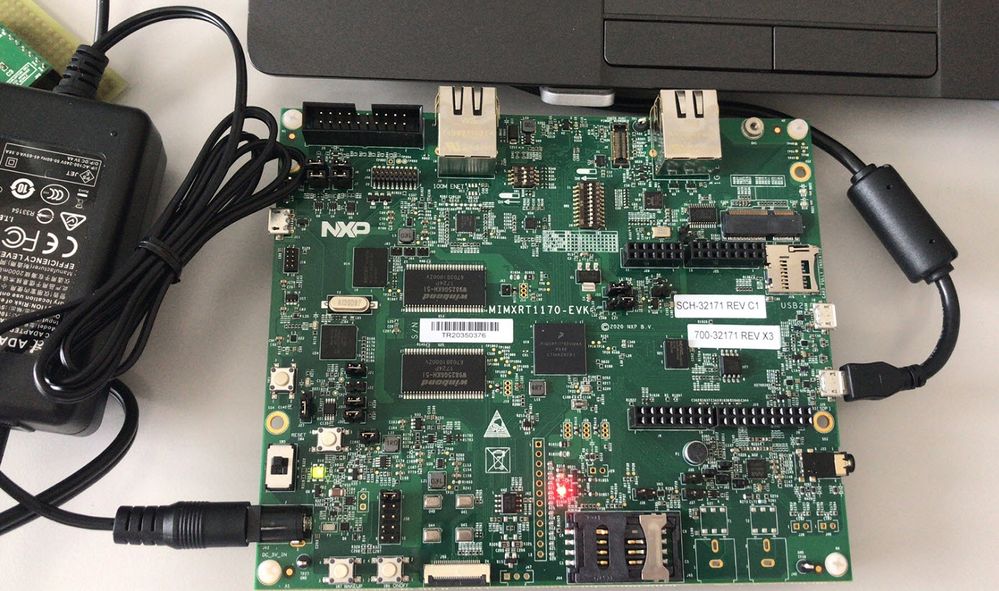
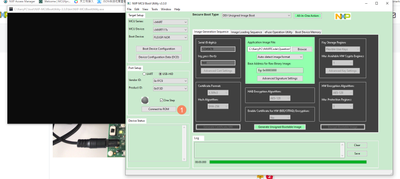
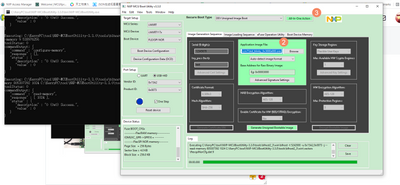
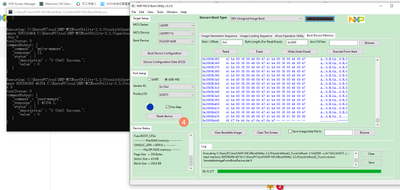
Now, finish the downloading, reset device, change SW1 back to 0010,, SW2_3 ON.
Then press the reset button, and check the led function.
If you still have issues, kindly let me know.
When I have time, I will also test both this tool method and the debug method.
Wish it helps you!
Best Regards,
Kerry
- 新着としてマーク
- ブックマーク
- 購読
- ミュート
- RSS フィードを購読する
- ハイライト
- 印刷
- 不適切なコンテンツを報告
Oh no what a stupid mistake! Thank you for being so patient, it's working now!
Next, I compiled an example from the SDK (the led_blinky demo app) with the changes from your previous post for the OctalSPI flash, using the ARM GCC toolchain and the flexspi_nor configuration (that is, using the armgcc/build_flexspi_nor_release.sh script). I tried flashing the resulting .ELF file in the same way as before with MCUBootUtility (but selected ".out(elf) from GCC ARM") but this time the app did not run (LED did not blink). Also, when I now flash the led_blinky_0x3000a000.srec again, this also does not work anymore.
Do I need to change anything else in the MCUBootUtility to be able to flash an .elf file? What could be the reason that it stopped working completely now?
Sorry if these are stupid questions, it's a pretty complex chip to be honest! Glad to have you helping out!
Best regards, Michael
kerryzhou
- 新着としてマーク
- ブックマーク
- 購読
- ミュート
- RSS フィードを購読する
- ハイライト
- 印刷
- 不適切なコンテンツを報告
Hi michael_parthei,
Can you output the .srec files, then we can check your generated .srec file details, make sure your application is located from flash address 0x30000000, and the real app is located from the 0x30002000.
Do you use the MCUXPresso IDE? In fact, I seldom use your mentioned GCC, I mainly use the MCUXPresso, air, mdk IDE.
You can define XIP_BOOT_HEADER_ENABLE=0, then it will not use your generated app header, it will use the MCUBOOTutility header. Please try it again, if still not OK, you can send me your .srec, I will help you check it at first.
Best Regards,
kerry
- 新着としてマーク
- ブックマーク
- 購読
- ミュート
- RSS フィードを購読する
- ハイライト
- 印刷
- 不適切なコンテンツを報告
Hi Kerry,
main problem is that, as I wrote, after flashing my own "broken" image now even the led_blinky_0x3000a000.srec app that is provided by MCUBootUtility does NOT work anymore. Flashing completes without errors but the LED does not blink, so probably it's not running correctly.
Do you have any ideas about how to make the board work again? I already tried completely erasing the flash (using the "Boot Device Memory" tab from MCUBootUtility) and flashing led_blinky_0x3000a000.srec again, but that did not help either.
Best, Michael
kerryzhou
- 新着としてマーク
- ブックマーク
- 購読
- ミュート
- RSS フィードを購読する
- ハイライト
- 印刷
- 不適切なコンテンツを報告
- 新着としてマーク
- ブックマーク
- 購読
- ミュート
- RSS フィードを購読する
- ハイライト
- 印刷
- 不適切なコンテンツを報告
Sadly that does not seem to help, the LED still does not blink.
Best regards, Michael
kerryzhou
- 新着としてマーク
- ブックマーク
- 購読
- ミュート
- RSS フィードを購読する
- ハイライト
- 印刷
- 不適切なコンテンツを報告
Use the tool to read out the memory, and give me screenshot:
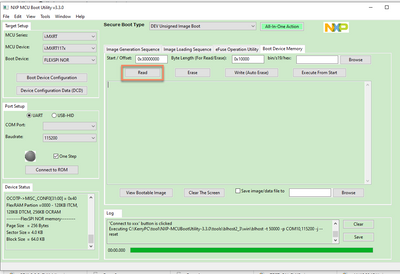
Just check, whether the image is downloaded or not?
Best Regards,
kerry
