
- Forums
- Product Forums
- General Purpose MicrocontrollersGeneral Purpose Microcontrollers
- i.MX Forumsi.MX Forums
- QorIQ Processing PlatformsQorIQ Processing Platforms
- Identification and SecurityIdentification and Security
- Power ManagementPower Management
- Wireless ConnectivityWireless Connectivity
- RFID / NFCRFID / NFC
- Advanced AnalogAdvanced Analog
- MCX Microcontrollers
- S32G
- S32K
- S32V
- MPC5xxx
- Other NXP Products
- S12 / MagniV Microcontrollers
- Powertrain and Electrification Analog Drivers
- Sensors
- Vybrid Processors
- Digital Signal Controllers
- 8-bit Microcontrollers
- ColdFire/68K Microcontrollers and Processors
- PowerQUICC Processors
- OSBDM and TBDML
- S32M
- S32Z/E
-
- Solution Forums
- Software Forums
- MCUXpresso Software and ToolsMCUXpresso Software and Tools
- CodeWarriorCodeWarrior
- MQX Software SolutionsMQX Software Solutions
- Model-Based Design Toolbox (MBDT)Model-Based Design Toolbox (MBDT)
- FreeMASTER
- eIQ Machine Learning Software
- Embedded Software and Tools Clinic
- S32 SDK
- S32 Design Studio
- GUI Guider
- Zephyr Project
- Voice Technology
- Application Software Packs
- Secure Provisioning SDK (SPSDK)
- Processor Expert Software
- Generative AI & LLMs
-
- Topics
- Mobile Robotics - Drones and RoversMobile Robotics - Drones and Rovers
- NXP Training ContentNXP Training Content
- University ProgramsUniversity Programs
- Rapid IoT
- NXP Designs
- SafeAssure-Community
- OSS Security & Maintenance
- Using Our Community
-
- Cloud Lab Forums
-
- Knowledge Bases
- ARM Microcontrollers
- i.MX Processors
- Identification and Security
- Model-Based Design Toolbox (MBDT)
- QorIQ Processing Platforms
- S32 Automotive Processing Platform
- Wireless Connectivity
- CodeWarrior
- MCUXpresso Suite of Software and Tools
- MQX Software Solutions
- RFID / NFC
- Advanced Analog
-
- NXP Tech Blogs
- Home
- :
- i.MX Forums
- :
- i.MX Processors
- :
- imx8mm mipi csi capture with tc358743 hdmi->mipi not working on multiple lanes
imx8mm mipi csi capture with tc358743 hdmi->mipi not working on multiple lanes
- Subscribe to RSS Feed
- Mark Topic as New
- Mark Topic as Read
- Float this Topic for Current User
- Bookmark
- Subscribe
- Mute
- Printer Friendly Page

- Mark as New
- Bookmark
- Subscribe
- Mute
- Subscribe to RSS Feed
- Permalink
- Report Inappropriate Content
Hello,
i am currently working on a custom board project in which i am using a toshiba tc358743 HDMI to MIPI CSI converter ic in order to capture the incoming data with the imx8mm.
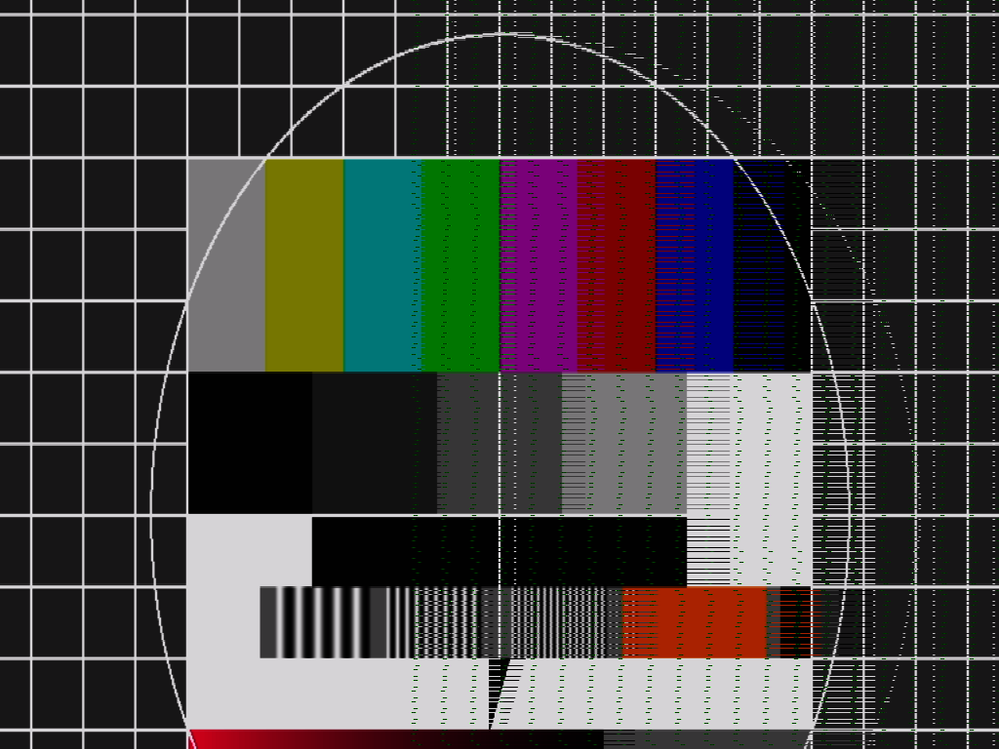
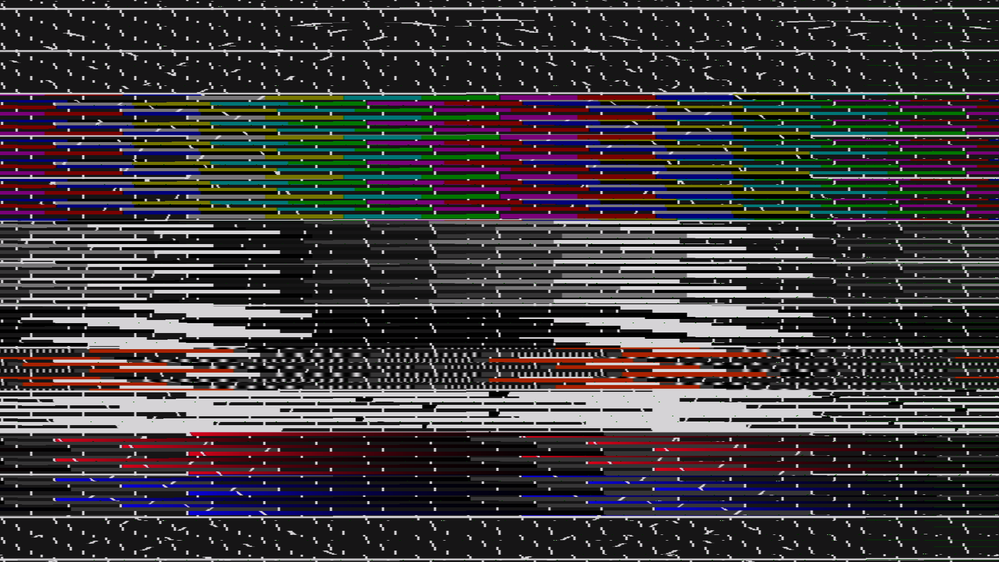
I am able to establish a stable stream on a single lane with 800x600@60Hz. However, if i try higher resolutions for which the driver increases the number of lanes that have to be used the received image is corrupted.
The statistics data of the mipi csi show no CRC or ECC errors and all frames seem to be received properly.
I tried several days playing around with different flags and tried all patches and suggestions i could find in the forum but i never got it to work with more than a single lane.
I am using the tc358743 from the codeaura linux-imx 5-10 kernel
https://source.codeaurora.org/external/imx/linux-imx/tree/?h=lf-5.10.y
For mipi and csi I am using the staging dir media drivers imx7_mipi_csis and imx7_media_csi.
This is the devicetree configuration:
/ {
tc358743_clk: tc358743_clk {
#clock-cells = <0>;
compatible = "fixed-clock";
clock-frequency = <27000000>;
status = "okay";
};
reg_mipi_1p0: regulator-mipi-1p0 {
compatible = "regulator-fixed";
regulator-name = "mipi_1p0";
regulator-min-microvolt = <1000000>;
regulator-max-microvolt = <1000000>;
};
};
&i2c2 {
tc358743_dvi: tc358743@f {
compatible = "toshiba,tc358743";
reg = <0x0f>;
clocks = <&tc358743_clk>;
clock-names = "refclk";
port@0 {
reg = <0>;
tc358743_out: endpoint {
remote-endpoint = <&mipi_csi2_in>;
data-lanes = <1 2 3 4>;
clock-lanes = <0>;
/*clock-noncontinuous;*/
link-frequencies = /bits/ 64 <297000000>;
};
};
};
};
&csi1_bridge {
dma-coherent;
status = "okay";
port {
csi1_ep: endpoint {
remote-endpoint = <&csi1_mipi_ep>;
};
};
};
&mipi_csi_1 {
#address-cells = <1>;
#size-cells = <0>;
status = "okay";
phy-supply = <®_mipi_1p0>;
fsl,csis-hs-settle = <6>; /* 13 */
fsl,csis-clk-settle = <0>;
clock-frequency = <333000000>;
/*clock-noncontinuous;*/
port@0 {
reg = <0>;
mipi_csi2_in: endpoint {
remote-endpoint = <&tc358743_out>;
data-lanes = <1 2>;
clock-lanes = <0>;
/*clock-noncontinuous;*/
};
};
port@1 {
reg = <1>;
csi1_mipi_ep: endpoint {
remote-endpoint = <&csi1_ep>;
};
};
};
media-ctl output
root@imx8mm:~> media-ctl -p
Media controller API version 5.10.9

Media device information
------------------------
driver          imx7-csi
model           imx-media
serial
bus info
hw revision     0x0
driver version  5.10.9

Device topology
- entity 1: csi (2 pads, 2 links)
            type V4L2 subdev subtype Unknown flags 0
            device node name /dev/v4l-subdev0
        pad0: Sink
                [fmt:UYVY8_2X8/1024x768 field:none colorspace:smpte170m xfer:709 ycbcr:601 quantization:lim-range]
                <- "imx7-mipi-csis.0":1 [ENABLED]
        pad1: Source
                [fmt:UYVY8_2X8/1024x768 field:none colorspace:smpte170m xfer:709 ycbcr:601 quantization:lim-range]
                -> "csi capture":0 [ENABLED]

- entity 4: csi capture (1 pad, 1 link)
            type Node subtype V4L flags 0
            device node name /dev/video0
        pad0: Sink
                <- "csi":1 [ENABLED]

- entity 10: imx7-mipi-csis.0 (2 pads, 2 links)
             type V4L2 subdev subtype Unknown flags 0
             device node name /dev/v4l-subdev1
        pad0: Sink
                [fmt:UYVY8_2X8/1024x768 field:none colorspace:smpte170m xfer:709 ycbcr:601 quantization:lim-range]
                <- "tc358743 1-000f":0 [ENABLED]
        pad1: Source
                [fmt:UYVY8_2X8/1024x768 field:none colorspace:smpte170m xfer:709 ycbcr:601 quantization:lim-range]
                -> "csi":0 [ENABLED]

- entity 15: tc358743 1-000f (1 pad, 1 link)
             type V4L2 subdev subtype Unknown flags 0
             device node name /dev/v4l-subdev2
        pad0: Source
                [fmt:UYVY8_2X8/1024x768 field:none colorspace:smpte170m]
                [dv.caps:BT.656/1120 min:640x350@13000000 max:1920x1200@165000000 stds:CEA-861,DMT,CVT,GTF caps:progressive,reduced-blanking,custom]
                [dv.detect:BT.656/1120 1024x768p60 (1344x798) stds: flags:]
                [dv.current:BT.656/1120 1024x768p60 (1344x798) stds: flags:]
                -> "imx7-mipi-csis.0":0 [ENABLED]
stream
root@imx8mm:~> v4l2-ctl --device /dev/video0 --stream-mmap --set-fmt-video=pixelformat=UYVY --stream-to=/tmp/testbild_2-lane_1024x768.yuv --stream-count=1 --verbose
VIDIOC_QUERYCAP: ok
VIDIOC_G_FMT: ok
VIDIOC_S_FMT: ok
Format Video Capture:
        Width/Height      : 1024/768
        Pixel Format      : 'UYVY' (UYVY 4:2:2)
        Field             : None
        Bytes per Line    : 2048
        Size Image        : 1572864
        Colorspace        : SMPTE 170M
        Transfer Function : Rec. 709
        YCbCr/HSV Encoding: ITU-R 601
        Quantization      : Limited Range
        Flags             :
                VIDIOC_REQBUFS returned 0 (Success)
                VIDIOC_QUERYBUF returned 0 (Success)
                VIDIOC_QUERYBUF returned 0 (Success)
                VIDIOC_QUERYBUF returned 0 (Success)
                VIDIOC_QUERYBUF returned 0 (Success)
                VIDIOC_QBUF returned 0 (Success)
                VIDIOC_QBUF returned 0 (Success)
                VIDIOC_QBUF returned 0 (Success)
                VIDIOC_QBUF returned 0 (Success)
                VIDIOC_STREAMON returned 0 (Success)
cap dqbuf: 0 seq:      0 bytesused: 1572864 ts: 40.679512 delta: 40679.512 ms (ts-monotonic, ts-src-eof)
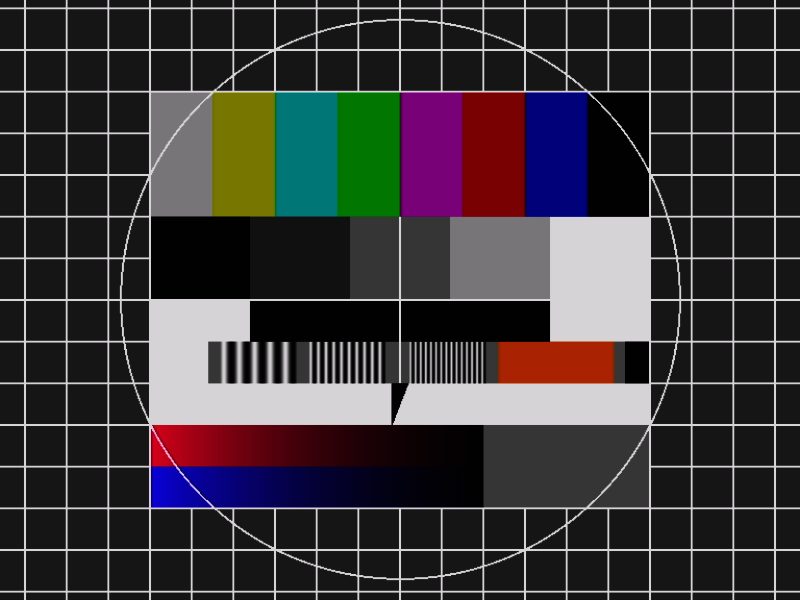
This is a grabbed image from 800x600@60 over 1-lane which looks perfect.
This is a grabbed image with 1024x768@60 over 2-lane which looks distorted and vertically strechted.
This is a grabbed image with 1920x1080@60 over 4-lane which looks heavily distorted.
Maybe somebody got a hint what i could try to resolve the problem or point me in the right direction.
Best Regards,
Thomas
Solved! Go to Solution.
- Mark as New
- Bookmark
- Subscribe
- Mute
- Subscribe to RSS Feed
- Permalink
- Report Inappropriate Content
Hi,
i was able to fix the issue. Though it was a bit more complicated as expected. I had to switch to RGB format in order to find out how the bitstream is being corrupted. By doing that i found out that there are some gaps in the data flow where bytes are coming too late and are padded with 0.
After some trial and error i found out that this is caused by the tc357843 hdmi->mipi chip. In the mainline driver the incoming fifo buffer is 16 bytes. Increasing this to 300 which the header file states as recommended default value the glitches are gone.
This patch should do the job if you are using UYVY with 4 bytes per 2 Pixels format. However, in RGB888 with 3 bytes per pixel the bandwidth for 1920x1080@60 on 4-lanes exceeds the maximum lane frequency of 297MHz (597Mbps).The FIFO size as well as the speed issue has been already fixed by a patch from Dave Stevenson which i adapted and included.
Furthermore the mainline driver does not take the hsync and vsync into the lane calculation equation. So the calculation of the necessary lane number may be too low if it is close to a boundary.
With the patches applied I am able to capture from 640x480@60 up to 1920x180@60 in YUV or RGB.
Additional to the attached patches i had to modify the imx7_mipi_csis and imx7_media_csi in order to support my xRGB "XR24" format. However, this is very specific to my project and there are several threads here describing this procedure.
Best Regards,
Thomas

- Mark as New
- Bookmark
- Subscribe
- Mute
- Subscribe to RSS Feed
- Permalink
- Report Inappropriate Content
hi lmtan91
Did you made it work imx7-mipi-csis.c in imx8mm ?
- Mark as New
- Bookmark
- Subscribe
- Mute
- Subscribe to RSS Feed
- Permalink
- Report Inappropriate Content
Hi @Toom ,
Is it required to make mipi_csi_1 compatible with imx7-mipi-csis in device tree?
Thanks,
Tan
- Mark as New
- Bookmark
- Subscribe
- Mute
- Subscribe to RSS Feed
- Permalink
- Report Inappropriate Content
Hi @lmtan91,
i must admit that i do not remember everything regarding this issue perfectly since some time has passed since i did this implementation.
As far as i can remember i needed to use the imx7-mipi-csis from the staging driver section in the corresponding kernel release. Besides that i needed to add the XR24 mode which i was using in my project in order to properly setup the mediactl topology.
However, maybe i am not really understanding what your actual issue is. Maybe you are able to give me a little more context in order to get a closer understanding of whats going wrong in your implementation.
Best Regards,
Thomas
- Mark as New
- Bookmark
- Subscribe
- Mute
- Subscribe to RSS Feed
- Permalink
- Report Inappropriate Content
Hi Toom,
Thank you so much for your reply.
I am working on imx8m mini and tc358743 to capture the camera from HDMI like GoPro.
I meant in drivers/staging/media/imx/imx7-mipi-csis.c, the compatible is "fsl,imx7-mipi-csi2", how could you made it work in imx8mm.
static const struct of_device_id mipi_csis_of_match[] = {
	{ .compatible = "fsl,imx7-mipi-csi2", },
	{ /* sentinel */ },
};
And drivers/staging/media/imx/imx7-media-csi.c too, it is not compatible with imx8mm yet.
static const struct of_device_id imx7_csi_of_match[] = {
	{ .compatible = "fsl,imx7-csi" },
	{ .compatible = "fsl,imx6ul-csi" },
Could you manage to support on this?
BR,
Tan
- Mark as New
- Bookmark
- Subscribe
- Mute
- Subscribe to RSS Feed
- Permalink
- Report Inappropriate Content
Hi,
i was able to fix the issue. Though it was a bit more complicated as expected. I had to switch to RGB format in order to find out how the bitstream is being corrupted. By doing that i found out that there are some gaps in the data flow where bytes are coming too late and are padded with 0.
After some trial and error i found out that this is caused by the tc357843 hdmi->mipi chip. In the mainline driver the incoming fifo buffer is 16 bytes. Increasing this to 300 which the header file states as recommended default value the glitches are gone.
This patch should do the job if you are using UYVY with 4 bytes per 2 Pixels format. However, in RGB888 with 3 bytes per pixel the bandwidth for 1920x1080@60 on 4-lanes exceeds the maximum lane frequency of 297MHz (597Mbps).The FIFO size as well as the speed issue has been already fixed by a patch from Dave Stevenson which i adapted and included.
Furthermore the mainline driver does not take the hsync and vsync into the lane calculation equation. So the calculation of the necessary lane number may be too low if it is close to a boundary.
With the patches applied I am able to capture from 640x480@60 up to 1920x180@60 in YUV or RGB.
Additional to the attached patches i had to modify the imx7_mipi_csis and imx7_media_csi in order to support my xRGB "XR24" format. However, this is very specific to my project and there are several threads here describing this procedure.
Best Regards,
Thomas

- Mark as New
- Bookmark
- Subscribe
- Mute
- Subscribe to RSS Feed
- Permalink
- Report Inappropriate Content
Hi, @Toom
Which is your current kernel version?
Did you also copy staging imx7* drivers together with tc358743 from 5.10.y?
How were you able to enable imx7* drivers compiling in menuconfig? I cannot select them without hack in 5.4.47 kernel.
I'm working with custom board based on imx8mm-evk and tc358743.
Any help will be very appreciated.
Thanks in advance!
- Mark as New
- Bookmark
- Subscribe
- Mute
- Subscribe to RSS Feed
- Permalink
- Report Inappropriate Content
HI Toom:
I'm using tc358743 in imx8mm platform too, but fail to get the csi frame.
My kernel version is 5.4.47, and the driver of tc358743 is from https://source.codeaurora.org/external/imx/linux-imx/tree/?h=lf-5.10.y.
But meta-ctl is not works:
root@imx8mmevk:~/camera# media-ctl -p
Failed to enumerate /dev/media0 (-2)
How to enable media0 ?
when I set the resolution to 1440x900(by set edid in the driver), it can get one frame, but data is uncorrect. and it will printk: skip frame 0, but all other resolution streamon will fail: timeout when wait for SOF
Any suggestion ? or could you provided your driver and dts and config for me ?
Thanks.
- Mark as New
- Bookmark
- Subscribe
- Mute
- Subscribe to RSS Feed
- Permalink
- Report Inappropriate Content
Hi jiangyaqiang,
this is the part of the devicetree which should be responsible for the mipi driver binding.
/ {
tc358743_clk: tc358743_clk {
#clock-cells = <0>;
compatible = "fixed-clock";
clock-frequency = <27000000>;
status = "okay";
};
reg_mipi_1p0: regulator-mipi-1p0 {
compatible = "regulator-fixed";
regulator-name = "mipi_1p0";
regulator-min-microvolt = <1000000>;
regulator-max-microvolt = <1000000>;
regulator-always-on;
};
}
&i2c2 {
tc358743_dvi: tc358743@f {
#address-cells = <1>;
#size-cells = <0>;
compatible = "toshiba,tc358743";
reg = <0x0f>;
clocks = <&tc358743_clk>;
clock-names = "refclk";
reset-gpios = <&gpio6 9 GPIO_ACTIVE_LOW>;
interrupt-parent = <&gpio2>;
interrupts = <5 IRQ_TYPE_LEVEL_HIGH>;
port@0 {
reg = <0>;
tc358743_out: endpoint {
remote-endpoint = <&mipi_csi2_in>;
data-lanes = <1 2 3 4>;
clock-lanes = <0>;
link-frequencies = /bits/ 64 <486000000>;
};
};
};
};
&csi1_bridge {
fsl,mipi-mode;
dma-coherent;
clock-names = "disp-axi", "mclk", "disp_dcic";
status = "okay";
port {
csi1_ep: endpoint {
remote-endpoint = <&csi1_mipi_ep>;
};
};
};
&mipi_csi_1 {
#address-cells = <1>;
#size-cells = <0>;
status = "okay";
phy-supply = <®_mipi_1p0>;
compatible = "fsl,imx8mm-mipi-csi2", "fsl,imx8mm-mipi-csi";
clocks = <&clk IMX8MM_CLK_DISP_APB_ROOT>,
<&clk IMX8MM_CLK_CSI1_CORE>,
<&clk IMX8MM_CLK_CSI1_PHY_REF>,
<&clk IMX8MM_CLK_DISP_AXI_ROOT>;
clock-names = "pclk", "wrap", "phy", "axi";
clock-frequency = <500000000>;
fsl,csis-hs-settle = <13>;
fsl,csis-clk-settle = <0>;
port@0 {
reg = <0>;
mipi_csi2_in: endpoint {
remote-endpoint = <&tc358743_out>;
data-lanes = <1 2 3 4>;
csis-hs-settle = <13>;
csis-clk-settle = <0>;
clock-lanes = <0>;
csis-wclk;
};
};
port@1 {
reg = <1>;
csi1_mipi_ep: endpoint {
remote-endpoint = <&csi1_ep>;
};
};
};
Try to check your dmesg if everything probes and maybe you are able to list the mediabus devices with "media-ctl -p"
Best Regards,
Thomas
- Mark as New
- Bookmark
- Subscribe
- Mute
- Subscribe to RSS Feed
- Permalink
- Report Inappropriate Content
HI Toom:
Thank you for your reply.
I can success to make /dev/media0 work by driver drivers/staging/media/imx/imx7-mipi-csis.c.
But in your dts, it seems that your config use driver drivers/media/platform/mxc/capture/mxc_mipi_csi.c,
but the driver has no clock "wrap". it confuses me.
BTW: I can catch the picture by driver drivers/media/platform/mxc/capture/mxc_mipi_csi.c, but sometime "tc358743" could not detect "hdmi" but "DVI", any idea about this ?
Best regards.
- Mark as New
- Bookmark
- Subscribe
- Mute
- Subscribe to RSS Feed
- Permalink
- Report Inappropriate Content
Hi, @jiangyaqiang
I'm working with custom board based on imx8mm-evk and also kernel 5.4.47
How were you able to enable imx7-mipi-csis.c compiling?
It's not possible to enable it just in menuconfig because it's dependent on SOC-IMX6Q.
I've tried to hack Makefile in imx7-mipi-csis.c's directory and seems that it's compiled now. But I still cannot run media-ctl -p successfully.
Are you going OK with drivers/media/i2c/tc358743 now?
- Mark as New
- Bookmark
- Subscribe
- Mute
- Subscribe to RSS Feed
- Permalink
- Report Inappropriate Content
HI ilyakosharov
there are two sets driver ok for hdmi to csi, one with media-ctl, the other no, both work.
I use "drivers/media/platform/mxc/capture/mxc_mipi_csi.c".
my problem is the color space is not correct at the beginning.
and the edid should be init.

 igorpadykov
- Mark as New
- Bookmark
- Subscribe
- Mute
- Subscribe to RSS Feed
- Permalink
- Report Inappropriate Content
Hi Thomas
tc358743 is used on boundary devices Nitrogen8mm board and one can look at its configuration on
https://boundarydevices.com/tag/nitrogen8mm/
Best regards
igor
