
- Forums
- Product Forums
- General Purpose MicrocontrollersGeneral Purpose Microcontrollers
- i.MX Forumsi.MX Forums
- QorIQ Processing PlatformsQorIQ Processing Platforms
- Identification and SecurityIdentification and Security
- Power ManagementPower Management
- Wireless ConnectivityWireless Connectivity
- RFID / NFCRFID / NFC
- Advanced AnalogAdvanced Analog
- MCX Microcontrollers
- S32G
- S32K
- S32V
- MPC5xxx
- Other NXP Products
- S12 / MagniV Microcontrollers
- Powertrain and Electrification Analog Drivers
- Sensors
- Vybrid Processors
- Digital Signal Controllers
- 8-bit Microcontrollers
- ColdFire/68K Microcontrollers and Processors
- PowerQUICC Processors
- OSBDM and TBDML
- S32M
- S32Z/E
-
- Solution Forums
- Software Forums
- MCUXpresso Software and ToolsMCUXpresso Software and Tools
- CodeWarriorCodeWarrior
- MQX Software SolutionsMQX Software Solutions
- Model-Based Design Toolbox (MBDT)Model-Based Design Toolbox (MBDT)
- FreeMASTER
- eIQ Machine Learning Software
- Embedded Software and Tools Clinic
- S32 SDK
- S32 Design Studio
- GUI Guider
- Zephyr Project
- Voice Technology
- Application Software Packs
- Secure Provisioning SDK (SPSDK)
- Processor Expert Software
- Generative AI & LLMs
-
- Topics
- Mobile Robotics - Drones and RoversMobile Robotics - Drones and Rovers
- NXP Training ContentNXP Training Content
- University ProgramsUniversity Programs
- Rapid IoT
- NXP Designs
- SafeAssure-Community
- OSS Security & Maintenance
- Using Our Community
-
- Cloud Lab Forums
-
- Knowledge Bases
- ARM Microcontrollers
- i.MX Processors
- Identification and Security
- Model-Based Design Toolbox (MBDT)
- QorIQ Processing Platforms
- S32 Automotive Processing Platform
- Wireless Connectivity
- CodeWarrior
- MCUXpresso Suite of Software and Tools
- MQX Software Solutions
- RFID / NFC
- Advanced Analog
-
- NXP Tech Blogs
- Home
- :
- i.MX Forums
- :
- i.MX Processors
- :
- Re: [i.MX8] How to share screen on Weston.
[i.MX8] How to share screen on Weston.
- Subscribe to RSS Feed
- Mark Topic as New
- Mark Topic as Read
- Float this Topic for Current User
- Bookmark
- Subscribe
- Mute
- Printer Friendly Page
[i.MX8] How to share screen on Weston.

- Mark as New
- Bookmark
- Subscribe
- Mute
- Subscribe to RSS Feed
- Permalink
- Report Inappropriate Content
Hi,
We are testing i.MX8 with below environment.
[Environment]
Evaluation Kit : 8MMINILPD4-EVK (Connect HDMI cable, USB keyboard and USB mouse.)
Linux for i.MX : Linux 5.10.9_1.0.0
We would like to share output screen.
So, we add as below to build rdp-backend.so.
---------------------------------------------------------
sources\meta-imx\meta-bsp\recipes-graphics\wayland\weston_9.0.0.imx.bbappend
#Add two lines.
DEPENDS += "freerdp"
EXTRA_OEMESON += "-Dbackend-rdp=true"
---------------------------------------------------------
Also, we edited weston.ini
---------------------------------------------------------
[core]
#gbm-format=argb8888
idle-time=0
use-g2d=1
xwayland=true
repaint-window=16
#enable-overlay-view=1
modules=screen-share.so <-- Add this line.
---------------------------------------------------------
We enter "Ctrl + Alt + S" key.
This is short cut key of Weston to share screen.
However we got the error message as below.
weston.log
---------------------------------------------------------
[05:47:47.435] Loading module '/usr/lib/weston/screen-share.so'
[05:47:47.440] Loading module '/usr/lib/weston/systemd-notify.so'
[05:47:47.440] info: add 1 socket(s) provided by systemd
[05:47:47.444] Loading module '/usr/lib/libweston-9/xwayland.so'
[05:47:47.649] Registered plugin API 'weston_xwayland_v1' of size 32
[05:47:47.649] Registered plugin API 'weston_xwayland_surface_v1' of size 16
[05:47:47.649] xserver listening on display :0
[05:47:47.649] launching '/usr/libexec/weston-desktop-shell'
[05:48:23.963] Screen share failed: No wl_shm found <-- Error message! What is this reason?
[05:48:23.963] unknown child process exited
---------------------------------------------------------
How can I share the screen on Weston?
Any help would be appreciated.
Thank you.
Best regards,

- Mark as New
- Bookmark
- Subscribe
- Mute
- Subscribe to RSS Feed
- Permalink
- Report Inappropriate Content
Hi @tan-k @romainmoura
I succeeded in remotely access wayland application using RDP client in yocto environment
FYI-
full article
https://medium.com/@prashant-divate/remotely-accessing-wayland-based-applications-using-rdp-client-i...
addressed in meta layer
https://github.com/prashantdivate/meta-sirius/tree/master
- Mark as New
- Bookmark
- Subscribe
- Mute
- Subscribe to RSS Feed
- Permalink
- Report Inappropriate Content
Hi,
we had the same problem. Black remote screen with "use-g2d=1".
Uncomment it:
#use-g2d=1
With our hardware it works (slower because no 2D graphic accel.)
 Bio_TICFSL
- Mark as New
- Bookmark
- Subscribe
- Mute
- Subscribe to RSS Feed
- Permalink
- Report Inappropriate Content
Hello tan-k
The screen share should be supported on imx platform with wayland backend. At least I know there are customers used this features on imx6q
Here is how they did it on imx6 for your reference. Hope it helps.
Remote Desktop: How-To
weston -imx should be built with rdp-compositor and screen sharing enabled :
add --enable-screen-sharing and --enable-rdp-compositor to the weston configs
The rdp-compositor has a dependency to freerdp.
On target:
1/ Install the freerdp package on target : Make sure you have the TLS certificate/key couple server.crt and server.key (generally : at /etc/freerdp/keys)
2/ the command to fork a compositor with the rdp backend should be written in the weston.ini
(make sure to export HOME) :
at $HOME/.config/weston.ini add the following:
[screen-share]
command=/usr/bin/weston --backend=rdp-backend.so --shell=fullscreen-shell.so --no-clients-resize --rdp-tls-cert=/etc/freerdp/keys/server.crt --rdp-tls-key=/etc/freerdp/keys/server.key
2/ launch weston with the following command :
weston --tty=2 --backend=fbdev-backend.so --modules=screen-share.so --use-gl=1
3/ In order to do remote desktop with the screen-sharing a keyboard and a mouse should be connected to target:
when the compositor is up : do the ctrl+alt+s to fork the new compositor with rdp-backend that will share the screen through RDP
On Host:
launch an rdp client : on X e.g xfreerdp :
xfreerdp <target ip address>
When launching weston with the gl-renderer you should get the same desktop in your remote host.
Regards
- Mark as New
- Bookmark
- Subscribe
- Mute
- Subscribe to RSS Feed
- Permalink
- Report Inappropriate Content
Hi,
Thank you for your information!
We already set "screen-share" item in weston.ini (Attached our file) and load "screen-share.so".
Also we have the TLS certificate/key couple server.crt and server.key.
Do the ctrl+alt+s, then the new compositor failed with the error of "Screen share failed: No wl_shm found".
We changed "ExecStart" item in weston.service file (Attached our file).
Then we can connect remote desktop by using xfreerdp normally.
But the desktop is not shown on display.
We would like to get the same desktop in my remote host.
Do you have any solutions?
Best regards,
- Mark as New
- Bookmark
- Subscribe
- Mute
- Subscribe to RSS Feed
- Permalink
- Report Inappropriate Content
Have you found any solution ?
- Mark as New
- Bookmark
- Subscribe
- Mute
- Subscribe to RSS Feed
- Permalink
- Report Inappropriate Content
Hi @tan-k ,
I'm having the same behavior. How did you resolve that? I need to change something else in other conf file?
Thanks

- Mark as New
- Bookmark
- Subscribe
- Mute
- Subscribe to RSS Feed
- Permalink
- Report Inappropriate Content
Same issue :
Screen share failed: No wl_shm found
Did someone find how to resolve it ?
Thanks
- Mark as New
- Bookmark
- Subscribe
- Mute
- Subscribe to RSS Feed
- Permalink
- Report Inappropriate Content
Hello @romainmoura
It looks like the screen-share module cannot find globals like `wl_compositor` and `wl_shm`, and screen sharing failed. So please add desktop shell in weston.ini file
- Mark as New
- Bookmark
- Subscribe
- Mute
- Subscribe to RSS Feed
- Permalink
- Report Inappropriate Content
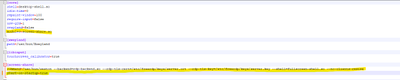
hello,
Thanks for your reply.
I fixed the issue a will ago, sorry for not posting the solution. I think there was issue in the weston.ini file. Here is mine which is working now :
Best regards
