
- Forums
- Product Forums
- General Purpose MicrocontrollersGeneral Purpose Microcontrollers
- i.MX Forumsi.MX Forums
- QorIQ Processing PlatformsQorIQ Processing Platforms
- Identification and SecurityIdentification and Security
- Power ManagementPower Management
- Wireless ConnectivityWireless Connectivity
- RFID / NFCRFID / NFC
- Advanced AnalogAdvanced Analog
- MCX Microcontrollers
- S32G
- S32K
- S32V
- MPC5xxx
- Other NXP Products
- S12 / MagniV Microcontrollers
- Powertrain and Electrification Analog Drivers
- Sensors
- Vybrid Processors
- Digital Signal Controllers
- 8-bit Microcontrollers
- ColdFire/68K Microcontrollers and Processors
- PowerQUICC Processors
- OSBDM and TBDML
- S32M
- S32Z/E
-
- Solution Forums
- Software Forums
- MCUXpresso Software and ToolsMCUXpresso Software and Tools
- CodeWarriorCodeWarrior
- MQX Software SolutionsMQX Software Solutions
- Model-Based Design Toolbox (MBDT)Model-Based Design Toolbox (MBDT)
- FreeMASTER
- eIQ Machine Learning Software
- Embedded Software and Tools Clinic
- S32 SDK
- S32 Design Studio
- GUI Guider
- Zephyr Project
- Voice Technology
- Application Software Packs
- Secure Provisioning SDK (SPSDK)
- Processor Expert Software
- Generative AI & LLMs
-
- Topics
- Mobile Robotics - Drones and RoversMobile Robotics - Drones and Rovers
- NXP Training ContentNXP Training Content
- University ProgramsUniversity Programs
- Rapid IoT
- NXP Designs
- SafeAssure-Community
- OSS Security & Maintenance
- Using Our Community
-
- Cloud Lab Forums
-
- Knowledge Bases
- ARM Microcontrollers
- i.MX Processors
- Identification and Security
- Model-Based Design Toolbox (MBDT)
- QorIQ Processing Platforms
- S32 Automotive Processing Platform
- Wireless Connectivity
- CodeWarrior
- MCUXpresso Suite of Software and Tools
- MQX Software Solutions
- RFID / NFC
- Advanced Analog
-
- NXP Tech Blogs
- Home
- :
- i.MX フォーラム
- :
- i.MXプロセッサ
- :
- Re: how to connect HDMI display to MCIMX6QP-SDB
how to connect HDMI display to MCIMX6QP-SDB
- RSS フィードを購読する
- トピックを新着としてマーク
- トピックを既読としてマーク
- このトピックを現在のユーザーにフロートします
- ブックマーク
- 購読
- ミュート
- 印刷用ページ
how to connect HDMI display to MCIMX6QP-SDB

- 新着としてマーク
- ブックマーク
- 購読
- ミュート
- RSS フィードを購読する
- ハイライト
- 印刷
- 不適切なコンテンツを報告
I bought MCIMX6QP-SDB recently.
I am trying to connect HDMI monitor to J8 on MCIMX6QP-SDB.
I used the following BSP(u-boot-2018-03, linux-imx-4.9.88).
repo init -u https://source.codeaurora.org/external/imx/imx-manifest -b imx-linux-sumo -m imx-4.14.98-2.0.0_ga.xml
..
bitbake fsl-image-qt5-validation-imx
I tried the following both kernel commands on u-boot.
setenv mmcargs 'setenv bootargs console=${console},${baudrate} ${smp} root=${mmcroot} rootwait rw video=mxcfb0:dev=hdmi,1920x1080M@60,bpp=32'
and
setenv mmcargs 'setenv bootargs console=${console},${baudrate} ${smp} root=${mmcroot} rootwait rw video=mxcfb0:dev=hdmi,1920x1080M@60,if=RGB24'
The monitor and the HDMI cable have been tested with PC. but HDMI display didn't work.
I saw the following hdmi error message and imx6qp chip was getting very hot.
mxc_hdmi 20e0000.hdmi_video: same edid
Should I do change more configuration except changing kernel command on u-boot?
 joanxie
- 新着としてマーク
- ブックマーク
- 購読
- ミュート
- RSS フィードを購読する
- ハイライト
- 印刷
- 不適切なコンテンツを報告
try to use the command "video=mxcfb0:dev=hdmi,1920x1080M@60,if=RGB24", is it typo? you use "1920x1080@M60"
- 新着としてマーク
- ブックマーク
- 購読
- ミュート
- RSS フィードを購読する
- ハイライト
- 印刷
- 不適切なコンテンツを報告
it was typo. The monitor and hdmi cable are already tested with PC.
Both 'video=mxcfb0:dev=hdmi,1920x1080M@60,if=RGB24' and 'video=mxcfb0:dev=hdmi,1920x1080M@60,bpp=32' didn't work, and imx6qp chip on sabresd board was getting very hot.

- 新着としてマーク
- ブックマーク
- 購読
- ミュート
- RSS フィードを購読する
- ハイライト
- 印刷
- 不適切なコンテンツを報告
Hi M C,
Please follow below steps and share us the result including logs:
1. Download the pre-builds for IMX6QP:
L4.14.98_2.0.0_MX6QDLSOLOX
2. Flash the SD card using below commands:
sudo dd if=<image> of=/dev/sdX bs=1M && sync
3. Insert the card in the board, connect HDMI and power on the system.
4. Stop the board from booting at u-boot by pressing any key.
5. Execute below command:
# setenv mmcargs $mmcargs video=mxcfb0:dev=hdmi,1920x1080M@60,if=RGB24
# saveenv
# boot
6. Try playing any video using gstreamer or any other application.
You should be able to see the video play on HDMI.
Let us know the result of above steps.
Regards,
Ankit Patel
- 新着としてマーク
- ブックマーク
- 購読
- ミュート
- RSS フィードを購読する
- ハイライト
- 印刷
- 不適切なコンテンツを報告
this doesn't work for me.
i see the same message.
- mxc_hdmi 20e0000.hdmi_video: same edid
- 新着としてマーク
- ブックマーク
- 購読
- ミュート
- RSS フィードを購読する
- ハイライト
- 印刷
- 不適切なコンテンツを報告
Hi M C,
- mxc_hdmi 20e0000.hdmi_video: same edid is not the error message.
When you unplug and plug the same HDMI , you get this message.
We got the display following the above steps, can you please share the kernel bootargs and full bootup logs?
Regards,
Ankit Patel
- 新着としてマーク
- ブックマーク
- 購読
- ミュート
- RSS フィードを購読する
- ハイライト
- 印刷
- 不適切なコンテンツを報告
- 新着としてマーク
- ブックマーク
- 購読
- ミュート
- RSS フィードを購読する
- ハイライト
- 印刷
- 不適切なコンテンツを報告
Hi M C ,
Can you let us know which of the following yocto image are you building?
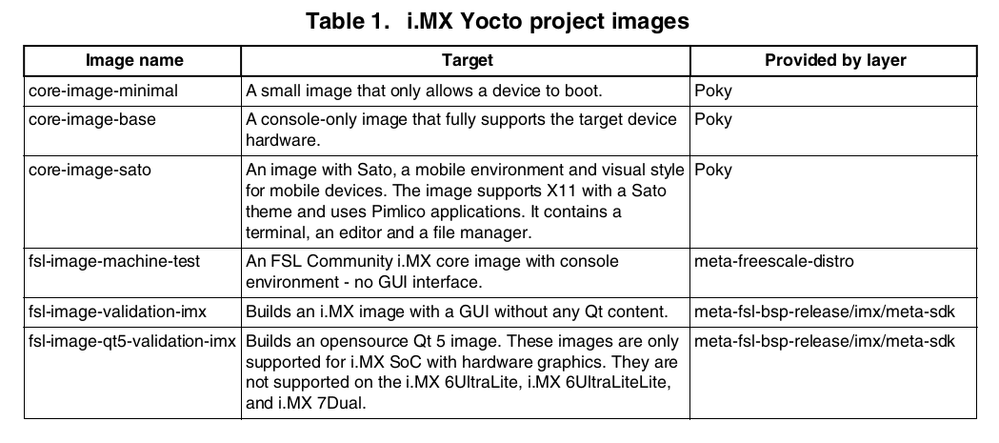
Also, with the current image, use this bootargs for display 'video=mxcfb0:dev=hdmi,1920x1080M@60,if=RGB24' and then on console try playing a video with application like gstreamer? If this too doesn't work do export DISPLAY=:0 and try again.
Regards,
Ankit Patel
- 新着としてマーク
- ブックマーク
- 購読
- ミュート
- RSS フィードを購読する
- ハイライト
- 印刷
- 不適切なコンテンツを報告
I am using "bitbake fsl-image-qt5-validation-imx" to build images
