
- Forums
- Product Forums
- General Purpose MicrocontrollersGeneral Purpose Microcontrollers
- i.MX Forumsi.MX Forums
- QorIQ Processing PlatformsQorIQ Processing Platforms
- Identification and SecurityIdentification and Security
- Power ManagementPower Management
- Wireless ConnectivityWireless Connectivity
- RFID / NFCRFID / NFC
- Advanced AnalogAdvanced Analog
- Neural Processing UnitsNeural Processing Units
- MCX Microcontrollers
- S32G
- S32K
- S32V
- MPC5xxx
- Other NXP Products
- S12 / MagniV Microcontrollers
- Powertrain and Electrification Analog Drivers
- Sensors
- Vybrid Processors
- Digital Signal Controllers
- 8-bit Microcontrollers
- ColdFire/68K Microcontrollers and Processors
- PowerQUICC Processors
- OSBDM and TBDML
- S32M
- S32Z/E
-
- Solution Forums
- Software Forums
- MCUXpresso Software and ToolsMCUXpresso Software and Tools
- CodeWarriorCodeWarrior
- MQX Software SolutionsMQX Software Solutions
- Model-Based Design Toolbox (MBDT)Model-Based Design Toolbox (MBDT)
- FreeMASTER
- eIQ Machine Learning Software
- Embedded Software and Tools Clinic
- S32 SDK
- S32 Design Studio
- GUI Guider
- Zephyr Project
- Voice Technology
- Application Software Packs
- Secure Provisioning SDK (SPSDK)
- Processor Expert Software
- Generative AI & LLMs
-
- Topics
- Mobile Robotics - Drones and RoversMobile Robotics - Drones and Rovers
- NXP Training ContentNXP Training Content
- University ProgramsUniversity Programs
- Rapid IoT
- NXP Designs
- SafeAssure-Community
- OSS Security & Maintenance
- Using Our Community
-
- Cloud Lab Forums
-
- Knowledge Bases
- ARM Microcontrollers
- i.MX Processors
- Identification and Security
- Model-Based Design Toolbox (MBDT)
- QorIQ Processing Platforms
- S32 Automotive Processing Platform
- Wireless Connectivity
- CodeWarrior
- MCUXpresso Suite of Software and Tools
- MQX Software Solutions
- RFID / NFC
- Advanced Analog
- Neural Processing Units
-
- NXP Tech Blogs
- Home
- :
- i.MX フォーラム
- :
- i.MXプロセッサ
- :
- Re: h264 encode video doesn't have a progress bar
h264 encode video doesn't have a progress bar
- RSS フィードを購読する
- トピックを新着としてマーク
- トピックを既読としてマーク
- このトピックを現在のユーザーにフロートします
- ブックマーク
- 購読
- ミュート
- 印刷用ページ

- 新着としてマーク
- ブックマーク
- 購読
- ミュート
- RSS フィードを購読する
- ハイライト
- 印刷
- 不適切なコンテンツを報告
Hi,
I have a problem that when I record the camera via H.264(Using OV5640), the H.264 video doesn't have the progress bar, so I can't fast or slow speed the video. I believe there is something wrong with the test code(VPU unittest).
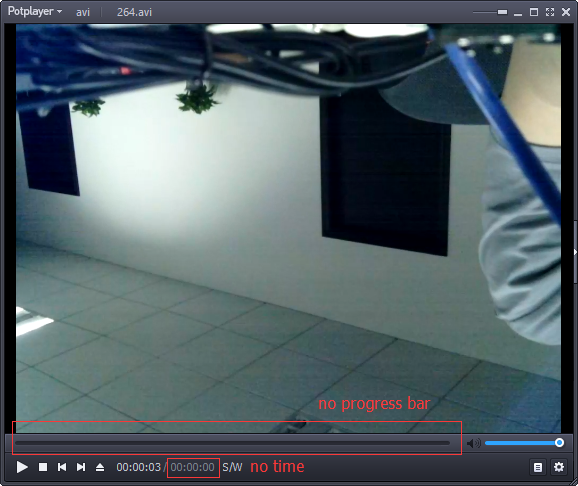
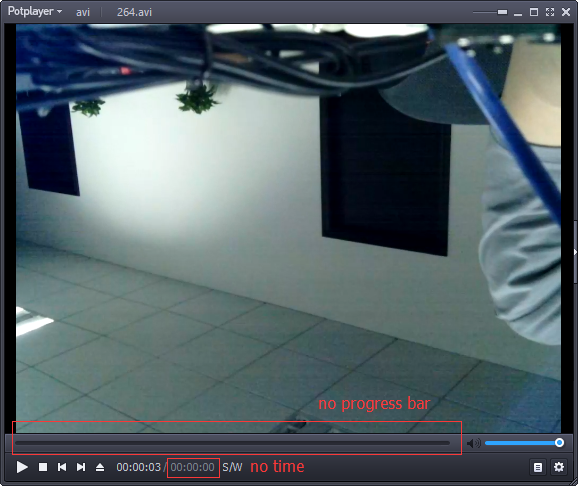
CPU: i.mx6q
System: Linux freescale 3.0.35
debug log:
$ ./mxc_vpu_test.out -E "-o 264.avi -w 1024 -h 768 -f 2 "
[INFO]  VPU test program built on Oct 19 2016 16:44:10
[INFO]  Product Info: i.MX6Q/D/S
[INFO]  VPU firmware version: 2.3.10_r40778
[INFO]  VPU library version: 5.4.16
[INFO]  Format: STD_AVC
[INFO]  AVC
[INFO]  Output file "264.avi" opened.
[INFO]  Capture/Encode fps will be 30
[INFO]  chromaInterleave 1, mapType 0, linear2TiledEnable 0
[INFO]  sensor chip is ov5640_camera
[INFO]  sensor frame size is 1024x768
ov5640: actual frame rate of XGA is 22.5fps
[WARN]  Ctrl-C received
[INFO]  Finished encoding: 123 frames
[INFO]  enc fps = 107.47
[INFO]  total fps= 22.15
Attachments are the test code and the h.264 vedio files.
Regards
Jerry
Original Attachment has been moved to: mxc_vpu_test.rar
解決済! 解決策の投稿を見る。

 igorpadykov
- 新着としてマーク
- ブックマーク
- 購読
- ミュート
- RSS フィードを購読する
- ハイライト
- 印刷
- 不適切なコンテンツを報告
Hi jerry
unittest are simple tests for testing peripherals for board bringup purpose,
please try to use gstreamer using sect.7 Multimedia attached Linux Guide.
Best regards
igor
-----------------------------------------------------------------------------------------------------------------------
Note: If this post answers your question, please click the Correct Answer button. Thank you!
-----------------------------------------------------------------------------------------------------------------------
igorpadykov
- 新着としてマーク
- ブックマーク
- 購読
- ミュート
- RSS フィードを購読する
- ハイライト
- 印刷
- 不適切なコンテンツを報告
Hi jerry
unittest are simple tests for testing peripherals for board bringup purpose,
please try to use gstreamer using sect.7 Multimedia attached Linux Guide.
Best regards
igor
-----------------------------------------------------------------------------------------------------------------------
Note: If this post answers your question, please click the Correct Answer button. Thank you!
-----------------------------------------------------------------------------------------------------------------------
