
- Forums
- Product Forums
- General Purpose MicrocontrollersGeneral Purpose Microcontrollers
- i.MX Forumsi.MX Forums
- QorIQ Processing PlatformsQorIQ Processing Platforms
- Identification and SecurityIdentification and Security
- Power ManagementPower Management
- Wireless ConnectivityWireless Connectivity
- RFID / NFCRFID / NFC
- Advanced AnalogAdvanced Analog
- Neural Processing UnitsNeural Processing Units
- MCX Microcontrollers
- S32G
- S32K
- S32V
- MPC5xxx
- Other NXP Products
- S12 / MagniV Microcontrollers
- Powertrain and Electrification Analog Drivers
- Sensors
- Vybrid Processors
- Digital Signal Controllers
- 8-bit Microcontrollers
- ColdFire/68K Microcontrollers and Processors
- PowerQUICC Processors
- OSBDM and TBDML
- S32M
- S32Z/E
-
- Solution Forums
- Software Forums
- MCUXpresso Software and ToolsMCUXpresso Software and Tools
- CodeWarriorCodeWarrior
- MQX Software SolutionsMQX Software Solutions
- Model-Based Design Toolbox (MBDT)Model-Based Design Toolbox (MBDT)
- FreeMASTER
- eIQ Machine Learning Software
- Embedded Software and Tools Clinic
- S32 SDK
- S32 Design Studio
- GUI Guider
- Zephyr Project
- Voice Technology
- Application Software Packs
- Secure Provisioning SDK (SPSDK)
- Processor Expert Software
- Generative AI & LLMs
-
- Topics
- Mobile Robotics - Drones and RoversMobile Robotics - Drones and Rovers
- NXP Training ContentNXP Training Content
- University ProgramsUniversity Programs
- Rapid IoT
- NXP Designs
- SafeAssure-Community
- OSS Security & Maintenance
- Using Our Community
-
- Cloud Lab Forums
-
- Knowledge Bases
- ARM Microcontrollers
- i.MX Processors
- Identification and Security
- Model-Based Design Toolbox (MBDT)
- QorIQ Processing Platforms
- S32 Automotive Processing Platform
- Wireless Connectivity
- CodeWarrior
- MCUXpresso Suite of Software and Tools
- MQX Software Solutions
- RFID / NFC
- Advanced Analog
- Neural Processing Units
-
- NXP Tech Blogs
- Home
- :
- i.MX Forums
- :
- i.MX Processors
- :
- Re: IMX93 FRDM board dts files
IMX93 FRDM board dts files
- Subscribe to RSS Feed
- Mark Topic as New
- Mark Topic as Read
- Float this Topic for Current User
- Bookmark
- Subscribe
- Mute
- Printer Friendly Page

- Mark as New
- Bookmark
- Subscribe
- Mute
- Subscribe to RSS Feed
- Permalink
- Report Inappropriate Content
Hi,
git clone https://github.com/nxp-imx-support/meta-imx-frdm.git
Solved! Go to Solution.

 Chavira
- Mark as New
- Bookmark
- Subscribe
- Mute
- Subscribe to RSS Feed
- Permalink
- Report Inappropriate Content
Hi @Et_MM!
Apparently you have configured the machine to imx93-evk
Try following the steps that we provide in our github.
#Install the repo utility:
$: mkdir ~/bin
$: curl https://storage.googleapis.com/git-repo-downloads/repo > ~/bin/repo
$: chmod a+x ~/bin/repo
$: PATH=${PATH}:~/bin

#Download i.MX Linux Yocto Release:
$: mkdir ${MY_YOCTO} # this directory will be the top directory of the Yocto source code
$: cd ${MY_YOCTO}
$: repo init -u https://github.com/nxp-imx/imx-manifest -b imx-linux-scarthgap -m imx-6.6.36-2.1.0.xml
$: repo sync

If errors on repo init, remove the .repo directory and try repo init again.

#Integrate meta-imx-frdm recipes into the Yocto code base:
$: cd ./sources
$: git clone https://github.com/nxp-imx-support/meta-imx-frdm.git
$: cd meta-imx-frdm
$: git checkout imx-frdm-2.0
Change to the top directory of the Yocto source code and execute the command below to setup environment for build.
#For i.MX93 FRDM
$: MACHINE=imx93frdm DISTRO=fsl-imx-xwayland source sources/meta-imx-frdm/tools/imx-frdm-setup.sh -b frdm-imx93
Run the command below to generate Yocto images:
$: bitbake <image recipe>
Some image recipes:
| Image Name | Description |
|---|---|
| imx-image-core | core image with basic graphics and no multimedia |
| imx-image-multimedia | image with multimedia and graphics |
| imx-image-full | image with multimedia and machine learning and Qt |
Best Regards!
Chavira
Chavira
- Mark as New
- Bookmark
- Subscribe
- Mute
- Subscribe to RSS Feed
- Permalink
- Report Inappropriate Content
Hi @Et_MM!
Thank you for contacting NXP Support!
You can follow the steps that we provide in this community post.
If you have more inquiries please let me know.
Best Regards!
Chavira
- Mark as New
- Bookmark
- Subscribe
- Mute
- Subscribe to RSS Feed
- Permalink
- Report Inappropriate Content
Hi,
Thank you for the reply.
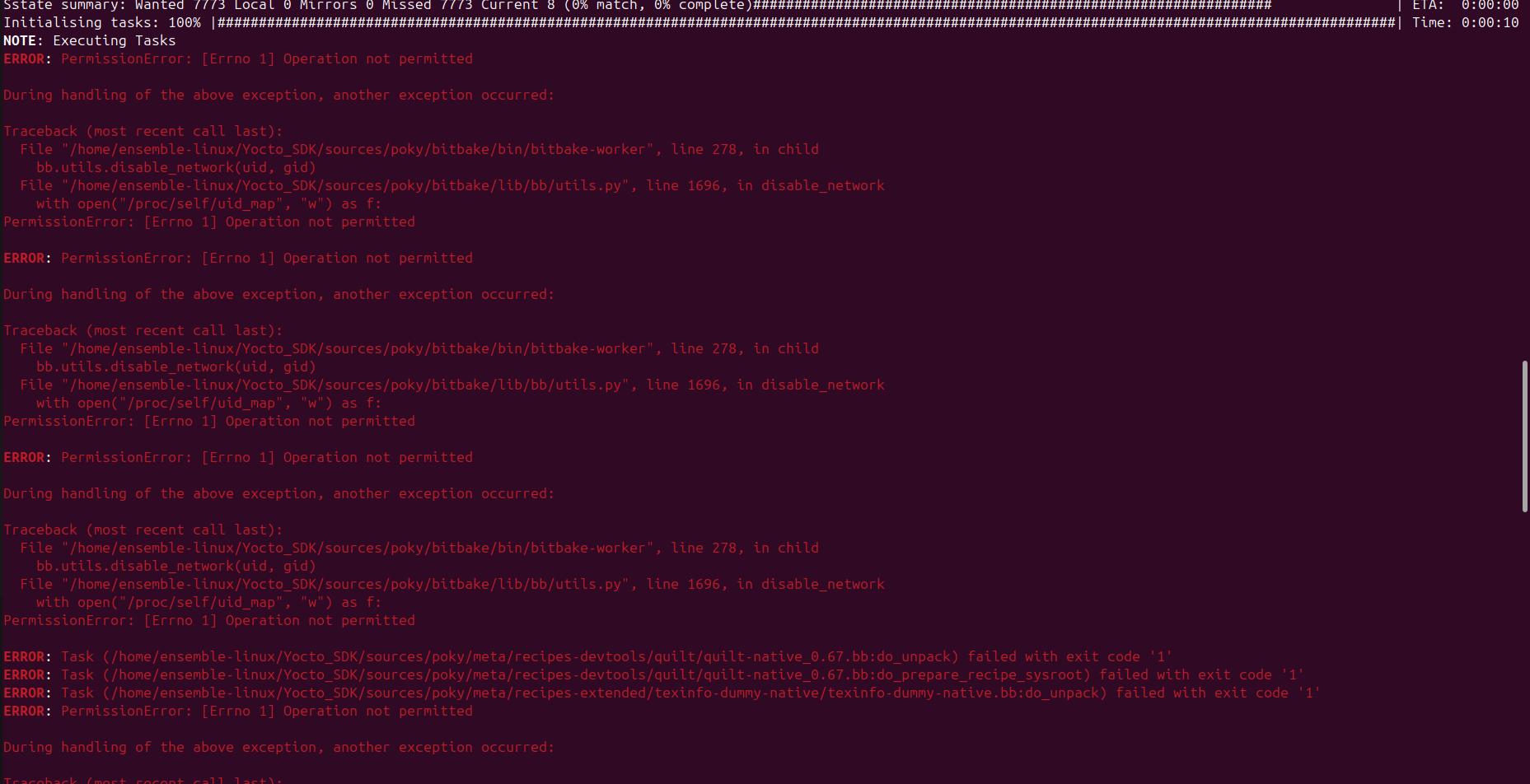
I have tried the procedure mentioned in the community but bitbake is giving error. i have tried to rectify it but couldn't. Please go through the attachments shared and suggest me how to clear and go forward.



 Chavira
- Mark as New
- Bookmark
- Subscribe
- Mute
- Subscribe to RSS Feed
- Permalink
- Report Inappropriate Content
Hi @Et_MM!
I just compiled the SDK by my side without errors.
Maybe the error is due to you are using Ubuntu 24.
We recommend to use Ubuntu 22 for this job.
Best Regards!
Chavira
- Mark as New
- Bookmark
- Subscribe
- Mute
- Subscribe to RSS Feed
- Permalink
- Report Inappropriate Content
Hi,
Thank you for your reply. I tried this on Ubuntu 20, but during the BitBake execution, the process gets stuck at a certain point, and even my laptop freezes. I have tried multiple times, but it always freezes at the same point (as shown in the image I shared).
Is there a minimum system requirement for this process?

 Chavira
- Mark as New
- Bookmark
- Subscribe
- Mute
- Subscribe to RSS Feed
- Permalink
- Report Inappropriate Content
Hi @Et_MM!
Do you have the proper packages to compile?
Essential Yocto Project host packages are:
$ sudo apt install gawk wget git diffstat unzip texinfo gcc build-essential
chrpath socat cpio python3 python3-pip python3-pexpect xz-utils debianutils
iputils-ping python3-git python3-jinja2 python3-subunit zstd liblz4-tool file
locales libacl1
Try reducing the cores of the Yocto compilation adding the next lines in local.conf file:
BB_NUMBER_THREADS = "4"
PARALLEL_MAKE = "-j 4"
We recommend 4GB of ram of each core.
Best Regards!
Chavira
- Mark as New
- Bookmark
- Subscribe
- Mute
- Subscribe to RSS Feed
- Permalink
- Report Inappropriate Content
Hi,
From beginning itself i have installed the yocto hostage, its already mentioned in the community. In local.conf file i have added the 2 lines and tried but still it is freezing at the same point.
even i tried by adding
BB_NUMBER_THREADS = "2"
PARALLEL_MAKE = "-j 2"
still freezing but at different point comparing to previous. please check the shared image.

 Chavira
- Mark as New
- Bookmark
- Subscribe
- Mute
- Subscribe to RSS Feed
- Permalink
- Report Inappropriate Content
Hi @Et_MM!
Thank you for contacting NXP Support!
Those packages take too long time to compile, in my VM (16 cores and 64GB of RAM) takes over an a 90 minutes, the full compilation takes up to 5 or 6 hours, the full compilation of sdk can take a entire day to compile if your computer does not have the enough resources.
- Mark as New
- Bookmark
- Subscribe
- Mute
- Subscribe to RSS Feed
- Permalink
- Report Inappropriate Content
Hi
I understood what you are telling, but if the stuck issue is resolved then only the bitbake process will be completed. I want solution for this freezing, for that what to do?
Please go through the shared images and clarify whether it is ok for this bitbake process.
Is it because my system doesn't have enough resources it is freezing during bitbake? Is yes please share me what are the needed resources for this.
Again i tried bitbake today and it freezed but after doing some process,i have shared that image too.


 Chavira
- Mark as New
- Bookmark
- Subscribe
- Mute
- Subscribe to RSS Feed
- Permalink
- Report Inappropriate Content
Hi @Et_MM!
I understand the problem that you have but I can't do nothing by my side since the problem is your host computer.
Try using another host computer or try using only one thread and one core to compile.
Best Regards!
Chavira
- Mark as New
- Bookmark
- Subscribe
- Mute
- Subscribe to RSS Feed
- Permalink
- Report Inappropriate Content
Hi,
I have done the bitbake process on ubuntu v22.4 and it is completed, as per the procedure mentioned in community till sdk installing i have done.
jesna@jesna-Latitude-5420:~/Yocto_SDK/bld-xwayland/tmp/deploy/sdk$ bash ./fsl-imx-xwayland-glibc-x86_64-imx-image-full-armv8a-imx93evk-toolchain-6.6-scarthgap.sh
NXP i.MX Release Distro SDK installer version 6.6-scarthgap
===========================================================
Enter target directory for SDK (default: /opt/fsl-imx-xwayland/6.6-scarthgap):
You are about to install the SDK to "/opt/fsl-imx-xwayland/6.6-scarthgap". Proceed [Y/n]? Y
Extracting SDK........................................................................................................................................................................................................................................................................................................................................................................................................................................................................................................................................................................................................................................................................................................................................................................................................................................................................................................................................................................................................................................................................................................................................................................................................done
Setting it up...done
SDK has been successfully set up and is ready to be used.
Each time you wish to use the SDK in a new shell session, you need to source the environment setup script e.g.
$ . /opt/fsl-imx-xwayland/6.6-scarthgap/environment-setup-armv8a-poky-linux
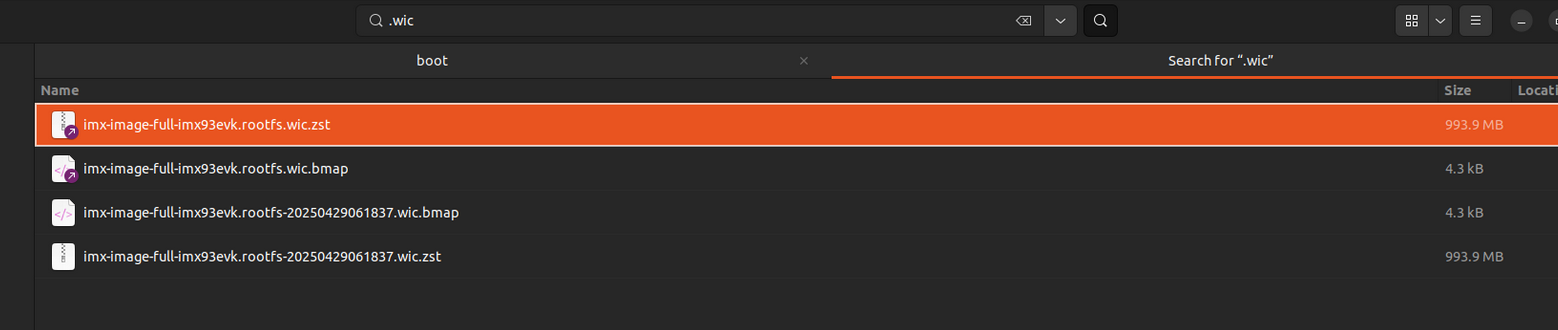
After this i could'nt find any .wic file. how to get the wic file?
if i am continuing the procedure mentioned in the community post what will be the outcome?
please check the shared image, and walk me through if anything went wrong.
 Chavira
- Mark as New
- Bookmark
- Subscribe
- Mute
- Subscribe to RSS Feed
- Permalink
- Report Inappropriate Content
HI @Et_MM!
To compile the image (.wic) you have to compile using the next command:
bitbake <image recipe>
Example:
bitbake imx-image-full
- Mark as New
- Bookmark
- Subscribe
- Mute
- Subscribe to RSS Feed
- Permalink
- Report Inappropriate Content
 Chavira
- Mark as New
- Bookmark
- Subscribe
- Mute
- Subscribe to RSS Feed
- Permalink
- Report Inappropriate Content
Hi @Et_MM!
Apparently you have configured the machine to imx93-evk
Try following the steps that we provide in our github.
#Install the repo utility:
$: mkdir ~/bin
$: curl https://storage.googleapis.com/git-repo-downloads/repo > ~/bin/repo
$: chmod a+x ~/bin/repo
$: PATH=${PATH}:~/bin

#Download i.MX Linux Yocto Release:
$: mkdir ${MY_YOCTO} # this directory will be the top directory of the Yocto source code
$: cd ${MY_YOCTO}
$: repo init -u https://github.com/nxp-imx/imx-manifest -b imx-linux-scarthgap -m imx-6.6.36-2.1.0.xml
$: repo sync

If errors on repo init, remove the .repo directory and try repo init again.

#Integrate meta-imx-frdm recipes into the Yocto code base:
$: cd ./sources
$: git clone https://github.com/nxp-imx-support/meta-imx-frdm.git
$: cd meta-imx-frdm
$: git checkout imx-frdm-2.0
Change to the top directory of the Yocto source code and execute the command below to setup environment for build.
#For i.MX93 FRDM
$: MACHINE=imx93frdm DISTRO=fsl-imx-xwayland source sources/meta-imx-frdm/tools/imx-frdm-setup.sh -b frdm-imx93
Run the command below to generate Yocto images:
$: bitbake <image recipe>
Some image recipes:
| Image Name | Description |
|---|---|
| imx-image-core | core image with basic graphics and no multimedia |
| imx-image-multimedia | image with multimedia and graphics |
| imx-image-full | image with multimedia and machine learning and Qt |
Best Regards!
Chavira
- Mark as New
- Bookmark
- Subscribe
- Mute
- Subscribe to RSS Feed
- Permalink
- Report Inappropriate Content
Hi,
Thank you for your reply. i am able to create wic file for imx93frdm board.
- Mark as New
- Bookmark
- Subscribe
- Mute
- Subscribe to RSS Feed
- Permalink
- Report Inappropriate Content
 Chavira
- Mark as New
- Bookmark
- Subscribe
- Mute
- Subscribe to RSS Feed
- Permalink
- Report Inappropriate Content
HI @Et_MM!
Apparently your network connection is not stable, I can see the network sign in notification.
- Mark as New
- Bookmark
- Subscribe
- Mute
- Subscribe to RSS Feed
- Permalink
- Report Inappropriate Content
Hi,
Thank you for the reply.
In that case then i will try with a new system, because there is no network issue after that and the freeze issue still persists.
- Mark as New
- Bookmark
- Subscribe
- Mute
- Subscribe to RSS Feed
- Permalink
- Report Inappropriate Content
Hi,
I have tried with the below config, but still freezing.
BB_NUMBER_THREADS = "1"
PARALLEL_MAKE = "-j 1"
Again i tried with 4 thread and 4 core ,at that time the process was running and freeze at some other point, i kept my system as such for 2 hrs suddenly some logs came (please go through the shared image).
If there is no other solutions then i will try it in another system and will update.

