
- Forums
- Product Forums
- General Purpose MicrocontrollersGeneral Purpose Microcontrollers
- i.MX Forumsi.MX Forums
- QorIQ Processing PlatformsQorIQ Processing Platforms
- Identification and SecurityIdentification and Security
- Power ManagementPower Management
- Wireless ConnectivityWireless Connectivity
- RFID / NFCRFID / NFC
- Advanced AnalogAdvanced Analog
- MCX Microcontrollers
- S32G
- S32K
- S32V
- MPC5xxx
- Other NXP Products
- S12 / MagniV Microcontrollers
- Powertrain and Electrification Analog Drivers
- Sensors
- Vybrid Processors
- Digital Signal Controllers
- 8-bit Microcontrollers
- ColdFire/68K Microcontrollers and Processors
- PowerQUICC Processors
- OSBDM and TBDML
- S32M
- S32Z/E
-
- Solution Forums
- Software Forums
- MCUXpresso Software and ToolsMCUXpresso Software and Tools
- CodeWarriorCodeWarrior
- MQX Software SolutionsMQX Software Solutions
- Model-Based Design Toolbox (MBDT)Model-Based Design Toolbox (MBDT)
- FreeMASTER
- eIQ Machine Learning Software
- Embedded Software and Tools Clinic
- S32 SDK
- S32 Design Studio
- GUI Guider
- Zephyr Project
- Voice Technology
- Application Software Packs
- Secure Provisioning SDK (SPSDK)
- Processor Expert Software
- Generative AI & LLMs
-
- Topics
- Mobile Robotics - Drones and RoversMobile Robotics - Drones and Rovers
- NXP Training ContentNXP Training Content
- University ProgramsUniversity Programs
- Rapid IoT
- NXP Designs
- SafeAssure-Community
- OSS Security & Maintenance
- Using Our Community
-
- Cloud Lab Forums
-
- Knowledge Bases
- ARM Microcontrollers
- i.MX Processors
- Identification and Security
- Model-Based Design Toolbox (MBDT)
- QorIQ Processing Platforms
- S32 Automotive Processing Platform
- Wireless Connectivity
- CodeWarrior
- MCUXpresso Suite of Software and Tools
- MQX Software Solutions
- RFID / NFC
- Advanced Analog
-
- NXP Tech Blogs
How to configure Qt6 for cross compiling to i.MX7ULP?

Hi
I'm trying to cross compile a Qt6 project for an i.MX7ULP processor on a Linux computer but facing some troubles getting the configuration correct. I have build the SDK toolchain as described further down and made setup of kit and compiler, but when I'm trying to compile I get the following error:
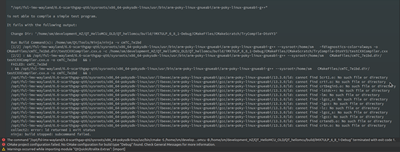
The output does indicate that some files are missing, however these files are not a part of the configuration.
When I configure the "kit setup I have made the following settings, but getting a general warning related to setup and a specific error related to Qt version. I have tried Qt 6.8.1 and Qt 6.7.3 but with the same result:


The compiler setup:
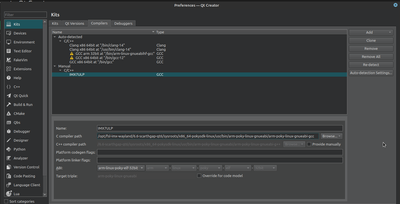
Some settings might be related to the configuration of the bitbake, hence these settings are described below.
I'm using the following software:
- https://github.com/nxp-imx/imx-manifest -b imx-linux-scarthgap -m imx-6.6.36-2.1.0.xml
For machine and distribution:
- DISTRO=fsl-imx-wayland MACHINE=imx7ulpevk source imx-setup-release.sh -b build-wayland
When searching for at solution, there seems to be two options for building the SDK toolchain, however the result is the same using one or the other:
- bitbake meta-toolchain-qt6
- DISTRO=Target-Distro MACHINE=Target-Machine bitbake core-image-minimal -c populate_sdk
The latter of the two is probably using the machine and distro settings further op, thus the difference is the "core-image-minimal -c populate_sdk" vs. "meta-toolchain-qt6"
The question is, how should Qt6 creator be configure to cross compile for and i.MX7ULP processor?
Regards
Henrik


HI @HenrikZ!
Thank you for contacting NXP Support!
According to our YOCTO PROJECT USERS GUIDE.
The image that you have to compile is the imx-image-full to enable the QT content.
Try to compile the SDK again.
Best Regards!
Chavira
Hi @Chavira
I tried to recompile with imx-image-full as you suggested. Unfortunately it did not make any difference. The screenshot below shows the project -> build&run configuration. At the top there are some red text where it says cmake configuration failed, and further down there is a cmake error also in red, and the line before at the end it says: ".../arm-poky-linux-gnueabi/arm-poky-linux-gnueabi-g++ - broken":

It could be related to the CMake configuration? In the preferences (shown below) I have selected the CMake version (3.29.3) from the toolkit. The reason there is a red dot next to "Run Device" is, that I have had to defined a "remote device" which isn't connected.

For the compiler settings, I have chosen the compiler in the SDK as shown below:

Suggestions how to solve the CMake configuration issue?
Is the issue somehow related to broken g++ compiler?
Regards Henrik
Hi @Chavira
I think a part of the problem is related to the supported Qt version from the Yocto (scarthgap) SDK build, and not the IDE. If I select the latest Qt version 6.8.1 or 6.7.3 I get an error saying (the text is exactly the same if I select 6.8.1 or 6.7.3):
ERROR: The compiler "GCC for IMX7ULP" (arm-linux-poky-elf-32bit) cannot produce code for the Qt version "Qt 6.7.3" (x86-linux-generic-elf-64bit)
There can be several reasons for the error above, one could be a compatibility problem between the compiler provided from the Yocto Bitbake. The other could be that for Qt 6.7.3 and above the text in the parenthesis says that it is 64 bit which doesn't align with 32 bit of the GCC compiler.
To solve the latter, I tried to define the Qt version under "Manage kits..." and select the qmake from the SDK (as shown in the picture).

This replaces the error with an warning:
Warning: The compiler "GCC for iMX7ULP" (arm-linux-poky-elf-32bit) may not produce code compatible with the Qt version "Qt 6.7.0 (System)" (arm-linux-generic-elf-32bit).

Which versions of Qt are supported by the SDK that is "bitbaked" from the Scarthgap imx-linux-scarthgap -m imx-6.6.36-2.1.0.xml?
When looking in the documentation from NXP related to Yocto, it just says Qt6, but does that relate to all version up to 6.8.1 (the newest at the time of writing)?
