
- Forums
- Product Forums
- General Purpose MicrocontrollersGeneral Purpose Microcontrollers
- i.MX Forumsi.MX Forums
- QorIQ Processing PlatformsQorIQ Processing Platforms
- Identification and SecurityIdentification and Security
- Power ManagementPower Management
- Wireless ConnectivityWireless Connectivity
- RFID / NFCRFID / NFC
- Advanced AnalogAdvanced Analog
- Neural Processing UnitsNeural Processing Units
- MCX Microcontrollers
- S32G
- S32K
- S32V
- MPC5xxx
- Other NXP Products
- S12 / MagniV Microcontrollers
- Powertrain and Electrification Analog Drivers
- Sensors
- Vybrid Processors
- Digital Signal Controllers
- 8-bit Microcontrollers
- ColdFire/68K Microcontrollers and Processors
- PowerQUICC Processors
- OSBDM and TBDML
- S32M
- S32Z/E
-
- Solution Forums
- Software Forums
- MCUXpresso Software and ToolsMCUXpresso Software and Tools
- CodeWarriorCodeWarrior
- MQX Software SolutionsMQX Software Solutions
- Model-Based Design Toolbox (MBDT)Model-Based Design Toolbox (MBDT)
- FreeMASTER
- eIQ Machine Learning Software
- Embedded Software and Tools Clinic
- S32 SDK
- S32 Design Studio
- GUI Guider
- Zephyr Project
- Voice Technology
- Application Software Packs
- Secure Provisioning SDK (SPSDK)
- Processor Expert Software
- Generative AI & LLMs
-
- Topics
- Mobile Robotics - Drones and RoversMobile Robotics - Drones and Rovers
- NXP Training ContentNXP Training Content
- University ProgramsUniversity Programs
- Rapid IoT
- NXP Designs
- SafeAssure-Community
- OSS Security & Maintenance
- Using Our Community
-
- Cloud Lab Forums
-
- Knowledge Bases
- ARM Microcontrollers
- i.MX Processors
- Identification and Security
- Model-Based Design Toolbox (MBDT)
- QorIQ Processing Platforms
- S32 Automotive Processing Platform
- Wireless Connectivity
- CodeWarrior
- MCUXpresso Suite of Software and Tools
- MQX Software Solutions
- RFID / NFC
- Advanced Analog
- Neural Processing Units
-
- NXP Tech Blogs
- Home
- :
- i.MX Forums
- :
- i.MX Processors
- :
- Compiling QT for Sabre-auto
Compiling QT for Sabre-auto
- Subscribe to RSS Feed
- Mark Topic as New
- Mark Topic as Read
- Float this Topic for Current User
- Bookmark
- Subscribe
- Mute
- Printer Friendly Page
Compiling QT for Sabre-auto

- Mark as New
- Bookmark
- Subscribe
- Mute
- Subscribe to RSS Feed
- Permalink
- Report Inappropriate Content
- Mark as New
- Bookmark
- Subscribe
- Mute
- Subscribe to RSS Feed
- Permalink
- Report Inappropriate Content
Hi Gusarambula,
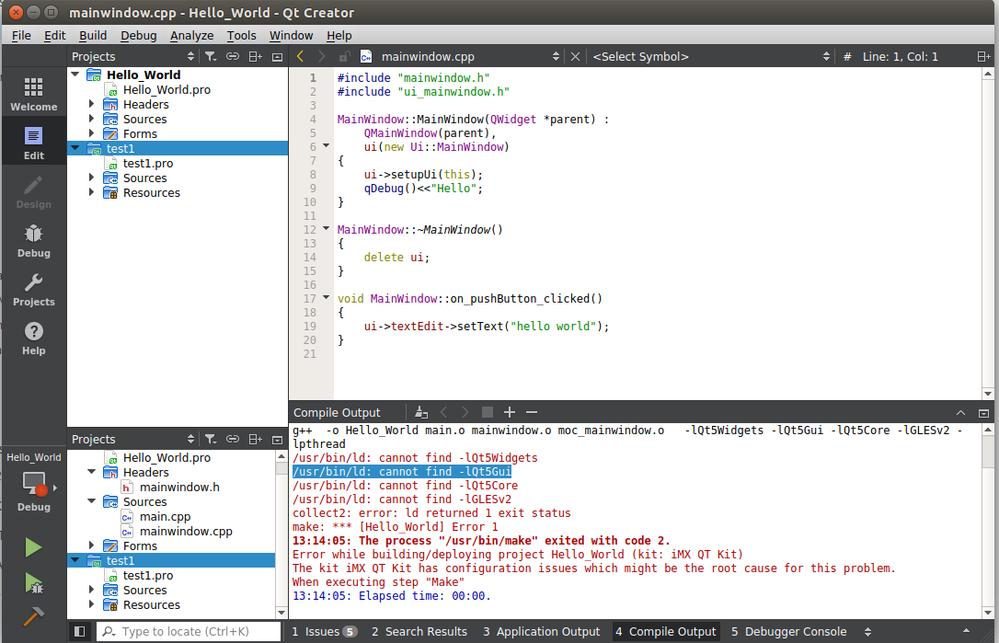
I followed https://community.nxp.com/docs/DOC-328543 .After doing the set up mentioned in the document. I am getting error in compiling a hello-world program. There may be some configuration error. Please take a look on the error and let me know .
- Mark as New
- Bookmark
- Subscribe
- Mute
- Subscribe to RSS Feed
- Permalink
- Report Inappropriate Content
Thanks gusarambula
I will follow the steps for creating a QT Creator using bitbake meta-toolchain-qt5 . Will try to compile a simple hello world. Then i ll come back to you in case of help.
Thanks for help
Deepika
- Mark as New
- Bookmark
- Subscribe
- Mute
- Subscribe to RSS Feed
- Permalink
- Report Inappropriate Content
Hi Gusarambula,
Thanks for reply.
Now my doubt is that after bitbaking the full QT image , do we need to do bitbake meta-toolchain-qt5 ?
Can't we only create a recipe for compiling the QT application? I mean to create a .bb file for the application and compile it using yocto?
Thanks
Deepika

 gusarambula
- Mark as New
- Bookmark
- Subscribe
- Mute
- Subscribe to RSS Feed
- Permalink
- Report Inappropriate Content
Hello Deepika Teriar ,
Yocto is meant to be used for distribution rather than development. Of course you may add a recipe (.bb) that builds and install a Qt application on your image. However, if you are still working up details of that application I would recommend manually building until it’s finished and then just adding a recipe for release.
You may find information and some examples of Qt applications on the following link:
https://wiki.yoctoproject.org/wiki/Creating_a_recipe_for_a_Qt_application
Regards,
- Mark as New
- Bookmark
- Subscribe
- Mute
- Subscribe to RSS Feed
- Permalink
- Report Inappropriate Content
Hi Gusarambula,
Thanks for suggestion. I have compiled full bitbake fsl-image-qt5 for sabreauto.
Now I need to compile a qt application . I have been given a .cpp file and it is using javascript and html.
Also it needs data from the CAN interface
Can you suggest me how to go forward?
Deepika
gusarambula
- Mark as New
- Bookmark
- Subscribe
- Mute
- Subscribe to RSS Feed
- Permalink
- Report Inappropriate Content
Hello Deepika,
I’m glad to hear you were able to bake the qt5 image.
As for compiling a Qt application, you would first need to extract the Qt5 toolchain, which you may do using the command:
bitbake meta-toolchain-qt5
After that you would have a script on the following path which you may run to install the toolchain.
fsl-release-bsp/<BUILD_DIR>/tmp/deploy/sdk/poky-glibc-x86_64-meta-toolchain-qt5-cortexa9hf-vfp-neon-toolchain-<VERSION>.sh
After that you would need to setup an IDE like Qt Creator. There are some documents on the communities like the following:
https://community.nxp.com/docs/DOC-328543
If you need something more specific to Qt I would recommend looking at the Qt forums where there may be more help specifically on how to build Qt applications.
Regards,
- Mark as New
- Bookmark
- Subscribe
- Mute
- Subscribe to RSS Feed
- Permalink
- Report Inappropriate Content
Hi Gusarambula,
Thanks a lot for your reply.
I planned to bitbake the QT toolchain itself after downloading the demo images
Now my next doubt is that we need CAN to be enabled in the sabreauto board. Is the demo image having that?
Otherwise I have to build a full QT image that would consume more time and memory.
Thanks
Deepika
gusarambula
- Mark as New
- Bookmark
- Subscribe
- Mute
- Subscribe to RSS Feed
- Permalink
- Report Inappropriate Content
Hello Deepika,
The demo images do have the CAN driver. Just make sure to look for the pin configuration on the board. There is a device tree for FlexCAN (imx6q-sabreauto-flexcan1.dtb ) which should be on the image bundle as well.
Regards,
- Mark as New
- Bookmark
- Subscribe
- Mute
- Subscribe to RSS Feed
- Permalink
- Report Inappropriate Content
I have compiled buildroot images for sabreauto.
Now the problem is that the board is not booting with this image. I have followed the steps given in Buildroot for the i.MX6 sabre sd platform in a few commands . My defconfig file is freescale_imx6qsabreauto_defconfig.
please let me know if you have any suggestions.
Thanks
Deepika
gusarambula
- Mark as New
- Bookmark
- Subscribe
- Mute
- Subscribe to RSS Feed
- Permalink
- Report Inappropriate Content
Hello Deepika Teriar,
My apologies! Please try the following link:
L4.1.15_2.0.0_MX6QDLSOLO
In my opinion the easiest way to have the board up and running is loading one of the demo images to an SD card using dd:
$ sudo dd if=<image name>.sdcard of=/dev/sd<partition> bs=1M && sync
Secondly, make sure that you’re using the corresponding bootloader, as the images are normally meant to be used for a whole family of boards and include all the Device Trees but the bootloader has to be written separately.
You may use the following command with the necessary bootloader, which is included as part of the Image bundle you downloaded.
$ sudo dd if=<U-Boot image> of=/dev/sdx bs=512 seek=2 conv=fsync
If you rather compile the image yourself my recommendation would be please following the directions on the Yocto Project User’s Guide document that’s part of the document bundle, as I’m not familiar with buildroot but it doesn’t look as updated.
Regards,
- Mark as New
- Bookmark
- Subscribe
- Mute
- Subscribe to RSS Feed
- Permalink
- Report Inappropriate Content
Thanks Gusarambula,
Thank you for your reply. The problem is that the images which you have shared is for imx6sx. I need it for imx6q sabre auto board. Can you please help.
Thanks
Deepika Teriar
- Mark as New
- Bookmark
- Subscribe
- Mute
- Subscribe to RSS Feed
- Permalink
- Report Inappropriate Content
Hi Gusarambula,
Thanks for your reply.
If I need to create a QT application on sabre-auto, how we can use demo image. For that will I be needing QT library and toolchain ?
Thanks
Deepika Teriar
gusarambula
- Mark as New
- Bookmark
- Subscribe
- Mute
- Subscribe to RSS Feed
- Permalink
- Report Inappropriate Content
Hello Deepika Teriar,
You may download the demo image from the link on my previous post and write it using dd as shown below:
$ sudo dd if=<image name>.sdcard of=/dev/sd<partition> bs=1M && sync
Then you would need to write the bootloader that corresponds to your board. All the bootloaders for the supported boards are available on the Demo Image bundle.
$ sudo dd if=<U-Boot image> of=/dev/sdx bs=512 seek=2 conv=fsync
You may find more details on loading the image on the i.MX Linux User's Guide, available as part of the BSP documentation.
You may run Qt5 applications on the demo image. If you need to cross compile your Qt applications you would need the Qt5 toolchain. For this you would need to follow the Yocto Project User’s Guide and then bake the toolchain:
$ bitbake meta-toolchain-qt5
You may find more details on how to do this on the following very useful Yocto Training:
https://community.nxp.com/docs/DOC-94849
I hope this helps!
Regards,
gusarambula
- Mark as New
- Bookmark
- Subscribe
- Mute
- Subscribe to RSS Feed
- Permalink
- Report Inappropriate Content
Hello Deepika Teriar,
You may download the Linux BSP for the i.MX6 SABRE Auto board using the link below (please note that you may need to login in order to download this documentation bundle). In there you will find the i.MX Yocto Project User's Guide, please follow it to compile the desired image. The fsl-image-qt5 is an opensource Qt5 image and it’s supported by the i.MX6Q SABRE Auto.
L4.1.15_2.0.0-ga Document Bundle
Alternatively you may download the demo images in case you do not wish to compile them yourself. These are available on the link bellow:
L4.1.15_2.0.0-ga Demo Images
I hope this helps!
Regards,
