
- Forums
- Product Forums
- General Purpose MicrocontrollersGeneral Purpose Microcontrollers
- i.MX Forumsi.MX Forums
- QorIQ Processing PlatformsQorIQ Processing Platforms
- Identification and SecurityIdentification and Security
- Power ManagementPower Management
- Wireless ConnectivityWireless Connectivity
- RFID / NFCRFID / NFC
- Advanced AnalogAdvanced Analog
- Neural Processing UnitsNeural Processing Units
- MCX Microcontrollers
- S32G
- S32K
- S32V
- MPC5xxx
- Other NXP Products
- S12 / MagniV Microcontrollers
- Powertrain and Electrification Analog Drivers
- Sensors
- Vybrid Processors
- Digital Signal Controllers
- 8-bit Microcontrollers
- ColdFire/68K Microcontrollers and Processors
- PowerQUICC Processors
- OSBDM and TBDML
- S32M
- S32Z/E
-
- Solution Forums
- Software Forums
- MCUXpresso Software and ToolsMCUXpresso Software and Tools
- CodeWarriorCodeWarrior
- MQX Software SolutionsMQX Software Solutions
- Model-Based Design Toolbox (MBDT)Model-Based Design Toolbox (MBDT)
- FreeMASTER
- eIQ Machine Learning Software
- Embedded Software and Tools Clinic
- S32 SDK
- S32 Design Studio
- GUI Guider
- Zephyr Project
- Voice Technology
- Application Software Packs
- Secure Provisioning SDK (SPSDK)
- Processor Expert Software
- Generative AI & LLMs
-
- Topics
- Mobile Robotics - Drones and RoversMobile Robotics - Drones and Rovers
- NXP Training ContentNXP Training Content
- University ProgramsUniversity Programs
- Rapid IoT
- NXP Designs
- SafeAssure-Community
- OSS Security & Maintenance
- Using Our Community
-
- Cloud Lab Forums
-
- Knowledge Bases
- ARM Microcontrollers
- i.MX Processors
- Identification and Security
- Model-Based Design Toolbox (MBDT)
- QorIQ Processing Platforms
- S32 Automotive Processing Platform
- Wireless Connectivity
- CodeWarrior
- MCUXpresso Suite of Software and Tools
- MQX Software Solutions
- RFID / NFC
- Advanced Analog
- Neural Processing Units
-
- NXP Tech Blogs
- Home
- :
- i.MX フォーラム
- :
- i.MXプロセッサ
- :
- Re: Android ICS -> Lollipop upgrade on IMx6 creates image binding
Android ICS -> Lollipop upgrade on IMx6 creates image binding
- RSS フィードを購読する
- トピックを新着としてマーク
- トピックを既読としてマーク
- このトピックを現在のユーザーにフロートします
- ブックマーク
- 購読
- ミュート
- 印刷用ページ

- 新着としてマーク
- ブックマーク
- 購読
- ミュート
- RSS フィードを購読する
- ハイライト
- 印刷
- 不適切なコンテンツを報告
Hi,
I am experience color binding issue when running Android Lollipop on boundary nitrogen6x platform(IMx6).
The same color binding is not present when running Android ICS on the same device.
I have tested:
- Disable OpenGL rendering on GPU, no effect.
- Change the device tree setting for interface_pix_fmt between RGB24/RGB565/RGB666
- Change the device tree setting for default_bpp from 16 to 32.
The binding is still visible on the attached image, but more obvious on the device I am running.
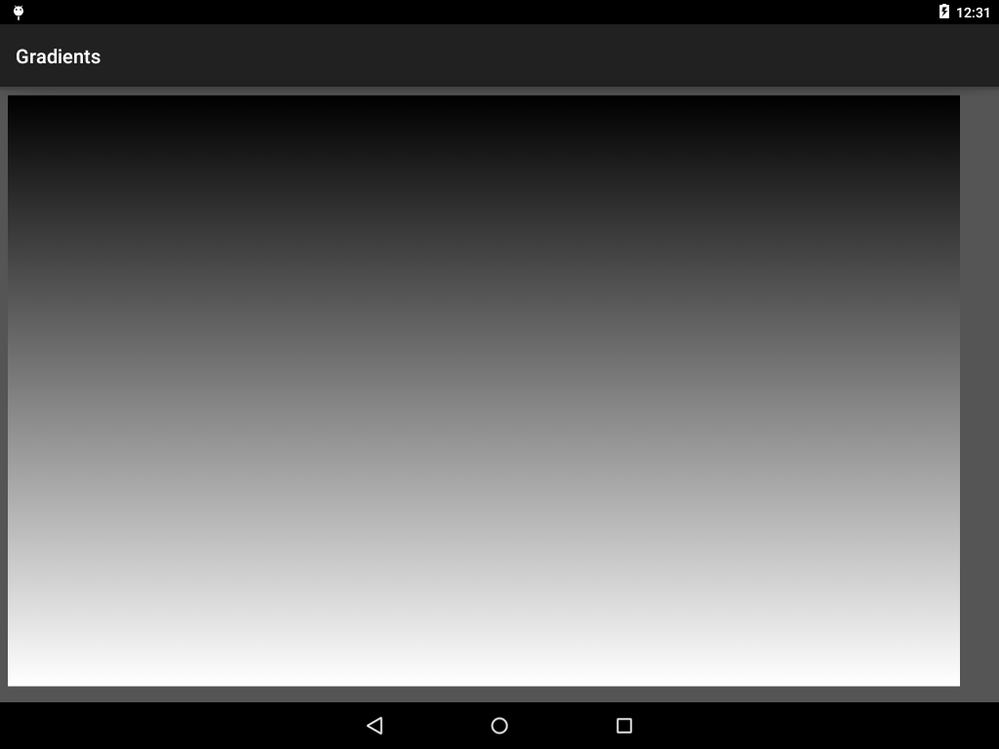
Any ideas on what could effect these bindings other than bpp which seems to make no difference..?
Thank you in advance for your help!
Regards,
Mikael
解決済! 解決策の投稿を見る。
- 新着としてマーク
- ブックマーク
- 購読
- ミュート
- RSS フィードを購読する
- ハイライト
- 印刷
- 不適切なコンテンツを報告
Hi Gary,
Don't know if you heard but nxp has found an issue in device/fsl-proprietary/fsl-hwc/hwcomposer_fsl.imx6.so.
I have tested a fixed version and it looks fine!
I will probably just miss-out some detail so better that they explain.. anyway my issue is resolved, and they will update this library.
Thanks for all your support!
Regards,
Mikael
- 新着としてマーク
- ブックマーク
- 購読
- ミュート
- RSS フィードを購読する
- ハイライト
- 印刷
- 不適切なコンテンツを報告
Ok, strange.
Yes, the versions are correct.
I guess the key for solving my problem is to find out why I am missing this bits_per_pixel.
I will confirm the device tree values, please let me know if you have any ideas on how to debug this issue further..
Regards,
Mikael
- 新着としてマーク
- ブックマーク
- 購読
- ミュート
- RSS フィードを購読する
- ハイライト
- 印刷
- 不適切なコンテンツを報告
Hi,
So I managed to get the fsl_disp_fb_format file by updating my src to boundary-imx-l5.1.1_2.1.0-ga (Was on boundary-imx-l5.0.0_1.0.0-ga).
I have also verified that the framebuffer looks fine (I can convert it manually to a image without banding.)
I also tried to just remove the android boot, and wrote the same file as I manually converted without problem to fb0 and then I also get this banding. So that leavs me with LVDS interface / LVDS driver, right?
Did you try with LVDS output?
Regards,
Mikael

- 新着としてマーク
- ブックマーク
- 購読
- ミュート
- RSS フィードを購読する
- ハイライト
- 印刷
- 不適切なコンテンツを報告
Hi Mikael,
No I haven't tried the LVDS output, just HDMI since this is the only interface I compare on both SabreSD and Nitrogen6x. Once again, my opinion is that any issue related to graphics often comes the pre-built Vivante libraries over which we have no control.
Can you summarize all your tests and results?
- HDMI interface, 16-bit fb, 32-bit, is the banding on/off?
- LVDS interface, 16-bit, 32-bit, HWComposer on/off, is the banding on/off?
Regards,
Gary
- 新着としてマーク
- ブックマーク
- 購読
- ミュート
- RSS フィードを購読する
- ハイライト
- 印刷
- 不適切なコンテンツを報告
Hi again,
The Lollipop summarize is that 16-/32-bit fb HDMI/LVDS all has the same banding issue. And it looks like the same issue you can see on your release with 16-bit bpp.
Ok, I double checked the Vivante lib versions and they are the same.
Do you think the IPU could be involved? Any device tree setting for IPU I might have missed?
Regards,
Mikael
- 新着としてマーク
- ブックマーク
- 購読
- ミュート
- RSS フィードを購読する
- ハイライト
- 印刷
- 不適切なコンテンツを報告
Hi Michael,
Can you specify the following:
- Which version of Lollipop are you using (5.0.0 or 5.1.1). We strongly recommend using 5.1.1.
- How did you disable the OpenGL rendering? Have you disabled the HWComposer which is using 2D GPU to render as well?
- Changing the interface_pix_fmt should result in not seeing the right image at all on the display since the display is wired one way only. This means that U-Boot was actually overwriting your changes most likely. Did you make sure in sysfs that your modifications were there?
- Do you have the source code of that gradient app you are using? Is it part of the ApiDemos?
Regards,
Gary
- 新着としてマーク
- ブックマーク
- 購読
- ミュート
- RSS フィードを購読する
- ハイライト
- 印刷
- 不適切なコンテンツを報告
Hi,
thanks for your quick reply, and excuse me for misleading you I meant banding of course..
The Lollipop version I am currently using is 5.1.1 (saw the same issue on 5.0.2).
I disabled the OpenGl rendering in two ways, in the developer options "OpenGL Render” and in the manifest file by android:hardwareAccelerated="false". I did not see any difference disabling the HW composer.
I think I found the reason for why the bpp settings did not have any effect, I had bpp=32 in the kernel config cmd. Anyway, having removed this an tried with bpp 16 and RGB666 plus Disable HW overlays(in developer menu) most of the banding is gone, I think I can still see a little bit more banding than on ICS but way better than before. Does this information tell you anything? Why would the HW overlay affect this?
Only way I found to setup 8 bit/color is to set RGB666 with bpp 32, is this correct? Shouldn't RGB24 & bpp 24 work?
With RGB32 I get problem starting the device:
E/imx6.gralloc( 309): <initialize,352> open /dev/fb0 failed
Another thing I noticed was that the R and B channels where swapped comparing the fbset output from ICS to lollipop, I tried changing the order of mxcfb_pfmt in mxc_ipuv3.c and managed to get the rgba channels as in ICS, but did not see any difference on the display. (ICS order Rgba 8/16,8/8,8/0,8/24.)
Yes, I have the source. To this app, but this was only to visualize the problem I see same issue in other apps, especially where grading is used.
Regards,
Mikael
- 新着としてマーク
- ブックマーク
- 購読
- ミュート
- RSS フィードを購読する
- ハイライト
- 印刷
- 不適切なコンテンツを報告
Hi Mikael,
Well the two parameters are quite different:
- RGB666 is the LVDS interface used, how the display is connected to the board, this cannot be changed;
- The fb format (16 or 24 or 32bpp) only concerns the framebuffer memory, how the pixels are stored in the memory. Then the IPU is in charge of translating the framebuffer memory into the right format for the LVDS interface.
So really the only thing you can modify is to increase the fb format to 32bpp in order to have better colors than 16bpp (since 2 bits are "lost").
Then, how did you disable the HW composer? Because the "Disable HW overlays" is the right way to disable the HW Composer. Another option is to rename/remove the /system/lib/hw/hwcomposer* libraries.
If the problem disappears when removing the HW composer (hw overlays), this means the GPU2D is the one introducing this issue.
Regards,
Gary
- 新着としてマーク
- ブックマーク
- 購読
- ミュート
- RSS フィードを購読する
- ハイライト
- 印刷
- 不適切なコンテンツを報告
Thanks again for your answers.
The disabling of the HWComposer did just help if I configured in 16bpp, and I would like 32bpp.
I get the same banding when running the boundary release:
https://boundarydevices.com/android-lollipop-5-1-1-ga-release-for-i-mx6-boards/
On a Nitrogen6X board, connected to a https://boundarydevices.com/product/nit6x_10-1hannstar/
Also tried this older ICS image:
https://boundarydevices.com/eula?file=r13.4.1-nitrogen-20130407.img.gz
On the same HW setup, and with this older setup the banding is gone.
The issues I have seen so far is clearly visible when using android colour grading.
Regards,
Mikael
- 新着としてマーク
- ブックマーク
- 購読
- ミュート
- RSS フィードを購読する
- ハイライト
- 印刷
- 不適切なコンテンツを報告
Hi Mikael,
Do you mean that if you disable hwc but use a 32bpp fb format the problem is back?
Regards,
Gary
- 新着としてマーク
- ブックマーク
- 購読
- ミュート
- RSS フィードを購読する
- ハイライト
- 印刷
- 不適切なコンテンツを報告
Hi,
Yes, exactly.
But more importantly is that I have this issue without tempering with anything with the Boundary latest lollipop GA release.
I don't see the same issue with with older ICS releases, am I the only one having this issue? Like I sad before I am running it on the nitrogen6x with the Hannastar display mentioned above.
Regards,
Mikael
- 新着としてマーク
- ブックマーク
- 購読
- ミュート
- RSS フィードを購読する
- ハイライト
- 印刷
- 不適切なコンテンツを報告
Hi Mikael,
I didn't notice this issue before which is why I'd like your gradient application to try it on here.
I understand you haven't tempered with the release, and we haven't modified the graphics setup from the original NXP release. So I'd like to confirm the issue on my platform first with your application, and then see it the same happens on NXP SabreSD platofrm.
Regards,
Gary
- 新着としてマーク
- ブックマーク
- 購読
- ミュート
- RSS フィードを購読する
- ハイライト
- 印刷
- 不適切なコンテンツを報告
Hi,
Ok, you can reproduce the problem with this app:
Display Tester - Android Apps on Google Play
Go to the menu option "Gradient Image Generator" without changing any colours, brightness level or so the banding issue is clearly visible. If you still like the other grading app. I can email it, but I think the display tester is better.
I grabbed a screen shoot from my device, it's interesting because the banding is almost totally gone on the screen shot. The image is not perfect but anyway, way better than I see on my device.

Just to make sure I am not running on some incompatible UBOOT(got it from same page as the Lollipop link I sent earlier https://storage.googleapis.com/boundarydevices.com/u-boot-boundary-v2015.07.zip):
U-Boot 2015.07-15135-g1f0a900 (Feb 25 2016 - 04:46:17 -0700)
arm-none-linux-gnueabi-gcc (Sourcery CodeBench Lite 2014.05-29) 4.8.3 20140320 (prerelease)
GNU ld (Sourcery CodeBench Lite 2014.05-29) 2.24.51.20140217
Regards,
Mikael
