
- Forums
- Product Forums
- General Purpose MicrocontrollersGeneral Purpose Microcontrollers
- i.MX Forumsi.MX Forums
- QorIQ Processing PlatformsQorIQ Processing Platforms
- Identification and SecurityIdentification and Security
- Power ManagementPower Management
- Wireless ConnectivityWireless Connectivity
- RFID / NFCRFID / NFC
- Advanced AnalogAdvanced Analog
- MCX Microcontrollers
- S32G
- S32K
- S32V
- MPC5xxx
- Other NXP Products
- S12 / MagniV Microcontrollers
- Powertrain and Electrification Analog Drivers
- Sensors
- Vybrid Processors
- Digital Signal Controllers
- 8-bit Microcontrollers
- ColdFire/68K Microcontrollers and Processors
- PowerQUICC Processors
- OSBDM and TBDML
- S32M
- S32Z/E
-
- Solution Forums
- Software Forums
- MCUXpresso Software and ToolsMCUXpresso Software and Tools
- CodeWarriorCodeWarrior
- MQX Software SolutionsMQX Software Solutions
- Model-Based Design Toolbox (MBDT)Model-Based Design Toolbox (MBDT)
- FreeMASTER
- eIQ Machine Learning Software
- Embedded Software and Tools Clinic
- S32 SDK
- S32 Design Studio
- GUI Guider
- Zephyr Project
- Voice Technology
- Application Software Packs
- Secure Provisioning SDK (SPSDK)
- Processor Expert Software
- Generative AI & LLMs
-
- Topics
- Mobile Robotics - Drones and RoversMobile Robotics - Drones and Rovers
- NXP Training ContentNXP Training Content
- University ProgramsUniversity Programs
- Rapid IoT
- NXP Designs
- SafeAssure-Community
- OSS Security & Maintenance
- Using Our Community
-
- Cloud Lab Forums
-
- Knowledge Bases
- ARM Microcontrollers
- i.MX Processors
- Identification and Security
- Model-Based Design Toolbox (MBDT)
- QorIQ Processing Platforms
- S32 Automotive Processing Platform
- Wireless Connectivity
- CodeWarrior
- MCUXpresso Suite of Software and Tools
- MQX Software Solutions
- RFID / NFC
- Advanced Analog
-
- NXP Tech Blogs
- Home
- :
- i.MX Forums
- :
- i.MX Processors
- :
- Re: Android Automotive 15 prebuilt and custom image not booting on i.MX 8QXP (NXP MCI board)
Android Automotive 15 prebuilt and custom image not booting on i.MX 8QXP (NXP MCI board)
- Subscribe to RSS Feed
- Mark Topic as New
- Mark Topic as Read
- Float this Topic for Current User
- Bookmark
- Subscribe
- Mute
- Printer Friendly Page
Android Automotive 15 prebuilt and custom image not booting on i.MX 8QXP (NXP MCI board)

- Mark as New
- Bookmark
- Subscribe
- Mute
- Subscribe to RSS Feed
- Permalink
- Report Inappropriate Content
Hi everyone,
We’re working on bringing up Android Automotive OS 15 on the NXP MCI i.MX 8QXP (i.MX 8QuadXPlus) board.
We followed the official NXP documentation from this link:
https://www.nxp.com/design/design-center/software/embedded-software/i-mx-software/android-automotive...
We downloaded and installed the prebuilt image: automotive-15.0.0_1.1.0_image_8qmek_car
Then we flashed it successfully to the board using the standard flashing procedure described in the NXP guide.
However, when we try to boot the board, here’s what happens:
The NXP loading screen appears for about a minute. As attached below ,
Then the display turns off (no Android UI).
On the serial console, we can see boot logs (screenshot attached).

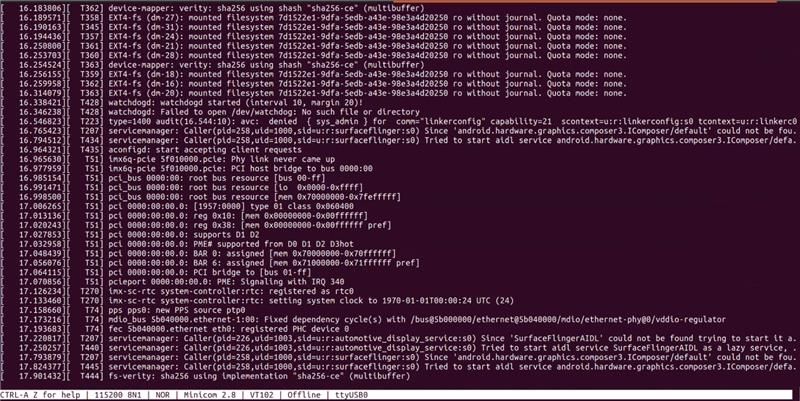
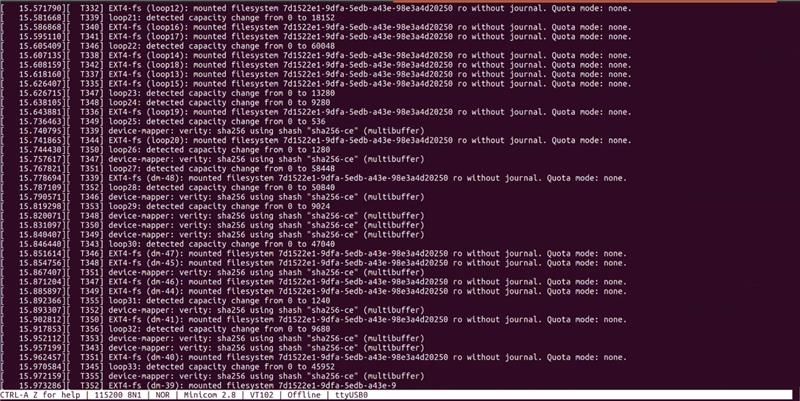


The same issue occurs when we build Android 15 from source package (automotive-15.0.0_1.3.0_source) — flashing works fine, but the scenario is same as that of the pre-built image as described above.
Are there known issues or patches needed for display or GPU initialization on this board? Any guidance or troubleshooting pointers would be really helpful!
 danielchen
- Mark as New
- Bookmark
- Subscribe
- Mute
- Subscribe to RSS Feed
- Permalink
- Report Inappropriate Content
Hi @SB_Cbe
I will try to reproduce this issue on my side. Which board you are using? B0 or C0?
Regards
Daniel
- Mark as New
- Bookmark
- Subscribe
- Mute
- Subscribe to RSS Feed
- Permalink
- Report Inappropriate Content
Hello @danielchen ,
Thanks for reaching out, its B0 Board.
Thanks
danielchen
- Mark as New
- Bookmark
- Subscribe
- Mute
- Subscribe to RSS Feed
- Permalink
- Report Inappropriate Content
please check whether your board is B0 or C0 revision.
My board is C0, I flashed image with command,
.\uuu_imx_android_flash.bat -f imx8qxp -e -u c0
Then this board can boot successfully

- Mark as New
- Bookmark
- Subscribe
- Mute
- Subscribe to RSS Feed
- Permalink
- Report Inappropriate Content
Ours is B0 board and we used this command from the official document , UG10177_Android_Automotive_Quick_Start_Guide.pdf, Page number 9

danielchen
- Mark as New
- Bookmark
- Subscribe
- Mute
- Subscribe to RSS Feed
- Permalink
- Report Inappropriate Content
For B0, please try

