
- Forums
- Product Forums
- General Purpose MicrocontrollersGeneral Purpose Microcontrollers
- i.MX Forumsi.MX Forums
- QorIQ Processing PlatformsQorIQ Processing Platforms
- Identification and SecurityIdentification and Security
- Power ManagementPower Management
- Wireless ConnectivityWireless Connectivity
- RFID / NFCRFID / NFC
- Advanced AnalogAdvanced Analog
- Neural Processing UnitsNeural Processing Units
- MCX Microcontrollers
- S32G
- S32K
- S32V
- MPC5xxx
- Other NXP Products
- S12 / MagniV Microcontrollers
- Powertrain and Electrification Analog Drivers
- Sensors
- Vybrid Processors
- Digital Signal Controllers
- 8-bit Microcontrollers
- ColdFire/68K Microcontrollers and Processors
- PowerQUICC Processors
- OSBDM and TBDML
- S32M
- S32Z/E
-
- Solution Forums
- Software Forums
- MCUXpresso Software and ToolsMCUXpresso Software and Tools
- CodeWarriorCodeWarrior
- MQX Software SolutionsMQX Software Solutions
- Model-Based Design Toolbox (MBDT)Model-Based Design Toolbox (MBDT)
- FreeMASTER
- eIQ Machine Learning Software
- Embedded Software and Tools Clinic
- S32 SDK
- S32 Design Studio
- GUI Guider
- Zephyr Project
- Voice Technology
- Application Software Packs
- Secure Provisioning SDK (SPSDK)
- Processor Expert Software
- Generative AI & LLMs
-
- Topics
- Mobile Robotics - Drones and RoversMobile Robotics - Drones and Rovers
- NXP Training ContentNXP Training Content
- University ProgramsUniversity Programs
- Rapid IoT
- NXP Designs
- SafeAssure-Community
- OSS Security & Maintenance
- Using Our Community
-
- Cloud Lab Forums
-
- Knowledge Bases
- ARM Microcontrollers
- i.MX Processors
- Identification and Security
- Model-Based Design Toolbox (MBDT)
- QorIQ Processing Platforms
- S32 Automotive Processing Platform
- Wireless Connectivity
- CodeWarrior
- MCUXpresso Suite of Software and Tools
- MQX Software Solutions
- RFID / NFC
- Advanced Analog
- Neural Processing Units
-
- NXP Tech Blogs
- Home
- :
- i.MX处理器
- :
- i.MX处理器知识库
- :
- i.MX35 PDK Board NAND Flashing
i.MX35 PDK Board NAND Flashing
i.MX35 PDK Board NAND Flashing
i.MX35 PDK Board NAND Flashing
ATK (Advanced Toolkit)
ATK (Advanced Toolkit) is a Windows software for programming the flash memory of i.MX boards. It can be downloaded here.
Using ATK
This section will describe the procedure to erase the flash memory and program the bootloader.
1 - Connect a serial cable between PC and i.MX board.
2 - Some hardware configurations (switches) must be done to flash the board.
Set red and cream switches as below:
Switch SW5 -> 000000
Switch SW4 -> 1000000
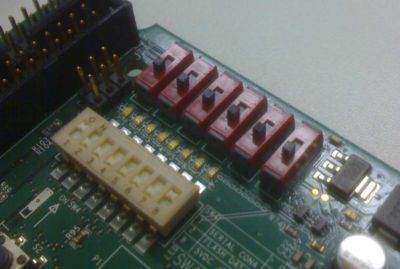
{{Note|On SW5 and SW4, "1" means the keys selected towards the edge of the board.}
3 - Run ATK (1.6 or above) going to Start -> Programs -> AdvancedToolKit -> AdvancedToolKit
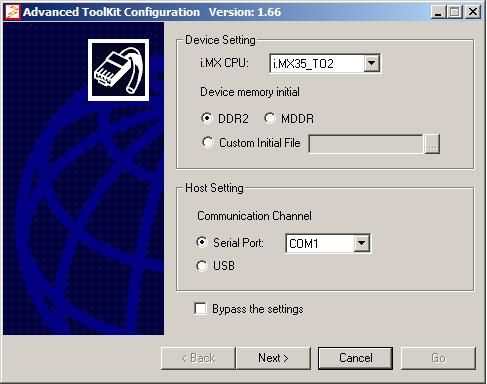
Set the options:
i.MX CPU -> i.MX35_TO2
Device memory -> DDR2;
Custom Initial File -> (keep it unmarked)
Communication Channel -> Serial Port (Usually COM1)
If you are using TO1, Device Memory -> MDDR
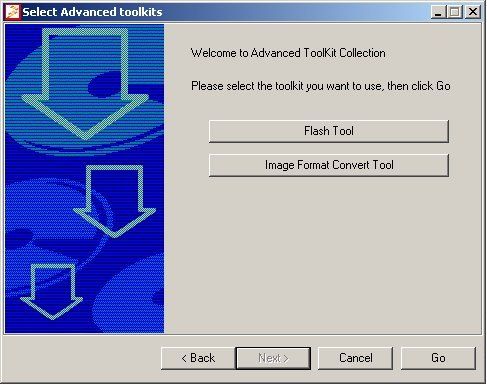
4 - Click on Flash Tools to erase, program or dump the the flash memory and click GO
NAND Flash Erasing
1- Configure the Dip Switch of Personality Board:
| Switch | 1 | 2 | 3 | 4 | 5 | 6 | 7 | 8 |
| SW1 | OFF | OFF | OFF | OFF | N/A | N/A | N/A | N/A |
| SW2 | ON | OFF | OFF | ON | ON | OFF | OFF | OFF |
2- Choose NAND model K9LAG08U8M
3- Continue the steps
Remember to select the checkbutton BBT (Back Block Table)


Please use section 3.2 (Dip switch setup for boot modes) of "pdk2009_12_imx35_Linux_UG.pdf" in Linux
documentation package.
thank you very much,I will try it.
在 2013-05-06 09:37:22,"Yuri Muhin" <[email protected]> 写道:
|
|
|
|
i.MX35 PDK Board Flashing NAND
new comment by Yuri MuhinView all comments on this document
Please use section 3.2 (Dip switch setup for boot modes) of "pdk2009_12_imx35_Linux_UG.pdf" in Linux
documentation package.
Reply to this email to respond to Yuri Muhin's comment.
|
|
