
- Forums
- Product Forums
- General Purpose MicrocontrollersGeneral Purpose Microcontrollers
- i.MX Forumsi.MX Forums
- QorIQ Processing PlatformsQorIQ Processing Platforms
- Identification and SecurityIdentification and Security
- Power ManagementPower Management
- Wireless ConnectivityWireless Connectivity
- RFID / NFCRFID / NFC
- Advanced AnalogAdvanced Analog
- MCX Microcontrollers
- S32G
- S32K
- S32V
- MPC5xxx
- Other NXP Products
- S12 / MagniV Microcontrollers
- Powertrain and Electrification Analog Drivers
- Sensors
- Vybrid Processors
- Digital Signal Controllers
- 8-bit Microcontrollers
- ColdFire/68K Microcontrollers and Processors
- PowerQUICC Processors
- OSBDM and TBDML
- S32M
- S32Z/E
-
- Solution Forums
- Software Forums
- MCUXpresso Software and ToolsMCUXpresso Software and Tools
- CodeWarriorCodeWarrior
- MQX Software SolutionsMQX Software Solutions
- Model-Based Design Toolbox (MBDT)Model-Based Design Toolbox (MBDT)
- FreeMASTER
- eIQ Machine Learning Software
- Embedded Software and Tools Clinic
- S32 SDK
- S32 Design Studio
- GUI Guider
- Zephyr Project
- Voice Technology
- Application Software Packs
- Secure Provisioning SDK (SPSDK)
- Processor Expert Software
- Generative AI & LLMs
-
- Topics
- Mobile Robotics - Drones and RoversMobile Robotics - Drones and Rovers
- NXP Training ContentNXP Training Content
- University ProgramsUniversity Programs
- Rapid IoT
- NXP Designs
- SafeAssure-Community
- OSS Security & Maintenance
- Using Our Community
-
- Cloud Lab Forums
-
- Knowledge Bases
- ARM Microcontrollers
- i.MX Processors
- Identification and Security
- Model-Based Design Toolbox (MBDT)
- QorIQ Processing Platforms
- S32 Automotive Processing Platform
- Wireless Connectivity
- CodeWarrior
- MCUXpresso Suite of Software and Tools
- MQX Software Solutions
- RFID / NFC
- Advanced Analog
-
- NXP Tech Blogs
- Home
- :
- i.MX Processors
- :
- i.MX Processors Knowledge Base
- :
- Set up QNX 6.50 SP1 development environment on i.MX6Q SabreLite
Set up QNX 6.50 SP1 development environment on i.MX6Q SabreLite
- Subscribe to RSS Feed
- Mark as New
- Mark as Read
- Bookmark
- Subscribe
- Printer Friendly Page
- Report Inappropriate Content
Set up QNX 6.50 SP1 development environment on i.MX6Q SabreLite
Set up QNX 6.50 SP1 development environment on i.MX6Q SabreLite
Host : Ubuntu 11.10
Part 1. Installation of QNX 6.50 and QNX 6.50 SP1
1.1 Create an account and activate the created account that will be assigned an 30-days evaluation serial numberin then on www.qnx.com, and download qnxsdp-6.5.0-201007091524-linux.bin, qnxsdp-6.5.0SP1-201206271006-linux.bin;
1.2 Execute "sudo apt-get install ia32-libs"
1.3 Execute "sudo -E /your/path/qnxsdp-6.5.0-201007091524-linux.bin", follow the guides as prompted, enter the received evaluation serial number, then the installation of QNX 6.50 will be done;
1.4 Logout, and re-login, so far typing "qconfig" will return the following messages:
---------------------------------------------------------------------------------------------------------------------
alanz@alanz-VirtualBox:~$ qconfig
QNX Installations
Installation Name: QNX Software Development Platform 6.5.0
Version: 6.5.0
Base Directory: /opt/qnx650
QNX_HOST: /opt/qnx650/host/linux/x86
QNX_TARGET: /opt/qnx650/target/qnx6
---------------------------------------------------------------------------------------------------------------------
1.5 Execute "sudo chmod a+rw /etc/qnx/license/licenses"
1.6 Execute "sudo -E /your/path/qnxsdp-6.5.0SP1-201206271006-linux.bin"
1.7 Logout, and re-login, so far typing "qconfig" will return the following messages:
---------------------------------------------------------------------------------------------------------------------
alanz@alanz-VirtualBox:~$ qconfig
QNX Installations
Installation Name: QNX Software Development Platform 6.5.0
Version: 6.5.0
Base Directory: /opt/qnx650
QNX_HOST: /opt/qnx650/host/linux/x86
QNX_TARGET: /opt/qnx650/target/qnx6
Additional Packages
Package Name: QNX Software Development Platform
Version: 6.5.0SP1
Base: QNX SDP 6.5.0
Installation Path: /opt/qnx650
---------------------------------------------------------------------------------------------------------------------
1.8 Download bsp-nto650-freescale-mx6q-sabrelite-trunk-201301161142.zip, and unzip it;
Part 2. Build i.MX6Q SabreLite QNX BSP
2.1 Edit a envsetup.sh as following:
---------------------------------------------------------------------------------------------------------------------
#!/bin/bash
export QNX_HOST=/opt/qnx650/host/linux/x86
export QNX_JAVAHOME=/opt/qnx650/_jvm
export QNX_TARGET=/opt/qnx650/target/qnx6
export QNX_CONFIGURATION=/etc/qnx
export ARCH=arm
export CPULIST=arm
export VARIANTLIST=v7
export MAKEFLAGS=-I/opt/qnx650/target/qnx6/usr/include
export PATH=$PATH:/opt/qnx650/host/linux/x86/usr/bin
export QCONFIG=/opt/qnx650/target/qnx6/usr/include/qconfig.mk
export BSP_ROOT_DIR=/home/alanz/Downloads/QNX_Software/i.MX6Q_SabreLite4QNX
---------------------------------------------------------------------------------------------------------------------
Note: BSP_ROOT_DIR is the BSP unzip directory.
2.2 Execute "make clean", then "make". The generated file will be under images/ifs-mx6q-sabrelite.raw
Part 3. Running i.MX6Q SabreLite QNX BSP
3.1 Copy images/ifs-mx6q-sabrelite.raw to SD;
3.2 Modify u-boot environment as following:
---------------------------------------------------------------------------------------------------------------------
setenv loadaddr '0x10800000'
setenv bootcmd_sd 'mmc dev 0; fatload mmc 0:1 ${loadaddr} ifs-mx6q-sabrelite.raw; go ${loadaddr}'
setenv bootcmd 'run bootcmd_sd'
saveenv
boot
---------------------------------------------------------------------------------------------------------------------
3.3 Connect i.MX6Q SabreLite w/ serial and ethernet, turn on, type "qconn" and "ifconfig" in the serial shell.
Part 4. Debug w/ QNX Momentics IDE
4.1 Type "qde" to activate Momentics IDE
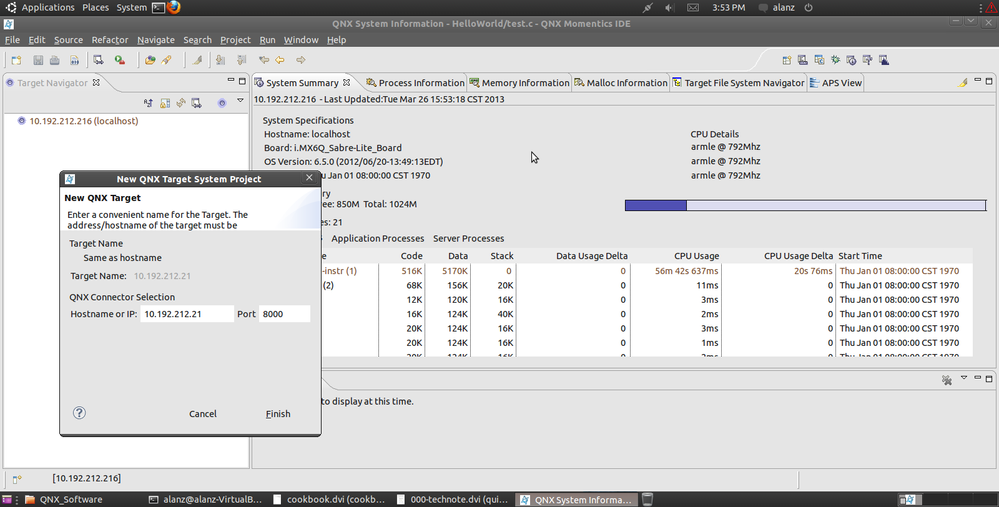
4.2 On the top-right corner, there exist several icons named in "xxx perspective" to switch the main window according to current selected "perspective" context. Click "QNX System Information Perspective" to create a target to conect and debug as following depicted.
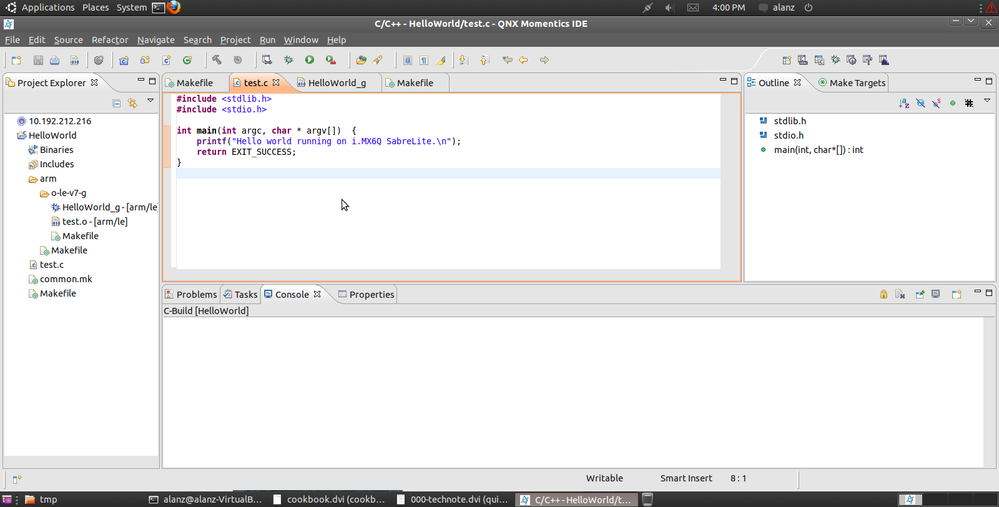
4.3 Switch to "C/C++ perspective" to create QNX C/C++ project as following depicted.
4.4 Switch to "Debug perspective" to perform "Debug Configuration" as following depicted.
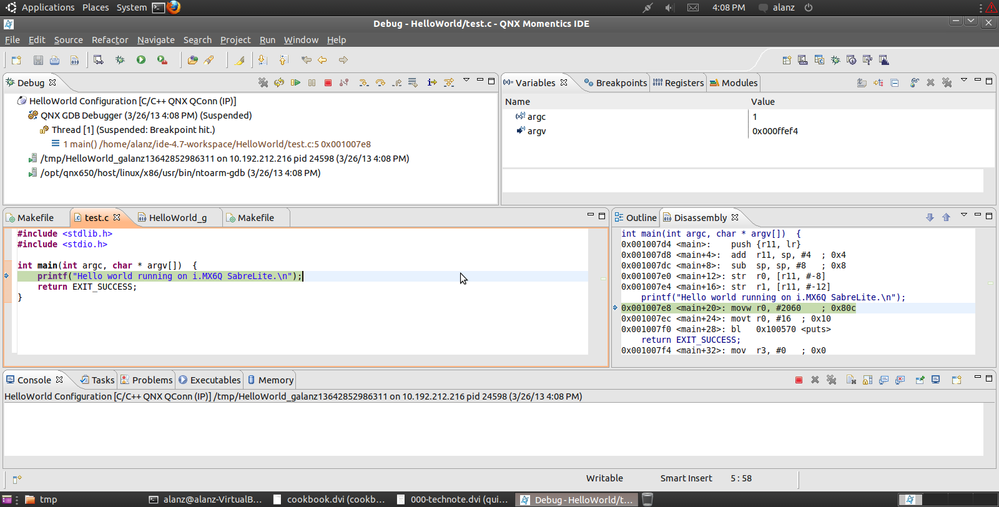
Then it can debug program on target i.MX6Q SabreLite board.

- Mark as Read
- Mark as New
- Bookmark
- Permalink
- Report Inappropriate Content
many thanks for this useful guide.. just one thing.. you might wish to turn section 1.8 to a link (?) as being new to this stuff i originally had trouble finding bsp-nto650-freescale-mx6q-sabrelite-trunk-201301161142.zip to download :smileywink:
- Mark as Read
- Mark as New
- Bookmark
- Permalink
- Report Inappropriate Content
Hi
I am new to QNX. I successfully ported QNX BSP for sabresmart and able to run a Hello world application created outside the BSP directory. But binaries like mknod, mkdir doesn't run, and the application created was put in prebuilt and build file was updated but surprisingly it is not available on target, I have added separately in project.bld and re-built the ifs and again built the entire project and thats how application is available on target. I added the binary in /bin but it got saved in /proc/boot how do I link to /bin?
I need to know how could i use i2c driver available in BSP to access the sensors on sabresmart sd board? any sample code?
If I wanted to write new Resource manager for i2c or any sample resource manager, how do I insert in the QNX kernel and what is the procedure
for that, should it be compiled as static/shared? Requesting to share an sample resource manager driver and procedure to insert in QNX. Looking for suggestions.