
- Forums
- Product Forums
- General Purpose MicrocontrollersGeneral Purpose Microcontrollers
- i.MX Forumsi.MX Forums
- QorIQ Processing PlatformsQorIQ Processing Platforms
- Identification and SecurityIdentification and Security
- Power ManagementPower Management
- Wireless ConnectivityWireless Connectivity
- RFID / NFCRFID / NFC
- Advanced AnalogAdvanced Analog
- Neural Processing UnitsNeural Processing Units
- MCX Microcontrollers
- S32G
- S32K
- S32V
- MPC5xxx
- Other NXP Products
- S12 / MagniV Microcontrollers
- Powertrain and Electrification Analog Drivers
- Sensors
- Vybrid Processors
- Digital Signal Controllers
- 8-bit Microcontrollers
- ColdFire/68K Microcontrollers and Processors
- PowerQUICC Processors
- OSBDM and TBDML
- S32M
- S32Z/E
-
- Solution Forums
- Software Forums
- MCUXpresso Software and ToolsMCUXpresso Software and Tools
- CodeWarriorCodeWarrior
- MQX Software SolutionsMQX Software Solutions
- Model-Based Design Toolbox (MBDT)Model-Based Design Toolbox (MBDT)
- FreeMASTER
- eIQ Machine Learning Software
- Embedded Software and Tools Clinic
- S32 SDK
- S32 Design Studio
- GUI Guider
- Zephyr Project
- Voice Technology
- Application Software Packs
- Secure Provisioning SDK (SPSDK)
- Processor Expert Software
- Generative AI & LLMs
-
- Topics
- Mobile Robotics - Drones and RoversMobile Robotics - Drones and Rovers
- NXP Training ContentNXP Training Content
- University ProgramsUniversity Programs
- Rapid IoT
- NXP Designs
- SafeAssure-Community
- OSS Security & Maintenance
- Using Our Community
-
- Cloud Lab Forums
-
- Knowledge Bases
- ARM Microcontrollers
- i.MX Processors
- Identification and Security
- Model-Based Design Toolbox (MBDT)
- QorIQ Processing Platforms
- S32 Automotive Processing Platform
- Wireless Connectivity
- CodeWarrior
- MCUXpresso Suite of Software and Tools
- MQX Software Solutions
- RFID / NFC
- Advanced Analog
- Neural Processing Units
-
- NXP Tech Blogs
- Home
- :
- i.MXプロセッサ
- :
- i.MXプロセッサ ナレッジベース
- :
- HDMI Audio Setting
HDMI Audio Setting
- RSS フィードを購読する
- 新着としてマーク
- 既読としてマーク
- ブックマーク
- 購読
- 印刷用ページ
- 不適切なコンテンツを報告
HDMI Audio Setting
HDMI Audio Setting
1. Set up HDMI
Set up your kernel to use HDMI adding the following code to bootargs on u-boot:
video=mxcfb0:dev=hdmi,1920x1080M@60,if=RGB24
2. Test raw audio
In order to test only raw audio, use the following command:
aplay -D hw:1,0 Kaleidoscope.wav
3. Make HDMI audio the default output
In order to configure audio output over HDMI, please, replace content of file ~/.asoundrc to the following one
pcm.dmix_48000{
type dmix
ipc_key 5678293
ipc_key_add_uid yes
slave{
pcm "hw:1,0"
period_time 0
period_size 2048
buffer_size 24576
format S16_LE
rate 48000
}
}
pcm.!dsnoop_44100{
type dsnoop
ipc_key 5778293
ipc_key_add_uid yes
slave{
pcm "hw:0,0"
period_time 0
period_size 2048
buffer_size 24576
format S16_LE
rate 44100
}
}
pcm.!dsnoop_48000{
type dsnoop
ipc_key 5778293
ipc_key_add_uid yes
slave{
pcm "hw:1,0"
period_time 0
period_size 2048
buffer_size 24576
format S16_LE
rate 48000
}
}
pcm.asymed{
type asym
playback.pcm "dmix_48000"
capture.pcm "dsnoop_44100"
}
pcm.dsp0{
type plug
slave.pcm "asymed"
}
pcm.!default{
type plug
route_policy "average"
slave.pcm "asymed"
}
ctl.mixer0{
type hw
card 0
}
This will configure alsa to use sound card hw:1,0. Please, pay attention to use the proper audio card name for your device.
In order to see available sound cards on board:
root@imx53qsb:~# aplay -l
**** List of PLAYBACK Hardware Devices ****
card 0: imx3stack [imx-3stack], device 0: SGTL5000 SGTL5000-0 []
Subdevices: 1/1
Subdevice #0: subdevice #0
card 1: imx3stackspdif [imx-3stack-spdif], device 0: IMX SPDIF mxc spdif-0 []
Subdevices: 1/1
Subdevice #0: subdevice #0
For detail on how to create asound.conf, please see alsa-lib configuration introduction.
4. Encoded audio
For encoded (i.e. AC3, DTS) audio, you can use, for example, ac3dec, an utility provided by alsa-tools with the following command line:
ac3dec -D hw:1,0 -C test.ac3
This would work for both HDMI audio and SPDIF audio. Double check your hardware and/or schematic in order to know which one to use.

- 既読としてマーク
- 新着としてマーク
- ブックマーク
- ハイライト
- 印刷
- 不適切なコンテンツを報告
Hello,
Very beautiful guide, how to set default SPDIF audio card on Android ?
Thanks

- 既読としてマーク
- 新着としてマーク
- ブックマーク
- ハイライト
- 印刷
- 不適切なコンテンツを報告
good, it really works if i use the native app to play audio in IMX6QSD :smileyhappy:
but there is no audio output from HDMI with the pulse audio server.
the output of audio just is from the "wm8962audio" as bellow in my IMX6QSD, any advices about this ?
i want to use pulse audio server to output in HDMI interface.
root@imx6qsabresd:~# aplay -l
**** List of PLAYBACK Hardware Devices ****
card 0: wm8962audio [wm8962-audio], device 0: HiFi wm8962-0 []
Subdevices: 1/1
Subdevice #0: subdevice #0
card 1: imxhdmisoc [imx-hdmi-soc], device 0: IMX HDMI TX mxc-hdmi-soc-0 []
Subdevices: 0/1
Subdevice #0: subdevice #0

- 既読としてマーク
- 新着としてマーク
- ブックマーク
- ハイライト
- 印刷
- 不適切なコンテンツを報告
ohhhhhhhhhhhh you´re right! the way to configure pulseaudio is different....
From my old emails, I got this command line:
pacmd set-default-sink 1
Could you, please, give it a try and let us know the results?
- 既読としてマーク
- 新着としてマーク
- ブックマーク
- ハイライト
- 印刷
- 不適切なコンテンツを報告
Hi,
There is not the command "pacmd", just "pactl".
BTW, i use the YOCTO project of FSL community to build all, what is my next step about for your ask ?
- 既読としてマーク
- 新着としてマーク
- ブックマーク
- ハイライト
- 印刷
- 不適切なコンテンツを報告
Well, I think you make it work (by your comment on meta-freescale)
- 既読としてマーク
- 新着としてマーク
- ブックマーク
- ハイライト
- 印刷
- 不適切なコンテンツを報告
it looks like bad, i also stat up the daemon like what i said in mail list,
i restart again with command "pulseaudio -D", the output of audio is not from HDMI except the "card 0: wm8962audio [wm8962-audio], device 0: HiFi wm8962-0 []"
it's really strange, help...
- 既読としてマーク
- 新着としてマーク
- ブックマーク
- ハイライト
- 印刷
- 不適切なコンテンツを報告
i think the pulseaduio detect the output of audio, sometime is HDMI and sometime is the other, so i need to specify the HDMI as the default output, how to do ?
- 既読としてマーク
- 新着としてマーク
- ブックマーク
- ハイライト
- 印刷
- 不適切なコンテンツを報告
look for some pulseaudio conf file. Create a bbappend on your meta layer in order to add this by default on your image.
(sorry, i don't know pulseaudio :smileysad:)
- 既読としてマーク
- 新着としてマーク
- ブックマーク
- ハイライト
- 印刷
- 不適切なコンテンツを報告
Dear Daiane Angolini,
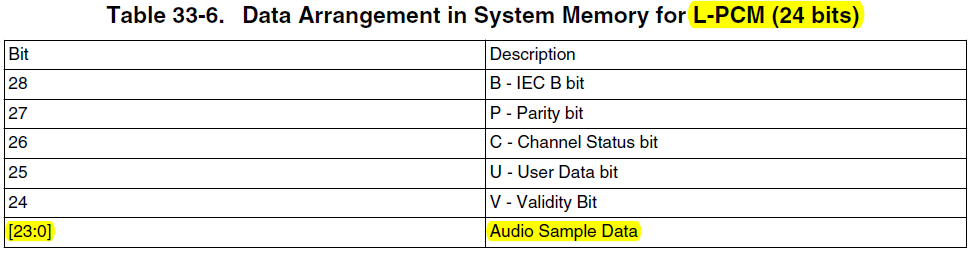
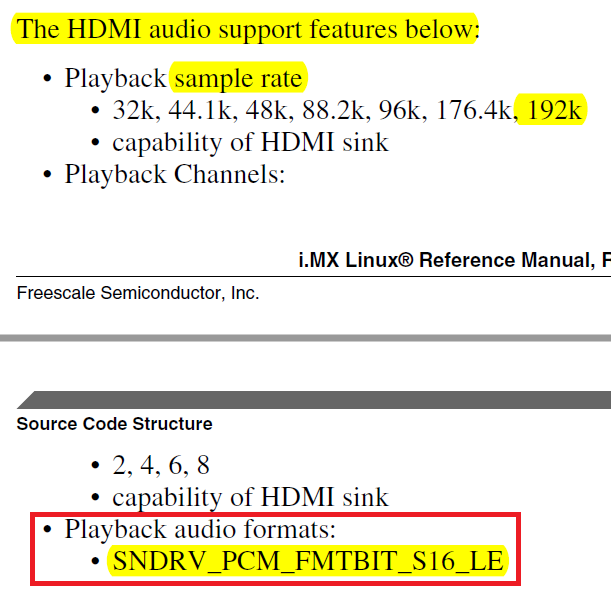
I want to know how to configure the HDMI Audio as 24bit in i.MX6Q / Linux 3.14.52.
Please let me know how to do that.
It's very helpful to me if you tell me how to confirm that in i.MX6Q Evaluation board.
Actually I could confirm the below contents in the some documents.
- HDMI Audio 24bit is supported in the i.MX6Q Reaference Manual
. Table 33-6. Data Arrangement in System Memory for L-PCM (24 bits) in Chapter 33
.
- HDMI Audio 24bit is NOT supported in the i.MX6 Linux Reference Manual for Linux 3.14.52
. Chapter 15 On-Chip High Definition Multimedia Interface (HDMI) Driver
.
Best Regards,
Eric.
- 既読としてマーク
- 新着としてマーク
- ブックマーク
- ハイライト
- 印刷
- 不適切なコンテンツを報告
Could you, please, create a new ticket? Otherwise it might get off the radar
- 既読としてマーク
- 新着としてマーク
- ブックマーク
- ハイライト
- 印刷
- 不適切なコンテンツを報告
Dear Daiane Angolini,
I created a new ticket through SR.
Please check the below case from SR.
[Case:00198948] How to configure the HDMI Audio as 24bit in i.MX6Q / Linux 3.14.52
Best Regards,
Eric.
