
- Forums
- Product Forums
- General Purpose MicrocontrollersGeneral Purpose Microcontrollers
- i.MX Forumsi.MX Forums
- QorIQ Processing PlatformsQorIQ Processing Platforms
- Identification and SecurityIdentification and Security
- Power ManagementPower Management
- Wireless ConnectivityWireless Connectivity
- RFID / NFCRFID / NFC
- Advanced AnalogAdvanced Analog
- Neural Processing UnitsNeural Processing Units
- MCX Microcontrollers
- S32G
- S32K
- S32V
- MPC5xxx
- Other NXP Products
- S12 / MagniV Microcontrollers
- Powertrain and Electrification Analog Drivers
- Sensors
- Vybrid Processors
- Digital Signal Controllers
- 8-bit Microcontrollers
- ColdFire/68K Microcontrollers and Processors
- PowerQUICC Processors
- OSBDM and TBDML
- S32M
- S32Z/E
-
- Solution Forums
- Software Forums
- MCUXpresso Software and ToolsMCUXpresso Software and Tools
- CodeWarriorCodeWarrior
- MQX Software SolutionsMQX Software Solutions
- Model-Based Design Toolbox (MBDT)Model-Based Design Toolbox (MBDT)
- FreeMASTER
- eIQ Machine Learning Software
- Embedded Software and Tools Clinic
- S32 SDK
- S32 Design Studio
- GUI Guider
- Zephyr Project
- Voice Technology
- Application Software Packs
- Secure Provisioning SDK (SPSDK)
- Processor Expert Software
- Generative AI & LLMs
-
- Topics
- Mobile Robotics - Drones and RoversMobile Robotics - Drones and Rovers
- NXP Training ContentNXP Training Content
- University ProgramsUniversity Programs
- Rapid IoT
- NXP Designs
- SafeAssure-Community
- OSS Security & Maintenance
- Using Our Community
-
- Cloud Lab Forums
-
- Knowledge Bases
- ARM Microcontrollers
- i.MX Processors
- Identification and Security
- Model-Based Design Toolbox (MBDT)
- QorIQ Processing Platforms
- S32 Automotive Processing Platform
- Wireless Connectivity
- CodeWarrior
- MCUXpresso Suite of Software and Tools
- MQX Software Solutions
- RFID / NFC
- Advanced Analog
- Neural Processing Units
-
- NXP Tech Blogs
- Home
- :
- i.MX Processors
- :
- i.MX Processors Knowledge Base
- :
- Develop a Simple OpenVG Application Under Linux: Tutorial
Develop a Simple OpenVG Application Under Linux: Tutorial
- Subscribe to RSS Feed
- Mark as New
- Mark as Read
- Bookmark
- Subscribe
- Printer Friendly Page
- Report Inappropriate Content
Develop a Simple OpenVG Application Under Linux: Tutorial
Develop a Simple OpenVG Application Under Linux: Tutorial
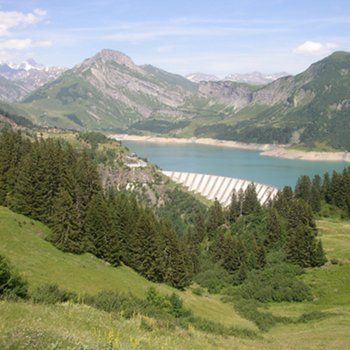
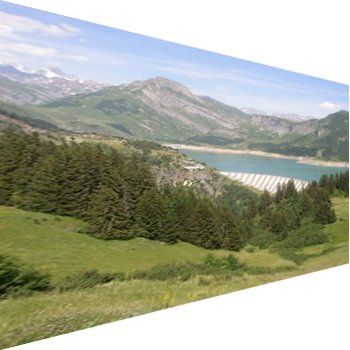
This tutorial has been done with an i.MX51 EVK. This example can be easily adapted to i.MX35 or i.MX53 that share the same GPU Core (Z160) and the same API (OpenVG 1.1). This tutorial show you how to do a simple image warp deformation with OpenVG 1.1.
Generation of Linux Image with 2D gpu support
To support 2D/3D gpu, you need to select gpu driver in LTIB. In LTIB's "package list" select the following packages:
[x] amd-gpu-bin-mx51 [x] libz160-bin
Build your Linux Image and copy it to your SD card.
Building OpenVG simple application
- Download the application (see attached archive)
- Untar/unbz2 the application source code.
- To build the simple OpenVG application, you need to adapt the Makerules file.
First you have to indicate where your linux image has been generated withLTIB:
ROOTFS = /home/fsl/LTIB_1_7/ltib/rootfs
- You also need to indicate the compiler path (usualy installed in /opt/freescale/usr/local/....):
GNUTOOL_PATH=/opt/freescale/usr/local/gcc-4.1.2-glibc-2.5-nptl-3/arm-none-linux-gnueabi/bin/
After that you have to copy gpu's driver headers files in the include folder of the project. You will find these header in /opt/freescale/pkgs/amd-gpu-bin-mx51-x.x.x.tar.gz archive:
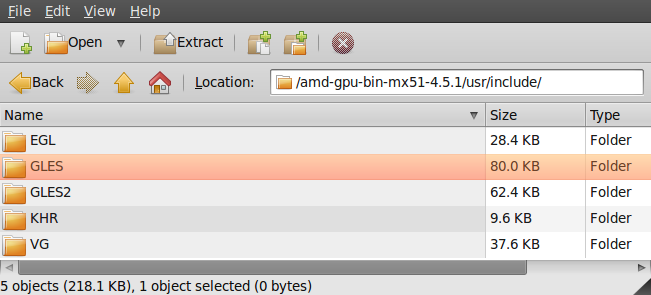
- extract all the include folders/files in the include folder of the project.
- Now you can build the application:
fsl@fsl-laptop:~/SW/openVG_sample$ make
/opt/freescale/usr/local/gcc-4.1.2-glibc-2.5-nptl-3/arm-none-linux-gnueabi/bin/arm-none-linux-gnueabi-gcc -mfloat-abi=softfp -mfpu=vfp -Wall -O3 -fsigned-char -D_LINUX -I/home/fsl/SW/openVG_sample/include -c warp.c -o warp.o
In file included from warp.c:37:
roselend_savoie_france_350x350.c:12391:66: warning: trigraph ??) ignored, use -trigraphs to enable
roselend_savoie_france_350x350.c:12964:71: warning: trigraph ??/ ignored, use -trigraphs to enable
roselend_savoie_france_350x350.c:14518:10: warning: trigraph ??- ignored, use -trigraphs to enable
roselend_savoie_france_350x350.c:15118:67: warning: trigraph ??) ignored, use -trigraphs to enable
roselend_savoie_france_350x350.c:15327:67: warning: trigraph ??' ignored, use -trigraphs to enable roselend_savoie_france_350x350.c:15795:62: warning: trigraph ??! ignored, use -trigraphs to enable /opt/freescale/usr/local/gcc-4.1.2-glibc-2.5-nptl-3/arm-none-linux-gnueabi/bin/arm-none-linux-gnueabi-gcc -I/home/fsl/SW/openVG_sample/include -lOpenVG -legl13 -Wl,--library-path=/home/fsl/LTIB_1_7/ltib/rootfs/usr/lib,-rpath-link=/home/fsl/LTIB_1_7/ltib/rootfs/usr/lib -o warp warp.o
fsl@fsl-laptop:~/SW/openVG_sample$
- Copy the application on your SD card
- Put the SD card in the i.MX51 and run the gpu drivers
$ login:root
$ modprobe gpu
- Run the application
$ ./warp
Modifying the image
A simple way to modify the image, is to use The Gimp. When you want to save your image, choose "C source code format":
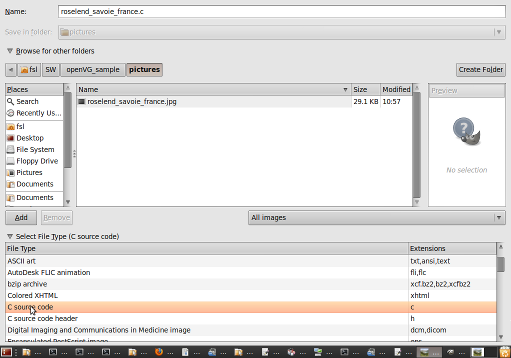
Then choose the prefix name (here "roselend"):
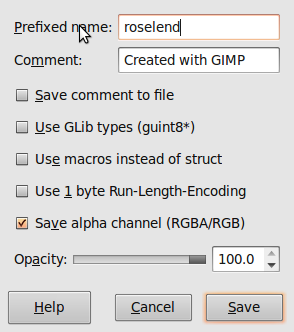
Click on "Save". The "C" file of your image is generated:
/* GIMP RGBA C-Source image dump (roselend_savoie_france.c) */

static const struct {
  guint        width;
  guint        height;
  guint        bytes_per_pixel; /* 3:RGB, 4:RGBA */
  guint8       pixel_data[350 * 350 * 4 + 1];
} roselend = {
  350, 350, 4,
  "\265\303\357\376\264\304\357\376\262\304\357\376\260\304\356\376\260\303"
  "\356\376\257\303\356\376\257\302\355\376\257\301\355\376\257\302\355\376"
  "\257\302\355\377\256\302\356\376\256\302\357\376\256\302\356\377\255\302"
"\357\376\254\302\360\376\253\302\357\376\254\302\355\376\255\302\357\376"
...

- Mark as Read
- Mark as New
- Bookmark
- Permalink
- Report Inappropriate Content
Do anybody has the files included in this tutorial? I have been trying to download it, but the link seems to be not working.

- Mark as Read
- Mark as New
- Bookmark
- Permalink
- Report Inappropriate Content
Hi Jose,
Archive is attached now.
Vincent
