
- Forums
- Product Forums
- General Purpose MicrocontrollersGeneral Purpose Microcontrollers
- i.MX Forumsi.MX Forums
- QorIQ Processing PlatformsQorIQ Processing Platforms
- Identification and SecurityIdentification and Security
- Power ManagementPower Management
- Wireless ConnectivityWireless Connectivity
- RFID / NFCRFID / NFC
- Advanced AnalogAdvanced Analog
- MCX Microcontrollers
- S32G
- S32K
- S32V
- MPC5xxx
- Other NXP Products
- S12 / MagniV Microcontrollers
- Powertrain and Electrification Analog Drivers
- Sensors
- Vybrid Processors
- Digital Signal Controllers
- 8-bit Microcontrollers
- ColdFire/68K Microcontrollers and Processors
- PowerQUICC Processors
- OSBDM and TBDML
- S32M
- S32Z/E
-
- Solution Forums
- Software Forums
- MCUXpresso Software and ToolsMCUXpresso Software and Tools
- CodeWarriorCodeWarrior
- MQX Software SolutionsMQX Software Solutions
- Model-Based Design Toolbox (MBDT)Model-Based Design Toolbox (MBDT)
- FreeMASTER
- eIQ Machine Learning Software
- Embedded Software and Tools Clinic
- S32 SDK
- S32 Design Studio
- GUI Guider
- Zephyr Project
- Voice Technology
- Application Software Packs
- Secure Provisioning SDK (SPSDK)
- Processor Expert Software
- Generative AI & LLMs
-
- Topics
- Mobile Robotics - Drones and RoversMobile Robotics - Drones and Rovers
- NXP Training ContentNXP Training Content
- University ProgramsUniversity Programs
- Rapid IoT
- NXP Designs
- SafeAssure-Community
- OSS Security & Maintenance
- Using Our Community
-
- Cloud Lab Forums
-
- Knowledge Bases
- ARM Microcontrollers
- i.MX Processors
- Identification and Security
- Model-Based Design Toolbox (MBDT)
- QorIQ Processing Platforms
- S32 Automotive Processing Platform
- Wireless Connectivity
- CodeWarrior
- MCUXpresso Suite of Software and Tools
- MQX Software Solutions
- RFID / NFC
- Advanced Analog
-
- NXP Tech Blogs
- Home
- :
- ワイヤレス接続
- :
- Wireless MCU
- :
- Re: Wireshark-win64-2.4.0 problem with Kinetis Protocol Analyzer Adapter
Wireshark-win64-2.4.0 problem with Kinetis Protocol Analyzer Adapter
- RSS フィードを購読する
- トピックを新着としてマーク
- トピックを既読としてマーク
- このトピックを現在のユーザーにフロートします
- ブックマーク
- 購読
- ミュート
- 印刷用ページ
Wireshark-win64-2.4.0 problem with Kinetis Protocol Analyzer Adapter

- 新着としてマーク
- ブックマーク
- 購読
- ミュート
- RSS フィードを購読する
- ハイライト
- 印刷
- 不適切なコンテンツを報告
I have been trying to use an USB-KW41Z with Wireshark (v2.4.0-0-g9be0fa500d) and the Kinetis Protocol Analyzer Adapter. However, there appears to be a problem with Wireshark\2.4.0\plugins\fsd802_15_4.dll. Wireshark runs as expected before the Kinetis Protocol Analyzer Adapter is installed. However, after installation a Wireshark Debug Console window pops up with the message Err Field 'Channel' (fsd802_15_4.channel) is a character value (FT_CHAR) but is being displayed as BASE_DEC.
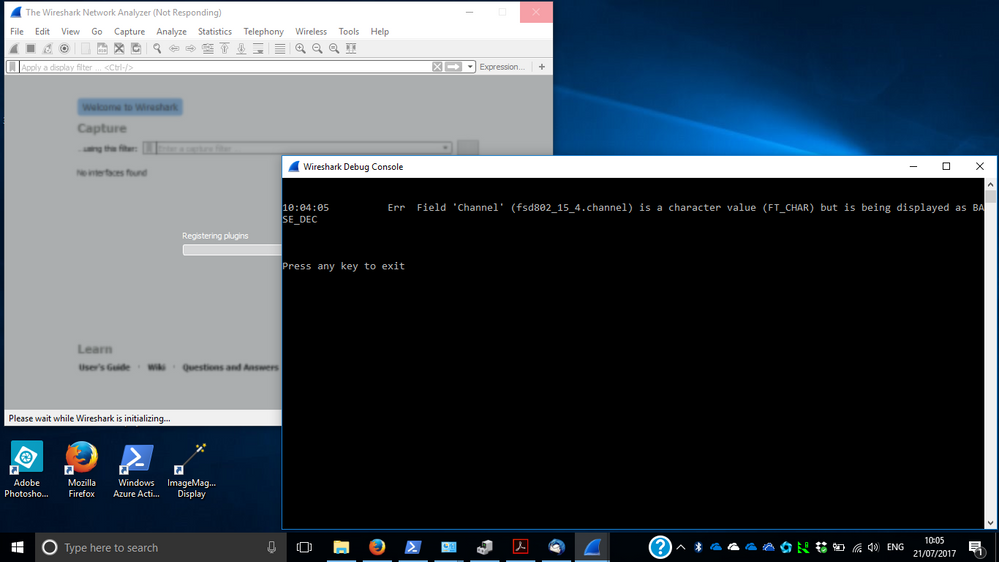
Pressing any key doesn't help.
Is there a fix or work around?

 AleGuzman
- 新着としてマーク
- ブックマーク
- 購読
- ミュート
- RSS フィードを購読する
- ハイライト
- 印刷
- 不適切なコンテンツを報告
This problem is that Kinetis Protocol Analyzer v1.2.4 needs to recompile the plugins for Wireshark version 2.4 and above.
To address this issue a new release was uploaded to Kinetis Protocol Analyzer Adapter v1.2.5
I tried it at my Windows 7 64-bit and it works.
- 新着としてマーク
- ブックマーク
- 購読
- ミュート
- RSS フィードを購読する
- ハイライト
- 印刷
- 不適切なコンテンツを報告
Tried it on Windows 10 Enterprise (64-bit) with mixed results.
Sniffing 802.4.15 works. Successfully captured some zigbee traffic on channel 25.
Attempting to sniff BLE (all channels, no address filter) causes Wireshark 2.4.0 to report a runtime error and exit with code 3 (0x3).
AleGuzman
- 新着としてマーク
- ブックマーク
- 購読
- ミュート
- RSS フィードを購読する
- ハイライト
- 印刷
- 不適切なコンテンツを報告
John,
I can confirm that the runtime error is duplicated with Windows 7 64-bit, our software team is working on finding a root cause and a fix. In the mid time, you can use Wireshark v2.2.9 Index of /download/automated/win64
- 新着としてマーク
- ブックマーク
- 購読
- ミュート
- RSS フィードを購読する
- ハイライト
- 印刷
- 不適切なコンテンツを報告
Hi,
It's been a couple of weeks now, has your software team got a fix for Wireshark 2.4.0 with BLE yet?
AleGuzman
- 新着としてマーク
- ブックマーク
- 購読
- ミュート
- RSS フィードを購読する
- ハイライト
- 印刷
- 不適切なコンテンツを報告
Hi Philip,
The software was uploaded last night you can download v1.2.6.1 from here.
To double-check, I select ALL BLE channels then launch the sniffer and there are no error messages.
- 新着としてマーク
- ブックマーク
- 購読
- ミュート
- RSS フィードを購読する
- ハイライト
- 印刷
- 不適切なコンテンツを報告
Thanks, that's resolved that specific issue and Wireshark is now behaving fine.
Thanks again for resolving this issue, please can you take a look at the other issue I raised on the another thread (https://community.nxp.com/thread/458293 ) which should be pretty simple to fix by the right person. It's a stupid little bug but makes the sniffer unusable for BLE connections.
 estephania_mart
- 新着としてマーク
- ブックマーク
- 購読
- ミュート
- RSS フィードを購読する
- ハイライト
- 印刷
- 不適切なコンテンツを報告
Hello,
Sorry for the late response, which release were you using ? I'm asking you so I can dig into the problem and hopefully this issue can be solved.
By any chance, are you using WIndows 10 ?
Best Regards,
Estephania
- 新着としてマーク
- ブックマーク
- 購読
- ミュート
- RSS フィードを購読する
- ハイライト
- 印刷
- 不適切なコンテンツを報告
When I saw the same issue as John, I saw it on both Win7 pro x64 and Win10pro x64, with protocol analyzer adapter 1.2.4.0.
- 新着としてマーク
- ブックマーク
- 購読
- ミュート
- RSS フィードを購読する
- ハイライト
- 印刷
- 不適切なコンテンツを報告
I know "Me Too" posts don't help the OP, but I can confirm the same issue.
So hopefully on the seemingly rare occurrence of someone from NXP taking a look through these forums, they might note that this looks like a general problem rather than a user specific one.
I reverted back to 2.2.8 which seems to run without crashing but I'm still unable to follow a BLE connection successfully.
- 新着としてマーク
- ブックマーク
- 購読
- ミュート
- RSS フィードを購読する
- ハイライト
- 印刷
- 不適切なコンテンツを報告
Many thanks. My guess is that there has been a change to the Wireshark plugin interface between 2.2 and 2.4. The folder containing the plugin that was installed was named 2.1.
Uninstalled Kinetis Protocol Analyzer Adapter (via Control Panel -> Uninstall a program - took two attempts to get rid of it); uninstalled Wireshark 2.4.0; installed Wireshark 2.2.8; installed Kinetis Protocol Analyzer Adapter (blue screened on first attempt, worked on second).
Gave it a try and it appears to work!
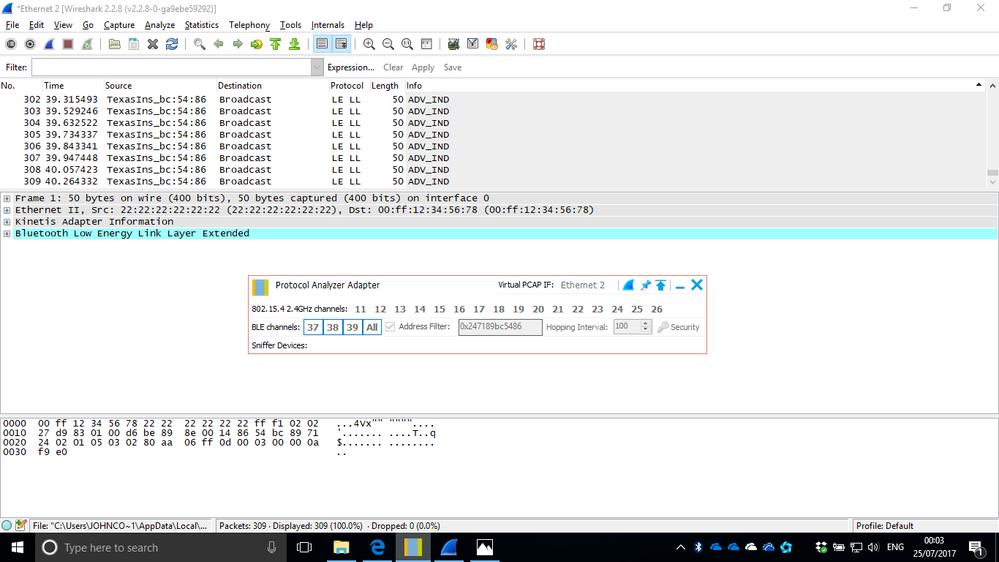
It was capturing BLE data from a TI CC2650 SensorTag and worked with or without an address filter.
Good enough to confirm that the USB-KW41Z is programmed with the sniffer and is functional.
- 新着としてマーク
- ブックマーク
- 購読
- ミュート
- RSS フィードを購読する
- ハイライト
- 印刷
- 不適切なコンテンツを報告
John,
Glad you got somewhere with 2.2.8. Your screenshot showed advertising data only, did you manage to sniff a connection request and follow the frames in the connected state? I'm trying to figure out if I've got an installation related problem or if there's a fundamental problem sniffing packets. At the moment sniffing advertisements works fine for me, but it looks like it's not following the hop pattern in the connection.
Thanks,
Phil.
- 新着としてマーク
- ブックマーク
- 購読
- ミュート
- RSS フィードを購読する
- ハイライト
- 印刷
- 不適切なコンテンツを報告
That's as far as I went before removing the NXP software and installing an evaluation copy of Ubilogix Ubiqua Protocol Analyzer to check if the USB-KW41Z could also sniff 802.15.4 packets. That appears to work, too!
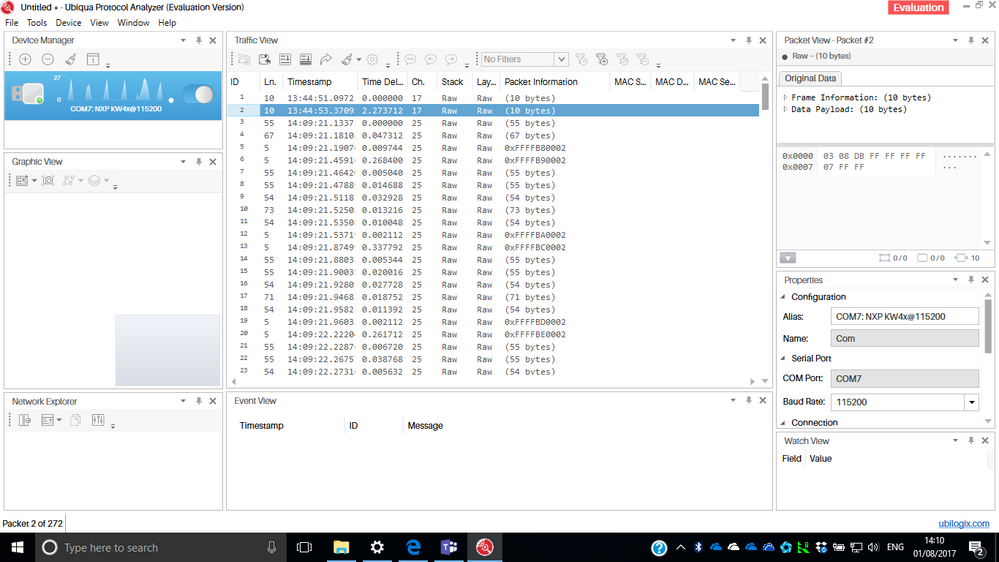
More confirmation that the USB-KW41Z is programmed with the sniffer and is functional.
Note that this and the earlier Wireshark output were produced on a borrowed laptop running Windows 10 Enterprise (64-bit), Version:1703, Build: 15063.483 with all recent updates applied.
I reinstalled Kinetis Protocol Analyzer Adapter 1.2.5 on the original laptop running the same flavour of Windows. Virtual Com Port (COM5) is running the Freescale driver (Version: 1.0.0.0, Date: 16/02/2011) and Freescale Kinetis-W Network Interface is running the Freescale driver (Version: 1.0.0.1; Date: 14/08/2014). Kinetis Protocol Analyzer Adapter still fails to start but at least Wireshark 2.4.0 (v2.4.0.0-g9be0fa500d) no longer pops up the Debug Console! Tried the USB-KW41Z in two different USB ports, same result! Both ports work fine with other USB devices. When Wireshark starts there is no traffic on Ethernet 2 (Freescale Kinetis-W Network Interface. I thought the problem might have been my VPN Manager firewalling Ethernet 2 but the same behaviour occurs when my VPN Manager is disabled. Strange! Not sure what might make two similar laptops behave differently ...
Anyway, I'm happy that the USB-KW41Z works as a sniffer on the borrowed laptop.
- 新着としてマーク
- ブックマーク
- 購読
- ミュート
- RSS フィードを購読する
- ハイライト
- 印刷
- 不適切なコンテンツを報告
Just tried the evaluation of Ubilogix Ubiqua Protocol Analyzer Version 2.0 (Build 0103) on the original laptop and the USB-KW41Z works fine in both USB sockets. It appears to talk directly to the COM device using the Microsoft driver (Version: 10.0.15063.0; Date: 21/06/2006) rather than a virtual network interface. Looks like Kinetis Protocol Analyzer Adapter has problems on some Windows systems but not on others. No idea why ...
