QN9080CDK - Enabling System View for Connectivity Software Stack

cancel
Showing results for 
Show  only  | Search instead for 
Did you mean: 

QN9080CDK - Enabling System View for Connectivity Software Stack

QN9080CDK - Enabling System View for Connectivity Software Stack

Introduction

This document describes the steps needed to enable System View tool emphasizing in connectivity software stack for the QN9080CDK MCU.


Software Requirements

  1. QN908XCDK SDK 2.2.0
  2. SystemView Software
  3. J-Link Software and Documentation Pack  


Hardware Requirements

  1. QN9080CDK Board with J-Link debug interface


Enabling SystemView in IAR Embedded Workbench IDE


1. Unzip your QN908XCDK SDK. Open your desired project from:<SDK_install_path>/boards/qn908xcdk/wireless_examples/<Choose_your_project>/freertos/iar/<Your_project.eww>


2. Select the project in the workspace, press the right mouse button and select “Add->Add Group...” option
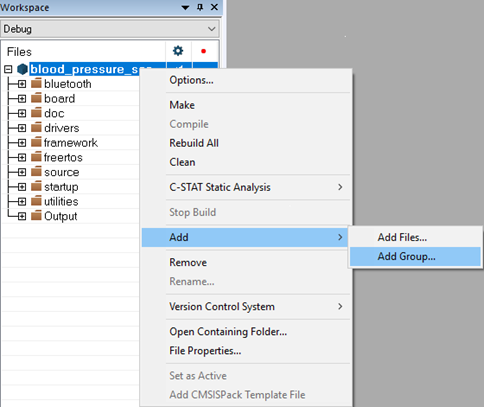
 

pastedImage_30.png


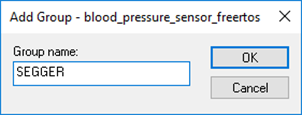
3. Create a new group called “SEGGER”, click on the “OK” button. Repeat the step 1 and create other groups called “Config” and “FreeRTOS_SEGGER”.
 

pastedImage_32.png


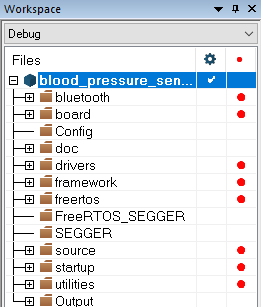
The workspace will be updated as shown below
 

pastedImage_34.png


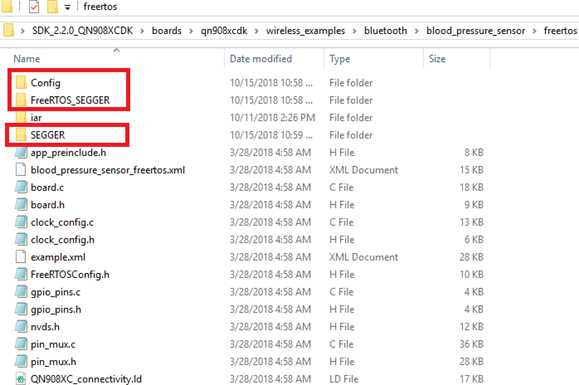
4. Create folders called “SEGGER”, “Config” and “FreeRTOS_SEGGER” in the Windows directory at the following path:

    <QN9080_SDK_root>/boards/qn908xcdk/wireless_examples/bluetooth/<your_example>/freertos
 

pastedImage_40.png


5. Add the following files in the recently created folders (SEGGER, Config and FreeRTOS_SEGGER) on Windows directory (the default SysView installation path is C:\Program Files (x86)\SEGGER\SystemView_V252c):


  • For the SEGGER folder:

       All files located at <SysView_installation_path>\Src\SEGGER


  • For the Config folder:

      All files located at <SysView_installation_path>\Src\Config


  • For the FreeRTOS_SEGGER folder:

      <SysView_installation_path>\Src\Sample\FreeRTOSV9\SEGGER_SYSVIEW_FreeRTOS.c

      <SysView_installation_path>\Src\Sample\FreeRTOSV9\SEGGER_SYSVIEW_FreeRTOS.h

      <SysView_installation_path>\Src\Sample\FreeRTOSV9\Config\SEGGER_SYSVIEW_Config_FreeRTOS.c


6. Go to the workspace and click the right mouse button on “SEGGER”, “Config” and “FreeRTOS_SEGGER” groups, then select “Add->Add Files...” option. Add the following files:


  • For the SEGGER group: 

       All files in <QN9080_SDK_root>/boards/qn908xcdk/wireless_examples/bluetooth/<your_example>/freertos/SEGGER folder 


  • For the Config group:

       All files in <QN9080_SDK_root>/boards/qn908xcdk/wireless_examples/bluetooth/<your_example>/freertos/Config folder


  • For the FreeRTOS_SEGGER group:

       All files in <QN9080_SDK_root>/boards/qn908xcdk/wireless_examples/bluetooth/<your_example>/freertos/FreeRTOS_SEGGER folder


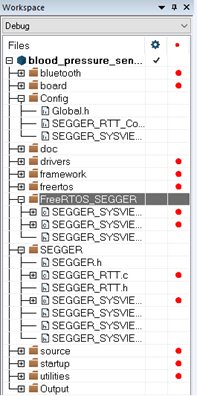
The workspace will be updated as shown in the picture below
 

pastedImage_38.png


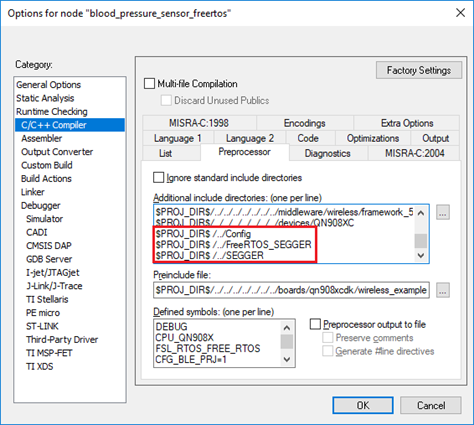
7. Select the project in the workspace and press Alt + F7. Go to “C/C++ Compiler” window and select “Preprocessor”. Include in “Additional include directories” view the following paths:


  • $PROJ_DIR$ /../Config
  • $PROJ_DIR$ /../FreeRTOS_SEGGER
  • $PROJ_DIR$ /../SEGGER


pastedImage_42.png


8. Go to “Assembler”, click on “Preprocessor”. Include the last paths on “Additional include directories” view as shown below. Click the OK button.
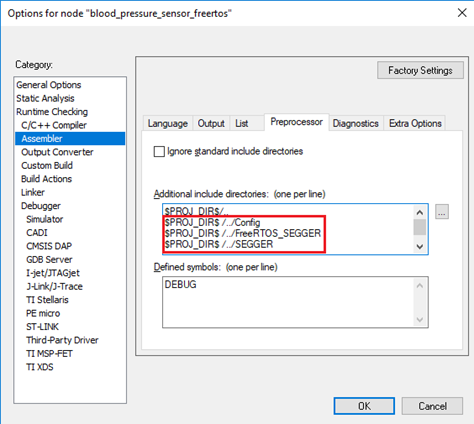
 

pastedImage_44.png


9. Replace the following files in the workspace with the files attached in this post (IAR files.zip). Make sure that each new file is located on the same path as the respectively last one.


  • freertos/FreeRTOS.h
  • freertos/task.h
  • freertos/tasks.c
  • freertos/portable/portasm.s
  • freertos/portable/port.c
  • freertos/portable/portmacro.h


10. Add #include "SEGGER_SYSVIEW_FreeRTOS.h" at the end of the FreeRTOSConfig.h file located at source/FreeRTOSConfig.h in the workspace.
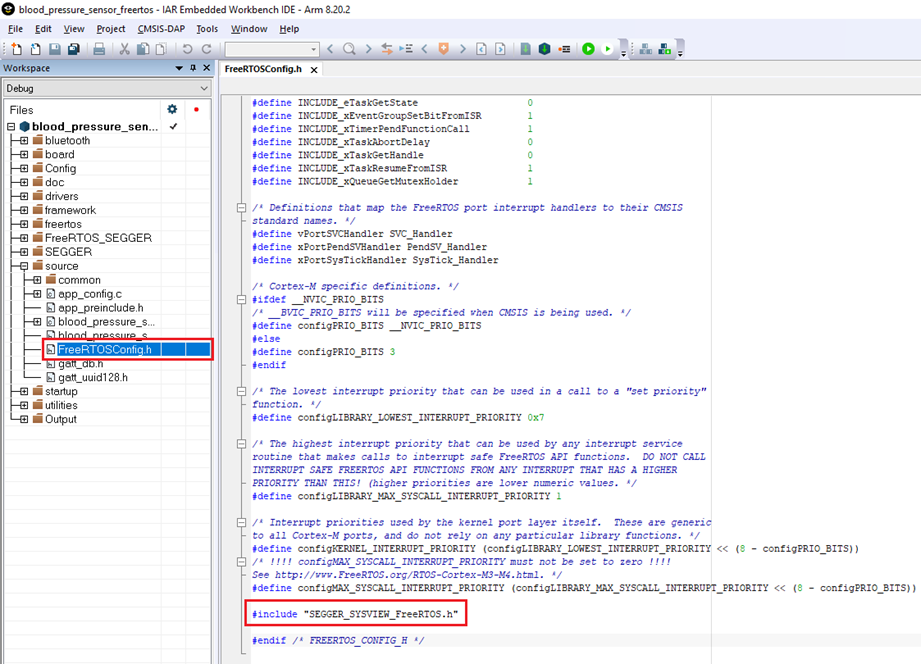
 
pastedImage_67.png


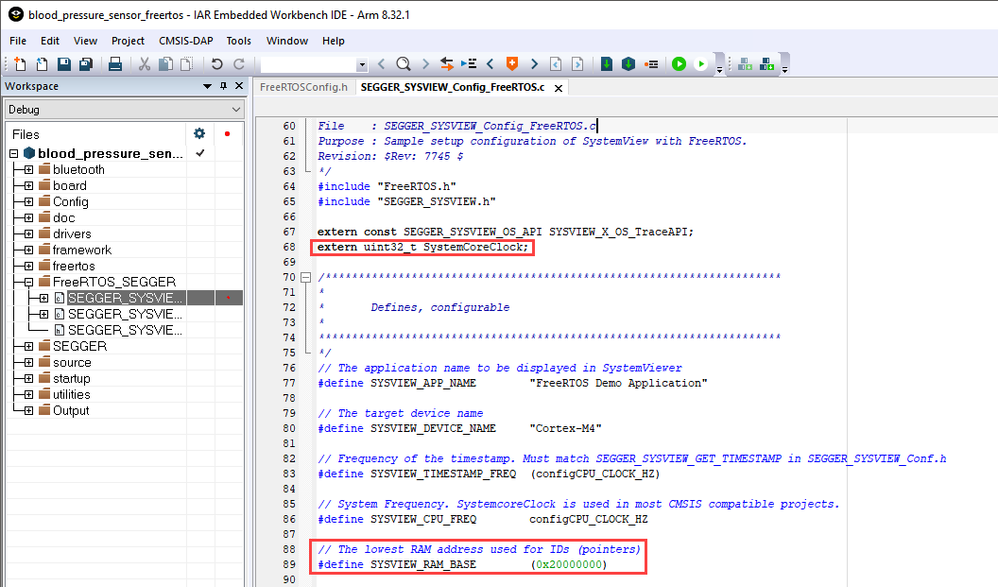
11. Search the “SEGGER_SYSVIEW_Config_FreeRTOS.c” file at FreeRTOS_SEGGER folder in the workspace. Modify the SYSVIEW_RAM_BASE value to the lowest RAM address (default 0x20000000 in QN9080) and add an extern declaration to the SystemCoreClock variable:

extern uint32_t SystemCoreClock;‍‍


pastedImage_2.png


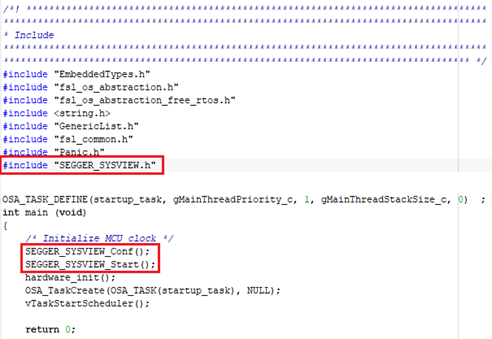
12. Search the “fsl_os_abstraction_free_rtos.c” file at framework/OSAbstraction folder in the workspace. Add #include "SEGGER_SYSVIEW.h" at the top of the file. Search the main function and add the following call to function inside:


SEGGER_SYSVIEW_Conf();
SEGGER_SYSVIEW_Start();‍‍‍‍‍‍‍‍‍‍


pastedImage_50.png


 13. Build and run your example. Run SystemView in your PC.


Enabling SystemView in MCUXpresso IDE

1. Install your QN908XCDK SDK in MCUXpresso IDE and import any freertos example from "wireless_examples" folder. 

2. Select the project in the workspace, press the right mouse button and select "New->Source Folder" option
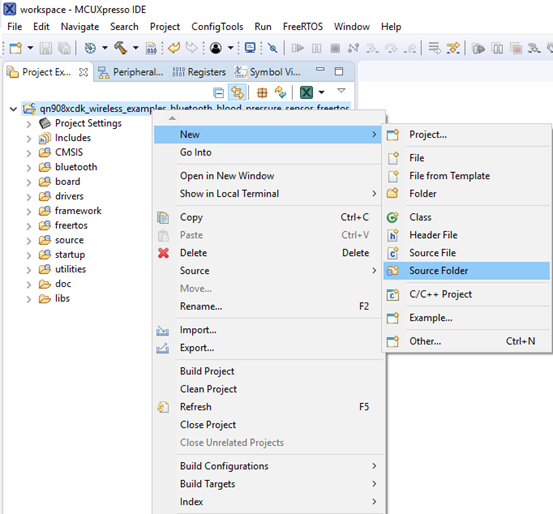
 

pastedImage_13.png


3. Create a new folder called “SEGGER”, click on the “Finish” button. Repeat the step 1 and create other folders called “Config” and “FreeRTOS_SEGGER”.
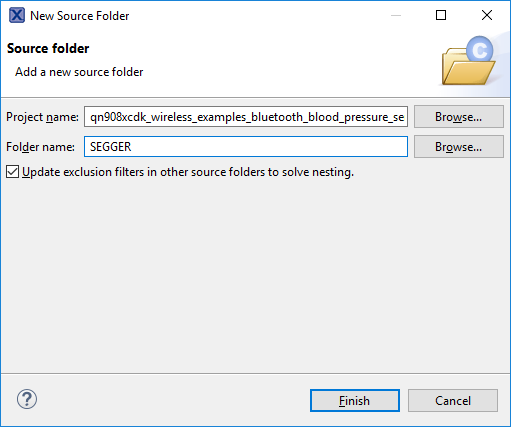
 

pastedImage_17.png


The workspace will be updated as shown below
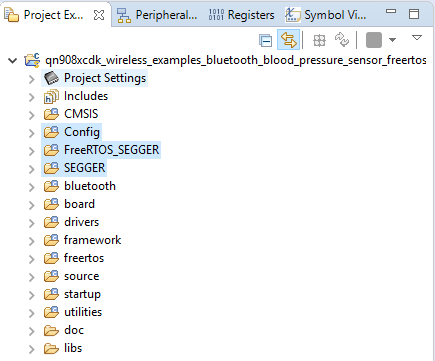
 

pastedImage_19.png


4. Add the following files in the SEGGER, Config and FreeRTOS_SEGGER folders on the workspace dragging and dropping (the default SysView installation path is C:\Program Files (x86)\SEGGER\SystemView_V252c):


  • For the SEGGER folder:

       All files located at <SysView_installation_path>\Src\SEGGER


  • For the Config folder:

      All files located at <SysView_installation_path>\Src\Config


  • For the FreeRTOS_SEGGER folder:

      <SysView_installation_path>\Src\Sample\FreeRTOSV9\SEGGER_SYSVIEW_FreeRTOS.c

      <SysView_installation_path>\Src\Sample\FreeRTOSV9\SEGGER_SYSVIEW_FreeRTOS.h

      <SysView_installation_path>\Src\Sample\FreeRTOSV9\Config\SEGGER_SYSVIEW_Config_FreeRTOS.c


When dragging and dropping, a new window will appear. Select "Copy files" in the button group and click "OK".
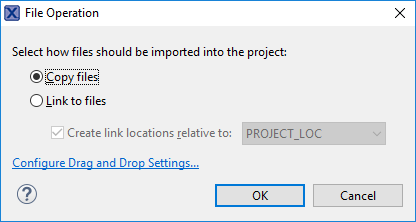
 

pastedImage_12.png


5. Select the project in the workspace, then go to "Project->Properties". The project properties window will be deployed.
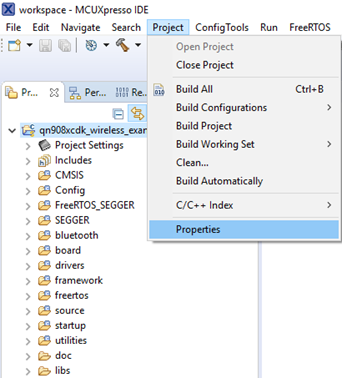
 

pastedImage_2.png 


6. Go to "C/C++ Build->Settings->Tool Settings->MCU C Compiler->Includes" view. Click on the "Green plus icon" in the "Include paths" view. A new window will appear, click on "Workspace..." button.
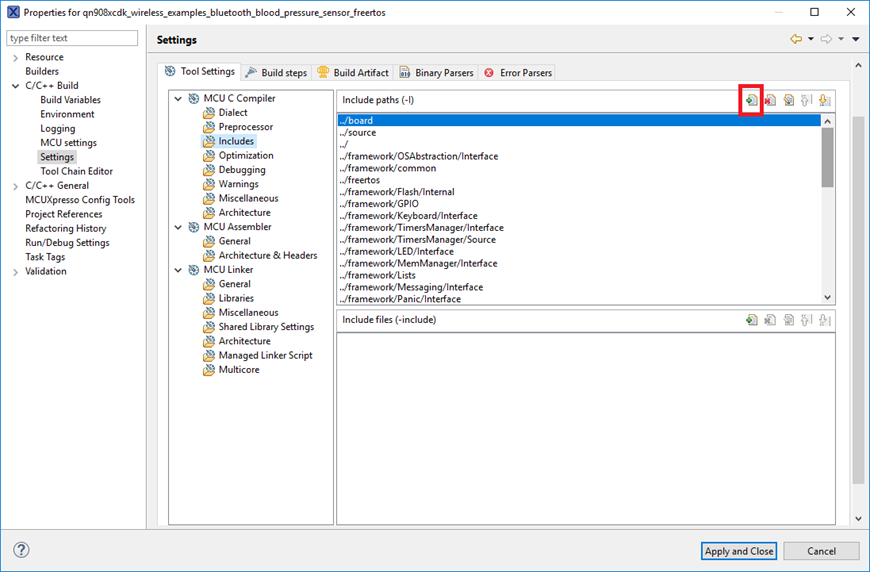
 

pastedImage_9.png


7. Select SEGGER, Config and FreeRTOS_SEGGER folders and click "OK", then click "Apply and Close" in the Project Properties window.
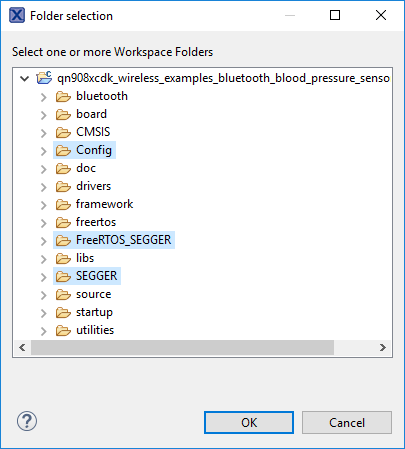
 

pastedImage_10.png.


8. Replace the following files in the workspace with the files attached in this post (MCUXpresso files.zip).


  • freertos/FreeRTOS.h
  • freertos/task.h
  • freertos/tasks.c
  • freertos/port.c
  • freertos/portmacro.h


9. Add #include "SEGGER_SYSVIEW_FreeRTOS.h" at the end of the FreeRTOSConfig.h file located at source/FreeRTOSConfig.h in the workspace.
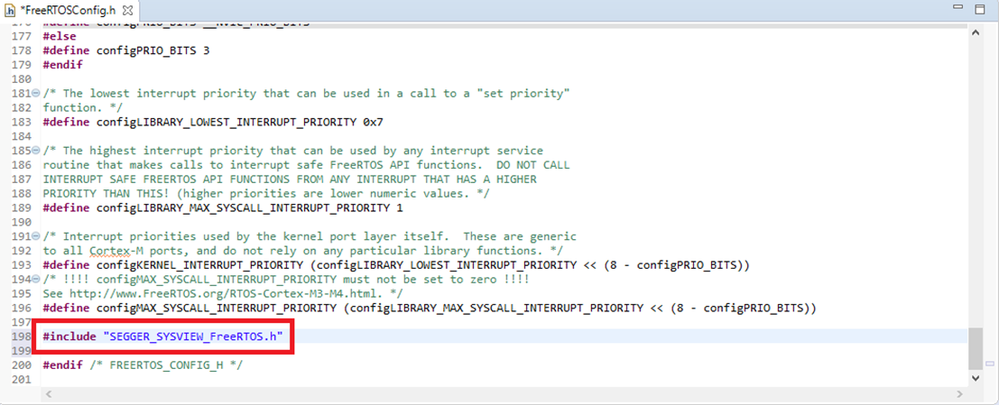
 

pastedImage_15.png


10. Search the “SEGGER_SYSVIEW_Config_FreeRTOS.c” file at FreeRTOS_SEGGER folder in the workspace. Modify the SYSVIEW_RAM_BASE value to the lowest RAM address (default 0x20000000 in QN9080) and add an extern declaration to the SystemCoreClock variable:

extern uint32_t SystemCoreClock;‍‍
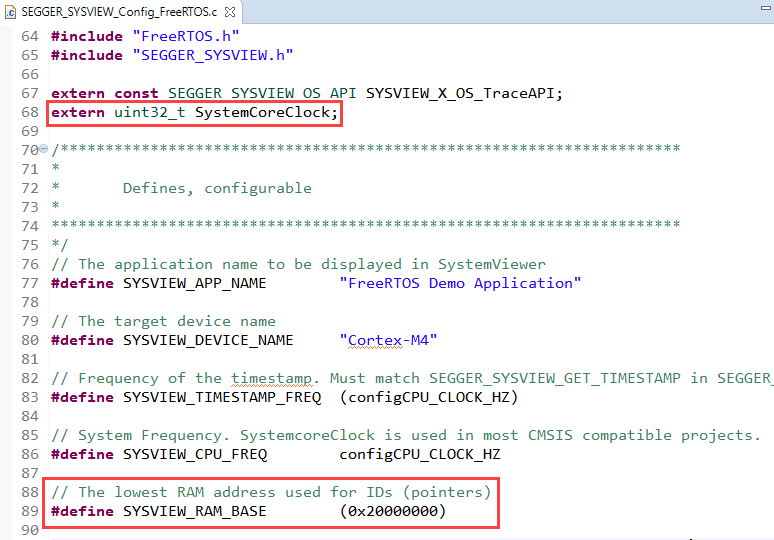
pastedImage_13.png


11. Search the “fsl_os_abstraction_free_rtos.c” file at framework/OSAbstraction/Source folder in the workspace. Add #include "SEGGER_SYSVIEW.h" at the top of the file. Search the main function and add the following call to function inside:

SEGGER_SYSVIEW_Conf();
SEGGER_SYSVIEW_Start();‍‍‍‍‍‍‍‍‍‍‍‍
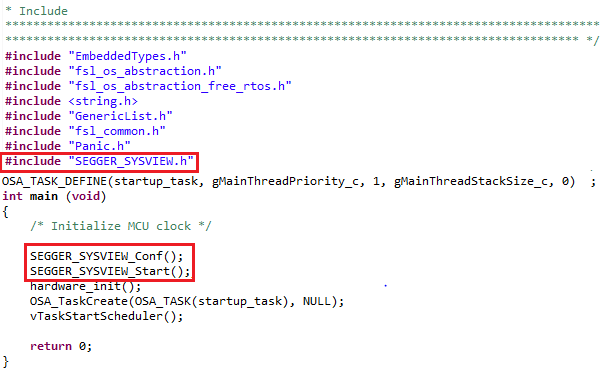
pastedImage_18.png


12. Build and run your example. Run SystemView in your PC.

Labels (2)
Tags (1)
Attachments
%3CLINGO-SUB%20id%3D%22lingo-sub-1118093%22%20slang%3D%22en-US%22%20mode%3D%22CREATE%22%3EQN9080CDK%20-%20Enabling%20System%20View%20for%20Connectivity%20Software%20Stack%3C%2FLINGO-SUB%3E%3CLINGO-BODY%20id%3D%22lingo-body-1118093%22%20slang%3D%22en-US%22%20mode%3D%22CREATE%22%3E%3CP%20style%3D%22margin-bottom%3A%20.0001pt%3B%20background%3A%20white%3B%22%3E%3CSTRONG%3E%3CFONT%20face%3D%22arial%2Chelvetica%2Csans-serif%22%20size%3D%225%22%20color%3D%22%23000000%22%3E%3CSPAN%20style%3D%22color%3A%20%23646464%3B%20font-size%3A%2030px%3B%22%3EIntroduction%3C%2FSPAN%3E%3C%2FFONT%3E%3C%2FSTRONG%3E%3C%2FP%3E%0A%3CP%20style%3D%22margin-bottom%3A%20.0001pt%3B%20background%3A%20white%3B%22%3E%3CFONT%20color%3D%22%23000000%22%3E%3CSPAN%20style%3D%22font-size%3A%2011.5pt%3B%20color%3A%20%2351626f%3B%22%3EThis%20document%20describes%20the%20steps%20needed%20to%20enable%20System%20View%20tool%20emphasizing%20in%20connectivity%20software%20stack%20for%20the%20QN9080CDK%20MCU.%3C%2FSPAN%3E%3C%2FFONT%3E%3C%2FP%3E%0A%3CP%20style%3D%22margin-bottom%3A%20.0001pt%3B%20background%3A%20white%3B%22%3E%3CFONT%20color%3D%22%23000000%22%3E%3CSPAN%20style%3D%22font-size%3A%2011.5pt%3B%20color%3A%20%2351626f%3B%22%3E%26nbsp%3B%3C%2FSPAN%3E%3C%2FFONT%3E%3C%2FP%3E%0A%3CP%20style%3D%22margin-bottom%3A%20.0001pt%3B%20background%3A%20white%3B%22%3E%3CFONT%20color%3D%22%23000000%22%3E%3CSPAN%20style%3D%22color%3A%20%23646464%3B%20font-size%3A%2030px%3B%22%3E%3CSTRONG%3ESoftware%20Requirements%3C%2FSTRONG%3E%3C%2FSPAN%3E%3C%2FFONT%3E%3C%2FP%3E%0A%3COL%3E%0A%3CLI%20style%3D%22margin-bottom%3A%20.0001pt%3B%20background%3A%20white%3B%22%3E%3CFONT%20color%3D%22%23000000%22%3E%3CA%20href%3D%22https%3A%2F%2Fmcuxpresso.nxp.com%2Fen%2Fselect%22%20target%3D%22_blank%22%20rel%3D%22nofollow%20noopener%20noreferrer%22%3EQN908XCDK%20SDK%202.2.0%3C%2FA%3E%3C%2FFONT%3E%3C%2FLI%3E%0A%3CLI%20style%3D%22margin-bottom%3A%20.0001pt%3B%20background%3A%20white%3B%22%3E%3CFONT%20color%3D%22%23000000%22%3E%3CA%20href%3D%22https%3A%2F%2Fwww.segger.com%2Fproducts%2Fdevelopment-tools%2Fsystemview%2F%22%20target%3D%22_blank%22%20rel%3D%22nofollow%20noopener%20noreferrer%22%3ESystemView%20Software%3C%2FA%3E%3C%2FFONT%3E%3C%2FLI%3E%0A%3CLI%20style%3D%22margin-bottom%3A%20.0001pt%3B%20background%3A%20white%3B%22%3E%3CFONT%20color%3D%22%23000000%22%3E%3CA%20href%3D%22https%3A%2F%2Fwww.segger.com%2Fdownloads%2Fjlink%2F%22%20target%3D%22_blank%22%20rel%3D%22nofollow%20noopener%20noreferrer%22%3EJ-Link%20Software%20and%20Documentation%20Pack%26nbsp%3B%26nbsp%3B%3C%2FA%3E%3C%2FFONT%3E%3C%2FLI%3E%0A%3C%2FOL%3E%0A%3CP%20style%3D%22margin-bottom%3A%20.0001pt%3B%20background%3A%20white%3B%22%3E%26nbsp%3B%3C%2FP%3E%0A%3CP%20style%3D%22margin-bottom%3A%20.0001pt%3B%20background%3A%20white%3B%22%3E%3CFONT%20color%3D%22%23000000%22%3E%3CSPAN%20style%3D%22color%3A%20%23646464%3B%20font-size%3A%2030px%3B%22%3E%3CSTRONG%3EHardware%20Requirements%3C%2FSTRONG%3E%3C%2FSPAN%3E%3C%2FFONT%3E%3C%2FP%3E%0A%3COL%3E%0A%3CLI%3E%3CFONT%20color%3D%22%23000000%22%3E%3CSPAN%20style%3D%22background-color%3A%20%23ffffff%3B%20color%3A%20%2351626f%3B%20text-indent%3A%20-24px%3B%20font-weight%3A%20400%3B%20font-size%3A%2015px%3B%22%3E%3CA%20href%3D%22https%3A%2F%2Fwww.nxp.com%2Fproducts%2Fwireless%2Fbluetooth-low-energy-ble%2Fqn908x-ultra-low-power-ble-system-on-chip-solution%3AQN9080%22%20target%3D%22_blank%22%20rel%3D%22nofollow%20noopener%20noreferrer%22%3EQN9080CDK%20Board%3C%2FA%3E%26nbsp%3Bwith%20J-Link%20debug%20interface%3C%2FSPAN%3E%3C%2FFONT%3E%3C%2FLI%3E%0A%3C%2FOL%3E%0A%3CBR%20%2F%3E%0A%3CP%20style%3D%22margin-bottom%3A%20.0001pt%3B%20background%3A%20white%3B%22%3E%3CFONT%20color%3D%22%23000000%22%3E%3CSPAN%20style%3D%22color%3A%20%23646464%3B%20font-size%3A%2030px%3B%22%3E%3CSTRONG%3EEnabling%20SystemView%20in%20IAR%20Embedded%20Workbench%20IDE%3C%2FSTRONG%3E%3C%2FSPAN%3E%3C%2FFONT%3E%3C%2FP%3E%0A%3CP%20style%3D%22margin-bottom%3A%20.0001pt%3B%20background%3A%20white%3B%22%3E%26nbsp%3B%3C%2FP%3E%0A%3CP%20style%3D%22margin-bottom%3A%20.0001pt%3B%20background%3A%20white%3B%22%3E%3CFONT%20color%3D%22%23000000%22%3E%3CSPAN%20style%3D%22color%3A%20%23646464%3B%20font-size%3A%2015px%3B%22%3E1.%20Unzip%20your%20QN908XCDK%20SDK.%20Open%20your%20desired%20project%20from%3A%3CSDK_INSTALL_PATH%3E%2Fboards%2Fqn908xcdk%2Fwireless_examples%2F%3CCHOOSE_YOUR_PROJECT%3E%2Ffreertos%2Fiar%2F%3CYOUR_PROJECT.EWW%3E%3C%2FYOUR_PROJECT.EWW%3E%3C%2FCHOOSE_YOUR_PROJECT%3E%3C%2FSDK_INSTALL_PATH%3E%3C%2FSPAN%3E%3C%2FFONT%3E%3C%2FP%3E%0A%3CP%20style%3D%22margin-bottom%3A%20.0001pt%3B%20background%3A%20white%3B%22%3E%26nbsp%3B%3C%2FP%3E%0A%3CP%3E%3CFONT%20color%3D%22%23000000%22%3E%3CSPAN%20style%3D%22font-size%3A%2011.5pt%3B%20color%3A%20%2351626f%3B%22%3E2.%20Select%20the%20project%20in%20the%20workspace%2C%20press%20the%20right%20mouse%20button%20and%20select%20%E2%80%9CAdd-%26gt%3BAdd%20Group...%E2%80%9D%20option%3C%2FSPAN%3E%3C%2FFONT%3E%3C%2FP%3E%0A%3CP%20style%3D%22margin-bottom%3A%20.0001pt%3B%20background%3A%20white%3B%22%3E%26nbsp%3B%3C%2FP%3E%0A%3CP%20style%3D%22margin-bottom%3A%20.0001pt%3B%20background%3A%20white%3B%22%3E%3CFONT%20color%3D%22%23000000%22%3E%3CSPAN%20style%3D%22font-size%3A%2011.5pt%3B%20color%3A%20%2351626f%3B%22%3E%3CSPAN%20class%3D%22lia-inline-image-display-wrapper%22%3E%3CSPAN%20class%3D%22lia-inline-image-display-wrapper%20lia-image-align-inline%22%20image-alt%3D%22pastedImage_30.png%22%20style%3D%22width%3A%20484px%3B%22%3E%3Cspan%20class%3D%22lia-inline-image-display-wrapper%22%20image-alt%3D%22pastedImage_30.png%22%20style%3D%22width%3A%20484px%3B%22%3E%3Cimg%20src%3D%22https%3A%2F%2Fcommunity.nxp.com%2Ft5%2Fimage%2Fserverpage%2Fimage-id%2F75747iBF992AA920B7D92F%2Fimage-size%2Flarge%3Fv%3Dv2%26amp%3Bpx%3D999%22%20role%3D%22button%22%20title%3D%22pastedImage_30.png%22%20alt%3D%22pastedImage_30.png%22%20%2F%3E%3C%2Fspan%3E%3C%2FSPAN%3E%3C%2FSPAN%3E%3C%2FSPAN%3E%3C%2FFONT%3E%3C%2FP%3E%0A%3CP%20style%3D%22margin-bottom%3A%20.0001pt%3B%20background%3A%20white%3B%22%3E%26nbsp%3B%3C%2FP%3E%0A%3CP%20style%3D%22margin-bottom%3A%20.0001pt%3B%20background%3A%20white%3B%22%3E%3CFONT%20color%3D%22%23000000%22%3E%3CSPAN%20style%3D%22font-size%3A%2011.5pt%3B%20color%3A%20%2351626f%3B%22%3E%26nbsp%3B%3C%2FSPAN%3E%3C%2FFONT%3E%3C%2FP%3E%0A%3CP%20style%3D%22margin-bottom%3A%20.0001pt%3B%20background%3A%20white%3B%22%3E%3CFONT%20color%3D%22%23000000%22%3E%3CSPAN%20style%3D%22font-size%3A%2011.5pt%3B%20color%3A%20%2351626f%3B%22%3E3.%20Create%20a%20new%20group%20called%20%E2%80%9CSEGGER%E2%80%9D%2C%20click%20on%20the%20%E2%80%9COK%E2%80%9D%20button.%20Repeat%20the%20step%201%20and%20create%20other%20groups%20called%20%E2%80%9CConfig%E2%80%9D%20and%20%E2%80%9CFreeRTOS_SEGGER%E2%80%9D.%3C%2FSPAN%3E%3C%2FFONT%3E%3C%2FP%3E%0A%3CP%20style%3D%22margin-bottom%3A%20.0001pt%3B%20background%3A%20white%3B%22%3E%26nbsp%3B%3C%2FP%3E%0A%3CP%20style%3D%22margin-bottom%3A%20.0001pt%3B%20background%3A%20white%3B%22%3E%3CFONT%20color%3D%22%23000000%22%3E%3CSPAN%20style%3D%22font-size%3A%2011.5pt%3B%20color%3A%20%2351626f%3B%22%3E%3CSPAN%20class%3D%22lia-inline-image-display-wrapper%22%3E%3CSPAN%20class%3D%22lia-inline-image-display-wrapper%20lia-image-align-inline%22%20image-alt%3D%22pastedImage_32.png%22%20style%3D%22width%3A%20302px%3B%22%3E%3Cspan%20class%3D%22lia-inline-image-display-wrapper%22%20image-alt%3D%22pastedImage_32.png%22%20style%3D%22width%3A%20302px%3B%22%3E%3Cimg%20src%3D%22https%3A%2F%2Fcommunity.nxp.com%2Ft5%2Fimage%2Fserverpage%2Fimage-id%2F75796iE617300A0814CB21%2Fimage-size%2Flarge%3Fv%3Dv2%26amp%3Bpx%3D999%22%20role%3D%22button%22%20title%3D%22pastedImage_32.png%22%20alt%3D%22pastedImage_32.png%22%20%2F%3E%3C%2Fspan%3E%3C%2FSPAN%3E%3C%2FSPAN%3E%3C%2FSPAN%3E%3C%2FFONT%3E%3C%2FP%3E%0A%3CP%20style%3D%22margin-bottom%3A%20.0001pt%3B%20background%3A%20white%3B%22%3E%3CFONT%20color%3D%22%23000000%22%3E%3CSPAN%20style%3D%22font-size%3A%2011.5pt%3B%20color%3A%20%2351626f%3B%22%3E%26nbsp%3B%3C%2FSPAN%3E%3C%2FFONT%3E%3C%2FP%3E%0A%3CP%20style%3D%22margin-bottom%3A%20.0001pt%3B%20background%3A%20white%3B%22%3E%3CFONT%20color%3D%22%23000000%22%3E%3CSPAN%20style%3D%22font-size%3A%2011.5pt%3B%20color%3A%20%2351626f%3B%22%3EThe%20workspace%20will%20be%20updated%20as%20shown%20below%3C%2FSPAN%3E%3C%2FFONT%3E%3C%2FP%3E%0A%3CP%20style%3D%22margin-bottom%3A%20.0001pt%3B%20background%3A%20white%3B%22%3E%26nbsp%3B%3C%2FP%3E%0A%3CP%20style%3D%22margin-bottom%3A%20.0001pt%3B%20background%3A%20white%3B%22%3E%3CFONT%20color%3D%22%23000000%22%3E%3CSPAN%20style%3D%22font-size%3A%2011.5pt%3B%20color%3A%20%2351626f%3B%22%3E%3CSPAN%20class%3D%22lia-inline-image-display-wrapper%22%3E%3CSPAN%20class%3D%22lia-inline-image-display-wrapper%20lia-image-align-inline%22%20image-alt%3D%22pastedImage_34.png%22%20style%3D%22width%3A%20261px%3B%22%3E%3Cspan%20class%3D%22lia-inline-image-display-wrapper%22%20image-alt%3D%22pastedImage_34.png%22%20style%3D%22width%3A%20261px%3B%22%3E%3Cimg%20src%3D%22https%3A%2F%2Fcommunity.nxp.com%2Ft5%2Fimage%2Fserverpage%2Fimage-id%2F75841i6BF868B051CA218F%2Fimage-size%2Flarge%3Fv%3Dv2%26amp%3Bpx%3D999%22%20role%3D%22button%22%20title%3D%22pastedImage_34.png%22%20alt%3D%22pastedImage_34.png%22%20%2F%3E%3C%2Fspan%3E%3C%2FSPAN%3E%3C%2FSPAN%3E%3C%2FSPAN%3E%3C%2FFONT%3E%3C%2FP%3E%0A%3CP%20style%3D%22margin-bottom%3A%20.0001pt%3B%20background%3A%20white%3B%22%3E%26nbsp%3B%3C%2FP%3E%0A%3CP%20style%3D%22margin-bottom%3A%20.0001pt%3B%20background%3A%20white%3B%22%3E%3CFONT%20color%3D%22%23000000%22%3E%3CSPAN%20style%3D%22font-size%3A%2011.5pt%3B%20color%3A%20%2351626f%3B%22%3E%26nbsp%3B%3C%2FSPAN%3E%3C%2FFONT%3E%3C%2FP%3E%0A%3CP%20style%3D%22margin-bottom%3A%20.0001pt%3B%20background%3A%20white%3B%22%3E%3CFONT%20color%3D%22%23000000%22%3E%3CSPAN%20style%3D%22font-size%3A%2011.5pt%3B%20color%3A%20%2351626f%3B%22%3E4.%20Create%20folders%20called%20%E2%80%9CSEGGER%E2%80%9D%2C%20%E2%80%9CConfig%E2%80%9D%20and%20%E2%80%9CFreeRTOS_SEGGER%E2%80%9D%20in%20the%20Windows%20directory%20at%20the%20following%20path%3A%3C%2FSPAN%3E%3C%2FFONT%3E%3C%2FP%3E%0A%3CP%20style%3D%22margin-bottom%3A%20.0001pt%3B%20background%3A%20white%3B%22%3E%3CFONT%20color%3D%22%23000000%22%3E%3CSPAN%20style%3D%22font-size%3A%2011.5pt%3B%20color%3A%20%2351626f%3B%22%3E%26nbsp%3B%26nbsp%3B%26nbsp%3B%26nbsp%3B%3C%2FSPAN%3E%3CSPAN%20style%3D%22font-size%3A%2011.5pt%3B%20color%3A%20%2351626f%3B%22%3E%3CQN9080_SDK_ROOT%3E%2Fboards%2Fqn908xcdk%2Fwireless_examples%2Fbluetooth%2F%3CYOUR_EXAMPLE%3E%2Ffreertos%3C%2FYOUR_EXAMPLE%3E%3C%2FQN9080_SDK_ROOT%3E%3C%2FSPAN%3E%3C%2FFONT%3E%3C%2FP%3E%0A%3CP%20style%3D%22margin-bottom%3A%20.0001pt%3B%20background%3A%20white%3B%22%3E%3CFONT%20color%3D%22%23000000%22%3E%3CSPAN%20style%3D%22font-size%3A%2011.5pt%3B%20color%3A%20%2351626f%3B%22%3E%26nbsp%3B%3C%2FSPAN%3E%3C%2FFONT%3E%3C%2FP%3E%0A%3CP%20style%3D%22margin-bottom%3A%200.0001pt%3B%20background%3A%20white%3B%20text-align%3A%20center%3B%22%3E%3CFONT%20color%3D%22%23000000%22%3E%3CSPAN%20style%3D%22font-size%3A%2011.5pt%3B%20color%3A%20%2351626f%3B%22%3E%3CSPAN%20class%3D%22lia-inline-image-display-wrapper%22%3E%3CSPAN%20class%3D%22lia-inline-image-display-wrapper%20lia-image-align-inline%22%20image-alt%3D%22pastedImage_40.png%22%20style%3D%22width%3A%20579px%3B%22%3E%3Cspan%20class%3D%22lia-inline-image-display-wrapper%22%20image-alt%3D%22pastedImage_40.png%22%20style%3D%22width%3A%20579px%3B%22%3E%3Cimg%20src%3D%22https%3A%2F%2Fcommunity.nxp.com%2Ft5%2Fimage%2Fserverpage%2Fimage-id%2F75964iE00D739DF2DCA92E%2Fimage-size%2Flarge%3Fv%3Dv2%26amp%3Bpx%3D999%22%20role%3D%22button%22%20title%3D%22pastedImage_40.png%22%20alt%3D%22pastedImage_40.png%22%20%2F%3E%3C%2Fspan%3E%3C%2FSPAN%3E%3C%2FSPAN%3E%3C%2FSPAN%3E%3C%2FFONT%3E%3C%2FP%3E%0A%3CP%20style%3D%22margin-bottom%3A%20.0001pt%3B%20background%3A%20white%3B%22%3E%26nbsp%3B%3C%2FP%3E%0A%3CP%20style%3D%22margin-bottom%3A%20.0001pt%3B%20background%3A%20white%3B%22%3E%26nbsp%3B%3C%2FP%3E%0A%3CP%20style%3D%22margin-bottom%3A%20.0001pt%3B%20background%3A%20white%3B%22%3E%3CFONT%20color%3D%22%23000000%22%3E%3CSPAN%20style%3D%22font-size%3A%2011.5pt%3B%20color%3A%20%2351626f%3B%22%3E5.%20Add%20the%20following%20files%20in%20the%20recently%20created%20folders%20(SEGGER%2C%20Config%20and%20FreeRTOS_SEGGER)%20on%20Windows%20directory%20(the%20default%20SysView%20installation%20path%20is%20C%3A%5CProgram%20Files%20(x86)%5CSEGGER%5CSystemView_V252c)%3A%3C%2FSPAN%3E%3C%2FFONT%3E%3C%2FP%3E%0A%3CP%20style%3D%22margin-bottom%3A%20.0001pt%3B%20background%3A%20white%3B%22%3E%3CFONT%20color%3D%22%23000000%22%3E%3CSPAN%20style%3D%22font-size%3A%2011.5pt%3B%20color%3A%20%2351626f%3B%22%3E%26nbsp%3B%3C%2FSPAN%3E%3C%2FFONT%3E%3C%2FP%3E%0A%3CUL%3E%0A%3CLI%3E%3CFONT%20color%3D%22%23000000%22%3E%3CSPAN%20style%3D%22font-size%3A%2011.5pt%3B%20color%3A%20%2351626f%3B%22%3EFor%20the%20SEGGER%20folder%3A%3C%2FSPAN%3E%3C%2FFONT%3E%3C%2FLI%3E%0A%3C%2FUL%3E%0A%3CP%3E%3CFONT%20color%3D%22%23000000%22%3E%3CSPAN%20style%3D%22font-size%3A%2011.5pt%3B%20color%3A%20%2351626f%3B%22%3E%26nbsp%3B%26nbsp%3B%26nbsp%3B%26nbsp%3B%26nbsp%3B%26nbsp%3B%26nbsp%3BAll%20files%20located%20at%20%3CSYSVIEW_INSTALLATION_PATH%3E%5CSrc%5CSEGGER%3C%2FSYSVIEW_INSTALLATION_PATH%3E%3C%2FSPAN%3E%3C%2FFONT%3E%3C%2FP%3E%0A%3CBR%20%2F%3E%0A%3CUL%3E%0A%3CLI%3E%3CFONT%20color%3D%22%23000000%22%3E%3CSPAN%20style%3D%22font-size%3A%2011.5pt%3B%20color%3A%20%2351626f%3B%22%3EFor%20the%20Config%20folder%3A%3C%2FSPAN%3E%3C%2FFONT%3E%3C%2FLI%3E%0A%3C%2FUL%3E%0A%3CP%3E%3CFONT%20color%3D%22%23000000%22%3E%3CSPAN%20style%3D%22font-size%3A%2011.5pt%3B%20color%3A%20%2351626f%3B%22%3E%26nbsp%3B%26nbsp%3B%26nbsp%3B%26nbsp%3B%26nbsp%3B%26nbsp%3BAll%20files%20located%20at%20%3CSYSVIEW_INSTALLATION_PATH%3E%5CSrc%5CConfig%3C%2FSYSVIEW_INSTALLATION_PATH%3E%3C%2FSPAN%3E%3C%2FFONT%3E%3C%2FP%3E%0A%3CBR%20%2F%3E%0A%3CUL%3E%0A%3CLI%3E%3CFONT%20color%3D%22%23000000%22%3E%3CSPAN%20style%3D%22font-size%3A%2011.5pt%3B%20color%3A%20%2351626f%3B%22%3EFor%20the%20FreeRTOS_SEGGER%20folder%3A%3C%2FSPAN%3E%3C%2FFONT%3E%3C%2FLI%3E%0A%3C%2FUL%3E%0A%3CP%3E%3CFONT%20color%3D%22%23000000%22%3E%3CSPAN%20style%3D%22font-size%3A%2011.5pt%3B%20color%3A%20%2351626f%3B%22%3E%26nbsp%3B%26nbsp%3B%26nbsp%3B%26nbsp%3B%26nbsp%3B%26nbsp%3B%3CSYSVIEW_INSTALLATION_PATH%3E%5CSrc%5CSample%5CFreeRTOSV9%5CSEGGER_SYSVIEW_FreeRTOS.c%3C%2FSYSVIEW_INSTALLATION_PATH%3E%3C%2FSPAN%3E%3C%2FFONT%3E%3C%2FP%3E%0A%3CP%3E%3CFONT%20color%3D%22%23000000%22%3E%3CSPAN%20style%3D%22font-size%3A%2011.5pt%3B%20color%3A%20%2351626f%3B%22%3E%26nbsp%3B%26nbsp%3B%26nbsp%3B%26nbsp%3B%26nbsp%3B%26nbsp%3B%3CSYSVIEW_INSTALLATION_PATH%3E%5CSrc%5CSample%5CFreeRTOSV9%5CSEGGER_SYSVIEW_FreeRTOS.h%3C%2FSYSVIEW_INSTALLATION_PATH%3E%3C%2FSPAN%3E%3C%2FFONT%3E%3C%2FP%3E%0A%3CP%3E%3CFONT%20color%3D%22%23000000%22%3E%3CSPAN%20style%3D%22font-size%3A%2011.5pt%3B%20color%3A%20%2351626f%3B%22%3E%26nbsp%3B%26nbsp%3B%26nbsp%3B%26nbsp%3B%26nbsp%3B%26nbsp%3B%3CSYSVIEW_INSTALLATION_PATH%3E%5CSrc%5CSample%5CFreeRTOSV9%5CConfig%5CSEGGER_SYSVIEW_Config_FreeRTOS.c%3C%2FSYSVIEW_INSTALLATION_PATH%3E%3C%2FSPAN%3E%3C%2FFONT%3E%3C%2FP%3E%0A%3CP%20style%3D%22margin-bottom%3A%20.0001pt%3B%20background%3A%20white%3B%22%3E%3CFONT%20color%3D%22%23000000%22%3E%3CSPAN%20style%3D%22font-size%3A%2011.5pt%3B%20color%3A%20%2351626f%3B%22%3E%26nbsp%3B%3C%2FSPAN%3E%3C%2FFONT%3E%3C%2FP%3E%0A%3CP%20style%3D%22margin-bottom%3A%20.0001pt%3B%20background%3A%20white%3B%22%3E%3CFONT%20color%3D%22%23000000%22%3E%3CSPAN%20style%3D%22font-size%3A%2011.5pt%3B%20color%3A%20%2351626f%3B%22%3E%26nbsp%3B%3C%2FSPAN%3E%3C%2FFONT%3E%3C%2FP%3E%0A%3CP%20style%3D%22margin-bottom%3A%20.0001pt%3B%20background%3A%20white%3B%22%3E%3CFONT%20color%3D%22%23000000%22%3E%3CSPAN%20style%3D%22font-size%3A%2011.5pt%3B%20color%3A%20%2351626f%3B%22%3E6.%20Go%20to%20the%20workspace%20and%20click%20the%20right%20mouse%20button%20on%20%E2%80%9CSEGGER%E2%80%9D%2C%20%E2%80%9CConfig%E2%80%9D%20and%20%E2%80%9CFreeRTOS_SEGGER%E2%80%9D%20groups%2C%20then%20select%20%E2%80%9CAdd-%26gt%3BAdd%20Files...%E2%80%9D%20option.%20Add%20the%20following%20files%3A%3C%2FSPAN%3E%3C%2FFONT%3E%3C%2FP%3E%0A%3CP%20style%3D%22margin-bottom%3A%20.0001pt%3B%20background%3A%20white%3B%22%3E%3CFONT%20color%3D%22%23000000%22%3E%3CSPAN%20style%3D%22font-size%3A%2011.5pt%3B%20color%3A%20%2351626f%3B%22%3E%26nbsp%3B%3C%2FSPAN%3E%3C%2FFONT%3E%3C%2FP%3E%0A%3CUL%3E%0A%3CLI%3E%3CFONT%20color%3D%22%23000000%22%3E%3CSPAN%20style%3D%22font-size%3A%2011.5pt%3B%20color%3A%20%2351626f%3B%22%3EFor%20the%20SEGGER%20group%3A%3C%2FSPAN%3E%3CSPAN%20style%3D%22font-size%3A%2011.5pt%3B%20color%3A%20%2351626f%3B%22%3E%26nbsp%3B%3C%2FSPAN%3E%3C%2FFONT%3E%3C%2FLI%3E%0A%3C%2FUL%3E%0A%3CP%20style%3D%22margin-bottom%3A%20.0001pt%3B%20background%3A%20white%3B%22%3E%3CFONT%20color%3D%22%23000000%22%3E%3CSPAN%20style%3D%22font-size%3A%2011.5pt%3B%20color%3A%20%2351626f%3B%22%3E%26nbsp%3B%20%26nbsp%3B%20%26nbsp%3B%20%26nbsp%3BAll%20files%20in%20%3CQN9080_SDK_ROOT%3E%2Fboards%2Fqn908xcdk%2Fwireless_examples%2Fbluetooth%2F%3CYOUR_EXAMPLE%3E%2Ffreertos%2FSEGGER%20folder%3C%2FYOUR_EXAMPLE%3E%3C%2FQN9080_SDK_ROOT%3E%3C%2FSPAN%3E%3CSPAN%20style%3D%22font-size%3A%2011.5pt%3B%20color%3A%20%2351626f%3B%22%3E%26nbsp%3B%3C%2FSPAN%3E%3C%2FFONT%3E%3C%2FP%3E%0A%3CP%20style%3D%22margin-bottom%3A%20.0001pt%3B%20background%3A%20white%3B%22%3E%26nbsp%3B%3C%2FP%3E%0A%3CUL%3E%0A%3CLI%3E%3CFONT%20color%3D%22%23000000%22%3E%3CSPAN%20style%3D%22font-size%3A%2011.5pt%3B%20color%3A%20%2351626f%3B%22%3EFor%20the%20Config%20group%3A%3C%2FSPAN%3E%3C%2FFONT%3E%3C%2FLI%3E%0A%3C%2FUL%3E%0A%3CP%20style%3D%22margin-bottom%3A%20.0001pt%3B%20background%3A%20white%3B%22%3E%3CFONT%20color%3D%22%23000000%22%3E%3CSPAN%20style%3D%22font-size%3A%2011.5pt%3B%20color%3A%20%2351626f%3B%22%3E%26nbsp%3B%20%26nbsp%3B%20%26nbsp%3B%20%26nbsp%3BAll%20files%20in%20%3CQN9080_SDK_ROOT%3E%2Fboards%2Fqn908xcdk%2Fwireless_examples%2Fbluetooth%2F%3CYOUR_EXAMPLE%3E%2Ffreertos%2FConfig%20folder%3C%2FYOUR_EXAMPLE%3E%3C%2FQN9080_SDK_ROOT%3E%3C%2FSPAN%3E%3C%2FFONT%3E%3C%2FP%3E%0A%3CP%20style%3D%22margin-bottom%3A%20.0001pt%3B%20background%3A%20white%3B%22%3E%26nbsp%3B%3C%2FP%3E%0A%3CUL%3E%0A%3CLI%3E%3CFONT%20color%3D%22%23000000%22%3E%3CSPAN%20style%3D%22font-size%3A%2011.5pt%3B%20color%3A%20%2351626f%3B%22%3EFor%20the%20FreeRTOS_SEGGER%20group%3A%3C%2FSPAN%3E%3C%2FFONT%3E%3C%2FLI%3E%0A%3C%2FUL%3E%0A%3CP%20style%3D%22margin-bottom%3A%20.0001pt%3B%20background%3A%20white%3B%22%3E%3CFONT%20color%3D%22%23000000%22%3E%3CSPAN%20style%3D%22font-size%3A%2011.5pt%3B%20color%3A%20%2351626f%3B%22%3E%26nbsp%3B%20%26nbsp%3B%20%26nbsp%3B%20%26nbsp%3BAll%20files%20in%20%3CQN9080_SDK_ROOT%3E%2Fboards%2Fqn908xcdk%2Fwireless_examples%2Fbluetooth%2F%3CYOUR_EXAMPLE%3E%2Ffreertos%2FFreeRTOS_SEGGER%20folder%3C%2FYOUR_EXAMPLE%3E%3C%2FQN9080_SDK_ROOT%3E%3C%2FSPAN%3E%3C%2FFONT%3E%3C%2FP%3E%0A%3CP%20style%3D%22background%3A%20white%3B%20margin%3A%200in%200in%20.0001pt%20.75in%3B%22%3E%3CFONT%20color%3D%22%23000000%22%3E%3CSPAN%20style%3D%22font-size%3A%2011.5pt%3B%20color%3A%20%2351626f%3B%22%3E%26nbsp%3B%3C%2FSPAN%3E%3C%2FFONT%3E%3C%2FP%3E%0A%3CP%20style%3D%22margin-bottom%3A%20.0001pt%3B%20background%3A%20white%3B%22%3E%3CFONT%20color%3D%22%23000000%22%3E%3CSPAN%20style%3D%22font-size%3A%2011.5pt%3B%20color%3A%20%2351626f%3B%22%3EThe%20workspace%20will%20be%20updated%20as%20shown%20in%20the%20picture%20below%3C%2FSPAN%3E%3C%2FFONT%3E%3C%2FP%3E%0A%3CP%20style%3D%22margin-bottom%3A%20.0001pt%3B%20background%3A%20white%3B%22%3E%26nbsp%3B%3C%2FP%3E%0A%3CP%20style%3D%22margin-bottom%3A%20.0001pt%3B%20background%3A%20white%3B%22%3E%3CFONT%20color%3D%22%23000000%22%3E%3CSPAN%20style%3D%22font-size%3A%2011.5pt%3B%20color%3A%20%2351626f%3B%22%3E%3CSPAN%20class%3D%22lia-inline-image-display-wrapper%22%3E%3CSPAN%20class%3D%22lia-inline-image-display-wrapper%20lia-image-align-inline%22%20image-alt%3D%22pastedImage_38.png%22%20style%3D%22width%3A%20197px%3B%22%3E%3Cspan%20class%3D%22lia-inline-image-display-wrapper%22%20image-alt%3D%22pastedImage_38.png%22%20style%3D%22width%3A%20197px%3B%22%3E%3Cimg%20src%3D%22https%3A%2F%2Fcommunity.nxp.com%2Ft5%2Fimage%2Fserverpage%2Fimage-id%2F75926i67C1A97F541B3BBC%2Fimage-size%2Flarge%3Fv%3Dv2%26amp%3Bpx%3D999%22%20role%3D%22button%22%20title%3D%22pastedImage_38.png%22%20alt%3D%22pastedImage_38.png%22%20%2F%3E%3C%2Fspan%3E%3C%2FSPAN%3E%3C%2FSPAN%3E%3C%2FSPAN%3E%3C%2FFONT%3E%3C%2FP%3E%0A%3CP%20style%3D%22margin-bottom%3A%20.0001pt%3B%20background%3A%20white%3B%22%3E%3CFONT%20color%3D%22%23000000%22%3E%3CSPAN%20style%3D%22font-size%3A%2011.5pt%3B%20color%3A%20%2351626f%3B%22%3E%26nbsp%3B%3C%2FSPAN%3E%3C%2FFONT%3E%3C%2FP%3E%0A%3CP%20style%3D%22margin-bottom%3A%20.0001pt%3B%20background%3A%20white%3B%22%3E%3CFONT%20color%3D%22%23000000%22%3E%3CSPAN%20style%3D%22font-size%3A%2011.5pt%3B%20color%3A%20%2351626f%3B%22%3E%26nbsp%3B%3C%2FSPAN%3E%3C%2FFONT%3E%3C%2FP%3E%0A%3CP%20style%3D%22margin-bottom%3A%20.0001pt%3B%20background%3A%20white%3B%22%3E%3CFONT%20color%3D%22%23000000%22%3E%3CSPAN%20style%3D%22font-size%3A%2011.5pt%3B%20color%3A%20%2351626f%3B%22%3E7.%20Select%20the%20project%20in%20the%20workspace%20and%20press%20Alt%20%2B%20F7.%20Go%20to%20%E2%80%9CC%2FC%2B%2B%20Compiler%E2%80%9D%20window%20and%20select%20%E2%80%9CPreprocessor%E2%80%9D.%20Include%20in%20%E2%80%9CAdditional%20include%20directories%E2%80%9D%20view%20the%20following%20paths%3A%3C%2FSPAN%3E%3C%2FFONT%3E%3C%2FP%3E%0A%3CP%20style%3D%22margin-bottom%3A%20.0001pt%3B%20background%3A%20white%3B%22%3E%3CFONT%20color%3D%22%23000000%22%3E%3CSPAN%20style%3D%22font-size%3A%2011.5pt%3B%20color%3A%20%2351626f%3B%22%3E%26nbsp%3B%3C%2FSPAN%3E%3C%2FFONT%3E%3C%2FP%3E%0A%3CUL%3E%0A%3CLI%20style%3D%22margin-bottom%3A%20.0001pt%3B%20background%3A%20white%3B%22%3E%3CFONT%20color%3D%22%23000000%22%3E%3CSPAN%20style%3D%22font-size%3A%2011.5pt%3B%20color%3A%20%2351626f%3B%22%3E%24PROJ_DIR%24%20%2F..%2FConfig%3C%2FSPAN%3E%3C%2FFONT%3E%3C%2FLI%3E%0A%3CLI%20style%3D%22margin-bottom%3A%20.0001pt%3B%20background%3A%20white%3B%22%3E%3CFONT%20color%3D%22%23000000%22%3E%3CSPAN%20style%3D%22font-size%3A%2011.5pt%3B%20color%3A%20%2351626f%3B%22%3E%24PROJ_DIR%24%20%2F..%2FFreeRTOS_SEGGER%3C%2FSPAN%3E%3C%2FFONT%3E%3C%2FLI%3E%0A%3CLI%20style%3D%22margin-bottom%3A%20.0001pt%3B%20background%3A%20white%3B%22%3E%3CFONT%20color%3D%22%23000000%22%3E%3CSPAN%20style%3D%22font-size%3A%2011.5pt%3B%20color%3A%20%2351626f%3B%22%3E%24PROJ_DIR%24%20%2F..%2FSEGGER%3C%2FSPAN%3E%3C%2FFONT%3E%3C%2FLI%3E%0A%3C%2FUL%3E%0A%3CP%20style%3D%22margin-bottom%3A%20.0001pt%3B%20background%3A%20white%3B%22%3E%26nbsp%3B%3C%2FP%3E%0A%3CP%20style%3D%22margin-bottom%3A%20.0001pt%3B%20background%3A%20white%3B%22%3E%3CFONT%20color%3D%22%23000000%22%3E%3CSPAN%20style%3D%22font-size%3A%2011.5pt%3B%20color%3A%20%2351626f%3B%22%3E%3CSPAN%20class%3D%22lia-inline-image-display-wrapper%22%3E%3CSPAN%20class%3D%22lia-inline-image-display-wrapper%20lia-image-align-inline%22%20image-alt%3D%22pastedImage_42.png%22%20style%3D%22width%3A%20474px%3B%22%3E%3Cspan%20class%3D%22lia-inline-image-display-wrapper%22%20image-alt%3D%22pastedImage_42.png%22%20style%3D%22width%3A%20474px%3B%22%3E%3Cimg%20src%3D%22https%3A%2F%2Fcommunity.nxp.com%2Ft5%2Fimage%2Fserverpage%2Fimage-id%2F71590i561D027D946A8DC3%2Fimage-size%2Flarge%3Fv%3Dv2%26amp%3Bpx%3D999%22%20role%3D%22button%22%20title%3D%22pastedImage_42.png%22%20alt%3D%22pastedImage_42.png%22%20%2F%3E%3C%2Fspan%3E%3C%2FSPAN%3E%3C%2FSPAN%3E%3C%2FSPAN%3E%3C%2FFONT%3E%3C%2FP%3E%0A%3CP%20style%3D%22margin-bottom%3A%20.0001pt%3B%20background%3A%20white%3B%22%3E%26nbsp%3B%3C%2FP%3E%0A%3CP%20style%3D%22margin-bottom%3A%20.0001pt%3B%20background%3A%20white%3B%22%3E%3CFONT%20color%3D%22%23000000%22%3E%3CSPAN%20style%3D%22font-size%3A%2011.5pt%3B%20color%3A%20%2351626f%3B%22%3E%26nbsp%3B%3C%2FSPAN%3E%3C%2FFONT%3E%3C%2FP%3E%0A%3CP%20style%3D%22margin-bottom%3A%20.0001pt%3B%20background%3A%20white%3B%22%3E%3CFONT%20color%3D%22%23000000%22%3E%3CSPAN%20style%3D%22font-size%3A%2011.5pt%3B%20color%3A%20%2351626f%3B%22%3E8.%20Go%20to%20%E2%80%9CAssembler%E2%80%9D%2C%20click%20on%20%E2%80%9CPreprocessor%E2%80%9D.%20Include%20the%20last%20paths%20on%20%E2%80%9CAdditional%20include%20directories%E2%80%9D%20view%20as%20shown%20below.%20Click%20the%20OK%20button.%3C%2FSPAN%3E%3C%2FFONT%3E%3C%2FP%3E%0A%3CP%20style%3D%22margin-bottom%3A%20.0001pt%3B%20background%3A%20white%3B%22%3E%26nbsp%3B%3C%2FP%3E%0A%3CP%20style%3D%22margin-bottom%3A%200.0001pt%3B%20background%3A%20white%3B%20text-align%3A%20center%3B%22%3E%3CFONT%20color%3D%22%23000000%22%3E%3CSPAN%20style%3D%22font-size%3A%2011.5pt%3B%20color%3A%20%2351626f%3B%22%3E%3CSPAN%20class%3D%22lia-inline-image-display-wrapper%22%3E%3CSPAN%20class%3D%22lia-inline-image-display-wrapper%20lia-image-align-inline%22%20image-alt%3D%22pastedImage_44.png%22%20style%3D%22width%3A%20474px%3B%22%3E%3Cspan%20class%3D%22lia-inline-image-display-wrapper%22%20image-alt%3D%22pastedImage_44.png%22%20style%3D%22width%3A%20474px%3B%22%3E%3Cimg%20src%3D%22https%3A%2F%2Fcommunity.nxp.com%2Ft5%2Fimage%2Fserverpage%2Fimage-id%2F76023i4F84489752A6DC7A%2Fimage-size%2Flarge%3Fv%3Dv2%26amp%3Bpx%3D999%22%20role%3D%22button%22%20title%3D%22pastedImage_44.png%22%20alt%3D%22pastedImage_44.png%22%20%2F%3E%3C%2Fspan%3E%3C%2FSPAN%3E%3C%2FSPAN%3E%3C%2FSPAN%3E%3C%2FFONT%3E%3C%2FP%3E%0A%3CP%20style%3D%22margin-bottom%3A%20.0001pt%3B%20background%3A%20white%3B%22%3E%3CFONT%20color%3D%22%23000000%22%3E%3CSPAN%20style%3D%22font-size%3A%2011.5pt%3B%20color%3A%20%2351626f%3B%22%3E%26nbsp%3B%3C%2FSPAN%3E%3C%2FFONT%3E%3C%2FP%3E%0A%3CP%20style%3D%22margin-bottom%3A%20.0001pt%3B%20background%3A%20white%3B%22%3E%3CFONT%20color%3D%22%23000000%22%3E%3CSPAN%20style%3D%22font-size%3A%2011.5pt%3B%20color%3A%20%2351626f%3B%22%3E9.%20Replace%20the%20following%20files%20in%20the%20workspace%20with%20the%20files%20attached%20in%20this%20post%20(IAR%20files.zip).%20Make%20sure%20that%20each%20new%20file%20is%20located%20on%20the%20same%20path%20as%20the%20respectively%20last%20one.%3C%2FSPAN%3E%3C%2FFONT%3E%3C%2FP%3E%0A%3CP%20style%3D%22margin-bottom%3A%20.0001pt%3B%20background%3A%20white%3B%22%3E%26nbsp%3B%3C%2FP%3E%0A%3CUL%3E%0A%3CLI%3E%3CFONT%20color%3D%22%23000000%22%3E%3CSPAN%20style%3D%22font-size%3A%2011.5pt%3B%20color%3A%20%2351626f%3B%22%3Efreertos%2FFreeRTOS.h%3C%2FSPAN%3E%3C%2FFONT%3E%3C%2FLI%3E%0A%3CLI%3E%3CFONT%20color%3D%22%23000000%22%3E%3CSPAN%20style%3D%22font-size%3A%2011.5pt%3B%20color%3A%20%2351626f%3B%22%3Efreertos%2Ftask.h%3C%2FSPAN%3E%3C%2FFONT%3E%3C%2FLI%3E%0A%3CLI%3E%3CFONT%20color%3D%22%23000000%22%3E%3CSPAN%20style%3D%22font-size%3A%2011.5pt%3B%20color%3A%20%2351626f%3B%22%3Efreertos%2Ftasks.c%3C%2FSPAN%3E%3C%2FFONT%3E%3C%2FLI%3E%0A%3CLI%3E%3CFONT%20color%3D%22%23000000%22%3E%3CSPAN%20style%3D%22font-size%3A%2011.5pt%3B%20color%3A%20%2351626f%3B%22%3Efreertos%2Fportable%2Fportasm.s%3C%2FSPAN%3E%3C%2FFONT%3E%3C%2FLI%3E%0A%3CLI%3E%3CFONT%20color%3D%22%23000000%22%3E%3CSPAN%20style%3D%22font-size%3A%2011.5pt%3B%20color%3A%20%2351626f%3B%22%3Efreertos%2Fportable%2Fport.c%3C%2FSPAN%3E%3C%2FFONT%3E%3C%2FLI%3E%0A%3CLI%3E%3CFONT%20color%3D%22%23000000%22%3E%3CSPAN%20style%3D%22font-size%3A%2011.5pt%3B%20color%3A%20%2351626f%3B%22%3Efreertos%2Fportable%2Fportmacro.h%3C%2FSPAN%3E%3C%2FFONT%3E%3C%2FLI%3E%0A%3C%2FUL%3E%0A%3CP%20style%3D%22margin-bottom%3A%20.0001pt%3B%20background%3A%20white%3B%22%3E%3CFONT%20color%3D%22%23000000%22%3E%3CSPAN%20style%3D%22font-size%3A%2011.5pt%3B%20color%3A%20%2351626f%3B%22%3E%26nbsp%3B%3C%2FSPAN%3E%3C%2FFONT%3E%3C%2FP%3E%0A%3CP%20style%3D%22margin-bottom%3A%20.0001pt%3B%20background%3A%20white%3B%22%3E%3CFONT%20color%3D%22%23000000%22%3E%3CSPAN%20style%3D%22font-size%3A%2011.5pt%3B%20color%3A%20%2351626f%3B%22%3E10.%20Add%20%23include%20%22SEGGER_SYSVIEW_FreeRTOS.h%22%20at%20the%20end%20of%20the%20FreeRTOSConfig.h%20file%20located%20at%20source%2FFreeRTOSConfig.h%20in%20the%20workspace.%3C%2FSPAN%3E%3C%2FFONT%3E%3C%2FP%3E%0A%3CP%20style%3D%22margin-bottom%3A%20.0001pt%3B%20background%3A%20white%3B%22%3E%3CFONT%20color%3D%22%23000000%22%3E%3CSPAN%20style%3D%22font-size%3A%2011.5pt%3B%20color%3A%20%2351626f%3B%22%3E%26nbsp%3B%3C%2FSPAN%3E%3CSPAN%20style%3D%22font-size%3A%2011.5pt%3B%20color%3A%20%2351626f%3B%22%3E%3CBR%20%2F%3E%3CSPAN%20class%3D%22lia-inline-image-display-wrapper%22%3E%3CSPAN%20class%3D%22lia-inline-image-display-wrapper%20lia-image-align-inline%22%20image-alt%3D%22pastedImage_67.png%22%20style%3D%22width%3A%20921px%3B%22%3E%3Cspan%20class%3D%22lia-inline-image-display-wrapper%22%20image-alt%3D%22pastedImage_67.png%22%20style%3D%22width%3A%20921px%3B%22%3E%3Cimg%20src%3D%22https%3A%2F%2Fcommunity.nxp.com%2Ft5%2Fimage%2Fserverpage%2Fimage-id%2F76103iE2F3CADABFED5901%2Fimage-size%2Flarge%3Fv%3Dv2%26amp%3Bpx%3D999%22%20role%3D%22button%22%20title%3D%22pastedImage_67.png%22%20alt%3D%22pastedImage_67.png%22%20%2F%3E%3C%2Fspan%3E%3C%2FSPAN%3E%3C%2FSPAN%3E%3CBR%20%2F%3E%3C%2FSPAN%3E%3C%2FFONT%3E%3C%2FP%3E%0A%3CP%20style%3D%22margin-bottom%3A%20.0001pt%3B%20background%3A%20white%3B%22%3E%26nbsp%3B%3C%2FP%3E%0A%3CP%20style%3D%22margin-bottom%3A%20.0001pt%3B%20background%3A%20white%3B%22%3E%3CFONT%20color%3D%22%23000000%22%3E%3CSPAN%20style%3D%22font-size%3A%2011.5pt%3B%20color%3A%20%2351626f%3B%22%3E%26nbsp%3B%3C%2FSPAN%3E%3C%2FFONT%3E%3C%2FP%3E%0A%3CP%20style%3D%22margin-bottom%3A%20.0001pt%3B%20background%3A%20white%3B%22%3E%3CFONT%20color%3D%22%23000000%22%3E%3CSPAN%20style%3D%22font-size%3A%2011.5pt%3B%20color%3A%20%2351626f%3B%22%3E11.%20Search%20the%20%E2%80%9CSEGGER_SYSVIEW_Config_FreeRTOS.c%E2%80%9D%20file%20at%20FreeRTOS_SEGGER%20folder%20in%20the%20workspace.%26nbsp%3BModify%20the%26nbsp%3B%3CEM%3ESYSVIEW_RAM_BASE%3C%2FEM%3E%20value%20to%20the%20lowest%20RAM%20address%20(default%200x20000000%20in%20QN9080)%20and%20add%20an%20extern%20declaration%20to%20the%20%3CEM%3ESystemCoreClock%3C%2FEM%3E%20variable%3A%3C%2FSPAN%3E%3C%2FFONT%3E%3C%2FP%3E%0A%3CPRE%20class%3D%22lia-code-sample%20language-c%22%3E%3CCODE%3Eextern%20uint32_t%20SystemCoreClock%3B%E2%80%8D%E2%80%8D%3C%2FCODE%3E%3C%2FPRE%3E%0A%3CP%20style%3D%22margin-bottom%3A%20.0001pt%3B%20background%3A%20white%3B%22%3E%26nbsp%3B%3C%2FP%3E%0A%3CP%20style%3D%22margin-bottom%3A%20.0001pt%3B%20background%3A%20white%3B%22%3E%3CFONT%20color%3D%22%23000000%22%3E%3CSPAN%20class%3D%22lia-inline-image-display-wrapper%22%3E%3CSPAN%20class%3D%22lia-inline-image-display-wrapper%20lia-image-align-inline%22%20image-alt%3D%22pastedImage_2.png%22%20style%3D%22width%3A%20998px%3B%22%3E%3Cspan%20class%3D%22lia-inline-image-display-wrapper%22%20image-alt%3D%22pastedImage_2.png%22%20style%3D%22width%3A%20999px%3B%22%3E%3Cimg%20src%3D%22https%3A%2F%2Fcommunity.nxp.com%2Ft5%2Fimage%2Fserverpage%2Fimage-id%2F71905iBE46AC3D68DD901C%2Fimage-size%2Flarge%3Fv%3Dv2%26amp%3Bpx%3D999%22%20role%3D%22button%22%20title%3D%22pastedImage_2.png%22%20alt%3D%22pastedImage_2.png%22%20%2F%3E%3C%2Fspan%3E%3C%2FSPAN%3E%3C%2FSPAN%3E%3C%2FFONT%3E%3C%2FP%3E%0A%3CP%20style%3D%22margin-bottom%3A%20.0001pt%3B%20background%3A%20white%3B%22%3E%26nbsp%3B%3C%2FP%3E%0A%3CP%20style%3D%22margin-bottom%3A%20.0001pt%3B%20background%3A%20white%3B%22%3E%3CFONT%20color%3D%22%23000000%22%3E%3CSPAN%20style%3D%22font-size%3A%2011.5pt%3B%20color%3A%20%2351626f%3B%22%3E%26nbsp%3B%3C%2FSPAN%3E%3C%2FFONT%3E%3C%2FP%3E%0A%3CP%20style%3D%22margin-bottom%3A%20.0001pt%3B%20background%3A%20white%3B%22%3E%3CFONT%20color%3D%22%23000000%22%3E%3CSPAN%20style%3D%22font-size%3A%2011.5pt%3B%20color%3A%20%2351626f%3B%22%3E12.%20Search%20the%20%E2%80%9Cfsl_os_abstraction_free_rtos.c%E2%80%9D%20file%20at%20framework%2FOSAbstraction%20folder%20in%20the%20workspace.%20Add%20%23include%20%22SEGGER_SYSVIEW.h%22%20at%20the%20top%20of%20the%20file.%20Search%20the%20main%20function%20and%20add%20the%20following%20call%20to%20function%20inside%3A%3C%2FSPAN%3E%3C%2FFONT%3E%3C%2FP%3E%0A%3CP%20style%3D%22margin-bottom%3A%20.0001pt%3B%20background%3A%20white%3B%22%3E%3CFONT%20color%3D%22%23000000%22%3E%3CSPAN%20style%3D%22font-size%3A%2011.5pt%3B%20color%3A%20%2351626f%3B%22%3E%26nbsp%3B%3C%2FSPAN%3E%3C%2FFONT%3E%3C%2FP%3E%0A%3CPRE%20class%3D%22lia-code-sample%20language-c%22%3E%3CCODE%3ESEGGER_SYSVIEW_Conf()%3B%0ASEGGER_SYSVIEW_Start()%3B%E2%80%8D%E2%80%8D%E2%80%8D%E2%80%8D%E2%80%8D%E2%80%8D%E2%80%8D%E2%80%8D%E2%80%8D%E2%80%8D%3C%2FCODE%3E%3C%2FPRE%3E%0A%3CP%20style%3D%22margin-bottom%3A%20.0001pt%3B%20background%3A%20white%3B%22%3E%26nbsp%3B%3C%2FP%3E%0A%3CP%20style%3D%22margin-bottom%3A%20.0001pt%3B%20background%3A%20white%3B%22%3E%3CFONT%20color%3D%22%23000000%22%3E%3CSPAN%20style%3D%22font-size%3A%2011.5pt%3B%20color%3A%20%2351626f%3B%22%3E%3CSPAN%20class%3D%22lia-inline-image-display-wrapper%22%3E%3CSPAN%20class%3D%22lia-inline-image-display-wrapper%20lia-image-align-inline%22%20image-alt%3D%22pastedImage_50.png%22%20style%3D%22width%3A%20492px%3B%22%3E%3Cspan%20class%3D%22lia-inline-image-display-wrapper%22%20image-alt%3D%22pastedImage_50.png%22%20style%3D%22width%3A%20492px%3B%22%3E%3Cimg%20src%3D%22https%3A%2F%2Fcommunity.nxp.com%2Ft5%2Fimage%2Fserverpage%2Fimage-id%2F76058i79EE04DED1121036%2Fimage-size%2Flarge%3Fv%3Dv2%26amp%3Bpx%3D999%22%20role%3D%22button%22%20title%3D%22pastedImage_50.png%22%20alt%3D%22pastedImage_50.png%22%20%2F%3E%3C%2Fspan%3E%3C%2FSPAN%3E%3C%2FSPAN%3E%3C%2FSPAN%3E%3C%2FFONT%3E%3C%2FP%3E%0A%3CP%20style%3D%22margin-bottom%3A%20.0001pt%3B%20background%3A%20white%3B%22%3E%3CFONT%20color%3D%22%23000000%22%3E%3CSPAN%20style%3D%22font-size%3A%2011.5pt%3B%20color%3A%20%2351626f%3B%22%3E%26nbsp%3B%3C%2FSPAN%3E%3C%2FFONT%3E%3C%2FP%3E%0A%3CP%20style%3D%22margin-bottom%3A%20.0001pt%3B%20background%3A%20white%3B%22%3E%3CFONT%20color%3D%22%23000000%22%3E%3CSPAN%20style%3D%22font-size%3A%2011.5pt%3B%20color%3A%20%2351626f%3B%22%3E%26nbsp%3B%3C%2FSPAN%3E%3C%2FFONT%3E%3C%2FP%3E%0A%3CP%20style%3D%22margin-bottom%3A%20.0001pt%3B%20background%3A%20white%3B%22%3E%3CFONT%20color%3D%22%23000000%22%3E%3CSPAN%20style%3D%22font-size%3A%2011.5pt%3B%20color%3A%20%2351626f%3B%22%3E%26nbsp%3B13.%20Build%20and%20run%20your%20example.%20Run%20SystemView%20in%20your%20PC.%3C%2FSPAN%3E%3C%2FFONT%3E%3C%2FP%3E%0A%3CP%20style%3D%22margin-bottom%3A%20.0001pt%3B%20background%3A%20white%3B%22%3E%26nbsp%3B%3C%2FP%3E%0A%3CP%20style%3D%22margin-bottom%3A%20.0001pt%3B%20background%3A%20white%3B%22%3E%26nbsp%3B%3C%2FP%3E%0A%3CP%20style%3D%22margin-bottom%3A%20.0001pt%3B%20background%3A%20white%3B%22%3E%3CFONT%20color%3D%22%23000000%22%3E%3CSPAN%20style%3D%22background-color%3A%20%23ffffff%3B%20color%3A%20%23646464%3B%20font-size%3A%2030px%3B%22%3E%3CSTRONG%3E%3CSTRONG%3EEnabling%20SystemView%20in%20MCUXpresso%20IDE%3C%2FSTRONG%3E%3C%2FSTRONG%3E%3C%2FSPAN%3E%3C%2FFONT%3E%3C%2FP%3E%0A%3CP%20style%3D%22margin-bottom%3A%20.0001pt%3B%20background%3A%20white%3B%22%3E%3CFONT%20color%3D%22%23000000%22%3E1.%20Install%20your%20QN908XCDK%20SDK%20in%20MCUXpresso%20IDE%20and%20import%20any%20freertos%20example%20from%20%22wireless_examples%22%20folder.%26nbsp%3B%3C%2FFONT%3E%3C%2FP%3E%0A%3CP%20style%3D%22margin-bottom%3A%20.0001pt%3B%20background%3A%20white%3B%22%3E%3CFONT%20color%3D%22%23000000%22%3E%3CSPAN%3E2.%20Select%20the%20project%20in%20the%20workspace%2C%20press%20the%20right%20mouse%20button%20and%20select%20%22New-%26gt%3BSource%20Folder%22%20option%3C%2FSPAN%3E%3C%2FFONT%3E%3C%2FP%3E%0A%3CP%20style%3D%22margin-bottom%3A%20.0001pt%3B%20background%3A%20white%3B%22%3E%26nbsp%3B%3C%2FP%3E%0A%3CP%20style%3D%22margin-bottom%3A%20.0001pt%3B%20background%3A%20white%3B%22%3E%3CFONT%20color%3D%22%23000000%22%3E%3CSPAN%3E%3CSPAN%20class%3D%22lia-inline-image-display-wrapper%22%3E%3CSPAN%20class%3D%22lia-inline-image-display-wrapper%20lia-image-align-inline%22%20image-alt%3D%22pastedImage_13.png%22%20style%3D%22width%3A%20553px%3B%22%3E%3Cspan%20class%3D%22lia-inline-image-display-wrapper%22%20image-alt%3D%22pastedImage_13.png%22%20style%3D%22width%3A%20553px%3B%22%3E%3Cimg%20src%3D%22https%3A%2F%2Fcommunity.nxp.com%2Ft5%2Fimage%2Fserverpage%2Fimage-id%2F71591i48D77275A4755631%2Fimage-size%2Flarge%3Fv%3Dv2%26amp%3Bpx%3D999%22%20role%3D%22button%22%20title%3D%22pastedImage_13.png%22%20alt%3D%22pastedImage_13.png%22%20%2F%3E%3C%2Fspan%3E%3C%2FSPAN%3E%3C%2FSPAN%3E%3C%2FSPAN%3E%3C%2FFONT%3E%3C%2FP%3E%0A%3CP%20style%3D%22margin-bottom%3A%20.0001pt%3B%20background%3A%20white%3B%22%3E%26nbsp%3B%3C%2FP%3E%0A%3CP%20style%3D%22margin-bottom%3A%20.0001pt%3B%20background%3A%20white%3B%22%3E%3CFONT%20color%3D%22%23000000%22%3E%3CSPAN%20style%3D%22background-color%3A%20%23ffffff%3B%20color%3A%20%2351626f%3B%22%3E3.%20Create%20a%20new%20folder%20called%20%E2%80%9CSEGGER%E2%80%9D%2C%20click%20on%20the%20%E2%80%9CFinish%E2%80%9D%20button.%20Repeat%20the%20step%201%20and%20create%20other%20folders%20called%20%E2%80%9CConfig%E2%80%9D%20and%20%E2%80%9CFreeRTOS_SEGGER%E2%80%9D.%3C%2FSPAN%3E%3C%2FFONT%3E%3C%2FP%3E%0A%3CP%20style%3D%22margin-bottom%3A%20.0001pt%3B%20background%3A%20white%3B%22%3E%26nbsp%3B%3C%2FP%3E%0A%3CP%20style%3D%22margin-bottom%3A%20.0001pt%3B%20background%3A%20white%3B%22%3E%3CFONT%20color%3D%22%23000000%22%3E%3CSPAN%20style%3D%22background-color%3A%20%23ffffff%3B%20color%3A%20%2351626f%3B%22%3E%3CSPAN%20class%3D%22lia-inline-image-display-wrapper%22%3E%3CSPAN%20class%3D%22lia-inline-image-display-wrapper%20lia-image-align-inline%22%20image-alt%3D%22pastedImage_17.png%22%20style%3D%22width%3A%20511px%3B%22%3E%3Cspan%20class%3D%22lia-inline-image-display-wrapper%22%20image-alt%3D%22pastedImage_17.png%22%20style%3D%22width%3A%20511px%3B%22%3E%3Cimg%20src%3D%22https%3A%2F%2Fcommunity.nxp.com%2Ft5%2Fimage%2Fserverpage%2Fimage-id%2F76146iB7B487F38417B5A4%2Fimage-size%2Flarge%3Fv%3Dv2%26amp%3Bpx%3D999%22%20role%3D%22button%22%20title%3D%22pastedImage_17.png%22%20alt%3D%22pastedImage_17.png%22%20%2F%3E%3C%2Fspan%3E%3C%2FSPAN%3E%3C%2FSPAN%3E%3C%2FSPAN%3E%3C%2FFONT%3E%3C%2FP%3E%0A%3CP%20style%3D%22margin-bottom%3A%20.0001pt%3B%20background%3A%20white%3B%22%3E%26nbsp%3B%3C%2FP%3E%0A%3CP%20style%3D%22margin-bottom%3A%20.0001pt%3B%20background%3A%20white%3B%22%3E%3CFONT%20color%3D%22%23000000%22%3E%3CSPAN%20style%3D%22background-color%3A%20%23ffffff%3B%20color%3A%20%2351626f%3B%22%3EThe%20workspace%20will%20be%20updated%20as%20shown%20below%3C%2FSPAN%3E%3C%2FFONT%3E%3C%2FP%3E%0A%3CP%20style%3D%22margin-bottom%3A%20.0001pt%3B%20background%3A%20white%3B%22%3E%26nbsp%3B%3C%2FP%3E%0A%3CP%20style%3D%22margin-bottom%3A%20.0001pt%3B%20background%3A%20white%3B%22%3E%3CFONT%20color%3D%22%23000000%22%3E%3CSPAN%20style%3D%22background-color%3A%20%23ffffff%3B%20color%3A%20%2351626f%3B%22%3E%3CSPAN%20class%3D%22lia-inline-image-display-wrapper%22%3E%3CSPAN%20class%3D%22lia-inline-image-display-wrapper%20lia-image-align-inline%22%20image-alt%3D%22pastedImage_19.png%22%20style%3D%22width%3A%20435px%3B%22%3E%3Cspan%20class%3D%22lia-inline-image-display-wrapper%22%20image-alt%3D%22pastedImage_19.png%22%20style%3D%22width%3A%20435px%3B%22%3E%3Cimg%20src%3D%22https%3A%2F%2Fcommunity.nxp.com%2Ft5%2Fimage%2Fserverpage%2Fimage-id%2F71592i111D76F6D98CD443%2Fimage-size%2Flarge%3Fv%3Dv2%26amp%3Bpx%3D999%22%20role%3D%22button%22%20title%3D%22pastedImage_19.png%22%20alt%3D%22pastedImage_19.png%22%20%2F%3E%3C%2Fspan%3E%3C%2FSPAN%3E%3C%2FSPAN%3E%3C%2FSPAN%3E%3C%2FFONT%3E%3C%2FP%3E%0A%3CP%20style%3D%22margin-bottom%3A%20.0001pt%3B%20background%3A%20white%3B%22%3E%26nbsp%3B%3C%2FP%3E%0A%3CP%20style%3D%22margin-bottom%3A%20.0001pt%3B%20background%3A%20white%3B%22%3E%3CFONT%20color%3D%22%23000000%22%3E%3CSPAN%20style%3D%22font-size%3A%2011.5pt%3B%20color%3A%20%2351626f%3B%22%3E4.%20Add%20the%20following%20files%20in%20the%20SEGGER%2C%20Config%20and%20FreeRTOS_SEGGER%20folders%20on%20the%20workspace%20dragging%20and%20dropping%20(the%20default%20SysView%20installation%20path%20is%20C%3A%5CProgram%20Files%20(x86)%5CSEGGER%5CSystemView_V252c)%3A%3C%2FSPAN%3E%3C%2FFONT%3E%3C%2FP%3E%0A%3CP%20style%3D%22margin-bottom%3A%20.0001pt%3B%20background%3A%20white%3B%22%3E%3CFONT%20color%3D%22%23000000%22%3E%3CSPAN%20style%3D%22font-size%3A%2011.5pt%3B%20color%3A%20%2351626f%3B%22%3E%26nbsp%3B%3C%2FSPAN%3E%3C%2FFONT%3E%3C%2FP%3E%0A%3CUL%20style%3D%22color%3A%20%233d3d3d%3B%20padding%3A%200px%200px%200px%2030px%3B%22%3E%0A%3CLI%20style%3D%22margin%3A%200.2em%200px%3B%22%3E%3CFONT%20color%3D%22%23000000%22%3E%3CSPAN%20style%3D%22font-size%3A%2011.5pt%3B%20color%3A%20%2351626f%3B%22%3EFor%20the%20SEGGER%20folder%3A%3C%2FSPAN%3E%3C%2FFONT%3E%3C%2FLI%3E%0A%3C%2FUL%3E%0A%3CP%20style%3D%22color%3A%20%233d3d3d%3B%22%3E%3CFONT%20color%3D%22%23000000%22%3E%3CSPAN%20style%3D%22font-size%3A%2011.5pt%3B%20color%3A%20%2351626f%3B%22%3E%26nbsp%3B%26nbsp%3B%26nbsp%3B%26nbsp%3B%26nbsp%3B%26nbsp%3B%26nbsp%3BAll%20files%20located%20at%20%3CSYSVIEW_INSTALLATION_PATH%3E%5CSrc%5CSEGGER%3C%2FSYSVIEW_INSTALLATION_PATH%3E%3C%2FSPAN%3E%3C%2FFONT%3E%3C%2FP%3E%0A%3CP%20style%3D%22color%3A%20%233d3d3d%3B%22%3E%26nbsp%3B%3C%2FP%3E%0A%3CUL%20style%3D%22color%3A%20%233d3d3d%3B%20padding%3A%200px%200px%200px%2030px%3B%22%3E%0A%3CLI%20style%3D%22margin%3A%200.2em%200px%3B%22%3E%3CFONT%20color%3D%22%23000000%22%3E%3CSPAN%20style%3D%22font-size%3A%2011.5pt%3B%20color%3A%20%2351626f%3B%22%3EFor%20the%20Config%20folder%3A%3C%2FSPAN%3E%3C%2FFONT%3E%3C%2FLI%3E%0A%3C%2FUL%3E%0A%3CP%20style%3D%22color%3A%20%233d3d3d%3B%22%3E%3CFONT%20color%3D%22%23000000%22%3E%3CSPAN%20style%3D%22font-size%3A%2011.5pt%3B%20color%3A%20%2351626f%3B%22%3E%26nbsp%3B%26nbsp%3B%26nbsp%3B%26nbsp%3B%26nbsp%3B%26nbsp%3BAll%20files%20located%20at%20%3CSYSVIEW_INSTALLATION_PATH%3E%5CSrc%5CConfig%3C%2FSYSVIEW_INSTALLATION_PATH%3E%3C%2FSPAN%3E%3C%2FFONT%3E%3C%2FP%3E%0A%3CP%20style%3D%22color%3A%20%233d3d3d%3B%22%3E%26nbsp%3B%3C%2FP%3E%0A%3CUL%20style%3D%22color%3A%20%233d3d3d%3B%20padding%3A%200px%200px%200px%2030px%3B%22%3E%0A%3CLI%20style%3D%22margin%3A%200.2em%200px%3B%22%3E%3CFONT%20color%3D%22%23000000%22%3E%3CSPAN%20style%3D%22font-size%3A%2011.5pt%3B%20color%3A%20%2351626f%3B%22%3EFor%20the%20FreeRTOS_SEGGER%20folder%3A%3C%2FSPAN%3E%3C%2FFONT%3E%3C%2FLI%3E%0A%3C%2FUL%3E%0A%3CP%20style%3D%22color%3A%20%233d3d3d%3B%22%3E%3CFONT%20color%3D%22%23000000%22%3E%3CSPAN%20style%3D%22font-size%3A%2011.5pt%3B%20color%3A%20%2351626f%3B%22%3E%26nbsp%3B%26nbsp%3B%26nbsp%3B%26nbsp%3B%26nbsp%3B%26nbsp%3B%3CSYSVIEW_INSTALLATION_PATH%3E%5CSrc%5CSample%5CFreeRTOSV9%5CSEGGER_SYSVIEW_FreeRTOS.c%3C%2FSYSVIEW_INSTALLATION_PATH%3E%3C%2FSPAN%3E%3C%2FFONT%3E%3C%2FP%3E%0A%3CP%20style%3D%22color%3A%20%233d3d3d%3B%22%3E%3CFONT%20color%3D%22%23000000%22%3E%3CSPAN%20style%3D%22font-size%3A%2011.5pt%3B%20color%3A%20%2351626f%3B%22%3E%26nbsp%3B%26nbsp%3B%26nbsp%3B%26nbsp%3B%26nbsp%3B%26nbsp%3B%3CSYSVIEW_INSTALLATION_PATH%3E%5CSrc%5CSample%5CFreeRTOSV9%5CSEGGER_SYSVIEW_FreeRTOS.h%3C%2FSYSVIEW_INSTALLATION_PATH%3E%3C%2FSPAN%3E%3C%2FFONT%3E%3C%2FP%3E%0A%3CP%20style%3D%22color%3A%20%233d3d3d%3B%22%3E%3CFONT%20color%3D%22%23000000%22%3E%3CSPAN%20style%3D%22font-size%3A%2011.5pt%3B%20color%3A%20%2351626f%3B%22%3E%26nbsp%3B%26nbsp%3B%26nbsp%3B%26nbsp%3B%26nbsp%3B%26nbsp%3B%3CSYSVIEW_INSTALLATION_PATH%3E%5CSrc%5CSample%5CFreeRTOSV9%5CConfig%5CSEGGER_SYSVIEW_Config_FreeRTOS.c%3C%2FSYSVIEW_INSTALLATION_PATH%3E%3C%2FSPAN%3E%3C%2FFONT%3E%3C%2FP%3E%0A%3CP%20style%3D%22color%3A%20%233d3d3d%3B%22%3E%26nbsp%3B%3C%2FP%3E%0A%3CP%20style%3D%22color%3A%20%233d3d3d%3B%22%3E%3CFONT%20color%3D%22%23000000%22%3E%3CSPAN%20style%3D%22font-size%3A%2011.5pt%3B%20color%3A%20%2351626f%3B%22%3EWhen%20dragging%20and%20dropping%2C%20a%20new%20window%20will%20appear.%20Select%20%22Copy%20files%22%20in%20the%20button%20group%20and%20click%20%22OK%22.%3C%2FSPAN%3E%3C%2FFONT%3E%3C%2FP%3E%0A%3CP%20style%3D%22color%3A%20%233d3d3d%3B%22%3E%26nbsp%3B%3C%2FP%3E%0A%3CP%20style%3D%22color%3A%20%233d3d3d%3B%22%3E%3CFONT%20color%3D%22%23000000%22%3E%3CSPAN%20style%3D%22font-size%3A%2011.5pt%3B%20color%3A%20%2351626f%3B%22%3E%3CSPAN%20class%3D%22lia-inline-image-display-wrapper%22%3E%3CSPAN%20class%3D%22lia-inline-image-display-wrapper%20lia-image-align-inline%22%20image-alt%3D%22pastedImage_12.png%22%20style%3D%22width%3A%20416px%3B%22%3E%3Cspan%20class%3D%22lia-inline-image-display-wrapper%22%20image-alt%3D%22pastedImage_12.png%22%20style%3D%22width%3A%20416px%3B%22%3E%3Cimg%20src%3D%22https%3A%2F%2Fcommunity.nxp.com%2Ft5%2Fimage%2Fserverpage%2Fimage-id%2F71589i54AB1BAE09277E3D%2Fimage-size%2Flarge%3Fv%3Dv2%26amp%3Bpx%3D999%22%20role%3D%22button%22%20title%3D%22pastedImage_12.png%22%20alt%3D%22pastedImage_12.png%22%20%2F%3E%3C%2Fspan%3E%3C%2FSPAN%3E%3C%2FSPAN%3E%3C%2FSPAN%3E%3C%2FFONT%3E%3C%2FP%3E%0A%3CP%20style%3D%22color%3A%20%233d3d3d%3B%22%3E%26nbsp%3B%3C%2FP%3E%0A%3CP%20style%3D%22margin-bottom%3A%20.0001pt%3B%20background%3A%20white%3B%22%3E%26nbsp%3B%3C%2FP%3E%0A%3CP%20style%3D%22margin-bottom%3A%20.0001pt%3B%20background%3A%20white%3B%22%3E%3CFONT%20color%3D%22%23000000%22%3E%3CSPAN%20style%3D%22background-color%3A%20%23ffffff%3B%20color%3A%20%2351626f%3B%22%3E5.%20Select%20the%20project%20in%20the%20workspace%2C%20then%20go%20to%20%22Project-%26gt%3BProperties%22.%20The%20project%20properties%20window%20will%20be%20deployed.%3C%2FSPAN%3E%3C%2FFONT%3E%3C%2FP%3E%0A%3CP%20style%3D%22margin-bottom%3A%20.0001pt%3B%20background%3A%20white%3B%22%3E%26nbsp%3B%3C%2FP%3E%0A%3CP%20style%3D%22margin-bottom%3A%20.0001pt%3B%20background%3A%20white%3B%22%3E%3CFONT%20color%3D%22%23000000%22%3E%3CSPAN%20style%3D%22background-color%3A%20%23ffffff%3B%20color%3A%20%2351626f%3B%22%3E%3CSPAN%20class%3D%22lia-inline-image-display-wrapper%22%3E%3CSPAN%20class%3D%22lia-inline-image-display-wrapper%20lia-image-align-inline%22%20image-alt%3D%22pastedImage_2.png%22%20style%3D%22width%3A%20342px%3B%22%3E%3Cspan%20class%3D%22lia-inline-image-display-wrapper%22%20image-alt%3D%22pastedImage_2.png%22%20style%3D%22width%3A%20342px%3B%22%3E%3Cimg%20src%3D%22https%3A%2F%2Fcommunity.nxp.com%2Ft5%2Fimage%2Fserverpage%2Fimage-id%2F75880i243E629D17421139%2Fimage-size%2Flarge%3Fv%3Dv2%26amp%3Bpx%3D999%22%20role%3D%22button%22%20title%3D%22pastedImage_2.png%22%20alt%3D%22pastedImage_2.png%22%20%2F%3E%3C%2Fspan%3E%3C%2FSPAN%3E%3C%2FSPAN%3E%26nbsp%3B%3C%2FSPAN%3E%3C%2FFONT%3E%3C%2FP%3E%0A%3CP%20style%3D%22margin-bottom%3A%20.0001pt%3B%20background%3A%20white%3B%22%3E%26nbsp%3B%3C%2FP%3E%0A%3CP%20style%3D%22margin-bottom%3A%20.0001pt%3B%20background%3A%20white%3B%22%3E%3CFONT%20color%3D%22%23000000%22%3E%3CSPAN%20style%3D%22background-color%3A%20%23ffffff%3B%20color%3A%20%2351626f%3B%22%3E6.%20Go%20to%20%22C%2FC%2B%2B%20Build-%26gt%3BSettings-%26gt%3BTool%20Settings-%26gt%3BMCU%20C%20Compiler-%26gt%3BIncludes%22%20view.%20Click%20on%20the%20%22Green%20plus%20icon%22%20in%20the%20%22Include%20paths%22%20view.%20A%20new%20window%20will%20appear%2C%20click%20on%20%22Workspace...%22%20button.%3C%2FSPAN%3E%3C%2FFONT%3E%3C%2FP%3E%0A%3CP%20style%3D%22margin-bottom%3A%20.0001pt%3B%20background%3A%20white%3B%22%3E%26nbsp%3B%3C%2FP%3E%0A%3CP%20style%3D%22margin-bottom%3A%20.0001pt%3B%20background%3A%20white%3B%22%3E%3CFONT%20color%3D%22%23000000%22%3E%3CSPAN%20class%3D%22lia-inline-image-display-wrapper%22%3E%3CSPAN%20class%3D%22lia-inline-image-display-wrapper%20lia-image-align-inline%22%20image-alt%3D%22pastedImage_9.png%22%20style%3D%22width%3A%20870px%3B%22%3E%3Cspan%20class%3D%22lia-inline-image-display-wrapper%22%20image-alt%3D%22pastedImage_9.png%22%20style%3D%22width%3A%20870px%3B%22%3E%3Cimg%20src%3D%22https%3A%2F%2Fcommunity.nxp.com%2Ft5%2Fimage%2Fserverpage%2Fimage-id%2F76022i03F8E3CE6BA7BAD6%2Fimage-size%2Flarge%3Fv%3Dv2%26amp%3Bpx%3D999%22%20role%3D%22button%22%20title%3D%22pastedImage_9.png%22%20alt%3D%22pastedImage_9.png%22%20%2F%3E%3C%2Fspan%3E%3C%2FSPAN%3E%3C%2FSPAN%3E%3C%2FFONT%3E%3C%2FP%3E%0A%3CP%20style%3D%22margin-bottom%3A%20.0001pt%3B%20background%3A%20white%3B%22%3E%26nbsp%3B%3C%2FP%3E%0A%3CP%20style%3D%22margin-bottom%3A%20.0001pt%3B%20background%3A%20white%3B%22%3E%26nbsp%3B%3C%2FP%3E%0A%3CP%20style%3D%22margin-bottom%3A%20.0001pt%3B%20background%3A%20white%3B%22%3E%3CFONT%20color%3D%22%23000000%22%3E7.%20Select%20SEGGER%2C%20Config%20and%20FreeRTOS_SEGGER%20folders%20and%20click%20%22OK%22%2C%20then%20click%20%22Apply%20and%20Close%22%20in%20the%20Project%20Properties%20window.%3C%2FFONT%3E%3C%2FP%3E%0A%3CP%20style%3D%22margin-bottom%3A%20.0001pt%3B%20background%3A%20white%3B%22%3E%26nbsp%3B%3C%2FP%3E%0A%3CP%20style%3D%22margin-bottom%3A%20.0001pt%3B%20background%3A%20white%3B%22%3E%3CFONT%20color%3D%22%23000000%22%3E%3CSPAN%20class%3D%22lia-inline-image-display-wrapper%22%3E%3CSPAN%20class%3D%22lia-inline-image-display-wrapper%20lia-image-align-inline%22%20image-alt%3D%22pastedImage_10.png%22%20style%3D%22width%3A%20405px%3B%22%3E%3Cspan%20class%3D%22lia-inline-image-display-wrapper%22%20image-alt%3D%22pastedImage_10.png%22%20style%3D%22width%3A%20405px%3B%22%3E%3Cimg%20src%3D%22https%3A%2F%2Fcommunity.nxp.com%2Ft5%2Fimage%2Fserverpage%2Fimage-id%2F76107i8DD52F4C7C1D77ED%2Fimage-size%2Flarge%3Fv%3Dv2%26amp%3Bpx%3D999%22%20role%3D%22button%22%20title%3D%22pastedImage_10.png%22%20alt%3D%22pastedImage_10.png%22%20%2F%3E%3C%2Fspan%3E%3C%2FSPAN%3E%3C%2FSPAN%3E.%3C%2FFONT%3E%3C%2FP%3E%0A%3CP%20style%3D%22margin-bottom%3A%20.0001pt%3B%20background%3A%20white%3B%22%3E%26nbsp%3B%3C%2FP%3E%0A%3CP%20style%3D%22margin-bottom%3A%20.0001pt%3B%20background%3A%20white%3B%22%3E%3CFONT%20color%3D%22%23000000%22%3E8.%20Replace%20the%20following%20files%20in%20the%20workspace%20with%20the%20files%20attached%20in%20this%20post%20(MCUXpresso%20files.zip).%3C%2FFONT%3E%3C%2FP%3E%0A%3CP%20style%3D%22margin-bottom%3A%20.0001pt%3B%20background%3A%20white%3B%22%3E%26nbsp%3B%3C%2FP%3E%0A%3CUL%20style%3D%22margin%3A%200px%3B%20padding%3A%200px%200px%200px%2030px%3B%22%3E%0A%3CLI%20style%3D%22margin%3A%200.2em%200px%3B%22%3E%3CFONT%20color%3D%22%23000000%22%3E%3CSPAN%20style%3D%22font-size%3A%2011.5pt%3B%20color%3A%20%2351626f%3B%22%3Efreertos%2FFreeRTOS.h%3C%2FSPAN%3E%3C%2FFONT%3E%3C%2FLI%3E%0A%3CLI%20style%3D%22margin%3A%200.2em%200px%3B%22%3E%3CFONT%20color%3D%22%23000000%22%3E%3CSPAN%20style%3D%22font-size%3A%2011.5pt%3B%20color%3A%20%2351626f%3B%22%3Efreertos%2Ftask.h%3C%2FSPAN%3E%3C%2FFONT%3E%3C%2FLI%3E%0A%3CLI%20style%3D%22margin%3A%200.2em%200px%3B%22%3E%3CFONT%20color%3D%22%23000000%22%3E%3CSPAN%20style%3D%22font-size%3A%2011.5pt%3B%20color%3A%20%2351626f%3B%22%3Efreertos%2Ftasks.c%3C%2FSPAN%3E%3C%2FFONT%3E%3C%2FLI%3E%0A%3CLI%20style%3D%22margin%3A%200.2em%200px%3B%22%3E%3CFONT%20color%3D%22%23000000%22%3E%3CSPAN%20style%3D%22font-size%3A%2011.5pt%3B%20color%3A%20%2351626f%3B%22%3Efreertos%2Fport.c%3C%2FSPAN%3E%3C%2FFONT%3E%3C%2FLI%3E%0A%3CLI%20style%3D%22margin%3A%200.2em%200px%3B%22%3E%3CFONT%20color%3D%22%23000000%22%3E%3CSPAN%20style%3D%22font-size%3A%2011.5pt%3B%20color%3A%20%2351626f%3B%22%3Efreertos%2Fportmacro.h%3C%2FSPAN%3E%3C%2FFONT%3E%3C%2FLI%3E%0A%3C%2FUL%3E%0A%3CBR%20%2F%3E%0A%3CP%3E%3CFONT%20color%3D%22%23000000%22%3E%3CSPAN%20style%3D%22background-color%3A%20%23ffffff%3B%20color%3A%20%2351626f%3B%20font-size%3A%2011.5pt%3B%22%3E9.%20Add%20%23include%20%22SEGGER_SYSVIEW_FreeRTOS.h%22%20at%20the%20end%20of%20the%20FreeRTOSConfig.h%20file%20located%20at%20source%2FFreeRTOSConfig.h%20in%20the%20workspace.%3C%2FSPAN%3E%3C%2FFONT%3E%3C%2FP%3E%0A%3CBR%20%2F%3E%0A%3CP%3E%3CFONT%20color%3D%22%23000000%22%3E%3CSPAN%20style%3D%22background-color%3A%20%23ffffff%3B%20color%3A%20%2351626f%3B%20font-size%3A%2011.5pt%3B%22%3E%3CSPAN%20class%3D%22lia-inline-image-display-wrapper%22%3E%3CSPAN%20class%3D%22lia-inline-image-display-wrapper%20lia-image-align-inline%22%20image-alt%3D%22pastedImage_15.png%22%20style%3D%22width%3A%20999px%3B%22%3E%3Cspan%20class%3D%22lia-inline-image-display-wrapper%22%20image-alt%3D%22pastedImage_15.png%22%20style%3D%22width%3A%20999px%3B%22%3E%3Cimg%20src%3D%22https%3A%2F%2Fcommunity.nxp.com%2Ft5%2Fimage%2Fserverpage%2Fimage-id%2F76251i0F42C6C3E40CCF0E%2Fimage-size%2Flarge%3Fv%3Dv2%26amp%3Bpx%3D999%22%20role%3D%22button%22%20title%3D%22pastedImage_15.png%22%20alt%3D%22pastedImage_15.png%22%20%2F%3E%3C%2Fspan%3E%3C%2FSPAN%3E%3C%2FSPAN%3E%3C%2FSPAN%3E%3C%2FFONT%3E%3C%2FP%3E%0A%3CBR%20%2F%3E%0A%3CP%20style%3D%22margin-bottom%3A%20.0001pt%3B%20background%3A%20white%3B%22%3E%3CFONT%20color%3D%22%23000000%22%3E%3CSPAN%20style%3D%22font-size%3A%2011.5pt%3B%20color%3A%20%2351626f%3B%22%3E10.%20%3CSPAN%20style%3D%22background-color%3A%20%23ffffff%3B%22%3ESearch%20the%20%E2%80%9CSEGGER_SYSVIEW_Config_FreeRTOS.c%E2%80%9D%20file%20at%20FreeRTOS_SEGGER%20folder%20in%20the%20workspace.%26nbsp%3BModify%20the%26nbsp%3B%3C%2FSPAN%3E%3CSPAN%20style%3D%22background-color%3A%20%23ffffff%3B%22%3E%3CEM%3ESYSVIEW_RAM_BASE%3C%2FEM%3E%3C%2FSPAN%3E%3CSPAN%20style%3D%22background-color%3A%20%23ffffff%3B%22%3E%3CSPAN%3E%26nbsp%3B%3C%2FSPAN%3Evalue%3CSPAN%3E%26nbsp%3B%3C%2FSPAN%3E%3C%2FSPAN%3E%3CSPAN%20style%3D%22background-color%3A%20%23ffffff%3B%22%3Eto%3CSPAN%3E%26nbsp%3B%3C%2FSPAN%3E%3C%2FSPAN%3E%3CSPAN%20style%3D%22background-color%3A%20%23ffffff%3B%22%3Ethe%20lowest%20RAM%20address%20(default%200x20000000%20in%20QN9080)%20and%20add%20an%20extern%20declaration%20to%20the%3CSPAN%3E%26nbsp%3B%3C%2FSPAN%3E%3C%2FSPAN%3E%3CSPAN%20style%3D%22background-color%3A%20%23ffffff%3B%22%3E%3CEM%3ESystemCoreClock%3C%2FEM%3E%3C%2FSPAN%3E%3CSPAN%20style%3D%22background-color%3A%20%23ffffff%3B%22%3E%3CSPAN%3E%26nbsp%3B%3C%2FSPAN%3Evariable%3A%3C%2FSPAN%3E%3C%2FSPAN%3E%3C%2FFONT%3E%3C%2FP%3E%0A%3CPRE%20class%3D%22lia-code-sample%20language-c%22%3E%3CCODE%3Eextern%20uint32_t%20SystemCoreClock%3B%E2%80%8D%E2%80%8D%3C%2FCODE%3E%3C%2FPRE%3E%0A%3CP%20style%3D%22margin-bottom%3A%20.0001pt%3B%20background%3A%20white%3B%22%3E%3CFONT%20color%3D%22%23000000%22%3E%3CSPAN%20class%3D%22lia-inline-image-display-wrapper%22%3E%3CSPAN%20class%3D%22lia-inline-image-display-wrapper%20lia-image-align-inline%22%20image-alt%3D%22pastedImage_13.png%22%20style%3D%22width%3A%20774px%3B%22%3E%3Cspan%20class%3D%22lia-inline-image-display-wrapper%22%20image-alt%3D%22pastedImage_13.png%22%20style%3D%22width%3A%20774px%3B%22%3E%3Cimg%20src%3D%22https%3A%2F%2Fcommunity.nxp.com%2Ft5%2Fimage%2Fserverpage%2Fimage-id%2F72084i4129C4F920C1BF7F%2Fimage-size%2Flarge%3Fv%3Dv2%26amp%3Bpx%3D999%22%20role%3D%22button%22%20title%3D%22pastedImage_13.png%22%20alt%3D%22pastedImage_13.png%22%20%2F%3E%3C%2Fspan%3E%3C%2FSPAN%3E%3C%2FSPAN%3E%3C%2FFONT%3E%3C%2FP%3E%0A%3CP%20style%3D%22margin-bottom%3A%20.0001pt%3B%20background%3A%20white%3B%22%3E%26nbsp%3B%3C%2FP%3E%0A%3CP%20style%3D%22margin-bottom%3A%20.0001pt%3B%20background%3A%20white%3B%22%3E%3CFONT%20color%3D%22%23000000%22%3E%3CSPAN%20style%3D%22background-color%3A%20%23ffffff%3B%20color%3A%20%2351626f%3B%20font-size%3A%2011.5pt%3B%22%3E11.%20Search%20the%20%E2%80%9Cfsl_os_abstraction_free_rtos.c%E2%80%9D%20file%20at%20framework%2FOSAbstraction%2FSource%20folder%20in%20the%20workspace.%20Add%20%23include%20%22SEGGER_SYSVIEW.h%22%20at%20the%20top%20of%20the%20file.%20Search%20the%20main%20function%20and%20add%20the%20following%20call%20to%20function%20inside%3A%3C%2FSPAN%3E%3C%2FFONT%3E%3C%2FP%3E%0A%3CPRE%20class%3D%22lia-code-sample%20language-c%22%3E%3CCODE%3ESEGGER_SYSVIEW_Conf()%3B%0ASEGGER_SYSVIEW_Start()%3B%E2%80%8D%E2%80%8D%E2%80%8D%E2%80%8D%E2%80%8D%E2%80%8D%E2%80%8D%E2%80%8D%E2%80%8D%E2%80%8D%E2%80%8D%E2%80%8D%3C%2FCODE%3E%3C%2FPRE%3E%0A%3CP%20style%3D%22margin-bottom%3A%20.0001pt%3B%20background%3A%20white%3B%22%3E%3CFONT%20color%3D%22%23000000%22%3E%3CSPAN%20style%3D%22background-color%3A%20%23ffffff%3B%20color%3A%20%2351626f%3B%20font-size%3A%2011.5pt%3B%22%3E%3CSPAN%20class%3D%22lia-inline-image-display-wrapper%22%3E%3CSPAN%20class%3D%22lia-inline-image-display-wrapper%20lia-image-align-inline%22%20image-alt%3D%22pastedImage_18.png%22%20style%3D%22width%3A%20605px%3B%22%3E%3Cspan%20class%3D%22lia-inline-image-display-wrapper%22%20image-alt%3D%22pastedImage_18.png%22%20style%3D%22width%3A%20605px%3B%22%3E%3Cimg%20src%3D%22https%3A%2F%2Fcommunity.nxp.com%2Ft5%2Fimage%2Fserverpage%2Fimage-id%2F76317i86A23CC530EBB91A%2Fimage-size%2Flarge%3Fv%3Dv2%26amp%3Bpx%3D999%22%20role%3D%22button%22%20title%3D%22pastedImage_18.png%22%20alt%3D%22pastedImage_18.png%22%20%2F%3E%3C%2Fspan%3E%3C%2FSPAN%3E%3C%2FSPAN%3E%3C%2FSPAN%3E%3C%2FFONT%3E%3C%2FP%3E%0A%3CP%20style%3D%22margin-bottom%3A%20.0001pt%3B%20background%3A%20white%3B%22%3E%26nbsp%3B%3C%2FP%3E%0A%3CP%20style%3D%22margin-bottom%3A%20.0001pt%3B%20background%3A%20white%3B%22%3E%3CSPAN%20style%3D%22background-color%3A%20%23ffffff%3B%20color%3A%20%2351626f%3B%20font-size%3A%2011.5pt%3B%22%3E%3CSPAN%3E%3CFONT%20color%3D%22%23000000%22%3E12.%20Build%20and%20run%20your%20example.%20Run%20SystemView%20in%20your%20PC.%3C%2FFONT%3E%3C%2FSPAN%3E%3C%2FSPAN%3E%3C%2FP%3E%3C%2FLINGO-BODY%3E%3CLINGO-LABS%20id%3D%22lingo-labs-1118093%22%20slang%3D%22en-US%22%20mode%3D%22CREATE%22%3E%3CLINGO-LABEL%3EBLE%20Software%3C%2FLINGO-LABEL%3E%3CLINGO-LABEL%3EQN%3C%2FLINGO-LABEL%3E%3C%2FLINGO-LABS%3E
No ratings
Version history
Last update:
‎09-14-2020 11:54 AM
Updated by: