KW35 - Reprogramming a KW35 device using the OTAP Client Software

cancel
Showing results for 
Show  only  | Search instead for 
Did you mean: 

KW35 - Reprogramming a KW35 device using the OTAP Client Software

KW35 - Reprogramming a KW35 device using the OTAP Client Software

Introduction

This document provides guidance to load a new software image in a KW35 device through OTAP (Over The Air Programming) bootloader for KW35. This article also provides the steps needed to download and install the SDK used in the tutorial.

Software Requirements

  1. IAR Embedded Workbench IDE or MCUXpresso IDE.
  2. SDK MKW36A512xxx4 RC4 or further.

Hardware Requirements

  1. MKW35A512xxx4 device.

KW35 Flash Memory Used for the OTAP Software Deployment

The KW35 Flash is partitioned into:

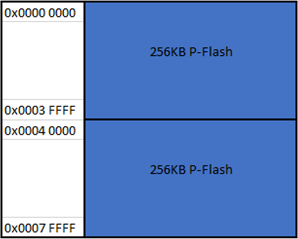
  • 2x256 KB Program Flash (P-Flash) array divided into 2 KB sectors with a flash address range from 0x0000_0000 to 0x0007_FFFF.
 

pastedImage_1.png


The statements to comprehend how the OTAP Client software and his features works are:

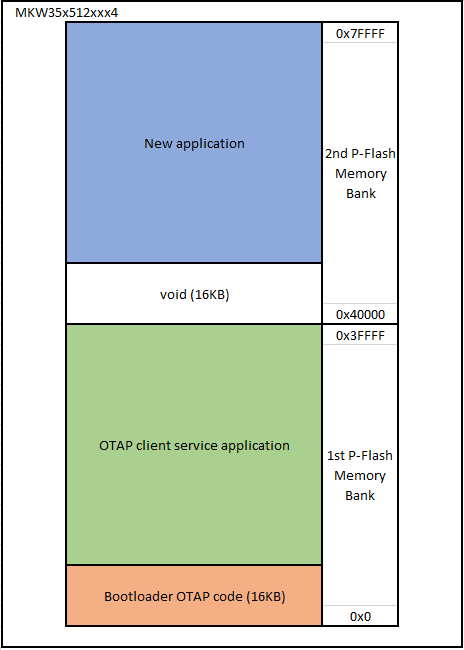
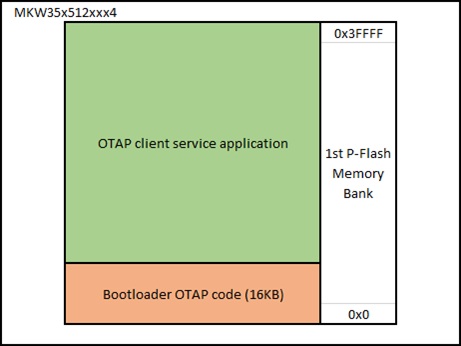
  1. The OTAP Client software is split into two parts, the OTAP bootloader and the OTAP client service. The OTAP bootloader verifies if there is a new image already available to reprogram the device. The OTAP client service software provides the Bluetooth LE custom services needed to communicate with the server that contains the new image file. Therefore, before to start the test, the device has been programmed twice, first with the OTAP bootloader then with the OTAP client service project. The mechanism used to have two different software in the same device is to store each one in different memory regions and this is implemented by the linker file. In the KW35 device, the bootloader application has reserved a 16KB slot of memory starting from the 0x0 address (0x0 to 0x3FFF) thus, the left memory of the first P-Flash memory bank is reserved, among other things, by the OTAP client service application.


    pastedImage_6.png
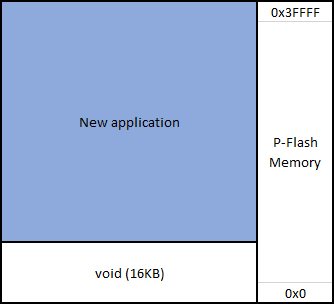
  2. To create a new image file for the client device, the developer needs to specify to the linker file that the code will be stored with an offset of 16KB since the first addresses are reserved for the bootloader.

    pastedImage_12.png
  3. At connection event, the server sends all the chunks of code to the client via Bluetooth LE. The client stores the code at the second P-Flash memory bank but is not able to run yet.


    pastedImage_14.png
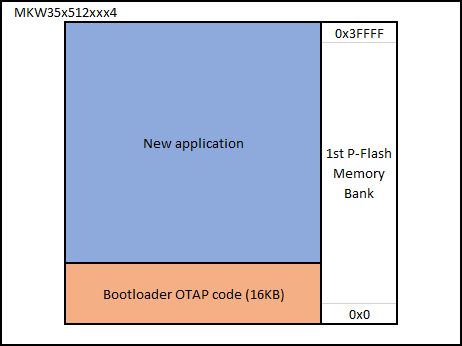
  4. When the broadcast has finished, and all chunks were sent, the OTAP bootloader detects this situation and triggers a command to reprogram the device with the new application. Due the new application was built with an offset of 16KB, the OTAP bootloader program the device starting from the 0x3FFF address and the OTAP client service application is overwritten by the new image. Then the OTAP bootloader triggers the new application, starting the execution of the code.
     

    pastedImage_16.png

Software Development Kit download and install


  1. Go to MCUXpresso web page.

  2. Log in with your registered account.

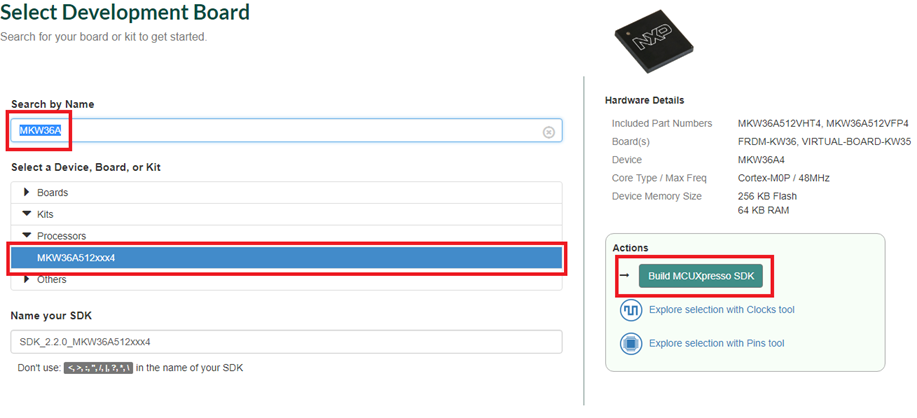
  3. Search for “MKW36A” device. Then click on the suggested processor and click on “Build MCUXpresso SDK”

    pastedImage_50.png
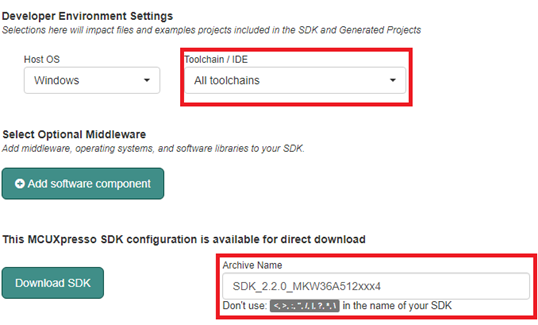
  4. The next page is displayed. Select “All toolchains” in the “Toolchain / IDE” combo box and provide the name to identify the package.pastedImage_52.png

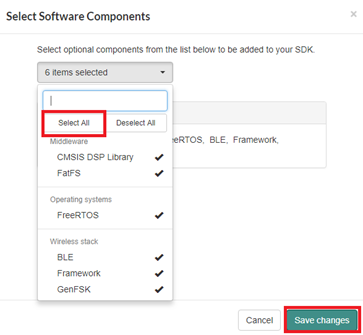
  5. Click on “Add software component”, then deploy the combo box and click on “Select All” option. Save the changes.pastedImage_55.png

  6. Click on “Download SDK” button and accept the license agreement.

  7. If MCUXpresso IDE is used, drag and drop the SDK zip folder in “Installed SDK’s” perspective to install the package.


Preparing the software to test the OTAP for KW35 device using IAR Embedded Workbench


This section provides the steps needed to test the OTAP software on the KW35.

  1. Program the OTAP bootloader on the KW35.

    1.1 Open the OTAP_bootloader project located at the following path:

    <SDK_download_root>\boards\virtual-board-kw35\wireless_examples\framework\bootloader_otap\bm\iar\bootloader_otap_bm.eww


    1.2 Flash the project (Ctrl + D). Stop the debug session (Ctrl + Shift + D).
  2. Program the OTAP client application on the KW35.

        2.1 Open the OTAP client project located in the path below.
         <SDK_download_root>\boards\frdmkw36\wireless_examples\bluetooth\otac_att\freertos\iar\otac_att_freertos.eww


         2.2 Follow the steps 2 to 12 described in the “4.1. Changes Required in Project Options and Settings” section of the AN12252 “Migration Guide from               MKW36Z512xxx4 to MKW35Z512xxx4” application note.


         2.3 Open the app_preinclude.h file under the source directory in the workspace. Find the “gEepromType_d” definition and update the value to                                 “gEepromDevice_InternalFlash_c” as shown below.


#define gEepromType_d gEepromDevice_InternalFlash_c‍‍‍‍‍


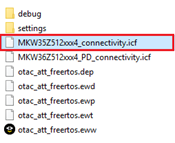
         2.4 Save the MKW35Z512xxx4_connectivity.icf file located at:

               <SDK_download_root>\middleware\wireless\framework_5.4.4\Common\devices\MKW35Z4\iar               

               Into the folder of the OTAP Client ATT project:

               <SDK_download_root>\boards\frdmkw36\wireless_examples\bluetooth\otac_att\freertos\iar
pastedImage_155.png


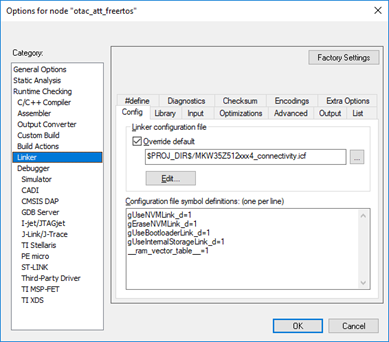
         2.5 Open the project options window (Alt+F7). In Linker/Config window click the icon next to linker path and select the linker configuration file “MKW35Z512xxx4_connectivity.icf”. Set the "gUseInternalStorageLink_d” flag to 1.
 

pastedImage_166.png


         2.6 Click the OK button in the project options window to save the new configuration.

         2.7 Flash the project (Ctrl + D). Stop the debug session (Ctrl + Shift + D).


Preparing the software to test the OTAP for KW35 device using MCUXpresso IDE


This section provides the steps needed to test the OTAP software on the KW35.

  1. Program the OTAP bootloader on the KW35.

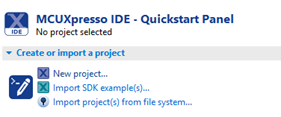
         1.1 Open MCUXpresso IDE. Click on “Import SDK example(s)” option in the “Quickstart Panel” view.            pastedImage_176.png
 

         1.2 Click on virtual-board-kw35 SDK icon.
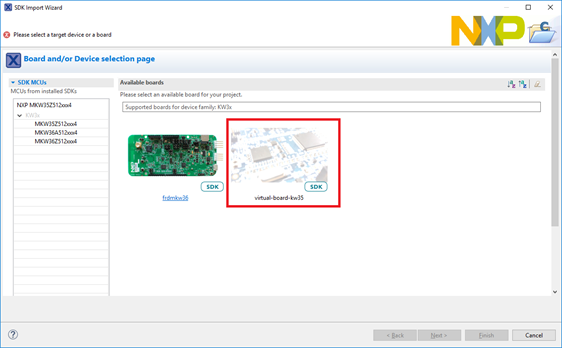
pastedImage_178.png         1.3 Deploy the wireless_examples\framework\bootloader_otap folders and select bm project. Click Finish button.                                                                           1.4 Select “Debug” option in the Quickstart Panel. Once the project is already loaded on the device, stop the debug session.


   2. Program the OTAP client application on the KW35.

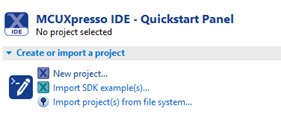
         2.1 Open MCUXpresso IDE. Click on “Import SDK example(s)” option in the “Quickstart Panel” view.              pastedImage_81.png
 

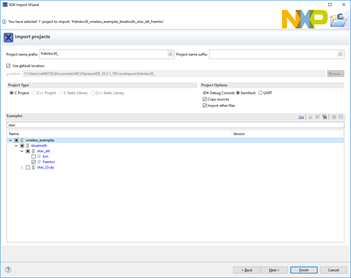
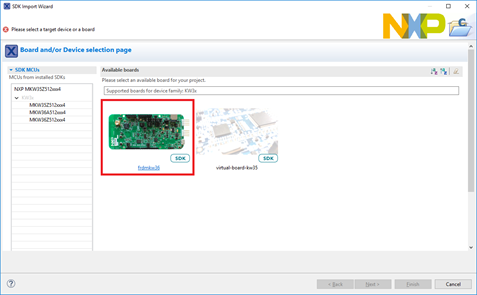
         2.2 Click twice on the frdmkw36 icon.                                                                  pastedImage_83.png         2.3 Type “otac_att” in the examples textbox and select the freertos project at wireless_examples\bluetooth\otac_att\freertos. Finally, click on Finish button.
 

pastedImage_85.png


         2.4 Follow the steps 5 to 17 described in the “5.1. Changes Required in Project Options and Settings” section of the AN12252 “Migration Guide from MKW36Z512xxx4 to MKW35Z512xxx4” application note.


         2.5. Open the app_preinclude.h file under the source directory in the workspace. Find the “gEepromType_d” definition and update the value to                “gEepromDevice_InternalFlash_c” as shown below.

#define gEepromType_d gEepromDevice_InternalFlash_c‍‍‍‍‍


         2.6 Save the MKW35Z512xxx4_connectivity.ld file located at:

               <SDK_download_root>\middleware\wireless\framework_5.4.4\Common\devices\MKW35Z4\gcc

               Into the source folder in the workspace.
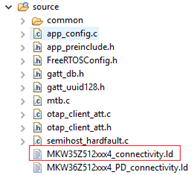
 

pastedImage_18.png


         2.7 Open the Project/Properties window. Next, go to the MCU Linker/Managed Linker Script perspective and edit the Linker Script name to “MKW35Z512xxx4_connectivity.ld”.
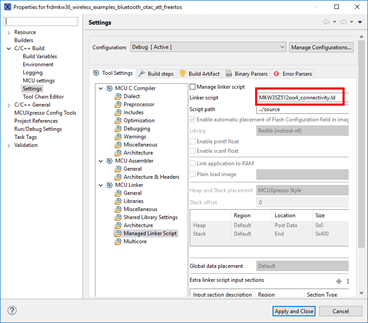
 

pastedImage_20.png


         2.8 Go to MCU Linker/Miscellaneous view. Press the icon below, a new window will be deployed. Add the following definition in the “Other options” box: --defsym=gUseInternalStorageLink_d=1.
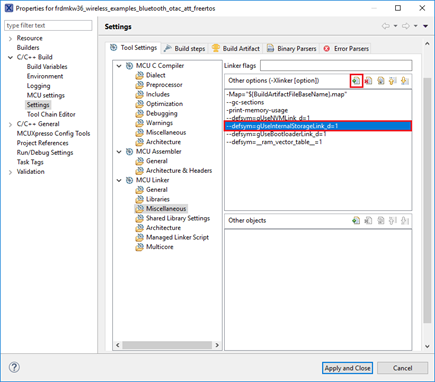
 

pastedImage_22.png


         2.9 Click the “Apply and Close” button in the project options window to save the new configuration.

         2.10 Select “Debug” option in the Quickstart Panel. Once the project is already loaded on the device, stop the debug session.


Running OTAP demo with the IoT Toolbox App

  1. Save the S-Record file created with the steps in Appendix A or Appendix B in your smartphone at a known location.
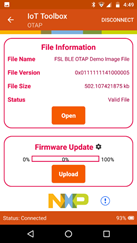
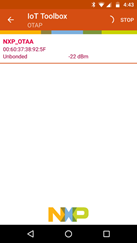
  2. Open the IoT Toolbox App and select OTAP demo. Press “SCAN” to start scanning for a suitable advertiser.

  3. Perform a falling edge on the PTB18 in the KW35 to start advertising.

  4. Create a connection with the founded device.

    pastedImage_94.png
  5. Press “Open” and search the S-Record file.

  6. Press “Upload” to start the transfer.

    pastedImage_95.png
  7. Once the transfer is complete, wait a few seconds until the bootloader has finished programming the new image. The new application will start automatically. 
 

Appendix A. Creating an S-Record image file for KW35 client using IAR Embedded Workbench

  1. Open the connectivity project that you want to program using the OTAP bootloader from your SDK. This example will make use of the glucose sensor project.

    <SDK_download_root>\boards\frdmkw36\wireless_examples\bluetooth\glucose_s\freertos\iar\glucose_s_freertos.eww
  2. Follow the steps 2 to 12 described in the “4.1. Changes Required in Project Options and Settings” section of the AN12252 “Migration Guide from              MKW36Z512xxx4 to MKW35Z512xxx4” application note.

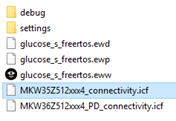
  3. Save the MKW35Z512xxx4_connectivity.icf file located at:

    <SDK_download_root>\middleware\wireless\framework_5.4.4\Common\devices\MKW35Z4\iar               

    In the containing folder of your project.

    <SDK_download_root>\boards\frdmkw36\wireless_examples\bluetooth\glucose_s\freertos\iar

    pastedImage_39.png
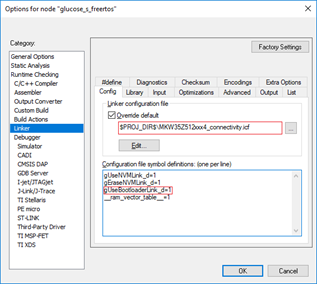
  4. Open the project options window (Alt+F7). In Linker/Config window click the icon next to linker path and select the linker configuration file MKW35Z512xxx4_connectivity.icf. Then, enable “gUseBootloaderLink_d” macro in the “Configuration file symbol definitions” textbox.pastedImage_79.png

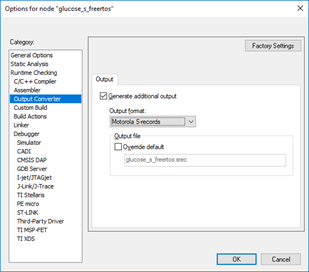
  5. Go to the “Output Converter” window. Deselect the “Override default" checkbox, expand the “Output format” combo box and select Motorola S-records format. Click OK button.                                                                                                                                          pastedImage_82.png

  6. Rebuild the project.

  7. Search the S-Record file in the following path:

    <SDK_download_root>\boards\frdmkw36\wireless_examples\bluetooth\glucose_s\freertos\iar\debug
 

Appendix B. Creating an S-Record image file for KW35 client using MCUXpresso IDE

  1. Open the connectivity project that you want to program using the OTAP bootloader from MCUXpresso IDE This example will make use of the glucose sensor project

  2. Follow the steps 5 to 17 described in the “5.1. Changes Required in Project Options and Settings” section of the AN12252 “Migration Guide from MKW36Z512xxx4 to MKW35Z512xxx4” application note.
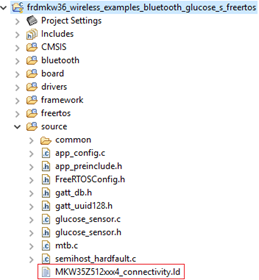
  3. Save the MKW35Z512xxx4_connectivity.ld file located at:

    <SDK_download_root>\middleware\wireless\framework_5.4.4\Common\devices\MKW35Z4\gcc

    Into the source folder in the workspace.                                                                                                                 pastedImage_193.png

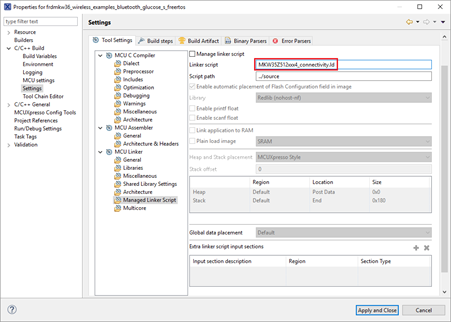
  4. Open the Project/Properties window. Next, go to the MCU Linker/Managed Linker Script perspective and edit the Linker Script name to “MKW35Z512xxx4_connectivity.ld”.                                                                                 pastedImage_195.png

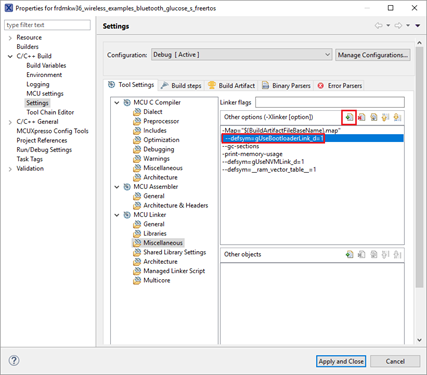
  5. Go to MCU Linker/Miscellaneous view. Press the icon below, a new window will be deployed. Add the following definition in the “Other options” box: --defsym=gUseBootloaderLink_d=1. Click the “Apply and Close” button.                             pastedImage_197.png

  6. Build the project.

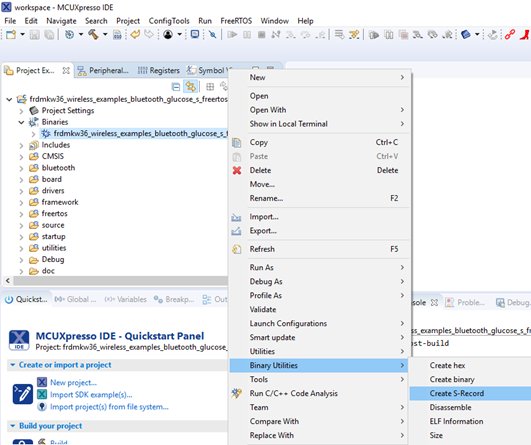
  7. Deploy the “Binaries” icon in the workspace. Click the right mouse button on the “.axf” file. Select “Binary Utilities/Create S-Record” option. The S-Record file will be saved at “Debug” folder in the workspace with “.s19” extension.
 pastedImage_199.png

Labels (3)
%3CLINGO-SUB%20id%3D%22lingo-sub-1117114%22%20slang%3D%22en-US%22%20mode%3D%22CREATE%22%3EKW35%20-%20Reprogramming%20a%20KW35%20device%20using%20the%20OTAP%20Client%20Software%3C%2FLINGO-SUB%3E%3CLINGO-BODY%20id%3D%22lingo-body-1117114%22%20slang%3D%22en-US%22%20mode%3D%22CREATE%22%3E%3CH1%20id%3D%22toc-hId-381618029%22%20style%3D%22color%3A%20%23646464%3B%20background-color%3A%20%23ffffff%3B%20border%3A%200px%3B%20font-weight%3A%20600%3B%20font-size%3A%2026px%3B%22%20id%3D%22toc-hId-381618029%22%20id%3D%22toc-hId-1297575032%22%3E%3CSTRONG%3E%3CFONT%20size%3D%225%22%20color%3D%22%23000000%22%3EIntroduction%3C%2FFONT%3E%3C%2FSTRONG%3E%3C%2FH1%3E%0A%3CP%3E%3CFONT%20color%3D%22%23000000%22%3EThis%20document%20provides%20guidance%20to%20load%20a%20new%20software%20image%20in%20a%20KW35%20device%20through%20OTAP%20(Over%20The%20Air%20Programming)%20bootloader%20for%20KW35.%20This%20article%20also%20provides%20the%20steps%20needed%20to%20download%20and%20install%20the%20SDK%20used%20in%20the%20tutorial.%3C%2FFONT%3E%3C%2FP%3E%0A%3CH1%20id%3D%22toc-hId--1425836434%22%20style%3D%22color%3A%20%23646464%3B%20background-color%3A%20%23ffffff%3B%20border%3A%200px%3B%20font-weight%3A%20600%3B%20font-size%3A%2026px%3B%22%20id%3D%22toc-hId--1425836434%22%20id%3D%22toc-hId--509879431%22%3E%3CSTRONG%3E%3CFONT%20size%3D%225%22%20color%3D%22%23000000%22%3ESoftware%20Requirements%3C%2FFONT%3E%3C%2FSTRONG%3E%3C%2FH1%3E%0A%3COL%20style%3D%22color%3A%20%2351626f%3B%20background-color%3A%20%23ffffff%3B%20border%3A%200px%3B%20padding%3A%200px%200px%200px%2030px%3B%22%3E%0A%3CLI%20style%3D%22border%3A%200px%3B%20font-weight%3A%20inherit%3B%20margin%3A%200.5ex%200px%3B%22%3E%3CFONT%20color%3D%22%23000000%22%3E%3CSPAN%20style%3D%22border%3A%200px%3B%20font-weight%3A%20inherit%3B%20font-size%3A%2011pt%3B%22%3EIAR%20Embedded%20Workbench%20IDE%20or%20MCUXpresso%20IDE%3C%2FSPAN%3E%3CSPAN%20style%3D%22border%3A%200px%3B%20font-weight%3A%20inherit%3B%20font-size%3A%2011pt%3B%22%3E.%3C%2FSPAN%3E%3C%2FFONT%3E%3C%2FLI%3E%0A%3CLI%20style%3D%22border%3A%200px%3B%20font-weight%3A%20inherit%3B%20margin%3A%200.5ex%200px%3B%22%3E%3CFONT%20color%3D%22%23000000%22%3E%3CSPAN%20style%3D%22background-color%3A%20%23ffffff%3B%20font-size%3A%2011.0pt%3B%22%3ESDK%20MKW36A512xxx4%20RC4%20or%20further.%3C%2FSPAN%3E%3C%2FFONT%3E%3C%2FLI%3E%0A%3C%2FOL%3E%0A%3CH1%20id%3D%22toc-hId-1061676399%22%20style%3D%22color%3A%20%23646464%3B%20background-color%3A%20%23ffffff%3B%20border%3A%200px%3B%20font-weight%3A%20600%3B%20font-size%3A%2026px%3B%22%20id%3D%22toc-hId-1061676399%22%20id%3D%22toc-hId-1977633402%22%3E%3CSTRONG%3E%3CFONT%20size%3D%225%22%20color%3D%22%23000000%22%3EHardware%20Requirements%3C%2FFONT%3E%3C%2FSTRONG%3E%3C%2FH1%3E%0A%3COL%20style%3D%22color%3A%20%2351626f%3B%20background-color%3A%20%23ffffff%3B%20border%3A%200px%3B%20padding%3A%200px%200px%200px%2030px%3B%22%3E%0A%3CLI%20style%3D%22border%3A%200px%3B%20font-weight%3A%20inherit%3B%20margin%3A%200.5ex%200px%3B%22%3E%0A%3CP%3E%3CFONT%20color%3D%22%23000000%22%3EMKW35A512xxx4%26nbsp%3B%3CSPAN%20style%3D%22font-size%3A%2011.0pt%3B%22%3Edevice.%3C%2FSPAN%3E%3C%2FFONT%3E%3C%2FP%3E%0A%3C%2FLI%3E%0A%3C%2FOL%3E%0A%3CH1%20id%3D%22toc-hId--745778064%22%20style%3D%22color%3A%20%23646464%3B%20background-color%3A%20%23ffffff%3B%20border%3A%200px%3B%20font-weight%3A%20600%3B%20font-size%3A%2026px%3B%22%20id%3D%22toc-hId--745778064%22%20id%3D%22toc-hId-170178939%22%3E%3CSTRONG%3E%3CFONT%20size%3D%225%22%20color%3D%22%23000000%22%3EKW35%20Flash%20Memory%20Used%20for%20the%20OTAP%20Software%20Deployment%3C%2FFONT%3E%3C%2FSTRONG%3E%3C%2FH1%3E%0A%3CP%20style%3D%22color%3A%20%2351626f%3B%20background-color%3A%20%23ffffff%3B%20border%3A%200px%3B%20font-size%3A%2015px%3B%22%3E%3CFONT%20color%3D%22%23000000%22%3EThe%20KW35%20Flash%20is%20partitioned%20into%3A%3C%2FFONT%3E%3C%2FP%3E%0A%3CUL%20style%3D%22color%3A%20%2351626f%3B%20background-color%3A%20%23ffffff%3B%20border%3A%200px%3B%20font-size%3A%2015px%3B%20padding%3A%200px%200px%200px%2030px%3B%22%3E%0A%3CLI%20style%3D%22border%3A%200px%3B%20font-weight%3A%20inherit%3B%20font-size%3A%2015px%3B%20margin%3A%200.5ex%200px%3B%22%3E%3CFONT%20color%3D%22%23000000%22%3E2x256%20KB%20Program%20Flash%20(P-Flash)%20array%20divided%20into%202%20KB%20sectors%20with%20a%20flash%20address%20range%20from%200x0000_0000%20to%200x0007_FFFF.%3C%2FFONT%3E%3C%2FLI%3E%0A%3C%2FUL%3E%0A%3CP%20style%3D%22color%3A%20%2351626f%3B%20background-color%3A%20%23ffffff%3B%20border%3A%200px%3B%20font-size%3A%2015px%3B%22%3E%26nbsp%3B%3C%2FP%3E%0A%3CP%20style%3D%22color%3A%20%2351626f%3B%20background-color%3A%20%23ffffff%3B%20border%3A%200px%3B%20font-size%3A%2015px%3B%22%3E%3CFONT%20color%3D%22%23000000%22%3E%3CSPAN%20class%3D%22lia-inline-image-display-wrapper%22%3E%3CSPAN%20class%3D%22lia-inline-image-display-wrapper%20lia-image-align-inline%22%20image-alt%3D%22pastedImage_1.png%22%20style%3D%22width%3A%20298px%3B%22%3E%3Cspan%20class%3D%22lia-inline-image-display-wrapper%22%20image-alt%3D%22pastedImage_1.png%22%20style%3D%22width%3A%20298px%3B%22%3E%3Cimg%20src%3D%22https%3A%2F%2Fcommunity.nxp.com%2Ft5%2Fimage%2Fserverpage%2Fimage-id%2F76926i90653FF7698D43BD%2Fimage-size%2Flarge%3Fv%3Dv2%26amp%3Bpx%3D999%22%20role%3D%22button%22%20title%3D%22pastedImage_1.png%22%20alt%3D%22pastedImage_1.png%22%20%2F%3E%3Cspan%20class%3D%22lia-inline-image-caption%22%20onclick%3D%22event.preventDefault()%3B%22%3EpastedImage_1.png%3C%2Fspan%3E%3C%2Fspan%3E%3C%2FSPAN%3E%3C%2FSPAN%3E%3C%2FFONT%3E%3C%2FP%3E%0A%3CP%20style%3D%22color%3A%20%2351626f%3B%20background-color%3A%20%23ffffff%3B%20border%3A%200px%3B%20font-size%3A%2015px%3B%22%3E%26nbsp%3B%3C%2FP%3E%0A%3CP%20style%3D%22color%3A%20%2351626f%3B%20background-color%3A%20%23ffffff%3B%20border%3A%200px%3B%20font-size%3A%2015px%3B%22%3E%3CFONT%20color%3D%22%23000000%22%3EThe%20statements%20to%20comprehend%20how%20the%20OTAP%20Client%20software%20and%20his%20features%20works%20are%3A%3C%2FFONT%3E%3C%2FP%3E%0A%3COL%20style%3D%22color%3A%20%2351626f%3B%20background-color%3A%20%23ffffff%3B%20border%3A%200px%3B%20font-size%3A%2015px%3B%20padding%3A%200px%200px%200px%2030px%3B%22%3E%0A%3CLI%20style%3D%22border%3A%200px%3B%20font-weight%3A%20inherit%3B%20font-size%3A%2015px%3B%20margin%3A%200.5ex%200px%3B%22%3E%0A%3CP%20style%3D%22border%3A%200px%3B%20font-weight%3A%20inherit%3B%20font-size%3A%2015px%3B%22%3E%3CFONT%20color%3D%22%23000000%22%3EThe%20OTAP%20Client%20software%20is%20split%20into%20two%20parts%2C%20the%20OTAP%20bootloader%20and%20the%20OTAP%20client%20service.%20The%20OTAP%20bootloader%20verifies%20if%20there%20is%20a%20new%20image%20already%20available%20to%20reprogram%20the%20device.%20The%20OTAP%20client%20service%20software%20provides%20the%20Bluetooth%20LE%20custom%20services%20needed%20to%20communicate%20with%20the%20server%20that%20contains%20the%20new%20image%20file.%20Therefore%2C%20before%20to%20start%20the%20test%2C%20the%20device%20has%20been%20programmed%20twice%2C%20first%20with%20the%20OTAP%20bootloader%20then%20with%20the%20OTAP%20client%20service%20project.%20The%20mechanism%20used%20to%20have%20two%20different%20software%20in%20the%20same%20device%20is%20to%20store%20each%20one%20in%20different%20memory%20regions%20and%20this%20is%20implemented%20by%20the%20linker%20file.%20In%20the%20KW35%20device%2C%20the%20bootloader%20application%20has%20reserved%20a%2016KB%20slot%20of%20memory%20starting%20from%20the%200x0%20address%20(0x0%20to%200x3FFF)%20thus%2C%20the%20left%20memory%20of%20the%20first%20P-Flash%20memory%20bank%20is%20reserved%2C%20among%20other%20things%2C%20by%20the%20OTAP%20client%20service%20application.%3C%2FFONT%3E%3C%2FP%3E%0A%3CP%20style%3D%22border%3A%200px%3B%20font-weight%3A%20inherit%3B%20font-size%3A%2015px%3B%22%3E%26nbsp%3B%3C%2FP%3E%0A%3CFONT%20color%3D%22%23000000%22%3E%3CSPAN%20class%3D%22lia-inline-image-display-wrapper%22%3E%3CSPAN%20class%3D%22lia-inline-image-display-wrapper%20lia-image-align-inline%22%20image-alt%3D%22pastedImage_6.png%22%20style%3D%22width%3A%20461px%3B%22%3E%3Cspan%20class%3D%22lia-inline-image-display-wrapper%22%20image-alt%3D%22pastedImage_6.png%22%20style%3D%22width%3A%20461px%3B%22%3E%3Cimg%20src%3D%22https%3A%2F%2Fcommunity.nxp.com%2Ft5%2Fimage%2Fserverpage%2Fimage-id%2F77499i28AD224815656367%2Fimage-size%2Flarge%3Fv%3Dv2%26amp%3Bpx%3D999%22%20role%3D%22button%22%20title%3D%22pastedImage_6.png%22%20alt%3D%22pastedImage_6.png%22%20%2F%3E%3Cspan%20class%3D%22lia-inline-image-caption%22%20onclick%3D%22event.preventDefault()%3B%22%3EpastedImage_6.png%3C%2Fspan%3E%3C%2Fspan%3E%3C%2FSPAN%3E%3C%2FSPAN%3E%3C%2FFONT%3E%3C%2FLI%3E%0A%3CLI%20style%3D%22border%3A%200px%3B%20font-weight%3A%20inherit%3B%20font-size%3A%2015px%3B%20margin%3A%200.5ex%200px%3B%22%3E%0A%3CP%20style%3D%22border%3A%200px%3B%20font-weight%3A%20inherit%3B%20font-size%3A%2015px%3B%22%3E%3CFONT%20color%3D%22%23000000%22%3ETo%20create%20a%20new%20image%20file%20for%20the%20client%20device%2C%20the%20developer%20needs%20to%20specify%20to%20the%20linker%20file%20that%20the%20code%20will%20be%20stored%20with%20an%20offset%20of%2016KB%20since%20the%20first%20addresses%20are%20reserved%20for%20the%20bootloader.%3C%2FFONT%3E%3C%2FP%3E%0A%3CFONT%20color%3D%22%23000000%22%3E%3CSPAN%20class%3D%22lia-inline-image-display-wrapper%22%3E%3CSPAN%20class%3D%22lia-inline-image-display-wrapper%20lia-image-align-inline%22%20image-alt%3D%22pastedImage_12.png%22%20style%3D%22width%3A%20334px%3B%22%3E%3Cspan%20class%3D%22lia-inline-image-display-wrapper%22%20image-alt%3D%22pastedImage_12.png%22%20style%3D%22width%3A%20334px%3B%22%3E%3Cimg%20src%3D%22https%3A%2F%2Fcommunity.nxp.com%2Ft5%2Fimage%2Fserverpage%2Fimage-id%2F77747i57C1D119460220F9%2Fimage-size%2Flarge%3Fv%3Dv2%26amp%3Bpx%3D999%22%20role%3D%22button%22%20title%3D%22pastedImage_12.png%22%20alt%3D%22pastedImage_12.png%22%20%2F%3E%3Cspan%20class%3D%22lia-inline-image-caption%22%20onclick%3D%22event.preventDefault()%3B%22%3EpastedImage_12.png%3C%2Fspan%3E%3C%2Fspan%3E%3C%2FSPAN%3E%3C%2FSPAN%3E%3C%2FFONT%3E%3C%2FLI%3E%0A%3CLI%20style%3D%22border%3A%200px%3B%20font-weight%3A%20inherit%3B%20font-size%3A%2015px%3B%20margin%3A%200.5ex%200px%3B%22%3E%0A%3CP%20style%3D%22border%3A%200px%3B%20font-weight%3A%20inherit%3B%20font-size%3A%2015px%3B%22%3E%3CFONT%20color%3D%22%23000000%22%3EAt%20connection%20event%2C%20the%20server%20sends%20all%20the%20chunks%20of%20code%20to%20the%20client%20via%20Bluetooth%20LE.%20The%20client%20stores%20the%20code%20at%20the%20second%20P-Flash%20memory%20bank%20but%20is%20not%20able%20to%20run%20yet.%3C%2FFONT%3E%3C%2FP%3E%0A%3CP%20style%3D%22border%3A%200px%3B%20font-weight%3A%20inherit%3B%20font-size%3A%2015px%3B%22%3E%26nbsp%3B%3C%2FP%3E%0A%3CFONT%20color%3D%22%23000000%22%3E%3CSPAN%20class%3D%22lia-inline-image-display-wrapper%22%3E%3CSPAN%20class%3D%22lia-inline-image-display-wrapper%20lia-image-align-inline%22%20image-alt%3D%22pastedImage_14.png%22%20style%3D%22width%3A%20464px%3B%22%3E%3Cspan%20class%3D%22lia-inline-image-display-wrapper%22%20image-alt%3D%22pastedImage_14.png%22%20style%3D%22width%3A%20464px%3B%22%3E%3Cimg%20src%3D%22https%3A%2F%2Fcommunity.nxp.com%2Ft5%2Fimage%2Fserverpage%2Fimage-id%2F77881iE9886FF3CF398154%2Fimage-size%2Flarge%3Fv%3Dv2%26amp%3Bpx%3D999%22%20role%3D%22button%22%20title%3D%22pastedImage_14.png%22%20alt%3D%22pastedImage_14.png%22%20%2F%3E%3Cspan%20class%3D%22lia-inline-image-caption%22%20onclick%3D%22event.preventDefault()%3B%22%3EpastedImage_14.png%3C%2Fspan%3E%3C%2Fspan%3E%3C%2FSPAN%3E%3C%2FSPAN%3E%3C%2FFONT%3E%3C%2FLI%3E%0A%3CLI%20style%3D%22border%3A%200px%3B%20font-weight%3A%20inherit%3B%20font-size%3A%2015px%3B%20margin%3A%200.5ex%200px%3B%22%3E%0A%3CP%20style%3D%22border%3A%200px%3B%20font-weight%3A%20inherit%3B%20font-size%3A%2015px%3B%22%3E%3CFONT%20color%3D%22%23000000%22%3EWhen%20the%20broadcast%20has%20finished%2C%20and%20all%20chunks%20were%20sent%2C%20the%20OTAP%20bootloader%20detects%20this%20situation%20and%20triggers%20a%20command%20to%20reprogram%20the%20device%20with%20the%20new%20application.%20Due%20the%20new%20application%20was%20built%20with%20an%20offset%20of%2016KB%2C%20the%20OTAP%20bootloader%20program%20the%20device%20starting%20from%20the%200x3FFF%20address%20and%20the%20OTAP%20client%20service%20application%20is%20overwritten%20by%20the%20new%20image.%20Then%20the%20OTAP%20bootloader%20triggers%20the%20new%20application%2C%20starting%20the%20execution%20of%20the%20code.%3C%2FFONT%3E%3C%2FP%3E%0A%3CP%20style%3D%22border%3A%200px%3B%20font-weight%3A%20inherit%3B%20font-size%3A%2015px%3B%22%3E%26nbsp%3B%3C%2FP%3E%0A%3CFONT%20color%3D%22%23000000%22%3E%3CSPAN%20class%3D%22lia-inline-image-display-wrapper%22%3E%3CSPAN%20class%3D%22lia-inline-image-display-wrapper%20lia-image-align-inline%22%20image-alt%3D%22pastedImage_16.png%22%20style%3D%22width%3A%20462px%3B%22%3E%3Cspan%20class%3D%22lia-inline-image-display-wrapper%22%20image-alt%3D%22pastedImage_16.png%22%20style%3D%22width%3A%20462px%3B%22%3E%3Cimg%20src%3D%22https%3A%2F%2Fcommunity.nxp.com%2Ft5%2Fimage%2Fserverpage%2Fimage-id%2F78059i2648CCF9B2E19163%2Fimage-size%2Flarge%3Fv%3Dv2%26amp%3Bpx%3D999%22%20role%3D%22button%22%20title%3D%22pastedImage_16.png%22%20alt%3D%22pastedImage_16.png%22%20%2F%3E%3Cspan%20class%3D%22lia-inline-image-caption%22%20onclick%3D%22event.preventDefault()%3B%22%3EpastedImage_16.png%3C%2Fspan%3E%3C%2Fspan%3E%3C%2FSPAN%3E%3C%2FSPAN%3E%3C%2FFONT%3E%3C%2FLI%3E%0A%3C%2FOL%3E%0A%3CH1%20id%3D%22toc-hId-1741734769%22%20style%3D%22color%3A%20%23646464%3B%20background-color%3A%20%23ffffff%3B%20border%3A%200px%3B%20font-weight%3A%20600%3B%20font-size%3A%2026px%3B%22%20id%3D%22toc-hId-1741734769%22%20id%3D%22toc-hId--1637275524%22%3E%3CSTRONG%3E%3CFONT%20size%3D%225%22%20color%3D%22%23000000%22%3ESoftware%20Development%20Kit%20download%20and%20install%3C%2FFONT%3E%3C%2FSTRONG%3E%3C%2FH1%3E%0A%3CBR%20%2F%3E%0A%3COL%3E%0A%3CLI%3E%0A%3CP%3E%3CFONT%20color%3D%22%23000000%22%3EGo%20to%20%3CA%20href%3D%22https%3A%2F%2Fmcuxpresso.nxp.com%2Fen%2Fselect%22%20target%3D%22_blank%22%20rel%3D%22nofollow%20noopener%20noreferrer%22%3EMCUXpresso%20web%20page%3C%2FA%3E.%3C%2FFONT%3E%3C%2FP%3E%0A%3C%2FLI%3E%0A%3CLI%3E%0A%3CP%3E%3CFONT%20color%3D%22%23000000%22%3ELog%20in%20with%20your%20registered%20account.%3C%2FFONT%3E%3C%2FP%3E%0A%3C%2FLI%3E%0A%3CLI%20style%3D%22text-align%3A%20left%3B%22%3E%0A%3CP%3E%3CFONT%20color%3D%22%23000000%22%3ESearch%20for%20%E2%80%9CMKW36A%E2%80%9D%20device.%20Then%20click%20on%20the%20suggested%20processor%20and%20click%20on%20%E2%80%9CBuild%20MCUXpresso%20SDK%E2%80%9D%3C%2FFONT%3E%3C%2FP%3E%0A%3CFONT%20color%3D%22%23000000%22%3E%3CSPAN%20class%3D%22lia-inline-image-display-wrapper%22%3E%3CSPAN%20class%3D%22lia-inline-image-display-wrapper%20lia-image-align-inline%22%20image-alt%3D%22pastedImage_50.png%22%20style%3D%22width%3A%20917px%3B%22%3E%3Cspan%20class%3D%22lia-inline-image-display-wrapper%22%20image-alt%3D%22pastedImage_50.png%22%20style%3D%22width%3A%20917px%3B%22%3E%3Cimg%20src%3D%22https%3A%2F%2Fcommunity.nxp.com%2Ft5%2Fimage%2Fserverpage%2Fimage-id%2F78386i43ECB317D51E87EA%2Fimage-size%2Flarge%3Fv%3Dv2%26amp%3Bpx%3D999%22%20role%3D%22button%22%20title%3D%22pastedImage_50.png%22%20alt%3D%22pastedImage_50.png%22%20%2F%3E%3Cspan%20class%3D%22lia-inline-image-caption%22%20onclick%3D%22event.preventDefault()%3B%22%3EpastedImage_50.png%3C%2Fspan%3E%3C%2Fspan%3E%3C%2FSPAN%3E%3C%2FSPAN%3E%3C%2FFONT%3E%3C%2FLI%3E%0A%3CLI%3E%0A%3CP%3E%3CFONT%20color%3D%22%23000000%22%3EThe%20next%20page%20is%20displayed.%20Select%20%E2%80%9CAll%20toolchains%E2%80%9D%20in%20the%20%E2%80%9CToolchain%20%2F%20IDE%E2%80%9D%20combo%20box%20and%20provide%20the%20name%20to%20identify%20the%20package.%3CSPAN%20class%3D%22lia-inline-image-display-wrapper%22%3E%3CSPAN%20class%3D%22lia-inline-image-display-wrapper%20lia-image-align-inline%22%20image-alt%3D%22pastedImage_52.png%22%20style%3D%22width%3A%20538px%3B%22%3E%3Cspan%20class%3D%22lia-inline-image-display-wrapper%22%20image-alt%3D%22pastedImage_52.png%22%20style%3D%22width%3A%20538px%3B%22%3E%3Cimg%20src%3D%22https%3A%2F%2Fcommunity.nxp.com%2Ft5%2Fimage%2Fserverpage%2Fimage-id%2F78550i4BD7BBAA4167980B%2Fimage-size%2Flarge%3Fv%3Dv2%26amp%3Bpx%3D999%22%20role%3D%22button%22%20title%3D%22pastedImage_52.png%22%20alt%3D%22pastedImage_52.png%22%20%2F%3E%3Cspan%20class%3D%22lia-inline-image-caption%22%20onclick%3D%22event.preventDefault()%3B%22%3EpastedImage_52.png%3C%2Fspan%3E%3C%2Fspan%3E%3C%2FSPAN%3E%3C%2FSPAN%3E%3C%2FFONT%3E%3C%2FP%3E%0A%3C%2FLI%3E%0A%3CLI%3E%0A%3CP%3E%3CFONT%20color%3D%22%23000000%22%3EClick%20on%20%E2%80%9CAdd%20software%20component%E2%80%9D%2C%20then%20deploy%20the%20combo%20box%20and%20click%20on%20%E2%80%9CSelect%20All%E2%80%9D%20option.%20Save%20the%20changes.%3CSPAN%20class%3D%22lia-inline-image-display-wrapper%22%3E%3CSPAN%20class%3D%22lia-inline-image-display-wrapper%20lia-image-align-inline%22%20image-alt%3D%22pastedImage_55.png%22%20style%3D%22width%3A%20363px%3B%22%3E%3Cspan%20class%3D%22lia-inline-image-display-wrapper%22%20image-alt%3D%22pastedImage_55.png%22%20style%3D%22width%3A%20363px%3B%22%3E%3Cimg%20src%3D%22https%3A%2F%2Fcommunity.nxp.com%2Ft5%2Fimage%2Fserverpage%2Fimage-id%2F78645i7B5C4D40E816061B%2Fimage-size%2Flarge%3Fv%3Dv2%26amp%3Bpx%3D999%22%20role%3D%22button%22%20title%3D%22pastedImage_55.png%22%20alt%3D%22pastedImage_55.png%22%20%2F%3E%3Cspan%20class%3D%22lia-inline-image-caption%22%20onclick%3D%22event.preventDefault()%3B%22%3EpastedImage_55.png%3C%2Fspan%3E%3C%2Fspan%3E%3C%2FSPAN%3E%3C%2FSPAN%3E%3C%2FFONT%3E%3C%2FP%3E%0A%3C%2FLI%3E%0A%3CLI%3E%0A%3CP%3E%3CFONT%20color%3D%22%23000000%22%3EClick%20on%20%E2%80%9CDownload%20SDK%E2%80%9D%20button%20and%20accept%20the%20license%20agreement.%3C%2FFONT%3E%3C%2FP%3E%0A%3C%2FLI%3E%0A%3CLI%3E%0A%3CP%3E%3CFONT%20color%3D%22%23000000%22%3EIf%20MCUXpresso%20IDE%20is%20used%2C%20drag%20and%20drop%20the%20SDK%20zip%20folder%20in%20%E2%80%9CInstalled%20SDK%E2%80%99s%E2%80%9D%20perspective%20to%20install%20the%20package.%3C%2FFONT%3E%3C%2FP%3E%0A%3C%2FLI%3E%0A%3C%2FOL%3E%0A%3CBR%20%2F%3E%0A%3CBR%20%2F%3E%0A%3CH1%20id%3D%22toc-hId--65719694%22%20style%3D%22color%3A%20%23646464%3B%20background-color%3A%20%23ffffff%3B%20border%3A%200px%3B%20font-weight%3A%20600%3B%20font-size%3A%2026px%3B%22%20id%3D%22toc-hId--65719694%22%20id%3D%22toc-hId-850237309%22%3E%3CSTRONG%3E%3CFONT%20size%3D%225%22%20color%3D%22%23000000%22%3EPreparing%20the%20software%20to%20test%20the%20OTAP%20for%20KW35%20device%20using%20IAR%20Embedded%20Workbench%3C%2FFONT%3E%3C%2FSTRONG%3E%3C%2FH1%3E%0A%3CP%20style%3D%22color%3A%20%2351626f%3B%20background-color%3A%20%23ffffff%3B%20border%3A%200px%3B%22%3E%26nbsp%3B%3C%2FP%3E%0A%3CP%20style%3D%22color%3A%20%2351626f%3B%20background-color%3A%20%23ffffff%3B%20border%3A%200px%3B%22%3E%3CFONT%20color%3D%22%23000000%22%3EThis%20section%20provides%20the%20steps%20needed%20to%20test%20the%20OTAP%20software%20on%20the%20KW35.%3C%2FFONT%3E%3C%2FP%3E%0A%3COL%20style%3D%22color%3A%20%2351626f%3B%20background-color%3A%20%23ffffff%3B%20border%3A%200px%3B%20padding%3A%200px%200px%200px%2030px%3B%22%3E%0A%3CLI%20style%3D%22border%3A%200px%3B%20font-weight%3A%20inherit%3B%20margin%3A%200.5ex%200px%3B%22%3E%0A%3CP%20style%3D%22border%3A%200px%3B%20font-weight%3A%20inherit%3B%22%3E%3CFONT%20color%3D%22%23000000%22%3E%3CSPAN%20style%3D%22border%3A%200px%3B%20font-weight%3A%20inherit%3B%22%3EProgram%20the%20OTAP%20bootloader%20on%20the%20KW35.%3C%2FSPAN%3E%3C%2FFONT%3E%3C%2FP%3E%0A%3CFONT%20color%3D%22%23000000%22%3E1.1%20Open%20the%20OTAP_bootloader%20project%20located%20at%20the%20following%20path%3A%3C%2FFONT%3E%3CBR%20%2F%3E%0A%3CP%3E%3CFONT%20color%3D%22%23000000%22%3E%3CSPAN%20style%3D%22font-size%3A%2012px%3B%22%3E%3CEM%3E%3CSDK_DOWNLOAD_ROOT%3E%5Cboards%5Cvirtual-board-kw35%5Cwireless_examples%5Cframework%5Cbootloader_otap%5Cbm%5Ciar%5Cbootloader_otap_bm.eww%3C%2FSDK_DOWNLOAD_ROOT%3E%3C%2FEM%3E%3C%2FSPAN%3E%3C%2FFONT%3E%3C%2FP%3E%0A%3CBR%20%2F%3E%0A%3CBR%20%2F%3E%0A%3CFONT%20color%3D%22%23000000%22%3E%3CSPAN%20style%3D%22background-color%3A%20%23ffffff%3B%22%3E1.2%20Flash%20the%20project%20(Ctrl%20%2B%20D).%20Stop%20the%20debug%20session%20(Ctrl%20%2B%20Shift%20%2B%20D).%3C%2FSPAN%3E%3C%2FFONT%3E%3C%2FLI%3E%0A%3CLI%20style%3D%22border%3A%200px%3B%20font-weight%3A%20inherit%3B%20margin%3A%200.5ex%200px%3B%22%3E%0A%3CP%20style%3D%22border%3A%200px%3B%20font-weight%3A%20inherit%3B%22%3E%3CFONT%20color%3D%22%23000000%22%3EProgram%20the%20OTAP%20client%20application%20on%20the%20KW35.%3C%2FFONT%3E%3C%2FP%3E%0A%3C%2FLI%3E%0A%3C%2FOL%3E%0A%3CP%20style%3D%22color%3A%20%2351626f%3B%20background-color%3A%20%23ffffff%3B%20border%3A%200px%3B%22%3E%3CFONT%20color%3D%22%23000000%22%3E%26nbsp%3B%26nbsp%3B%26nbsp%3B%26nbsp%3B%26nbsp%3B%26nbsp%3B%26nbsp%3B%26nbsp%3B2.1%20Open%20the%20OTAP%20client%20project%20located%20in%20the%20path%20below.%3C%2FFONT%3E%3CBR%20%2F%3E%3CFONT%20color%3D%22%23000000%22%3E%26nbsp%3B%26nbsp%3B%26nbsp%3B%26nbsp%3B%26nbsp%3B%26nbsp%3B%26nbsp%3B%26nbsp%3B%26nbsp%3B%3CSPAN%20style%3D%22border%3A%200px%3B%20font-weight%3A%20inherit%3B%20font-size%3A%2012px%3B%22%3E%3CEM%3E%3CSDK_DOWNLOAD_ROOT%3E%5Cboards%5Cfrdmkw36%5Cwireless_examples%5Cbluetooth%5Cotac_att%5Cfreertos%5Ciar%5Cotac_att_freertos.eww%3C%2FSDK_DOWNLOAD_ROOT%3E%3C%2FEM%3E%3C%2FSPAN%3E%3C%2FFONT%3E%3C%2FP%3E%0A%3CP%20style%3D%22color%3A%20%2351626f%3B%20background-color%3A%20%23ffffff%3B%20border%3A%200px%3B%22%20dir%3D%22ltr%22%3E%3CBR%20%2F%3E%3CFONT%20color%3D%22%23000000%22%3E%26nbsp%3B%26nbsp%3B%26nbsp%3B%26nbsp%3B%26nbsp%3B%26nbsp%3B%26nbsp%3B%26nbsp%3B%26nbsp%3B2.2%26nbsp%3B%3CSPAN%20style%3D%22font-size%3A%2011.0pt%3B%22%3EFollow%20the%20steps%202%20to%2012%20described%20in%20the%20%E2%80%9C%3CEM%3E4.1.%20Changes%20Required%20in%20Project%20Options%20and%20Settings%3C%2FEM%3E%E2%80%9D%20section%20of%20the%20AN12252%20%E2%80%9CMigration%20Guide%20from%26nbsp%3B%20%26nbsp%3B%20%26nbsp%3B%20%26nbsp%3B%20%26nbsp%3B%20%26nbsp%3B%20%26nbsp%3B%20%26nbsp%3BMKW36Z512xxx4%20to%20MKW35Z512xxx4%E2%80%9D%20%3CA%20href%3D%22https%3A%2F%2Fwww.nxp.com%2Fdocs%2Fen%2Fapplication-note%2FAN12252.pdf%22%20target%3D%22_blank%22%20rel%3D%22nofollow%20noopener%20noreferrer%22%3Eapplication%20note%3C%2FA%3E.%3C%2FSPAN%3E%3C%2FFONT%3E%3C%2FP%3E%0A%3CP%20style%3D%22color%3A%20%2351626f%3B%20background-color%3A%20%23ffffff%3B%20border%3A%200px%3B%22%3E%26nbsp%3B%3C%2FP%3E%0A%3CP%20style%3D%22color%3A%20%2351626f%3B%20background-color%3A%20%23ffffff%3B%20border%3A%200px%3B%22%3E%3CFONT%20color%3D%22%23000000%22%3E%26nbsp%3B%20%26nbsp%3B%26nbsp%3B%26nbsp%3B%26nbsp%3B%26nbsp%3B%26nbsp%3B%26nbsp%3B2.3%20Open%20the%20app_preinclude.h%20file%20under%20the%20source%20directory%20in%20the%20workspace.%20Find%20the%20%E2%80%9CgEepromType_d%E2%80%9D%20definition%20and%20update%20the%20value%20to%26nbsp%3B%20%26nbsp%3B%20%26nbsp%3B%20%26nbsp%3B%20%26nbsp%3B%20%26nbsp%3B%20%26nbsp%3B%20%26nbsp%3B%20%26nbsp%3B%20%26nbsp%3B%26nbsp%3B%26nbsp%3B%26nbsp%3B%26nbsp%3B%26nbsp%3B%26nbsp%3B%26nbsp%3B%26nbsp%3B%26nbsp%3B%26nbsp%3B%26nbsp%3B%26nbsp%3B%26nbsp%3B%26nbsp%3B%E2%80%9CgEepromDevice_InternalFlash_c%E2%80%9D%20as%20shown%20below.%3C%2FFONT%3E%3C%2FP%3E%0A%3CP%20style%3D%22color%3A%20%2351626f%3B%20background-color%3A%20%23ffffff%3B%20border%3A%200px%3B%22%3E%26nbsp%3B%3C%2FP%3E%0A%3CPRE%20class%3D%22lia-code-sample%20language-c%22%3E%3CCODE%3E%23define%20gEepromType_d%20gEepromDevice_InternalFlash_c%E2%80%8D%E2%80%8D%E2%80%8D%E2%80%8D%E2%80%8D%3C%2FCODE%3E%3C%2FPRE%3E%0A%3CP%20style%3D%22color%3A%20%2351626f%3B%20background-color%3A%20%23ffffff%3B%20border%3A%200px%3B%22%3E%26nbsp%3B%3C%2FP%3E%0A%3CP%20style%3D%22color%3A%20%2351626f%3B%20background-color%3A%20%23ffffff%3B%20border%3A%200px%3B%22%3E%3CFONT%20color%3D%22%23000000%22%3E%26nbsp%3B%26nbsp%3B%26nbsp%3B%26nbsp%3B%26nbsp%3B%26nbsp%3B%26nbsp%3B%26nbsp%3B%26nbsp%3B2.4%26nbsp%3B%3CSPAN%20style%3D%22font-size%3A%2011.0pt%3B%22%3ESave%20the%20MKW35Z512xxx4_connectivity.icf%20file%20located%20at%3A%3C%2FSPAN%3E%3C%2FFONT%3E%3C%2FP%3E%0A%3CP%20style%3D%22color%3A%20%2351626f%3B%20background-color%3A%20%23ffffff%3B%20border%3A%200px%3B%22%3E%3CFONT%20color%3D%22%23000000%22%3E%3CSPAN%20style%3D%22font-size%3A%2011.0pt%3B%22%3E%26nbsp%3B%20%26nbsp%3B%20%26nbsp%3B%20%26nbsp%3B%20%26nbsp%3B%20%26nbsp%3B%20%26nbsp%3B%20%26nbsp%3B%3CSPAN%20style%3D%22font-size%3A%2012px%3B%22%3E%3CEM%3E%3CSDK_DOWNLOAD_ROOT%3E%5Cmiddleware%5Cwireless%5Cframework_5.4.4%5CCommon%5Cdevices%5CMKW35Z4%5Ciar%3C%2FSDK_DOWNLOAD_ROOT%3E%3C%2FEM%3E%3C%2FSPAN%3E%26nbsp%3B%26nbsp%3B%26nbsp%3B%26nbsp%3B%26nbsp%3B%26nbsp%3B%26nbsp%3B%26nbsp%3B%26nbsp%3B%26nbsp%3B%26nbsp%3B%26nbsp%3B%26nbsp%3B%26nbsp%3B%26nbsp%3B%3C%2FSPAN%3E%3C%2FFONT%3E%3C%2FP%3E%0A%3CP%20style%3D%22color%3A%20%2351626f%3B%20background-color%3A%20%23ffffff%3B%20border%3A%200px%3B%22%3E%3CFONT%20color%3D%22%23000000%22%3E%3CSPAN%20style%3D%22font-size%3A%2011.0pt%3B%22%3E%26nbsp%3B%20%26nbsp%3B%20%26nbsp%3B%20%26nbsp%3B%20%26nbsp%3B%20%26nbsp%3B%20%26nbsp%3B%20%26nbsp%3BInto%20the%20folder%20of%20the%20OTAP%20Client%20ATT%20project%3A%3C%2FSPAN%3E%3C%2FFONT%3E%3C%2FP%3E%0A%3CP%20style%3D%22color%3A%20%2351626f%3B%20background-color%3A%20%23ffffff%3B%20border%3A%200px%3B%22%3E%3CFONT%20color%3D%22%23000000%22%3E%3CSPAN%20style%3D%22font-size%3A%2011.0pt%3B%22%3E%26nbsp%3B%26nbsp%3B%26nbsp%3B%26nbsp%3B%26nbsp%3B%26nbsp%3B%26nbsp%3B%26nbsp%3B%26nbsp%3B%26nbsp%3B%26nbsp%3B%26nbsp%3B%26nbsp%3B%26nbsp%3B%26nbsp%3B%3C%2FSPAN%3E%3CSPAN%20style%3D%22font-size%3A%2012px%3B%22%3E%3CEM%3E%3CSDK_DOWNLOAD_ROOT%3E%5Cboards%5Cfrdmkw36%5Cwireless_examples%5Cbluetooth%5Cotac_att%5Cfreertos%5Ciar%3C%2FSDK_DOWNLOAD_ROOT%3E%3C%2FEM%3E%3C%2FSPAN%3E%3C%2FFONT%3E%3C%2FP%3E%0A%3CP%20style%3D%22color%3A%20%2351626f%3B%20background-color%3A%20%23ffffff%3B%20border%3A%200px%3B%22%3E%3CFONT%20color%3D%22%23000000%22%3E%3CSPAN%20style%3D%22font-size%3A%2011.0pt%3B%22%3E%3CSPAN%20class%3D%22lia-inline-image-display-wrapper%22%3E%3CSPAN%20class%3D%22lia-inline-image-display-wrapper%20lia-image-align-inline%22%20image-alt%3D%22pastedImage_155.png%22%20style%3D%22width%3A%20175px%3B%22%3E%3Cspan%20class%3D%22lia-inline-image-display-wrapper%22%20image-alt%3D%22pastedImage_155.png%22%20style%3D%22width%3A%20175px%3B%22%3E%3Cimg%20src%3D%22https%3A%2F%2Fcommunity.nxp.com%2Ft5%2Fimage%2Fserverpage%2Fimage-id%2F76803i5645C419D1B222FB%2Fimage-size%2Flarge%3Fv%3Dv2%26amp%3Bpx%3D999%22%20role%3D%22button%22%20title%3D%22pastedImage_155.png%22%20alt%3D%22pastedImage_155.png%22%20%2F%3E%3Cspan%20class%3D%22lia-inline-image-caption%22%20onclick%3D%22event.preventDefault()%3B%22%3EpastedImage_155.png%3C%2Fspan%3E%3C%2Fspan%3E%3C%2FSPAN%3E%3C%2FSPAN%3E%3C%2FSPAN%3E%3C%2FFONT%3E%3C%2FP%3E%0A%3CP%20style%3D%22color%3A%20%2351626f%3B%20background-color%3A%20%23ffffff%3B%20border%3A%200px%3B%22%3E%26nbsp%3B%3C%2FP%3E%0A%3CP%20style%3D%22color%3A%20%2351626f%3B%20background-color%3A%20%23ffffff%3B%20border%3A%200px%3B%22%3E%3CFONT%20color%3D%22%23000000%22%3E%3CSPAN%20style%3D%22font-size%3A%2011.0pt%3B%22%3E%26nbsp%3B%20%26nbsp%3B%20%26nbsp%3B%20%26nbsp%3B%20%26nbsp%3B2.5%26nbsp%3B%3C%2FSPAN%3E%3CSPAN%3EOpen%20the%20project%20options%20window%20(Alt%2BF7).%20In%20Linker%2FConfig%20window%20click%20the%20icon%20next%20to%20linker%20path%20and%20select%20the%20linker%20configuration%20file%20%E2%80%9CMKW35Z512xxx4_connectivity.icf%E2%80%9D.%20Set%20the%20%22gUseInternalStorageLink_d%E2%80%9D%20flag%20to%201.%3C%2FSPAN%3E%3C%2FFONT%3E%3C%2FP%3E%0A%3CP%20style%3D%22color%3A%20%2351626f%3B%20background-color%3A%20%23ffffff%3B%20border%3A%200px%3B%22%3E%26nbsp%3B%3C%2FP%3E%0A%3CP%20style%3D%22color%3A%20%2351626f%3B%20background-color%3A%20%23ffffff%3B%20border%3A%200px%3B%22%3E%3CFONT%20color%3D%22%23000000%22%3E%3CSPAN%3E%3CSPAN%20class%3D%22lia-inline-image-display-wrapper%22%3E%3CSPAN%20class%3D%22lia-inline-image-display-wrapper%20lia-image-align-inline%22%20image-alt%3D%22pastedImage_166.png%22%20style%3D%22width%3A%20389px%3B%22%3E%3Cspan%20class%3D%22lia-inline-image-display-wrapper%22%20image-alt%3D%22pastedImage_166.png%22%20style%3D%22width%3A%20389px%3B%22%3E%3Cimg%20src%3D%22https%3A%2F%2Fcommunity.nxp.com%2Ft5%2Fimage%2Fserverpage%2Fimage-id%2F76843i893194990B58613D%2Fimage-size%2Flarge%3Fv%3Dv2%26amp%3Bpx%3D999%22%20role%3D%22button%22%20title%3D%22pastedImage_166.png%22%20alt%3D%22pastedImage_166.png%22%20%2F%3E%3Cspan%20class%3D%22lia-inline-image-caption%22%20onclick%3D%22event.preventDefault()%3B%22%3EpastedImage_166.png%3C%2Fspan%3E%3C%2Fspan%3E%3C%2FSPAN%3E%3C%2FSPAN%3E%3C%2FSPAN%3E%3C%2FFONT%3E%3C%2FP%3E%0A%3CP%20style%3D%22color%3A%20%2351626f%3B%20background-color%3A%20%23ffffff%3B%20border%3A%200px%3B%22%3E%26nbsp%3B%3C%2FP%3E%0A%3CP%20style%3D%22color%3A%20%2351626f%3B%20background-color%3A%20%23ffffff%3B%20border%3A%200px%3B%22%3E%3CFONT%20color%3D%22%23000000%22%3E%3CSPAN%3E%26nbsp%3B%20%26nbsp%3B%20%26nbsp%3B%20%26nbsp%3B%20%26nbsp%3B2.6%26nbsp%3B%3C%2FSPAN%3E%3CSPAN%3EClick%20the%20OK%20button%20in%20the%20project%20options%20window%20to%20save%20the%20new%20configuration.%3C%2FSPAN%3E%3C%2FFONT%3E%3C%2FP%3E%0A%3CP%20style%3D%22color%3A%20%2351626f%3B%20background-color%3A%20%23ffffff%3B%20border%3A%200px%3B%22%3E%3CFONT%20color%3D%22%23000000%22%3E%3CSPAN%3E%26nbsp%3B%20%26nbsp%3B%20%26nbsp%3B%20%26nbsp%3B%20%26nbsp%3B2.7%26nbsp%3B%3C%2FSPAN%3EFlash%20the%20project%20(Ctrl%20%2B%20D).%20Stop%20the%20debug%20session%20(Ctrl%20%2B%20Shift%20%2B%20D).%3C%2FFONT%3E%3C%2FP%3E%0A%3CP%20style%3D%22color%3A%20%2351626f%3B%20background-color%3A%20%23ffffff%3B%20border%3A%200px%3B%22%3E%3CFONT%20color%3D%22%23000000%22%3E%26nbsp%3B%26nbsp%3B%3C%2FFONT%3E%3C%2FP%3E%0A%3CH1%20id%3D%22toc-hId--1873174157%22%20style%3D%22color%3A%20%23646464%3B%20background-color%3A%20%23ffffff%3B%20border%3A%200px%3B%20font-weight%3A%20600%3B%20font-size%3A%2026px%3B%22%20id%3D%22toc-hId--1873174157%22%20id%3D%22toc-hId--957217154%22%3E%3CSTRONG%3E%3CFONT%20face%3D%22arial%2Chelvetica%2Csans-serif%22%20size%3D%225%22%20color%3D%22%23000000%22%3EPreparing%20the%20software%20to%20test%20the%20OTAP%20for%20KW35%20device%20using%20MCUXpresso%20IDE%3C%2FFONT%3E%3C%2FSTRONG%3E%3C%2FH1%3E%0A%3CP%20style%3D%22color%3A%20%2351626f%3B%20background-color%3A%20%23ffffff%3B%20border%3A%200px%3B%22%3E%26nbsp%3B%3C%2FP%3E%0A%3CP%20style%3D%22color%3A%20%2351626f%3B%20background-color%3A%20%23ffffff%3B%20border%3A%200px%3B%22%3E%3CFONT%20color%3D%22%23000000%22%3E%3CSPAN%3EThis%20section%20provides%20the%20steps%20needed%20to%20test%20the%20OTAP%20software%20on%20the%20KW35.%3C%2FSPAN%3E%3C%2FFONT%3E%3C%2FP%3E%0A%3COL%3E%0A%3CLI%20style%3D%22color%3A%20%2351626f%3B%20background-color%3A%20%23ffffff%3B%20border%3A%200px%3B%22%3E%3CFONT%20color%3D%22%23000000%22%3EProgram%20the%20OTAP%20bootloader%20on%20the%20KW35.%3C%2FFONT%3E%3C%2FLI%3E%0A%3C%2FOL%3E%0A%3CP%20style%3D%22color%3A%20%2351626f%3B%20background-color%3A%20%23ffffff%3B%20border%3A%200px%3B%22%3E%3CFONT%20color%3D%22%23000000%22%3E%26nbsp%3B%26nbsp%3B%26nbsp%3B%26nbsp%3B%26nbsp%3B%26nbsp%3B%26nbsp%3B%26nbsp%3B%26nbsp%3B1.1%20Open%20MCUXpresso%20IDE.%20Click%20on%20%E2%80%9CImport%20SDK%20example(s)%E2%80%9D%20option%20in%20the%20%E2%80%9CQuickstart%20Panel%E2%80%9D%20view.%26nbsp%3B%20%26nbsp%3B%20%26nbsp%3B%20%26nbsp%3B%20%26nbsp%3B%20%26nbsp%3B%26nbsp%3B%3CSPAN%20class%3D%22lia-inline-image-display-wrapper%22%3E%3CSPAN%20class%3D%22lia-inline-image-display-wrapper%20lia-image-align-inline%22%20image-alt%3D%22pastedImage_176.png%22%20style%3D%22width%3A%20281px%3B%22%3E%3Cspan%20class%3D%22lia-inline-image-display-wrapper%22%20image-alt%3D%22pastedImage_176.png%22%20style%3D%22width%3A%20281px%3B%22%3E%3Cimg%20src%3D%22https%3A%2F%2Fcommunity.nxp.com%2Ft5%2Fimage%2Fserverpage%2Fimage-id%2F76903iF8A6032B7D963A48%2Fimage-size%2Flarge%3Fv%3Dv2%26amp%3Bpx%3D999%22%20role%3D%22button%22%20title%3D%22pastedImage_176.png%22%20alt%3D%22pastedImage_176.png%22%20%2F%3E%3Cspan%20class%3D%22lia-inline-image-caption%22%20onclick%3D%22event.preventDefault()%3B%22%3EpastedImage_176.png%3C%2Fspan%3E%3C%2Fspan%3E%3C%2FSPAN%3E%3C%2FSPAN%3E%3C%2FFONT%3E%3C%2FP%3E%0A%3CP%20style%3D%22color%3A%20%2351626f%3B%20background-color%3A%20%23ffffff%3B%20border%3A%200px%3B%22%3E%26nbsp%3B%3C%2FP%3E%0A%3CP%20style%3D%22color%3A%20%2351626f%3B%20background-color%3A%20%23ffffff%3B%20border%3A%200px%3B%22%3E%3CFONT%20color%3D%22%23000000%22%3E%26nbsp%3B%26nbsp%3B%26nbsp%3B%26nbsp%3B%26nbsp%3B%26nbsp%3B%26nbsp%3B%26nbsp%3B%26nbsp%3B1.2%20Click%20on%20virtual-board-kw35%20SDK%20icon.%3C%2FFONT%3E%3CBR%20%2F%3E%3CFONT%20color%3D%22%23000000%22%3E%3CSPAN%20class%3D%22lia-inline-image-display-wrapper%22%3E%3CSPAN%20class%3D%22lia-inline-image-display-wrapper%20lia-image-align-inline%22%20image-alt%3D%22pastedImage_178.png%22%20style%3D%22width%3A%20562px%3B%22%3E%3Cspan%20class%3D%22lia-inline-image-display-wrapper%22%20image-alt%3D%22pastedImage_178.png%22%20style%3D%22width%3A%20562px%3B%22%3E%3Cimg%20src%3D%22https%3A%2F%2Fcommunity.nxp.com%2Ft5%2Fimage%2Fserverpage%2Fimage-id%2F76967iB4E09FCB1FCE0A4B%2Fimage-size%2Flarge%3Fv%3Dv2%26amp%3Bpx%3D999%22%20role%3D%22button%22%20title%3D%22pastedImage_178.png%22%20alt%3D%22pastedImage_178.png%22%20%2F%3E%3Cspan%20class%3D%22lia-inline-image-caption%22%20onclick%3D%22event.preventDefault()%3B%22%3EpastedImage_178.png%3C%2Fspan%3E%3C%2Fspan%3E%3C%2FSPAN%3E%3C%2FSPAN%3E%26nbsp%3B%26nbsp%3B%26nbsp%3B%26nbsp%3B%26nbsp%3B%26nbsp%3B%26nbsp%3B%26nbsp%3B%26nbsp%3B1.3%20Deploy%20the%20wireless_examples%5Cframework%5Cbootloader_otap%20folders%20and%20select%20bm%20project.%20Click%20Finish%20button.%26nbsp%3B%20%26nbsp%3B%20%26nbsp%3B%20%26nbsp%3B%20%26nbsp%3B%20%26nbsp%3B%20%26nbsp%3B%20%26nbsp%3B%20%26nbsp%3B%20%26nbsp%3B%20%26nbsp%3B%20%26nbsp%3B%20%26nbsp%3B%20%26nbsp%3B%20%26nbsp%3B%20%26nbsp%3B%20%26nbsp%3B%20%26nbsp%3B%20%26nbsp%3B%20%26nbsp%3B%20%26nbsp%3B%20%26nbsp%3B%20%26nbsp%3B%20%26nbsp%3B%20%26nbsp%3B%20%26nbsp%3B%20%26nbsp%3B%20%26nbsp%3B%20%26nbsp%3B%20%26nbsp%3B%20%26nbsp%3B%20%26nbsp%3B%20%26nbsp%3B%20%26nbsp%3B%20%26nbsp%3B%20%26nbsp%3B%20%26nbsp%3B%20%26nbsp%3B1.4%20Select%20%E2%80%9CDebug%E2%80%9D%20option%20in%20the%20Quickstart%20Panel.%20Once%20the%20project%20is%20already%20loaded%20on%20the%20device%2C%20stop%20the%20debug%20session.%3C%2FFONT%3E%3C%2FP%3E%0A%3CP%20style%3D%22color%3A%20%2351626f%3B%20background-color%3A%20%23ffffff%3B%20border%3A%200px%3B%22%3E%26nbsp%3B%3C%2FP%3E%0A%3CP%3E%3CFONT%20color%3D%22%23000000%22%3E%26nbsp%3B%20%26nbsp%3B2.%20Program%20the%20OTAP%20client%20application%20on%20the%20KW35.%3C%2FFONT%3E%3C%2FP%3E%0A%3CP%3E%3CFONT%20color%3D%22%23000000%22%3E%3CSPAN%20style%3D%22border%3A%200px%3B%20font-weight%3A%20inherit%3B%20font-size%3A%2011pt%3B%22%3E%26nbsp%3B%26nbsp%3B%26nbsp%3B%26nbsp%3B%26nbsp%3B%26nbsp%3B%26nbsp%3B%26nbsp%3B%26nbsp%3B2.1%20Open%20MCUXpresso%20IDE.%20Click%20on%20%E2%80%9CImport%20SDK%20example(s)%E2%80%9D%20option%20in%20the%20%E2%80%9CQuickstart%20Panel%E2%80%9D%20view.%26nbsp%3B%20%26nbsp%3B%20%26nbsp%3B%20%26nbsp%3B%20%26nbsp%3B%20%26nbsp%3B%20%26nbsp%3B%26nbsp%3B%3C%2FSPAN%3E%3CSPAN%20style%3D%22border%3A%200px%3B%20font-weight%3A%20inherit%3B%20font-size%3A%2011pt%3B%22%3E%3CSPAN%20class%3D%22lia-inline-image-display-wrapper%22%3E%3CSPAN%20class%3D%22lia-inline-image-display-wrapper%20lia-image-align-inline%22%20image-alt%3D%22pastedImage_81.png%22%20style%3D%22width%3A%20281px%3B%22%3E%3Cspan%20class%3D%22lia-inline-image-display-wrapper%22%20image-alt%3D%22pastedImage_81.png%22%20style%3D%22width%3A%20281px%3B%22%3E%3Cimg%20src%3D%22https%3A%2F%2Fcommunity.nxp.com%2Ft5%2Fimage%2Fserverpage%2Fimage-id%2F77453iC18ED3A10E0223FD%2Fimage-size%2Flarge%3Fv%3Dv2%26amp%3Bpx%3D999%22%20role%3D%22button%22%20title%3D%22pastedImage_81.png%22%20alt%3D%22pastedImage_81.png%22%20%2F%3E%3Cspan%20class%3D%22lia-inline-image-caption%22%20onclick%3D%22event.preventDefault()%3B%22%3EpastedImage_81.png%3C%2Fspan%3E%3C%2Fspan%3E%3C%2FSPAN%3E%3C%2FSPAN%3E%3C%2FSPAN%3E%3C%2FFONT%3E%3C%2FP%3E%0A%3CBR%20%2F%3E%0A%3CP%3E%3CFONT%20color%3D%22%23000000%22%3E%3CSPAN%20style%3D%22border%3A%200px%3B%20font-weight%3A%20inherit%3B%20font-size%3A%2011pt%3B%22%3E%26nbsp%3B%26nbsp%3B%26nbsp%3B%26nbsp%3B%26nbsp%3B%26nbsp%3B%26nbsp%3B%26nbsp%3B%26nbsp%3B2.2%20Click%20twice%20on%20the%20frdmkw36%20icon.%26nbsp%3B%20%26nbsp%3B%20%26nbsp%3B%20%26nbsp%3B%20%26nbsp%3B%20%26nbsp%3B%20%26nbsp%3B%20%26nbsp%3B%20%26nbsp%3B%20%26nbsp%3B%20%26nbsp%3B%20%26nbsp%3B%20%26nbsp%3B%20%26nbsp%3B%20%26nbsp%3B%20%26nbsp%3B%20%26nbsp%3B%20%26nbsp%3B%20%26nbsp%3B%20%26nbsp%3B%20%26nbsp%3B%20%26nbsp%3B%20%26nbsp%3B%20%26nbsp%3B%20%26nbsp%3B%20%26nbsp%3B%20%26nbsp%3B%20%26nbsp%3B%20%26nbsp%3B%20%26nbsp%3B%20%26nbsp%3B%20%26nbsp%3B%20%26nbsp%3B%26nbsp%3B%3C%2FSPAN%3E%3CSPAN%20style%3D%22border%3A%200px%3B%20font-weight%3A%20inherit%3B%20font-size%3A%2011pt%3B%22%3E%3CSPAN%20class%3D%22lia-inline-image-display-wrapper%22%3E%3CSPAN%20class%3D%22lia-inline-image-display-wrapper%20lia-image-align-inline%22%20image-alt%3D%22pastedImage_83.png%22%20style%3D%22width%3A%20477px%3B%22%3E%3Cspan%20class%3D%22lia-inline-image-display-wrapper%22%20image-alt%3D%22pastedImage_83.png%22%20style%3D%22width%3A%20477px%3B%22%3E%3Cimg%20src%3D%22https%3A%2F%2Fcommunity.nxp.com%2Ft5%2Fimage%2Fserverpage%2Fimage-id%2F77452iF268F7B3C8D51B8A%2Fimage-size%2Flarge%3Fv%3Dv2%26amp%3Bpx%3D999%22%20role%3D%22button%22%20title%3D%22pastedImage_83.png%22%20alt%3D%22pastedImage_83.png%22%20%2F%3E%3Cspan%20class%3D%22lia-inline-image-caption%22%20onclick%3D%22event.preventDefault()%3B%22%3EpastedImage_83.png%3C%2Fspan%3E%3C%2Fspan%3E%3C%2FSPAN%3E%3C%2FSPAN%3E%3C%2FSPAN%3E%3CSPAN%20style%3D%22border%3A%200px%3B%20font-weight%3A%20inherit%3B%20font-size%3A%2011pt%3B%22%3E%26nbsp%3B%20%26nbsp%3B%26nbsp%3B%26nbsp%3B%26nbsp%3B%26nbsp%3B%26nbsp%3B%26nbsp%3B2.3%20Type%20%E2%80%9Cotac_att%E2%80%9D%20in%20the%20examples%20textbox%20and%20select%20the%20freertos%20project%20at%20wireless_examples%5Cbluetooth%5Cotac_att%5Cfreertos.%20Finally%2C%20click%20on%20Finish%20button.%3C%2FSPAN%3E%3C%2FFONT%3E%3C%2FP%3E%0A%3CP%20style%3D%22color%3A%20%2351626f%3B%20background-color%3A%20%23ffffff%3B%20border%3A%200px%3B%22%3E%26nbsp%3B%3C%2FP%3E%0A%3CP%20style%3D%22color%3A%20%2351626f%3B%20background-color%3A%20%23ffffff%3B%20border%3A%200px%3B%22%3E%3CFONT%20color%3D%22%23000000%22%3E%3CSPAN%20style%3D%22border%3A%200px%3B%20font-weight%3A%20inherit%3B%20font-size%3A%2011pt%3B%22%3E%3CSPAN%20class%3D%22lia-inline-image-display-wrapper%22%3E%3CSPAN%20class%3D%22lia-inline-image-display-wrapper%20lia-image-align-inline%22%20image-alt%3D%22pastedImage_85.png%22%20style%3D%22width%3A%20351px%3B%22%3E%3Cspan%20class%3D%22lia-inline-image-display-wrapper%22%20image-alt%3D%22pastedImage_85.png%22%20style%3D%22width%3A%20351px%3B%22%3E%3Cimg%20src%3D%22https%3A%2F%2Fcommunity.nxp.com%2Ft5%2Fimage%2Fserverpage%2Fimage-id%2F77451iA56A9EAE92357702%2Fimage-size%2Flarge%3Fv%3Dv2%26amp%3Bpx%3D999%22%20role%3D%22button%22%20title%3D%22pastedImage_85.png%22%20alt%3D%22pastedImage_85.png%22%20%2F%3E%3Cspan%20class%3D%22lia-inline-image-caption%22%20onclick%3D%22event.preventDefault()%3B%22%3EpastedImage_85.png%3C%2Fspan%3E%3C%2Fspan%3E%3C%2FSPAN%3E%3C%2FSPAN%3E%3C%2FSPAN%3E%3C%2FFONT%3E%3C%2FP%3E%0A%3CP%20style%3D%22color%3A%20%2351626f%3B%20background-color%3A%20%23ffffff%3B%20border%3A%200px%3B%22%3E%26nbsp%3B%3C%2FP%3E%0A%3CP%20style%3D%22color%3A%20%2351626f%3B%20background-color%3A%20%23ffffff%3B%20border%3A%200px%3B%22%3E%3CFONT%20color%3D%22%23000000%22%3E%3CSPAN%20style%3D%22border%3A%200px%3B%20font-weight%3A%20inherit%3B%20font-size%3A%2011pt%3B%22%3E%26nbsp%3B%26nbsp%3B%26nbsp%3B%26nbsp%3B%26nbsp%3B%26nbsp%3B%26nbsp%3B%26nbsp%3B%26nbsp%3B2.4%26nbsp%3B%3C%2FSPAN%3E%3CSPAN%3EFollow%20the%20steps%205%20to%2017%20described%20in%20the%20%E2%80%9C%3CEM%3E5.1.%20Changes%20Required%20in%20Project%20Options%20and%20Settings%3C%2FEM%3E%E2%80%9D%20section%20of%20the%20AN12252%20%E2%80%9CMigration%20Guide%20from%20MKW36Z512xxx4%20to%20MKW35Z512xxx4%E2%80%9D%26nbsp%3B%3CA%20style%3D%22color%3A%20%232989c5%3B%20text-decoration%3A%20none%3B%22%20href%3D%22https%3A%2F%2Fwww.nxp.com%2Fdocs%2Fen%2Fapplication-note%2FAN12252.pdf%22%20target%3D%22_blank%22%20rel%3D%22nofollow%20noopener%20noreferrer%22%3Eapplication%20note%3C%2FA%3E%3CSPAN%20style%3D%22background-color%3A%20%23ffffff%3B%22%3E.%3C%2FSPAN%3E%3C%2FSPAN%3E%3C%2FFONT%3E%3C%2FP%3E%0A%3CP%20style%3D%22color%3A%20%2351626f%3B%20background-color%3A%20%23ffffff%3B%20border%3A%200px%3B%22%3E%26nbsp%3B%3C%2FP%3E%0A%3CP%20style%3D%22color%3A%20%2351626f%3B%20background-color%3A%20%23ffffff%3B%20border%3A%200px%3B%22%3E%3CFONT%20color%3D%22%23000000%22%3E%3CSPAN%20style%3D%22border%3A%200px%3B%20font-weight%3A%20inherit%3B%20font-size%3A%2011pt%3B%22%3E%26nbsp%3B%26nbsp%3B%26nbsp%3B%26nbsp%3B%26nbsp%3B%26nbsp%3B%26nbsp%3B%26nbsp%3B%26nbsp%3B2.5.%26nbsp%3B%3C%2FSPAN%3E%3CSPAN%3EOpen%20the%20app_preinclude.h%20file%20under%20the%20source%20directory%20in%20the%20workspace.%20Find%20the%20%E2%80%9CgEepromType_d%E2%80%9D%20definition%20and%20update%20the%20value%20to%20%26nbsp%3B%26nbsp%3B%26nbsp%3B%26nbsp%3B%26nbsp%3B%26nbsp%3B%26nbsp%3B%26nbsp%3B%26nbsp%3B%26nbsp%3B%26nbsp%3B%26nbsp%3B%26nbsp%3B%26nbsp%3B%26nbsp%3B%E2%80%9CgEepromDevice_InternalFlash_c%E2%80%9D%20as%20shown%20below.%3C%2FSPAN%3E%3C%2FFONT%3E%3C%2FP%3E%0A%3CPRE%20class%3D%22lia-code-sample%20language-c%22%3E%3CCODE%3E%23define%20gEepromType_d%20gEepromDevice_InternalFlash_c%E2%80%8D%E2%80%8D%E2%80%8D%E2%80%8D%E2%80%8D%3C%2FCODE%3E%3C%2FPRE%3E%0A%3CP%20style%3D%22color%3A%20%2351626f%3B%20background-color%3A%20%23ffffff%3B%20border%3A%200px%3B%22%3E%26nbsp%3B%3C%2FP%3E%0A%3CP%20style%3D%22color%3A%20%2351626f%3B%20background-color%3A%20%23ffffff%3B%20border%3A%200px%3B%22%3E%3CFONT%20color%3D%22%23000000%22%3E%26nbsp%3B%26nbsp%3B%26nbsp%3B%26nbsp%3B%26nbsp%3B%26nbsp%3B%26nbsp%3B%26nbsp%3B%26nbsp%3B2.6%26nbsp%3B%3CSPAN%3ESave%20the%20MKW35Z512xxx4_connectivity.ld%20file%20located%20at%3A%3C%2FSPAN%3E%3C%2FFONT%3E%3C%2FP%3E%0A%3CP%20style%3D%22color%3A%20%2351626f%3B%20background-color%3A%20%23ffffff%3B%20border%3A%200px%3B%22%3E%3CFONT%20color%3D%22%23000000%22%3E%3CSPAN%3E%26nbsp%3B%20%26nbsp%3B%20%26nbsp%3B%20%26nbsp%3B%20%26nbsp%3B%20%26nbsp%3B%20%26nbsp%3B%20%26nbsp%3B%3CSPAN%20style%3D%22background-color%3A%20%23ffffff%3B%20font-size%3A%2012px%3B%22%3E%3CEM%3E%3CSDK_DOWNLOAD_ROOT%3E%5Cmiddleware%5Cwireless%5Cframework_5.4.4%5CCommon%5Cdevices%5CMKW35Z4%5Cgcc%3C%2FSDK_DOWNLOAD_ROOT%3E%3C%2FEM%3E%3C%2FSPAN%3E%3C%2FSPAN%3E%3C%2FFONT%3E%3C%2FP%3E%0A%3CP%20style%3D%22color%3A%20%2351626f%3B%20background-color%3A%20%23ffffff%3B%20border%3A%200px%3B%22%3E%3CFONT%20color%3D%22%23000000%22%3E%3CSPAN%3E%26nbsp%3B%20%26nbsp%3B%20%26nbsp%3B%20%26nbsp%3B%20%26nbsp%3B%20%26nbsp%3B%20%26nbsp%3B%20%26nbsp%3BInto%20the%20source%20folder%20in%20the%20workspace.%3C%2FSPAN%3E%3C%2FFONT%3E%3C%2FP%3E%0A%3CP%20style%3D%22color%3A%20%2351626f%3B%20background-color%3A%20%23ffffff%3B%20border%3A%200px%3B%22%3E%26nbsp%3B%3C%2FP%3E%0A%3CP%20style%3D%22color%3A%20%2351626f%3B%20background-color%3A%20%23ffffff%3B%20border%3A%200px%3B%22%3E%3CFONT%20color%3D%22%23000000%22%3E%3CSPAN%3E%3CSPAN%20class%3D%22lia-inline-image-display-wrapper%22%3E%3CSPAN%20class%3D%22lia-inline-image-display-wrapper%20lia-image-align-inline%22%20image-alt%3D%22pastedImage_18.png%22%20style%3D%22width%3A%20194px%3B%22%3E%3Cspan%20class%3D%22lia-inline-image-display-wrapper%22%20image-alt%3D%22pastedImage_18.png%22%20style%3D%22width%3A%20194px%3B%22%3E%3Cimg%20src%3D%22https%3A%2F%2Fcommunity.nxp.com%2Ft5%2Fimage%2Fserverpage%2Fimage-id%2F77174i1270AA13C6F844BD%2Fimage-size%2Flarge%3Fv%3Dv2%26amp%3Bpx%3D999%22%20role%3D%22button%22%20title%3D%22pastedImage_18.png%22%20alt%3D%22pastedImage_18.png%22%20%2F%3E%3Cspan%20class%3D%22lia-inline-image-caption%22%20onclick%3D%22event.preventDefault()%3B%22%3EpastedImage_18.png%3C%2Fspan%3E%3C%2Fspan%3E%3C%2FSPAN%3E%3C%2FSPAN%3E%3C%2FSPAN%3E%3C%2FFONT%3E%3C%2FP%3E%0A%3CP%20style%3D%22color%3A%20%2351626f%3B%20background-color%3A%20%23ffffff%3B%20border%3A%200px%3B%22%3E%26nbsp%3B%3C%2FP%3E%0A%3CP%20style%3D%22color%3A%20%2351626f%3B%20background-color%3A%20%23ffffff%3B%20border%3A%200px%3B%22%3E%3CFONT%20color%3D%22%23000000%22%3E%3CSPAN%3E%26nbsp%3B%26nbsp%3B%26nbsp%3B%26nbsp%3B%26nbsp%3B%26nbsp%3B%26nbsp%3B%26nbsp%3B%26nbsp%3B2.7%26nbsp%3B%3C%2FSPAN%3E%3CSPAN%3EOpen%20the%20Project%2FProperties%20window.%20Next%2C%20go%20to%20the%20MCU%20Linker%2FManaged%20Linker%20Script%20perspective%20and%20edit%20the%20Linker%20Script%20name%20to%20%E2%80%9CMKW35Z512xxx4_connectivity.ld%E2%80%9D.%3C%2FSPAN%3E%3C%2FFONT%3E%3C%2FP%3E%0A%3CP%20style%3D%22color%3A%20%2351626f%3B%20background-color%3A%20%23ffffff%3B%20border%3A%200px%3B%22%3E%26nbsp%3B%3C%2FP%3E%0A%3CP%20style%3D%22color%3A%20%2351626f%3B%20background-color%3A%20%23ffffff%3B%20border%3A%200px%3B%22%3E%3CFONT%20color%3D%22%23000000%22%3E%3CSPAN%3E%3CSPAN%20class%3D%22lia-inline-image-display-wrapper%22%3E%3CSPAN%20class%3D%22lia-inline-image-display-wrapper%20lia-image-align-inline%22%20image-alt%3D%22pastedImage_20.png%22%20style%3D%22width%3A%20368px%3B%22%3E%3Cspan%20class%3D%22lia-inline-image-display-wrapper%22%20image-alt%3D%22pastedImage_20.png%22%20style%3D%22width%3A%20368px%3B%22%3E%3Cimg%20src%3D%22https%3A%2F%2Fcommunity.nxp.com%2Ft5%2Fimage%2Fserverpage%2Fimage-id%2F77269i72DDD8E568FD6BB3%2Fimage-size%2Flarge%3Fv%3Dv2%26amp%3Bpx%3D999%22%20role%3D%22button%22%20title%3D%22pastedImage_20.png%22%20alt%3D%22pastedImage_20.png%22%20%2F%3E%3Cspan%20class%3D%22lia-inline-image-caption%22%20onclick%3D%22event.preventDefault()%3B%22%3EpastedImage_20.png%3C%2Fspan%3E%3C%2Fspan%3E%3C%2FSPAN%3E%3C%2FSPAN%3E%3C%2FSPAN%3E%3C%2FFONT%3E%3C%2FP%3E%0A%3CP%20style%3D%22color%3A%20%2351626f%3B%20background-color%3A%20%23ffffff%3B%20border%3A%200px%3B%22%3E%26nbsp%3B%3C%2FP%3E%0A%3CP%20style%3D%22color%3A%20%2351626f%3B%20background-color%3A%20%23ffffff%3B%20border%3A%200px%3B%22%3E%3CFONT%20color%3D%22%23000000%22%3E%3CSPAN%3E%26nbsp%3B%26nbsp%3B%26nbsp%3B%26nbsp%3B%26nbsp%3B%26nbsp%3B%26nbsp%3B%26nbsp%3B%26nbsp%3B2.8%26nbsp%3B%3C%2FSPAN%3E%3CSPAN%3EGo%20to%20MCU%20Linker%2FMiscellaneous%20view.%20Press%20the%20icon%20below%2C%20a%20new%20window%20will%20be%20deployed.%20Add%20the%20following%20definition%20in%20the%20%E2%80%9COther%20options%E2%80%9D%20box%3A%20--defsym%3DgUseInternalStorageLink_d%3D1.%3C%2FSPAN%3E%3C%2FFONT%3E%3C%2FP%3E%0A%3CP%20style%3D%22color%3A%20%2351626f%3B%20background-color%3A%20%23ffffff%3B%20border%3A%200px%3B%22%3E%26nbsp%3B%3C%2FP%3E%0A%3CP%20style%3D%22color%3A%20%2351626f%3B%20background-color%3A%20%23ffffff%3B%20border%3A%200px%3B%22%3E%3CFONT%20color%3D%22%23000000%22%3E%3CSPAN%3E%3CSPAN%20class%3D%22lia-inline-image-display-wrapper%22%3E%3CSPAN%20class%3D%22lia-inline-image-display-wrapper%20lia-image-align-inline%22%20image-alt%3D%22pastedImage_22.png%22%20style%3D%22width%3A%20435px%3B%22%3E%3Cspan%20class%3D%22lia-inline-image-display-wrapper%22%20image-alt%3D%22pastedImage_22.png%22%20style%3D%22width%3A%20435px%3B%22%3E%3Cimg%20src%3D%22https%3A%2F%2Fcommunity.nxp.com%2Ft5%2Fimage%2Fserverpage%2Fimage-id%2F77308i8BE62F56A031CDEC%2Fimage-size%2Flarge%3Fv%3Dv2%26amp%3Bpx%3D999%22%20role%3D%22button%22%20title%3D%22pastedImage_22.png%22%20alt%3D%22pastedImage_22.png%22%20%2F%3E%3Cspan%20class%3D%22lia-inline-image-caption%22%20onclick%3D%22event.preventDefault()%3B%22%3EpastedImage_22.png%3C%2Fspan%3E%3C%2Fspan%3E%3C%2FSPAN%3E%3C%2FSPAN%3E%3C%2FSPAN%3E%3C%2FFONT%3E%3C%2FP%3E%0A%3CP%20style%3D%22color%3A%20%2351626f%3B%20background-color%3A%20%23ffffff%3B%20border%3A%200px%3B%22%3E%26nbsp%3B%3C%2FP%3E%0A%3CP%20style%3D%22color%3A%20%2351626f%3B%20background-color%3A%20%23ffffff%3B%20border%3A%200px%3B%22%3E%3CFONT%20color%3D%22%23000000%22%3E%3CSPAN%3E%26nbsp%3B%26nbsp%3B%26nbsp%3B%26nbsp%3B%26nbsp%3B%26nbsp%3B%26nbsp%3B%26nbsp%3B%26nbsp%3B2.9%26nbsp%3B%3C%2FSPAN%3E%3CSPAN%3EClick%20the%20%E2%80%9CApply%20and%20Close%E2%80%9D%20button%20in%20the%20project%20options%20window%20to%20save%20the%20new%20configuration.%3C%2FSPAN%3E%3C%2FFONT%3E%3C%2FP%3E%0A%3CP%20style%3D%22color%3A%20%2351626f%3B%20background-color%3A%20%23ffffff%3B%20border%3A%200px%3B%22%3E%3CFONT%20color%3D%22%23000000%22%3E%3CSPAN%3E%26nbsp%3B%26nbsp%3B%26nbsp%3B%26nbsp%3B%26nbsp%3B%26nbsp%3B%26nbsp%3B%26nbsp%3B%26nbsp%3B2.10%26nbsp%3B%3C%2FSPAN%3ESelect%20%E2%80%9CDebug%E2%80%9D%20option%20in%20the%20Quickstart%20Panel.%20Once%20the%20project%20is%20already%20loaded%20on%20the%20device%2C%20stop%20the%20debug%20session.%3C%2FFONT%3E%3C%2FP%3E%0A%3CP%20style%3D%22color%3A%20%2351626f%3B%20background-color%3A%20%23ffffff%3B%20border%3A%200px%3B%22%3E%26nbsp%3B%3C%2FP%3E%0A%3CH1%20id%3D%22toc-hId-614338676%22%20style%3D%22color%3A%20%23646464%3B%20background-color%3A%20%23ffffff%3B%20border%3A%200px%3B%20font-weight%3A%20600%3B%20font-size%3A%2026px%3B%22%20id%3D%22toc-hId-614338676%22%20id%3D%22toc-hId-1530295679%22%3E%3CFONT%20size%3D%225%22%3E%3CSTRONG%3E%3CFONT%20face%3D%22arial%2Chelvetica%2Csans-serif%22%20color%3D%22%23000000%22%3ERunning%20OTAP%20demo%20with%20the%20IoT%20Toolbox%20App%3C%2FFONT%3E%3C%2FSTRONG%3E%3C%2FFONT%3E%3C%2FH1%3E%0A%3COL%20style%3D%22color%3A%20%2351626f%3B%20background-color%3A%20%23ffffff%3B%20border%3A%200px%3B%20padding%3A%200px%200px%200px%2030px%3B%22%3E%0A%3CLI%20style%3D%22border%3A%200px%3B%20font-weight%3A%20inherit%3B%20margin%3A%200.5ex%200px%3B%22%3E%3CFONT%20color%3D%22%23000000%22%3ESave%20the%20S-Record%20file%20created%20with%20the%20steps%20in%20Appendix%20A%20or%20Appendix%20B%20in%20your%20smartphone%20at%20a%20known%20location.%3C%2FFONT%3E%3C%2FLI%3E%0A%3CLI%20style%3D%22border%3A%200px%3B%20font-weight%3A%20inherit%3B%20margin%3A%200.5ex%200px%3B%22%3E%0A%3CP%20style%3D%22border%3A%200px%3B%20font-weight%3A%20inherit%3B%22%3E%3CFONT%20color%3D%22%23000000%22%3EOpen%20the%20IoT%20Toolbox%20App%20and%20select%20OTAP%20demo.%20Press%20%E2%80%9CSCAN%E2%80%9D%20to%20start%20scanning%20for%20a%20suitable%20advertiser.%3C%2FFONT%3E%3C%2FP%3E%0A%3C%2FLI%3E%0A%3CLI%20style%3D%22border%3A%200px%3B%20font-weight%3A%20inherit%3B%20margin%3A%200.5ex%200px%3B%22%3E%0A%3CP%20style%3D%22border%3A%200px%3B%20font-weight%3A%20inherit%3B%22%3E%3CFONT%20color%3D%22%23000000%22%3EPerform%20a%20falling%20edge%20on%20the%20PTB18%20in%20the%20KW35%20to%20start%20advertising.%3C%2FFONT%3E%3C%2FP%3E%0A%3C%2FLI%3E%0A%3CLI%20style%3D%22border%3A%200px%3B%20font-weight%3A%20inherit%3B%20margin%3A%200.5ex%200px%3B%22%3E%0A%3CP%20style%3D%22border%3A%200px%3B%20font-weight%3A%20inherit%3B%22%3E%3CFONT%20color%3D%22%23000000%22%3ECreate%20a%20connection%20with%20the%20founded%20device.%3C%2FFONT%3E%3C%2FP%3E%0A%3CFONT%20color%3D%22%23000000%22%3E%3CSPAN%20class%3D%22lia-inline-image-display-wrapper%22%3E%3CSPAN%20class%3D%22lia-inline-image-display-wrapper%20lia-image-align-inline%22%20image-alt%3D%22pastedImage_94.png%22%20style%3D%22width%3A%20137px%3B%22%3E%3Cspan%20class%3D%22lia-inline-image-display-wrapper%22%20image-alt%3D%22pastedImage_94.png%22%20style%3D%22width%3A%20137px%3B%22%3E%3Cimg%20src%3D%22https%3A%2F%2Fcommunity.nxp.com%2Ft5%2Fimage%2Fserverpage%2Fimage-id%2F77450iBDB464F030340AFD%2Fimage-size%2Flarge%3Fv%3Dv2%26amp%3Bpx%3D999%22%20role%3D%22button%22%20title%3D%22pastedImage_94.png%22%20alt%3D%22pastedImage_94.png%22%20%2F%3E%3Cspan%20class%3D%22lia-inline-image-caption%22%20onclick%3D%22event.preventDefault()%3B%22%3EpastedImage_94.png%3C%2Fspan%3E%3C%2Fspan%3E%3C%2FSPAN%3E%3C%2FSPAN%3E%3C%2FFONT%3E%3C%2FLI%3E%0A%3CLI%20style%3D%22border%3A%200px%3B%20font-weight%3A%20inherit%3B%20margin%3A%200.5ex%200px%3B%22%3E%0A%3CP%20style%3D%22border%3A%200px%3B%20font-weight%3A%20inherit%3B%22%3E%3CFONT%20color%3D%22%23000000%22%3EPress%20%E2%80%9COpen%E2%80%9D%20and%20search%20the%20S-Record%20file.%3C%2FFONT%3E%3C%2FP%3E%0A%3C%2FLI%3E%0A%3CLI%20style%3D%22border%3A%200px%3B%20font-weight%3A%20inherit%3B%20margin%3A%200.5ex%200px%3B%22%3E%0A%3CP%20style%3D%22border%3A%200px%3B%20font-weight%3A%20inherit%3B%22%3E%3CFONT%20color%3D%22%23000000%22%3EPress%20%E2%80%9CUpload%E2%80%9D%20to%20start%20the%20transfer.%3C%2FFONT%3E%3C%2FP%3E%0A%3CFONT%20color%3D%22%23000000%22%3E%3CSPAN%20class%3D%22lia-inline-image-display-wrapper%22%3E%3CSPAN%20class%3D%22lia-inline-image-display-wrapper%20lia-image-align-inline%22%20image-alt%3D%22pastedImage_95.png%22%20style%3D%22width%3A%20137px%3B%22%3E%3Cspan%20class%3D%22lia-inline-image-display-wrapper%22%20image-alt%3D%22pastedImage_95.png%22%20style%3D%22width%3A%20137px%3B%22%3E%3Cimg%20src%3D%22https%3A%2F%2Fcommunity.nxp.com%2Ft5%2Fimage%2Fserverpage%2Fimage-id%2F76718iB7436598A5EBB189%2Fimage-size%2Flarge%3Fv%3Dv2%26amp%3Bpx%3D999%22%20role%3D%22button%22%20title%3D%22pastedImage_95.png%22%20alt%3D%22pastedImage_95.png%22%20%2F%3E%3Cspan%20class%3D%22lia-inline-image-caption%22%20onclick%3D%22event.preventDefault()%3B%22%3EpastedImage_95.png%3C%2Fspan%3E%3C%2Fspan%3E%3C%2FSPAN%3E%3C%2FSPAN%3E%3C%2FFONT%3E%3C%2FLI%3E%0A%3CLI%20style%3D%22border%3A%200px%3B%20font-weight%3A%20inherit%3B%20margin%3A%200.5ex%200px%3B%22%3E%0A%3CP%20style%3D%22border%3A%200px%3B%20font-weight%3A%20inherit%3B%22%3E%3CFONT%20color%3D%22%23000000%22%3EOnce%20the%20transfer%20is%20complete%2C%20wait%20a%20few%20seconds%20until%20the%20bootloader%20has%20finished%20programming%20the%20new%20image.%20The%20new%20application%20will%20start%20automatically.%26nbsp%3B%3C%2FFONT%3E%3C%2FP%3E%0A%3C%2FLI%3E%0A%3C%2FOL%3E%0A%3CP%20style%3D%22color%3A%20%2351626f%3B%20background-color%3A%20%23ffffff%3B%20border%3A%200px%3B%22%3E%26nbsp%3B%3C%2FP%3E%0A%3CH1%20id%3D%22toc-hId--1193115787%22%20style%3D%22color%3A%20%23646464%3B%20background-color%3A%20%23ffffff%3B%20border%3A%200px%3B%20font-weight%3A%20600%3B%20font-size%3A%2026px%3B%22%20id%3D%22toc-hId--1193115787%22%20id%3D%22toc-hId--277158784%22%3E%3CFONT%20size%3D%225%22%3E%3CSTRONG%3E%3CFONT%20color%3D%22%23000000%22%3EAppendix%20A.%20Creating%20an%20S-Record%20image%20file%20for%20KW35%20client%20using%20IAR%20Embedded%20Workbench%3C%2FFONT%3E%3C%2FSTRONG%3E%3C%2FFONT%3E%3C%2FH1%3E%0A%3COL%20style%3D%22color%3A%20%2351626f%3B%20background-color%3A%20%23ffffff%3B%20border%3A%200px%3B%20padding%3A%200px%200px%200px%2030px%3B%22%3E%0A%3CLI%20style%3D%22border%3A%200px%3B%20font-weight%3A%20inherit%3B%20margin%3A%200.5ex%200px%3B%22%3E%0A%3CP%3E%3CFONT%20color%3D%22%23000000%22%3E%3CSPAN%3EOpen%20the%20connectivity%20project%20that%20you%20want%20to%20program%20using%20the%20OTAP%20bootloader%20from%20your%20SDK.%20This%20example%20will%20make%20use%20of%20the%20glucose%20sensor%20project.%3C%2FSPAN%3E%3C%2FFONT%3E%3C%2FP%3E%0A%3CFONT%20color%3D%22%23000000%22%3E%3CSPAN%20style%3D%22background-color%3A%20%23ffffff%3B%20border%3A%200px%3B%20font-size%3A%2012px%3B%22%3E%3CEM%3E%3CSDK_DOWNLOAD_ROOT%3E%5Cboards%5Cfrdmkw36%5Cwireless_examples%5Cbluetooth%5Cglucose_s%5Cfreertos%5Ciar%5Cglucose_s_freertos.eww%3C%2FSDK_DOWNLOAD_ROOT%3E%3C%2FEM%3E%3C%2FSPAN%3E%3C%2FFONT%3E%3C%2FLI%3E%0A%3CLI%20style%3D%22border%3A%200px%3B%20font-weight%3A%20inherit%3B%20margin%3A%200.5ex%200px%3B%22%3E%0A%3CP%20style%3D%22border%3A%200px%3B%20font-weight%3A%20inherit%3B%22%3E%3CFONT%20color%3D%22%23000000%22%3E%3CSPAN%20style%3D%22background-color%3A%20%23ffffff%3B%22%3EFollow%20the%20steps%202%20to%2012%20described%20in%20the%20%E2%80%9C%3C%2FSPAN%3E%3CSPAN%20style%3D%22background-color%3A%20%23ffffff%3B%22%3E%3CEM%3E4.1.%20Changes%20Required%20in%20Project%20Options%20and%20Settings%3C%2FEM%3E%3C%2FSPAN%3E%3CSPAN%20style%3D%22background-color%3A%20%23ffffff%3B%22%3E%E2%80%9D%20section%20of%20the%20AN12252%20%E2%80%9CMigration%20Guide%20from%26nbsp%3B%20%26nbsp%3B%20%26nbsp%3B%20%26nbsp%3B%20%26nbsp%3B%20%26nbsp%3B%20%26nbsp%3B%20MKW36Z512xxx4%20to%20MKW35Z512xxx4%E2%80%9D%3CSPAN%3E%26nbsp%3B%3C%2FSPAN%3E%3C%2FSPAN%3E%3CA%20style%3D%22color%3A%20%232989c5%3B%20background-color%3A%20%23ffffff%3B%20text-decoration%3A%20none%3B%22%20href%3D%22https%3A%2F%2Fwww.nxp.com%2Fdocs%2Fen%2Fapplication-note%2FAN12252.pdf%22%20target%3D%22_blank%22%20rel%3D%22nofollow%20noopener%20noreferrer%22%3Eapplication%20note%3C%2FA%3E%3CSPAN%20style%3D%22background-color%3A%20%23ffffff%3B%22%3E.%3C%2FSPAN%3E%3C%2FFONT%3E%3C%2FP%3E%0A%3C%2FLI%3E%0A%3CLI%20style%3D%22border%3A%200px%3B%20font-weight%3A%20inherit%3B%20margin%3A%200.5ex%200px%3B%22%3E%0A%3CP%20style%3D%22color%3A%20%2351626f%3B%20background-color%3A%20%23ffffff%3B%20border%3A%200px%3B%22%3E%3CFONT%20color%3D%22%23000000%22%3E%3CSPAN%20style%3D%22font-size%3A%2011.0pt%3B%22%3ESave%20the%20MKW35Z512xxx4_connectivity.icf%20file%20located%20at%3A%3C%2FSPAN%3E%3C%2FFONT%3E%3C%2FP%3E%0A%3CP%20style%3D%22color%3A%20%2351626f%3B%20background-color%3A%20%23ffffff%3B%20border%3A%200px%3B%22%3E%3CFONT%20color%3D%22%23000000%22%3E%3CSPAN%20style%3D%22font-size%3A%2011.0pt%3B%22%3E%3CSPAN%20style%3D%22font-size%3A%2012px%3B%22%3E%3CEM%3E%3CSDK_DOWNLOAD_ROOT%3E%5Cmiddleware%5Cwireless%5Cframework_5.4.4%5CCommon%5Cdevices%5CMKW35Z4%5Ciar%3C%2FSDK_DOWNLOAD_ROOT%3E%3C%2FEM%3E%3C%2FSPAN%3E%26nbsp%3B%26nbsp%3B%26nbsp%3B%26nbsp%3B%26nbsp%3B%26nbsp%3B%26nbsp%3B%26nbsp%3B%26nbsp%3B%26nbsp%3B%26nbsp%3B%26nbsp%3B%26nbsp%3B%26nbsp%3B%26nbsp%3B%3C%2FSPAN%3E%3C%2FFONT%3E%3C%2FP%3E%0A%3CP%3E%3CFONT%20color%3D%22%23000000%22%3E%3CSPAN%3EIn%20the%20containing%20folder%20of%20your%20project.%3C%2FSPAN%3E%3C%2FFONT%3E%3C%2FP%3E%0A%3CP%20style%3D%22color%3A%20%2351626f%3B%20background-color%3A%20%23ffffff%3B%20border%3A%200px%3B%22%3E%3CFONT%20color%3D%22%23000000%22%3E%3CSPAN%20style%3D%22font-size%3A%2012px%3B%22%3E%3CEM%3E%3CSDK_DOWNLOAD_ROOT%3E%5Cboards%5Cfrdmkw36%5Cwireless_examples%5Cbluetooth%5Cglucose_s%5Cfreertos%5Ciar%3C%2FSDK_DOWNLOAD_ROOT%3E%3C%2FEM%3E%3C%2FSPAN%3E%3C%2FFONT%3E%3C%2FP%3E%0A%3CFONT%20color%3D%22%23000000%22%3E%3CSPAN%20style%3D%22font-size%3A%2012px%3B%22%3E%3CEM%3E%3CSPAN%20class%3D%22lia-inline-image-display-wrapper%22%3E%3CSPAN%20class%3D%22lia-inline-image-display-wrapper%20lia-image-align-inline%22%20image-alt%3D%22pastedImage_39.png%22%20style%3D%22width%3A%20176px%3B%22%3E%3Cspan%20class%3D%22lia-inline-image-display-wrapper%22%20image-alt%3D%22pastedImage_39.png%22%20style%3D%22width%3A%20176px%3B%22%3E%3Cimg%20src%3D%22https%3A%2F%2Fcommunity.nxp.com%2Ft5%2Fimage%2Fserverpage%2Fimage-id%2F77498i4CA1C7790326E8AF%2Fimage-size%2Flarge%3Fv%3Dv2%26amp%3Bpx%3D999%22%20role%3D%22button%22%20title%3D%22pastedImage_39.png%22%20alt%3D%22pastedImage_39.png%22%20%2F%3E%3Cspan%20class%3D%22lia-inline-image-caption%22%20onclick%3D%22event.preventDefault()%3B%22%3EpastedImage_39.png%3C%2Fspan%3E%3C%2Fspan%3E%3C%2FSPAN%3E%3C%2FSPAN%3E%3C%2FEM%3E%3C%2FSPAN%3E%3C%2FFONT%3E%3C%2FLI%3E%0A%3CLI%20style%3D%22border%3A%200px%3B%20font-weight%3A%20inherit%3B%20margin%3A%200.5ex%200px%3B%22%3E%0A%3CP%3E%3CFONT%20color%3D%22%23000000%22%3E%3CSPAN%3EOpen%20the%20project%20options%20window%20(Alt%2BF7).%20In%20Linker%2FConfig%20window%20click%20the%20icon%20next%20to%20linker%20path%20and%20select%20the%20linker%20configuration%20file%20MKW35Z512xxx4_connectivity.icf.%20Then%2C%20enable%20%E2%80%9CgUseBootloaderLink_d%E2%80%9D%20macro%20in%20the%20%E2%80%9CConfiguration%20file%20symbol%20definitions%E2%80%9D%20textbox.%3CSPAN%20class%3D%22lia-inline-image-display-wrapper%22%3E%3CSPAN%20class%3D%22lia-inline-image-display-wrapper%20lia-image-align-inline%22%20image-alt%3D%22pastedImage_79.png%22%20style%3D%22width%3A%20317px%3B%22%3E%3Cspan%20class%3D%22lia-inline-image-display-wrapper%22%20image-alt%3D%22pastedImage_79.png%22%20style%3D%22width%3A%20317px%3B%22%3E%3Cimg%20src%3D%22https%3A%2F%2Fcommunity.nxp.com%2Ft5%2Fimage%2Fserverpage%2Fimage-id%2F77533iD2AA51CE8B3C9155%2Fimage-size%2Flarge%3Fv%3Dv2%26amp%3Bpx%3D999%22%20role%3D%22button%22%20title%3D%22pastedImage_79.png%22%20alt%3D%22pastedImage_79.png%22%20%2F%3E%3Cspan%20class%3D%22lia-inline-image-caption%22%20onclick%3D%22event.preventDefault()%3B%22%3EpastedImage_79.png%3C%2Fspan%3E%3C%2Fspan%3E%3C%2FSPAN%3E%3C%2FSPAN%3E%3C%2FSPAN%3E%3C%2FFONT%3E%3C%2FP%3E%0A%3C%2FLI%3E%0A%3CLI%20style%3D%22border%3A%200px%3B%20font-weight%3A%20inherit%3B%20margin%3A%200.5ex%200px%3B%22%3E%0A%3CP%3E%3CFONT%20color%3D%22%23000000%22%3E%3CSPAN%3EGo%20to%20the%20%E2%80%9COutput%20Converter%E2%80%9D%20window.%20Deselect%20the%20%E2%80%9COverride%20default%22%20checkbox%2C%20expand%20the%20%E2%80%9COutput%20format%E2%80%9D%20combo%20box%20and%20select%20Motorola%20S-records%20format.%20Click%20OK%20button.%26nbsp%3B%20%26nbsp%3B%20%26nbsp%3B%20%26nbsp%3B%20%26nbsp%3B%20%26nbsp%3B%20%26nbsp%3B%20%26nbsp%3B%20%26nbsp%3B%20%26nbsp%3B%20%26nbsp%3B%20%26nbsp%3B%20%26nbsp%3B%20%26nbsp%3B%20%26nbsp%3B%20%26nbsp%3B%20%26nbsp%3B%20%26nbsp%3B%20%26nbsp%3B%20%26nbsp%3B%20%26nbsp%3B%20%26nbsp%3B%20%26nbsp%3B%20%26nbsp%3B%20%26nbsp%3B%20%26nbsp%3B%20%26nbsp%3B%20%26nbsp%3B%20%26nbsp%3B%20%26nbsp%3B%20%26nbsp%3B%20%26nbsp%3B%20%26nbsp%3B%20%26nbsp%3B%20%26nbsp%3B%20%26nbsp%3B%20%26nbsp%3B%20%26nbsp%3B%20%26nbsp%3B%20%26nbsp%3B%20%26nbsp%3B%20%26nbsp%3B%20%26nbsp%3B%20%26nbsp%3B%20%26nbsp%3B%20%26nbsp%3B%20%26nbsp%3B%20%26nbsp%3B%20%26nbsp%3B%20%26nbsp%3B%20%26nbsp%3B%20%26nbsp%3B%20%26nbsp%3B%20%26nbsp%3B%20%26nbsp%3B%20%26nbsp%3B%20%26nbsp%3B%20%26nbsp%3B%20%26nbsp%3B%20%26nbsp%3B%20%26nbsp%3B%20%26nbsp%3B%20%26nbsp%3B%20%26nbsp%3B%20%26nbsp%3B%20%26nbsp%3B%20%26nbsp%3B%20%26nbsp%3B%20%26nbsp%3B%26nbsp%3B%3CSPAN%20class%3D%22lia-inline-image-display-wrapper%22%3E%3CSPAN%20class%3D%22lia-inline-image-display-wrapper%20lia-image-align-inline%22%20image-alt%3D%22pastedImage_82.png%22%20style%3D%22width%3A%20309px%3B%22%3E%3Cspan%20class%3D%22lia-inline-image-display-wrapper%22%20image-alt%3D%22pastedImage_82.png%22%20style%3D%22width%3A%20309px%3B%22%3E%3Cimg%20src%3D%22https%3A%2F%2Fcommunity.nxp.com%2Ft5%2Fimage%2Fserverpage%2Fimage-id%2F77576i56C14B60B46B8C20%2Fimage-size%2Flarge%3Fv%3Dv2%26amp%3Bpx%3D999%22%20role%3D%22button%22%20title%3D%22pastedImage_82.png%22%20alt%3D%22pastedImage_82.png%22%20%2F%3E%3Cspan%20class%3D%22lia-inline-image-caption%22%20onclick%3D%22event.preventDefault()%3B%22%3EpastedImage_82.png%3C%2Fspan%3E%3C%2Fspan%3E%3C%2FSPAN%3E%3C%2FSPAN%3E%3C%2FSPAN%3E%3C%2FFONT%3E%3C%2FP%3E%0A%3C%2FLI%3E%0A%3CLI%20style%3D%22border%3A%200px%3B%20font-weight%3A%20inherit%3B%20margin%3A%200.5ex%200px%3B%22%3E%0A%3CP%3E%3CFONT%20color%3D%22%23000000%22%3E%3CSPAN%3ERebuild%20the%20project.%3C%2FSPAN%3E%3C%2FFONT%3E%3C%2FP%3E%0A%3C%2FLI%3E%0A%3CLI%20style%3D%22border%3A%200px%3B%20font-weight%3A%20inherit%3B%20margin%3A%200.5ex%200px%3B%22%3E%0A%3CP%3E%3CFONT%20color%3D%22%23000000%22%3E%3CSPAN%3ESearch%20the%20S-Record%20file%20in%20the%20following%20path%3A%3C%2FSPAN%3E%3C%2FFONT%3E%3C%2FP%3E%0A%3CP%3E%3CFONT%20color%3D%22%23000000%22%3E%3CSPAN%20style%3D%22font-size%3A%2012px%3B%22%3E%3CEM%3E%3CSDK_DOWNLOAD_ROOT%3E%5Cboards%5Cfrdmkw36%5Cwireless_examples%5Cbluetooth%5Cglucose_s%5Cfreertos%5Ciar%5Cdebug%3C%2FSDK_DOWNLOAD_ROOT%3E%3C%2FEM%3E%3C%2FSPAN%3E%3C%2FFONT%3E%3C%2FP%3E%0A%3C%2FLI%3E%0A%3C%2FOL%3E%0A%3CP%20style%3D%22color%3A%20%2351626f%3B%20background-color%3A%20%23ffffff%3B%20border%3A%200px%3B%22%3E%26nbsp%3B%3C%2FP%3E%0A%3CH1%20id%3D%22toc-hId-1294397046%22%20style%3D%22color%3A%20%23646464%3B%20background-color%3A%20%23ffffff%3B%20border%3A%200px%3B%20font-weight%3A%20600%3B%20font-size%3A%2026px%3B%22%20id%3D%22toc-hId-1294397046%22%20id%3D%22toc-hId--2084613247%22%3E%3CSTRONG%3E%3CFONT%20size%3D%225%22%20color%3D%22%23000000%22%3EAppendix%20B.%20Creating%20an%20S-Record%20image%20file%20for%20KW35%20client%20using%20MCUXpresso%20IDE%3C%2FFONT%3E%3C%2FSTRONG%3E%3C%2FH1%3E%0A%3COL%20style%3D%22color%3A%20%2351626f%3B%20background-color%3A%20%23ffffff%3B%20border%3A%200px%3B%20padding%3A%200px%200px%200px%2030px%3B%22%3E%0A%3CLI%20style%3D%22border%3A%200px%3B%20font-weight%3A%20inherit%3B%20margin%3A%200.5ex%200px%3B%22%3E%0A%3CP%20style%3D%22border%3A%200px%3B%20font-weight%3A%20inherit%3B%22%3E%3CFONT%20color%3D%22%23000000%22%3EOpen%20the%20connectivity%20project%20that%20you%20want%20to%20program%20using%20the%20OTAP%20bootloader%20from%20MCUXpresso%20IDE%20This%20example%20will%20make%20use%20of%20the%20glucose%20sensor%20project%3C%2FFONT%3E%3C%2FP%3E%0A%3C%2FLI%3E%0A%3CLI%20style%3D%22border%3A%200px%3B%20font-weight%3A%20inherit%3B%20margin%3A%200.5ex%200px%3B%22%3E%3CFONT%20color%3D%22%23000000%22%3E%3CSPAN%20style%3D%22background-color%3A%20%23ffffff%3B%22%3EFollow%20the%20steps%205%20to%2017%20described%20in%20the%20%E2%80%9C%3C%2FSPAN%3E%3CSPAN%20style%3D%22background-color%3A%20%23ffffff%3B%22%3E%3CEM%3E5.1.%20Changes%20Required%20in%20Project%20Options%20and%20Settings%3C%2FEM%3E%3C%2FSPAN%3E%3CSPAN%20style%3D%22background-color%3A%20%23ffffff%3B%22%3E%E2%80%9D%20section%20of%20the%20AN12252%20%E2%80%9CMigration%20Guide%20from%20MKW36Z512xxx4%20to%20MKW35Z512xxx4%E2%80%9D%26nbsp%3B%3C%2FSPAN%3E%3CA%20style%3D%22color%3A%20%232989c5%3B%20text-decoration%3A%20none%3B%22%20href%3D%22https%3A%2F%2Fwww.nxp.com%2Fdocs%2Fen%2Fapplication-note%2FAN12252.pdf%22%20target%3D%22_blank%22%20rel%3D%22nofollow%20noopener%20noreferrer%22%3Eapplication%20note%3C%2FA%3E%3CSPAN%20style%3D%22background-color%3A%20%23ffffff%3B%22%3E.%3C%2FSPAN%3E%3C%2FFONT%3E%3C%2FLI%3E%0A%3CLI%20style%3D%22border%3A%200px%3B%20font-weight%3A%20inherit%3B%20margin%3A%200.5ex%200px%3B%22%3E%0A%3CP%20style%3D%22color%3A%20%2351626f%3B%20background-color%3A%20%23ffffff%3B%20border%3A%200px%3B%22%3E%3CFONT%20color%3D%22%23000000%22%3E%3CSPAN%3ESave%20the%20MKW35Z512xxx4_connectivity.ld%20file%20located%20at%3A%3C%2FSPAN%3E%3C%2FFONT%3E%3C%2FP%3E%0A%3CP%20style%3D%22color%3A%20%2351626f%3B%20background-color%3A%20%23ffffff%3B%20border%3A%200px%3B%22%3E%3CFONT%20color%3D%22%23000000%22%3E%3CSPAN%20style%3D%22background-color%3A%20%23ffffff%3B%20font-size%3A%2012px%3B%22%3E%3CEM%3E%3CSDK_DOWNLOAD_ROOT%3E%5Cmiddleware%5Cwireless%5Cframework_5.4.4%5CCommon%5Cdevices%5CMKW35Z4%5Cgcc%3C%2FSDK_DOWNLOAD_ROOT%3E%3C%2FEM%3E%3C%2FSPAN%3E%3C%2FFONT%3E%3C%2FP%3E%0A%3CP%20style%3D%22color%3A%20%2351626f%3B%20background-color%3A%20%23ffffff%3B%20border%3A%200px%3B%22%3E%3CFONT%20color%3D%22%23000000%22%3E%3CSPAN%3EInto%20the%20source%20folder%20in%20the%20workspace.%26nbsp%3B%20%26nbsp%3B%20%26nbsp%3B%20%26nbsp%3B%20%26nbsp%3B%20%26nbsp%3B%20%26nbsp%3B%20%26nbsp%3B%20%26nbsp%3B%20%26nbsp%3B%20%26nbsp%3B%20%26nbsp%3B%20%26nbsp%3B%20%26nbsp%3B%20%26nbsp%3B%20%26nbsp%3B%20%26nbsp%3B%20%26nbsp%3B%20%26nbsp%3B%20%26nbsp%3B%20%26nbsp%3B%20%26nbsp%3B%20%26nbsp%3B%20%26nbsp%3B%20%26nbsp%3B%20%26nbsp%3B%20%26nbsp%3B%20%26nbsp%3B%20%26nbsp%3B%20%26nbsp%3B%20%26nbsp%3B%20%26nbsp%3B%20%26nbsp%3B%20%26nbsp%3B%20%26nbsp%3B%20%26nbsp%3B%20%26nbsp%3B%20%26nbsp%3B%20%26nbsp%3B%20%26nbsp%3B%20%26nbsp%3B%20%26nbsp%3B%20%26nbsp%3B%20%26nbsp%3B%20%26nbsp%3B%20%26nbsp%3B%20%26nbsp%3B%20%26nbsp%3B%20%26nbsp%3B%20%26nbsp%3B%20%26nbsp%3B%20%26nbsp%3B%20%26nbsp%3B%20%26nbsp%3B%20%26nbsp%3B%20%26nbsp%3B%20%26nbsp%3B%3CSPAN%20class%3D%22lia-inline-image-display-wrapper%22%3E%3CSPAN%20class%3D%22lia-inline-image-display-wrapper%20lia-image-align-inline%22%20image-alt%3D%22pastedImage_193.png%22%20style%3D%22width%3A%20259px%3B%22%3E%3Cspan%20class%3D%22lia-inline-image-display-wrapper%22%20image-alt%3D%22pastedImage_193.png%22%20style%3D%22width%3A%20259px%3B%22%3E%3Cimg%20src%3D%22https%3A%2F%2Fcommunity.nxp.com%2Ft5%2Fimage%2Fserverpage%2Fimage-id%2F77780i25D351397EC054F8%2Fimage-size%2Flarge%3Fv%3Dv2%26amp%3Bpx%3D999%22%20role%3D%22button%22%20title%3D%22pastedImage_193.png%22%20alt%3D%22pastedImage_193.png%22%20%2F%3E%3Cspan%20class%3D%22lia-inline-image-caption%22%20onclick%3D%22event.preventDefault()%3B%22%3EpastedImage_193.png%3C%2Fspan%3E%3C%2Fspan%3E%3C%2FSPAN%3E%3C%2FSPAN%3E%3C%2FSPAN%3E%3C%2FFONT%3E%3C%2FP%3E%0A%3C%2FLI%3E%0A%3CLI%20style%3D%22border%3A%200px%3B%20font-weight%3A%20inherit%3B%20margin%3A%200.5ex%200px%3B%22%3E%0A%3CP%3E%3CFONT%20color%3D%22%23000000%22%3E%3CSPAN%3EOpen%20the%20Project%2FProperties%20window.%20Next%2C%20go%20to%20the%20MCU%20Linker%2FManaged%20Linker%20Script%20perspective%20and%20edit%20the%20Linker%20Script%20name%20to%20%E2%80%9CMKW35Z512xxx4_connectivity.ld%E2%80%9D.%26nbsp%3B%20%26nbsp%3B%20%26nbsp%3B%20%26nbsp%3B%20%26nbsp%3B%20%26nbsp%3B%20%26nbsp%3B%20%26nbsp%3B%20%26nbsp%3B%20%26nbsp%3B%20%26nbsp%3B%20%26nbsp%3B%20%26nbsp%3B%20%26nbsp%3B%20%26nbsp%3B%20%26nbsp%3B%20%26nbsp%3B%20%26nbsp%3B%20%26nbsp%3B%20%26nbsp%3B%20%26nbsp%3B%20%26nbsp%3B%20%26nbsp%3B%20%26nbsp%3B%20%26nbsp%3B%20%26nbsp%3B%20%26nbsp%3B%20%26nbsp%3B%20%26nbsp%3B%20%26nbsp%3B%20%26nbsp%3B%20%26nbsp%3B%20%26nbsp%3B%20%26nbsp%3B%20%26nbsp%3B%20%26nbsp%3B%20%26nbsp%3B%20%26nbsp%3B%20%26nbsp%3B%20%26nbsp%3B%20%26nbsp%3B%3CSPAN%20class%3D%22lia-inline-image-display-wrapper%22%3E%3CSPAN%20class%3D%22lia-inline-image-display-wrapper%20lia-image-align-inline%22%20image-alt%3D%22pastedImage_195.png%22%20style%3D%22width%3A%20451px%3B%22%3E%3Cspan%20class%3D%22lia-inline-image-display-wrapper%22%20image-alt%3D%22pastedImage_195.png%22%20style%3D%22width%3A%20451px%3B%22%3E%3Cimg%20src%3D%22https%3A%2F%2Fcommunity.nxp.com%2Ft5%2Fimage%2Fserverpage%2Fimage-id%2F78151i01FE494130422E56%2Fimage-size%2Flarge%3Fv%3Dv2%26amp%3Bpx%3D999%22%20role%3D%22button%22%20title%3D%22pastedImage_195.png%22%20alt%3D%22pastedImage_195.png%22%20%2F%3E%3Cspan%20class%3D%22lia-inline-image-caption%22%20onclick%3D%22event.preventDefault()%3B%22%3EpastedImage_195.png%3C%2Fspan%3E%3C%2Fspan%3E%3C%2FSPAN%3E%3C%2FSPAN%3E%3C%2FSPAN%3E%3C%2FFONT%3E%3C%2FP%3E%0A%3C%2FLI%3E%0A%3CLI%20style%3D%22border%3A%200px%3B%20font-weight%3A%20inherit%3B%20margin%3A%200.5ex%200px%3B%22%3E%0A%3CP%3E%3CFONT%20color%3D%22%23000000%22%3E%3CSPAN%3EGo%20to%20MCU%20Linker%2FMiscellaneous%20view.%20Press%20the%20icon%20below%2C%20a%20new%20window%20will%20be%20deployed.%20Add%20the%20following%20definition%20in%20the%20%E2%80%9COther%20options%E2%80%9D%20box%3A%20--defsym%3DgUseBootloaderLink_d%3D1.%20Click%20the%20%E2%80%9CApply%20and%20Close%E2%80%9D%20button.%26nbsp%3B%20%26nbsp%3B%20%26nbsp%3B%20%26nbsp%3B%20%26nbsp%3B%20%26nbsp%3B%20%26nbsp%3B%20%26nbsp%3B%20%26nbsp%3B%20%26nbsp%3B%20%26nbsp%3B%20%26nbsp%3B%20%26nbsp%3B%20%26nbsp%3B%20%26nbsp%3B%3CSPAN%20class%3D%22lia-inline-image-display-wrapper%22%3E%3CSPAN%20class%3D%22lia-inline-image-display-wrapper%20lia-image-align-inline%22%20image-alt%3D%22pastedImage_197.png%22%20style%3D%22width%3A%20427px%3B%22%3E%3Cspan%20class%3D%22lia-inline-image-display-wrapper%22%20image-alt%3D%22pastedImage_197.png%22%20style%3D%22width%3A%20427px%3B%22%3E%3Cimg%20src%3D%22https%3A%2F%2Fcommunity.nxp.com%2Ft5%2Fimage%2Fserverpage%2Fimage-id%2F78058iB6673928B2CB4280%2Fimage-size%2Flarge%3Fv%3Dv2%26amp%3Bpx%3D999%22%20role%3D%22button%22%20title%3D%22pastedImage_197.png%22%20alt%3D%22pastedImage_197.png%22%20%2F%3E%3Cspan%20class%3D%22lia-inline-image-caption%22%20onclick%3D%22event.preventDefault()%3B%22%3EpastedImage_197.png%3C%2Fspan%3E%3C%2Fspan%3E%3C%2FSPAN%3E%3C%2FSPAN%3E%3C%2FSPAN%3E%3C%2FFONT%3E%3C%2FP%3E%0A%3C%2FLI%3E%0A%3CLI%20style%3D%22border%3A%200px%3B%20font-weight%3A%20inherit%3B%20margin%3A%200.5ex%200px%3B%22%3E%0A%3CP%3E%3CFONT%20color%3D%22%23000000%22%3E%3CSPAN%3EBuild%20the%20project.%3C%2FSPAN%3E%3C%2FFONT%3E%3C%2FP%3E%0A%3C%2FLI%3E%0A%3CLI%20style%3D%22border%3A%200px%3B%20font-weight%3A%20inherit%3B%20margin%3A%200.5ex%200px%3B%22%3E%0A%3CP%3E%3CFONT%20color%3D%22%23000000%22%3E%3CSPAN%3EDeploy%20the%20%E2%80%9CBinaries%E2%80%9D%20icon%20in%20the%20workspace.%20Click%20the%20right%20mouse%20button%20on%20the%20%E2%80%9C.axf%E2%80%9D%20file.%20Select%20%E2%80%9CBinary%20Utilities%2FCreate%20S-Record%E2%80%9D%20option.%20The%20S-Record%20file%20will%20be%20saved%20at%20%E2%80%9CDebug%E2%80%9D%20folder%20in%20the%20workspace%20with%20%E2%80%9C.s19%E2%80%9D%20extension.%3C%2FSPAN%3E%3C%2FFONT%3E%3C%2FP%3E%0A%3C%2FLI%3E%0A%3C%2FOL%3E%0A%3CP%20style%3D%22color%3A%20%2351626f%3B%20background-color%3A%20%23ffffff%3B%20border%3A%200px%3B%22%3E%3CFONT%20color%3D%22%23000000%22%3E%26nbsp%3B%3CSPAN%20class%3D%22lia-inline-image-display-wrapper%22%3E%3CSPAN%20class%3D%22lia-inline-image-display-wrapper%20lia-image-align-inline%22%20image-alt%3D%22pastedImage_199.png%22%20style%3D%22width%3A%20531px%3B%22%3E%3Cspan%20class%3D%22lia-inline-image-display-wrapper%22%20image-alt%3D%22pastedImage_199.png%22%20style%3D%22width%3A%20531px%3B%22%3E%3Cimg%20src%3D%22https%3A%2F%2Fcommunity.nxp.com%2Ft5%2Fimage%2Fserverpage%2Fimage-id%2F77532iBD2DB25D7B5DC8F4%2Fimage-size%2Flarge%3Fv%3Dv2%26amp%3Bpx%3D999%22%20role%3D%22button%22%20title%3D%22pastedImage_199.png%22%20alt%3D%22pastedImage_199.png%22%20%2F%3E%3Cspan%20class%3D%22lia-inline-image-caption%22%20onclick%3D%22event.preventDefault()%3B%22%3EpastedImage_199.png%3C%2Fspan%3E%3C%2Fspan%3E%3C%2FSPAN%3E%3C%2FSPAN%3E%3C%2FFONT%3E%3C%2FP%3E%3C%2FLINGO-BODY%3E%3CLINGO-LABS%20id%3D%22lingo-labs-1117114%22%20slang%3D%22en-US%22%20mode%3D%22CREATE%22%3E%3CLINGO-LABEL%3EBLE%20Software%3C%2FLINGO-LABEL%3E%3CLINGO-LABEL%3EKW%3C%2FLINGO-LABEL%3E%3CLINGO-LABEL%3EKW35%20%7C%2036%3C%2FLINGO-LABEL%3E%3C%2FLINGO-LABS%3E
No ratings
Version history
Last update:
‎09-14-2020 11:25 AM
Updated by: