Create a binary file for OTAP

cancel
Showing results for 
Show  only  | Search instead for 
Did you mean: 

Create a binary file for OTAP

Create a binary file for OTAP

The KW40Z connectivity software stack has several demo application available, and one of them is the OTAP client. This application allows the user to reprogram the device in a wireless fashion. This can be done by both using another device with an OTAP server application, or with the Kinetis BLE Toolbox mobile application, using the OTAP tool.

To create a binary file for the KW40Z, follow these next steps:

  1. Using IAR Embedded Workbench, open the application you want to send through OTAP.
  2. Right click the main project, and open the Options... menu.                                                                                                                                              1.png
  3. In the options menu, go to the Output Converter submenu. In the Output Converter submenu, check the "Generate additional output" box, and choose Motorola as the Output format.                                                                                                                                                                            1.png
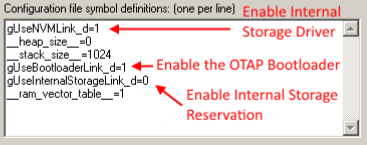
  4. In the options menu, go to the Linker submenu. Now, in the Config tab, replace the symbols in the Configuration file symbol definitions box with these:
    • gUseNVMLink_d=1
    • gUseBootloaderLink_d=1
    • gUseInternalStorageLink_d=0
    • __ram_vector_table__=1                                                                                                                                                                                              1.png
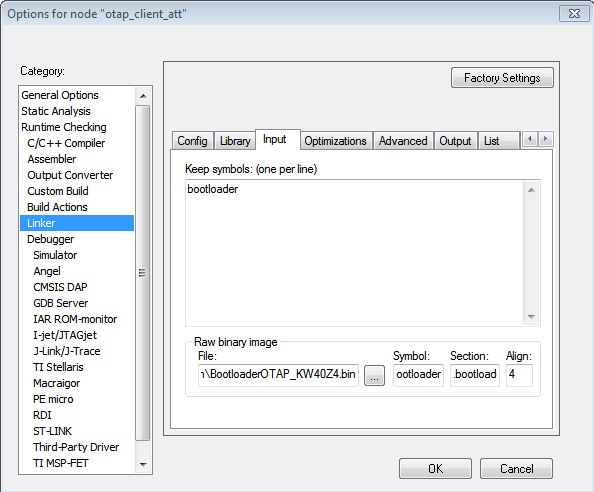
  5. In the Linker submenu, go to the Input tab. In the Keep symbols box, add the symbol 'bootloader' (without the quotes).
  6. In the Input tab, in the Raw binary image box, in the File option, add the following path:
    • $PROJ_DIR$\..\..\..\..\..\..\..\framework\Bootloader\Bin\BootloaderOTAP_KW40Z4.bin
  7. In the Raw binary image box, add the following options to the Symbol, Section and Align boxes:
    • Symbol: bootloader
    • Section: .bootloader
    • Align: 4                                                                                                                                                                                                                         1.png
  8. Press OK. Compile the project. The output file (*.srec) should be in the main project folder, inside the debug folder.                                                      1.png
  9. You can now use this binary file to reprogram your device with OTAP.
Labels (2)
Comments

What is the use for:

__heap_size__=0

__stack_size__=1024
pastedImage_1.png

Bluetooth® Low Energy Application Developer’s Guide Rev. 1, 10/2015

Since customer use different IDE other than IAR.

Could you offer the same example on MDK Keil and MCUXpresso IDE?

Otherwise it is useless for Keil or MXUXpresso user.

%3CLINGO-SUB%20id%3D%22lingo-sub-1114869%22%20slang%3D%22en-US%22%20mode%3D%22CREATE%22%3ECreate%20a%20binary%20file%20for%20OTAP%3C%2FLINGO-SUB%3E%3CLINGO-BODY%20id%3D%22lingo-body-1114869%22%20slang%3D%22en-US%22%20mode%3D%22CREATE%22%3E%3CP%3EThe%20KW40Z%20connectivity%20software%20stack%20has%20several%20demo%20application%20available%2C%20and%20one%20of%20them%20is%20the%20OTAP%20client.%20This%20application%20allows%20the%20user%20to%20reprogram%20the%20device%20in%20a%20wireless%20fashion.%20This%20can%20be%20done%20by%20both%20using%20another%20device%20with%20an%20OTAP%20server%20application%2C%20or%20with%20the%20Kinetis%20BLE%20Toolbox%20mobile%20application%2C%20using%20the%20OTAP%20tool.%3C%2FP%3E%3CP%3E%3C%2FP%3E%3CP%3ETo%20create%20a%20binary%20file%20for%20the%20KW40Z%2C%20follow%20these%20next%20steps%3A%3C%2FP%3E%3COL%3E%3CLI%3EUsing%20IAR%20Embedded%20Workbench%2C%20open%20the%20application%20you%20want%20to%20send%20through%20OTAP.%3C%2FLI%3E%3CLI%3ERight%20click%20the%20main%20project%2C%20and%20open%20the%20%3CSTRONG%3EOptions...%3C%2FSTRONG%3E%20menu.%26nbsp%3B%26nbsp%3B%26nbsp%3B%26nbsp%3B%26nbsp%3B%26nbsp%3B%26nbsp%3B%26nbsp%3B%26nbsp%3B%26nbsp%3B%26nbsp%3B%26nbsp%3B%26nbsp%3B%26nbsp%3B%26nbsp%3B%26nbsp%3B%26nbsp%3B%26nbsp%3B%26nbsp%3B%26nbsp%3B%26nbsp%3B%26nbsp%3B%26nbsp%3B%26nbsp%3B%26nbsp%3B%26nbsp%3B%26nbsp%3B%26nbsp%3B%26nbsp%3B%26nbsp%3B%26nbsp%3B%26nbsp%3B%26nbsp%3B%26nbsp%3B%26nbsp%3B%26nbsp%3B%26nbsp%3B%26nbsp%3B%26nbsp%3B%26nbsp%3B%26nbsp%3B%26nbsp%3B%26nbsp%3B%26nbsp%3B%26nbsp%3B%26nbsp%3B%26nbsp%3B%26nbsp%3B%26nbsp%3B%26nbsp%3B%26nbsp%3B%26nbsp%3B%26nbsp%3B%26nbsp%3B%26nbsp%3B%26nbsp%3B%26nbsp%3B%26nbsp%3B%26nbsp%3B%26nbsp%3B%26nbsp%3B%26nbsp%3B%26nbsp%3B%26nbsp%3B%26nbsp%3B%26nbsp%3B%26nbsp%3B%26nbsp%3B%26nbsp%3B%26nbsp%3B%26nbsp%3B%26nbsp%3B%26nbsp%3B%26nbsp%3B%26nbsp%3B%26nbsp%3B%26nbsp%3B%26nbsp%3B%26nbsp%3B%26nbsp%3B%26nbsp%3B%26nbsp%3B%26nbsp%3B%26nbsp%3B%26nbsp%3B%26nbsp%3B%26nbsp%3B%26nbsp%3B%26nbsp%3B%26nbsp%3B%26nbsp%3B%26nbsp%3B%26nbsp%3B%26nbsp%3B%26nbsp%3B%26nbsp%3B%26nbsp%3B%26nbsp%3B%26nbsp%3B%26nbsp%3B%26nbsp%3B%26nbsp%3B%26nbsp%3B%26nbsp%3B%26nbsp%3B%26nbsp%3B%26nbsp%3B%26nbsp%3B%26nbsp%3B%26nbsp%3B%26nbsp%3B%26nbsp%3B%26nbsp%3B%26nbsp%3B%26nbsp%3B%26nbsp%3B%26nbsp%3B%26nbsp%3B%26nbsp%3B%26nbsp%3B%26nbsp%3B%26nbsp%3B%26nbsp%3B%26nbsp%3B%26nbsp%3B%26nbsp%3B%26nbsp%3B%26nbsp%3B%26nbsp%3B%26nbsp%3B%26nbsp%3B%26nbsp%3B%26nbsp%3B%26nbsp%3B%26nbsp%3B%26nbsp%3B%26nbsp%3B%26nbsp%3B%26nbsp%3B%26nbsp%3B%26nbsp%3B%20%3CSPAN%20class%3D%22lia-inline-image-display-wrapper%22%20image-alt%3D%221.png%22%3E%3Cspan%20class%3D%22lia-inline-image-display-wrapper%22%20image-alt%3D%221.png%22%20style%3D%22width%3A%20499px%3B%22%3E%3Cimg%20src%3D%22https%3A%2F%2Fcommunity.nxp.com%2Ft5%2Fimage%2Fserverpage%2Fimage-id%2F36775i4809ADB7322655FC%2Fimage-size%2Flarge%3Fv%3Dv2%26amp%3Bpx%3D999%22%20role%3D%22button%22%20title%3D%221.png%22%20alt%3D%221.png%22%20%2F%3E%3C%2Fspan%3E%3C%2FSPAN%3E%3C%2FLI%3E%3CLI%3EIn%20the%20options%20menu%2C%20go%20to%20the%20%3CSTRONG%3EOutput%20Converter%3C%2FSTRONG%3E%20submenu.%20In%20the%20%3CSTRONG%3EOutput%20Converter%3C%2FSTRONG%3E%20submenu%2C%20check%20the%20%22%3CSTRONG%3EGenerate%20additional%20output%3C%2FSTRONG%3E%22%20box%2C%20and%20choose%20%3CSTRONG%3EMotorola%3C%2FSTRONG%3E%20as%20the%20%3CSTRONG%3EOutput%20format%3C%2FSTRONG%3E.%26nbsp%3B%26nbsp%3B%26nbsp%3B%26nbsp%3B%26nbsp%3B%26nbsp%3B%26nbsp%3B%26nbsp%3B%26nbsp%3B%26nbsp%3B%26nbsp%3B%26nbsp%3B%26nbsp%3B%26nbsp%3B%26nbsp%3B%26nbsp%3B%26nbsp%3B%26nbsp%3B%26nbsp%3B%26nbsp%3B%26nbsp%3B%26nbsp%3B%26nbsp%3B%26nbsp%3B%26nbsp%3B%26nbsp%3B%26nbsp%3B%26nbsp%3B%26nbsp%3B%26nbsp%3B%26nbsp%3B%26nbsp%3B%26nbsp%3B%26nbsp%3B%26nbsp%3B%26nbsp%3B%26nbsp%3B%26nbsp%3B%26nbsp%3B%26nbsp%3B%26nbsp%3B%26nbsp%3B%26nbsp%3B%26nbsp%3B%26nbsp%3B%26nbsp%3B%26nbsp%3B%26nbsp%3B%26nbsp%3B%26nbsp%3B%26nbsp%3B%26nbsp%3B%26nbsp%3B%26nbsp%3B%26nbsp%3B%26nbsp%3B%26nbsp%3B%26nbsp%3B%26nbsp%3B%26nbsp%3B%26nbsp%3B%26nbsp%3B%26nbsp%3B%26nbsp%3B%26nbsp%3B%26nbsp%3B%26nbsp%3B%26nbsp%3B%26nbsp%3B%26nbsp%3B%26nbsp%3B%26nbsp%3B%26nbsp%3B%26nbsp%3B%26nbsp%3B%26nbsp%3B%26nbsp%3B%26nbsp%3B%26nbsp%3B%26nbsp%3B%26nbsp%3B%26nbsp%3B%26nbsp%3B%26nbsp%3B%26nbsp%3B%26nbsp%3B%26nbsp%3B%26nbsp%3B%26nbsp%3B%26nbsp%3B%26nbsp%3B%26nbsp%3B%26nbsp%3B%26nbsp%3B%26nbsp%3B%26nbsp%3B%26nbsp%3B%26nbsp%3B%26nbsp%3B%26nbsp%3B%26nbsp%3B%26nbsp%3B%26nbsp%3B%26nbsp%3B%26nbsp%3B%26nbsp%3B%26nbsp%3B%26nbsp%3B%26nbsp%3B%26nbsp%3B%26nbsp%3B%26nbsp%3B%26nbsp%3B%26nbsp%3B%26nbsp%3B%26nbsp%3B%26nbsp%3B%26nbsp%3B%26nbsp%3B%26nbsp%3B%26nbsp%3B%26nbsp%3B%26nbsp%3B%26nbsp%3B%26nbsp%3B%26nbsp%3B%26nbsp%3B%26nbsp%3B%26nbsp%3B%26nbsp%3B%26nbsp%3B%26nbsp%3B%26nbsp%3B%26nbsp%3B%26nbsp%3B%26nbsp%3B%26nbsp%3B%26nbsp%3B%26nbsp%3B%26nbsp%3B%26nbsp%3B%26nbsp%3B%26nbsp%3B%26nbsp%3B%26nbsp%3B%26nbsp%3B%26nbsp%3B%26nbsp%3B%26nbsp%3B%26nbsp%3B%26nbsp%3B%26nbsp%3B%26nbsp%3B%26nbsp%3B%26nbsp%3B%26nbsp%3B%26nbsp%3B%26nbsp%3B%26nbsp%3B%26nbsp%3B%26nbsp%3B%26nbsp%3B%26nbsp%3B%26nbsp%3B%26nbsp%3B%26nbsp%3B%26nbsp%3B%26nbsp%3B%26nbsp%3B%26nbsp%3B%26nbsp%3B%20%3CSPAN%20class%3D%22lia-inline-image-display-wrapper%22%20image-alt%3D%221.png%22%3E%3Cspan%20class%3D%22lia-inline-image-display-wrapper%22%20image-alt%3D%221.png%22%20style%3D%22width%3A%20568px%3B%22%3E%3Cimg%20src%3D%22https%3A%2F%2Fcommunity.nxp.com%2Ft5%2Fimage%2Fserverpage%2Fimage-id%2F36852iD4FF9074846E3E82%2Fimage-size%2Flarge%3Fv%3Dv2%26amp%3Bpx%3D999%22%20role%3D%22button%22%20title%3D%221.png%22%20alt%3D%221.png%22%20%2F%3E%3C%2Fspan%3E%3C%2FSPAN%3E%3C%2FLI%3E%3CLI%3EIn%20the%20options%20menu%2C%20go%20to%20the%20%3CSTRONG%3ELinker%3C%2FSTRONG%3E%20submenu.%20Now%2C%20in%20the%20%3CSTRONG%3EConfig%3C%2FSTRONG%3E%20tab%2C%20replace%20the%20symbols%20in%20the%20%3CSTRONG%3EConfiguration%20file%20symbol%20definitions%3C%2FSTRONG%3E%20box%20with%20these%3A%3CUL%3E%3CLI%3EgUseNVMLink_d%3D1%3C%2FLI%3E%3CLI%3EgUseBootloaderLink_d%3D1%3C%2FLI%3E%3CLI%3EgUseInternalStorageLink_d%3D0%3C%2FLI%3E%3CLI%3E__ram_vector_table__%3D1%26nbsp%3B%26nbsp%3B%26nbsp%3B%26nbsp%3B%26nbsp%3B%26nbsp%3B%26nbsp%3B%26nbsp%3B%26nbsp%3B%26nbsp%3B%26nbsp%3B%26nbsp%3B%26nbsp%3B%26nbsp%3B%26nbsp%3B%26nbsp%3B%26nbsp%3B%26nbsp%3B%26nbsp%3B%26nbsp%3B%26nbsp%3B%26nbsp%3B%26nbsp%3B%26nbsp%3B%26nbsp%3B%26nbsp%3B%26nbsp%3B%26nbsp%3B%26nbsp%3B%26nbsp%3B%26nbsp%3B%26nbsp%3B%26nbsp%3B%26nbsp%3B%26nbsp%3B%26nbsp%3B%26nbsp%3B%26nbsp%3B%26nbsp%3B%26nbsp%3B%26nbsp%3B%26nbsp%3B%26nbsp%3B%26nbsp%3B%26nbsp%3B%26nbsp%3B%26nbsp%3B%26nbsp%3B%26nbsp%3B%26nbsp%3B%26nbsp%3B%26nbsp%3B%26nbsp%3B%26nbsp%3B%26nbsp%3B%26nbsp%3B%26nbsp%3B%26nbsp%3B%26nbsp%3B%26nbsp%3B%26nbsp%3B%26nbsp%3B%26nbsp%3B%26nbsp%3B%26nbsp%3B%26nbsp%3B%26nbsp%3B%26nbsp%3B%26nbsp%3B%26nbsp%3B%26nbsp%3B%26nbsp%3B%26nbsp%3B%26nbsp%3B%26nbsp%3B%26nbsp%3B%26nbsp%3B%26nbsp%3B%26nbsp%3B%26nbsp%3B%26nbsp%3B%26nbsp%3B%26nbsp%3B%26nbsp%3B%26nbsp%3B%26nbsp%3B%26nbsp%3B%26nbsp%3B%26nbsp%3B%26nbsp%3B%26nbsp%3B%26nbsp%3B%26nbsp%3B%26nbsp%3B%26nbsp%3B%26nbsp%3B%26nbsp%3B%26nbsp%3B%26nbsp%3B%26nbsp%3B%26nbsp%3B%26nbsp%3B%26nbsp%3B%26nbsp%3B%26nbsp%3B%26nbsp%3B%26nbsp%3B%26nbsp%3B%26nbsp%3B%26nbsp%3B%26nbsp%3B%26nbsp%3B%26nbsp%3B%26nbsp%3B%26nbsp%3B%26nbsp%3B%26nbsp%3B%26nbsp%3B%26nbsp%3B%26nbsp%3B%26nbsp%3B%26nbsp%3B%26nbsp%3B%26nbsp%3B%26nbsp%3B%26nbsp%3B%26nbsp%3B%26nbsp%3B%26nbsp%3B%26nbsp%3B%26nbsp%3B%26nbsp%3B%26nbsp%3B%26nbsp%3B%26nbsp%3B%26nbsp%3B%26nbsp%3B%26nbsp%3B%26nbsp%3B%26nbsp%3B%26nbsp%3B%26nbsp%3B%26nbsp%3B%26nbsp%3B%26nbsp%3B%26nbsp%3B%26nbsp%3B%26nbsp%3B%26nbsp%3B%26nbsp%3B%26nbsp%3B%26nbsp%3B%26nbsp%3B%26nbsp%3B%26nbsp%3B%26nbsp%3B%26nbsp%3B%26nbsp%3B%26nbsp%3B%26nbsp%3B%26nbsp%3B%26nbsp%3B%26nbsp%3B%26nbsp%3B%26nbsp%3B%26nbsp%3B%26nbsp%3B%26nbsp%3B%26nbsp%3B%26nbsp%3B%26nbsp%3B%26nbsp%3B%26nbsp%3B%26nbsp%3B%26nbsp%3B%26nbsp%3B%26nbsp%3B%26nbsp%3B%26nbsp%3B%26nbsp%3B%26nbsp%3B%26nbsp%3B%26nbsp%3B%26nbsp%3B%26nbsp%3B%26nbsp%3B%26nbsp%3B%26nbsp%3B%26nbsp%3B%20%3CSPAN%20class%3D%22lia-inline-image-display-wrapper%22%20image-alt%3D%221.png%22%3E%3Cspan%20class%3D%22lia-inline-image-display-wrapper%22%20image-alt%3D%221.png%22%20style%3D%22width%3A%20568px%3B%22%3E%3Cimg%20src%3D%22https%3A%2F%2Fcommunity.nxp.com%2Ft5%2Fimage%2Fserverpage%2Fimage-id%2F36899i1DE5475EFDAC671D%2Fimage-size%2Flarge%3Fv%3Dv2%26amp%3Bpx%3D999%22%20role%3D%22button%22%20title%3D%221.png%22%20alt%3D%221.png%22%20%2F%3E%3C%2Fspan%3E%3C%2FSPAN%3E%3C%2FLI%3E%3C%2FUL%3E%3C%2FLI%3E%3CLI%3EIn%20the%20%3CSTRONG%3ELinker%3C%2FSTRONG%3E%20submenu%2C%20go%20to%20the%20%3CSTRONG%3EInput%3C%2FSTRONG%3E%20tab.%20In%20the%20%3CSTRONG%3EKeep%20symbols%3C%2FSTRONG%3E%20box%2C%20add%20the%20symbol%20'bootloader'%20(without%20the%20quotes).%3C%2FLI%3E%3CLI%3EIn%20the%20%3CSTRONG%3EInput%3C%2FSTRONG%3E%20tab%2C%20in%20the%20%3CSTRONG%3ERaw%20binary%20image%3C%2FSTRONG%3E%20box%2C%20in%20the%20%3CSTRONG%3EFile%3C%2FSTRONG%3E%20option%2C%20add%20the%20following%20path%3A%3CUL%3E%3CLI%3E%24PROJ_DIR%24%5C..%5C..%5C..%5C..%5C..%5C..%5C..%5Cframework%5CBootloader%5CBin%5CBootloaderOTAP_KW40Z4.bin%3C%2FLI%3E%3C%2FUL%3E%3C%2FLI%3E%3CLI%3EIn%20the%20%3CSTRONG%3ERaw%20binary%20image%3C%2FSTRONG%3E%20box%2C%20add%20the%20following%20options%20to%20the%20%3CSTRONG%3ESymbol%3C%2FSTRONG%3E%2C%20%3CSTRONG%3ESection%3C%2FSTRONG%3E%20and%20%3CSTRONG%3EAlign%3C%2FSTRONG%3E%20boxes%3A%3CUL%3E%3CLI%3E%3CSTRONG%3ESymbol%3C%2FSTRONG%3E%3A%20bootloader%3C%2FLI%3E%3CLI%3E%3CSTRONG%3ESection%3C%2FSTRONG%3E%3A%20.bootloader%3C%2FLI%3E%3CLI%3E%3CSTRONG%3EAlign%3C%2FSTRONG%3E%3A%204%26nbsp%3B%26nbsp%3B%26nbsp%3B%26nbsp%3B%26nbsp%3B%26nbsp%3B%26nbsp%3B%26nbsp%3B%26nbsp%3B%26nbsp%3B%26nbsp%3B%26nbsp%3B%26nbsp%3B%26nbsp%3B%26nbsp%3B%26nbsp%3B%26nbsp%3B%26nbsp%3B%26nbsp%3B%26nbsp%3B%26nbsp%3B%26nbsp%3B%26nbsp%3B%26nbsp%3B%26nbsp%3B%26nbsp%3B%26nbsp%3B%26nbsp%3B%26nbsp%3B%26nbsp%3B%26nbsp%3B%26nbsp%3B%26nbsp%3B%26nbsp%3B%26nbsp%3B%26nbsp%3B%26nbsp%3B%26nbsp%3B%26nbsp%3B%26nbsp%3B%26nbsp%3B%26nbsp%3B%26nbsp%3B%26nbsp%3B%26nbsp%3B%26nbsp%3B%26nbsp%3B%26nbsp%3B%26nbsp%3B%26nbsp%3B%26nbsp%3B%26nbsp%3B%26nbsp%3B%26nbsp%3B%26nbsp%3B%26nbsp%3B%26nbsp%3B%26nbsp%3B%26nbsp%3B%26nbsp%3B%26nbsp%3B%26nbsp%3B%26nbsp%3B%26nbsp%3B%26nbsp%3B%26nbsp%3B%26nbsp%3B%26nbsp%3B%26nbsp%3B%26nbsp%3B%26nbsp%3B%26nbsp%3B%26nbsp%3B%26nbsp%3B%26nbsp%3B%26nbsp%3B%26nbsp%3B%26nbsp%3B%26nbsp%3B%26nbsp%3B%26nbsp%3B%26nbsp%3B%26nbsp%3B%26nbsp%3B%26nbsp%3B%26nbsp%3B%26nbsp%3B%26nbsp%3B%26nbsp%3B%26nbsp%3B%26nbsp%3B%26nbsp%3B%26nbsp%3B%26nbsp%3B%26nbsp%3B%26nbsp%3B%26nbsp%3B%26nbsp%3B%26nbsp%3B%26nbsp%3B%26nbsp%3B%26nbsp%3B%26nbsp%3B%26nbsp%3B%26nbsp%3B%26nbsp%3B%26nbsp%3B%26nbsp%3B%26nbsp%3B%26nbsp%3B%26nbsp%3B%26nbsp%3B%26nbsp%3B%26nbsp%3B%26nbsp%3B%26nbsp%3B%26nbsp%3B%26nbsp%3B%26nbsp%3B%26nbsp%3B%26nbsp%3B%26nbsp%3B%26nbsp%3B%26nbsp%3B%26nbsp%3B%26nbsp%3B%26nbsp%3B%26nbsp%3B%26nbsp%3B%26nbsp%3B%26nbsp%3B%26nbsp%3B%26nbsp%3B%26nbsp%3B%26nbsp%3B%26nbsp%3B%26nbsp%3B%26nbsp%3B%26nbsp%3B%26nbsp%3B%26nbsp%3B%26nbsp%3B%26nbsp%3B%26nbsp%3B%26nbsp%3B%26nbsp%3B%26nbsp%3B%26nbsp%3B%26nbsp%3B%26nbsp%3B%26nbsp%3B%26nbsp%3B%26nbsp%3B%26nbsp%3B%26nbsp%3B%26nbsp%3B%26nbsp%3B%26nbsp%3B%26nbsp%3B%26nbsp%3B%26nbsp%3B%26nbsp%3B%26nbsp%3B%26nbsp%3B%26nbsp%3B%26nbsp%3B%26nbsp%3B%26nbsp%3B%26nbsp%3B%26nbsp%3B%26nbsp%3B%26nbsp%3B%26nbsp%3B%26nbsp%3B%26nbsp%3B%26nbsp%3B%26nbsp%3B%26nbsp%3B%26nbsp%3B%26nbsp%3B%26nbsp%3B%26nbsp%3B%26nbsp%3B%26nbsp%3B%26nbsp%3B%26nbsp%3B%26nbsp%3B%26nbsp%3B%26nbsp%3B%26nbsp%3B%26nbsp%3B%26nbsp%3B%26nbsp%3B%26nbsp%3B%26nbsp%3B%26nbsp%3B%26nbsp%3B%26nbsp%3B%26nbsp%3B%26nbsp%3B%26nbsp%3B%26nbsp%3B%26nbsp%3B%26nbsp%3B%26nbsp%3B%26nbsp%3B%26nbsp%3B%26nbsp%3B%26nbsp%3B%26nbsp%3B%26nbsp%3B%26nbsp%3B%26nbsp%3B%26nbsp%3B%26nbsp%3B%26nbsp%3B%20%3CSPAN%20class%3D%22lia-inline-image-display-wrapper%22%20image-alt%3D%221.png%22%3E%3Cspan%20class%3D%22lia-inline-image-display-wrapper%22%20image-alt%3D%221.png%22%20style%3D%22width%3A%20594px%3B%22%3E%3Cimg%20src%3D%22https%3A%2F%2Fcommunity.nxp.com%2Ft5%2Fimage%2Fserverpage%2Fimage-id%2F36948i47DB3EABE031A0BA%2Fimage-size%2Flarge%3Fv%3Dv2%26amp%3Bpx%3D999%22%20role%3D%22button%22%20title%3D%221.png%22%20alt%3D%221.png%22%20%2F%3E%3C%2Fspan%3E%3C%2FSPAN%3E%3C%2FLI%3E%3C%2FUL%3E%3C%2FLI%3E%3CLI%3EPress%20OK.%20Compile%20the%20project.%20The%20output%20file%20(*.srec)%20should%20be%20in%20the%20main%20project%20folder%2C%20inside%20the%20debug%20folder.%26nbsp%3B%26nbsp%3B%26nbsp%3B%26nbsp%3B%26nbsp%3B%26nbsp%3B%26nbsp%3B%26nbsp%3B%26nbsp%3B%26nbsp%3B%26nbsp%3B%26nbsp%3B%26nbsp%3B%26nbsp%3B%26nbsp%3B%26nbsp%3B%26nbsp%3B%26nbsp%3B%26nbsp%3B%26nbsp%3B%26nbsp%3B%26nbsp%3B%26nbsp%3B%26nbsp%3B%26nbsp%3B%26nbsp%3B%26nbsp%3B%26nbsp%3B%26nbsp%3B%26nbsp%3B%26nbsp%3B%26nbsp%3B%26nbsp%3B%26nbsp%3B%26nbsp%3B%26nbsp%3B%26nbsp%3B%26nbsp%3B%26nbsp%3B%26nbsp%3B%26nbsp%3B%26nbsp%3B%26nbsp%3B%26nbsp%3B%26nbsp%3B%26nbsp%3B%26nbsp%3B%26nbsp%3B%26nbsp%3B%26nbsp%3B%26nbsp%3B%26nbsp%3B%26nbsp%3B%20%3CSPAN%20class%3D%22lia-inline-image-display-wrapper%22%20image-alt%3D%221.png%22%3E%3Cspan%20class%3D%22lia-inline-image-display-wrapper%22%20image-alt%3D%221.png%22%20style%3D%22width%3A%20838px%3B%22%3E%3Cimg%20src%3D%22https%3A%2F%2Fcommunity.nxp.com%2Ft5%2Fimage%2Fserverpage%2Fimage-id%2F36991i5D2675C2766AA4F2%2Fimage-size%2Flarge%3Fv%3Dv2%26amp%3Bpx%3D999%22%20role%3D%22button%22%20title%3D%221.png%22%20alt%3D%221.png%22%20%2F%3E%3C%2Fspan%3E%3C%2FSPAN%3E%3C%2FLI%3E%3CLI%3EYou%20can%20now%20use%20this%20binary%20file%20to%20reprogram%20your%20device%20with%20OTAP.%3C%2FLI%3E%3C%2FOL%3E%3C%2FLINGO-BODY%3E%3CLINGO-LABS%20id%3D%22lingo-labs-1114869%22%20slang%3D%22en-US%22%20mode%3D%22CREATE%22%3E%3CLINGO-LABEL%3EBLE%20Software%3C%2FLINGO-LABEL%3E%3CLINGO-LABEL%3EKW40Z30Z20Z%3C%2FLINGO-LABEL%3E%3C%2FLINGO-LABS%3E%3CLINGO-SUB%20id%3D%22lingo-sub-1114871%22%20slang%3D%22en-US%22%20mode%3D%22CREATE%22%3ERe%3A%20Create%20a%20binary%20file%20for%20OTAP%3C%2FLINGO-SUB%3E%3CLINGO-BODY%20id%3D%22lingo-body-1114871%22%20slang%3D%22en-US%22%20mode%3D%22CREATE%22%3E%3CP%3ESince%20customer%20use%20different%20IDE%20other%20than%20IAR.%3C%2FP%3E%3CP%3ECould%20you%20offer%20the%20same%20example%20on%20MDK%20Keil%20and%20MCUXpresso%20IDE%3F%3C%2FP%3E%3CP%3EOtherwise%20it%20is%20useless%20for%20Keil%20or%20MXUXpresso%20user.%3C%2FP%3E%3C%2FLINGO-BODY%3E%3CLINGO-SUB%20id%3D%22lingo-sub-1114870%22%20slang%3D%22en-US%22%20mode%3D%22CREATE%22%3ERe%3A%20Create%20a%20binary%20file%20for%20OTAP%3C%2FLINGO-SUB%3E%3CLINGO-BODY%20id%3D%22lingo-body-1114870%22%20slang%3D%22en-US%22%20mode%3D%22CREATE%22%3E%3CP%3EWhat%20is%20the%20use%20for%3A%3C%2FP%3E%3CP%3E__heap_size__%3D0%3C%2FP%3E%3CP%3E__stack_size__%3D1024%3C%2FP%3E%3CP%3E%3CSPAN%20class%3D%22lia-inline-image-display-wrapper%22%20image-alt%3D%22pastedImage_1.png%22%3E%3Cspan%20class%3D%22lia-inline-image-display-wrapper%22%20image-alt%3D%22pastedImage_1.png%22%20style%3D%22width%3A%20367px%3B%22%3E%3Cimg%20src%3D%22https%3A%2F%2Fcommunity.nxp.com%2Ft5%2Fimage%2Fserverpage%2Fimage-id%2F4523iF29FF1F04C2A6622%2Fimage-size%2Flarge%3Fv%3Dv2%26amp%3Bpx%3D999%22%20role%3D%22button%22%20title%3D%22pastedImage_1.png%22%20alt%3D%22pastedImage_1.png%22%20%2F%3E%3C%2Fspan%3E%3C%2FSPAN%3E%3C%2FP%3E%3CP%3E%3C%2FP%3E%3CP%3E%3C%2FP%3E%3CP%3E%3C%2FP%3E%3CP%3E%3C%2FP%3E%3CP%3E%3C%2FP%3E%3CP%3E%3C%2FP%3E%3CP%3E%3C%2FP%3E%3CP%3E%3CSPAN%20class%3D%22%22%3EBluetooth%C2%AE%20Low%20Energy%20Application%20Developer%E2%80%99s%20Guide%20Rev.%201%2C%2010%2F2015%3C%2FSPAN%3E%20%3C%2FP%3E%3C%2FLINGO-BODY%3E
No ratings
Version history
Last update:
‎07-21-2016 11:02 AM
Updated by: