
- Forums
- Product Forums
- General Purpose MicrocontrollersGeneral Purpose Microcontrollers
- i.MX Forumsi.MX Forums
- QorIQ Processing PlatformsQorIQ Processing Platforms
- Identification and SecurityIdentification and Security
- Power ManagementPower Management
- Wireless ConnectivityWireless Connectivity
- RFID / NFCRFID / NFC
- Advanced AnalogAdvanced Analog
- Neural Processing UnitsNeural Processing Units
- MCX Microcontrollers
- S32G
- S32K
- S32V
- MPC5xxx
- Other NXP Products
- S12 / MagniV Microcontrollers
- Powertrain and Electrification Analog Drivers
- Sensors
- Vybrid Processors
- Digital Signal Controllers
- 8-bit Microcontrollers
- ColdFire/68K Microcontrollers and Processors
- PowerQUICC Processors
- OSBDM and TBDML
- S32M
- S32Z/E
-
- Solution Forums
- Software Forums
- MCUXpresso Software and ToolsMCUXpresso Software and Tools
- CodeWarriorCodeWarrior
- MQX Software SolutionsMQX Software Solutions
- Model-Based Design Toolbox (MBDT)Model-Based Design Toolbox (MBDT)
- FreeMASTER
- eIQ Machine Learning Software
- Embedded Software and Tools Clinic
- S32 SDK
- S32 Design Studio
- GUI Guider
- Zephyr Project
- Voice Technology
- Application Software Packs
- Secure Provisioning SDK (SPSDK)
- Processor Expert Software
- Generative AI & LLMs
-
- Topics
- Mobile Robotics - Drones and RoversMobile Robotics - Drones and Rovers
- NXP Training ContentNXP Training Content
- University ProgramsUniversity Programs
- Rapid IoT
- NXP Designs
- SafeAssure-Community
- OSS Security & Maintenance
- Using Our Community
-
- Cloud Lab Forums
-
- Knowledge Bases
- ARM Microcontrollers
- i.MX Processors
- Identification and Security
- Model-Based Design Toolbox (MBDT)
- QorIQ Processing Platforms
- S32 Automotive Processing Platform
- Wireless Connectivity
- CodeWarrior
- MCUXpresso Suite of Software and Tools
- MQX Software Solutions
- RFID / NFC
- Advanced Analog
- Neural Processing Units
-
- NXP Tech Blogs
- Home
- :
- QorIQ Processing Platforms
- :
- T-Series
- :
- Re: T1024 USDPAA Support
T1024 USDPAA Support
- Subscribe to RSS Feed
- Mark Topic as New
- Mark Topic as Read
- Float this Topic for Current User
- Bookmark
- Subscribe
- Mute
- Printer Friendly Page

- Mark as New
- Bookmark
- Subscribe
- Mute
- Subscribe to RSS Feed
- Permalink
- Report Inappropriate Content
We have a new board based on the T1024 and I was trying to upgrade the codebase to SDK to 1703 but the compilation failed with message
ERROR: Function failed: Fetcher failure for URL: 'git://git.freescale.com/ppc/sdk/u-boot.git;branch=sdk-v2.0.x'. Unable to fetch URL from any source.
I tried the various suggestions about changing to github but none of them worked.
The question I had is in multipart form
I need the USDPAA T1024 functionality for the project that we have.
I tried the Layerscape SDK as suggested on the NXP website but that does not support usdpaa. The only option for USDPAA for the T1024 is using the SDK 2.0.
The questions I have are
1. Will the Network/Packet processing functionality on the T1024 be supported by DPDK ?
2. What is the official method for compilation of the T1024 with USDPAA support.
Thank you,
Ram Krishnan
Solved! Go to Solution.

 Pavel
Pavel
- Mark as New
- Bookmark
- Subscribe
- Mute
- Subscribe to RSS Feed
- Permalink
- Report Inappropriate Content
SDK 20.1703 automatically builds and generates image for USDPAA support. See attached snapshot.
It looks like that this SDK is not correctly installed.
Use Ubuntu 14 for SDK building. Do not use Ubuntu 16 or Ubuntu 18.
See below command sequence for installing:
- sudo apt-get install ubuntu-minimal ubuntu-standard patch vim-common sed wget subversion git-core coreutils libbonobo2-common unzip texi2html texinfo libsdl1.2-dev docbook-utils gawk python-pysqlite2 diffstat make gcc build-essential xz-utils g++ desktop-file-utils chrpath libgl1-mesa-dev libglu1-mesa-dev autoconf automake groff libtool xterm libncurses5-dev cvs tofrodos
- a) command: ls -l /bin/sh
Message: /bin/sh -> dash
- b) command: sudo dpkg-reconfigure dash
Answer after password – No
Message:
Removing 'diversion of /bin/sh to /bin/sh.distrib by dash'
Adding 'diversion of /bin/sh to /bin/sh.distrib by bash'
Removing 'diversion of /usr/share/man/man1/sh.1.gz to /usr/share/man/man1/sh.distrib.1.gz by dash'
Adding 'diversion of /usr/share/man/man1/sh.1.gz to /usr/share/man/man1/sh.distrib.1.gz by bash'
- c) command for checking: ls -l /bin/sh
Message: /bin/sh -> bash
- mount SDK source .iso file
- cd <sdk-install-dir>.
- ./sources/meta-freescale/scripts/host-prepare.sh
Usually Linux recommends also run the following command: sudo usr/sbin/visudo
- Install SDK 2.0-1703
- . fsl-setup-env -m t1024rdb
- bitbake fsl-image-minimal
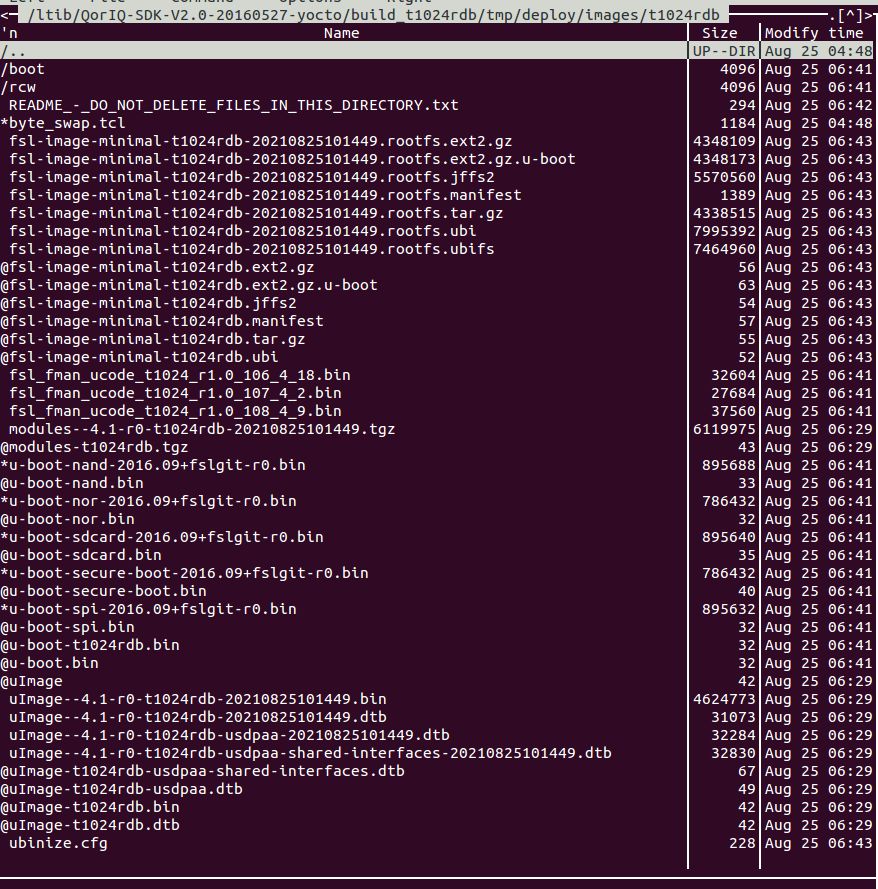 Pavel
Pavel
- Mark as New
- Bookmark
- Subscribe
- Mute
- Subscribe to RSS Feed
- Permalink
- Report Inappropriate Content
SDK 20.1703 automatically builds and generates image for USDPAA support. See attached snapshot.
It looks like that this SDK is not correctly installed.
Use Ubuntu 14 for SDK building. Do not use Ubuntu 16 or Ubuntu 18.
See below command sequence for installing:
- sudo apt-get install ubuntu-minimal ubuntu-standard patch vim-common sed wget subversion git-core coreutils libbonobo2-common unzip texi2html texinfo libsdl1.2-dev docbook-utils gawk python-pysqlite2 diffstat make gcc build-essential xz-utils g++ desktop-file-utils chrpath libgl1-mesa-dev libglu1-mesa-dev autoconf automake groff libtool xterm libncurses5-dev cvs tofrodos
- a) command: ls -l /bin/sh
Message: /bin/sh -> dash
- b) command: sudo dpkg-reconfigure dash
Answer after password – No
Message:
Removing 'diversion of /bin/sh to /bin/sh.distrib by dash'
Adding 'diversion of /bin/sh to /bin/sh.distrib by bash'
Removing 'diversion of /usr/share/man/man1/sh.1.gz to /usr/share/man/man1/sh.distrib.1.gz by dash'
Adding 'diversion of /usr/share/man/man1/sh.1.gz to /usr/share/man/man1/sh.distrib.1.gz by bash'
- c) command for checking: ls -l /bin/sh
Message: /bin/sh -> bash
- mount SDK source .iso file
- cd <sdk-install-dir>.
- ./sources/meta-freescale/scripts/host-prepare.sh
Usually Linux recommends also run the following command: sudo usr/sbin/visudo
- Install SDK 2.0-1703
- . fsl-setup-env -m t1024rdb
- bitbake fsl-image-minimal
- Mark as New
- Bookmark
- Subscribe
- Mute
- Subscribe to RSS Feed
- Permalink
- Report Inappropriate Content
Thank you Pavel. I am making a build following your instructions and I will keep you posted.
Another question I had was
Would you know if T1024 Packet Processing Functionality will be supported by DPDK. I would like to use the later releases like dunfell for T1024 with the packet processing capability. Dunfell has a lot of new feature and updates that I would like to use for the newer chips that we use.
Thanks,
Ram
Pavel
- Mark as New
- Bookmark
- Subscribe
- Mute
- Subscribe to RSS Feed
- Permalink
- Report Inappropriate Content
See the following NXP community page:
https://community.nxp.com/t5/T-Series/USDPAA-Support-in-YoctoProject/m-p/1356640
