
- Forums
- Product Forums
- General Purpose MicrocontrollersGeneral Purpose Microcontrollers
- i.MX Forumsi.MX Forums
- QorIQ Processing PlatformsQorIQ Processing Platforms
- Identification and SecurityIdentification and Security
- Power ManagementPower Management
- Wireless ConnectivityWireless Connectivity
- RFID / NFCRFID / NFC
- Advanced AnalogAdvanced Analog
- Neural Processing UnitsNeural Processing Units
- MCX Microcontrollers
- S32G
- S32K
- S32V
- MPC5xxx
- Other NXP Products
- S12 / MagniV Microcontrollers
- Powertrain and Electrification Analog Drivers
- Sensors
- Vybrid Processors
- Digital Signal Controllers
- 8-bit Microcontrollers
- ColdFire/68K Microcontrollers and Processors
- PowerQUICC Processors
- OSBDM and TBDML
- S32M
- S32Z/E
-
- Solution Forums
- Software Forums
- MCUXpresso Software and ToolsMCUXpresso Software and Tools
- CodeWarriorCodeWarrior
- MQX Software SolutionsMQX Software Solutions
- Model-Based Design Toolbox (MBDT)Model-Based Design Toolbox (MBDT)
- FreeMASTER
- eIQ Machine Learning Software
- Embedded Software and Tools Clinic
- S32 SDK
- S32 Design Studio
- GUI Guider
- Zephyr Project
- Voice Technology
- Application Software Packs
- Secure Provisioning SDK (SPSDK)
- Processor Expert Software
- Generative AI & LLMs
-
- Topics
- Mobile Robotics - Drones and RoversMobile Robotics - Drones and Rovers
- NXP Training ContentNXP Training Content
- University ProgramsUniversity Programs
- Rapid IoT
- NXP Designs
- SafeAssure-Community
- OSS Security & Maintenance
- Using Our Community
-
- Cloud Lab Forums
-
- Knowledge Bases
- ARM Microcontrollers
- i.MX Processors
- Identification and Security
- Model-Based Design Toolbox (MBDT)
- QorIQ Processing Platforms
- S32 Automotive Processing Platform
- Wireless Connectivity
- CodeWarrior
- MCUXpresso Suite of Software and Tools
- MQX Software Solutions
- RFID / NFC
- Advanced Analog
- Neural Processing Units
-
- NXP Tech Blogs
- Home
- :
- 本人確認とセキュリティ
- :
- セキュア認証
- :
- Enabling NFC on SE050ARDF2 board
Enabling NFC on SE050ARDF2 board
- RSS フィードを購読する
- トピックを新着としてマーク
- トピックを既読としてマーク
- このトピックを現在のユーザーにフロートします
- ブックマーク
- 購読
- ミュート
- 印刷用ページ

- 新着としてマーク
- ブックマーク
- 購読
- ミュート
- RSS フィードを購読する
- ハイライト
- 印刷
- 不適切なコンテンツを報告
Hello NXP community and support team,
I've been working on porting middleware for the SE050ARDF2 with an STM32 MCU. So far, I've successfully managed to port the middleware, and the "get info" example works perfectly fine. Additionally, I've tested functionalities like writing user IDs and some other functionality.
However, I've hit a roadblock when it comes to enabling NFC detection with the SE050. I'm currently seeking guidance on how to enable NFC in the SE050 and how to perform testing to ensure it's functioning as expected.
I have checked the link given below get the steps for NFC enable in SE050 but not getting clear idea about commands.
https://community.nxp.com/t5/Secure-Authentication-Knowledge/How-To-Play-With-SE050-via-CL-Interface...
Can you please provide step-by-step instructions regarding enabling NFC on the SE050 and conducting relevant tests?
Thank you in advance for your support!
解決済! 解決策の投稿を見る。

 Kan_Li
- 新着としてマーク
- ブックマーク
- 購読
- ミュート
- RSS フィードを購読する
- ハイライト
- 印刷
- 不適切なコンテンツを報告
Hi @Shivangi ,
Yes, NFC mobile phone can also be used for that purpose, but you have to design the app by yourself.
To enable NFC, disable the I2C communication from the host controller is not enough, you have to remove the power as well, and let the RF field from the NFC device to power the SE instead.
Hope that make sense,
Have a great day,
Kan
-------------------------------------------------------------------------------
Note:
- If this post answers your question, please click the "Mark Correct" button. Thank you!
- We are following threads for 7 weeks after the last post, later replies are ignored
Please open a new thread and refer to the closed one, if you have a related question at a later point in time.
-------------------------------------------------------------------------------
- 新着としてマーク
- ブックマーク
- 購読
- ミュート
- RSS フィードを購読する
- ハイライト
- 印刷
- 不適切なコンテンツを報告
Hi @Kan_Li ,
Thank you for the reply.
Can I use the mobile phone as a NFC reader instead of the one you suggested Identive CLOUD 3700F reader ?
BTW, only 1 interface can be selected to communicate with the host, since you are using SE050F2 with MCU like STM32, I2C interface should be selected by default, so it is not possible to enable the NFC interface at the same time.
So to enable the NFC, I need to disable the I2C communication from STM32. Is my understanding correct ??
Is there any video or tutorial available to work with NFC ? Can you please share link of the same ?
Thanks,
Shivangi
Kan_Li
- 新着としてマーク
- ブックマーク
- 購読
- ミュート
- RSS フィードを購読する
- ハイライト
- 印刷
- 不適切なコンテンツを報告
Hi @Shivangi ,
Yes, NFC mobile phone can also be used for that purpose, but you have to design the app by yourself.
To enable NFC, disable the I2C communication from the host controller is not enough, you have to remove the power as well, and let the RF field from the NFC device to power the SE instead.
Hope that make sense,
Have a great day,
Kan
-------------------------------------------------------------------------------
Note:
- If this post answers your question, please click the "Mark Correct" button. Thank you!
- We are following threads for 7 weeks after the last post, later replies are ignored
Please open a new thread and refer to the closed one, if you have a related question at a later point in time.
-------------------------------------------------------------------------------
Kan_Li
- 新着としてマーク
- ブックマーク
- 購読
- ミュート
- RSS フィードを購読する
- ハイライト
- 印刷
- 不適切なコンテンツを報告
Hi @Shivangi ,
You may refer to the following for details.
1. Board settings: To configure the SE050ARD board using NFC interface, please refer to 4.4 in https://www.nxp.com/docs/en/application-note/AN12395.pdf .
2 . MW configuration: Please refer to https://www.nxp.com/docs/en/application-note/AN12398.pdf to set up the MW to work on PC. and please also note to select PCSC as the com port.
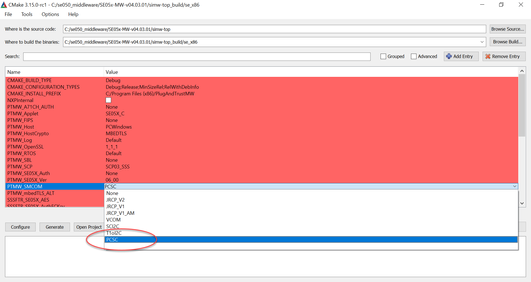
Since you are using SE050ARDF2, platformSCP should also be enabled. Please refer to chapter 6 in https://www.nxp.com/docs/en/application-note/AN12398.pdf for details.
3. You have to connect a NFC reader such as Identive CLOUD 3700F reader(https://www.nxp.com/products/rfid-nfc/nfc-hf/connected-nfc-tags/ntag-ic-iplus-i-explorer-kit-with-nf... ) with the PC, and put the SE050ARDF2 board on the reader to run any demo out of the MW.
BTW, only 1 interface can be selected to communicate with the host, since you are using SE050F2 with MCU like STM32, I2C interface should be selected by default, so it is not possible to enable the NFC interface at the same time.
Hope that makes sense,
Have a great day,
Kan
-------------------------------------------------------------------------------
Note:
- If this post answers your question, please click the "Mark Correct" button. Thank you!
- We are following threads for 7 weeks after the last post, later replies are ignored
Please open a new thread and refer to the closed one, if you have a related question at a later point in time.
-------------------------------------------------------------------------------
