- Forums
- Product Forums
- General Purpose MicrocontrollersGeneral Purpose Microcontrollers
- i.MX Forumsi.MX Forums
- QorIQ Processing PlatformsQorIQ Processing Platforms
- Identification and SecurityIdentification and Security
- Power ManagementPower Management
- Wireless ConnectivityWireless Connectivity
- RFID / NFCRFID / NFC
- Advanced AnalogAdvanced Analog
- MCX Microcontrollers
- S32G
- S32K
- S32V
- MPC5xxx
- Other NXP Products
- S12 / MagniV Microcontrollers
- Powertrain and Electrification Analog Drivers
- Sensors
- Vybrid Processors
- Digital Signal Controllers
- 8-bit Microcontrollers
- ColdFire/68K Microcontrollers and Processors
- PowerQUICC Processors
- OSBDM and TBDML
- S32M
- S32Z/E
-
- Solution Forums
- Software Forums
- MCUXpresso Software and ToolsMCUXpresso Software and Tools
- CodeWarriorCodeWarrior
- MQX Software SolutionsMQX Software Solutions
- Model-Based Design Toolbox (MBDT)Model-Based Design Toolbox (MBDT)
- FreeMASTER
- eIQ Machine Learning Software
- Embedded Software and Tools Clinic
- S32 SDK
- S32 Design Studio
- GUI Guider
- Zephyr Project
- Voice Technology
- Application Software Packs
- Secure Provisioning SDK (SPSDK)
- Processor Expert Software
- Generative AI & LLMs
-
- Topics
- Mobile Robotics - Drones and RoversMobile Robotics - Drones and Rovers
- NXP Training ContentNXP Training Content
- University ProgramsUniversity Programs
- Rapid IoT
- NXP Designs
- SafeAssure-Community
- OSS Security & Maintenance
- Using Our Community
-
- Cloud Lab Forums
-
- Knowledge Bases
- ARM Microcontrollers
- i.MX Processors
- Identification and Security
- Model-Based Design Toolbox (MBDT)
- QorIQ Processing Platforms
- S32 Automotive Processing Platform
- Wireless Connectivity
- CodeWarrior
- MCUXpresso Suite of Software and Tools
- MQX Software Solutions
- RFID / NFC
- Advanced Analog
-
- NXP Tech Blogs
application firmware broke after installing HSE

After installing the HSE using the firmware S32K3_HSE_DemoExamples_1_0_0, I installed the full memory.
My application code no longer works. In debug mode, I probably get a fatal failure when trying to access flash.
Do I need to change something in my application to work with HSE?
I just want the HSE to generate random numbers.

 lukaszadrapa
Hi @ggreguer
1. Once HSE is installed, parts of flash are allocated exclusively for HSE firmware. You can take a look at following tables in the reference manual:
Table 199. Configuration details when the HSE_B firmware usage feature flag is enabled
Table 200. AB swap configuration
https://www.nxp.com/webapp/Download?colCode=S32K3XXRM
Table 199 is actually the state of memory when FULL_MEM is installed.
For example, if Pemicro debugger is used, it's up to user to select the right flash algorithm depending on installed firmware. Such flash algorithm then avoids access to reserved areas.
I believe that Segger's tools do that automatically based on status registers. You may contact Segger directly for details.
https://kb.segger.com/NXP_S32K3xx#HSE_activated
https://www.segger.com/support/technical-support/
2. Once HSE firmware is installed, two things are needed:
- It's necessary to wait until HSE_STATUS_INIT_OK flag in FSR register in MU_0 is set. Before that, you can't trigger any HSE services. For example, you can find something like this in HSE DemoExamples:

Or something like this in RTD examples:

- When clocks are being initialized after reset, it's necessary to wait for WFI bit in PRTN0_CORE2_STAT register. This bit says that SBAF/HSE is in idle state and clocks can be changed. It's not possible to change the HSE_CLK while HSE is running, this can lead to unpredictable behavior. This was not done in earlier version of RTD drivers, it was up to user. Now it's fixed and implemented in clock init functions in RTD 5.0.0 and higher.
Regards,
Lukas
I’ve already tested my application firmware by waiting for the HSE to initialize, as shown in the image you sent, but it’s still not working. When I try to write to flash using:
C40_Ip_pFlashBaseAddress->DATA[0] = 0x00U;
lukaszadrapa
If there’s something wrong with HSE (some fatal error caused by wrong clock configuration, ECC error in HSE memory resources…), it’s possible that the flash is locked for HSE but the operation has not been finished due to some errors. You can check HSE GPR register at 0x4039_C028, bits 16-29 (see HSE Firmware reference manual v2.6, Table 143. Status Bits on HSE_CONFIG_GPR3). If some of the bits are set permanently even after about 1s after reset then the HSE is probably in shutdown mode and it’s necessary to start handshake procedure. See “14.6.7 HSE Firmware Handshake” in the HSE FW reference manual. I also wrote some description here:
https://community.nxp.com/t5/S32K/S32K3-HSE-ERR-GENERAL/m-p/2072826/highlight/true#M47407
If this doesn’t help, I would need more details what is failing exactly.
Regards,
Lukas
Hi @lukaszadrapa , how are you? I’ll check those flags to investigate further what might be happening.
Meanwhile, is there any way to perform a master reset on these MCUs that are locking up? I need a factory reset to remove everything from the HSE and get it working normally again. I have several boards locked up and they’re really needed.
lukaszadrapa
Hi @ggreguer
If HSE is up and running, it's possible to use service HSE_SRV_ID_ERASE_FW if you are still in CUST_DEL life cycle. This will erase HSE firmware and SYS_IMG, so it's almost like "factory reset" from HSE point of view. I'm saying almost because it does not affect data programmed in UTEST flash which is OTP memory. That means - if HSE feature flag in UTEST is programmed and FULL_MEM firmware was installed, areas reserved for HSE will be still reserved. If AB_SWAP is installed, OTA flag in UTEST is programmed, so areas for AB_SWAP firmware will be still reserved even after HSE FW erase. So, it's not 100% factory reset.
If there's something wrong with HSE firmware and it cannot start, it's necessary to either recover the firmware or erase the firmware by SBAF - this can be done by handshake mechanism. Unfortunately there's no other way in this situation.
Regards,
Lukas
#hello @lukaszadrapa
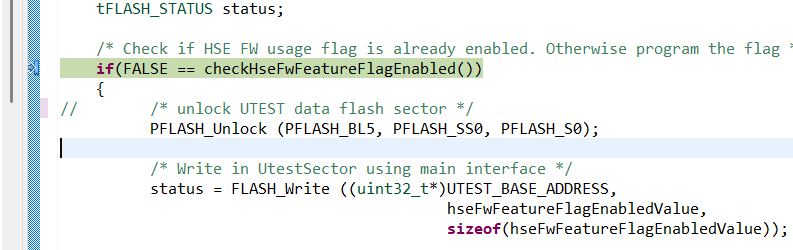
I am working on the S32K3X4EVB-T172 board and trying to install the HSE firmware
The HSE firmware flashing is successful, but my application always stops at:
if (FALSE == checkHseFwFeatureFlagEnabled())
{
/* Stuck here */
}
So HSE FW initialization does not proceed.
I checked the UTEST region (0x1B000080), and I am getting the value 0XFFFFFFFF
please review our project and image and help us with this problem .
Thank u