
- Forums
- Product Forums
- General Purpose MicrocontrollersGeneral Purpose Microcontrollers
- i.MX Forumsi.MX Forums
- QorIQ Processing PlatformsQorIQ Processing Platforms
- Identification and SecurityIdentification and Security
- Power ManagementPower Management
- Wireless ConnectivityWireless Connectivity
- RFID / NFCRFID / NFC
- Advanced AnalogAdvanced Analog
- Neural Processing UnitsNeural Processing Units
- MCX Microcontrollers
- S32G
- S32K
- S32V
- MPC5xxx
- Other NXP Products
- S12 / MagniV Microcontrollers
- Powertrain and Electrification Analog Drivers
- Sensors
- Vybrid Processors
- Digital Signal Controllers
- 8-bit Microcontrollers
- ColdFire/68K Microcontrollers and Processors
- PowerQUICC Processors
- OSBDM and TBDML
- S32M
- S32Z/E
-
- Solution Forums
- Software Forums
- MCUXpresso Software and ToolsMCUXpresso Software and Tools
- CodeWarriorCodeWarrior
- MQX Software SolutionsMQX Software Solutions
- Model-Based Design Toolbox (MBDT)Model-Based Design Toolbox (MBDT)
- FreeMASTER
- eIQ Machine Learning Software
- Embedded Software and Tools Clinic
- S32 SDK
- S32 Design Studio
- GUI Guider
- Zephyr Project
- Voice Technology
- Application Software Packs
- Secure Provisioning SDK (SPSDK)
- Processor Expert Software
- Generative AI & LLMs
-
- Topics
- Mobile Robotics - Drones and RoversMobile Robotics - Drones and Rovers
- NXP Training ContentNXP Training Content
- University ProgramsUniversity Programs
- Rapid IoT
- NXP Designs
- SafeAssure-Community
- OSS Security & Maintenance
- Using Our Community
-
- Cloud Lab Forums
-
- Knowledge Bases
- ARM Microcontrollers
- i.MX Processors
- Identification and Security
- Model-Based Design Toolbox (MBDT)
- QorIQ Processing Platforms
- S32 Automotive Processing Platform
- Wireless Connectivity
- CodeWarrior
- MCUXpresso Suite of Software and Tools
- MQX Software Solutions
- RFID / NFC
- Advanced Analog
- Neural Processing Units
-
- NXP Tech Blogs
- Home
- :
- Product Forums
- :
- S32K
- :
- S32DS IDE installation issue
S32DS IDE installation issue
- Subscribe to RSS Feed
- Mark Topic as New
- Mark Topic as Read
- Float this Topic for Current User
- Bookmark
- Subscribe
- Mute
- Printer Friendly Page
S32DS IDE installation issue

- Mark as New
- Bookmark
- Subscribe
- Mute
- Subscribe to RSS Feed
- Permalink
- Report Inappropriate Content
Hi Team,
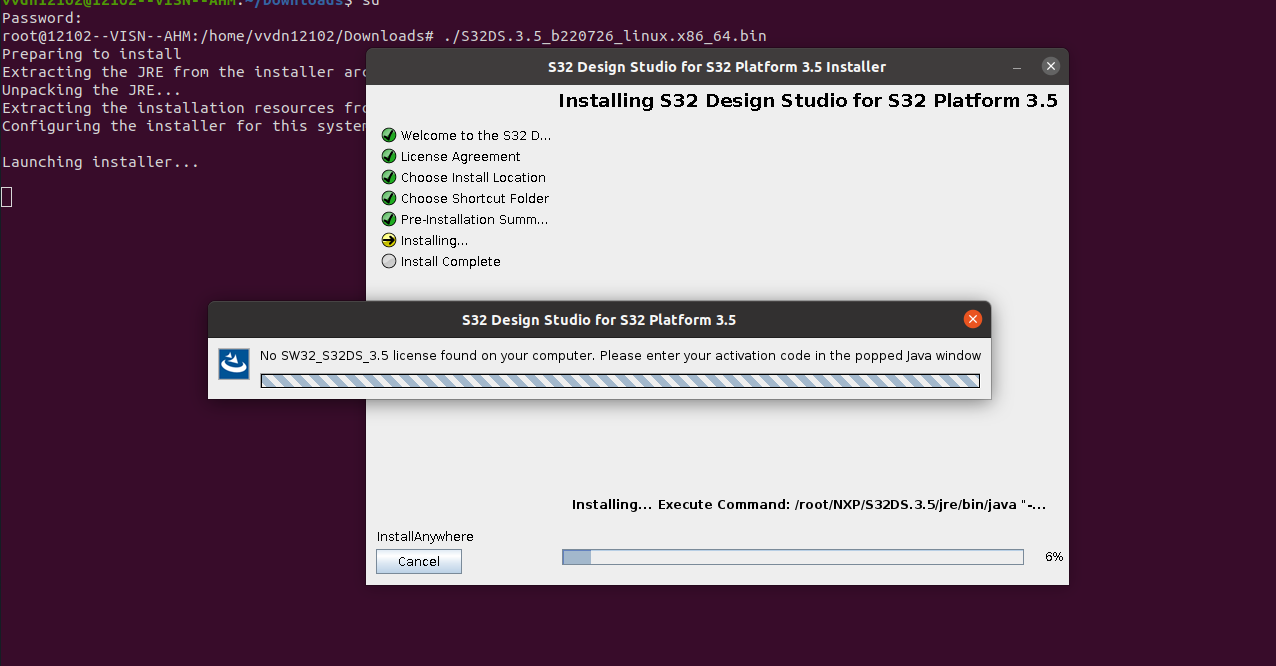
I have downloaded bin file to install S32DS IDE in my ubuntu (v20.04.6 LTS) machine. While installing S32DS binary in ubuntu, the installation does not move ahead even after applying correct activation code. Can you please support for this?
For the reference i have attached the screenshot below.

 petervlna
- Mark as New
- Bookmark
- Subscribe
- Mute
- Subscribe to RSS Feed
- Permalink
- Report Inappropriate Content
Hello,
According to the latest information there is some issue for some installations on ubuntu. (most probably because of the rights).
We are working on solving on this issue, but so far we do not have solution.
Best regards,
Peter
- Mark as New
- Bookmark
- Subscribe
- Mute
- Subscribe to RSS Feed
- Permalink
- Report Inappropriate Content
petervlna
- Mark as New
- Bookmark
- Subscribe
- Mute
- Subscribe to RSS Feed
- Permalink
- Report Inappropriate Content
Hello,
OK, so now you are stuck at connecting to license server?
Or still at valid license?
This might be due to firewall settings on your machine.
Please share more details.
Best regards,
Peter
- Mark as New
- Bookmark
- Subscribe
- Mute
- Subscribe to RSS Feed
- Permalink
- Report Inappropriate Content
Hi
Below are the steps :
1) I downloaded bin file for S32DS IDE for linux machine (License key can be found in License key tab)
2) Followed the S32DS IDE installation guide and installed the required software packages
3) Set bin file as executable to make it installable
4) Started installing S32DS IDE by executing bin file from linux (ubuntu) terminal
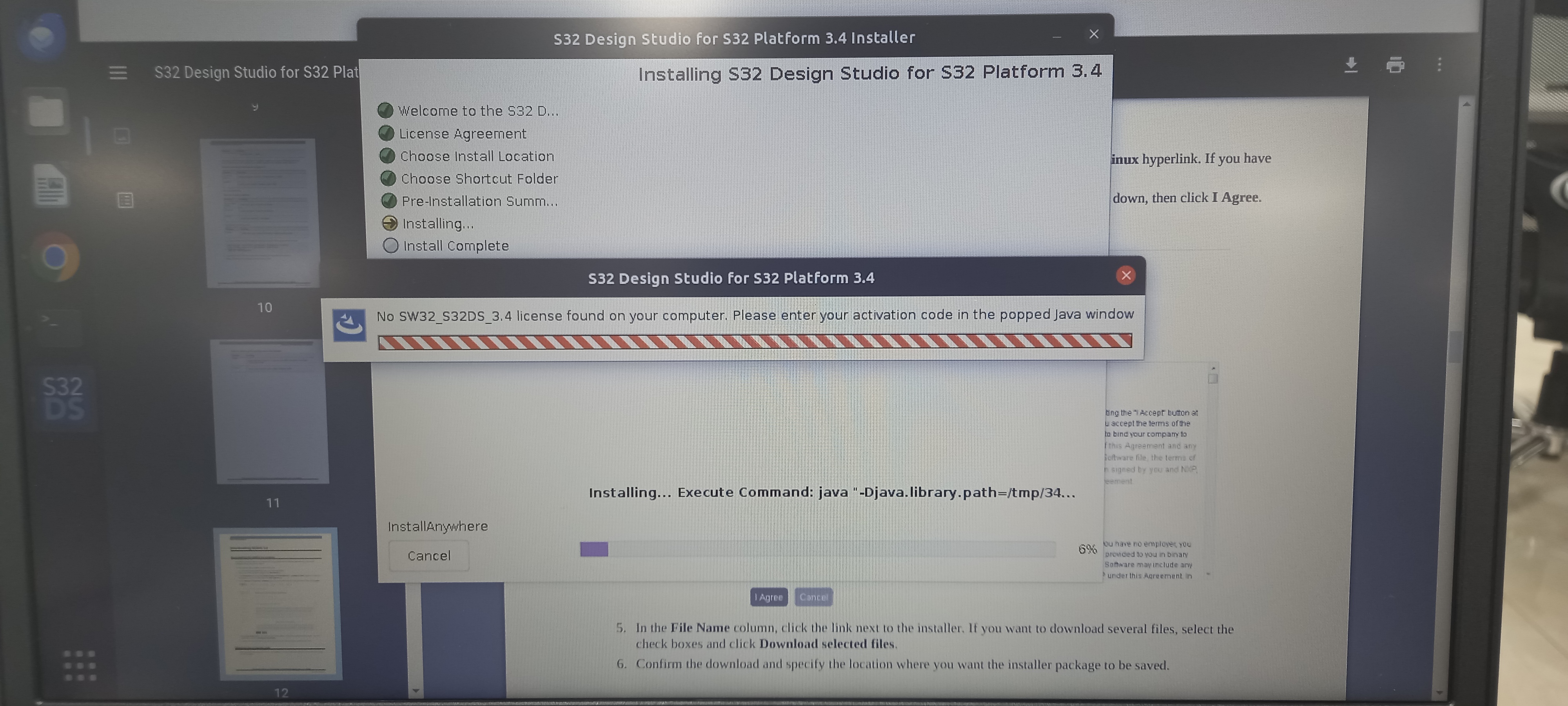
5) At one stage where installation asks for the license key or activation key to be entered when java window pops-up.
6) After appyling license key / activation key, the installation does not go ahead and keeps on finding for the license key / activation key
I am attaching the snapshot below from where installation did not go ahead and remains at 6% installation at all.
I tried all the possible ways like installing on different laptops having different ubuntu versions (18.04 LTS, 20.04 LTS and 22.04 LTS), changing BIOS versions, installed different soft. packages like java., but could not find breakthroughs
 petervlna
- Mark as New
- Bookmark
- Subscribe
- Mute
- Subscribe to RSS Feed
- Permalink
- Report Inappropriate Content
Hello,
Please try the offline activation:
Hmm, it also say you do not have license in place where the installation search for it. Make sure it is in right folder.
Best regards,
Peter
- Mark as New
- Bookmark
- Subscribe
- Mute
- Subscribe to RSS Feed
- Permalink
- Report Inappropriate Content
Hi,
Can you please provide link for this extension? As i am unable to find it.
petervlna
- Mark as New
- Bookmark
- Subscribe
- Mute
- Subscribe to RSS Feed
- Permalink
- Report Inappropriate Content
Hello,
Which extension do you have in mind?
Extention are installed once S32DS installation is complete. See following thread.
https://community.nxp.com/docs/DOC-344707
Best regards,
Peter
