
- Forums
- Product Forums
- General Purpose MicrocontrollersGeneral Purpose Microcontrollers
- i.MX Forumsi.MX Forums
- QorIQ Processing PlatformsQorIQ Processing Platforms
- Identification and SecurityIdentification and Security
- Power ManagementPower Management
- Wireless ConnectivityWireless Connectivity
- RFID / NFCRFID / NFC
- Advanced AnalogAdvanced Analog
- Neural Processing UnitsNeural Processing Units
- MCX Microcontrollers
- S32G
- S32K
- S32V
- MPC5xxx
- Other NXP Products
- S12 / MagniV Microcontrollers
- Powertrain and Electrification Analog Drivers
- Sensors
- Vybrid Processors
- Digital Signal Controllers
- 8-bit Microcontrollers
- ColdFire/68K Microcontrollers and Processors
- PowerQUICC Processors
- OSBDM and TBDML
- S32M
- S32Z/E
-
- Solution Forums
- Software Forums
- MCUXpresso Software and ToolsMCUXpresso Software and Tools
- CodeWarriorCodeWarrior
- MQX Software SolutionsMQX Software Solutions
- Model-Based Design Toolbox (MBDT)Model-Based Design Toolbox (MBDT)
- FreeMASTER
- eIQ Machine Learning Software
- Embedded Software and Tools Clinic
- S32 SDK
- S32 Design Studio
- GUI Guider
- Zephyr Project
- Voice Technology
- Application Software Packs
- Secure Provisioning SDK (SPSDK)
- Processor Expert Software
- Generative AI & LLMs
-
- Topics
- Mobile Robotics - Drones and RoversMobile Robotics - Drones and Rovers
- NXP Training ContentNXP Training Content
- University ProgramsUniversity Programs
- Rapid IoT
- NXP Designs
- SafeAssure-Community
- OSS Security & Maintenance
- Using Our Community
-
- Cloud Lab Forums
-
- Knowledge Bases
- ARM Microcontrollers
- i.MX Processors
- Identification and Security
- Model-Based Design Toolbox (MBDT)
- QorIQ Processing Platforms
- S32 Automotive Processing Platform
- Wireless Connectivity
- CodeWarrior
- MCUXpresso Suite of Software and Tools
- MQX Software Solutions
- RFID / NFC
- Advanced Analog
- Neural Processing Units
-
- NXP Tech Blogs
- Home
- :
- Product Forums
- :
- S32K
- :
- Port initialization
Port initialization
- Subscribe to RSS Feed
- Mark Topic as New
- Mark Topic as Read
- Float this Topic for Current User
- Bookmark
- Subscribe
- Mute
- Printer Friendly Page

- Mark as New
- Bookmark
- Subscribe
- Mute
- Subscribe to RSS Feed
- Permalink
- Report Inappropriate Content
Here are the details of my setup:
MCU: S32K148 144pin package
IDE: S32DS 3.6.6 running on Windows 11
Toolchain: gcc 10.2
RTD version 3.0.0
Driver model used: Non-Autosar
With regards to using the MCU pins as GPIO, I am confused about the role of the Pin tool and the Port peripheral. Are they both needed at the same time?
The gist of my problem is that, in autogenerated file board/Port_Ci_Port_Ip_Cfg.c, for my custom board, all the pins have
.direction = PORT_CI_PORT_PIN_IN
even when a pin is set as output in pin tool. Adding the same pin to the Port peripheral *does* identify the correct direction in the GUI screen (i.e. direction in Port peripheral matches what is configured in the Pin tool; there is no way to change this in the Port peripheral), but the 'Update Code' button is still shown in grey and clicking on it anyway does not make any difference to the generated code (i.e. it still shows the pin direction as INPUT).
To add to the confusion, this issue does not happen in some of the provided examples. I tried Port_Ci_Port_Ip_Example_S32K148 and the Port peripheral shows the pins configured as output (but all the pins in this example are output, so this may not be a good example to try)
To add to the confusion even more, I added a pin IN THE PIN TOOL to this example that is connected to an LED in my own board (not the EVK) WITHOUT ADDING THIS PIN TO THE PORT PERIPHERAL and I was able to blink this LED successfully. So why would one need to configure the Port peripheral.
To add to confusion yet more, I could not find any code matching the Port peripheral in the 'generated' subdirectory. When I added a new pin to the Port peripheral, the generated code, which is under git version control, did not show any changed files (that would correspond to this change)
Solved! Go to Solution.
- Mark as New
- Bookmark
- Subscribe
- Mute
- Subscribe to RSS Feed
- Permalink
- Report Inappropriate Content
To close out the topic, as VaneB and I discussed over a support ticket, this issue has been noted and a fix will be available in a future release of the IDE. The current work around is to hand edit the tool generated code.
- Mark as New
- Bookmark
- Subscribe
- Mute
- Subscribe to RSS Feed
- Permalink
- Report Inappropriate Content
To close out the topic, as VaneB and I discussed over a support ticket, this issue has been noted and a fix will be available in a future release of the IDE. The current work around is to hand edit the tool generated code.

 VaneB
VaneB
- Mark as New
- Bookmark
- Subscribe
- Mute
- Subscribe to RSS Feed
- Permalink
- Report Inappropriate Content
No, when using low‑level drivers (IP drivers), there is no need to add the pins configured in the Pins Tool to the Port_Ip. The array of configured pin structures "g_pin_mux_InitConfigArr_PortContainer_0_BOARD_InitPeripherals" is modified only when changes are made in the Pins Tool.
You may manually add all Pins Tool configurations to the Port_Ip, but this will not produce any changes in the generated files.
In contrast, when using high‑level drivers (MCAL), the Pins Tool and the PORT driver are tightly coupled. In this case, it is required to configure the pins in the Pins Tool and add them to the PORT driver. This ensures that the array of configured pin structures is generated correctly and that the MCAL PORT driver receives the proper configuration.
BR, VaneB
- Mark as New
- Bookmark
- Subscribe
- Mute
- Subscribe to RSS Feed
- Permalink
- Report Inappropriate Content
Hello @VaneB
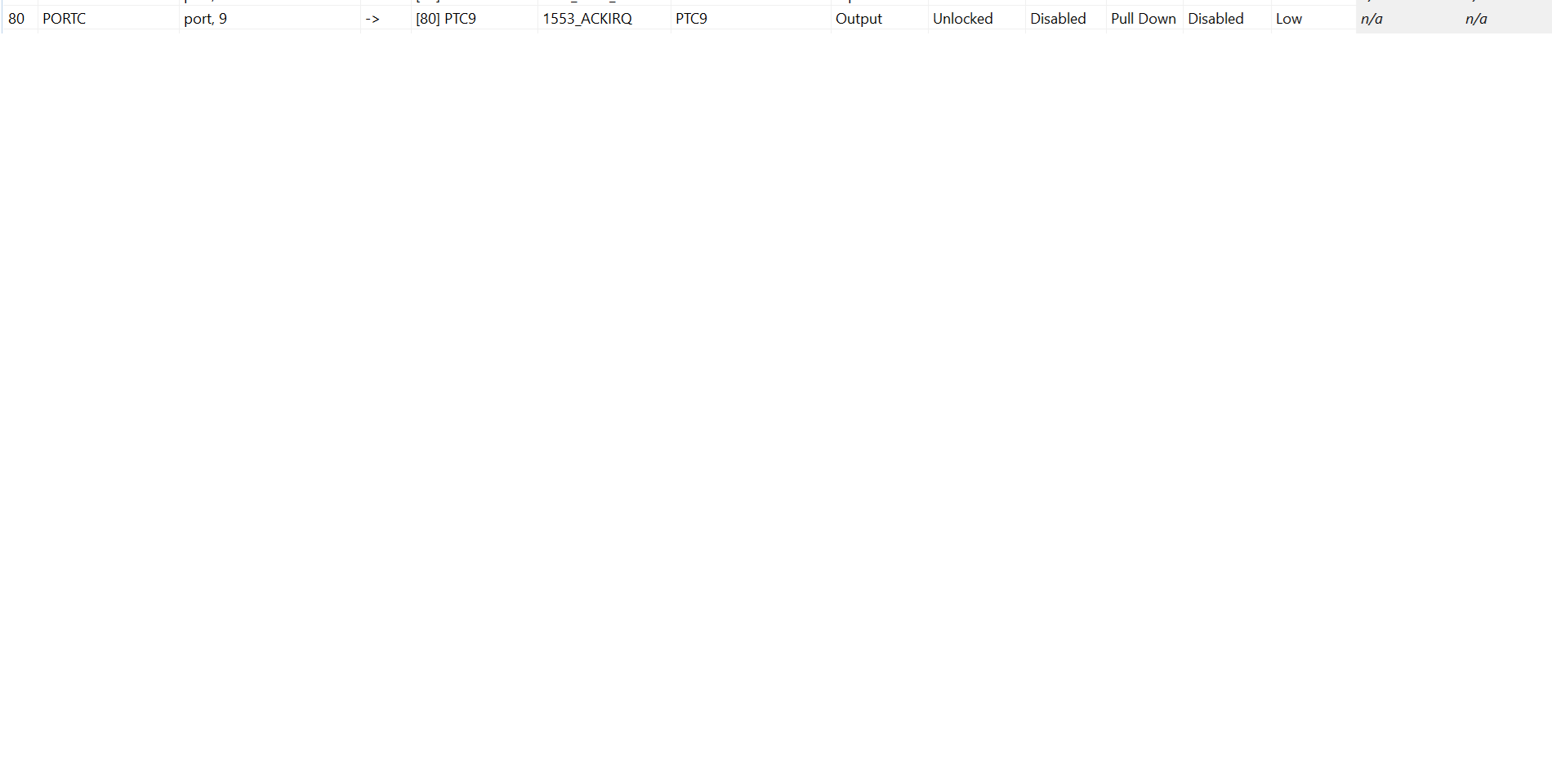
Thank you for your feedback. This does answer some of my questions. But the actual issue that I am struggling with (and one that is not happening with the example code) is that in my project running on a custom designed board, all the GPIO lines are marked as input in the generated code, even when they are configured as output in the PinTool.
Here is an example: as you can see, pin PTC9 is configured as Output in PinTool:

Update Code has been executed (the button is gray)
The generated code (board/Port_Ci_Port_Ip_Cfg.c) is this:
{
.portBase = IP_PORTC,
.gpioBase = IP_PTC,
.pinPortIdx = 9U,
.pullConfig = PORT_INTERNAL_PULL_NOT_ENABLED,
.driveStrength = PORT_DRIVE_STRENGTH_LOW,
.passiveFilter = (boolean)FALSE,
.mux = PORT_MUX_AS_GPIO,
.lockRegister = PORT_LOCK_REGISTER_DISABLED,
.direction = PORT_CI_PORT_PIN_IN,
.digitalFilter = (boolean)FALSE,
.initValue = 0U,
},
 VaneB
VaneB
- Mark as New
- Bookmark
- Subscribe
- Mute
- Subscribe to RSS Feed
- Permalink
- Report Inappropriate Content
I created a project from scratch using the exact same RTD version you mentioned, and on my side I am able to see the value correctly updating from input to output in the generated code when making changes in the Pins Tool.
Could you please share your .mex file so I can verify if something is missing in your configuration?
Any additional information you can provide would also be helpful.
- Mark as New
- Bookmark
- Subscribe
- Mute
- Subscribe to RSS Feed
- Permalink
- Report Inappropriate Content
VaneB
- Mark as New
- Bookmark
- Subscribe
- Mute
- Subscribe to RSS Feed
- Permalink
- Report Inappropriate Content
You can create a support ticket and attach the files there. Please make sure to reference this thread in the ticket so the case can be assigned to me and I can continue supporting you.
- Mark as New
- Bookmark
- Subscribe
- Mute
- Subscribe to RSS Feed
- Permalink
- Report Inappropriate Content
VaneB
- Mark as New
- Bookmark
- Subscribe
- Mute
- Subscribe to RSS Feed
- Permalink
- Report Inappropriate Content
In the following link, go to “Submit a ticket” and create a new case: https://www.nxp.com/support/support:SUPPORTHOME
I am also sharing a link to a video that shows how to do it: Tutorial for NXP Support Case Portal | NXP Semiconductors
- Mark as New
- Bookmark
- Subscribe
- Mute
- Subscribe to RSS Feed
- Permalink
- Report Inappropriate Content
Thank you. I have created support ticket 500Tg00000ZDmM4
