
- Forums
- Product Forums
- General Purpose MicrocontrollersGeneral Purpose Microcontrollers
- i.MX Forumsi.MX Forums
- QorIQ Processing PlatformsQorIQ Processing Platforms
- Identification and SecurityIdentification and Security
- Power ManagementPower Management
- Wireless ConnectivityWireless Connectivity
- RFID / NFCRFID / NFC
- Advanced AnalogAdvanced Analog
- Neural Processing UnitsNeural Processing Units
- MCX Microcontrollers
- S32G
- S32K
- S32V
- MPC5xxx
- Other NXP Products
- S12 / MagniV Microcontrollers
- Powertrain and Electrification Analog Drivers
- Sensors
- Vybrid Processors
- Digital Signal Controllers
- 8-bit Microcontrollers
- ColdFire/68K Microcontrollers and Processors
- PowerQUICC Processors
- OSBDM and TBDML
- S32M
- S32Z/E
-
- Solution Forums
- Software Forums
- MCUXpresso Software and ToolsMCUXpresso Software and Tools
- CodeWarriorCodeWarrior
- MQX Software SolutionsMQX Software Solutions
- Model-Based Design Toolbox (MBDT)Model-Based Design Toolbox (MBDT)
- FreeMASTER
- eIQ Machine Learning Software
- Embedded Software and Tools Clinic
- S32 SDK
- S32 Design Studio
- GUI Guider
- Zephyr Project
- Voice Technology
- Application Software Packs
- Secure Provisioning SDK (SPSDK)
- Processor Expert Software
- Generative AI & LLMs
-
- Topics
- Mobile Robotics - Drones and RoversMobile Robotics - Drones and Rovers
- NXP Training ContentNXP Training Content
- University ProgramsUniversity Programs
- Rapid IoT
- NXP Designs
- SafeAssure-Community
- OSS Security & Maintenance
- Using Our Community
-
- Cloud Lab Forums
-
- Knowledge Bases
- ARM Microcontrollers
- i.MX Processors
- Identification and Security
- Model-Based Design Toolbox (MBDT)
- QorIQ Processing Platforms
- S32 Automotive Processing Platform
- Wireless Connectivity
- CodeWarrior
- MCUXpresso Suite of Software and Tools
- MQX Software Solutions
- RFID / NFC
- Advanced Analog
- Neural Processing Units
-
- NXP Tech Blogs
- RSS フィードを購読する
- トピックを新着としてマーク
- トピックを既読としてマーク
- このトピックを現在のユーザーにフロートします
- ブックマーク
- 購読
- ミュート
- 印刷用ページ
NXP S32K144 EVB Reset LED continuously ON

- 新着としてマーク
- ブックマーク
- 購読
- ミュート
- RSS フィードを購読する
- ハイライト
- 印刷
- 不適切なコンテンツを報告
Hello,
I'm using MBDT V4.2 with MATLAB 2019b and trying to run GPIO S32K examples for S32K144 EVB. As soon as I connected the board, the red LED is continuously ON and the two green LEDs are also ON. I'm able to detect the board on my computer. But after building the model, I don't see any output - No RGB LED output when I tried pressing SW2 as per the example.
Can someone help me with this, please?

 Robin_Shen
- 新着としてマーク
- ブックマーク
- 購読
- ミュート
- RSS フィードを購読する
- ハイライト
- 印刷
- 不適切なコンテンツを報告
Hi saranya_chitta,
If S32K144EVB Reset LED(D1 RED) continuously ON, then your S32K144 may continuously reset.
It may caused by no correct program flashed into S32K144.
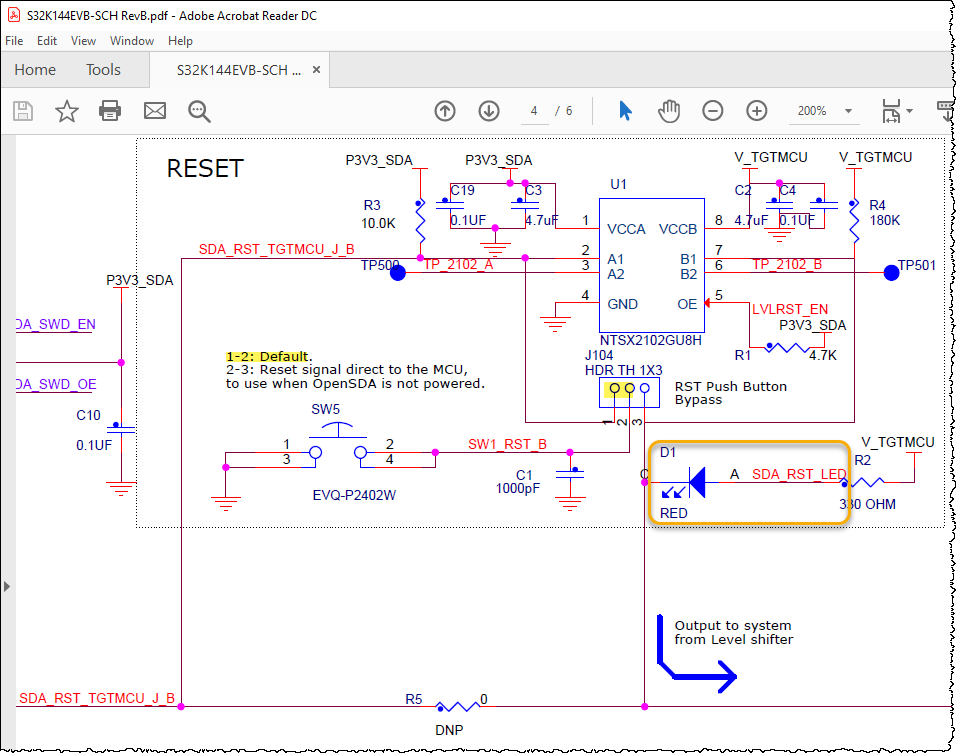
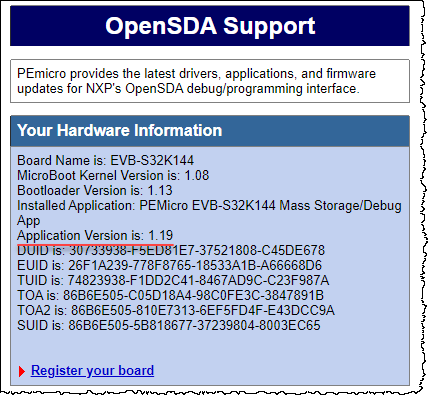
Please try to Enter OpenSDA Bootloader Mode and then click SDA_INFO.HTML check the Application Version.
If Application Version is: 1.19 (ok), then you can try to drop srec file to EVB-S32K144. I have attached hello_world_iar.srec for you to test. The RGB leds should be able to blink.
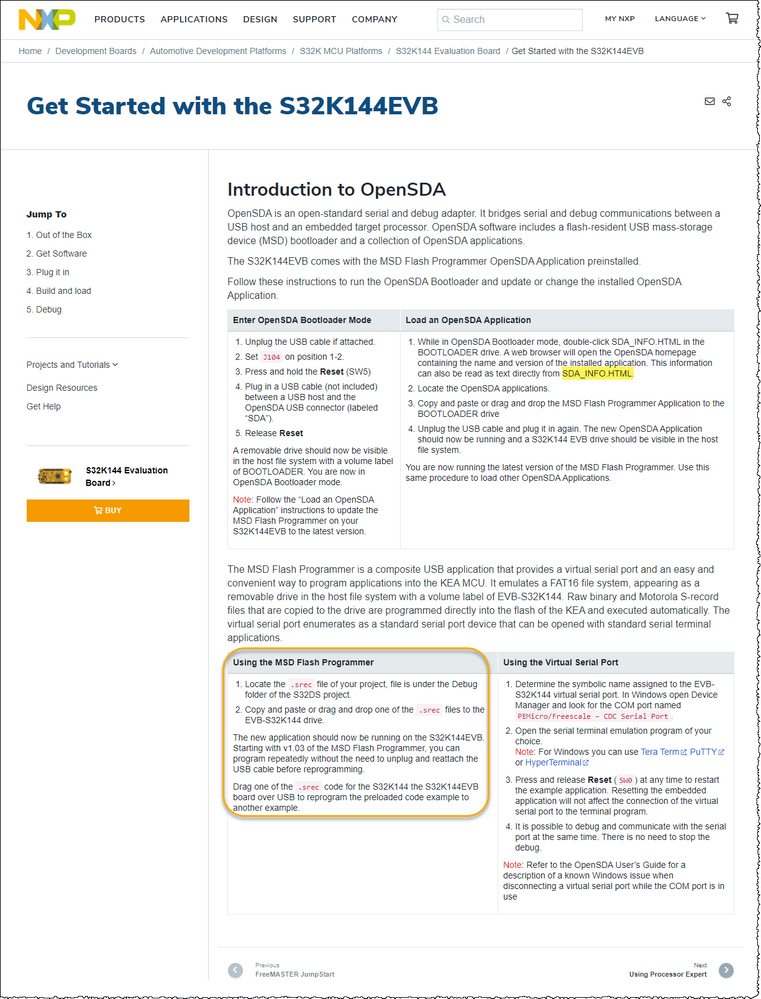
If it does not work, then you may need to refer: Unbricking S32K146
For MBED related issue, you should discuss it in: NXP S32K144 Red LED Continuously ON
Best Regards,
Robin
-------------------------------------------------------------------------------
Note:
- If this post answers your question, please click the "Mark Correct" button. Thank you!
- We are following threads for 7 weeks after the last post, later replies are ignored
Please open a new thread and refer to the closed one, if you have a related question at a later point in time.
-------------------------------------------------------------------------------
- 新着としてマーク
- ブックマーク
- 購読
- ミュート
- RSS フィードを購読する
- ハイライト
- 印刷
- 不適切なコンテンツを報告
Hello @Robin_Shen
Thank you for your reply.
As you mentioned, looks like an incorrect program(a Simulink model with FLASH blocks) has been flashed. I got to know that it goes to continuously reset state right after that. Is it something to do with the FLASH blocks? I do have MBDT V4.2 which is the latest.
Also, I did check the application version and I can confirm it's 1.19
I also tried flashing the 'hello_world_iar.srec' example that you've sent. There has been no change, the red LED is still ON. So, I used S32DS with PEmicro JTAG to flash, and then looks like it got back to normal and the reset LED is off now. I guess it's called 'RappID bootloader way of flashing the board'.
Thanks to @mariuslucianand for suggesting that method in my other thread.
BUT.....
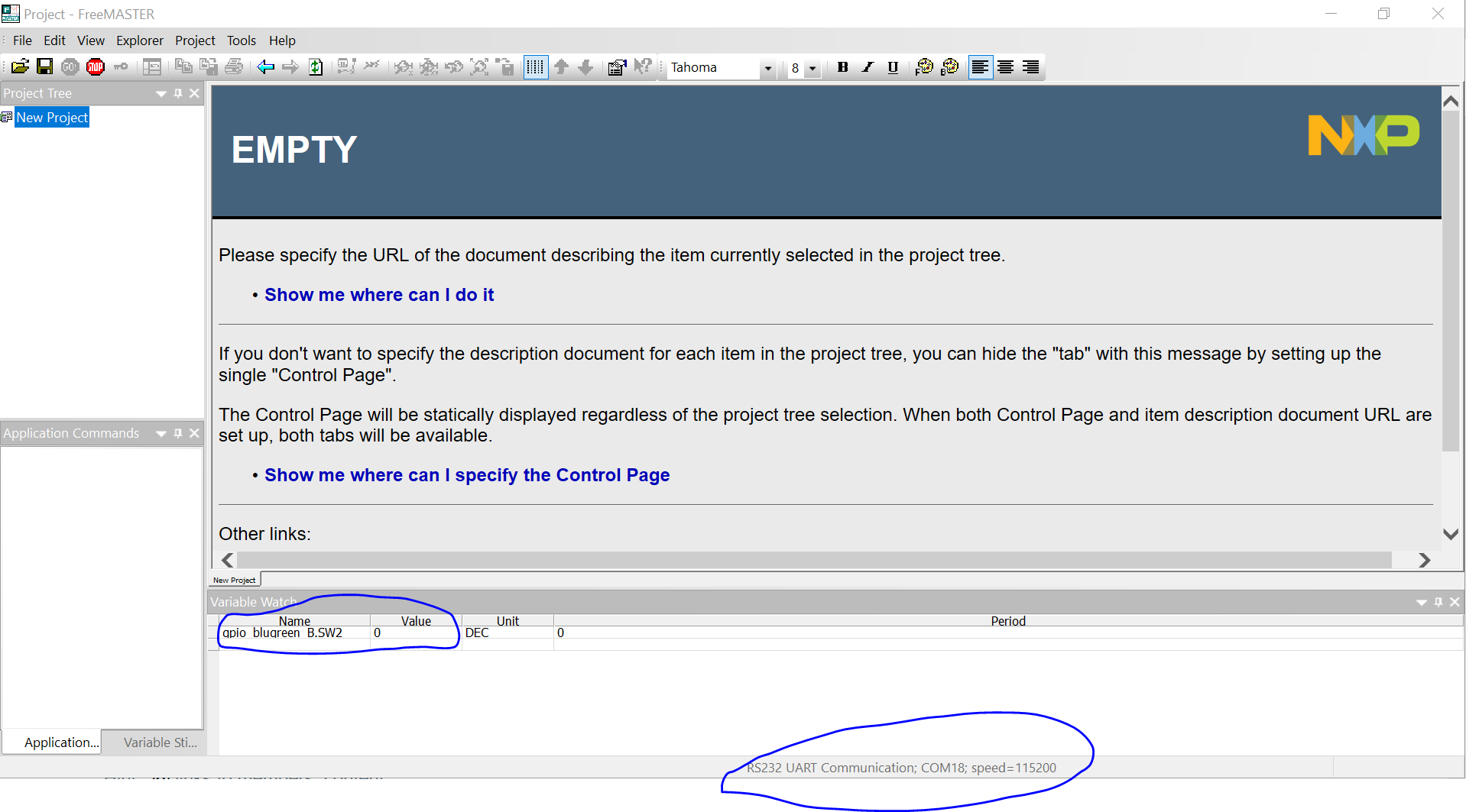
I wanted to monitor the state of SW2 from the example in FreeMASTER. Instead of choosing the 'plug-in module' option, since my S32K144EVB is back to normal, I just tried using the RS232 option and I'm able to connect successfully and also able to track the status of the switch. Attached an image (RS232.PNG).
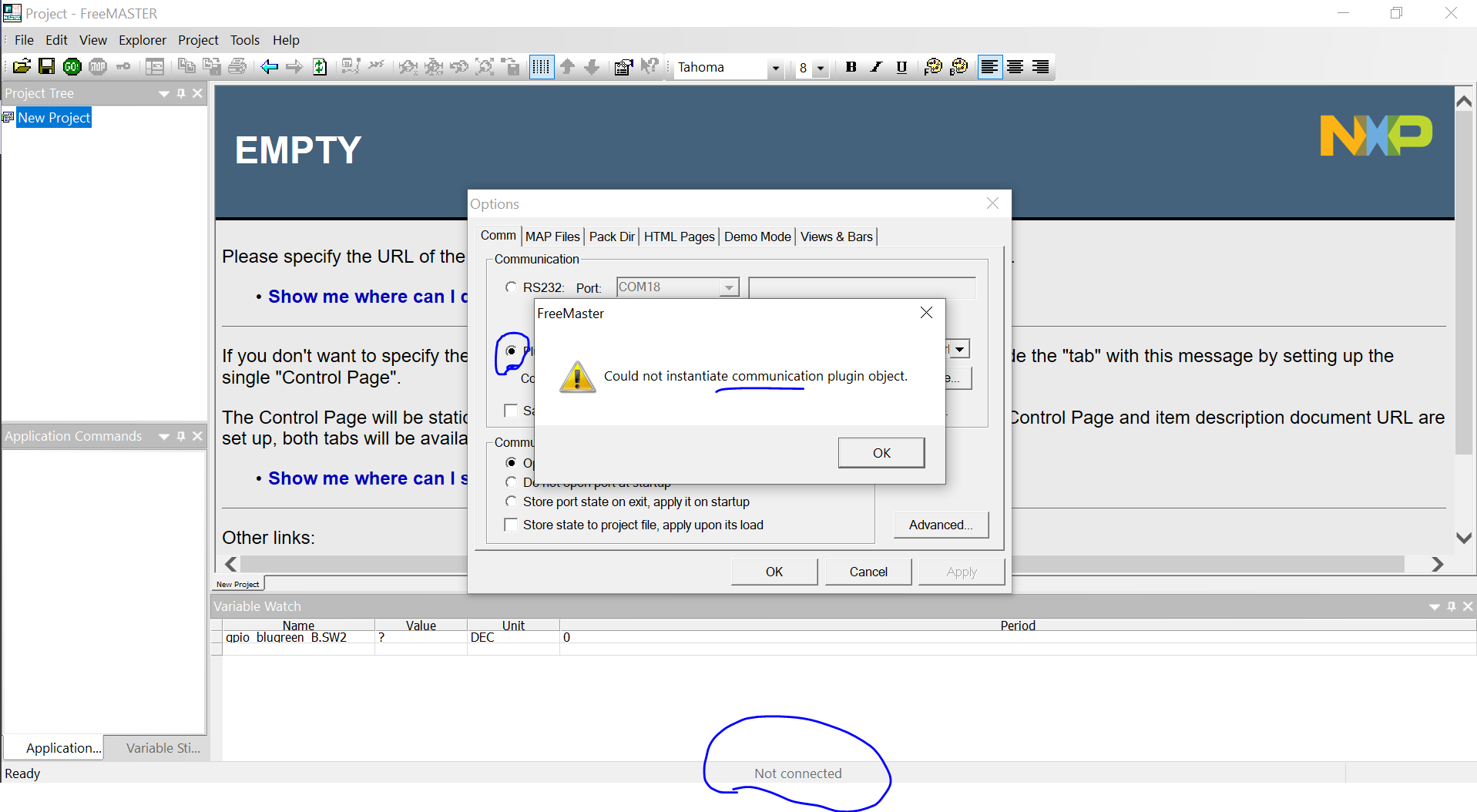
I'm seeing an ISSUE now by using RappID method with S32DS and PEmicro JTAG. I was able to select the 'plug-in module' option. But when I hit "Configure", an error pops up "Could not instantiate communication plug-in object". Please find the image attached below (Error.PNG). The example program is still running and I see the blue LED blink, and with SW2, I see the Green one blink as well.
Why isn't it working via JTAG? Am I doing something wrong? Can you help me figure this out, please?

- 新着としてマーク
- ブックマーク
- 購読
- ミュート
- RSS フィードを購読する
- ハイライト
- 印刷
- 不適切なコンテンツを報告
Hey @saranya_chitta , I am now stuck with the same problem with the reset LED Continuously ON. I am not able to debug any more program using OpenSDA.
I have 2 Boards Corrupted like this. Can you please help me recover these boards?Should i use USB Multilink universal ?
I have posted my issue in the community-> Click here
Robin_Shen
- 新着としてマーク
- ブックマーク
- 購読
- ミュート
- RSS フィードを購読する
- ハイライト
- 印刷
- 不適切なコンテンツを報告
Sorry for the delay!
Would you please let me know which project are you testing? I am not familiar with FreeMaster. Maybe I can test it at my side.
- 新着としてマーク
- ブックマーク
- 購読
- ミュート
- RSS フィードを購読する
- ハイライト
- 印刷
- 不適切なコンテンツを報告
I am using the GPIO example project for S32K144 EVB with PE Micro Debugger. I'm able to flash it all good, I see the blue LED blink during execution and the green LED when I press SW2.
I wanted to observe it in real-time using FreeMaster and that's where the issue comes in.
I open Freemaster, go to 'options' from the 'Project' menu to connect via 'plug-in' and 'Configure' options since I am using a debugger. I've attached the error I'm seeing. Please help!
 Robin_Shen
- 新着としてマーク
- ブックマーク
- 購読
- ミュート
- RSS フィードを購読する
- ハイライト
- 印刷
- 不適切なコンテンツを報告
Please refer: Cannot Connect to S32K144 (Neither FreeMaster nor S32DS)
I have attached S32K144_EVB_JumpStart_Firmware.srec file in it.
After drop it in USB drive, the FreeMaster should be able to Setup communication automatically.
- 新着としてマーク
- ブックマーク
- 購読
- ミュート
- RSS フィードを購読する
- ハイライト
- 印刷
- 不適切なコンテンツを報告
Hello @Robin_Shen
One thing is that my reset LED has already been fixed(https://community.nxp.com/t5/NXP-Model-Based-Design-Tools/NXP-S32K144-Red-LED-Continuously-ON/m-p/12...)
I did go through the thread you've shared. Looks like that user in the thread is working with OpenSDA. Well, I'm not using OpenSDA. But then I did try dropping it in the USB drive for EVBS32K144. RGB LED started glowing. Then I tried dropping the GPIO example .mot file with USB and it works fine, I see the blue LED glowing as per what the example says. But, I don't want to use the OpenSDA method. I want to use the debugger.
I'm using S32K144 EVB, with Matlab R2019b. I'm able to build and successfully generate the .mot file, the .elf file for the GPIO example of S32K144.
I'm using a 'PEMicro Multilink Universal FX' debugger with S32Design studio, using the Flash option, for flashing the board, Disabled auto-build, and select the generated elf that I wanted to flash. (which is GPIO example .elf file in my case) Here's a thread I followed - (https://community.nxp.com/t5/NXP-Model-Based-Design-Tools/Flashing-S32K144-with-PEMicro-Multilink-fr...)
I'm successfully able to flash the .elf to S32K144 EVB using the debugger and S32DS.
During execution, LED is blue and by pressing SW2, the LED changes color to Green. On the board, I see the LED glow.
I wanted to check the status of the switch as per the GPIO example. So, I wanted to use a real-time debugging tool - FreeMASTER.
I've got the latest version (3.1) installed along with FreeMASTER Serial communication driver V2.0
I also got P&E Micro drivers, P&E Multilink Universal installed today and everything is up to date as per my knowledge.
I still see the same error -- "Could not instantiate communication plugin object" whenever I try to go under "Project>Options>Configure"
Please help me as to why it is not able to instantiate the plug-in.
Thank you!
- 新着としてマーク
- ブックマーク
- 購読
- ミュート
- RSS フィードを購読する
- ハイライト
- 印刷
- 不適切なコンテンツを報告
Hello @Robin_Shen
My issue with FreeMASTER is now resolved.
I tried running "register.bat" file in the FreeMASTER installation folder (with admin privileges)
Running the script registers all the plugins and helped access the configuration.
Everything is working fine and as expected now.
Thanks for your help!
