
- Forums
- Product Forums
- General Purpose MicrocontrollersGeneral Purpose Microcontrollers
- i.MX Forumsi.MX Forums
- QorIQ Processing PlatformsQorIQ Processing Platforms
- Identification and SecurityIdentification and Security
- Power ManagementPower Management
- Wireless ConnectivityWireless Connectivity
- RFID / NFCRFID / NFC
- Advanced AnalogAdvanced Analog
- Neural Processing UnitsNeural Processing Units
- MCX Microcontrollers
- S32G
- S32K
- S32V
- MPC5xxx
- Other NXP Products
- S12 / MagniV Microcontrollers
- Powertrain and Electrification Analog Drivers
- Sensors
- Vybrid Processors
- Digital Signal Controllers
- 8-bit Microcontrollers
- ColdFire/68K Microcontrollers and Processors
- PowerQUICC Processors
- OSBDM and TBDML
- S32M
- S32Z/E
-
- Solution Forums
- Software Forums
- MCUXpresso Software and ToolsMCUXpresso Software and Tools
- CodeWarriorCodeWarrior
- MQX Software SolutionsMQX Software Solutions
- Model-Based Design Toolbox (MBDT)Model-Based Design Toolbox (MBDT)
- FreeMASTER
- eIQ Machine Learning Software
- Embedded Software and Tools Clinic
- S32 SDK
- S32 Design Studio
- GUI Guider
- Zephyr Project
- Voice Technology
- Application Software Packs
- Secure Provisioning SDK (SPSDK)
- Processor Expert Software
- Generative AI & LLMs
-
- Topics
- Mobile Robotics - Drones and RoversMobile Robotics - Drones and Rovers
- NXP Training ContentNXP Training Content
- University ProgramsUniversity Programs
- Rapid IoT
- NXP Designs
- SafeAssure-Community
- OSS Security & Maintenance
- Using Our Community
-
- Cloud Lab Forums
-
- Knowledge Bases
- ARM Microcontrollers
- i.MX Processors
- Identification and Security
- Model-Based Design Toolbox (MBDT)
- QorIQ Processing Platforms
- S32 Automotive Processing Platform
- Wireless Connectivity
- CodeWarrior
- MCUXpresso Suite of Software and Tools
- MQX Software Solutions
- RFID / NFC
- Advanced Analog
- Neural Processing Units
-
- NXP Tech Blogs
- Home
- :
- Product Forums
- :
- S32K
- :
- Re: MCSPTE1AK144 kit with Encoder
MCSPTE1AK144 kit with Encoder
- Subscribe to RSS Feed
- Mark Topic as New
- Mark Topic as Read
- Float this Topic for Current User
- Bookmark
- Subscribe
- Mute
- Printer Friendly Page
MCSPTE1AK144 kit with Encoder

- Mark as New
- Bookmark
- Subscribe
- Mute
- Subscribe to RSS Feed
- Permalink
- Report Inappropriate Content
I have got MCSPTE1AK144 development kit and I want to use bldc motor with encoder. I changed encoder macro to 1 just like application note said but when ı run the program bldc motor didn't spin.
I tried to understand the pospe_sensor.c file and I saw there was two variable named MOTOR_PP_GAIN and MOTOR_PP_SHIFT that effects position value. What are those values, do I have to changed them or my problem could be something else?
thanks
I shared the screenshots of the variables that I talked about
 _Leo_
_Leo_
- Mark as New
- Bookmark
- Subscribe
- Mute
- Subscribe to RSS Feed
- Permalink
- Report Inappropriate Content
Hi @Canberk,
Thank you so much for your interest in our products and for using our community.
Just to be clear, are you basing it on the MCSPTE1AK144_PMSM_FOC_xSh example? Because in the example MCSPTE1AK144_BLDC_6Step is not implemented with an encoder.
I think the screenshots you are talking about were not attached, could you please attach them again?
Have a nice day!
- Mark as New
- Bookmark
- Subscribe
- Mute
- Subscribe to RSS Feed
- Permalink
- Report Inappropriate Content
First off all thanks for answering and yes I am basing it on the MCSPTE1AK144_PMSM_FOC_2Sh example.

_Leo_
- Mark as New
- Bookmark
- Subscribe
- Mute
- Subscribe to RSS Feed
- Permalink
- Report Inappropriate Content
Hi again @Canberk,
To use the MCSPTE1AK144 with encoder you must follow the Getting Started with the S32K144 BLDC/PMSM Development Kit.
In the Plug It In section, place DEVKIT-MOTORGD jumpers J9, J10, J11 to position 1-2 for PMSM application (Because only for PMSM application is the encoder function available, in this case MCSPTE1AK144_PMSM_FOC_2Sh).
In my case I left J8 open to establish a 5V voltage level for the encoder.
Connect the encoder to JP1 as shown in the following figure:
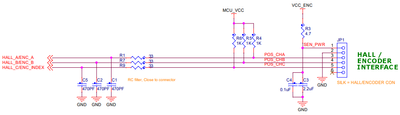
In the Build section, before clean, build, debug and load, change the ENCODER macro to 1 in the main source code.

Then in FreeMASTER, set the resolution of your encoder in the Sensors tab.
Finally, Start application and Set speed in the App Control tab, then in the Project Tree/Encoder Sensor/Speed you will be able to visualize the Speed Encoder in the dynamic graph.
Regarding the MOTOR_PP_GAIN and MOTOR_PP_SHIFT macros, you don't need to change them, since these are motor parameters, not encoder parameters.
Hope it helps you!
Have a nice day!
