
- Forums
- Product Forums
- General Purpose MicrocontrollersGeneral Purpose Microcontrollers
- i.MX Forumsi.MX Forums
- QorIQ Processing PlatformsQorIQ Processing Platforms
- Identification and SecurityIdentification and Security
- Power ManagementPower Management
- Wireless ConnectivityWireless Connectivity
- RFID / NFCRFID / NFC
- Advanced AnalogAdvanced Analog
- Neural Processing UnitsNeural Processing Units
- MCX Microcontrollers
- S32G
- S32K
- S32V
- MPC5xxx
- Other NXP Products
- S12 / MagniV Microcontrollers
- Powertrain and Electrification Analog Drivers
- Sensors
- Vybrid Processors
- Digital Signal Controllers
- 8-bit Microcontrollers
- ColdFire/68K Microcontrollers and Processors
- PowerQUICC Processors
- OSBDM and TBDML
- S32M
- S32Z/E
-
- Solution Forums
- Software Forums
- MCUXpresso Software and ToolsMCUXpresso Software and Tools
- CodeWarriorCodeWarrior
- MQX Software SolutionsMQX Software Solutions
- Model-Based Design Toolbox (MBDT)Model-Based Design Toolbox (MBDT)
- FreeMASTER
- eIQ Machine Learning Software
- Embedded Software and Tools Clinic
- S32 SDK
- S32 Design Studio
- GUI Guider
- Zephyr Project
- Voice Technology
- Application Software Packs
- Secure Provisioning SDK (SPSDK)
- Processor Expert Software
- Generative AI & LLMs
-
- Topics
- Mobile Robotics - Drones and RoversMobile Robotics - Drones and Rovers
- NXP Training ContentNXP Training Content
- University ProgramsUniversity Programs
- Rapid IoT
- NXP Designs
- SafeAssure-Community
- OSS Security & Maintenance
- Using Our Community
-
- Cloud Lab Forums
-
- Knowledge Bases
- ARM Microcontrollers
- i.MX Processors
- Identification and Security
- Model-Based Design Toolbox (MBDT)
- QorIQ Processing Platforms
- S32 Automotive Processing Platform
- Wireless Connectivity
- CodeWarrior
- MCUXpresso Suite of Software and Tools
- MQX Software Solutions
- RFID / NFC
- Advanced Analog
- Neural Processing Units
-
- NXP Tech Blogs
- RSS フィードを購読する
- トピックを新着としてマーク
- トピックを既読としてマーク
- このトピックを現在のユーザーにフロートします
- ブックマーク
- 購読
- ミュート
- 印刷用ページ
INCA Prof File Reflash

- 新着としてマーク
- ブックマーク
- 購読
- ミュート
- RSS フィードを購読する
- ハイライト
- 印刷
- 不適切なコンテンツを報告
Hello,
I'm experiencing an issue when I try to use ETAS INCA to reflash an S32K148 using a custom A2L and Prof file. Briefly, the issue I'm having involves the calibration data. Reflashing with INCA (i.e. flashing from the reference or working page using Flash programming) always returns the code and calibration data on the ECU back to the original build. In other words, any changes I make to calibration variables in INCA are “forgotten” when flashing, and the ECU (and the working page and reference page checksums) returns to its original state. This happens when flashing from both the reference and working pages.
Let me illustrate the issue below. When I start INCA (before any reflash), the checksums all match:

Then I make a change to a calibration variable (it doesn't matter which variable, it's the same behavior regardless) and update the checksums:
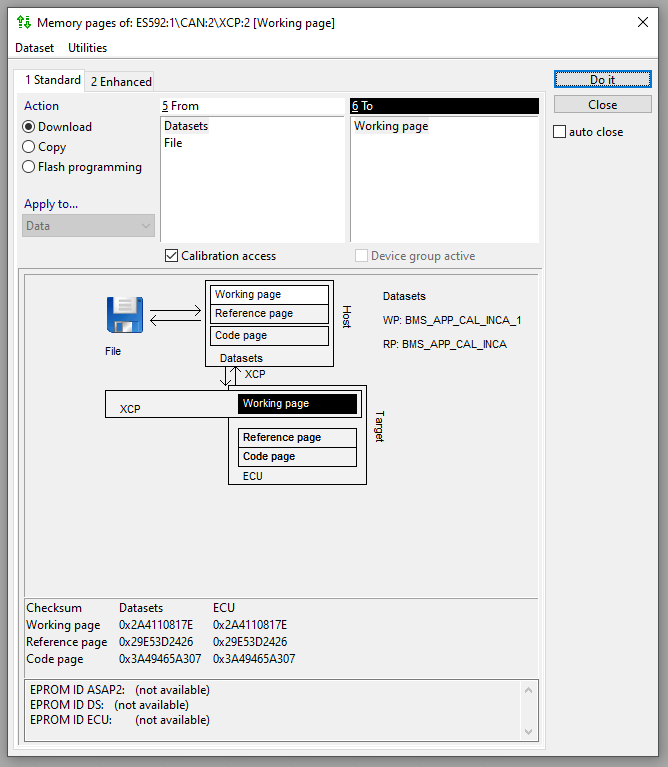
Then I copy the working page to the reference page. This step isn't necessary, but it creates a situation where all of the checksums are different from the original, so it's theoretically not possible to return to the original state.
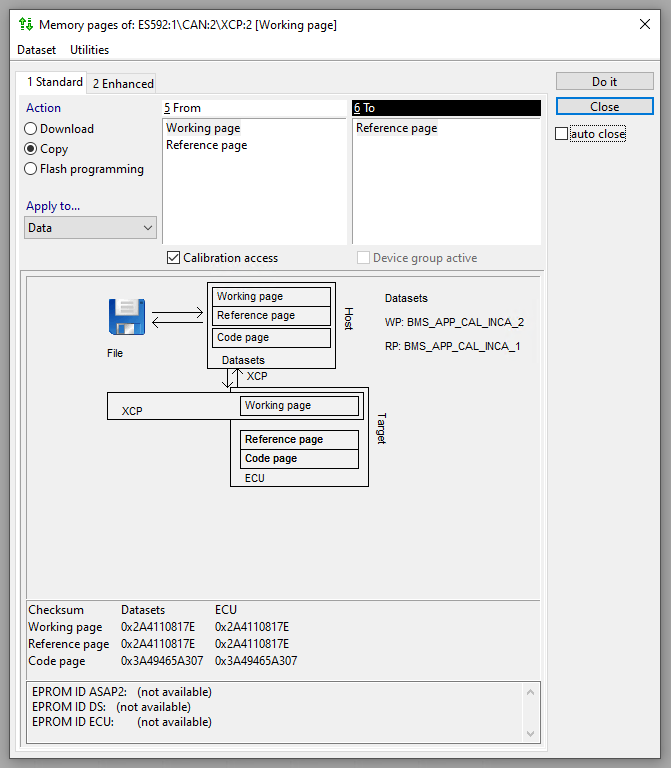
Lastly, I select Flash programming to flash the ECU with either the working or reference page (it doesn't matter which is used, the final result is identical). After the reflash, INCA says flash programming finished successfully, and the checksums are updated again. However, the ECU checksums revert back to what was originally on the ECU, and the INCA checksums remain unchanged. In other words, the calibration change is not reflected in the data that was used to reflash the ECU.
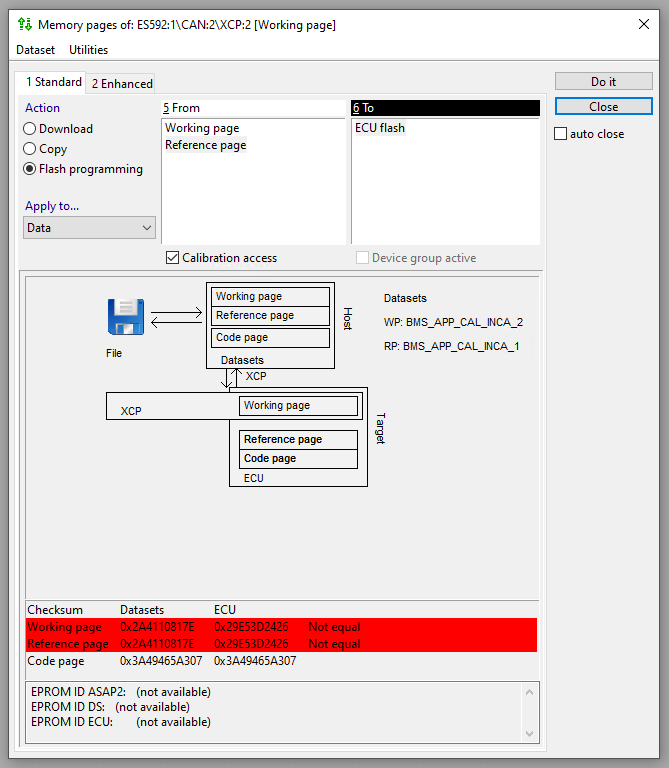
Can you tell what the issue might be here? Is this due to a problem in the A2L file, the prof file, INCA configuration, something else?
Another note: if I change the source memory area for the calibration data from the reference page start address to the working page start address (and leave the destination memory area for the calibration data unchanged), the checksum changes correctly during a Flash programming and it doesn't return back to the original state. In other words, the issue is fixed (however, this has to do with some circumstantial data being all 0xFF's, so it's not a sustainable solution). I thought this might indicate that the reference page being declared RESERVED in the A2L file was the problem, but changing that RESERVED keyword to DATA or OFFLINE_DATA didn't fix anything.
Any help you can provide with respect to this issue is much appreciated.
Thank you very much.
- 新着としてマーク
- ブックマーク
- 購読
- ミュート
- RSS フィードを購読する
- ハイライト
- 印刷
- 不適切なコンテンツを報告
Hi @Chris_C_ , Try copying the new dataset (in which you changed calibration) and then you can replace the workspace project with the new dataset , this will create both reference and working page with the new dataset. Now you can try flash programming.
- 新着としてマーク
- ブックマーク
- 購読
- ミュート
- RSS フィードを購読する
- ハイライト
- 印刷
- 不適切なコンテンツを報告
Its a checksum error in your version , A2l checksum code this version unable to bypass due to which its clashing while reading the file.Change version 7.4.7 or 7.5.x
- 新着としてマーク
- ブックマーク
- 購読
- ミュート
- RSS フィードを購読する
- ハイライト
- 印刷
- 不適切なコンテンツを報告
Thanks, Lukas. I'm of the same opinion frankly, but I'm posting here on instruction from an ETAS support engineer who advised that "there is a issue with the prof files and the ECU supplier would be able to assist you with this". If you don't think this is something in the realm of NXP TechSupport, I don't know that I could disagree with you. In that case, I'll see if I can continue the discussion with ETAS. Thanks again.

 lukaszadrapa
- 新着としてマーク
- ブックマーク
- 購読
- ミュート
- RSS フィードを購読する
- ハイライト
- 印刷
- 不適切なコンテンツを報告
Well, I have done some research and quickly asked around. The result is that we do not provide specific support files for calibration, only standard files like *.elf, *.map, srecord files...
Then I found that I already supported a couple of customers who used INCA software. All the questions were related to remapping of RAM over flash to be able to do the calibration. In case of MPC55xx, MPC56xx and MPC57xx devices, it could be done using either Memory Management Unit (on older devices) or by Overlay feature (on newer devices).
Now the thing is that there's no support for remapping on S32K1xx devices. My impression is that hardware support of remapping is mandatory here. Or do you know if only SW implementation is possible for calibration with INCA? I'm really not sure if we can help here...
Regards,
Lukas
lukaszadrapa
- 新着としてマーク
- ブックマーク
- 購読
- ミュート
- RSS フィードを購読する
- ハイライト
- 印刷
- 不適切なコンテンツを報告
Hi @Chris_C_
I believe this should be redirected rather to Etas, I don't think we can answer this.
Regards,
Lukas
