
- Forums
- Product Forums
- General Purpose MicrocontrollersGeneral Purpose Microcontrollers
- i.MX Forumsi.MX Forums
- QorIQ Processing PlatformsQorIQ Processing Platforms
- Identification and SecurityIdentification and Security
- Power ManagementPower Management
- Wireless ConnectivityWireless Connectivity
- RFID / NFCRFID / NFC
- Advanced AnalogAdvanced Analog
- Neural Processing UnitsNeural Processing Units
- MCX Microcontrollers
- S32G
- S32K
- S32V
- MPC5xxx
- Other NXP Products
- S12 / MagniV Microcontrollers
- Powertrain and Electrification Analog Drivers
- Sensors
- Vybrid Processors
- Digital Signal Controllers
- 8-bit Microcontrollers
- ColdFire/68K Microcontrollers and Processors
- PowerQUICC Processors
- OSBDM and TBDML
- S32M
- S32Z/E
-
- Solution Forums
- Software Forums
- MCUXpresso Software and ToolsMCUXpresso Software and Tools
- CodeWarriorCodeWarrior
- MQX Software SolutionsMQX Software Solutions
- Model-Based Design Toolbox (MBDT)Model-Based Design Toolbox (MBDT)
- FreeMASTER
- eIQ Machine Learning Software
- Embedded Software and Tools Clinic
- S32 SDK
- S32 Design Studio
- GUI Guider
- Zephyr Project
- Voice Technology
- Application Software Packs
- Secure Provisioning SDK (SPSDK)
- Processor Expert Software
- Generative AI & LLMs
-
- Topics
- Mobile Robotics - Drones and RoversMobile Robotics - Drones and Rovers
- NXP Training ContentNXP Training Content
- University ProgramsUniversity Programs
- Rapid IoT
- NXP Designs
- SafeAssure-Community
- OSS Security & Maintenance
- Using Our Community
-
- Cloud Lab Forums
-
- Knowledge Bases
- ARM Microcontrollers
- i.MX Processors
- Identification and Security
- Model-Based Design Toolbox (MBDT)
- QorIQ Processing Platforms
- S32 Automotive Processing Platform
- Wireless Connectivity
- CodeWarrior
- MCUXpresso Suite of Software and Tools
- MQX Software Solutions
- RFID / NFC
- Advanced Analog
- Neural Processing Units
-
- NXP Tech Blogs
EEEPROM S32K144

Hello,
Could you help me please with my project. I need to use the memory of the board S32K144. It means i need to receive the data by uart, write into the memory and after read. I saw the Example_S32K144_EEEPROM_usage, I take the function EEE_Write_ByteArray(), I can read the data, but i lose them after disconnect the board from power 12V. And actually I would like to use the function of FLASH, for example, FLASH_DRV_EEEWrite().
I attached my project.


There is a sample code "flash_partitioning_s32k144" in SDK.
The examples does the following operations:
- Partitions the flash
- Configures FlexNVM region as EEPROM
- Erases flash
- Programs flash
- Write data to EEPROM.
So,please refer to this example.
BR!
Jim,
Hi,
Thank you for your support, but unfortunately it doesn't work. Can you guide me to the right direction, please. so my steps are next:
1. Initialization of flash
2. Configure FlexRAM as EEPROM
3 . Write data to EEPROM
4. Read data
So my code
- FLASH_DRV_Init(&Flash_InitConfig0, &flashSSDConfig);
- FLASH_DRV_DEFlashPartition(&flashSSDConfig, 0x02u, 0x08u, 0x0u, false, true);
- FLASH_DRV_SetFlexRamFunction(&flashSSDConfig, EEE_ENABLE, 0x00u, NULL);
- FLASH_DRV_EEEWrite(&flashSSDConfig, flashSSDConfig.EERAMBase, sizeof(Array), Array);
- memcpy(SendArray,&flashSSDConfig.EERAMBase,sizeof(SendArray));
What i'm doing wrong?
BR
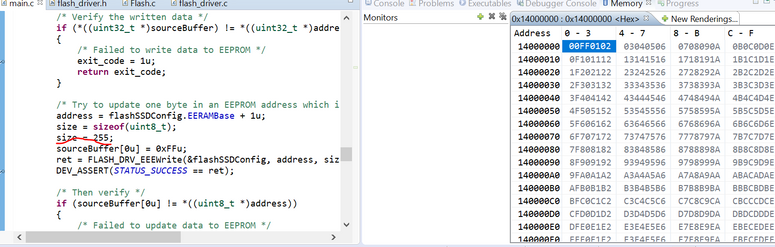

Hi Alex,
Please set some breakpoints,
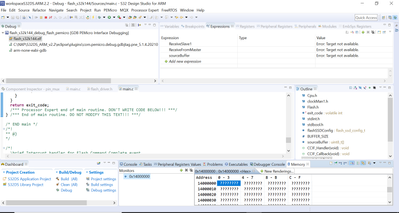
I tried again and the result was the same.
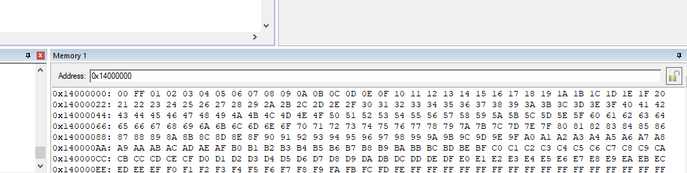
I‘m using:
IDE: S32 Design Studio for ARM 2018 or Keil
SDK:S32K1xx RTM SDK 3.0.0
Hardware:S32K142EVB.
BR!
Jim,
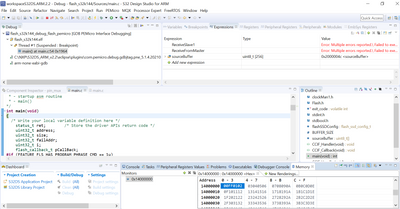
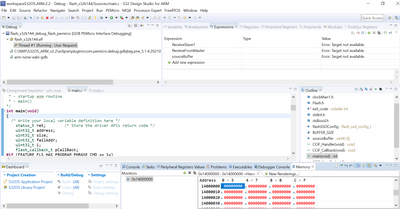
Hi Alex,
you can try single-step debugging to find the reason,I can't judge the root casue based on the picture you provided.I have tried several times and there is no such problem.
BR!
Jim,
hi Jim,
I tried with single-step debugging and it works fine, it means I go step by step until the end of the code
(Debug ->Debug Configuration -> flash_partitioning_s32k144_debug_flash_premicro -> Step over->I push "step over" until the end of the code).
But if I run full-speed running mode it doesn't work (Debug ->Debug Configuration -> flash_partitioning_s32k144_debug_flash_premicro -> Resume)
Maybe there is some configuration?
