
- Forums
- Product Forums
- General Purpose MicrocontrollersGeneral Purpose Microcontrollers
- i.MX Forumsi.MX Forums
- QorIQ Processing PlatformsQorIQ Processing Platforms
- Identification and SecurityIdentification and Security
- Power ManagementPower Management
- Wireless ConnectivityWireless Connectivity
- RFID / NFCRFID / NFC
- Advanced AnalogAdvanced Analog
- Neural Processing UnitsNeural Processing Units
- MCX Microcontrollers
- S32G
- S32K
- S32V
- MPC5xxx
- Other NXP Products
- S12 / MagniV Microcontrollers
- Powertrain and Electrification Analog Drivers
- Sensors
- Vybrid Processors
- Digital Signal Controllers
- 8-bit Microcontrollers
- ColdFire/68K Microcontrollers and Processors
- PowerQUICC Processors
- OSBDM and TBDML
- S32M
- S32Z/E
-
- Solution Forums
- Software Forums
- MCUXpresso Software and ToolsMCUXpresso Software and Tools
- CodeWarriorCodeWarrior
- MQX Software SolutionsMQX Software Solutions
- Model-Based Design Toolbox (MBDT)Model-Based Design Toolbox (MBDT)
- FreeMASTER
- eIQ Machine Learning Software
- Embedded Software and Tools Clinic
- S32 SDK
- S32 Design Studio
- GUI Guider
- Zephyr Project
- Voice Technology
- Application Software Packs
- Secure Provisioning SDK (SPSDK)
- Processor Expert Software
- Generative AI & LLMs
-
- Topics
- Mobile Robotics - Drones and RoversMobile Robotics - Drones and Rovers
- NXP Training ContentNXP Training Content
- University ProgramsUniversity Programs
- Rapid IoT
- NXP Designs
- SafeAssure-Community
- OSS Security & Maintenance
- Using Our Community
-
- Cloud Lab Forums
-
- Knowledge Bases
- ARM Microcontrollers
- i.MX Processors
- Identification and Security
- Model-Based Design Toolbox (MBDT)
- QorIQ Processing Platforms
- S32 Automotive Processing Platform
- Wireless Connectivity
- CodeWarrior
- MCUXpresso Suite of Software and Tools
- MQX Software Solutions
- RFID / NFC
- Advanced Analog
- Neural Processing Units
-
- NXP Tech Blogs
- Home
- :
- Product Forums
- :
- S32K
- :
- Re: EEEPROM S32K144
EEEPROM S32K144
- Subscribe to RSS Feed
- Mark Topic as New
- Mark Topic as Read
- Float this Topic for Current User
- Bookmark
- Subscribe
- Mute
- Printer Friendly Page
EEEPROM S32K144

- Mark as New
- Bookmark
- Subscribe
- Mute
- Subscribe to RSS Feed
- Permalink
- Report Inappropriate Content
Hello,
Could you help me please with my project. I need to use the memory of the board S32K144. It means i need to receive the data by uart, write into the memory and after read. I saw the Example_S32K144_EEEPROM_usage, I take the function EEE_Write_ByteArray(), I can read the data, but i lose them after disconnect the board from power 12V. And actually I would like to use the function of FLASH, for example, FLASH_DRV_EEEWrite().
I attached my project.

 Senlent
- Mark as New
- Bookmark
- Subscribe
- Mute
- Subscribe to RSS Feed
- Permalink
- Report Inappropriate Content
There is a sample code "flash_partitioning_s32k144" in SDK.
The examples does the following operations:
- Partitions the flash
- Configures FlexNVM region as EEPROM
- Erases flash
- Programs flash
- Write data to EEPROM.
So,please refer to this example.
BR!
Jim,
- Mark as New
- Bookmark
- Subscribe
- Mute
- Subscribe to RSS Feed
- Permalink
- Report Inappropriate Content
Hi,
Thank you for your support, but unfortunately it doesn't work. Can you guide me to the right direction, please. so my steps are next:
1. Initialization of flash
2. Configure FlexRAM as EEPROM
3 . Write data to EEPROM
4. Read data
So my code
- FLASH_DRV_Init(&Flash_InitConfig0, &flashSSDConfig);
- FLASH_DRV_DEFlashPartition(&flashSSDConfig, 0x02u, 0x08u, 0x0u, false, true);
- FLASH_DRV_SetFlexRamFunction(&flashSSDConfig, EEE_ENABLE, 0x00u, NULL);
- FLASH_DRV_EEEWrite(&flashSSDConfig, flashSSDConfig.EERAMBase, sizeof(Array), Array);
- memcpy(SendArray,&flashSSDConfig.EERAMBase,sizeof(SendArray));
What i'm doing wrong?
BR
Senlent
- Mark as New
- Bookmark
- Subscribe
- Mute
- Subscribe to RSS Feed
- Permalink
- Report Inappropriate Content
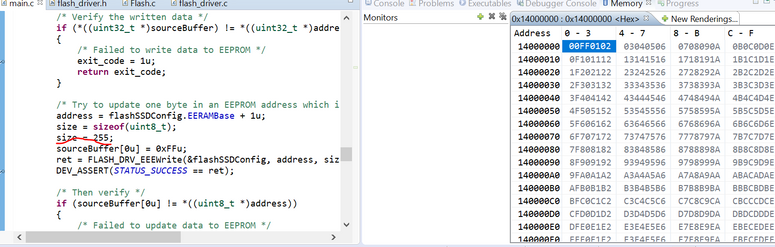

- Mark as New
- Bookmark
- Subscribe
- Mute
- Subscribe to RSS Feed
- Permalink
- Report Inappropriate Content
I have this results
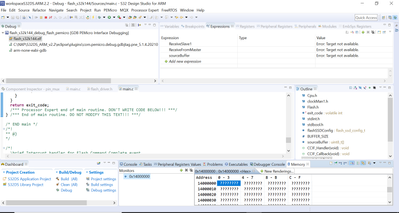
Senlent
- Mark as New
- Bookmark
- Subscribe
- Mute
- Subscribe to RSS Feed
- Permalink
- Report Inappropriate Content
Hi Alex,
Please set some breakpoints,
I tried again and the result was the same.
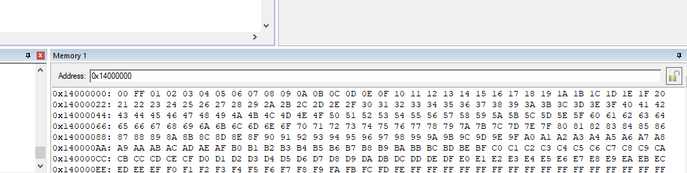
I‘m using:
IDE: S32 Design Studio for ARM 2018 or Keil
SDK:S32K1xx RTM SDK 3.0.0
Hardware:S32K142EVB.
BR!
Jim,
- Mark as New
- Bookmark
- Subscribe
- Mute
- Subscribe to RSS Feed
- Permalink
- Report Inappropriate Content
Hello,
Thank you for your reply. Can you tell me please, is it normal, when i debug the project i have the expected result like this
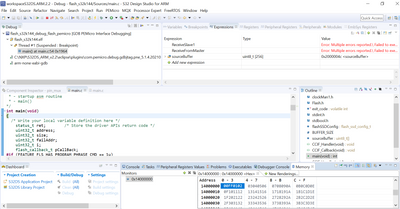
but when I click the button Resume F8, i have this
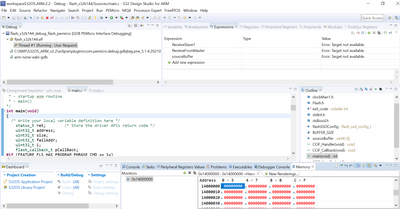
BR
Senlent
- Mark as New
- Bookmark
- Subscribe
- Mute
- Subscribe to RSS Feed
- Permalink
- Report Inappropriate Content
Hi Alex,
you can try single-step debugging to find the reason,I can't judge the root casue based on the picture you provided.I have tried several times and there is no such problem.
BR!
Jim,
- Mark as New
- Bookmark
- Subscribe
- Mute
- Subscribe to RSS Feed
- Permalink
- Report Inappropriate Content
hi Jim,
I tried with single-step debugging and it works fine, it means I go step by step until the end of the code
(Debug ->Debug Configuration -> flash_partitioning_s32k144_debug_flash_premicro -> Step over->I push "step over" until the end of the code).
But if I run full-speed running mode it doesn't work (Debug ->Debug Configuration -> flash_partitioning_s32k144_debug_flash_premicro -> Resume)
Maybe there is some configuration?
Senlent
- Mark as New
- Bookmark
- Subscribe
- Mute
- Subscribe to RSS Feed
- Permalink
- Report Inappropriate Content
The debugger may not be able to read the contents of the memory when running at full speed,so breakpoints and single-step debugging are necessary.
