
- Forums
- Product Forums
- General Purpose MicrocontrollersGeneral Purpose Microcontrollers
- i.MX Forumsi.MX Forums
- QorIQ Processing PlatformsQorIQ Processing Platforms
- Identification and SecurityIdentification and Security
- Power ManagementPower Management
- Wireless ConnectivityWireless Connectivity
- RFID / NFCRFID / NFC
- Advanced AnalogAdvanced Analog
- Neural Processing UnitsNeural Processing Units
- MCX Microcontrollers
- S32G
- S32K
- S32V
- MPC5xxx
- Other NXP Products
- S12 / MagniV Microcontrollers
- Powertrain and Electrification Analog Drivers
- Sensors
- Vybrid Processors
- Digital Signal Controllers
- 8-bit Microcontrollers
- ColdFire/68K Microcontrollers and Processors
- PowerQUICC Processors
- OSBDM and TBDML
- S32M
- S32Z/E
-
- Solution Forums
- Software Forums
- MCUXpresso Software and ToolsMCUXpresso Software and Tools
- CodeWarriorCodeWarrior
- MQX Software SolutionsMQX Software Solutions
- Model-Based Design Toolbox (MBDT)Model-Based Design Toolbox (MBDT)
- FreeMASTER
- eIQ Machine Learning Software
- Embedded Software and Tools Clinic
- S32 SDK
- S32 Design Studio
- GUI Guider
- Zephyr Project
- Voice Technology
- Application Software Packs
- Secure Provisioning SDK (SPSDK)
- Processor Expert Software
- Generative AI & LLMs
-
- Topics
- Mobile Robotics - Drones and RoversMobile Robotics - Drones and Rovers
- NXP Training ContentNXP Training Content
- University ProgramsUniversity Programs
- Rapid IoT
- NXP Designs
- SafeAssure-Community
- OSS Security & Maintenance
- Using Our Community
-
- Cloud Lab Forums
-
- Knowledge Bases
- ARM Microcontrollers
- i.MX Processors
- Identification and Security
- Model-Based Design Toolbox (MBDT)
- QorIQ Processing Platforms
- S32 Automotive Processing Platform
- Wireless Connectivity
- CodeWarrior
- MCUXpresso Suite of Software and Tools
- MQX Software Solutions
- RFID / NFC
- Advanced Analog
- Neural Processing Units
-
- NXP Tech Blogs
- Home
- :
- Product Forums
- :
- S32K
- :
- Re: EB tresos Example Project and Guidance on RTE/SWC Configuration for S32K3 Series
EB tresos Example Project and Guidance on RTE/SWC Configuration for S32K3 Series
- Subscribe to RSS Feed
- Mark Topic as New
- Mark Topic as Read
- Float this Topic for Current User
- Bookmark
- Subscribe
- Mute
- Printer Friendly Page

- Mark as New
- Bookmark
- Subscribe
- Mute
- Subscribe to RSS Feed
- Permalink
- Report Inappropriate Content
Hello NXP Support Team,
I am currently evaluating AUTOSAR development using EB tresos Studio (version 29.3) with the evaluation license provided by NXP. I am working with the S32K3 and have all necessary hardware.
EB tresos is installed and confirmed that all MCAL modules (e.g., ADC, DIO, PORT, MCU..) are listed and available under Help → EB tresos Details → Module Registry.
However, I was unable to find any preconfigured or example project that provides a baseline setup. Under File > New, I only see options to create a new or import an existing project, but I do not have any existing projects to start from.
I would appreciate your support on the following:
Example Projects:
Where can I find an official example or demo project for S32K3 MCUs that includes basic MCAL configuration (e.g., clock, port, and build integration)?
If such projects are included in the MCAL delivery package, could you please provide the exact path or file names?
RTE Configuration and SWC Design:
In EB tresos Studio, I noticed the “RTE Contract Phase” menu which allows importing ARXML files.
Could you confirm whether EB tresos supports full RTE generation and SWC integration, or if a separate tool is required for authoring SWCs and system descriptions?
If external tools are needed for creating SWCs or defining RTE contract input (e.g., ARXML files), what tools do you recommend or officially support with the NXP toolchain?
I am interested in building up a complete AUTOSAR application stack starting from MCAL through to RTE and SWCs, and any guidance or starting points would be highly appreciated.
Thank you in advance for your support.
Solved! Go to Solution.

 Julián_AragónM
- Mark as New
- Bookmark
- Subscribe
- Mute
- Subscribe to RSS Feed
- Permalink
- Report Inappropriate Content
Hi @Kazarian,
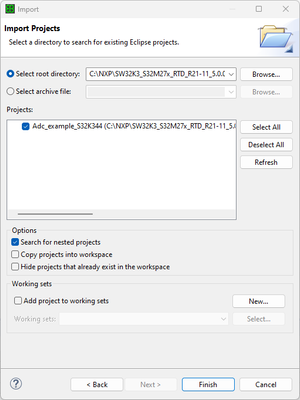
1. The RTD package includes some example modules for each driver. You can find them under your installation (by default: C:\NXP\SW32K3_S32M27x_RTD_R21-11_5.0.0). You can select "Import > General > Existing Projects into Workspace" and with the "Select root directory", add the path to the example you need, for example: "C:\NXP\SW32K3_S32M27x_RTD_R21-11_5.0.0\eclipse\plugins\Adc_TS_T40D34M50I0R0\examples\EBT\S32K3XX\Adc_example_S32K344"
2. Tresos does support RTE generation and SWC integration, however, the RTE module released in the RTD package for S32K3 devices is only a support stub, it does not support configuration. This is only for testing purpose from our side. You will need to contact a third-party provider, such as Elektrobit(EB), Vector, etc, for a compatible package.
For a full-on description on RTE & SWC configuration, I suggest contacting Elektrobit, as they have some training materials regarding AUTOSAR workflow: EB tresos Studio demonstrator – Elektrobit. They cover general topics such as configuring ECUs, including features (Importer, Exporters, System Description Editors, etc.), functionality (SWC to ECU mapping, generating ECU extract, derive ECU configuration, etc.), among other things.
We do not provide any specific tools for SWC & RTE compatibility.
Best regards,
Julián
Julián_AragónM
- Mark as New
- Bookmark
- Subscribe
- Mute
- Subscribe to RSS Feed
- Permalink
- Report Inappropriate Content
Hi @Kazarian,
1. The RTD package includes some example modules for each driver. You can find them under your installation (by default: C:\NXP\SW32K3_S32M27x_RTD_R21-11_5.0.0). You can select "Import > General > Existing Projects into Workspace" and with the "Select root directory", add the path to the example you need, for example: "C:\NXP\SW32K3_S32M27x_RTD_R21-11_5.0.0\eclipse\plugins\Adc_TS_T40D34M50I0R0\examples\EBT\S32K3XX\Adc_example_S32K344"
2. Tresos does support RTE generation and SWC integration, however, the RTE module released in the RTD package for S32K3 devices is only a support stub, it does not support configuration. This is only for testing purpose from our side. You will need to contact a third-party provider, such as Elektrobit(EB), Vector, etc, for a compatible package.
For a full-on description on RTE & SWC configuration, I suggest contacting Elektrobit, as they have some training materials regarding AUTOSAR workflow: EB tresos Studio demonstrator – Elektrobit. They cover general topics such as configuring ECUs, including features (Importer, Exporters, System Description Editors, etc.), functionality (SWC to ECU mapping, generating ECU extract, derive ECU configuration, etc.), among other things.
We do not provide any specific tools for SWC & RTE compatibility.
Best regards,
Julián
- Mark as New
- Bookmark
- Subscribe
- Mute
- Subscribe to RSS Feed
- Permalink
- Report Inappropriate Content
Thanks a lot @Julián_AragónM . The demo however need Dassault AUTOSAR Builder which require a license and its pretty expensive too, i was hoping for an evaluation license or a free alternative, but there isn't.
Best regards.
