
- Forums
- Product Forums
- General Purpose MicrocontrollersGeneral Purpose Microcontrollers
- i.MX Forumsi.MX Forums
- QorIQ Processing PlatformsQorIQ Processing Platforms
- Identification and SecurityIdentification and Security
- Power ManagementPower Management
- Wireless ConnectivityWireless Connectivity
- RFID / NFCRFID / NFC
- Advanced AnalogAdvanced Analog
- Neural Processing UnitsNeural Processing Units
- MCX Microcontrollers
- S32G
- S32K
- S32V
- MPC5xxx
- Other NXP Products
- S12 / MagniV Microcontrollers
- Powertrain and Electrification Analog Drivers
- Sensors
- Vybrid Processors
- Digital Signal Controllers
- 8-bit Microcontrollers
- ColdFire/68K Microcontrollers and Processors
- PowerQUICC Processors
- OSBDM and TBDML
- S32M
- S32Z/E
-
- Solution Forums
- Software Forums
- MCUXpresso Software and ToolsMCUXpresso Software and Tools
- CodeWarriorCodeWarrior
- MQX Software SolutionsMQX Software Solutions
- Model-Based Design Toolbox (MBDT)Model-Based Design Toolbox (MBDT)
- FreeMASTER
- eIQ Machine Learning Software
- Embedded Software and Tools Clinic
- S32 SDK
- S32 Design Studio
- GUI Guider
- Zephyr Project
- Voice Technology
- Application Software Packs
- Secure Provisioning SDK (SPSDK)
- Processor Expert Software
- Generative AI & LLMs
-
- Topics
- Mobile Robotics - Drones and RoversMobile Robotics - Drones and Rovers
- NXP Training ContentNXP Training Content
- University ProgramsUniversity Programs
- Rapid IoT
- NXP Designs
- SafeAssure-Community
- OSS Security & Maintenance
- Using Our Community
-
- Cloud Lab Forums
-
- Knowledge Bases
- ARM Microcontrollers
- i.MX Processors
- Identification and Security
- Model-Based Design Toolbox (MBDT)
- QorIQ Processing Platforms
- S32 Automotive Processing Platform
- Wireless Connectivity
- CodeWarrior
- MCUXpresso Suite of Software and Tools
- MQX Software Solutions
- RFID / NFC
- Advanced Analog
- Neural Processing Units
-
- NXP Tech Blogs
- RSS フィードを購読する
- トピックを新着としてマーク
- トピックを既読としてマーク
- このトピックを現在のユーザーにフロートします
- ブックマーク
- 購読
- ミュート
- 印刷用ページ

- 新着としてマーク
- ブックマーク
- 購読
- ミュート
- RSS フィードを購読する
- ハイライト
- 印刷
- 不適切なコンテンツを報告
Dear Technical Support Team,
We are facing a critical issue with the DMA module on the S32K312 development board where the CHn_ES (Channel Error Status) bit is being unexpectedly set, leading to program freezes. Here are the details:
Configuration:
- Toolchain: EB Tresos (EB 28) for peripheral configuration.
- ADC Setup: ADC0 and ADC1 configured with ADC_DMA interrupts for data transfer.
- DMAMUX: Configured in the MCL to route ADC triggers to DMA channels.
Issue:
- After initializing the MCL and running the code (see snippet below), the CHn_ES bit asserts immediately, halting the system.
- The error persists despite correct DMA transfer configurations. Power cycling is required to clear the error. Software reset cannot solve the problem.
- A similar unresolved case was referenced here: https://community.nxp.com/t5/S32K/Dma-transfer-on-S32K310/m-p/1938347.
Code Snippet:
void IoHwAdc_SetupInit(void)
{
Adc_Calibrate(0U, &iohwadc_hw_uint0_calib_status);
while(E_OK != iohwadc_hw_uint0_calib_status.AdcUnitSelfTestStatus) {};
Adc_Calibrate(1U, &iohwadc_hw_uint1_calib_status);
while(E_OK != iohwadc_hw_uint1_calib_status.AdcUnitSelfTestStatus) {};
Mcl_SetDmaChannelTransferList(DMA_LOGIC_CH_4, DmaCh_TransferList, IOHWADC_DMA_CH0_CONFIG_LIST_DIMENSION);
Mcl_SetDmaChannelTransferList(DMA_LOGIC_CH_3, DmaCh_TransferList, IOHWADC_DMA_CH0_CONFIG_LIST_DIMENSION);
}4. EB configuration


5. Read Register

Request for Assistance:
- Could this be caused by DMAMUX/DMA channel misconfiguration or a known hardware/software defect?
- Are there specific initialization sequences or errata patches for the S32K312 DMA subsystem?
- How can we reliably prevent CHn_ES assertion during startup?
Best regards,
dongxun.
解決済! 解決策の投稿を見る。

 danielmartynek
- 新着としてマーク
- ブックマーク
- 購読
- ミュート
- RSS フィードを購読する
- ハイライト
- 印刷
- 不適切なコンテンツを報告
Hi @dongxun,
The clock configuration in the MCU driver is incorrect.
You selected 120MHz for the core:

Which means you have Option B - Reduced Speed mode (CORE_CLK @ 120 MHz) RM rev10, Table 158.
However, both AIPS clocks are set to 40MHz.
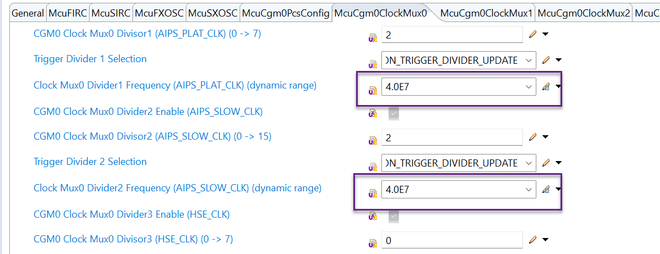
It should be set to 60MHz (PLAT) and 30MHz (SLOW).
Otherwise we cannot guarantee the functionality of the MCU, it can behave unpredictable.
The clock configuration does not have to follow the options precisely (Option B, in this case), but the ratios between the clocks must.

Best regards,
Daniel
danielmartynek
- 新着としてマーク
- ブックマーク
- 購読
- ミュート
- RSS フィードを購読する
- ハイライト
- 印刷
- 不適切なコンテンツを報告
Hello @dongxun,
I see there is a bus error on the source.
And the source address is not configured:

Double check the DMA configuration in EB tresos.
Can you share the project or the configuration .xdm files?
Which RTD revision do you use?
Regards,
Daniel
- 新着としてマーク
- ブックマーク
- 購読
- ミュート
- RSS フィードを購読する
- ハイライト
- 印刷
- 不適切なコンテンツを報告
Hi Daniel Martynek,
Thank you for your reply. I've attached the xdm files. We are using RTD version "SW32K3_RTD_4.4_2.0.2_D2211".
I want to mention that this issue is intermittent. Two of my colleagues frequently encounter it, while others do not experience it at all. Personally, the program runs fine in the evening before I leave work, but when I reopen the debugger and upload it in the morning, it goes into ErrorHook. Additionally, the problematic DMA channels are Channel 3 and Channel 4, which are designated for ADC services.
Best regards,
dongxun
danielmartynek
- 新着としてマーク
- ブックマーク
- 購読
- ミュート
- RSS フィードを購読する
- ハイライト
- 印刷
- 不適切なコンテンツを報告
Hi @dongxun,
The clock configuration in the MCU driver is incorrect.
You selected 120MHz for the core:
Which means you have Option B - Reduced Speed mode (CORE_CLK @ 120 MHz) RM rev10, Table 158.
However, both AIPS clocks are set to 40MHz.
It should be set to 60MHz (PLAT) and 30MHz (SLOW).
Otherwise we cannot guarantee the functionality of the MCU, it can behave unpredictable.
The clock configuration does not have to follow the options precisely (Option B, in this case), but the ratios between the clocks must.
Best regards,
Daniel
