
- Forums
- Product Forums
- General Purpose MicrocontrollersGeneral Purpose Microcontrollers
- i.MX Forumsi.MX Forums
- QorIQ Processing PlatformsQorIQ Processing Platforms
- Identification and SecurityIdentification and Security
- Power ManagementPower Management
- Wireless ConnectivityWireless Connectivity
- RFID / NFCRFID / NFC
- Advanced AnalogAdvanced Analog
- Neural Processing UnitsNeural Processing Units
- MCX Microcontrollers
- S32G
- S32K
- S32V
- MPC5xxx
- Other NXP Products
- S12 / MagniV Microcontrollers
- Powertrain and Electrification Analog Drivers
- Sensors
- Vybrid Processors
- Digital Signal Controllers
- 8-bit Microcontrollers
- ColdFire/68K Microcontrollers and Processors
- PowerQUICC Processors
- OSBDM and TBDML
- S32M
- S32Z/E
-
- Solution Forums
- Software Forums
- MCUXpresso Software and ToolsMCUXpresso Software and Tools
- CodeWarriorCodeWarrior
- MQX Software SolutionsMQX Software Solutions
- Model-Based Design Toolbox (MBDT)Model-Based Design Toolbox (MBDT)
- FreeMASTER
- eIQ Machine Learning Software
- Embedded Software and Tools Clinic
- S32 SDK
- S32 Design Studio
- GUI Guider
- Zephyr Project
- Voice Technology
- Application Software Packs
- Secure Provisioning SDK (SPSDK)
- Processor Expert Software
- Generative AI & LLMs
-
- Topics
- Mobile Robotics - Drones and RoversMobile Robotics - Drones and Rovers
- NXP Training ContentNXP Training Content
- University ProgramsUniversity Programs
- Rapid IoT
- NXP Designs
- SafeAssure-Community
- OSS Security & Maintenance
- Using Our Community
-
- Cloud Lab Forums
-
- Knowledge Bases
- ARM Microcontrollers
- i.MX Processors
- Identification and Security
- Model-Based Design Toolbox (MBDT)
- QorIQ Processing Platforms
- S32 Automotive Processing Platform
- Wireless Connectivity
- CodeWarrior
- MCUXpresso Suite of Software and Tools
- MQX Software Solutions
- RFID / NFC
- Advanced Analog
- Neural Processing Units
-
- NXP Tech Blogs
- Home
- :
- Software Forums
- :
- S32 SDK
- :
- Switching Between Processor Packages in S32DS Processor Expert
Switching Between Processor Packages in S32DS Processor Expert
- Subscribe to RSS Feed
- Mark Topic as New
- Mark Topic as Read
- Float this Topic for Current User
- Bookmark
- Subscribe
- Mute
- Printer Friendly Page

- Mark as New
- Bookmark
- Subscribe
- Mute
- Subscribe to RSS Feed
- Permalink
- Report Inappropriate Content
According to this post, I am able to switch to a new processor package by adding a new package and clicking the switch configuration button. This works as explained. The problem is that once you have both packages installed, how do you switch between them?
The answer is that you right click for the context menu and select "Component Enabled", which doesn't sound like an option but rather the status of the processor.
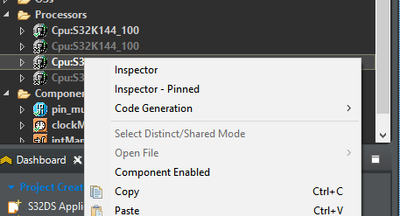
In fact, it wasn't until I noticed that on the processor that is actually enabled, that option has a check mark and is greyed out, that I realized what was happening. There is a sizable delay between the time you click enable and the time the x switches to a checkmark so it's not immediately obvious that it has worked.
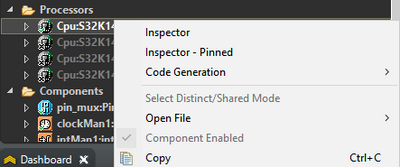
This is a very low level piece of info that few people will probably encounter and/or care about but I wanted to put it out here in case it was causing anyone issues.
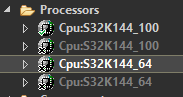
I am still confused as to why it adds 2 instances of the processor. I can delete 1 of the instances and everything seems to work. Anybody care to elaborate?
Solved! Go to Solution.

 hungnguyenphi
- Mark as New
- Bookmark
- Subscribe
- Mute
- Subscribe to RSS Feed
- Permalink
- Report Inappropriate Content
Hello @sparkee
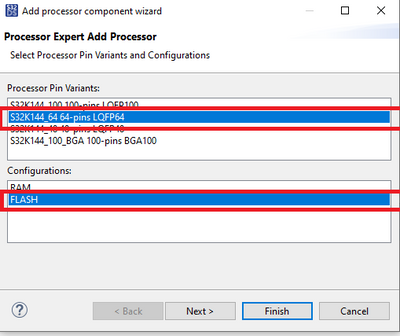
I have checked the version S32DS.ARM.2.2 and SDK RTM 3.0.0. And it is normal. If you just choose one configuration (Just FLASH or RAM) and just one "Processor Pin Variants", then just one processor is added. Could you please help to check if you have choose both RAM and FLASH in Configurations.
Best regards,
Hung
hungnguyenphi
- Mark as New
- Bookmark
- Subscribe
- Mute
- Subscribe to RSS Feed
- Permalink
- Report Inappropriate Content
Hello @sparkee
I am still confused as to why it adds 2 instances of the processor. I can delete 1 of the instances and everything seems to work. Anybody care to elaborate?
[Hung] As you can see, we have multiple instance of the processor in your project, but just one of them is activated at one time(so from my understand, we will not have any issue with it). In some case, user can use it to switch between different pin type of CPU. So I think that it is normal.
Best regards,
Hung
- Mark as New
- Bookmark
- Subscribe
- Mute
- Subscribe to RSS Feed
- Permalink
- Report Inappropriate Content
I understand only 1 is activated at a time but my question is why does it duplicate instances of my processor? I understand having different instances for different footprints but I don't understand why there are duplicates of the same footprint.
hungnguyenphi
- Mark as New
- Bookmark
- Subscribe
- Mute
- Subscribe to RSS Feed
- Permalink
- Report Inappropriate Content
Hello @sparkee
I understand only 1 is activated at a time but my question is why does it duplicate instances of my processor?
[Hung] From my understand, you have added the same processor double times. So you have it. But please notice that just one process is activated. So we still have no issue here. The current Processor Expert will not count it as error. Anyway you can remove unused unit.
Best regards,
Hung
- Mark as New
- Bookmark
- Subscribe
- Mute
- Subscribe to RSS Feed
- Permalink
- Report Inappropriate Content
I feel like you keep repeating what I've already said. Let me be more clear.
When I add a processor to my project, 2 processors show up in the components box. I add 1 but 2 show up. My question is: WHY do 2 processors show up when I only add 1? I'm not asking how many are active at the same time or if it will work. It's been this way for at least a year and everything works fine. I always just delete 1. It was just a curious afterthought because it doesn't seem right to me.
hungnguyenphi
- Mark as New
- Bookmark
- Subscribe
- Mute
- Subscribe to RSS Feed
- Permalink
- Report Inappropriate Content
Hello @sparkee ,
Actually I have not met this issue with S32 Design Studio for ARM Version 2018.R1. Could you please specific the S32DS version and the SDK driver version.
Best regards,
Hung
- Mark as New
- Bookmark
- Subscribe
- Mute
- Subscribe to RSS Feed
- Permalink
- Report Inappropriate Content
S32DS.ARM.2.2
SDK RTM 3.0.0
hungnguyenphi
- Mark as New
- Bookmark
- Subscribe
- Mute
- Subscribe to RSS Feed
- Permalink
- Report Inappropriate Content
Hello @sparkee
I have checked the version S32DS.ARM.2.2 and SDK RTM 3.0.0. And it is normal. If you just choose one configuration (Just FLASH or RAM) and just one "Processor Pin Variants", then just one processor is added. Could you please help to check if you have choose both RAM and FLASH in Configurations.
Best regards,
Hung
- Mark as New
- Bookmark
- Subscribe
- Mute
- Subscribe to RSS Feed
- Permalink
- Report Inappropriate Content
There's the answer, it creates a processor for each configuration. Thank you!
