
- Forums
- Product Forums
- General Purpose MicrocontrollersGeneral Purpose Microcontrollers
- i.MX Forumsi.MX Forums
- QorIQ Processing PlatformsQorIQ Processing Platforms
- Identification and SecurityIdentification and Security
- Power ManagementPower Management
- Wireless ConnectivityWireless Connectivity
- RFID / NFCRFID / NFC
- Advanced AnalogAdvanced Analog
- Neural Processing UnitsNeural Processing Units
- MCX Microcontrollers
- S32G
- S32K
- S32V
- MPC5xxx
- Other NXP Products
- S12 / MagniV Microcontrollers
- Powertrain and Electrification Analog Drivers
- Sensors
- Vybrid Processors
- Digital Signal Controllers
- 8-bit Microcontrollers
- ColdFire/68K Microcontrollers and Processors
- PowerQUICC Processors
- OSBDM and TBDML
- S32M
- S32Z/E
-
- Solution Forums
- Software Forums
- MCUXpresso Software and ToolsMCUXpresso Software and Tools
- CodeWarriorCodeWarrior
- MQX Software SolutionsMQX Software Solutions
- Model-Based Design Toolbox (MBDT)Model-Based Design Toolbox (MBDT)
- FreeMASTER
- eIQ Machine Learning Software
- Embedded Software and Tools Clinic
- S32 SDK
- S32 Design Studio
- GUI Guider
- Zephyr Project
- Voice Technology
- Application Software Packs
- Secure Provisioning SDK (SPSDK)
- Processor Expert Software
- Generative AI & LLMs
-
- Topics
- Mobile Robotics - Drones and RoversMobile Robotics - Drones and Rovers
- NXP Training ContentNXP Training Content
- University ProgramsUniversity Programs
- Rapid IoT
- NXP Designs
- SafeAssure-Community
- OSS Security & Maintenance
- Using Our Community
-
- Cloud Lab Forums
-
- Knowledge Bases
- ARM Microcontrollers
- i.MX Processors
- Identification and Security
- Model-Based Design Toolbox (MBDT)
- QorIQ Processing Platforms
- S32 Automotive Processing Platform
- Wireless Connectivity
- CodeWarrior
- MCUXpresso Suite of Software and Tools
- MQX Software Solutions
- RFID / NFC
- Advanced Analog
- Neural Processing Units
-
- NXP Tech Blogs
- Home
- :
- Software Forums
- :
- S32 Design Studio
- :
- S32DS Activation Issue
S32DS Activation Issue
- Subscribe to RSS Feed
- Mark Topic as New
- Mark Topic as Read
- Float this Topic for Current User
- Bookmark
- Subscribe
- Mute
- Printer Friendly Page
S32DS Activation Issue

- Mark as New
- Bookmark
- Subscribe
- Mute
- Subscribe to RSS Feed
- Permalink
- Report Inappropriate Content
Hello,
I cannot seem to get S32DS to activate the license. I have tried online (via local WiFi and mobile hotspot) to no avail (FNP error). I have tried the offline method through several other machines. Here's the error in the image below. I have attached the install log for reference.
Any ideas?
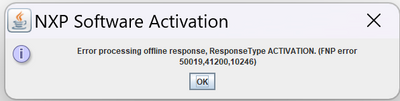
Thanks!
- Mark as New
- Bookmark
- Subscribe
- Mute
- Subscribe to RSS Feed
- Permalink
- Report Inappropriate Content
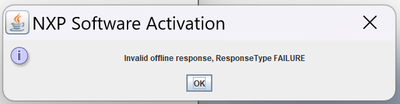
Here's another offline attempt.
- Mark as New
- Bookmark
- Subscribe
- Mute
- Subscribe to RSS Feed
- Permalink
- Report Inappropriate Content
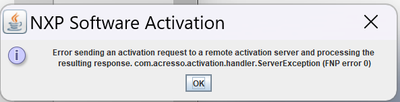
Here the error from Online activation.
- Mark as New
- Bookmark
- Subscribe
- Mute
- Subscribe to RSS Feed
- Permalink
- Report Inappropriate Content
I should note this machine has Windows 11.

 mikedoidge
- Mark as New
- Bookmark
- Subscribe
- Mute
- Subscribe to RSS Feed
- Permalink
- Report Inappropriate Content
Hello Robert,
As is noted in the release notes, the S32 Design Studio for Arm v2.2 is supporting the following versions of Windows OS:
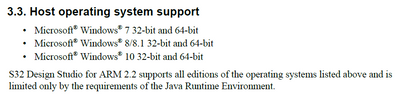
We have not tested it for installation within Windows 11. I can see from the flexera activation server that the license request is not generated properly. This could be due to the version of FNP (FlexNet Publisher) which was included for the S32DS for Arm v2.2. It is likely this version does not work properly in Win11. I would suggest that you try to enable 'Windows 7 compatibility mode' on the install file and see if it will work. If this does not work, you will need to install Win10 or other supported version as listed in the release notes.
Best Regards,
Mike
- Mark as New
- Bookmark
- Subscribe
- Mute
- Subscribe to RSS Feed
- Permalink
- Report Inappropriate Content
Is there an update planned? New laptops are seldomly available with Windows 10.
I have tried everything imaginable. Nothing can get around the FNP issue. I think this is strictly an issue with the license manager. Perhaps a deactivated license? Or some temporary fix?
mikedoidge
- Mark as New
- Bookmark
- Subscribe
- Mute
- Subscribe to RSS Feed
- Permalink
- Report Inappropriate Content
Hi Robert,
Sorry for the delay.
If this is truly an FNP version issue, then I may be able to help you. We have an updated version I can share with you that you will install to your PC and use to activate the license. Once activated, then you should be able to run the S32DS installer and it should see the license already exists and then allow you to complete the installation.
I have attached a package of files which will allow you to update the version of FNP on your machine. There is a file 'help.txt' included in the package that provides the command line instructions to be followed to do 2 things:
1) Install the updated FNP to your PC
2) Activate your S32 Design Studio license
It is important to perform both steps. By activating the S32 Design Studio license through this method, we can add the license to the trusted storage on your PC. Then, when you execute the S32 Design Studio installer, the trusted storage will be checked for a license. The license will already be present, so the activation process can be skipped by the installer and the installation can be completed successfully.
Best Regards,
Mike
- Mark as New
- Bookmark
- Subscribe
- Mute
- Subscribe to RSS Feed
- Permalink
- Report Inappropriate Content
Thanks, Mike.
I am having some trouble with this. First, there was no java installed on the machine. I installed java, and am still having issues running the first command:
java -Djava.library.path=lib/ -jar com.nxp.s32ds.rcp.license.core.jar install -prod s32ds
I get the following error:
Exception in thread "main" java.lang.UnsatisfiedLinkError: no FNP_Act_Installer in java.library.path: lib/
I've tried running it from different locations. This is another error.

Any ideas?
Robert
- Mark as New
- Bookmark
- Subscribe
- Mute
- Subscribe to RSS Feed
- Permalink
- Report Inappropriate Content
Any chance of getting an unlocked version? This is a free software after all.
mikedoidge
- Mark as New
- Bookmark
- Subscribe
- Mute
- Subscribe to RSS Feed
- Permalink
- Report Inappropriate Content
Hi Robert,
I will check if there is some solution to this problem. We have no plans for future releases for this product. All Arm core device support has been migrated to S32 Design Studio for S32 Platform and the support will be maintained there. Is there any possibility you could use this tool instead?
Best Regards,
Mike
- Mark as New
- Bookmark
- Subscribe
- Mute
- Subscribe to RSS Feed
- Permalink
- Report Inappropriate Content
I am trying to get that going. Do you have an IDE recommendation for the Kinetis EA? It's not supported directly by MCUXpresso.
mikedoidge
- Mark as New
- Bookmark
- Subscribe
- Mute
- Subscribe to RSS Feed
- Permalink
- Report Inappropriate Content
Hi Robert,
Unfortunately, for the KEA devices, you will need to continue to use the S32 Design Studio for Arm product. There is no plans to migrate this device support.
I would like to setup a meeting on MS Teams with you for sometime next week. We have some internal meetings this week and cannot manage it. I would like to include the product engineer who can help us to try to resolve the installation issues. He is in eastern europe time zone and I am in central US time zone. Please suggest some times which work for you as well as both of us.
Best Regards,
Mike
