
- Forums
- Product Forums
- General Purpose MicrocontrollersGeneral Purpose Microcontrollers
- i.MX Forumsi.MX Forums
- QorIQ Processing PlatformsQorIQ Processing Platforms
- Identification and SecurityIdentification and Security
- Power ManagementPower Management
- Wireless ConnectivityWireless Connectivity
- RFID / NFCRFID / NFC
- Advanced AnalogAdvanced Analog
- Neural Processing UnitsNeural Processing Units
- MCX Microcontrollers
- S32G
- S32K
- S32V
- MPC5xxx
- Other NXP Products
- S12 / MagniV Microcontrollers
- Powertrain and Electrification Analog Drivers
- Sensors
- Vybrid Processors
- Digital Signal Controllers
- 8-bit Microcontrollers
- ColdFire/68K Microcontrollers and Processors
- PowerQUICC Processors
- OSBDM and TBDML
- S32M
- S32Z/E
-
- Solution Forums
- Software Forums
- MCUXpresso Software and ToolsMCUXpresso Software and Tools
- CodeWarriorCodeWarrior
- MQX Software SolutionsMQX Software Solutions
- Model-Based Design Toolbox (MBDT)Model-Based Design Toolbox (MBDT)
- FreeMASTER
- eIQ Machine Learning Software
- Embedded Software and Tools Clinic
- S32 SDK
- S32 Design Studio
- GUI Guider
- Zephyr Project
- Voice Technology
- Application Software Packs
- Secure Provisioning SDK (SPSDK)
- Processor Expert Software
- Generative AI & LLMs
-
- Topics
- Mobile Robotics - Drones and RoversMobile Robotics - Drones and Rovers
- NXP Training ContentNXP Training Content
- University ProgramsUniversity Programs
- Rapid IoT
- NXP Designs
- SafeAssure-Community
- OSS Security & Maintenance
- Using Our Community
-
- Cloud Lab Forums
-
- Knowledge Bases
- ARM Microcontrollers
- i.MX Processors
- Identification and Security
- Model-Based Design Toolbox (MBDT)
- QorIQ Processing Platforms
- S32 Automotive Processing Platform
- Wireless Connectivity
- CodeWarrior
- MCUXpresso Suite of Software and Tools
- MQX Software Solutions
- RFID / NFC
- Advanced Analog
- Neural Processing Units
-
- NXP Tech Blogs
- Home
- :
- ソフトウェア・フォーラム
- :
- S32 デザインスタジオ
- :
- Re: Import Memory dump into Clock Tree in S32 DS not working!
Import Memory dump into Clock Tree in S32 DS not working!
- RSS フィードを購読する
- トピックを新着としてマーク
- トピックを既読としてマーク
- このトピックを現在のユーザーにフロートします
- ブックマーク
- 購読
- ミュート
- 印刷用ページ
Import Memory dump into Clock Tree in S32 DS not working!

- 新着としてマーク
- ブックマーク
- 購読
- ミュート
- RSS フィードを購読する
- ハイライト
- 印刷
- 不適切なコンテンツを報告
Hello NXP,
i have a BSP38 running on a S32G399 and i want to verifiy the clock settings with S32 DS. I tried to read back a memory dump either in csv or S19 and it is actually not reflecting the values from my dump. I need a Solution really urgent because validations are ongoing, i hope you can support me. I attached the S19 and the CSV Files i tried with.

Best Regards
Tobias

 alejandro_e
- 新着としてマーク
- ブックマーク
- 購読
- ミュート
- RSS フィードを購読する
- ハイライト
- 印刷
- 不適切なコンテンツを報告
Hello @tobiasgrimm,
Thanks for contacting NXP support. About your problem, can you elaborate more about it? please share the following information:
- Which version of the S32 DS are you using?
- Please describe all the steps you are performing to export and import the register values, what is the expected and the real behavior and please include screenshots when helpful
Thanks in advance for the information.
- 新着としてマーク
- ブックマーク
- 購読
- ミュート
- RSS フィードを購読する
- ハイライト
- 印刷
- 不適切なコンテンツを報告
Hello @alejandro_e ,
i am using Build id: 240924 (Update 14) Version 3.5.
I am doing the steps mentioned in your Help section of the Import Register function.

I found out only the format created by the export function can be read in:
| ACCEL_PLL->PLLCLKMUX,REFCLKSEL,0 |
| ACCEL_PLL->PLLCR,PLLPD,0 |
| ACCEL_PLL->PLLDV,MFI,80 |
| ACCEL_PLL->PLLDV,RDIV,1 |
| ACCEL_PLL->PLLFD,MFN,0 |
But actually there is no possibility to import a register dump or something. I need a way to directly import registers from a memory dump or csv file like i attached.
Is there SW Available to create a proper Memory Dump from S32G for the S32DS import function?
Best regards
Tobi
alejandro_e
- 新着としてマーク
- ブックマーク
- 購読
- ミュート
- RSS フィードを購読する
- ハイライト
- 印刷
- 不適切なコンテンツを報告
Hello @tobiasgrimm,
After exporting to a CSV file, you should be able to import by clicking the import button you show in the image and then selecting the file you exported erlier:
Press the import button:

Press the "Browse..." button and search for your file

Select the file you have exported previously:

Once selected click finish:
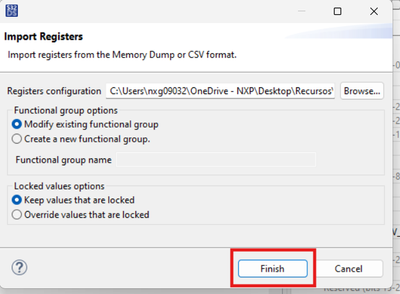
You will see the modified values highlighted in yellow:
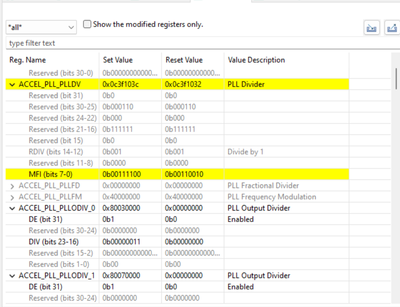
Let me know if you can follow the steps described above or if you encounter any error.
PS: I am not able to see the files you mentioned as attached.
Alejandro
