
- Forums
- Product Forums
- General Purpose MicrocontrollersGeneral Purpose Microcontrollers
- i.MX Forumsi.MX Forums
- QorIQ Processing PlatformsQorIQ Processing Platforms
- Identification and SecurityIdentification and Security
- Power ManagementPower Management
- Wireless ConnectivityWireless Connectivity
- RFID / NFCRFID / NFC
- Advanced AnalogAdvanced Analog
- Neural Processing UnitsNeural Processing Units
- MCX Microcontrollers
- S32G
- S32K
- S32V
- MPC5xxx
- Other NXP Products
- S12 / MagniV Microcontrollers
- Powertrain and Electrification Analog Drivers
- Sensors
- Vybrid Processors
- Digital Signal Controllers
- 8-bit Microcontrollers
- ColdFire/68K Microcontrollers and Processors
- PowerQUICC Processors
- OSBDM and TBDML
- S32M
- S32Z/E
-
- Solution Forums
- Software Forums
- MCUXpresso Software and ToolsMCUXpresso Software and Tools
- CodeWarriorCodeWarrior
- MQX Software SolutionsMQX Software Solutions
- Model-Based Design Toolbox (MBDT)Model-Based Design Toolbox (MBDT)
- FreeMASTER
- eIQ Machine Learning Software
- Embedded Software and Tools Clinic
- S32 SDK
- S32 Design Studio
- GUI Guider
- Zephyr Project
- Voice Technology
- Application Software Packs
- Secure Provisioning SDK (SPSDK)
- Processor Expert Software
- Generative AI & LLMs
-
- Topics
- Mobile Robotics - Drones and RoversMobile Robotics - Drones and Rovers
- NXP Training ContentNXP Training Content
- University ProgramsUniversity Programs
- Rapid IoT
- NXP Designs
- SafeAssure-Community
- OSS Security & Maintenance
- Using Our Community
-
- Cloud Lab Forums
-
- Knowledge Bases
- ARM Microcontrollers
- i.MX Processors
- Identification and Security
- Model-Based Design Toolbox (MBDT)
- QorIQ Processing Platforms
- S32 Automotive Processing Platform
- Wireless Connectivity
- CodeWarrior
- MCUXpresso Suite of Software and Tools
- MQX Software Solutions
- RFID / NFC
- Advanced Analog
- Neural Processing Units
-
- NXP Tech Blogs
- Home
- :
- Software Forums
- :
- S32 Design Studio
- :
- Re: Get source files in S32 eclipse project
Get source files in S32 eclipse project
- Subscribe to RSS Feed
- Mark Topic as New
- Mark Topic as Read
- Float this Topic for Current User
- Bookmark
- Subscribe
- Mute
- Printer Friendly Page

- Mark as New
- Bookmark
- Subscribe
- Mute
- Subscribe to RSS Feed
- Permalink
- Report Inappropriate Content
Hi,
I have a problem with getting the filenames in a specific project and configuration. In S32 studio (Version: 2017.R1, Build id: 171018) I did it rather awkwardly by looking in the file .cproject for this section:
<option id="com.freescale.s32ds.cross.gnu.tool.c.linker.option.linkOrder.1217940141" name="Link Order" superClass="com.freescale.s32ds.cross.gnu.tool.c.linker.option.linkOrder" useByScannerDiscovery="false" valueType="stringList">
<listOptionValue builtIn="false" value="Core0/flashrchw.c"/>
....
....
But this section is only appearing when setting the tick box "customize linker input order" in the setting for linker.
To make things worse, this section member "name" field has been removed in S32 Version: 2.1, Build id: 190624.
Do you have any suggestion how to get all the source files that is being used/built for a specific project/configuration? What file contains this information?
I want a list like this:
<listOptionValue builtIn="false" value="Core0/flashrchw.c"/>
<listOptionValue builtIn="false" value="Core0/main_Z7_0.c"/>
<listOptionValue builtIn="false" value="Core1/main_Z7_1.c"/>
...
...
Regards,
Mathias
Solved! Go to Solution.

 jiri_kral
- Mark as New
- Bookmark
- Subscribe
- Mute
- Subscribe to RSS Feed
- Permalink
- Report Inappropriate Content
Hi,
Well - if I understand it correctly - you like to get something like sources list for particular configuration (Debug/Debug RAM/Release), correct?
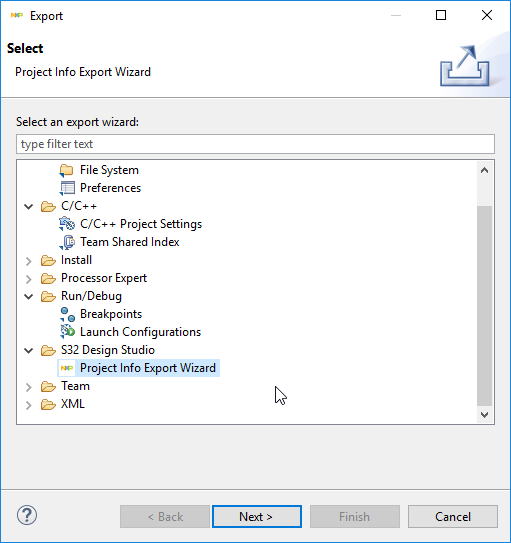
You can get ProjectInfo.xml file where is list of sources. Right click on project name -> Export -> S32Design Studio -> Project Info Export wizard:
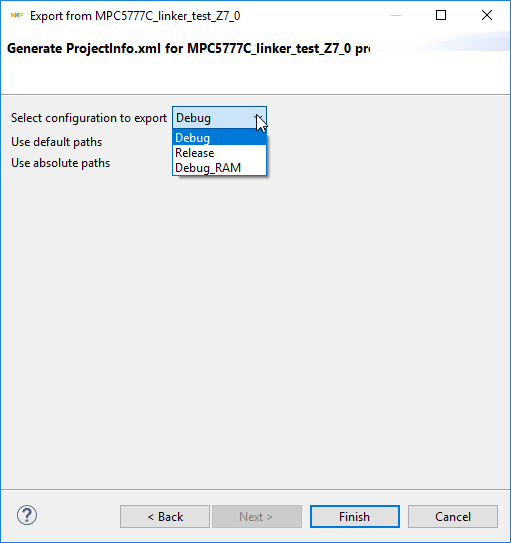
Select configuration you are interested in:
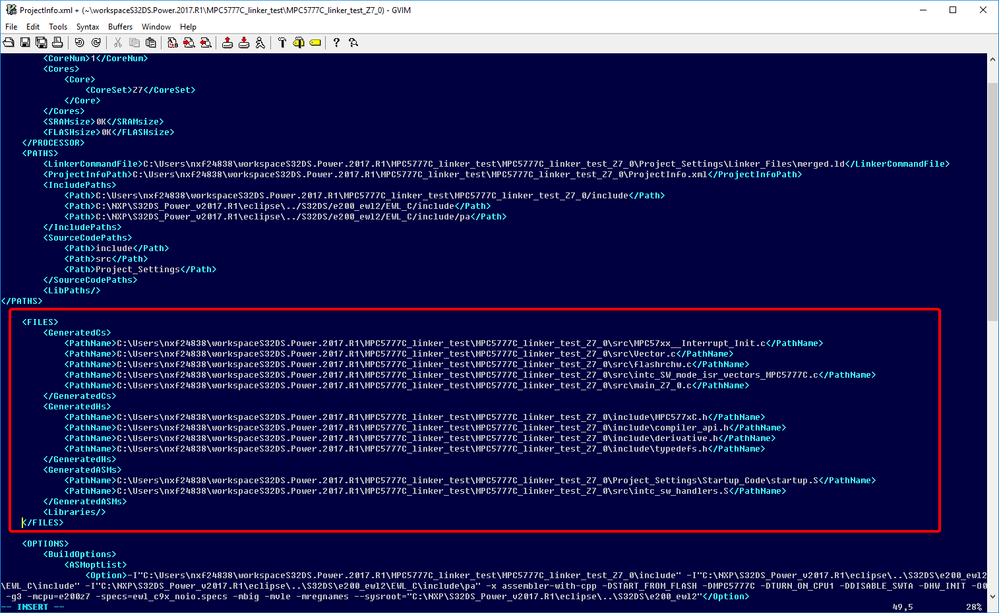
After finish you will get ProjectInfo.xml file in project root folder:
Hope it helps.
Jiri
- Mark as New
- Bookmark
- Subscribe
- Mute
- Subscribe to RSS Feed
- Permalink
- Report Inappropriate Content
Can anyone help me with this?
jiri_kral
- Mark as New
- Bookmark
- Subscribe
- Mute
- Subscribe to RSS Feed
- Permalink
- Report Inappropriate Content
Hi,
Well - if I understand it correctly - you like to get something like sources list for particular configuration (Debug/Debug RAM/Release), correct?
You can get ProjectInfo.xml file where is list of sources. Right click on project name -> Export -> S32Design Studio -> Project Info Export wizard:
Select configuration you are interested in:
After finish you will get ProjectInfo.xml file in project root folder:
Hope it helps.
Jiri
- Mark as New
- Bookmark
- Subscribe
- Mute
- Subscribe to RSS Feed
- Permalink
- Report Inappropriate Content
Hi Jiri,
Thanks a lot!
This is exactly what I need. Do you know if it is possible to automate this somehow, so that this file is always generated when building for example?
Mathias
jiri_kral
- Mark as New
- Bookmark
- Subscribe
- Mute
- Subscribe to RSS Feed
- Permalink
- Report Inappropriate Content
Hi Mathias,
I'm afraid that there is no such feature. You need to create poroject info xml file manually.
Other possibility is parsing build log which looks like this:
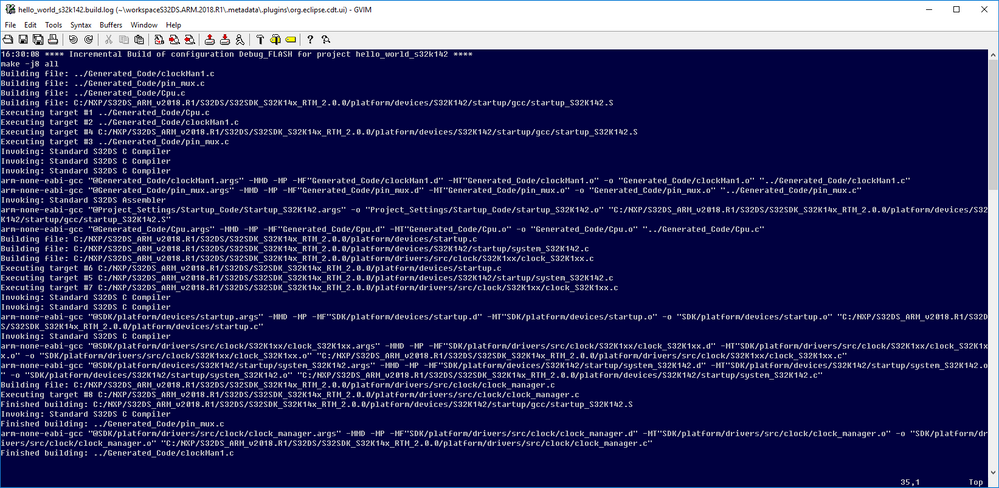
This file is generated when project is build and is stored in workspace\.metadata\.plugins\org.eclipse.cdt.ui\ProjectName.log
Jiri
