
- Forums
- Product Forums
- General Purpose MicrocontrollersGeneral Purpose Microcontrollers
- i.MX Forumsi.MX Forums
- QorIQ Processing PlatformsQorIQ Processing Platforms
- Identification and SecurityIdentification and Security
- Power ManagementPower Management
- Wireless ConnectivityWireless Connectivity
- RFID / NFCRFID / NFC
- Advanced AnalogAdvanced Analog
- MCX Microcontrollers
- S32G
- S32K
- S32V
- MPC5xxx
- Other NXP Products
- S12 / MagniV Microcontrollers
- Powertrain and Electrification Analog Drivers
- Sensors
- Vybrid Processors
- Digital Signal Controllers
- 8-bit Microcontrollers
- ColdFire/68K Microcontrollers and Processors
- PowerQUICC Processors
- OSBDM and TBDML
- S32M
- S32Z/E
-
- Solution Forums
- Software Forums
- MCUXpresso Software and ToolsMCUXpresso Software and Tools
- CodeWarriorCodeWarrior
- MQX Software SolutionsMQX Software Solutions
- Model-Based Design Toolbox (MBDT)Model-Based Design Toolbox (MBDT)
- FreeMASTER
- eIQ Machine Learning Software
- Embedded Software and Tools Clinic
- S32 SDK
- S32 Design Studio
- GUI Guider
- Zephyr Project
- Voice Technology
- Application Software Packs
- Secure Provisioning SDK (SPSDK)
- Processor Expert Software
- Generative AI & LLMs
-
- Topics
- Mobile Robotics - Drones and RoversMobile Robotics - Drones and Rovers
- NXP Training ContentNXP Training Content
- University ProgramsUniversity Programs
- Rapid IoT
- NXP Designs
- SafeAssure-Community
- OSS Security & Maintenance
- Using Our Community
-
- Cloud Lab Forums
-
- Knowledge Bases
- ARM Microcontrollers
- i.MX Processors
- Identification and Security
- Model-Based Design Toolbox (MBDT)
- QorIQ Processing Platforms
- S32 Automotive Processing Platform
- Wireless Connectivity
- CodeWarrior
- MCUXpresso Suite of Software and Tools
- MQX Software Solutions
- RFID / NFC
- Advanced Analog
-
- NXP Tech Blogs
- Home
- :
- 软件论坛
- :
- S32 Design Studio
- :
- A question about export of s32 design stduio for s32 platform,lose some files
A question about export of s32 design stduio for s32 platform,lose some files
A question about export of s32 design stduio for s32 platform,lose some files

I want to export all the files of the project, but I cannot find some files in the final exported project folder .
for example ,I can find "interrupt_manager. c" in the development environment directory "\ SDK \ platform \ drivers \ src \ interrupt",but it's empty in the exported project folder,and when I search in the workspace project folder,it's empty too and the same to "S32K144_64_flash.ld" .how can I make all the files in the exported project folder.


One more question, when I edit "S32K144_64_flash.ld" of one project,the "S32K144_64_flash.ld" of other projects are changed to the same at one time,It is not alone for a project?

 Julián_AragónM
Hi @pangyun,
Please make sure that when exporting, all the files are included and selected for the destination folder/zip:

As for the linker file, when creating a new project using project wizard there are typically 2 linker script files (S32K1xx_flash.ld and S32K1xx_ram.ld) these files are local copies for the project so any modification in the file should influence just this project.
If you need to change the .ld file, please go to project properties -> C/C++ Build -> Settings -> "Standard S32DS Linker"/General and adjust the "Script files" path:

Best regards,
Julián
Thank you for your advice,but it seems can't solve my problem.I'm sure all the files are included and selected for the destination folder/zip when exporting.
Today I found this:
when I creat a project by"File -> New -> S32DS Application Project",Such problems will not occur,
and I can find "S32K144_64_flash.ld" in the folder.
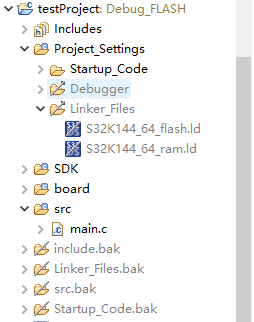

when I creat a project by"File -> New -> S32DS Project from Example",these problems will always exist.


So, how can I solve this problem when I creat a project by"File -> New -> S32DS Project from Example".
Julián_AragónM
Hi @pangyun,
I can see the Linker_Files folder with both files when exporting the project, even when I use "File > New > S32DS Project from Example". Could you confirm you are building and correctly export the project? You could also try selecting the "Resolve and export linked resources."


Best regards,
Julián
