
- Forums
- Product Forums
- General Purpose MicrocontrollersGeneral Purpose Microcontrollers
- i.MX Forumsi.MX Forums
- QorIQ Processing PlatformsQorIQ Processing Platforms
- Identification and SecurityIdentification and Security
- Power ManagementPower Management
- Wireless ConnectivityWireless Connectivity
- RFID / NFCRFID / NFC
- Advanced AnalogAdvanced Analog
- Neural Processing UnitsNeural Processing Units
- MCX Microcontrollers
- S32G
- S32K
- S32V
- MPC5xxx
- Other NXP Products
- S12 / MagniV Microcontrollers
- Powertrain and Electrification Analog Drivers
- Sensors
- Vybrid Processors
- Digital Signal Controllers
- 8-bit Microcontrollers
- ColdFire/68K Microcontrollers and Processors
- PowerQUICC Processors
- OSBDM and TBDML
- S32M
- S32Z/E
-
- Solution Forums
- Software Forums
- MCUXpresso Software and ToolsMCUXpresso Software and Tools
- CodeWarriorCodeWarrior
- MQX Software SolutionsMQX Software Solutions
- Model-Based Design Toolbox (MBDT)Model-Based Design Toolbox (MBDT)
- FreeMASTER
- eIQ Machine Learning Software
- Embedded Software and Tools Clinic
- S32 SDK
- S32 Design Studio
- GUI Guider
- Zephyr Project
- Voice Technology
- Application Software Packs
- Secure Provisioning SDK (SPSDK)
- Processor Expert Software
- Generative AI & LLMs
-
- Topics
- Mobile Robotics - Drones and RoversMobile Robotics - Drones and Rovers
- NXP Training ContentNXP Training Content
- University ProgramsUniversity Programs
- Rapid IoT
- NXP Designs
- SafeAssure-Community
- OSS Security & Maintenance
- Using Our Community
-
- Cloud Lab Forums
-
- Knowledge Bases
- ARM Microcontrollers
- i.MX Processors
- Identification and Security
- Model-Based Design Toolbox (MBDT)
- QorIQ Processing Platforms
- S32 Automotive Processing Platform
- Wireless Connectivity
- CodeWarrior
- MCUXpresso Suite of Software and Tools
- MQX Software Solutions
- RFID / NFC
- Advanced Analog
- Neural Processing Units
-
- NXP Tech Blogs
- Home
- :
- 软件论坛
- :
- S32 Design Studio知识库
- :
- HOWTO: S32 Design Studio - Create a New S32DS Project from Example
HOWTO: S32 Design Studio - Create a New S32DS Project from Example
HOWTO: S32 Design Studio - Create a New S32DS Project from Example
HOWTO: S32 Design Studio - Create a New S32DS Project from Example
In this document, the steps to create a new S32 Design Studio project from example will be detailed.
1. Launch S32 Design Studio
2. Use quick S32DS Project from Example button from Dashboard.
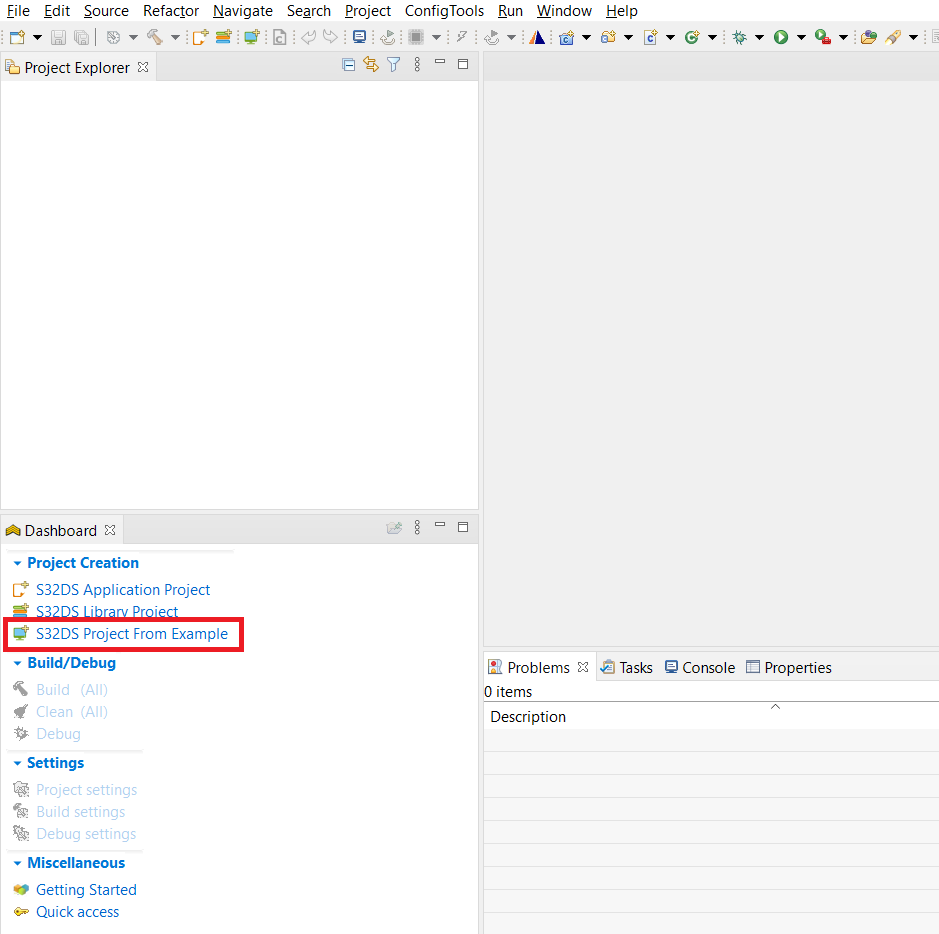
or select File -> New -> S32DS Project From Example
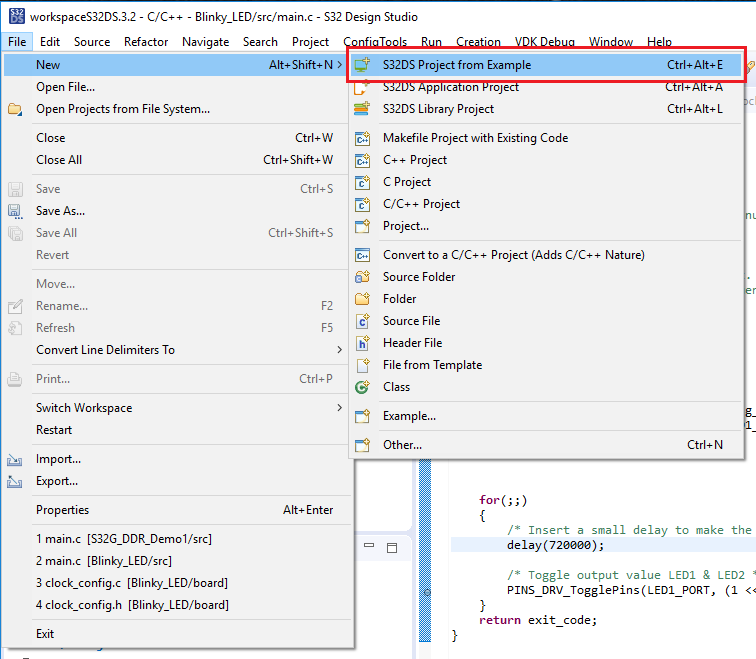
3. Select one of the projects, for example, S32K58_PI_MonteCarlo_BM. Click Finish.

4. The project is added to the current workspace. It is ready to be built and can be executed on the target.



Exactly my question also. I want to test out the SPI example project, but it's useless since it doesn't use Processor Expert and therefore can't run on my evaluation kit.
[edit] Shortly after my initial post I discovered some other examples that were downloaded with my SDK that do have Processor Expert enabled. Check this location (relative to your SDK and device) on your machine to see if the example you are looking for exists:
C:\NXP\S32DS_Power_v2.1\S32DS\software\S32_SDK_S32PA_RTM_3.0.0\examples\MPC5748G\driver_examples
