HOWTO: Create An ISP Project From Existing VSDK Graph in S32DS

cancel
Showing results for 
Show  only  | Search instead for 
Did you mean: 

HOWTO: Create An ISP Project From Existing VSDK Graph in S32DS

HOWTO: Create An ISP Project From Existing VSDK Graph in S32DS

There are a number of existing ISP Graph diagrams provided within the VSDK. It is possible to import them into S32DS and use them in a new C/C++ project. The steps to do this are detailed within this document.

Prerequisite

Before following the steps in this HOWTO, ensure you have the Vision Extension Package for V2xx (as well as the S32V2xx development package) installed to S32DS.

1) Launch S32DS

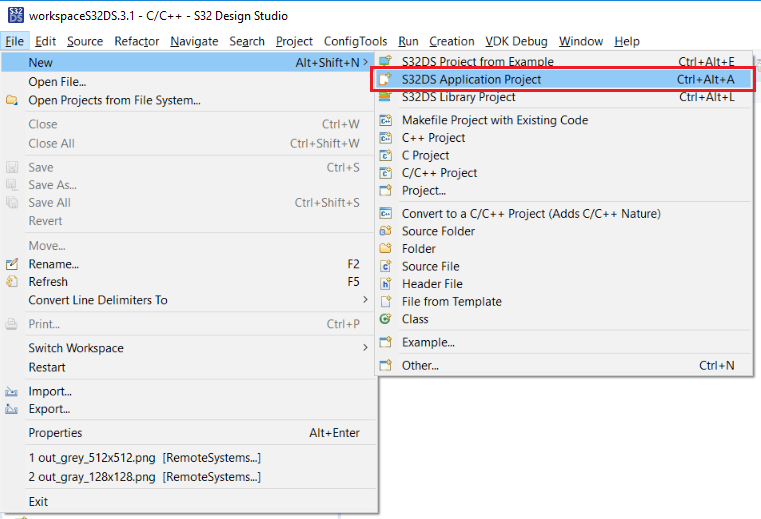
2) Select File -> New -> S32DS Application Project.
pastedImage_2.png

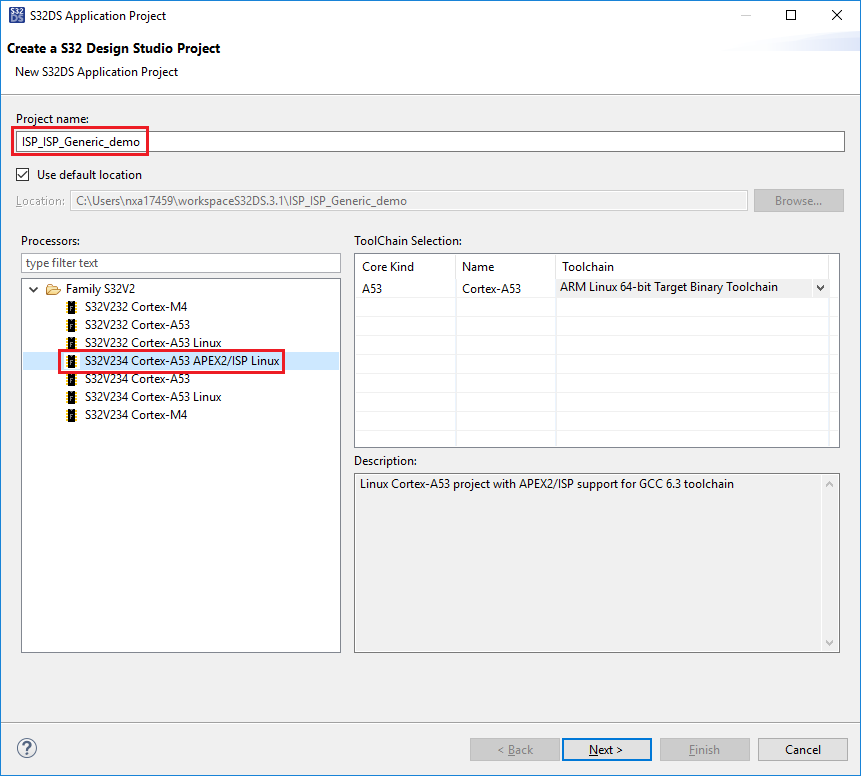
3) Enter a project name, such as: ISP_ISP_Generic_demo

4) Select 'A53 APEX/ISP Linux'

5) Click Next
pastedImage_1.png

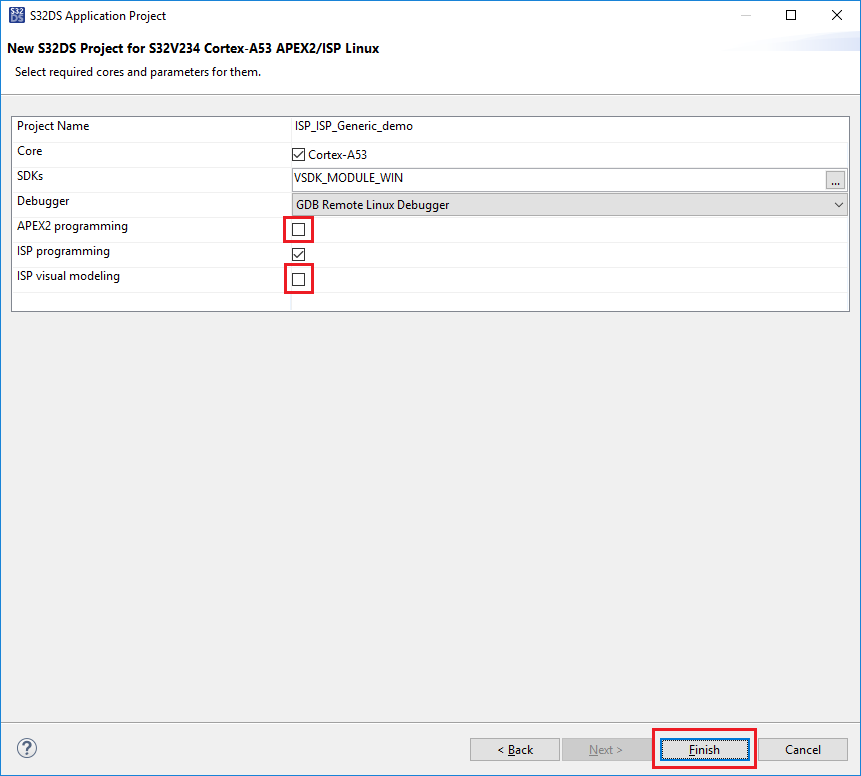
6) Deselect the APEX2 options and 'ISP Visual Modeling' option.

7) Click Finish
pastedImage_2.png

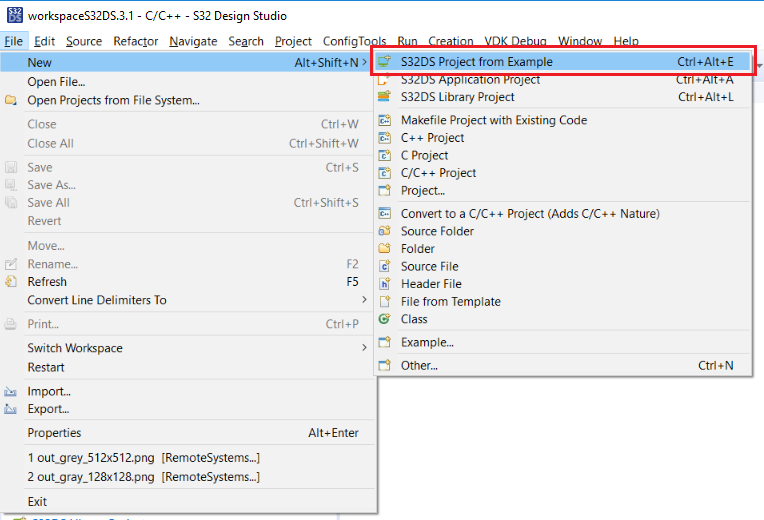
8) Select File -> New -> S32DS Project from Example.
pastedImage_2.png

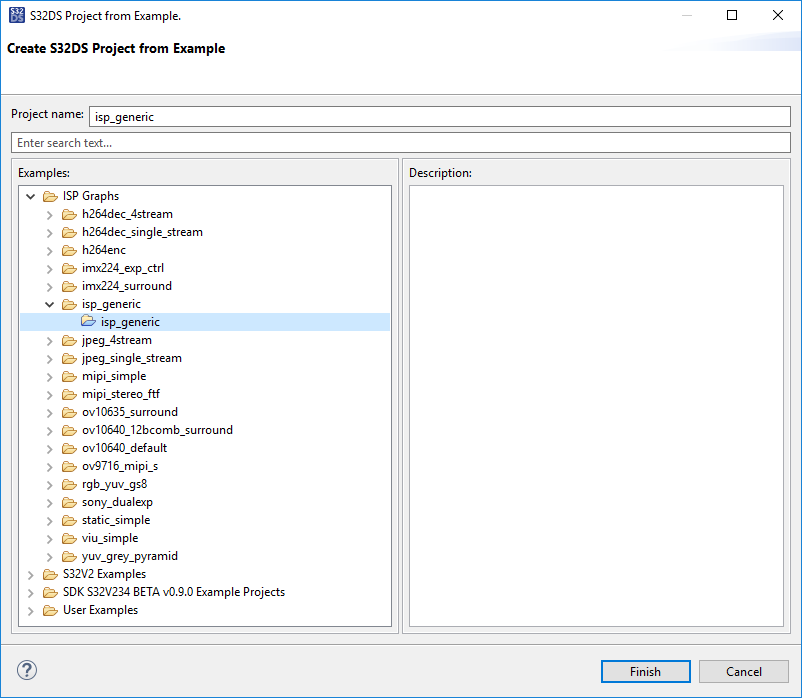
9) Select isp_generic.

10) Select Finish
pastedImage_3.png

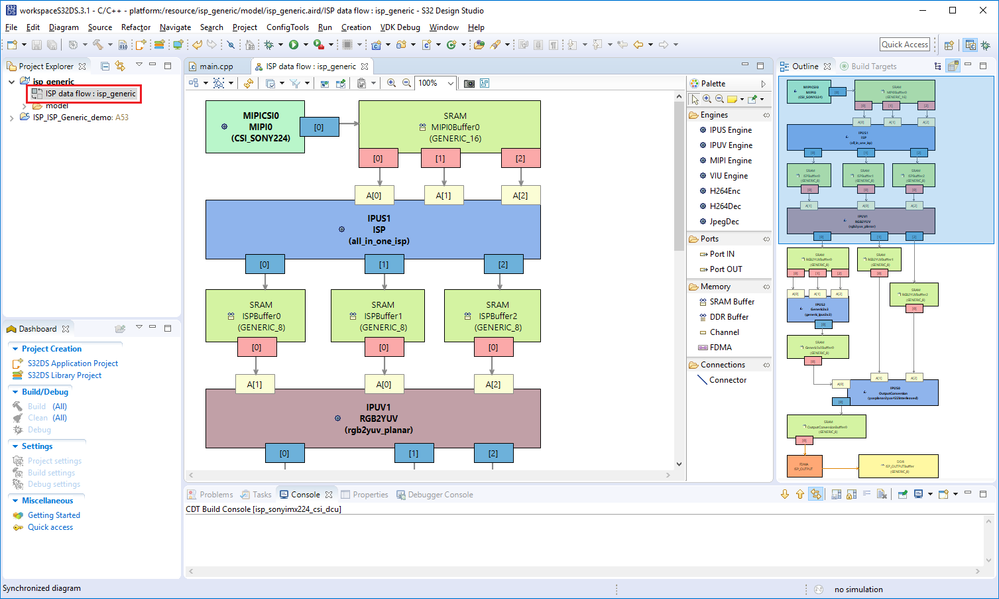
11) Open isp_generic in the project explorer

12) Double-click ISP data flow ; isp_generic. The ISP data flow graph will appear in the editor
pastedImage_4.png

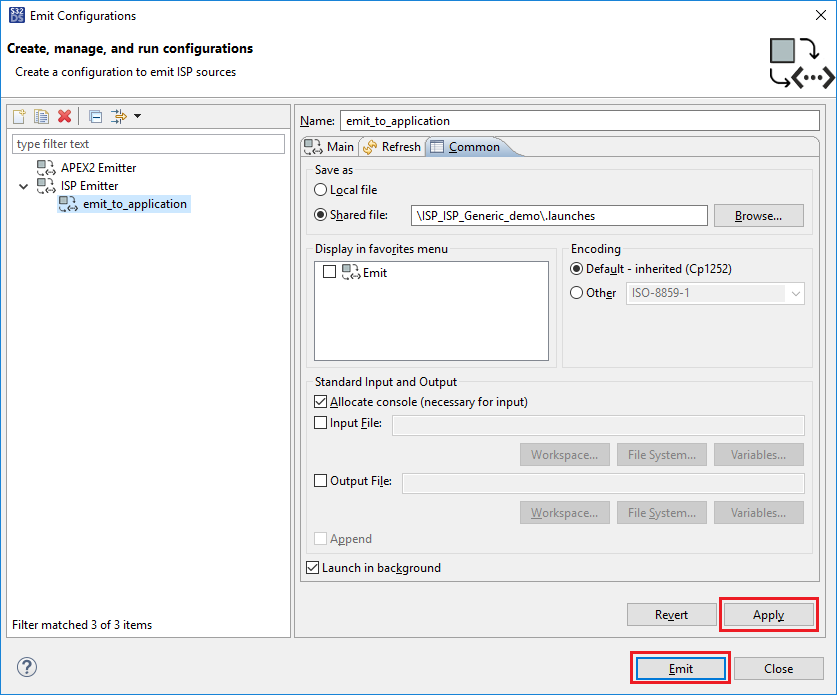
13) Define a new configuration for emitting code from the graph

      a) Right-click in the ISP data flow window and select Emit As -> Emit Configurations...
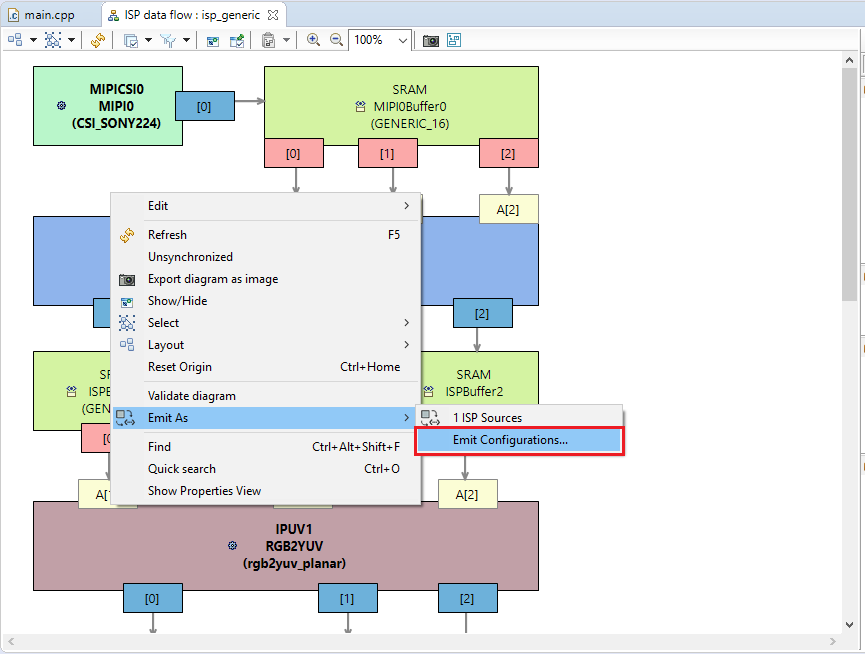
pastedImage_8.png

      b) Select ISP Emitter

      c) Press New Launch Configuration
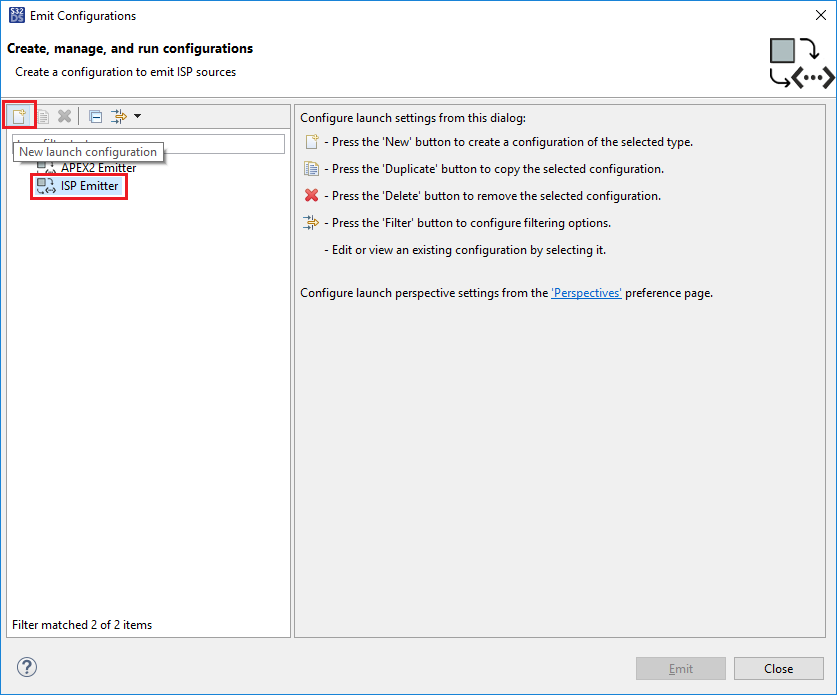
pastedImage_16.png

      d) Enter a name

      e) To select the graph, press Browse Workspace
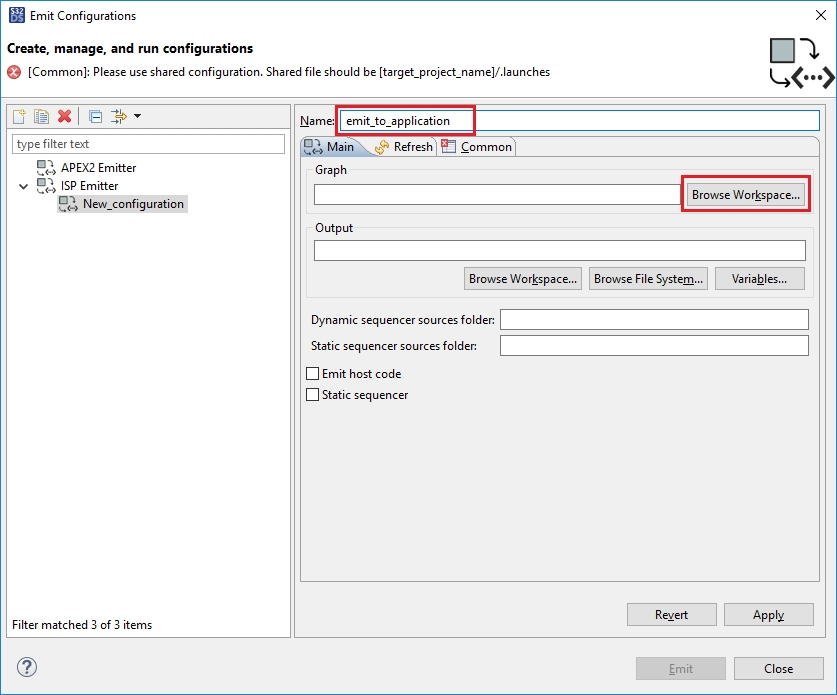
pastedImage_20.png

      f) Expand each item until you can select the .isp file. Click OK
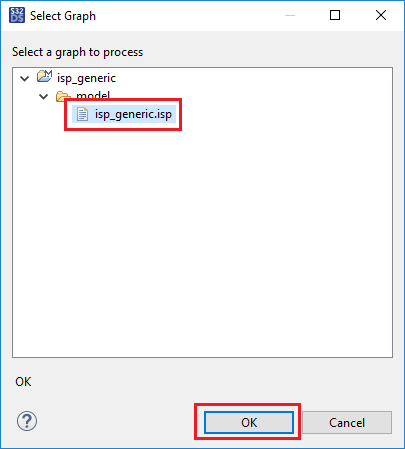
pastedImage_24.png

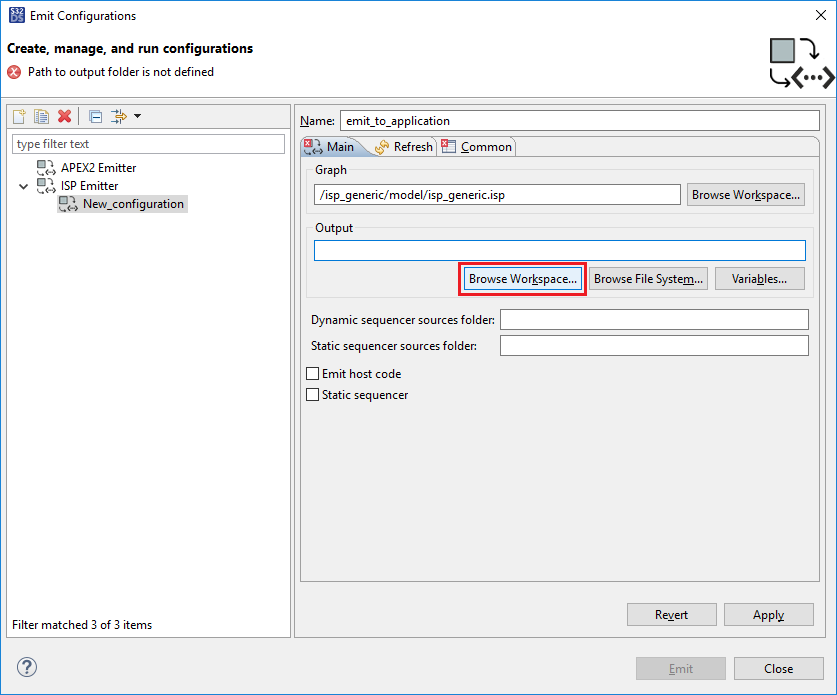
      g) Select the location of the emitted output to the application project, select Browse Workspace
pastedImage_26.png

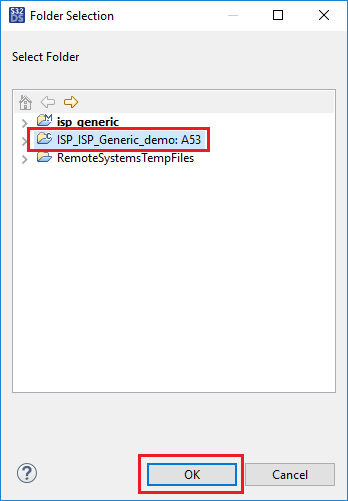
      h) Select the name of your application project, then press OK
pastedImage_28.png

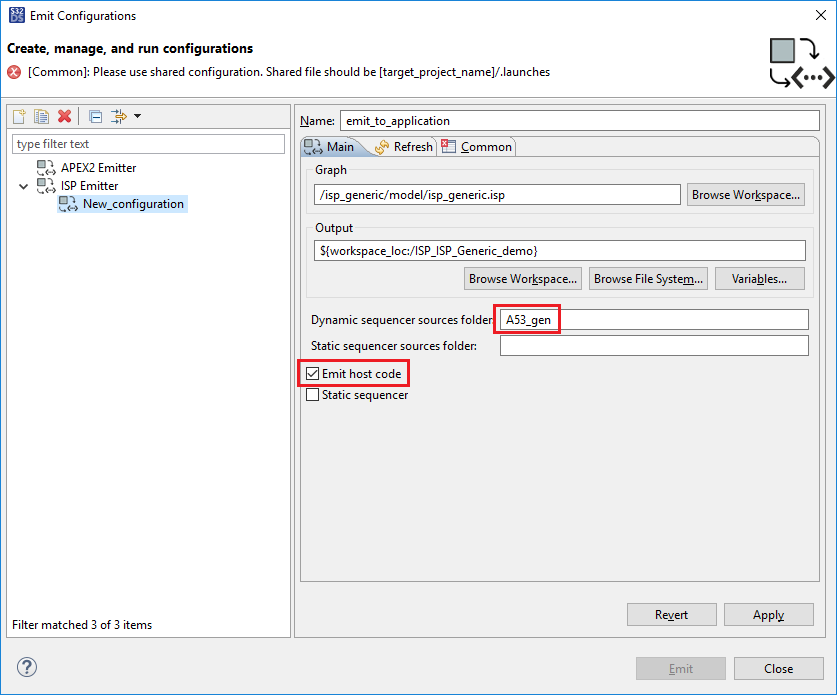
      i) Enter 'A53_gen' to the Dynamic sequences sources folder box. This is the folder within the target project that generated code will be stored. Check the box for Emit host code.
pastedImage_29.png

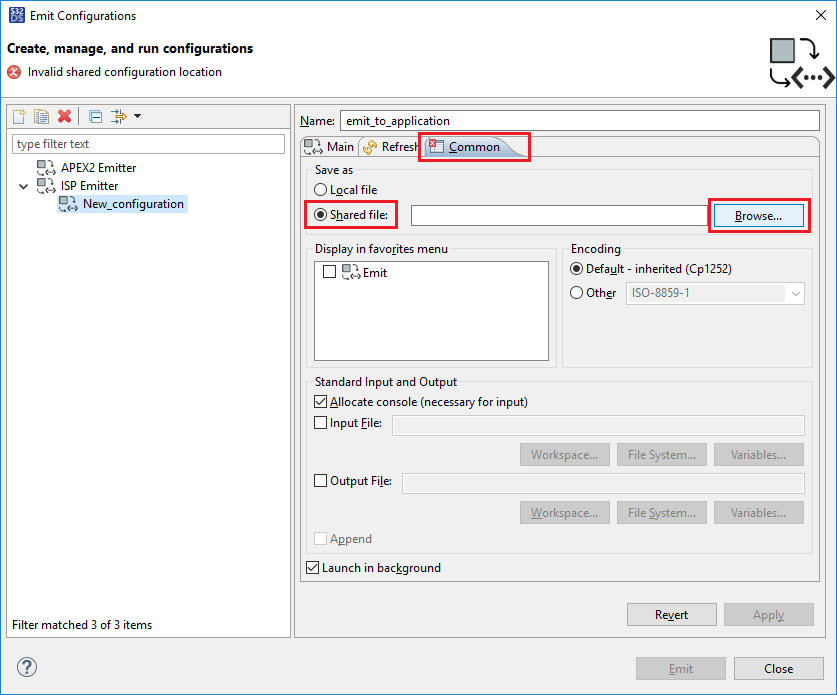
      j)Now select the location to store the configuration file. Go to the Common tab, select Shared file and click Browse
pastedImage_31.png

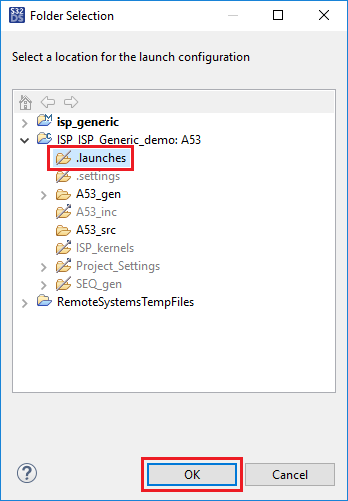
      k) Select the .launches folder inside ISP_ISP_Generic_demo and click OK
pastedImage_45.png

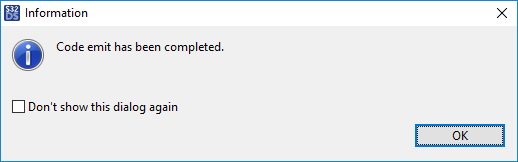
      l) Click Apply and Emit. Dialog box will appear when code generation is successful
pastedImage_46.pngpastedImage_47.png      

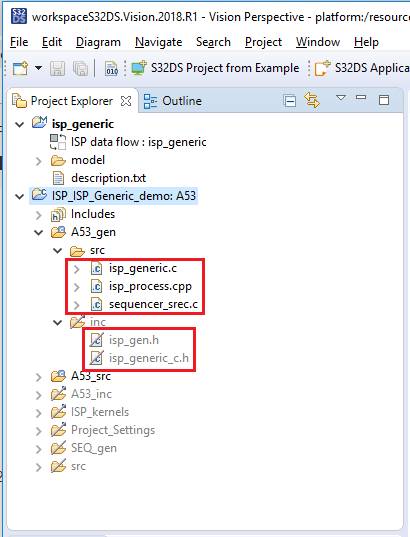
      m) Expand the folders within ISP_ISP_Generic_demo, A53_gen, src and inc, to see the newly generated output files
pastedImage_49.png

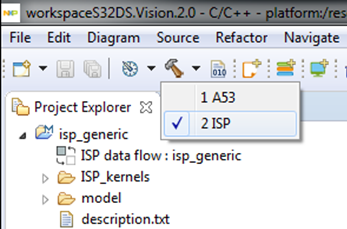
14) Build the project 'ISP_ISP_Generic_demo' for ISP
pastedImage_22.png

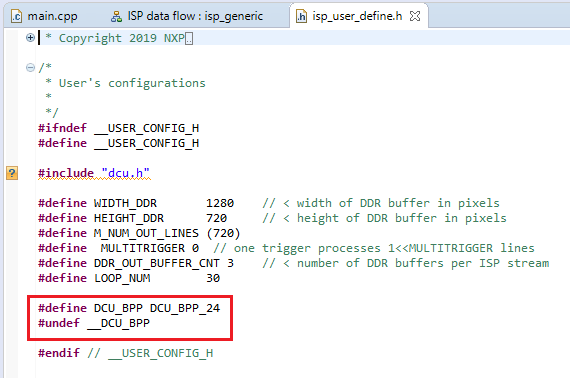
15) Open file 'ISP_ISP_Generic_demo/A53_inc/isp_user_define.h', by double clicking on it in the Project Explorer.

Change '#define DCU_BPP DCU_BPP_YCbCr422' to '#define DCU_BPP DCU_BPP_24'

and

change '#define __DCU_BPP' to "#undef __DCU_BPP".

Before
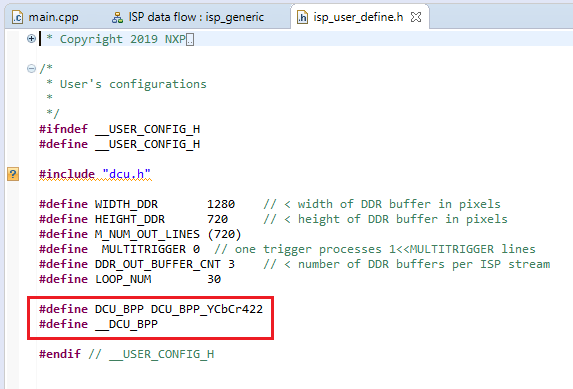
pastedImage_15.png

After

pastedImage_17.png

16) Using the method detailed in steps 8 - 10, create the example project 'isp_sonyimx224_csi_dcu'. Take from this project the file 'isp_sonyimx224_csi_dcu/A53_src/main.cpp' and use it to replace the file 'ISP_ISP_Generic_demo/A53_src/main.cpp' in the current project. Then make the following modifications: 

On line 36, change <#include "mipi_simple_c.h"> to <#include "isp_generic_c.h">.
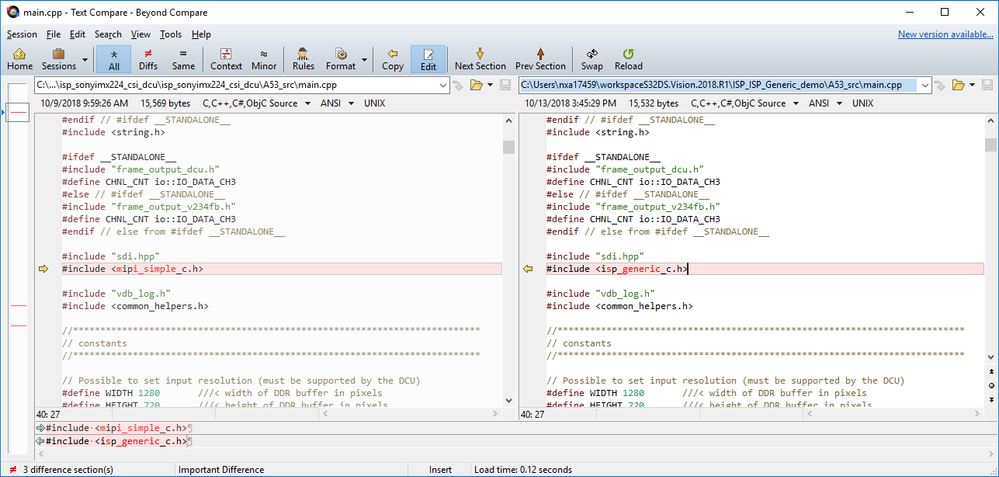
pastedImage_55.png

On line 303, change <gpGraph_mipi_simple> to <gpGraph> AND <gGraphMetadata_mipi_simple> to <gGraphMetadata>
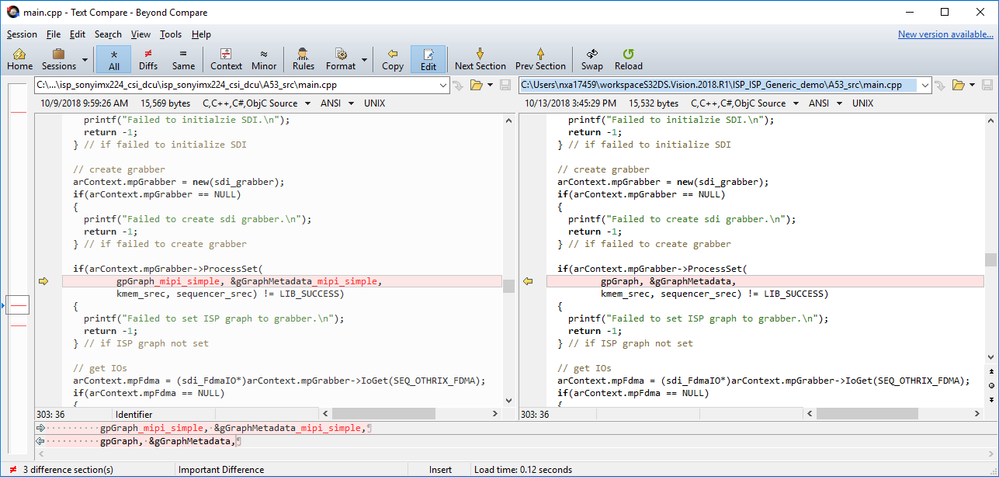
pastedImage_56.png

On line 330, change <FDMA_IX_FastDMA_Out_MIPI_SIMPLE> to <FDMA_IX_ISP_OUTPUT>.
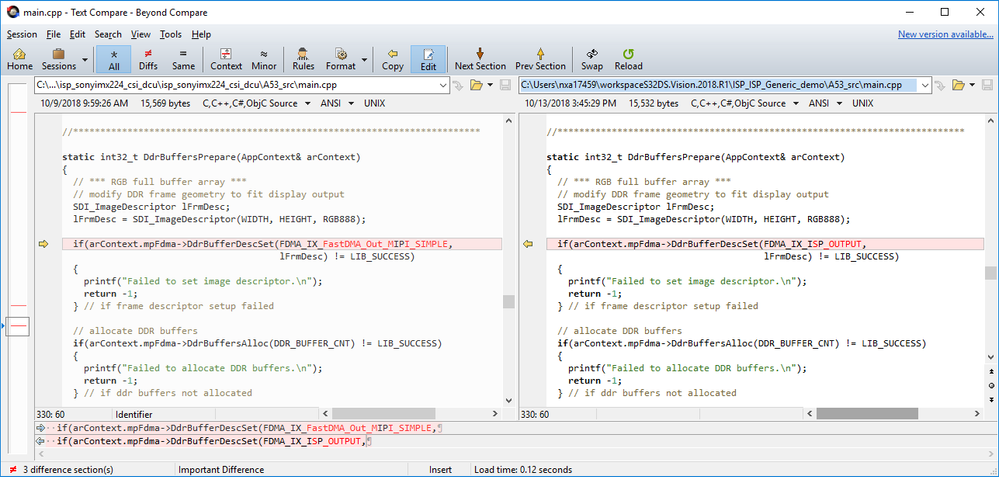
pastedImage_57.png

Please see C:\NXP\S32DS.3.1\S32DS\software\VSDK_S32V2_RTM_1_3_0\s32v234_sdk\docs\drivers\SDI_Software_User_Guide.pdf for details on what this code is for.

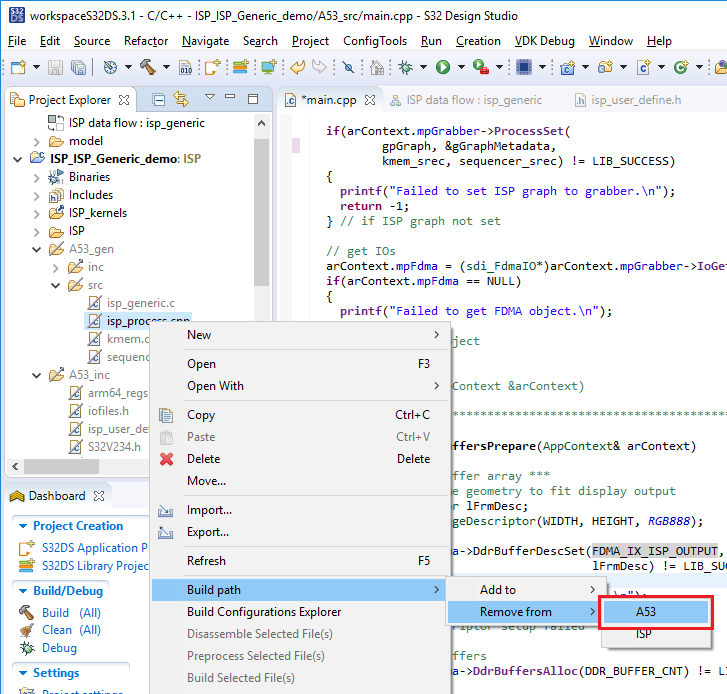
17) In Project Explorer, right-click on "...\A53_gen\src\isp_process.cpp" and select Build path -> Remove from -> A53
pastedImage_12.png

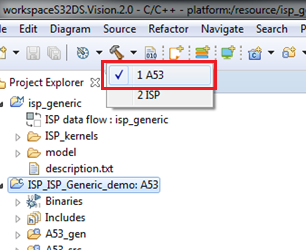
18) Select 'ISP_ISP_Generic_demo:A53' in the Project Explorer panel, then Build for A53
pastedImage_61.png

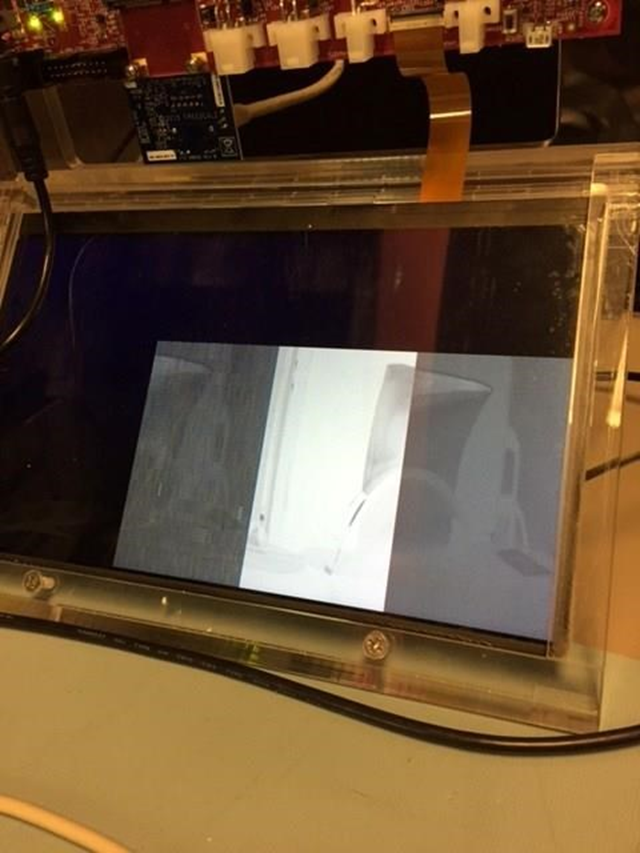
19) Run it remotely on the target using the method fromHOWTO: Create S32V234 Cortex-A53 Linux Project in S32DS . Should get results similar to this:
pastedImage_29.png

%3CLINGO-SUB%20id%3D%22lingo-sub-1123639%22%20slang%3D%22en-US%22%20mode%3D%22CREATE%22%3EHOWTO%3A%20Create%20An%20ISP%20Project%20From%20Existing%20VSDK%20Graph%20in%20S32DS%3C%2FLINGO-SUB%3E%3CLINGO-BODY%20id%3D%22lingo-body-1123639%22%20slang%3D%22en-US%22%20mode%3D%22CREATE%22%3E%3CP%3EThere%20are%20a%20number%20of%20existing%20ISP%20Graph%20diagrams%20provided%20within%20the%20VSDK.%20It%20is%20possible%20to%20import%20them%20into%20S32DS%20and%20use%20them%20in%20a%20new%20C%2FC%2B%2B%20project.%20The%20steps%20to%20do%20this%20are%20detailed%20within%20this%20document.%3C%2FP%3E%3CP%3E%3C%2FP%3E%3CP%20style%3D%22color%3A%20%2351626f%3B%20background-color%3A%20%23ffffff%3B%20border%3A%200px%3B%22%3E%3CSPAN%20style%3D%22border%3A%200px%3B%20font-weight%3A%20inherit%3B%20text-decoration%3A%20underline%3B%22%3EPrerequisite%3C%2FSPAN%3E%3C%2FP%3E%3CP%20style%3D%22color%3A%20%2351626f%3B%20background-color%3A%20%23ffffff%3B%20border%3A%200px%3B%22%3EBefore%20following%20the%20steps%20in%20this%20HOWTO%2C%20ensure%20you%20have%20the%20Vision%20Extension%20Package%20for%20V2xx%20(as%20well%20as%20the%20S32V2xx%20development%20package)%20installed%20to%20S32DS.%3C%2FP%3E%3CP%20style%3D%22color%3A%20%2351626f%3B%20background-color%3A%20%23ffffff%3B%20border%3A%200px%3B%22%3E%3C%2FP%3E%3CP%3E1)%20Launch%20S32DS%3C%2FP%3E%3CP%3E2)%20Select%20File%20-%26gt%3B%20New%20-%26gt%3B%20S32DS%20Application%20Project.%3C%2FP%3E%3CP%3E%3C%2FP%3E%3CP%3E%3CSPAN%20class%3D%22lia-inline-image-display-wrapper%22%20image-alt%3D%22pastedImage_2.png%22%3E%3Cspan%20class%3D%22lia-inline-image-display-wrapper%22%20image-alt%3D%22pastedImage_2.png%22%20style%3D%22width%3A%20761px%3B%22%3E%3Cimg%20src%3D%22https%3A%2F%2Fcommunity.nxp.com%2Ft5%2Fimage%2Fserverpage%2Fimage-id%2F77151iA1B1ABECBE15CF23%2Fimage-size%2Flarge%3Fv%3Dv2%26amp%3Bpx%3D999%22%20role%3D%22button%22%20title%3D%22pastedImage_2.png%22%20alt%3D%22pastedImage_2.png%22%20%2F%3E%3Cspan%20class%3D%22lia-inline-image-caption%22%20onclick%3D%22event.preventDefault()%3B%22%3EpastedImage_2.png%3C%2Fspan%3E%3C%2Fspan%3E%3C%2FSPAN%3E%3C%2FP%3E%3CP%3E%3C%2FP%3E%3CP%3E3)%20Enter%20a%20project%20name%2C%20such%20as%3A%20ISP_ISP_Generic_demo%3C%2FP%3E%3CP%3E4)%20Select%20'A53%20APEX%2FISP%20Linux'%3C%2FP%3E%3CP%3E5)%20Click%20%3CSTRONG%3ENext%3C%2FSTRONG%3E%3C%2FP%3E%3CP%3E%3C%2FP%3E%3CP%3E%3CSPAN%20class%3D%22lia-inline-image-display-wrapper%22%20image-alt%3D%22pastedImage_1.png%22%3E%3Cspan%20class%3D%22lia-inline-image-display-wrapper%22%20image-alt%3D%22pastedImage_1.png%22%20style%3D%22width%3A%20861px%3B%22%3E%3Cimg%20src%3D%22https%3A%2F%2Fcommunity.nxp.com%2Ft5%2Fimage%2Fserverpage%2Fimage-id%2F75583i8130DDF70CCFD76F%2Fimage-size%2Flarge%3Fv%3Dv2%26amp%3Bpx%3D999%22%20role%3D%22button%22%20title%3D%22pastedImage_1.png%22%20alt%3D%22pastedImage_1.png%22%20%2F%3E%3Cspan%20class%3D%22lia-inline-image-caption%22%20onclick%3D%22event.preventDefault()%3B%22%3EpastedImage_1.png%3C%2Fspan%3E%3C%2Fspan%3E%3C%2FSPAN%3E%3C%2FP%3E%3CP%3E%3C%2FP%3E%3CP%3E6)%20Deselect%20the%20APEX2%20options%20and%20'ISP%26nbsp%3BVisual%20Modeling'%20option.%3C%2FP%3E%3CP%3E7)%20Click%26nbsp%3B%3CSTRONG%3EFinish%3C%2FSTRONG%3E%3C%2FP%3E%3CP%3E%3C%2FP%3E%3CP%3E%3CSPAN%20class%3D%22lia-inline-image-display-wrapper%22%20image-alt%3D%22pastedImage_2.png%22%3E%3Cspan%20class%3D%22lia-inline-image-display-wrapper%22%20image-alt%3D%22pastedImage_2.png%22%20style%3D%22width%3A%20861px%3B%22%3E%3Cimg%20src%3D%22https%3A%2F%2Fcommunity.nxp.com%2Ft5%2Fimage%2Fserverpage%2Fimage-id%2F76623iA43BCE3B599F38BE%2Fimage-size%2Flarge%3Fv%3Dv2%26amp%3Bpx%3D999%22%20role%3D%22button%22%20title%3D%22pastedImage_2.png%22%20alt%3D%22pastedImage_2.png%22%20%2F%3E%3Cspan%20class%3D%22lia-inline-image-caption%22%20onclick%3D%22event.preventDefault()%3B%22%3EpastedImage_2.png%3C%2Fspan%3E%3C%2Fspan%3E%3C%2FSPAN%3E%3C%2FP%3E%3CP%3E%3C%2FP%3E%3CP%3E%3CLI-EMOJI%20id%3D%22lia_smiling-face-with-sunglasses%22%20title%3D%22%3Asmiling_face_with_sunglasses%3A%22%3E%3C%2FLI-EMOJI%3E%20Select%20File%20-%26gt%3B%20New%20-%26gt%3B%20S32DS%20Project%20from%20Example.%3C%2FP%3E%3CP%3E%3C%2FP%3E%3CP%3E%3CSPAN%20class%3D%22lia-inline-image-display-wrapper%22%20image-alt%3D%22pastedImage_2.png%22%3E%3Cspan%20class%3D%22lia-inline-image-display-wrapper%22%20image-alt%3D%22pastedImage_2.png%22%20style%3D%22width%3A%20764px%3B%22%3E%3Cimg%20src%3D%22https%3A%2F%2Fcommunity.nxp.com%2Ft5%2Fimage%2Fserverpage%2Fimage-id%2F77152i420AF31C8984C5D6%2Fimage-size%2Flarge%3Fv%3Dv2%26amp%3Bpx%3D999%22%20role%3D%22button%22%20title%3D%22pastedImage_2.png%22%20alt%3D%22pastedImage_2.png%22%20%2F%3E%3Cspan%20class%3D%22lia-inline-image-caption%22%20onclick%3D%22event.preventDefault()%3B%22%3EpastedImage_2.png%3C%2Fspan%3E%3C%2Fspan%3E%3C%2FSPAN%3E%3C%2FP%3E%3CP%3E%3C%2FP%3E%3CP%3E9)%20Select%20%3CSTRONG%3Eisp_generic%3C%2FSTRONG%3E.%3C%2FP%3E%3CP%3E10)%20Select%20%3CSTRONG%3EFinish%3C%2FSTRONG%3E%3C%2FP%3E%3CP%3E%3C%2FP%3E%3CP%3E%3CSPAN%20class%3D%22lia-inline-image-display-wrapper%22%20image-alt%3D%22pastedImage_3.png%22%3E%3Cspan%20class%3D%22lia-inline-image-display-wrapper%22%20image-alt%3D%22pastedImage_3.png%22%20style%3D%22width%3A%20802px%3B%22%3E%3Cimg%20src%3D%22https%3A%2F%2Fcommunity.nxp.com%2Ft5%2Fimage%2Fserverpage%2Fimage-id%2F77150i7EAA5E4F8503E908%2Fimage-size%2Flarge%3Fv%3Dv2%26amp%3Bpx%3D999%22%20role%3D%22button%22%20title%3D%22pastedImage_3.png%22%20alt%3D%22pastedImage_3.png%22%20%2F%3E%3Cspan%20class%3D%22lia-inline-image-caption%22%20onclick%3D%22event.preventDefault()%3B%22%3EpastedImage_3.png%3C%2Fspan%3E%3C%2Fspan%3E%3C%2FSPAN%3E%3C%2FP%3E%3CP%3E%3C%2FP%3E%3CP%3E11)%20Open%20%3CSTRONG%3Eisp_generic%3C%2FSTRONG%3E%20in%20the%20project%20explorer%3C%2FP%3E%3CP%3E12)%26nbsp%3BDouble-click%26nbsp%3B%3CSTRONG%3EISP%20data%20flow%20%3B%20isp_generic%3C%2FSTRONG%3E.%20The%20ISP%20data%20flow%20graph%20will%20appear%20in%20the%20editor%3C%2FP%3E%3CP%3E%3C%2FP%3E%3CP%3E%3CSPAN%20class%3D%22lia-inline-image-display-wrapper%22%20image-alt%3D%22pastedImage_4.png%22%3E%3Cspan%20class%3D%22lia-inline-image-display-wrapper%22%20image-alt%3D%22pastedImage_4.png%22%20style%3D%22width%3A%20999px%3B%22%3E%3Cimg%20src%3D%22https%3A%2F%2Fcommunity.nxp.com%2Ft5%2Fimage%2Fserverpage%2Fimage-id%2F77148iB819A90D5FD21115%2Fimage-size%2Flarge%3Fv%3Dv2%26amp%3Bpx%3D999%22%20role%3D%22button%22%20title%3D%22pastedImage_4.png%22%20alt%3D%22pastedImage_4.png%22%20%2F%3E%3Cspan%20class%3D%22lia-inline-image-caption%22%20onclick%3D%22event.preventDefault()%3B%22%3EpastedImage_4.png%3C%2Fspan%3E%3C%2Fspan%3E%3C%2FSPAN%3E%3C%2FP%3E%3CP%3E%3C%2FP%3E%3CP%3E13)%20Define%20a%20new%20configuration%20for%20emitting%20code%20from%20the%20graph%3C%2FP%3E%3CP%3E%26nbsp%3B%20%26nbsp%3B%20%26nbsp%3B%20a)%20Right-click%20in%20the%20ISP%20data%20flow%20window%26nbsp%3Band%20select%20%3CSTRONG%3EEmit%20As%20-%26gt%3B%20Emit%20Configurations...%3C%2FSTRONG%3E%3C%2FP%3E%3CP%3E%3C%2FP%3E%3CP%3E%3CSPAN%20class%3D%22lia-inline-image-display-wrapper%22%20image-alt%3D%22pastedImage_8.png%22%3E%3Cspan%20class%3D%22lia-inline-image-display-wrapper%22%20image-alt%3D%22pastedImage_8.png%22%20style%3D%22width%3A%20865px%3B%22%3E%3Cimg%20src%3D%22https%3A%2F%2Fcommunity.nxp.com%2Ft5%2Fimage%2Fserverpage%2Fimage-id%2F77154i487DEA956289563F%2Fimage-size%2Flarge%3Fv%3Dv2%26amp%3Bpx%3D999%22%20role%3D%22button%22%20title%3D%22pastedImage_8.png%22%20alt%3D%22pastedImage_8.png%22%20%2F%3E%3Cspan%20class%3D%22lia-inline-image-caption%22%20onclick%3D%22event.preventDefault()%3B%22%3EpastedImage_8.png%3C%2Fspan%3E%3C%2Fspan%3E%3C%2FSPAN%3E%3C%2FP%3E%3CP%3E%3C%2FP%3E%3CP%3E%26nbsp%3B%20%26nbsp%3B%20%26nbsp%3B%20b)%20Select%20%3CSTRONG%3EISP%20Emitter%3C%2FSTRONG%3E%3C%2FP%3E%3CP%3E%26nbsp%3B%20%26nbsp%3B%20%26nbsp%3B%20c)%20Press%26nbsp%3B%3CSTRONG%3ENew%20Launch%20Configuration%3C%2FSTRONG%3E%3C%2FP%3E%3CP%3E%3C%2FP%3E%3CP%3E%3C%2FP%3E%3CP%3E%3CSTRONG%3E%3CSPAN%20class%3D%22lia-inline-image-display-wrapper%22%20image-alt%3D%22pastedImage_16.png%22%3E%3Cspan%20class%3D%22lia-inline-image-display-wrapper%22%20image-alt%3D%22pastedImage_16.png%22%20style%3D%22width%3A%20837px%3B%22%3E%3Cimg%20src%3D%22https%3A%2F%2Fcommunity.nxp.com%2Ft5%2Fimage%2Fserverpage%2Fimage-id%2F77155i65895AAEAFB64F48%2Fimage-size%2Flarge%3Fv%3Dv2%26amp%3Bpx%3D999%22%20role%3D%22button%22%20title%3D%22pastedImage_16.png%22%20alt%3D%22pastedImage_16.png%22%20%2F%3E%3Cspan%20class%3D%22lia-inline-image-caption%22%20onclick%3D%22event.preventDefault()%3B%22%3EpastedImage_16.png%3C%2Fspan%3E%3C%2Fspan%3E%3C%2FSPAN%3E%3C%2FSTRONG%3E%3C%2FP%3E%3CP%3E%3C%2FP%3E%3CP%3E%26nbsp%3B%20%26nbsp%3B%20%26nbsp%3B%3CSTRONG%3E%26nbsp%3B%3C%2FSTRONG%3Ed)%20Enter%20a%20name%3C%2FP%3E%3CP%3E%26nbsp%3B%20%26nbsp%3B%20%26nbsp%3B%20e)%20To%20select%20the%20graph%2C%20press%26nbsp%3B%3CSTRONG%3EBrowse%20Workspace%3C%2FSTRONG%3E%3C%2FP%3E%3CP%3E%3C%2FP%3E%3CP%3E%3C%2FP%3E%3CP%3E%3CSTRONG%3E%3CSPAN%20class%3D%22lia-inline-image-display-wrapper%22%20image-alt%3D%22pastedImage_20.png%22%3E%3Cspan%20class%3D%22lia-inline-image-display-wrapper%22%20image-alt%3D%22pastedImage_20.png%22%20style%3D%22width%3A%20837px%3B%22%3E%3Cimg%20src%3D%22https%3A%2F%2Fcommunity.nxp.com%2Ft5%2Fimage%2Fserverpage%2Fimage-id%2F72903i519F3D458D0F43DA%2Fimage-size%2Flarge%3Fv%3Dv2%26amp%3Bpx%3D999%22%20role%3D%22button%22%20title%3D%22pastedImage_20.png%22%20alt%3D%22pastedImage_20.png%22%20%2F%3E%3Cspan%20class%3D%22lia-inline-image-caption%22%20onclick%3D%22event.preventDefault()%3B%22%3EpastedImage_20.png%3C%2Fspan%3E%3C%2Fspan%3E%3C%2FSPAN%3E%3C%2FSTRONG%3E%3C%2FP%3E%3CP%3E%3C%2FP%3E%3CP%3E%3CSTRONG%3E%26nbsp%3B%20%26nbsp%3B%20%26nbsp%3B%3C%2FSTRONG%3E%20f)%20Expand%20each%20item%20until%20you%20can%20select%20the%20.isp%20file.%20Click%26nbsp%3B%3CSTRONG%3EOK%3C%2FSTRONG%3E%3C%2FP%3E%3CP%3E%3C%2FP%3E%3CP%3E%3CSPAN%20class%3D%22lia-inline-image-display-wrapper%22%20image-alt%3D%22pastedImage_24.png%22%3E%3Cspan%20class%3D%22lia-inline-image-display-wrapper%22%20image-alt%3D%22pastedImage_24.png%22%20style%3D%22width%3A%20405px%3B%22%3E%3Cimg%20src%3D%22https%3A%2F%2Fcommunity.nxp.com%2Ft5%2Fimage%2Fserverpage%2Fimage-id%2F72904iB410AD0EF6D0939A%2Fimage-size%2Flarge%3Fv%3Dv2%26amp%3Bpx%3D999%22%20role%3D%22button%22%20title%3D%22pastedImage_24.png%22%20alt%3D%22pastedImage_24.png%22%20%2F%3E%3Cspan%20class%3D%22lia-inline-image-caption%22%20onclick%3D%22event.preventDefault()%3B%22%3EpastedImage_24.png%3C%2Fspan%3E%3C%2Fspan%3E%3C%2FSPAN%3E%3C%2FP%3E%3CP%3E%3C%2FP%3E%3CP%3E%26nbsp%3B%20%26nbsp%3B%20%26nbsp%3B%20g)%20Select%20the%20location%20of%20the%20emitted%20output%20to%20the%20application%20project%2C%20select%20%3CSTRONG%3EBrowse%20Workspace%3C%2FSTRONG%3E%3C%2FP%3E%3CP%3E%3C%2FP%3E%3CP%3E%3CSPAN%20class%3D%22lia-inline-image-display-wrapper%22%20image-alt%3D%22pastedImage_26.png%22%3E%3Cspan%20class%3D%22lia-inline-image-display-wrapper%22%20image-alt%3D%22pastedImage_26.png%22%20style%3D%22width%3A%20837px%3B%22%3E%3Cimg%20src%3D%22https%3A%2F%2Fcommunity.nxp.com%2Ft5%2Fimage%2Fserverpage%2Fimage-id%2F72905iEA5B2EBE5616F4C7%2Fimage-size%2Flarge%3Fv%3Dv2%26amp%3Bpx%3D999%22%20role%3D%22button%22%20title%3D%22pastedImage_26.png%22%20alt%3D%22pastedImage_26.png%22%20%2F%3E%3Cspan%20class%3D%22lia-inline-image-caption%22%20onclick%3D%22event.preventDefault()%3B%22%3EpastedImage_26.png%3C%2Fspan%3E%3C%2Fspan%3E%3C%2FSPAN%3E%3C%2FP%3E%3CP%3E%3C%2FP%3E%3CP%3E%26nbsp%3B%20%26nbsp%3B%20%26nbsp%3B%20h)%20Select%20the%20name%20of%20your%20application%20project%2C%20then%20press%26nbsp%3B%3CSTRONG%3EOK%3C%2FSTRONG%3E%3C%2FP%3E%3CP%3E%3C%2FP%3E%3CP%3E%3CSTRONG%3E%3CSPAN%20class%3D%22lia-inline-image-display-wrapper%22%20image-alt%3D%22pastedImage_28.png%22%3E%3Cspan%20class%3D%22lia-inline-image-display-wrapper%22%20image-alt%3D%22pastedImage_28.png%22%20style%3D%22width%3A%20348px%3B%22%3E%3Cimg%20src%3D%22https%3A%2F%2Fcommunity.nxp.com%2Ft5%2Fimage%2Fserverpage%2Fimage-id%2F72908i2D45B941897AB379%2Fimage-size%2Flarge%3Fv%3Dv2%26amp%3Bpx%3D999%22%20role%3D%22button%22%20title%3D%22pastedImage_28.png%22%20alt%3D%22pastedImage_28.png%22%20%2F%3E%3Cspan%20class%3D%22lia-inline-image-caption%22%20onclick%3D%22event.preventDefault()%3B%22%3EpastedImage_28.png%3C%2Fspan%3E%3C%2Fspan%3E%3C%2FSPAN%3E%3C%2FSTRONG%3E%3C%2FP%3E%3CP%3E%3C%2FP%3E%3CP%3E%26nbsp%3B%20%26nbsp%3B%20%26nbsp%3B%20i)%20Enter%3CSPAN%20style%3D%22font-size%3A%2010.0pt%3B%20color%3A%20black%3B%22%3E%26nbsp%3B'A53_gen'%20to%20the%20%3CSTRONG%3EDynamic%20sequences%20sources%20folder%3C%2FSTRONG%3E%20box.%20This%20is%20the%20folder%20within%20the%20target%20project%20that%20generated%20code%20will%20be%20stored.%20Check%20the%20box%20for%26nbsp%3B%3CSTRONG%3EEmit%20host%20code.%3C%2FSTRONG%3E%3C%2FSPAN%3E%3C%2FP%3E%3CP%3E%3C%2FP%3E%3CP%3E%3CSPAN%20class%3D%22lia-inline-image-display-wrapper%22%20image-alt%3D%22pastedImage_29.png%22%3E%3Cspan%20class%3D%22lia-inline-image-display-wrapper%22%20image-alt%3D%22pastedImage_29.png%22%20style%3D%22width%3A%20837px%3B%22%3E%3Cimg%20src%3D%22https%3A%2F%2Fcommunity.nxp.com%2Ft5%2Fimage%2Fserverpage%2Fimage-id%2F72909i097DF0FB24D1F2B4%2Fimage-size%2Flarge%3Fv%3Dv2%26amp%3Bpx%3D999%22%20role%3D%22button%22%20title%3D%22pastedImage_29.png%22%20alt%3D%22pastedImage_29.png%22%20%2F%3E%3Cspan%20class%3D%22lia-inline-image-caption%22%20onclick%3D%22event.preventDefault()%3B%22%3EpastedImage_29.png%3C%2Fspan%3E%3C%2Fspan%3E%3C%2FSPAN%3E%3C%2FP%3E%3CP%3E%3C%2FP%3E%3CP%3E%26nbsp%3B%20%26nbsp%3B%20%26nbsp%3B%20j)Now%20select%20the%20location%20to%20store%20the%20configuration%20file.%26nbsp%3B%3CSPAN%20style%3D%22font-size%3A%2010.0pt%3B%20color%3A%20black%3B%22%3EGo%20to%20the%20%3CSTRONG%3ECommon%3C%2FSTRONG%3E%20tab%2C%20select%20%3CSTRONG%3EShared%20file%3C%2FSTRONG%3E%20and%20click%20%3CSTRONG%3EBrowse%3C%2FSTRONG%3E%3C%2FSPAN%3E%3C%2FP%3E%3CP%3E%3C%2FP%3E%3CP%3E%3CSPAN%20class%3D%22lia-inline-image-display-wrapper%22%20image-alt%3D%22pastedImage_31.png%22%3E%3Cspan%20class%3D%22lia-inline-image-display-wrapper%22%20image-alt%3D%22pastedImage_31.png%22%20style%3D%22width%3A%20837px%3B%22%3E%3Cimg%20src%3D%22https%3A%2F%2Fcommunity.nxp.com%2Ft5%2Fimage%2Fserverpage%2Fimage-id%2F72910i54216B1A1B155794%2Fimage-size%2Flarge%3Fv%3Dv2%26amp%3Bpx%3D999%22%20role%3D%22button%22%20title%3D%22pastedImage_31.png%22%20alt%3D%22pastedImage_31.png%22%20%2F%3E%3Cspan%20class%3D%22lia-inline-image-caption%22%20onclick%3D%22event.preventDefault()%3B%22%3EpastedImage_31.png%3C%2Fspan%3E%3C%2Fspan%3E%3C%2FSPAN%3E%3C%2FP%3E%3CP%3E%3C%2FP%3E%3CP%3E%3CSPAN%20style%3D%22font-size%3A%2010.0pt%3B%20color%3A%20black%3B%22%3E%26nbsp%3B%20%26nbsp%3B%20%26nbsp%3B%20k)%20Select%20the%20.launches%20folder%20inside%20%3CSTRONG%3EISP_ISP_Generic_demo%26nbsp%3B%3C%2FSTRONG%3Eand%20click%20%3CSTRONG%3EOK%3C%2FSTRONG%3E%3C%2FSPAN%3E%3C%2FP%3E%3CP%3E%3C%2FP%3E%3CP%3E%3CSPAN%20class%3D%22lia-inline-image-display-wrapper%22%20image-alt%3D%22pastedImage_45.png%22%3E%3Cspan%20class%3D%22lia-inline-image-display-wrapper%22%20image-alt%3D%22pastedImage_45.png%22%20style%3D%22width%3A%20348px%3B%22%3E%3Cimg%20src%3D%22https%3A%2F%2Fcommunity.nxp.com%2Ft5%2Fimage%2Fserverpage%2Fimage-id%2F72911i6E00CE34B3CD2896%2Fimage-size%2Flarge%3Fv%3Dv2%26amp%3Bpx%3D999%22%20role%3D%22button%22%20title%3D%22pastedImage_45.png%22%20alt%3D%22pastedImage_45.png%22%20%2F%3E%3Cspan%20class%3D%22lia-inline-image-caption%22%20onclick%3D%22event.preventDefault()%3B%22%3EpastedImage_45.png%3C%2Fspan%3E%3C%2Fspan%3E%3C%2FSPAN%3E%3C%2FP%3E%3CP%3E%3C%2FP%3E%3CP%3E%26nbsp%3B%20%26nbsp%3B%20%26nbsp%3B%20l)%20%3CSPAN%20style%3D%22font-size%3A%2010.0pt%3B%20color%3A%20black%3B%22%3EClick%20%3CSTRONG%3EApply%3C%2FSTRONG%3E%20and%20%3CSTRONG%3EEmit%3C%2FSTRONG%3E.%20Dialog%20box%20will%20appear%20when%20code%20generation%20is%20successful%3C%2FSPAN%3E%3C%2FP%3E%3CP%3E%3C%2FP%3E%3CP%3E%3CSPAN%20class%3D%22lia-inline-image-display-wrapper%22%20image-alt%3D%22pastedImage_46.png%22%3E%3Cspan%20class%3D%22lia-inline-image-display-wrapper%22%20image-alt%3D%22pastedImage_46.png%22%20style%3D%22width%3A%20837px%3B%22%3E%3Cimg%20src%3D%22https%3A%2F%2Fcommunity.nxp.com%2Ft5%2Fimage%2Fserverpage%2Fimage-id%2F72912i5F68547411640FFA%2Fimage-size%2Flarge%3Fv%3Dv2%26amp%3Bpx%3D999%22%20role%3D%22button%22%20title%3D%22pastedImage_46.png%22%20alt%3D%22pastedImage_46.png%22%20%2F%3E%3Cspan%20class%3D%22lia-inline-image-caption%22%20onclick%3D%22event.preventDefault()%3B%22%3EpastedImage_46.png%3C%2Fspan%3E%3C%2Fspan%3E%3C%2FSPAN%3E%3CSPAN%20class%3D%22lia-inline-image-display-wrapper%22%20image-alt%3D%22pastedImage_47.png%22%3E%3Cspan%20class%3D%22lia-inline-image-display-wrapper%22%20image-alt%3D%22pastedImage_47.png%22%20style%3D%22width%3A%20518px%3B%22%3E%3Cimg%20src%3D%22https%3A%2F%2Fcommunity.nxp.com%2Ft5%2Fimage%2Fserverpage%2Fimage-id%2F77284iA31CFDE4D0C7DCBF%2Fimage-size%2Flarge%3Fv%3Dv2%26amp%3Bpx%3D999%22%20role%3D%22button%22%20title%3D%22pastedImage_47.png%22%20alt%3D%22pastedImage_47.png%22%20%2F%3E%3Cspan%20class%3D%22lia-inline-image-caption%22%20onclick%3D%22event.preventDefault()%3B%22%3EpastedImage_47.png%3C%2Fspan%3E%3C%2Fspan%3E%3C%2FSPAN%3E%26nbsp%3B%20%26nbsp%3B%20%26nbsp%3B%26nbsp%3B%3C%2FP%3E%3CP%3E%3C%2FP%3E%3CP%3E%26nbsp%3B%20%26nbsp%3B%20%26nbsp%3B%20m)%20Expand%20the%20folders%20within%3CSPAN%20style%3D%22font-size%3A%2010.0pt%3B%20color%3A%20black%3B%22%3E%26nbsp%3B%3CSTRONG%3EISP_ISP_Generic_demo%3C%2FSTRONG%3E%2C%20A53_gen%2C%20src%20and%20inc%2C%20to%20see%20the%20newly%20generated%20output%20files%3C%2FSPAN%3E%3C%2FP%3E%3CP%3E%3C%2FP%3E%3CP%3E%3CSPAN%20class%3D%22lia-inline-image-display-wrapper%22%20image-alt%3D%22pastedImage_49.png%22%3E%3Cspan%20class%3D%22lia-inline-image-display-wrapper%22%20image-alt%3D%22pastedImage_49.png%22%20style%3D%22width%3A%20410px%3B%22%3E%3Cimg%20src%3D%22https%3A%2F%2Fcommunity.nxp.com%2Ft5%2Fimage%2Fserverpage%2Fimage-id%2F77288iEA04606D05DD352E%2Fimage-size%2Flarge%3Fv%3Dv2%26amp%3Bpx%3D999%22%20role%3D%22button%22%20title%3D%22pastedImage_49.png%22%20alt%3D%22pastedImage_49.png%22%20%2F%3E%3Cspan%20class%3D%22lia-inline-image-caption%22%20onclick%3D%22event.preventDefault()%3B%22%3EpastedImage_49.png%3C%2Fspan%3E%3C%2Fspan%3E%3C%2FSPAN%3E%3C%2FP%3E%3CP%3E%3C%2FP%3E%3CP%3E14)%26nbsp%3BBuild%20the%20project%20'ISP_ISP_Generic_demo'%20for%20ISP%3C%2FP%3E%3CP%3E%3C%2FP%3E%3CP%3E%3CSPAN%20class%3D%22lia-inline-image-display-wrapper%22%20image-alt%3D%22pastedImage_22.png%22%3E%3Cspan%20class%3D%22lia-inline-image-display-wrapper%22%20image-alt%3D%22pastedImage_22.png%22%20style%3D%22width%3A%20347px%3B%22%3E%3Cimg%20src%3D%22https%3A%2F%2Fcommunity.nxp.com%2Ft5%2Fimage%2Fserverpage%2Fimage-id%2F72913i788D7AEAFA6DE914%2Fimage-size%2Flarge%3Fv%3Dv2%26amp%3Bpx%3D999%22%20role%3D%22button%22%20title%3D%22pastedImage_22.png%22%20alt%3D%22pastedImage_22.png%22%20%2F%3E%3Cspan%20class%3D%22lia-inline-image-caption%22%20onclick%3D%22event.preventDefault()%3B%22%3EpastedImage_22.png%3C%2Fspan%3E%3C%2Fspan%3E%3C%2FSPAN%3E%3C%2FP%3E%3CP%3E%3C%2FP%3E%3CP%3E15)%26nbsp%3BOpen%20file%26nbsp%3B'ISP_ISP_Generic_demo%2FA53_inc%2Fisp_user_define.h'%2C%20by%20double%20clicking%20on%20it%20in%20the%20Project%20Explorer.%3C%2FP%3E%3CP%3EChange%20'%23define%20DCU_BPP%20DCU_BPP_YCbCr422'%20to%20'%23define%20DCU_BPP%20DCU_BPP_24'%3C%2FP%3E%3CP%3Eand%3C%2FP%3E%3CP%3Echange%20'%23define%20__DCU_BPP'%20to%20%22%23undef%20__DCU_BPP%22.%3C%2FP%3E%3CP%3E%3C%2FP%3E%3CP%3E%3CSPAN%20style%3D%22text-decoration%3A%20underline%3B%22%3EBefore%3C%2FSPAN%3E%3C%2FP%3E%3CP%3E%3CSPAN%20class%3D%22lia-inline-image-display-wrapper%22%20image-alt%3D%22pastedImage_15.png%22%3E%3Cspan%20class%3D%22lia-inline-image-display-wrapper%22%20image-alt%3D%22pastedImage_15.png%22%20style%3D%22width%3A%20573px%3B%22%3E%3Cimg%20src%3D%22https%3A%2F%2Fcommunity.nxp.com%2Ft5%2Fimage%2Fserverpage%2Fimage-id%2F76684iBD1392F8DBE167D7%2Fimage-size%2Flarge%3Fv%3Dv2%26amp%3Bpx%3D999%22%20role%3D%22button%22%20title%3D%22pastedImage_15.png%22%20alt%3D%22pastedImage_15.png%22%20%2F%3E%3Cspan%20class%3D%22lia-inline-image-caption%22%20onclick%3D%22event.preventDefault()%3B%22%3EpastedImage_15.png%3C%2Fspan%3E%3C%2Fspan%3E%3C%2FSPAN%3E%3C%2FP%3E%3CP%3E%3C%2FP%3E%3CP%3E%3CSPAN%20style%3D%22text-decoration%3A%20underline%3B%22%3EAfter%3C%2FSPAN%3E%3C%2FP%3E%3CP%3E%3CSPAN%20class%3D%22lia-inline-image-display-wrapper%22%20image-alt%3D%22pastedImage_17.png%22%3E%3Cspan%20class%3D%22lia-inline-image-display-wrapper%22%20image-alt%3D%22pastedImage_17.png%22%20style%3D%22width%3A%20570px%3B%22%3E%3Cimg%20src%3D%22https%3A%2F%2Fcommunity.nxp.com%2Ft5%2Fimage%2Fserverpage%2Fimage-id%2F72898iE16C276C5B9760A7%2Fimage-size%2Flarge%3Fv%3Dv2%26amp%3Bpx%3D999%22%20role%3D%22button%22%20title%3D%22pastedImage_17.png%22%20alt%3D%22pastedImage_17.png%22%20%2F%3E%3Cspan%20class%3D%22lia-inline-image-caption%22%20onclick%3D%22event.preventDefault()%3B%22%3EpastedImage_17.png%3C%2Fspan%3E%3C%2Fspan%3E%3C%2FSPAN%3E%3C%2FP%3E%3CP%3E%3C%2FP%3E%3CP%3E16)%20Using%20the%20method%20detailed%20in%20steps%208%20-%2010%2C%20create%20the%20example%20project%20'isp_sonyimx224_csi_dcu'.%20Take%20from%20this%20project%20the%20file%20'isp_sonyimx224_csi_dcu%2FA53_src%2Fmain.cpp'%20and%20use%20it%20to%20replace%20the%20file%20'ISP_ISP_Generic_demo%2FA53_src%2Fmain.cpp'%20in%20the%20current%20project.%20Then%20make%20the%20following%20modifications%3A%26nbsp%3B%3C%2FP%3E%3CP%3E%3C%2FP%3E%3CP%3EOn%20line%2036%2C%20change%20%26lt%3B%23include%20%22mipi_simple_c.h%22%26gt%3B%20to%20%26lt%3B%23include%20%22isp_generic_c.h%22%26gt%3B.%3C%2FP%3E%3CP%3E%3CSPAN%20class%3D%22lia-inline-image-display-wrapper%22%20image-alt%3D%22pastedImage_55.png%22%3E%3Cspan%20class%3D%22lia-inline-image-display-wrapper%22%20image-alt%3D%22pastedImage_55.png%22%20style%3D%22width%3A%20999px%3B%22%3E%3Cimg%20src%3D%22https%3A%2F%2Fcommunity.nxp.com%2Ft5%2Fimage%2Fserverpage%2Fimage-id%2F72914iEF70C5E724E3171C%2Fimage-size%2Flarge%3Fv%3Dv2%26amp%3Bpx%3D999%22%20role%3D%22button%22%20title%3D%22pastedImage_55.png%22%20alt%3D%22pastedImage_55.png%22%20%2F%3E%3Cspan%20class%3D%22lia-inline-image-caption%22%20onclick%3D%22event.preventDefault()%3B%22%3EpastedImage_55.png%3C%2Fspan%3E%3C%2Fspan%3E%3C%2FSPAN%3E%3C%2FP%3E%3CP%3E%3C%2FP%3E%3CP%3EOn%20line%20303%2C%20change%20%3CGPGRAPH_MIPI_SIMPLE%3E%20to%20%3CGPGRAPH%3E%20AND%20%3CGGRAPHMETADATA_MIPI_SIMPLE%3E%20to%20%3CGGRAPHMETADATA%3E%3C%2FGGRAPHMETADATA%3E%3C%2FGGRAPHMETADATA_MIPI_SIMPLE%3E%3C%2FGPGRAPH%3E%3C%2FGPGRAPH_MIPI_SIMPLE%3E%3C%2FP%3E%3CP%3E%3C%2FP%3E%3CP%3E%3CSPAN%20class%3D%22lia-inline-image-display-wrapper%22%20image-alt%3D%22pastedImage_56.png%22%3E%3Cspan%20class%3D%22lia-inline-image-display-wrapper%22%20image-alt%3D%22pastedImage_56.png%22%20style%3D%22width%3A%20999px%3B%22%3E%3Cimg%20src%3D%22https%3A%2F%2Fcommunity.nxp.com%2Ft5%2Fimage%2Fserverpage%2Fimage-id%2F72928iDB15437829642F61%2Fimage-size%2Flarge%3Fv%3Dv2%26amp%3Bpx%3D999%22%20role%3D%22button%22%20title%3D%22pastedImage_56.png%22%20alt%3D%22pastedImage_56.png%22%20%2F%3E%3Cspan%20class%3D%22lia-inline-image-caption%22%20onclick%3D%22event.preventDefault()%3B%22%3EpastedImage_56.png%3C%2Fspan%3E%3C%2Fspan%3E%3C%2FSPAN%3E%3C%2FP%3E%3CP%3E%3C%2FP%3E%3CP%3EOn%20line%20330%2C%20change%20%3CFDMA_IX_FASTDMA_OUT_MIPI_SIMPLE%3E%20to%20%3CFDMA_IX_ISP_OUTPUT%3E.%3C%2FFDMA_IX_ISP_OUTPUT%3E%3C%2FFDMA_IX_FASTDMA_OUT_MIPI_SIMPLE%3E%3C%2FP%3E%3CP%3E%3CSPAN%20class%3D%22lia-inline-image-display-wrapper%22%20image-alt%3D%22pastedImage_57.png%22%3E%3Cspan%20class%3D%22lia-inline-image-display-wrapper%22%20image-alt%3D%22pastedImage_57.png%22%20style%3D%22width%3A%20999px%3B%22%3E%3Cimg%20src%3D%22https%3A%2F%2Fcommunity.nxp.com%2Ft5%2Fimage%2Fserverpage%2Fimage-id%2F72933i41272B5E1BC55316%2Fimage-size%2Flarge%3Fv%3Dv2%26amp%3Bpx%3D999%22%20role%3D%22button%22%20title%3D%22pastedImage_57.png%22%20alt%3D%22pastedImage_57.png%22%20%2F%3E%3Cspan%20class%3D%22lia-inline-image-caption%22%20onclick%3D%22event.preventDefault()%3B%22%3EpastedImage_57.png%3C%2Fspan%3E%3C%2Fspan%3E%3C%2FSPAN%3E%3C%2FP%3E%3CP%20style%3D%22margin%3A%200in%203.2pt%202.3pt%20.45pt%3B%22%3E%3C%2FP%3E%3CP%20style%3D%22margin%3A%200in%203.2pt%202.3pt%20.45pt%3B%22%3EPlease%20see%20C%3A%5CNXP%5CS32DS.3.1%5CS32DS%5Csoftware%5CVSDK_S32V2_RTM_1_3_0%5Cs32v234_sdk%5Cdocs%5Cdrivers%5CSDI_Software_User_Guide.pdf%20for%20details%20on%20what%20this%20code%20is%20for.%3C%2FP%3E%3CP%20style%3D%22margin%3A%200in%203.2pt%202.3pt%20.45pt%3B%22%3E%3C%2FP%3E%3CP%20style%3D%22margin%3A%200in%203.2pt%202.3pt%20.45pt%3B%22%3E17)%20In%20Project%20Explorer%2C%20right-click%20on%20%22...%5CA53_gen%5Csrc%5Cisp_process.cpp%22%20and%20select%20%3CSTRONG%3EBuild%20path%20-%26gt%3B%20Remove%20from%20-%26gt%3B%20A53%3C%2FSTRONG%3E%3C%2FP%3E%3CP%20style%3D%22margin%3A%200in%203.2pt%202.3pt%20.45pt%3B%22%3E%3C%2FP%3E%3CP%20style%3D%22margin%3A%200in%203.2pt%202.3pt%20.45pt%3B%22%3E%3CSPAN%20class%3D%22lia-inline-image-display-wrapper%22%20image-alt%3D%22pastedImage_12.png%22%3E%3Cspan%20class%3D%22lia-inline-image-display-wrapper%22%20image-alt%3D%22pastedImage_12.png%22%20style%3D%22width%3A%20727px%3B%22%3E%3Cimg%20src%3D%22https%3A%2F%2Fcommunity.nxp.com%2Ft5%2Fimage%2Fserverpage%2Fimage-id%2F76946i6CE4ED1F0E411549%2Fimage-size%2Flarge%3Fv%3Dv2%26amp%3Bpx%3D999%22%20role%3D%22button%22%20title%3D%22pastedImage_12.png%22%20alt%3D%22pastedImage_12.png%22%20%2F%3E%3Cspan%20class%3D%22lia-inline-image-caption%22%20onclick%3D%22event.preventDefault()%3B%22%3EpastedImage_12.png%3C%2Fspan%3E%3C%2Fspan%3E%3C%2FSPAN%3E%3C%2FP%3E%3CP%20style%3D%22margin%3A%200in%203.2pt%202.3pt%20.45pt%3B%22%3E%3C%2FP%3E%3CP%3E18)%20%3CSPAN%20style%3D%22font-size%3A%2010.0pt%3B%20color%3A%20black%3B%22%3ESelect%20'ISP_ISP_Generic_demo%3AA53'%20in%20the%20Project%20Explorer%20panel%2C%20then%20Build%20for%20%3CSTRONG%3EA53%3C%2FSTRONG%3E%3C%2FSPAN%3E%3C%2FP%3E%3CP%3E%3C%2FP%3E%3CP%3E%3CSPAN%20class%3D%22lia-inline-image-display-wrapper%22%20image-alt%3D%22pastedImage_61.png%22%3E%3Cspan%20class%3D%22lia-inline-image-display-wrapper%22%20image-alt%3D%22pastedImage_61.png%22%20style%3D%22width%3A%20306px%3B%22%3E%3Cimg%20src%3D%22https%3A%2F%2Fcommunity.nxp.com%2Ft5%2Fimage%2Fserverpage%2Fimage-id%2F72934iB1BA89EE932A065F%2Fimage-size%2Flarge%3Fv%3Dv2%26amp%3Bpx%3D999%22%20role%3D%22button%22%20title%3D%22pastedImage_61.png%22%20alt%3D%22pastedImage_61.png%22%20%2F%3E%3Cspan%20class%3D%22lia-inline-image-caption%22%20onclick%3D%22event.preventDefault()%3B%22%3EpastedImage_61.png%3C%2Fspan%3E%3C%2Fspan%3E%3C%2FSPAN%3E%3C%2FP%3E%3CP%3E%3C%2FP%3E%3CP%3E19)%20Run%20it%20remotely%20on%20the%20target%20using%20the%20method%20from%3CA%20href%3D%22https%3A%2F%2Fcommunity.nxp.com%2Fdocs%2FDOC-342765%22%20target%3D%22_blank%22%3EHOWTO%3A%20Create%20S32V234%20Cortex-A53%20Linux%20Project%20in%20S32DS%3C%2FA%3E%26nbsp%3B.%26nbsp%3BShould%20get%20results%20similar%20to%20this%3A%3C%2FP%3E%3CP%3E%3C%2FP%3E%3CP%3E%3CSPAN%20class%3D%22lia-inline-image-display-wrapper%22%20image-alt%3D%22pastedImage_29.png%22%3E%3Cspan%20class%3D%22lia-inline-image-display-wrapper%22%20image-alt%3D%22pastedImage_29.png%22%20style%3D%22width%3A%20640px%3B%22%3E%3Cimg%20src%3D%22https%3A%2F%2Fcommunity.nxp.com%2Ft5%2Fimage%2Fserverpage%2Fimage-id%2F72935i7A4D0CFE4CFBB2C7%2Fimage-size%2Flarge%3Fv%3Dv2%26amp%3Bpx%3D999%22%20role%3D%22button%22%20title%3D%22pastedImage_29.png%22%20alt%3D%22pastedImage_29.png%22%20%2F%3E%3Cspan%20class%3D%22lia-inline-image-caption%22%20onclick%3D%22event.preventDefault()%3B%22%3EpastedImage_29.png%3C%2Fspan%3E%3C%2Fspan%3E%3C%2FSPAN%3E%3C%2FP%3E%3C%2FLINGO-BODY%3E
No ratings
Version history
Last update:
‎03-04-2019 01:12 PM
Updated by: