
- Forums
- Product Forums
- General Purpose MicrocontrollersGeneral Purpose Microcontrollers
- i.MX Forumsi.MX Forums
- QorIQ Processing PlatformsQorIQ Processing Platforms
- Identification and SecurityIdentification and Security
- Power ManagementPower Management
- Wireless ConnectivityWireless Connectivity
- RFID / NFCRFID / NFC
- Advanced AnalogAdvanced Analog
- Neural Processing UnitsNeural Processing Units
- MCX Microcontrollers
- S32G
- S32K
- S32V
- MPC5xxx
- Other NXP Products
- S12 / MagniV Microcontrollers
- Powertrain and Electrification Analog Drivers
- Sensors
- Vybrid Processors
- Digital Signal Controllers
- 8-bit Microcontrollers
- ColdFire/68K Microcontrollers and Processors
- PowerQUICC Processors
- OSBDM and TBDML
- S32M
- S32Z/E
-
- Solution Forums
- Software Forums
- MCUXpresso Software and ToolsMCUXpresso Software and Tools
- CodeWarriorCodeWarrior
- MQX Software SolutionsMQX Software Solutions
- Model-Based Design Toolbox (MBDT)Model-Based Design Toolbox (MBDT)
- FreeMASTER
- eIQ Machine Learning Software
- Embedded Software and Tools Clinic
- S32 SDK
- S32 Design Studio
- GUI Guider
- Zephyr Project
- Voice Technology
- Application Software Packs
- Secure Provisioning SDK (SPSDK)
- Processor Expert Software
- Generative AI & LLMs
-
- Topics
- Mobile Robotics - Drones and RoversMobile Robotics - Drones and Rovers
- NXP Training ContentNXP Training Content
- University ProgramsUniversity Programs
- Rapid IoT
- NXP Designs
- SafeAssure-Community
- OSS Security & Maintenance
- Using Our Community
-
- Cloud Lab Forums
-
- Knowledge Bases
- ARM Microcontrollers
- i.MX Processors
- Identification and Security
- Model-Based Design Toolbox (MBDT)
- QorIQ Processing Platforms
- S32 Automotive Processing Platform
- Wireless Connectivity
- CodeWarrior
- MCUXpresso Suite of Software and Tools
- MQX Software Solutions
- RFID / NFC
- Advanced Analog
- Neural Processing Units
-
- NXP Tech Blogs
- Home
- :
- Product Forums
- :
- S12 / MagniV Microcontrollers
- :
- some question about S12XEP EEE(eeprom)
some question about S12XEP EEE(eeprom)
- Subscribe to RSS Feed
- Mark Topic as New
- Mark Topic as Read
- Float this Topic for Current User
- Bookmark
- Subscribe
- Mute
- Printer Friendly Page
some question about S12XEP EEE(eeprom)

- Mark as New
- Bookmark
- Subscribe
- Mute
- Subscribe to RSS Feed
- Permalink
- Report Inappropriate Content
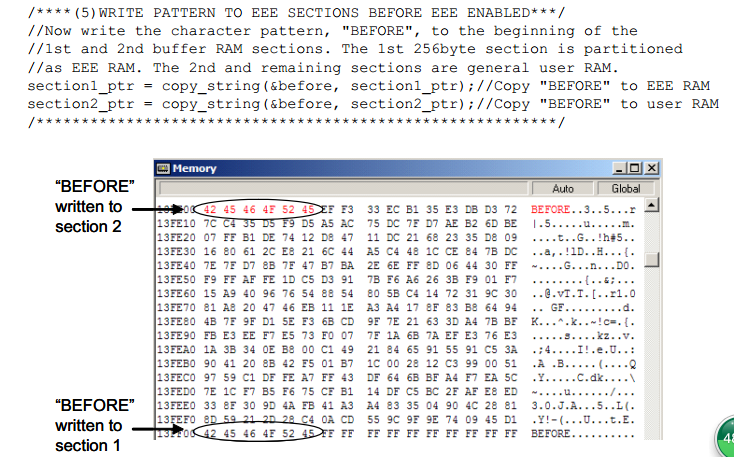
when i see the An3743,there are some question . when us use the EEE,if the EEE is enabled is necessary?Because in the An3743.step 5 is write data(before) before EEE ENABLED.
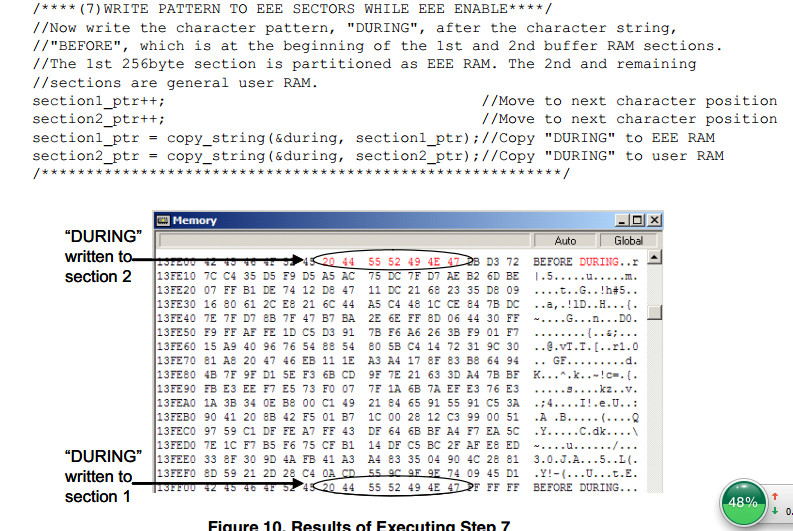
step 7 is write data(during) after EEE ENABLED.
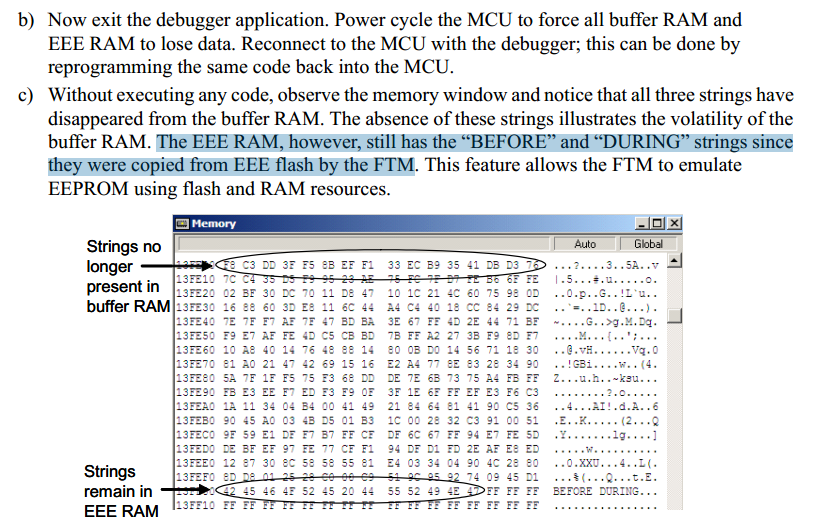
at last,power cycle the mcu,then Without executing any code, observe the memory window and notice that all three strings have disappeared from the buffer RAM. in the EEE RAM, however, still has the “BEFORE” and “DURING” strings since they were copied from EEE flash by the FTM .
So what is The difference between the EEE ENABLED and not EEE ENABLED. Is it is necessary to EEE ENABLED when i use the EEPROM?
- Mark as New
- Bookmark
- Subscribe
- Mute
- Subscribe to RSS Feed
- Permalink
- Report Inappropriate Content
HI Radek,thanks for your answer,it is useful for me。there is one more question,what is The difference between the D-FLASH and not EEPROM. IS it the difference erase by byte?How can i Erase the EEPROM by byte,which command。

 RadekS
- Mark as New
- Bookmark
- Subscribe
- Mute
- Subscribe to RSS Feed
- Permalink
- Report Inappropriate Content
Hi 展辉 刘,
Yes, the difference between Flash and standard EEPROM is that EEPROM sector size (smallest part which may be erased) is small (typically 1~4 bytes). The next difference is in guaranteed number of erase/write cycles. The EEPROM is typically more robust (you may write it for example ten times often).
For these reasons, the EEPROM must be designed very robust and it occupied large area on silicon.
The S12XE do not contain standard EEPROM memory. It is emulated EEPROM memory. The emulated EEPROM (EEE) may be created by software (like AN4483) or by hardware (like on S12XE).
The emulated EEPROM at S12XE consist from (part of) D-Flash, (part of) Buffer RAM and CPU with firmware code running on background and manage that changes on EEE RAM will be stored into D-Flash and latest values loaded into EEE RAM after reset.
For using emulated EEPROM at S12XE we must partition D-Flash for EEE use. It will format this memory and lock for EEE use (you cannot access this memory by flash commands). The partition parameters define how big portion of D-Flash and Buffer RAM will be used for EEE. The partition is typically executed just once during MCU lifetime.
For enabling EEE (store RAM changes into D-Flash), we must also execute Enable EEE flash command (EEE is disabled by default after reset).
The user access point for EEE is just EEE RAM range. So, you may simply modify EEE RAM content like on standard RAM. When EEE is enabled, the changes will be stored into D-Flash on background. So, there isn’t any default erased state prior write. You may simply change for example 0x1234 value to the 0xABCD…
I hope it helps you.
Have a great day,
Radek
-----------------------------------------------------------------------------------------------------------------------
Note: If this post answers your question, please click the Correct Answer button. Thank you!
-----------------------------------------------------------------------------------------------------------------------
- Mark as New
- Bookmark
- Subscribe
- Mute
- Subscribe to RSS Feed
- Permalink
- Report Inappropriate Content
Hi,Radek
Thank you for your serious and responsible reply,now i met a very strange question.Our product use the EEE to store some data,and a few months later, they can't store the data normally(Not all products ).
Then we debug the S12XE,found after Power down restart,the data in the EEE_RAM is not the data which before the power down.And we use the Query Command,the DFPART and ERPART is 0xFF,This is different from our previous partition。
My code is use the Partition D-Flash Command to partition the D-flash and ram ,when i found this question,i change the code Partition D-flash command to the Full Partition D-Flash Command,then the eeprom work normally and after power down reset,the data in the EEE_RAM is correct。
It is strange ,not all products appear this problem,can you help me?what is The difference between the Full Partition D-Flash and Partition D-Flash Command?Which one i should use ?And why i use the Partition D-Flash Command in code, after afew months later,the DFPART and ERPART is wrong and can't work normal.
(My analysis is,is it because too many times to erase eeprom (is it every time EEE-ram write data will immediately put the data into d-flash ?), resulting the d-flash has bad sectosr, And then use the Full Partition command, it will automatically step the bad sector and partition the good sector to the EEE_flash? like the NAND flash bad block management mechanism )
RadekS
- Mark as New
- Bookmark
- Subscribe
- Mute
- Subscribe to RSS Feed
- Permalink
- Report Inappropriate Content
Hi 展辉 刘,
I am not fully sure what exactly is the root cause in your case.
When the Query Command returns DFPART and ERPART as 0xFF, something is wrong. I would like to recommend looking at that data in the debugger (address 0x120000’G, first you have to set MMCCTL1_EEEIFRON bit and check “refresh memory when halting” for global memory map range).
The ranges 0x12_0002 – 0x12_0003 and 0x12_0006 – 0x12_0007 should also contain duplicate values of DFPART and ERPART.
The described behavior (“a few months later, they can't store the data normally”) may fit case when Partition command was not finished successfully and DFlash is partitioned just partially.
For confirmation that, please check D-Flash area allocated for EEE (0x10_0000 – 0x10_7FFF when you use the whole 32kB). Every D-Flash sector (256bytes) should start with sector header (2 words with sector status and sector erase counter). Since these sectors are programmed sequentially, you may directly focus on last sector header at address 0x107F00’G.
Unfortunately, the testing DFPART and ERPART at address 0x120000 and 0x120004 is not enough for check whether partition was executed correctly or not.
About difference between Partition D-Flash and Full Partition D-Flash commands)
The Full Partition D-Flash command may be executed only in the special mode (with the connected debugger). The Partition D-Flash may run also in normal mode.
The Full Partition D-Flash command will fully erase D-Flash and EEE IFR (with DFPART and ERPART information) and program DFPART and ERPART again. After that, it will format (part of) D-Flash for EEE use (program sector headers).
The Partition D-Flash command will do the same what Full Partition D-Flash command except erasing D-Flash and EEE IFR (it will just check whether they are already erased or not).
Since the Full Partition D-Flash command may be used only in the special mode, we use it just for debugging purposes. The Partition D-Flash command typically used for partitioning in production.
Another theoretical potential source of the issue may be for example incorrect flash clock settings during partitioning – the EEE IFR memory cells may be insufficiently programmed. That kind of root cause may be checked by reading with different Margin Level (User/Field). Of course, the system clock and code check should be performed rather first.
I hope it helps you.
Have a great day,
Radek
-----------------------------------------------------------------------------------------------------------------------
Note: If this post answers your question, please click the Correct Answer button. Thank you!
-----------------------------------------------------------------------------------------------------------------------
- Mark as New
- Bookmark
- Subscribe
- Mute
- Subscribe to RSS Feed
- Permalink
- Report Inappropriate Content
Hi Radek
“The described behavior (“a few months later, they can't store the data normally”) may fit case when Partition command was not finished successfully and DFlash is partitioned just partially.
For confirmation that, please check D-Flash area allocated for EEE (0x10_0000 – 0x10_7FFF when you use the whole 32kB). Every D-Flash sector (256bytes) should start with sector header (2 words with sector status and sector erase counter). Since these sectors are programmed sequentially, you may directly focus on last sector header at address 0x107F00’G.”
i dont know why check the D-flash 0x10_0000 – 0x10_7FFF can confirm whether the partitionde is successfull?Is it if partition the Dflash is successfull ,the data in the D-FLASH( 0x10_0000 – 0x10_7FFF ) is the 0XFF like the EEE_RAM ?
And i want to know when i write the data to the EEE_RAM,the data will stored in where address in the D-FLASH?Can you give me a example?
Thanks!
RadekS
- Mark as New
- Bookmark
- Subscribe
- Mute
- Subscribe to RSS Feed
- Permalink
- Report Inappropriate Content
Hi 展辉 刘,
The detail EEE principle is described in AN3490 Overview of the MC9S12XE Emulated EEPROM
http://www.nxp.com/files/microcontrollers/doc/app_note/AN3490.pdf
In short: When we will use EEE, every word in EEE RAM will have own 16bit address (rather say index). When we change the value of this word, the EEE state machine will store this new value together with word index into D-Flash (it will write one record = 4 bytes). The records are stored into D-Flash sequentially until D-Flash sector is full. There isn’t any direct relation between EEE RAM address and D-Flash address. So, the same D-Flash sector may contain several records for the same word in EEE RAM.
After reset, the EEE state machine will find all latest records and restore EEE RAM content from them. For that reason, the D-Flash sectors need to be internally classified as Full/Active/Ready_0/Oldest_0/… in sector header. Since the D-Flash endurance is still limited the ECOUNT value is also stored in sector header.
Some details about EEE RAM and D-Flash content relationship may be found also in AN3743 Emulated EEPROM Quick Start Guide
http://www.nxp.com/files/microcontrollers/doc/app_note/AN3743.pdf
http://www.nxp.com/files/microcontrollers/doc/app_note/AN3743SW.zip
I hope it helps you.
I hope it helps you.
Have a great day,
Radek
-----------------------------------------------------------------------------------------------------------------------
Note: If this post answers your question, please click the Correct Answer button. Thank you!
-----------------------------------------------------------------------------------------------------------------------
RadekS
- Mark as New
- Bookmark
- Subscribe
- Mute
- Subscribe to RSS Feed
- Permalink
- Report Inappropriate Content
Hi 展辉 刘,
The observed behavior is fully expected.
The AN3743 example configure Buffer RAM from 0x13FF00 as EEE RAM, while range 0x13F000-0x13FEFF woks as standard RAM.
The EEE consist from (part of) D-Flash and (part of) Buffer RAM (called EEE RAM in AN3743). The D-Flash must be partitioned prior first use as EEE.
The loading EEE RAM from D-Flash after reset is performed automatically.
The EEE Enable command is necessary for starting store EEE RAM changes into D-Flash.
So, if you will not execute EEE Enable command, the changes in EEE RAM will be not stored into D-Flash and the EEE RAM will be loaded by last known values after next power cycle.
So, you should execute EEE Enable command when you want to store your EEE RAM changes into D-Flash.
The number of pending tasks for EEE write into D-Flash may be checked in ETAG register. So, if you want to wait until all pending EEE RAM changes will be stored prior next reset, you may use next command:
while((ETAG > 0) || (FSTAT_MGBUSY == 1)); //we can wait for EEE to finish
Please be aware that (Full) Partition command must not be interrupted by reset. Such case may lead to situation when D-Flash stay formatted only partitioned and EEE will work only for limited time.
If you want check whether D-Flash was successfully formatted for EEE, you may use command like:
if(*(unsigned int *far)0x107F00 == 0xFFFF) err = FORMAT_ERROR; //Was D-Flash correctly formatted?
//err signalize format error
//partitioning was interrupted
Note: At address 0x107F00 starts the last sector header
Attached is simple S12XE EEE description and two example codes.
I hope it helps you.
Have a great day,
Radek
-----------------------------------------------------------------------------------------------------------------------
Note: If this post answers your question, please click the Correct Answer button. Thank you!
-----------------------------------------------------------------------------------------------------------------------
