
- Forums
- Product Forums
- General Purpose MicrocontrollersGeneral Purpose Microcontrollers
- i.MX Forumsi.MX Forums
- QorIQ Processing PlatformsQorIQ Processing Platforms
- Identification and SecurityIdentification and Security
- Power ManagementPower Management
- Wireless ConnectivityWireless Connectivity
- RFID / NFCRFID / NFC
- Advanced AnalogAdvanced Analog
- MCX Microcontrollers
- S32G
- S32K
- S32V
- MPC5xxx
- Other NXP Products
- S12 / MagniV Microcontrollers
- Powertrain and Electrification Analog Drivers
- Sensors
- Vybrid Processors
- Digital Signal Controllers
- 8-bit Microcontrollers
- ColdFire/68K Microcontrollers and Processors
- PowerQUICC Processors
- OSBDM and TBDML
- S32M
- S32Z/E
-
- Solution Forums
- Software Forums
- MCUXpresso Software and ToolsMCUXpresso Software and Tools
- CodeWarriorCodeWarrior
- MQX Software SolutionsMQX Software Solutions
- Model-Based Design Toolbox (MBDT)Model-Based Design Toolbox (MBDT)
- FreeMASTER
- eIQ Machine Learning Software
- Embedded Software and Tools Clinic
- S32 SDK
- S32 Design Studio
- GUI Guider
- Zephyr Project
- Voice Technology
- Application Software Packs
- Secure Provisioning SDK (SPSDK)
- Processor Expert Software
- Generative AI & LLMs
-
- Topics
- Mobile Robotics - Drones and RoversMobile Robotics - Drones and Rovers
- NXP Training ContentNXP Training Content
- University ProgramsUniversity Programs
- Rapid IoT
- NXP Designs
- SafeAssure-Community
- OSS Security & Maintenance
- Using Our Community
-
- Cloud Lab Forums
-
- Knowledge Bases
- ARM Microcontrollers
- i.MX Processors
- Identification and Security
- Model-Based Design Toolbox (MBDT)
- QorIQ Processing Platforms
- S32 Automotive Processing Platform
- Wireless Connectivity
- CodeWarrior
- MCUXpresso Suite of Software and Tools
- MQX Software Solutions
- RFID / NFC
- Advanced Analog
-
- NXP Tech Blogs
Pearing NXP rapid IoT with windows
Hi to everyone !!
I wrote this question because I have a problem. I wish to pair a NXP rapid IoT with a Windows operating system.
When I go to the Bluetooth & other devices -> Add Bluetooth or other devices -> on Add device panel I am able to "see" the NXP rapid IoT, but when I tray to connect I receive the following error: "Try connecting your device again".
Any ideas or information?
Thanks very much !

I have 2 different NXP rapid IoT and both have the same behavior (counting also the device belonging to Jose Manuel Cano Garcia, there a three with the same problem): it is impossible to pair them with the Windows, using the interface and tools provided by Microsoft.
Best regards,
Dan Dobrea.

Hi Estephania,
Thank you for replying.
Yes you are right; I have developped my own application using the Qt framework, It works OK in linux, but not in windows (I get the same message shown/reported above). I have also tried other third-party tools in linux (such as the command line tools gatttool and bluetoothctl and both work fine, I am able to connect to the device, search services, read/write characteristics, activate characteristics notification, etc.). But in windows, when trying to add the device using the windows system control panel (windows native "add bluetooth device" menu, outside my application) it also fails with the same error, so I think it is not a problem specific to my application.
I developped a similar application for testing some of the examples of the FRDM-KW41Z (health thermometer, heartrate, etc), and all of them worked fine both for linux and windows computers. The characteristics and services are diferent in the rapid IoT kit, of course, but my custom application is essentially the same (connects to devices, search services and tries to enable notification for some characteristics). For the FRDM-KW41Z it works fine. but for the rapid iot kit it fails when trying to connect (after a while the message above is shown), .
Again, manually adding the FRDM-KW41Z through the windows "add bluetooth device" menu (outside my app) works fine for FRDM-KW41Z, but fails for rapid iot kit (again the same behaviour, the error message shown above is displayed). That is why I was wondering if someone has managed to connect the device to a windows computer (with either a custom or a third party app).
I tried changing some parameters of the rapid iot device firmware (particularly those related with pairing/bonding), but no sucess so far.
Best Regards,
Jose
Yes I'm using Rapid IoT Kit Out Of Box Demo. The windows (Version 1803 - OS Build 17134.590) detect the device (Rapid IoT) see below - B22F are the last characters of the number printed on the back of the case. But when I want to connect, each time I get this error:
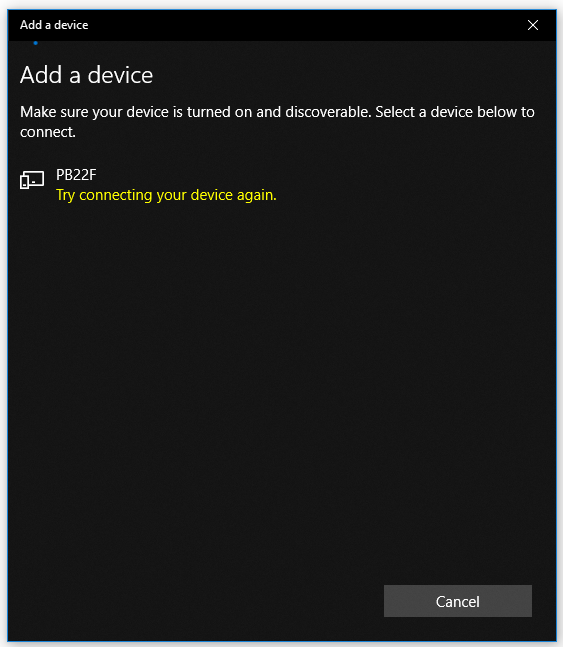
I imagine that the problem is related to the Bluetooth communication parameters. So in the studio I change the BLEConnection block parameters to "Custom Passkey" and "Just Works" (in PAIRING TYPE field) - Random Passkey it was initially. I got the same error.
Are there other places to change the Bluetooth communication parameters ? Or do you have other solutions ?
Thanks a lot !
Dobrea Dan.
Hi,
I have the same problem.
I have written a Qt application that connects to the rapid IoT device and it works OK for Linux. Oher linux command-line tools such as gatttool and bluetoothctl can connect to the device, too.
But in windows, my Qt app does not connect successfully to the device, neither am I able to pair the computer with the device using the windows standard "add bluetooth device" dialog. It fails and displays the same message displayed above.
Has anyone managed to pair the rapid iot device with windows 10?
Regards,
Jose

 estephania_mart
Hello,
just to fully understand your problem, it does pairs in Linux but not in Windows? Is that correct? Also, you are pairing it with your own application, right?
Regards,
Estephania
Hi again, Estephania,
Any suggestion/pointer on this issue so far? I know windows have some limitations supporting bluetooth, but it works perfecly with FRDM-KW41Z whereas It won't connect to the rapid IoT kit. Maybe it is necessary to update the firmware of the KW41Z subsystem embbedded in the rapid IoT kit?
Regards,
Jose
estephania_mart
Hello,
Are you working with the Out of the Box example in the Rapid IoT ?
Regards,
Estephania
