
- Forums
- Product Forums
- General Purpose MicrocontrollersGeneral Purpose Microcontrollers
- i.MX Forumsi.MX Forums
- QorIQ Processing PlatformsQorIQ Processing Platforms
- Identification and SecurityIdentification and Security
- Power ManagementPower Management
- Wireless ConnectivityWireless Connectivity
- RFID / NFCRFID / NFC
- Advanced AnalogAdvanced Analog
- Neural Processing UnitsNeural Processing Units
- MCX Microcontrollers
- S32G
- S32K
- S32V
- MPC5xxx
- Other NXP Products
- S12 / MagniV Microcontrollers
- Powertrain and Electrification Analog Drivers
- Sensors
- Vybrid Processors
- Digital Signal Controllers
- 8-bit Microcontrollers
- ColdFire/68K Microcontrollers and Processors
- PowerQUICC Processors
- OSBDM and TBDML
- S32M
- S32Z/E
-
- Solution Forums
- Software Forums
- MCUXpresso Software and ToolsMCUXpresso Software and Tools
- CodeWarriorCodeWarrior
- MQX Software SolutionsMQX Software Solutions
- Model-Based Design Toolbox (MBDT)Model-Based Design Toolbox (MBDT)
- FreeMASTER
- eIQ Machine Learning Software
- Embedded Software and Tools Clinic
- S32 SDK
- S32 Design Studio
- GUI Guider
- Zephyr Project
- Voice Technology
- Application Software Packs
- Secure Provisioning SDK (SPSDK)
- Processor Expert Software
- Generative AI & LLMs
-
- Topics
- Mobile Robotics - Drones and RoversMobile Robotics - Drones and Rovers
- NXP Training ContentNXP Training Content
- University ProgramsUniversity Programs
- Rapid IoT
- NXP Designs
- SafeAssure-Community
- OSS Security & Maintenance
- Using Our Community
-
- Cloud Lab Forums
-
- Knowledge Bases
- ARM Microcontrollers
- i.MX Processors
- Identification and Security
- Model-Based Design Toolbox (MBDT)
- QorIQ Processing Platforms
- S32 Automotive Processing Platform
- Wireless Connectivity
- CodeWarrior
- MCUXpresso Suite of Software and Tools
- MQX Software Solutions
- RFID / NFC
- Advanced Analog
- Neural Processing Units
-
- NXP Tech Blogs
- Home
- :
- ソフトウェア・フォーラム
- :
- プロセッサ・エキスパート・ソフトウェア
- :
- Processor Expert support for MK22FN256VLH12?
Processor Expert support for MK22FN256VLH12?
- RSS フィードを購読する
- トピックを新着としてマーク
- トピックを既読としてマーク
- このトピックを現在のユーザーにフロートします
- ブックマーク
- 購読
- ミュート
- 印刷用ページ

- 新着としてマーク
- ブックマーク
- 購読
- ミュート
- RSS フィードを購読する
- ハイライト
- 印刷
- 不適切なコンテンツを報告
Hi. As of today Processor expert does not support the MK22FN256VLH12 (Ver 2.0.0 of Kinetis Design Studio). PE has support for MK22FN1M0VLH12, a 1MByte variant of the same MCU. I have modified the linker script to adjust for the smaler FLASH and RAM in the 256 device, but the program then enters an exception when setting upp the MPU. I'am affraid that there might be other differences also between the 1MB and 256KB device. Is there anyone who knows if PE will support MK22FN256VLH12 soon? Alternatively is it enough to change the address map and the MPU setup to be able to use the 1MB device settings for 256KB device instead?
解決済! 解決策の投稿を見る。

 Jorge_Gonzalez
- 新着としてマーク
- ブックマーク
- 購読
- ミュート
- RSS フィードを購読する
- ハイライト
- 印刷
- 不適切なコンテンツを報告
Hello Olav Birkeland:
The support for K22FN256 is available, but you have to install the Service Pack for K22F/KV31F.
Go to Help -> Install New software, in Work with select "Freescale KDS Update Site" and install the one called "Processor Expert Support for Kinetis K22F/KV31F @120/100 MHz Service Pack". See below:
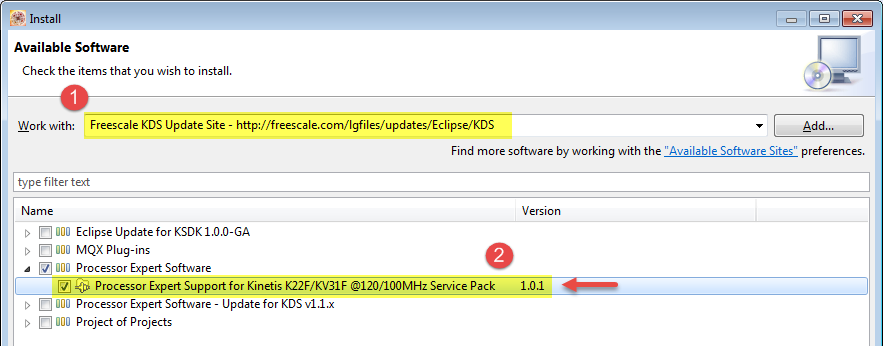
With this you have Processor Expert support for K22FN256 and other variants of K22.
Regards!,
Jorge Gonzalez
-----------------------------------------------------------------------------------------------------------------------
Note: If this post answers your question, please click the Correct Answer button. Thank you!
-----------------------------------------------------------------------------------------------------------------------
Jorge_Gonzalez
- 新着としてマーク
- ブックマーク
- 購読
- ミュート
- RSS フィードを購読する
- ハイライト
- 印刷
- 不適切なコンテンツを報告
Hello Olav Birkeland:
The support for K22FN256 is available, but you have to install the Service Pack for K22F/KV31F.
Go to Help -> Install New software, in Work with select "Freescale KDS Update Site" and install the one called "Processor Expert Support for Kinetis K22F/KV31F @120/100 MHz Service Pack". See below:
With this you have Processor Expert support for K22FN256 and other variants of K22.
Regards!,
Jorge Gonzalez
-----------------------------------------------------------------------------------------------------------------------
Note: If this post answers your question, please click the Correct Answer button. Thank you!
-----------------------------------------------------------------------------------------------------------------------
- 新着としてマーク
- ブックマーク
- 購読
- ミュート
- RSS フィードを購読する
- ハイライト
- 印刷
- 不適切なコンテンツを報告
Hi Jorge
I restarted KDS and then I actually godt a choice of switching to the correct package. And now it works!
Thanks!
- 新着としてマーク
- ブックマーク
- 購読
- ミュート
- RSS フィードを購読する
- ハイライト
- 印刷
- 不適切なコンテンツを報告
Thanks Jorge.
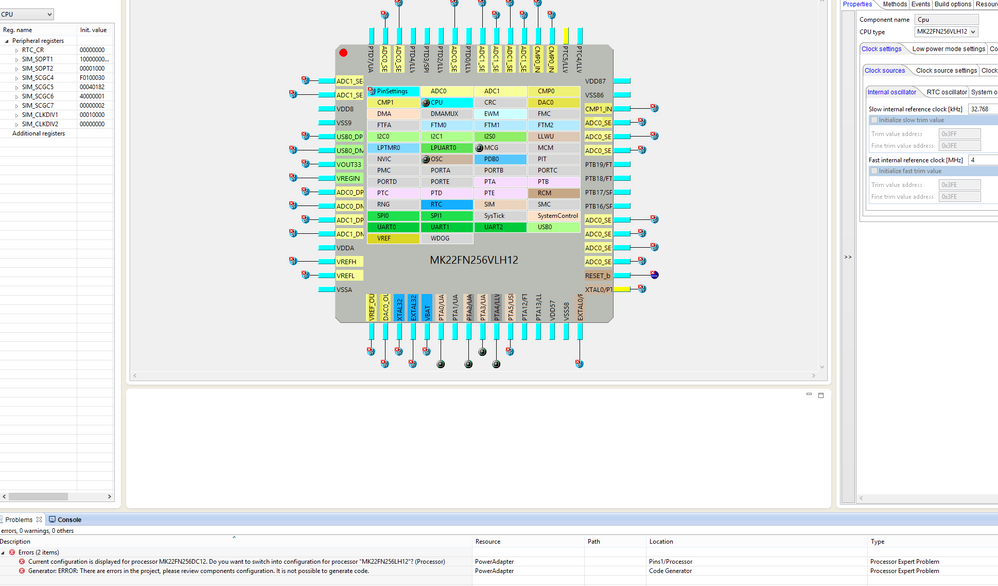
I have now the correct MCU, but the problems are not over yet. I switched to the 64pin package (MK22FN256VLH12 in LQFP 64-pin package)
and then I receive the errors as can be seen from the screen capture:
Olav
- 新着としてマーク
- ブックマーク
- 購読
- ミュート
- RSS フィードを購読する
- ハイライト
- 印刷
- 不適切なコンテンツを報告
When I tried to use PE to create KDS project for MK22FN512VLL12, met below error:
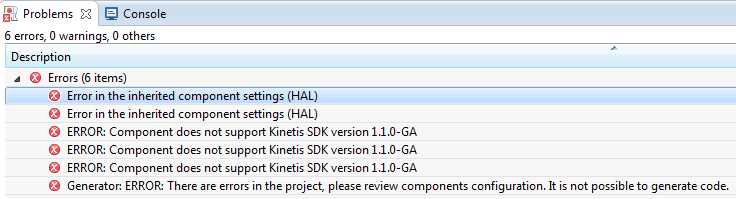
after installed the update, have more errors:
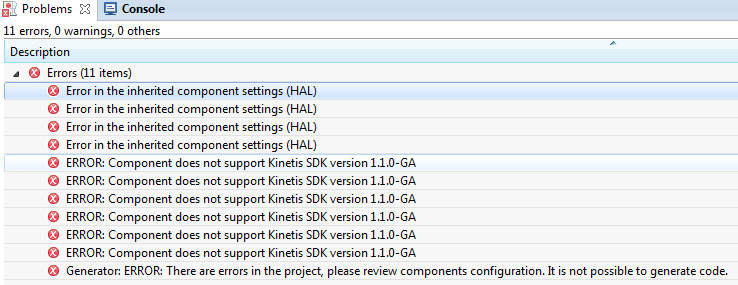
thx.
