
- Forums
- Product Forums
- General Purpose MicrocontrollersGeneral Purpose Microcontrollers
- i.MX Forumsi.MX Forums
- QorIQ Processing PlatformsQorIQ Processing Platforms
- Identification and SecurityIdentification and Security
- Power ManagementPower Management
- Wireless ConnectivityWireless Connectivity
- RFID / NFCRFID / NFC
- Advanced AnalogAdvanced Analog
- Neural Processing UnitsNeural Processing Units
- MCX Microcontrollers
- S32G
- S32K
- S32V
- MPC5xxx
- Other NXP Products
- S12 / MagniV Microcontrollers
- Powertrain and Electrification Analog Drivers
- Sensors
- Vybrid Processors
- Digital Signal Controllers
- 8-bit Microcontrollers
- ColdFire/68K Microcontrollers and Processors
- PowerQUICC Processors
- OSBDM and TBDML
- S32M
- S32Z/E
-
- Solution Forums
- Software Forums
- MCUXpresso Software and ToolsMCUXpresso Software and Tools
- CodeWarriorCodeWarrior
- MQX Software SolutionsMQX Software Solutions
- Model-Based Design Toolbox (MBDT)Model-Based Design Toolbox (MBDT)
- FreeMASTER
- eIQ Machine Learning Software
- Embedded Software and Tools Clinic
- S32 SDK
- S32 Design Studio
- GUI Guider
- Zephyr Project
- Voice Technology
- Application Software Packs
- Secure Provisioning SDK (SPSDK)
- Processor Expert Software
- Generative AI & LLMs
-
- Topics
- Mobile Robotics - Drones and RoversMobile Robotics - Drones and Rovers
- NXP Training ContentNXP Training Content
- University ProgramsUniversity Programs
- Rapid IoT
- NXP Designs
- SafeAssure-Community
- OSS Security & Maintenance
- Using Our Community
-
- Cloud Lab Forums
-
- Knowledge Bases
- ARM Microcontrollers
- i.MX Processors
- Identification and Security
- Model-Based Design Toolbox (MBDT)
- QorIQ Processing Platforms
- S32 Automotive Processing Platform
- Wireless Connectivity
- CodeWarrior
- MCUXpresso Suite of Software and Tools
- MQX Software Solutions
- RFID / NFC
- Advanced Analog
- Neural Processing Units
-
- NXP Tech Blogs
- Home
- :
- Software Forums
- :
- Processor Expert Software
- :
- Re: PE Option to Enter VLP Stop?
PE Option to Enter VLP Stop?
- Subscribe to RSS Feed
- Mark Topic as New
- Mark Topic as Read
- Float this Topic for Current User
- Bookmark
- Subscribe
- Mute
- Printer Friendly Page
PE Option to Enter VLP Stop?

- Mark as New
- Bookmark
- Subscribe
- Mute
- Subscribe to RSS Feed
- Permalink
- Report Inappropriate Content
Hi
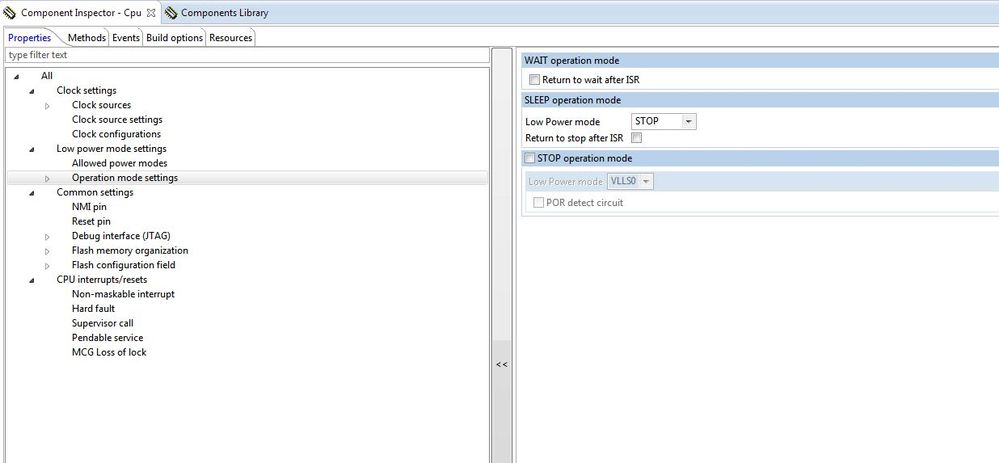
In a future version of Processor Expert for the MK22FN512, would it be possible to add an option to enter the VLP STOP mode from run (in Operation Mode Settings - SLEEP Options)?
Right now the only three options for SLEEP are: STOP, PSTOP1 and PSTOP2.
It is always possible to modify the CPU_Init.c file directly of course, or to use a custom function to replace it. But adding the options in the Processor Expert GUI would be nicer!
Thanks
Bruno

 Jorge_Gonzalez
- Mark as New
- Bookmark
- Subscribe
- Mute
- Subscribe to RSS Feed
- Permalink
- Report Inappropriate Content
Hello Bruno:
I have not played much with low power modes, but I think VLPS is achieved combining CPU operation mode with Clock configuration, according to the next document by colleague Petr Hradsky:
Operation modes in Processor Expert
Regards!,
Jorge Gonzalez
-----------------------------------------------------------------------------------------------------------------------
Note: If this post answers your question, please click the Correct Answer button. Thank you!
-----------------------------------------------------------------------------------------------------------------------
- Mark as New
- Bookmark
- Subscribe
- Mute
- Subscribe to RSS Feed
- Permalink
- Report Inappropriate Content
Hi Jorge
Either I do not understand the text in the document that you sent, or there is an option missing (exactly the option that I am suggesting I think).
Regarding sleep modes (not run modes), in the last part, Petr's document indicates:
"For example the DOM_SLEEP can be mapped to normal stop mode, very low power stop, partial stop 1 or partial stop 2 of Kinetis L"
But the image below it only shows 3 options: Normal STOP, PSTOP1 and PSTOP2. Allowing the VLP mode checkmark above has no impact on the code (I checked).
What I am suggesting is to add a VLP STOP mode menu option, which is exactly what Petr seems to say already exists...
Bruno
 adriancano
- Mark as New
- Bookmark
- Subscribe
- Mute
- Subscribe to RSS Feed
- Permalink
- Report Inappropriate Content
Hi,
Prior to enter VLPS mode you need to enter a VLPR mode, this is what is indicated in the mentioned document. To accomplish this you need to set a Clock Configuration for BLPE or BLPI mode checking the Very low power mode as enabled, here an example:
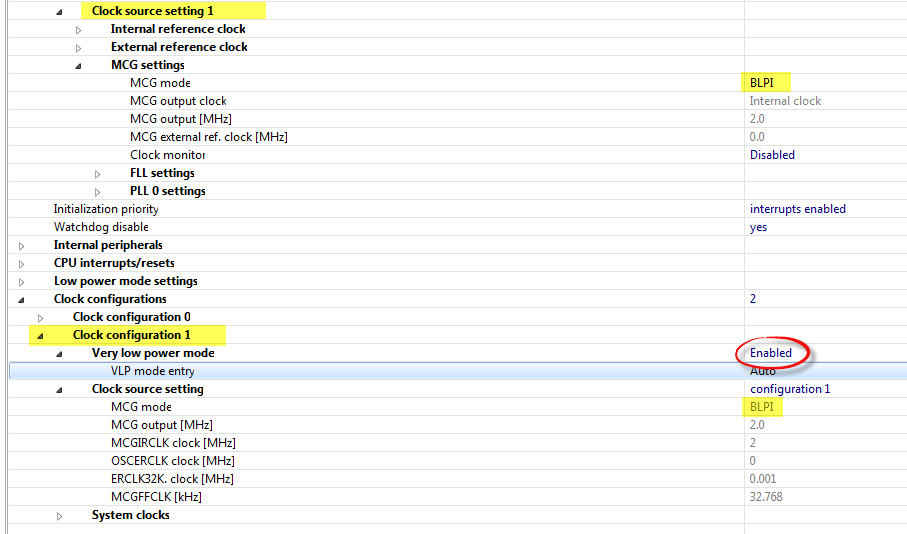
You enter the Clock configuration calling the methods Cpu_SetClockConfiguration(); and Cpu_GetClockConfiguration();. After ensuring you are running the BLPI or BLPE configuration you call the Cpu_SetOperationMode(DOM_SLEEP, NULL, NULL) to enter VLPS mode. This is the normal behavior of the MCU you can check more information in the AN4503 document. Referring to it:
"STOP mode entry routine:
if in Run mode puts the processor into normal stop mode.
If in VLPR mode puts the processor into VLPS mode.
In this mode core, bus and peripheral clocks are disabled."
As you mentioned before it is possible to enter VLPS mode from Normal RUN mode but this is not implemented in Processor Expert.
Hope this information can help you
Best Regards,
Adrian Sanchez Cano
Technical Support Engineer
-----------------------------------------------------------------------------------------------------------------------
Note: If this post answers your question, please click the Correct Answer button. Thank you!
-----------------------------------------------------------------------------------------------------------------------
- Mark as New
- Bookmark
- Subscribe
- Mute
- Subscribe to RSS Feed
- Permalink
- Report Inappropriate Content
Hi Adrian
Going directly from normal RUN to VLPS and back from VLPS to normal RUN is a very attractive option (and it is what I need to do). All that would be needed for that code to be generated by Processor Expert would be to have a fourth "VLPS" option for SLEEP, beside STOP, PSTOP1 and PSTOP2. Such an option would be very easy to manage in CPU_Init.c. Right now I have modified manually CPU_Init.c to get that feature (not that hard to do), but it would be much cleaner if PE would manage such an option on its own.
Maybe in a future version?
Bruno
 marek_neuzil
- Mark as New
- Bookmark
- Subscribe
- Mute
- Subscribe to RSS Feed
- Permalink
- Report Inappropriate Content
Hi Bruno,
Thank you for the new feature proposal. I have created a ticket for Processor Expert development team with your request (PEXMCU-2129).
Best Regards,
Marek Neuzil
