
- Forums
- Product Forums
- General Purpose MicrocontrollersGeneral Purpose Microcontrollers
- i.MX Forumsi.MX Forums
- QorIQ Processing PlatformsQorIQ Processing Platforms
- Identification and SecurityIdentification and Security
- Power ManagementPower Management
- Wireless ConnectivityWireless Connectivity
- RFID / NFCRFID / NFC
- Advanced AnalogAdvanced Analog
- MCX Microcontrollers
- S32G
- S32K
- S32V
- MPC5xxx
- Other NXP Products
- S12 / MagniV Microcontrollers
- Powertrain and Electrification Analog Drivers
- Sensors
- Vybrid Processors
- Digital Signal Controllers
- 8-bit Microcontrollers
- ColdFire/68K Microcontrollers and Processors
- PowerQUICC Processors
- OSBDM and TBDML
- S32M
- S32Z/E
-
- Solution Forums
- Software Forums
- MCUXpresso Software and ToolsMCUXpresso Software and Tools
- CodeWarriorCodeWarrior
- MQX Software SolutionsMQX Software Solutions
- Model-Based Design Toolbox (MBDT)Model-Based Design Toolbox (MBDT)
- FreeMASTER
- eIQ Machine Learning Software
- Embedded Software and Tools Clinic
- S32 SDK
- S32 Design Studio
- GUI Guider
- Zephyr Project
- Voice Technology
- Application Software Packs
- Secure Provisioning SDK (SPSDK)
- Processor Expert Software
- Generative AI & LLMs
-
- Topics
- Mobile Robotics - Drones and RoversMobile Robotics - Drones and Rovers
- NXP Training ContentNXP Training Content
- University ProgramsUniversity Programs
- Rapid IoT
- NXP Designs
- SafeAssure-Community
- OSS Security & Maintenance
- Using Our Community
-
- Cloud Lab Forums
-
- Knowledge Bases
- ARM Microcontrollers
- i.MX Processors
- Identification and Security
- Model-Based Design Toolbox (MBDT)
- QorIQ Processing Platforms
- S32 Automotive Processing Platform
- Wireless Connectivity
- CodeWarrior
- MCUXpresso Suite of Software and Tools
- MQX Software Solutions
- RFID / NFC
- Advanced Analog
-
- NXP Tech Blogs
P2020 Cannot stop at jtag
Hi,
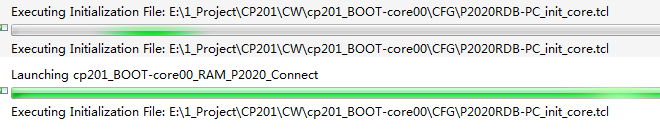
When i used Jtag to dubug,but the PPC cannot stop the Chip and show as text。I need your help to debug this problem,Thanks!!!
radix x
cmdwin::eclipse::config hexprefix 0x
cmdwin::eclipse::config MemIdentifier v
cmdwin::eclipse::config MemWidth 32
cmdwin::eclipse::config MemAccess 32
cmdwin::eclipse::config MemSwap off
cmdwin::reg e500 Special Purpose Registers/PIR %d -np
cmdwin::mem p:0xff700000 = 0x000e0000
thread break: Stopped, 0x0, 0x0, cpuPowerPCBig, Connected (state, tid, pid, cpu, target)
cmdwin::mem p:0xe0005000 = 0x00001000
cmdwin::mem p:0xe0020e44 = 0x0000001D
cmdwin::reg Standard Special Purpose Registers/MSR = 0x02000200
cmdwin::reg regPPCTLB1/L2MMU_CAM1 = 0x500003CAFC080000E0000000E0000001
cmdwin::reg regPPCTLB1/L2MMU_CAM2 = 0x70000FCAFC080000FF000000FF000001
cmdwin::reg regPPCTLB1/L2MMU_CAM3 = 0xA0007FCAFC0800008000000080000001
cmdwin::reg regPPCTLB1/L2MMU_CAM6 = 0x400001CAFC080000EFC00000EFC00001
cmdwin::reg regPPCTLB1/L2MMU_CAM7 = 0x500003CAFC080000F8000000F8000001
cmdwin::reg regPPCTLB1/L2MMU_CAM9 = 0xA0007FC4FC0800000000000000000001
cmdwin::reg e500 Special Purpose Registers/L1CSR0 = 0x2
cmdwin::reg e500 Special Purpose Registers/L1CSR1 = 0x0
cmdwin::reg e500 Special Purpose Registers/L1CSR1 = 0x2
cmdwin::mem p:0xe0000c08 = 0x000ff000
cmdwin::mem p:0xe0000c10 = 0x80400017
cmdwin::mem p:0xe0000c28 = 0x000a0000
cmdwin::mem p:0xe0000c30 = 0x8020001c
cmdwin::mem p:0xe0000c48 = 0x000efc20
cmdwin::mem p:0xe0000c50 = 0x8020000f
cmdwin::mem p:0xe0000c68 = 0x00080000
cmdwin::mem p:0xe0000c70 = 0x8010001c
cmdwin::mem p:0xe0000c88 = 0x000efc10
cmdwin::mem p:0xe0000c90 = 0x8010000f
cmdwin::mem p:0xe0000ca8 = 0x000f8000
cmdwin::mem p:0xe0000cb0 = 0x80400013
cmdwin::mem p:0xe0000d68 = 0x00000000
cmdwin::mem p:0xe0000d70 = 0x80F0001d
cmdwin::mem p:0xe0002110 = 0x47000008
cmdwin::mem p:0xe0002000 = 0x0000003F
cmdwin::mem p:0xe0002080 = 0x80014202
cmdwin::mem p:0xe0002104 = 0x00110104
cmdwin::mem p:0xe0002108 = 0x6f6b8846
cmdwin::mem p:0xe000210c = 0x0fa8c8cc
cmdwin::mem p:0xe0002100 = 0x00030000
cmdwin::mem p:0xe0002114 = 0x24401050
cmdwin::mem p:0xe0002118 = 0x00441421
cmdwin::mem p:0xe000211c = 0x00000000
cmdwin::mem p:0xe0002120 = 0x00000000
cmdwin::mem p:0xe0002124 = 0x0c300100
cmdwin::mem p:0xe0002128 = 0xDEADBEEF
cmdwin::mem p:0xe0002130 = 0x03000000
cmdwin::mem p:0xe0002160 = 0x00220001
cmdwin::mem p:0xe0002164 = 0x02401400
cmdwin::mem p:0xe0002170 = 0x89080600
cmdwin::mem p:0xe0002174 = 0x8675f608
cmdwin::mem p:0xe0002e48 = 0x00000000
cmdwin::mem p:0xe0002e58 = 0x00000000
cmdwin::mem p:0xe0002b28 = 0x00000000
cmdwin::mem p:0xe0002b2c = 0x00000000
cmdwin::wait 500
cmdwin::mem p:0xe0002110 = 0xc7000008
cmdwin::wait 500
cmdwin::mem p:0xe00e0004 -np
cmdwin::mem p:0xe0005000 = 0xFF001001
cmdwin::mem p:0xe0005004 = 0xFF000FF7
cmdwin::mem p:0xe0005008 = 0xF8000821
cmdwin::mem p:0xe000500c = 0xFFF003AE
cmdwin::mem p:0xe00050e0 = 0x0000F020
cmdwin::mem p:0xe0007000 = 0x80000403
cmdwin::mem p:0xe0007008 = 0x0000FB00
cmdwin::mem p:0xe0007020 = 0x2e170008
cmdwin::mem p:0xe0020000 -np
cmdwin::mem p:0xe0020000 = 0x60000000
cmdwin::reg e500 Special Purpose Registers/IVPR = 0x00000000
cmdwin::reg e500 Special Purpose Registers/IVOR0 = 0x00000100
cmdwin::reg e500 Special Purpose Registers/IVOR1 = 0x00000200
cmdwin::reg e500 Special Purpose Registers/IVOR2 = 0x00000300
cmdwin::reg e500 Special Purpose Registers/IVOR3 = 0x00000400
cmdwin::reg e500 Special Purpose Registers/IVOR4 = 0x00000500
cmdwin::reg e500 Special Purpose Registers/IVOR5 = 0x00000600
cmdwin::reg e500 Special Purpose Registers/IVOR6 = 0x00000700
cmdwin::reg e500 Special Purpose Registers/IVOR8 = 0x00000c00
cmdwin::reg e500 Special Purpose Registers/IVOR10 = 0x00000900
cmdwin::reg e500 Special Purpose Registers/IVOR11 = 0x00000f00
cmdwin::reg e500 Special Purpose Registers/IVOR12 = 0x00000b00
cmdwin::reg e500 Special Purpose Registers/IVOR13 = 0x00001100
cmdwin::reg e500 Special Purpose Registers/IVOR14 = 0x00001000
cmdwin::reg e500 Special Purpose Registers/IVOR15 = 0x00001500
cmdwin::reg e500 Special Purpose Registers/IVOR32 = 0x00001600
cmdwin::reg e500 Special Purpose Registers/IVOR33 = 0x00001700
cmdwin::reg e500 Special Purpose Registers/IVOR34 = 0x00001800
cmdwin::reg e500 Special Purpose Registers/IVOR35 = 0x00001900
cmdwin::mem v:0x00000700 = 0x48000000
cmdwin::mem v:0x00001500 = 0x48000000
cmdwin::reg e500 Special Purpose Registers/IAC1 = 0xfffffffc
cmdwin::reg e500 Special Purpose Registers/DBCR0 = 0x40800000
cmdwin::reg e500 Special Purpose Registers/DBCR1 = 0x00000000
cmdwin::eclipse::config runcontrolsync off
cmdwin::go
cmdwin::wait 50
cmdwin::eclipse::config runcontrolsync on
cmdwin::stop

 yipingwang
Hello Lu Yingyu,
Would you please refer to the following procedure to capture CCS log to me to do more investigation.
Before connect to the target, please enable CCS log from "Run->Debug Configurations-><project>-core00_RAM_T2080_Download->Edit...->Advanced->Advanced CCS setting->Enable logging", and connect to the target from "Run->Debug Configurations-><project>-core00_RAM_T2080_Download->Debug", the CCS log will be printed in the console panel in CodeWarrior IDE.
Note: Please open the console panel from Window->Show View->Console, and if nothing displayed, please choose the correct session on the right top icon in the panel.If the CCS log in the console is truncated, please enlarge the console buffer from Window->Preferences->Run/Debug->Console->uncheck "Limit console output".
Thanks,
Yiping
Thanks,there are some message in Console。Is this what you want?If not Enough i will send you a text include all the detail。
ccs_read_register
coreh = [serverh:0;cc_index:0;chain_pos:1]
index = 285212672
count = 1
size = 4
value: (size = 4)
00000003
ccs_read_register; ccs_error = 0; duration=2 ms
ccs_write_mem
coreh = [serverh:0;cc_index:0;chain_pos:1]
addr = [space:0;size:4;address:0xe0002160]
data: (size = 4)
00220001
ccs_write_mem; ccs_error = 0; duration=3 ms
cmdwin::mem p:0xe0002164 = 0x02401400
ccs_read_register
coreh = [serverh:0;cc_index:0;chain_pos:1]
index = 285212672
count = 1
size = 4
value: (size = 4)
00000003
ccs_read_register; ccs_error = 0; duration=2 ms
ccs_write_mem
coreh = [serverh:0;cc_index:0;chain_pos:1]
addr = [space:0;size:4;address:0xe0002164]
data: (size = 4)
02401400
ccs_write_mem; ccs_error = 0; duration=3 ms
cmdwin::mem p:0xe0002170 = 0x89080600
ccs_read_register
coreh = [serverh:0;cc_index:0;chain_pos:1]
index = 285212672
count = 1
size = 4
value: (size = 4)
00000003
ccs_read_register; ccs_error = 0; duration=2 ms
ccs_write_mem
coreh = [serverh:0;cc_index:0;chain_pos:1]
addr = [space:0;size:4;address:0xe0002170]
data: (size = 4)
89080600
ccs_write_mem; ccs_error = 0; duration=3 ms
cmdwin::mem p:0xe0002174 = 0x8675f608
ccs_read_register
coreh = [serverh:0;cc_index:0;chain_pos:1]
index = 285212672
count = 1
size = 4
value: (size = 4)
00000003
ccs_read_register; ccs_error = 0; duration=2 ms
ccs_write_mem
coreh = [serverh:0;cc_index:0;chain_pos:1]
addr = [space:0;size:4;address:0xe0002174]
data: (size = 4)
8675F608
ccs_write_mem; ccs_error = 0; duration=2 ms
cmdwin::mem p:0xe0002e48 = 0x00000000
ccs_read_register
coreh = [serverh:0;cc_index:0;chain_pos:1]
index = 285212672
count = 1
size = 4
value: (size = 4)
00000003
ccs_read_register; ccs_error = 0; duration=2 ms
ccs_write_mem
coreh = [serverh:0;cc_index:0;chain_pos:1]
addr = [space:0;size:4;address:0xe0002e48]
data: (size = 4)
00000000
ccs_write_mem; ccs_error = 0; duration=2 ms
cmdwin::mem p:0xe0002e58 = 0x00000000
ccs_read_register
coreh = [serverh:0;cc_index:0;chain_pos:1]
index = 285212672
count = 1
size = 4
value: (size = 4)
00000003
ccs_read_register; ccs_error = 0; duration=2 ms
ccs_write_mem
coreh = [serverh:0;cc_index:0;chain_pos:1]
addr = [space:0;size:4;address:0xe0002e58]
data: (size = 4)
00000000
ccs_write_mem; ccs_error = 0; duration=3 ms
cmdwin::mem p:0xe0002b28 = 0x00000000
ccs_read_register
coreh = [serverh:0;cc_index:0;chain_pos:1]
index = 285212672
count = 1
size = 4
value: (size = 4)
00000003
ccs_read_register; ccs_error = 0; duration=2 ms
ccs_write_mem
coreh = [serverh:0;cc_index:0;chain_pos:1]
addr = [space:0;size:4;address:0xe0002b28]
data: (size = 4)
00000000
ccs_write_mem; ccs_error = 0; duration=3 ms
cmdwin::mem p:0xe0002b2c = 0x00000000
ccs_read_register
coreh = [serverh:0;cc_index:0;chain_pos:1]
index = 285212672
count = 1
size = 4
value: (size = 4)
00000003
ccs_read_register; ccs_error = 0; duration=2 ms
ccs_write_mem
coreh = [serverh:0;cc_index:0;chain_pos:1]
addr = [space:0;size:4;address:0xe0002b2c]
data: (size = 4)
00000000
ccs_write_mem; ccs_error = 0; duration=3 ms
cmdwin::wait 500
cmdwin::mem p:0xe0002110 = 0xc7000008
ccs_read_register
coreh = [serverh:0;cc_index:0;chain_pos:1]
index = 285212672
count = 1
size = 4
value: (size = 4)
00000003
ccs_read_register; ccs_error = 0; duration=2 ms
ccs_write_mem
coreh = [serverh:0;cc_index:0;chain_pos:1]
addr = [space:0;size:4;address:0xe0002110]
data: (size = 4)
C7000008
ccs_write_mem; ccs_error = 0; duration=2 ms
cmdwin::wait 500
cmdwin::mem p:0xe00e0004 -np
ccs_read_mem
coreh = [serverh:0;cc_index:0;chain_pos:1]
addr = [space:0;size:4;address:0xe00e0004]
data: (size = 4)
8F370000
ccs_read_mem; ccs_error = 0; duration=2 ms
cmdwin::mem p:0xe0005000 = 0xFF001001
ccs_read_register
coreh = [serverh:0;cc_index:0;chain_pos:1]
index = 285212672
count = 1
size = 4
value: (size = 4)
00000003
ccs_read_register; ccs_error = 0; duration=2 ms
ccs_write_mem
coreh = [serverh:0;cc_index:0;chain_pos:1]
addr = [space:0;size:4;address:0xe0005000]
data: (size = 4)
FF001001
ccs_write_mem; ccs_error = 0; duration=3 ms
cmdwin::mem p:0xe0005004 = 0xFF000FF7
ccs_read_register
coreh = [serverh:0;cc_index:0;chain_pos:1]
index = 285212672
count = 1
size = 4
value: (size = 4)
00000003
ccs_read_register; ccs_error = 0; duration=2 ms
ccs_write_mem
coreh = [serverh:0;cc_index:0;chain_pos:1]
addr = [space:0;size:4;address:0xe0005004]
data: (size = 4)
FF000FF7
ccs_write_mem; ccs_error = 0; duration=3 ms
cmdwin::mem p:0xe0005008 = 0xF8000821
ccs_read_register
coreh = [serverh:0;cc_index:0;chain_pos:1]
index = 285212672
count = 1
size = 4
value: (size = 4)
00000003
ccs_read_register; ccs_error = 0; duration=2 ms
ccs_write_mem
coreh = [serverh:0;cc_index:0;chain_pos:1]
addr = [space:0;size:4;address:0xe0005008]
data: (size = 4)
F8000821
ccs_write_mem; ccs_error = 0; duration=3 ms
cmdwin::mem p:0xe000500c = 0xFFF003AE
ccs_read_register
coreh = [serverh:0;cc_index:0;chain_pos:1]
index = 285212672
count = 1
size = 4
value: (size = 4)
00000003
ccs_read_register; ccs_error = 0; duration=2 ms
ccs_write_mem
coreh = [serverh:0;cc_index:0;chain_pos:1]
addr = [space:0;size:4;address:0xe000500c]
data: (size = 4)
FFF003AE
ccs_write_mem; ccs_error = 0; duration=2 ms
cmdwin::mem p:0xe00050e0 = 0x0000F020
ccs_read_register
coreh = [serverh:0;cc_index:0;chain_pos:1]
index = 285212672
count = 1
size = 4
value: (size = 4)
00000003
ccs_read_register; ccs_error = 0; duration=2 ms
ccs_write_mem
coreh = [serverh:0;cc_index:0;chain_pos:1]
addr = [space:0;size:4;address:0xe00050e0]
data: (size = 4)
0000F020
ccs_write_mem; ccs_error = 0; duration=2 ms
cmdwin::mem p:0xe0007000 = 0x80000403
ccs_read_register
coreh = [serverh:0;cc_index:0;chain_pos:1]
index = 285212672
count = 1
size = 4
value: (size = 4)
00000003
ccs_read_register; ccs_error = 0; duration=2 ms
ccs_write_mem
coreh = [serverh:0;cc_index:0;chain_pos:1]
addr = [space:0;size:4;address:0xe0007000]
data: (size = 4)
80000403
ccs_write_mem; ccs_error = 0; duration=2 ms
cmdwin::mem p:0xe0007008 = 0x0000FB00
ccs_read_register
coreh = [serverh:0;cc_index:0;chain_pos:1]
index = 285212672
count = 1
size = 4
value: (size = 4)
00000003
ccs_read_register; ccs_error = 0; duration=2 ms
ccs_write_mem
coreh = [serverh:0;cc_index:0;chain_pos:1]
addr = [space:0;size:4;address:0xe0007008]
data: (size = 4)
0000FB00
ccs_write_mem; ccs_error = 0; duration=3 ms
cmdwin::mem p:0xe0007020 = 0x2e170008
ccs_read_register
coreh = [serverh:0;cc_index:0;chain_pos:1]
index = 285212672
count = 1
size = 4
value: (size = 4)
00000003
ccs_read_register; ccs_error = 0; duration=2 ms
ccs_write_mem
coreh = [serverh:0;cc_index:0;chain_pos:1]
addr = [space:0;size:4;address:0xe0007020]
data: (size = 4)
2E170008
ccs_write_mem; ccs_error = 0; duration=3 ms
cmdwin::mem p:0xe0020000 -np
ccs_read_mem
coreh = [serverh:0;cc_index:0;chain_pos:1]
addr = [space:0;size:4;address:0xe0020000]
data: (size = 4)
20000000
ccs_read_mem; ccs_error = 0; duration=2 ms
cmdwin::mem p:0xe0020000 = 0x60000000
ccs_read_register
coreh = [serverh:0;cc_index:0;chain_pos:1]
index = 285212672
count = 1
size = 4
value: (size = 4)
00000003
ccs_read_register; ccs_error = 0; duration=2 ms
ccs_write_mem
coreh = [serverh:0;cc_index:0;chain_pos:1]
addr = [space:0;size:4;address:0xe0020000]
data: (size = 4)
60000000
ccs_write_mem; ccs_error = 0; duration=2 ms
cmdwin::reg e500 Special Purpose Registers/IVPR = 0x00000000
ccs_write_register
coreh = [serverh:0;cc_index:0;chain_pos:1]
index = 63
count = 1
size = 4
value: (size = 4)
00000000
ccs_write_register; ccs_error = 0; duration=2 ms
ccs_read_register
coreh = [serverh:0;cc_index:0;chain_pos:1]
index = 63
count = 1
size = 4
value: (size = 4)
00000000
ccs_read_register; ccs_error = 0; duration=2 ms
cmdwin::reg e500 Special Purpose Registers/IVOR0 = 0x00000100
ccs_write_register
coreh = [serverh:0;cc_index:0;chain_pos:1]
index = 400
count = 1
size = 4
value: (size = 4)
00000100
ccs_write_register; ccs_error = 0; duration=2 ms
ccs_read_register
coreh = [serverh:0;cc_index:0;chain_pos:1]
index = 400
count = 1
size = 4
value: (size = 4)
00000100
ccs_read_register; ccs_error = 0; duration=2 ms
cmdwin::reg e500 Special Purpose Registers/IVOR1 = 0x00000200
ccs_write_register
coreh = [serverh:0;cc_index:0;chain_pos:1]
index = 401
count = 1
size = 4
value: (size = 4)
00000200
ccs_write_register; ccs_error = 0; duration=2 ms
ccs_read_register
coreh = [serverh:0;cc_index:0;chain_pos:1]
index = 401
count = 1
size = 4
value: (size = 4)
00000200
ccs_read_register; ccs_error = 0; duration=2 ms
cmdwin::reg e500 Special Purpose Registers/IVOR2 = 0x00000300
ccs_write_register
coreh = [serverh:0;cc_index:0;chain_pos:1]
index = 402
count = 1
size = 4
value: (size = 4)
00000300
ccs_write_register; ccs_error = 0; duration=1 ms
ccs_read_register
coreh = [serverh:0;cc_index:0;chain_pos:1]
index = 402
count = 1
size = 4
value: (size = 4)
00000300
ccs_read_register; ccs_error = 0; duration=2 ms
cmdwin::reg e500 Special Purpose Registers/IVOR3 = 0x00000400
ccs_write_register
coreh = [serverh:0;cc_index:0;chain_pos:1]
index = 403
count = 1
size = 4
value: (size = 4)
00000400
ccs_write_register; ccs_error = 0; duration=2 ms
ccs_read_register
coreh = [serverh:0;cc_index:0;chain_pos:1]
index = 403
count = 1
size = 4
value: (size = 4)
00000400
ccs_read_register; ccs_error = 0; duration=2 ms
cmdwin::reg e500 Special Purpose Registers/IVOR4 = 0x00000500
ccs_write_register
coreh = [serverh:0;cc_index:0;chain_pos:1]
index = 404
count = 1
size = 4
value: (size = 4)
00000500
ccs_write_register; ccs_error = 0; duration=2 ms
ccs_read_register
coreh = [serverh:0;cc_index:0;chain_pos:1]
index = 404
count = 1
size = 4
value: (size = 4)
00000500
ccs_read_register; ccs_error = 0; duration=2 ms
cmdwin::reg e500 Special Purpose Registers/IVOR5 = 0x00000600
ccs_write_register
coreh = [serverh:0;cc_index:0;chain_pos:1]
index = 405
count = 1
size = 4
value: (size = 4)
00000600
ccs_write_register; ccs_error = 0; duration=2 ms
ccs_read_register
coreh = [serverh:0;cc_index:0;chain_pos:1]
index = 405
count = 1
size = 4
value: (size = 4)
00000600
ccs_read_register; ccs_error = 0; duration=2 ms
cmdwin::reg e500 Special Purpose Registers/IVOR6 = 0x00000700
ccs_write_register
coreh = [serverh:0;cc_index:0;chain_pos:1]
index = 406
count = 1
size = 4
value: (size = 4)
00000700
ccs_write_register; ccs_error = 0; duration=1 ms
ccs_read_register
coreh = [serverh:0;cc_index:0;chain_pos:1]
index = 406
count = 1
size = 4
value: (size = 4)
00000700
ccs_read_register; ccs_error = 0; duration=2 ms
cmdwin::reg e500 Special Purpose Registers/IVOR8 = 0x00000c00
ccs_write_register
coreh = [serverh:0;cc_index:0;chain_pos:1]
index = 408
count = 1
size = 4
value: (size = 4)
00000C00
ccs_write_register; ccs_error = 0; duration=2 ms
ccs_read_register
coreh = [serverh:0;cc_index:0;chain_pos:1]
index = 408
count = 1
size = 4
value: (size = 4)
00000C00
ccs_read_register; ccs_error = 0; duration=2 ms
cmdwin::reg e500 Special Purpose Registers/IVOR10 = 0x00000900
ccs_write_register
coreh = [serverh:0;cc_index:0;chain_pos:1]
index = 410
count = 1
size = 4
value: (size = 4)
00000900
ccs_write_register; ccs_error = 0; duration=1 ms
ccs_read_register
coreh = [serverh:0;cc_index:0;chain_pos:1]
index = 410
count = 1
size = 4
value: (size = 4)
00000900
ccs_read_register; ccs_error = 0; duration=3 ms
cmdwin::reg e500 Special Purpose Registers/IVOR11 = 0x00000f00
ccs_write_register
coreh = [serverh:0;cc_index:0;chain_pos:1]
index = 411
count = 1
size = 4
value: (size = 4)
00000F00
ccs_write_register; ccs_error = 0; duration=2 ms
ccs_read_register
coreh = [serverh:0;cc_index:0;chain_pos:1]
index = 411
count = 1
size = 4
value: (size = 4)
00000F00
ccs_read_register; ccs_error = 0; duration=2 ms
cmdwin::reg e500 Special Purpose Registers/IVOR12 = 0x00000b00
ccs_write_register
coreh = [serverh:0;cc_index:0;chain_pos:1]
index = 412
count = 1
size = 4
value: (size = 4)
00000B00
ccs_write_register; ccs_error = 0; duration=1 ms
ccs_read_register
coreh = [serverh:0;cc_index:0;chain_pos:1]
index = 412
count = 1
size = 4
value: (size = 4)
00000B00
ccs_read_register; ccs_error = 0; duration=2 ms
cmdwin::reg e500 Special Purpose Registers/IVOR13 = 0x00001100
ccs_write_register
coreh = [serverh:0;cc_index:0;chain_pos:1]
index = 413
count = 1
size = 4
value: (size = 4)
00001100
ccs_write_register; ccs_error = 0; duration=2 ms
ccs_read_register
coreh = [serverh:0;cc_index:0;chain_pos:1]
index = 413
count = 1
size = 4
value: (size = 4)
00001100
ccs_read_register; ccs_error = 0; duration=2 ms
cmdwin::reg e500 Special Purpose Registers/IVOR14 = 0x00001000
ccs_write_register
coreh = [serverh:0;cc_index:0;chain_pos:1]
index = 414
count = 1
size = 4
value: (size = 4)
00001000
ccs_write_register; ccs_error = 0; duration=1 ms
ccs_read_register
coreh = [serverh:0;cc_index:0;chain_pos:1]
index = 414
count = 1
size = 4
value: (size = 4)
00001000
ccs_read_register; ccs_error = 0; duration=3 ms
cmdwin::reg e500 Special Purpose Registers/IVOR15 = 0x00001500
ccs_write_register
coreh = [serverh:0;cc_index:0;chain_pos:1]
index = 415
count = 1
size = 4
value: (size = 4)
00001500
ccs_write_register; ccs_error = 0; duration=2 ms
ccs_read_register
coreh = [serverh:0;cc_index:0;chain_pos:1]
index = 415
count = 1
size = 4
value: (size = 4)
00001500
ccs_read_register; ccs_error = 0; duration=2 ms
cmdwin::reg e500 Special Purpose Registers/IVOR32 = 0x00001600
ccs_write_register
coreh = [serverh:0;cc_index:0;chain_pos:1]
index = 528
count = 1
size = 4
value: (size = 4)
00001600
ccs_write_register; ccs_error = 0; duration=2 ms
ccs_read_register
coreh = [serverh:0;cc_index:0;chain_pos:1]
index = 528
count = 1
size = 4
value: (size = 4)
00001600
ccs_read_register; ccs_error = 0; duration=2 ms
cmdwin::reg e500 Special Purpose Registers/IVOR33 = 0x00001700
ccs_write_register
coreh = [serverh:0;cc_index:0;chain_pos:1]
index = 529
count = 1
size = 4
value: (size = 4)
00001700
ccs_write_register; ccs_error = 0; duration=1 ms
ccs_read_register
coreh = [serverh:0;cc_index:0;chain_pos:1]
index = 529
count = 1
size = 4
value: (size = 4)
00001700
ccs_read_register; ccs_error = 0; duration=2 ms
cmdwin::reg e500 Special Purpose Registers/IVOR34 = 0x00001800
ccs_write_register
coreh = [serverh:0;cc_index:0;chain_pos:1]
index = 530
count = 1
size = 4
value: (size = 4)
00001800
ccs_write_register; ccs_error = 0; duration=1 ms
ccs_read_register
coreh = [serverh:0;cc_index:0;chain_pos:1]
index = 530
count = 1
size = 4
value: (size = 4)
00001800
ccs_read_register; ccs_error = 0; duration=3 ms
cmdwin::reg e500 Special Purpose Registers/IVOR35 = 0x00001900
ccs_write_register
coreh = [serverh:0;cc_index:0;chain_pos:1]
index = 531
count = 1
size = 4
value: (size = 4)
00001900
ccs_write_register; ccs_error = 0; duration=2 ms
ccs_read_register
coreh = [serverh:0;cc_index:0;chain_pos:1]
index = 531
count = 1
size = 4
value: (size = 4)
00001900
ccs_read_register; ccs_error = 0; duration=2 ms
cmdwin::mem v:0x00000700 = 0x48000000
ccs_read_register
coreh = [serverh:0;cc_index:0;chain_pos:1]
index = 285212672
count = 1
size = 4
value: (size = 4)
00000003
ccs_read_register; ccs_error = 0; duration=2 ms
ccs_write_mem
coreh = [serverh:0;cc_index:0;chain_pos:1]
addr = [space:0;size:4;address:0x00000700]
data: (size = 4)
48000000
ccs_write_mem; ccs_error = 0; duration=2 ms
cmdwin::mem v:0x00001500 = 0x48000000
ccs_read_register
coreh = [serverh:0;cc_index:0;chain_pos:1]
index = 285212672
count = 1
size = 4
value: (size = 4)
00000003
ccs_read_register; ccs_error = 0; duration=2 ms
ccs_write_mem
coreh = [serverh:0;cc_index:0;chain_pos:1]
addr = [space:0;size:4;address:0x00001500]
data: (size = 4)
48000000
ccs_write_mem; ccs_error = 0; duration=3 ms
cmdwin::reg e500 Special Purpose Registers/IAC1 = 0xfffffffc
ccs_write_register
coreh = [serverh:0;cc_index:0;chain_pos:1]
index = 312
count = 1
size = 4
value: (size = 4)
FFFFFFFC
ccs_write_register; ccs_error = 0; duration=2 ms
ccs_read_register
coreh = [serverh:0;cc_index:0;chain_pos:1]
index = 312
count = 1
size = 4
value: (size = 4)
FFFFFFFC
ccs_read_register; ccs_error = 0; duration=2 ms
cmdwin::reg e500 Special Purpose Registers/DBCR0 = 0x40800000
ccs_write_register
coreh = [serverh:0;cc_index:0;chain_pos:1]
index = 308
count = 1
size = 4
value: (size = 4)
40800000
ccs_write_register; ccs_error = 0; duration=2 ms
ccs_read_register
coreh = [serverh:0;cc_index:0;chain_pos:1]
index = 308
count = 1
size = 4
value: (size = 4)
40800000
ccs_read_register; ccs_error = 0; duration=2 ms
cmdwin::reg e500 Special Purpose Registers/DBCR1 = 0x00000000
ccs_write_register
coreh = [serverh:0;cc_index:0;chain_pos:1]
index = 309
count = 1
size = 4
value: (size = 4)
00000000
ccs_write_register; ccs_error = 0; duration=1 ms
ccs_read_register
coreh = [serverh:0;cc_index:0;chain_pos:1]
index = 309
count = 1
size = 4
value: (size = 4)
00000000
ccs_read_register; ccs_error = 0; duration=2 ms
cmdwin::eclipse::config runcontrolsync off
cmdwin::go
ccs_read_reg
coreh = [serverh:0;cc_index:0;chain_pos:1]
index = 308
count = 1
value: (size = 1)
0x40800000
ccs_read_reg; ccs_error = 0; duration=2 ms
ccs_read_reg
coreh = [serverh:0;cc_index:0;chain_pos:1]
index = 2034
count = 1
value: (size = 1)
0x02000200
ccs_read_reg; ccs_error = 0; duration=2 ms
ccs_write_reg
coreh = [serverh:0;cc_index:0;chain_pos:1]
index = 308
count = 1
value: (size = 1)
0x41800000
ccs_write_reg; ccs_error = 0; duration=2 ms
ccs_out
coreh = [serverh:0;cc_index:0;chain_pos:1]
ccs_io addr: (size = 4)
0x00000000 0x00007531 0x00000000 0x00000000
value: (size = 8)
00000000 00000200
ccs_out; ccs_error = 0; duration=2 ms
ccs_run_core
coreh = [serverh:0;cc_index:0;chain_pos:1]
ccs_run_core; ccs_error = 0
cmdwin::wait 50
cmdwin::eclipse::config runcontrolsync on
cmdwin::stop
ccs_stop_core
coreh = [serverh:0;cc_index:0;chain_pos:1]
ccs_stop_core; ccs_error = -2147418099
Error message: ELF is not in expected HALT mode
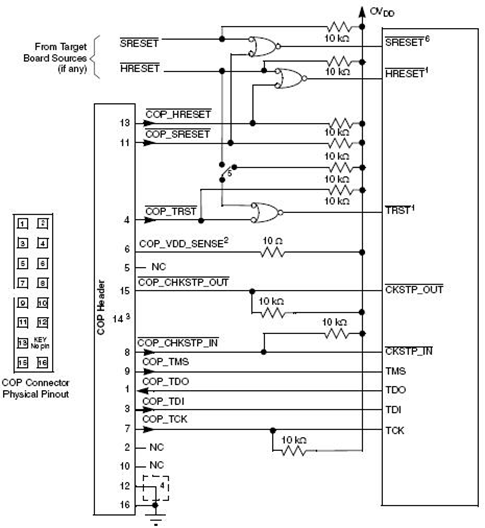
Thanks,Maybe I find the reason is that i destroied the CPU when i measuring the signals。Others PCBA is no problem but this one。
But i have another question is that can I use SPI and SDHC in 4 bits mode together in P2020?Thanks。
yipingwang
Please create a new thread to address your new question.
