
- Forums
- Product Forums
- General Purpose MicrocontrollersGeneral Purpose Microcontrollers
- i.MX Forumsi.MX Forums
- QorIQ Processing PlatformsQorIQ Processing Platforms
- Identification and SecurityIdentification and Security
- Power ManagementPower Management
- Wireless ConnectivityWireless Connectivity
- RFID / NFCRFID / NFC
- Advanced AnalogAdvanced Analog
- Neural Processing UnitsNeural Processing Units
- MCX Microcontrollers
- S32G
- S32K
- S32V
- MPC5xxx
- Other NXP Products
- S12 / MagniV Microcontrollers
- Powertrain and Electrification Analog Drivers
- Sensors
- Vybrid Processors
- Digital Signal Controllers
- 8-bit Microcontrollers
- ColdFire/68K Microcontrollers and Processors
- PowerQUICC Processors
- OSBDM and TBDML
- S32M
- S32Z/E
-
- Solution Forums
- Software Forums
- MCUXpresso Software and ToolsMCUXpresso Software and Tools
- CodeWarriorCodeWarrior
- MQX Software SolutionsMQX Software Solutions
- Model-Based Design Toolbox (MBDT)Model-Based Design Toolbox (MBDT)
- FreeMASTER
- eIQ Machine Learning Software
- Embedded Software and Tools Clinic
- S32 SDK
- S32 Design Studio
- GUI Guider
- Zephyr Project
- Voice Technology
- Application Software Packs
- Secure Provisioning SDK (SPSDK)
- Processor Expert Software
- Generative AI & LLMs
-
- Topics
- Mobile Robotics - Drones and RoversMobile Robotics - Drones and Rovers
- NXP Training ContentNXP Training Content
- University ProgramsUniversity Programs
- Rapid IoT
- NXP Designs
- SafeAssure-Community
- OSS Security & Maintenance
- Using Our Community
-
- Cloud Lab Forums
-
- Knowledge Bases
- ARM Microcontrollers
- i.MX Processors
- Identification and Security
- Model-Based Design Toolbox (MBDT)
- QorIQ Processing Platforms
- S32 Automotive Processing Platform
- Wireless Connectivity
- CodeWarrior
- MCUXpresso Suite of Software and Tools
- MQX Software Solutions
- RFID / NFC
- Advanced Analog
- Neural Processing Units
-
- NXP Tech Blogs
- Home
- :
- Translated Content
- :
- Multi Source Translation Content
- :
- 818105_en-US
818105_en-US
- RSS フィードを購読する
- 新着としてマーク
- 既読としてマーク
- ブックマーク
- 購読
- 印刷用ページ
- 不適切なコンテンツを報告
818105_en-US
818105_en-US
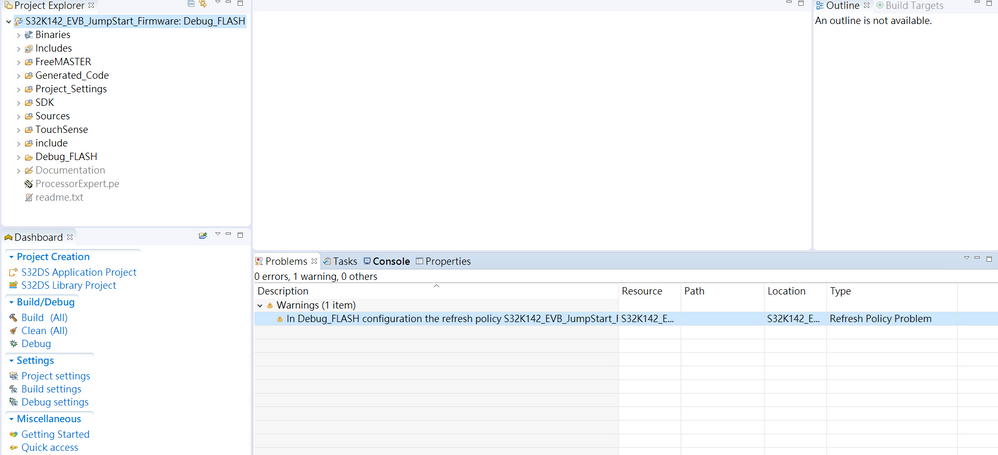
I open project from file system then get this warning.
How to Fix this warning????
Description Resource Path Location Type
In Debug_FLASH configuration the refresh policy S32K142_EVB_JumpStart_Firmware does not match the project name S32K142_EVB_JumpStart_Firmware S32K142_EVB_JumpStart_Firmware S32K142_EVB_JumpStart_Firmware Refresh Policy Problem.
A few years to late but i can confirm that for me, doing the last step only then cleaning and compiled fixed it all.
I just got into the .cproject, searched all references to the old project name and changed them for the new project name. Then it compiled without these warnings.
I guess removing the warnings does the same as cleaning.
Hello,
My colleague @BlackNight has an excellent blog on this topic. Please check it out for your solution!
MCU on Eclipse | Eclipse Project ‘Refresh Policy’: Broken Incremental Build with External Make?
Best regards,
Mike
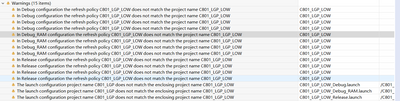
I had the same problem after I copied an existing build configuration in S32DS 2018.R1 and delete the configuration gain in S32DS.
The problem is that S32DS does not completely delete the reference to the configuration but only deletes its properties:
Working configuration:
<configuration configurationName="Release">
<resource resourceType="PROJECT" workspacePath="/Project_Name"/>
configuration>Deleted Configuration:
<configuration configurationName="Debug_Release"/>So what I did to solve the warnings is:
- Right click and delete all warnings in the console after opening the project
- Close the project
- Delete the unused configuration tag shown above in the .cproject file located in the project root folder
This was of course after I had already deleted the built configuration in S32DS itself.
As you say Xu zhao, this issue is not resolved in S32 Studio.
When you duplicate a project S32 Studio fails to rename certain files and configurations.
You have to review all Debug Configurations for your project (right click on project > Debug As > Debug Configuration)
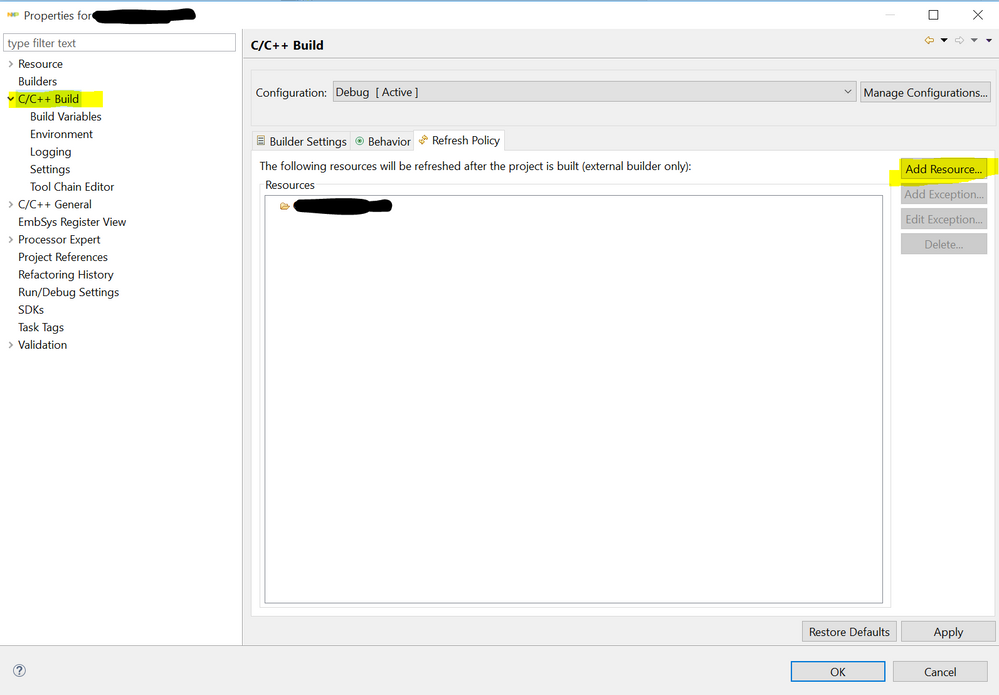
You will also have to review the Refresh Policy in each of your C/C++ Build configurations. Delete the wrong resources and add the proper ones
hi, my IDE is
S32 Design Studio for ARM
Version: 2018.R1
Build id: 180815
also have this bad problem. always warning in problem console.
I had check the prj names, it is sure correct.
still not solved....
fix by S32DS ARM 2.0 version. thanks~
Hi,
there are different names for .launch xml files - located in project root -> Project_Settings\Debugger. Just rename these files to met the project name:
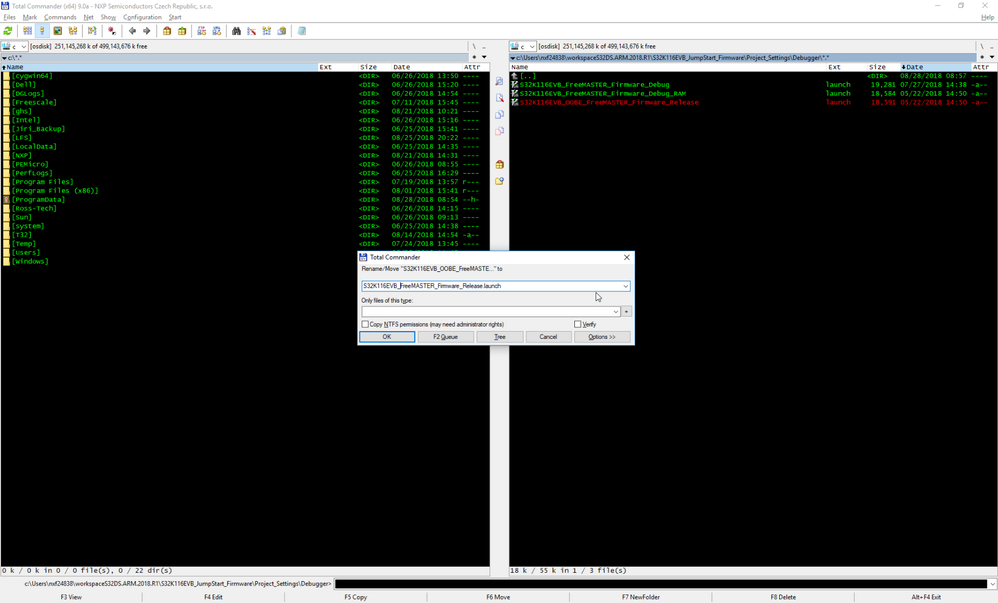
On screenshot I already renamed the first two files. In my case there was extra _OOBE_ in filename.
Hope it helps.
Jiri