
- Forums
- Product Forums
- General Purpose MicrocontrollersGeneral Purpose Microcontrollers
- i.MX Forumsi.MX Forums
- QorIQ Processing PlatformsQorIQ Processing Platforms
- Identification and SecurityIdentification and Security
- Power ManagementPower Management
- Wireless ConnectivityWireless Connectivity
- RFID / NFCRFID / NFC
- Advanced AnalogAdvanced Analog
- Neural Processing UnitsNeural Processing Units
- MCX Microcontrollers
- S32G
- S32K
- S32V
- MPC5xxx
- Other NXP Products
- S12 / MagniV Microcontrollers
- Powertrain and Electrification Analog Drivers
- Sensors
- Vybrid Processors
- Digital Signal Controllers
- 8-bit Microcontrollers
- ColdFire/68K Microcontrollers and Processors
- PowerQUICC Processors
- OSBDM and TBDML
- S32M
- S32Z/E
-
- Solution Forums
- Software Forums
- MCUXpresso Software and ToolsMCUXpresso Software and Tools
- CodeWarriorCodeWarrior
- MQX Software SolutionsMQX Software Solutions
- Model-Based Design Toolbox (MBDT)Model-Based Design Toolbox (MBDT)
- FreeMASTER
- eIQ Machine Learning Software
- Embedded Software and Tools Clinic
- S32 SDK
- S32 Design Studio
- GUI Guider
- Zephyr Project
- Voice Technology
- Application Software Packs
- Secure Provisioning SDK (SPSDK)
- Processor Expert Software
- Generative AI & LLMs
-
- Topics
- Mobile Robotics - Drones and RoversMobile Robotics - Drones and Rovers
- NXP Training ContentNXP Training Content
- University ProgramsUniversity Programs
- Rapid IoT
- NXP Designs
- SafeAssure-Community
- OSS Security & Maintenance
- Using Our Community
-
- Cloud Lab Forums
-
- Knowledge Bases
- ARM Microcontrollers
- i.MX Processors
- Identification and Security
- Model-Based Design Toolbox (MBDT)
- QorIQ Processing Platforms
- S32 Automotive Processing Platform
- Wireless Connectivity
- CodeWarrior
- MCUXpresso Suite of Software and Tools
- MQX Software Solutions
- RFID / NFC
- Advanced Analog
- Neural Processing Units
-
- NXP Tech Blogs
- Home
- :
- Translated Content
- :
- Multi Source Translation Content
- :
- 2074233_en-US
2074233_en-US
- Subscribe to RSS Feed
- Mark as New
- Mark as Read
- Bookmark
- Subscribe
- Printer Friendly Page
- Report Inappropriate Content
2074233_en-US
2074233_en-US
Hello everyone,
I'm experiencing an issue with managing SDK components in Visual Studio Code. When I click on "Manage components," nothing happens at all.
I access this feature by right-clicking on the project, then selecting Configure → Manage Components.
I've attached a screenshot showing all the tools I have installed. And as you can see, the SDK has been properly added to my repository.
Is there something I'm missing in my setup? Has anyone else encountered this issue and found a solution?
Any help would be greatly appreciated!
Hi @jBahae,
I have replicated this issue. Indeed, when trying to manage components from a project that was converted to VS Code using the MCUXpresso IDE Project Converter, it won't work. I believe this is a bug and I already reported it to the VS Code team for their review. In the meantime, I recommend you manage the necessary components using the option in MCUXpresso, before importing the project to VS Code. This seems to be the only current workaround.
Sorry for the inconvenience this may cause.
BR,
Edwin.
However, my main project was originally developed in MCUXpresso IDE, and I'm now trying to migrate it to VSCode. Is there a way to make this functionality work for projects that were initially created in MCUXpresso IDE?
Hi @jBahae,
The manage component option will prompt a component search on the top search bar of VS Code:

It might be slow, but after a while of loading the available components, these should display as such:
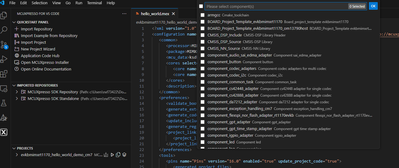
Do you see the top search bar loading? If so, please be patient as it will take a while to load all of the components.
BR,
Edwin.