
- Forums
- Product Forums
- General Purpose MicrocontrollersGeneral Purpose Microcontrollers
- i.MX Forumsi.MX Forums
- QorIQ Processing PlatformsQorIQ Processing Platforms
- Identification and SecurityIdentification and Security
- Power ManagementPower Management
- Wireless ConnectivityWireless Connectivity
- RFID / NFCRFID / NFC
- Advanced AnalogAdvanced Analog
- Neural Processing UnitsNeural Processing Units
- MCX Microcontrollers
- S32G
- S32K
- S32V
- MPC5xxx
- Other NXP Products
- S12 / MagniV Microcontrollers
- Powertrain and Electrification Analog Drivers
- Sensors
- Vybrid Processors
- Digital Signal Controllers
- 8-bit Microcontrollers
- ColdFire/68K Microcontrollers and Processors
- PowerQUICC Processors
- OSBDM and TBDML
- S32M
- S32Z/E
-
- Solution Forums
- Software Forums
- MCUXpresso Software and ToolsMCUXpresso Software and Tools
- CodeWarriorCodeWarrior
- MQX Software SolutionsMQX Software Solutions
- Model-Based Design Toolbox (MBDT)Model-Based Design Toolbox (MBDT)
- FreeMASTER
- eIQ Machine Learning Software
- Embedded Software and Tools Clinic
- S32 SDK
- S32 Design Studio
- GUI Guider
- Zephyr Project
- Voice Technology
- Application Software Packs
- Secure Provisioning SDK (SPSDK)
- Processor Expert Software
- Generative AI & LLMs
-
- Topics
- Mobile Robotics - Drones and RoversMobile Robotics - Drones and Rovers
- NXP Training ContentNXP Training Content
- University ProgramsUniversity Programs
- Rapid IoT
- NXP Designs
- SafeAssure-Community
- OSS Security & Maintenance
- Using Our Community
-
- Cloud Lab Forums
-
- Knowledge Bases
- ARM Microcontrollers
- i.MX Processors
- Identification and Security
- Model-Based Design Toolbox (MBDT)
- QorIQ Processing Platforms
- S32 Automotive Processing Platform
- Wireless Connectivity
- CodeWarrior
- MCUXpresso Suite of Software and Tools
- MQX Software Solutions
- RFID / NFC
- Advanced Analog
- Neural Processing Units
-
- NXP Tech Blogs
- Home
- :
- Translated Content
- :
- Multi Source Translation Content
- :
- 2005104_en-US
2005104_en-US
- Subscribe to RSS Feed
- Mark as New
- Mark as Read
- Bookmark
- Subscribe
- Printer Friendly Page
- Report Inappropriate Content
2005104_en-US
2005104_en-US
When i run "cpufreq-info" command on yocto , i got the below error.
Below i have add what are the configurations are enbaled in defconfig
CONFIG_CPUSETS=y
CONFIG_CGROUP_CPUACCT=y
CONFIG_ARM_PSCI_CPUIDLE=y
CONFIG_CPU_FREQ=y
CONFIG_CPU_FREQ_STAT=y
CONFIG_CPU_FREQ_DEFAULT_GOV_ONDEMAND=y
CONFIG_CPU_FREQ_GOV_POWERSAVE=y
CONFIG_CPU_FREQ_GOV_USERSPACE=y
CONFIG_CPU_FREQ_GOV_CONSERVATIVE=y
CONFIG_CPU_FREQ_GOV_SCHEDUTIL=y
CONFIG_CPUFREQ_DT=y
CONFIG_ACPI_CPPC_CPUFREQ=m
CONFIG_ARM_SCPI_CPUFREQ=y
CONFIG_ARM_IMX_CPUFREQ_DT=y
CONFIG_ARM_SCMI_CPUFREQ=y
CONFIG_QORIQ_CPUFREQ=y
CONFIG_CPU_THERMAL=y
CONFIG_LEDS_TRIGGER_CPU=y
CONFIG_CORESIGHT_CPU_DEBUG=m
Please suggest me any fixes?
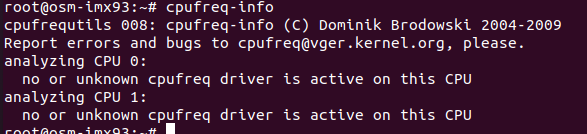
Unfortunately in general in i.MX93 the Cpu frecuency is managed by lpm (Low power Module) and we use the lpm driver in iMX93 and is the reason that we obtain the error using that command.
You can use the mhz command instead.
Best Regards!
Chavira
Hi ,
i could not able to find mode directory
ls /sys/devices/platform/imx93-lpm/
driver_override of_node/ subsystem/ uevent
modalias power/ supplier:platform:44450000.clock-controller/ waiting_for_supplier
Please suggest me any fix ?
Hi @Chavira
Why we could not able to use cpufreq-info command on imx93 custom board ?
Thank you for contacting NXP Support!
Try with the command mhz.
The result should be the next:

Best Regards!
Chavira