
- Forums
- Product Forums
- General Purpose MicrocontrollersGeneral Purpose Microcontrollers
- i.MX Forumsi.MX Forums
- QorIQ Processing PlatformsQorIQ Processing Platforms
- Identification and SecurityIdentification and Security
- Power ManagementPower Management
- Wireless ConnectivityWireless Connectivity
- RFID / NFCRFID / NFC
- Advanced AnalogAdvanced Analog
- Neural Processing UnitsNeural Processing Units
- MCX Microcontrollers
- S32G
- S32K
- S32V
- MPC5xxx
- Other NXP Products
- S12 / MagniV Microcontrollers
- Powertrain and Electrification Analog Drivers
- Sensors
- Vybrid Processors
- Digital Signal Controllers
- 8-bit Microcontrollers
- ColdFire/68K Microcontrollers and Processors
- PowerQUICC Processors
- OSBDM and TBDML
- S32M
- S32Z/E
-
- Solution Forums
- Software Forums
- MCUXpresso Software and ToolsMCUXpresso Software and Tools
- CodeWarriorCodeWarrior
- MQX Software SolutionsMQX Software Solutions
- Model-Based Design Toolbox (MBDT)Model-Based Design Toolbox (MBDT)
- FreeMASTER
- eIQ Machine Learning Software
- Embedded Software and Tools Clinic
- S32 SDK
- S32 Design Studio
- GUI Guider
- Zephyr Project
- Voice Technology
- Application Software Packs
- Secure Provisioning SDK (SPSDK)
- Processor Expert Software
- Generative AI & LLMs
-
- Topics
- Mobile Robotics - Drones and RoversMobile Robotics - Drones and Rovers
- NXP Training ContentNXP Training Content
- University ProgramsUniversity Programs
- Rapid IoT
- NXP Designs
- SafeAssure-Community
- OSS Security & Maintenance
- Using Our Community
-
- Cloud Lab Forums
-
- Knowledge Bases
- ARM Microcontrollers
- i.MX Processors
- Identification and Security
- Model-Based Design Toolbox (MBDT)
- QorIQ Processing Platforms
- S32 Automotive Processing Platform
- Wireless Connectivity
- CodeWarrior
- MCUXpresso Suite of Software and Tools
- MQX Software Solutions
- RFID / NFC
- Advanced Analog
- Neural Processing Units
-
- NXP Tech Blogs
- Home
- :
- Translated Content
- :
- Multi Source Translation Content
- :
- 1845449_en-US
1845449_en-US
1845449_en-US
1845449_en-US
I have a python script to aggregative GIT info like commit and branch name, in the root directory of my project.
I want the script to execute as a pre-build step.
I go to Properties -> Settings -> Build Steps ... and enter the command to run the script with the `Release_FLASH` config"
cd.. python sample.py
However, the python script does not execute.
I tried creating a .bat file with the same execution instructions, but still no luck.
What am I missing here? Is there a flag I need to set somewhere?
Hi @Farnam,
Thank you for the workaround as well!
Best regards,
Julián
Hi @Julián_AragónM ,
Thank you!!
This may well have worked, so I'll mark it as the accepted answer.
However, I ended up doing the following work-around.
- Go to Properties → Builders
- Create a new builder, click "New..."
- Double click program
- Name the new builder
- Enter the location of the script
- Enter the working directory of the script
- Under refresh
- Select "Refresh resources upon completion."
- Then select "The selected resource"
- Select "After a "Clean"" (Optional)
- Select "During manual builds" (Optional)
- Then click "OK"
- Now click on the new builder and press the "Up" key until it is at the top of the list
Hi @Farnam,
If the file (.py or .bat) is not included inside the project and by project properties, try with the whole path to the file so it can be recognized, as such:
python "C:\User\user\Downloads\hello_world.py"
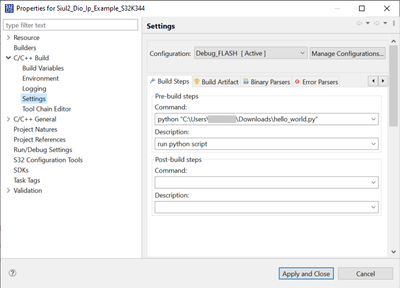
I did a simple test with a hello world and it printed before finishing building:
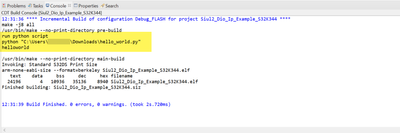
If this still does not work, try to add
cmd.exe
in front of your command line, so it launches the windows shell/command prompt.
Best regards,
Julián