
- Forums
- Product Forums
- General Purpose MicrocontrollersGeneral Purpose Microcontrollers
- i.MX Forumsi.MX Forums
- QorIQ Processing PlatformsQorIQ Processing Platforms
- Identification and SecurityIdentification and Security
- Power ManagementPower Management
- Wireless ConnectivityWireless Connectivity
- RFID / NFCRFID / NFC
- Advanced AnalogAdvanced Analog
- Neural Processing UnitsNeural Processing Units
- MCX Microcontrollers
- S32G
- S32K
- S32V
- MPC5xxx
- Other NXP Products
- S12 / MagniV Microcontrollers
- Powertrain and Electrification Analog Drivers
- Sensors
- Vybrid Processors
- Digital Signal Controllers
- 8-bit Microcontrollers
- ColdFire/68K Microcontrollers and Processors
- PowerQUICC Processors
- OSBDM and TBDML
- S32M
- S32Z/E
-
- Solution Forums
- Software Forums
- MCUXpresso Software and ToolsMCUXpresso Software and Tools
- CodeWarriorCodeWarrior
- MQX Software SolutionsMQX Software Solutions
- Model-Based Design Toolbox (MBDT)Model-Based Design Toolbox (MBDT)
- FreeMASTER
- eIQ Machine Learning Software
- Embedded Software and Tools Clinic
- S32 SDK
- S32 Design Studio
- GUI Guider
- Zephyr Project
- Voice Technology
- Application Software Packs
- Secure Provisioning SDK (SPSDK)
- Processor Expert Software
- Generative AI & LLMs
-
- Topics
- Mobile Robotics - Drones and RoversMobile Robotics - Drones and Rovers
- NXP Training ContentNXP Training Content
- University ProgramsUniversity Programs
- Rapid IoT
- NXP Designs
- SafeAssure-Community
- OSS Security & Maintenance
- Using Our Community
-
- Cloud Lab Forums
-
- Knowledge Bases
- ARM Microcontrollers
- i.MX Processors
- Identification and Security
- Model-Based Design Toolbox (MBDT)
- QorIQ Processing Platforms
- S32 Automotive Processing Platform
- Wireless Connectivity
- CodeWarrior
- MCUXpresso Suite of Software and Tools
- MQX Software Solutions
- RFID / NFC
- Advanced Analog
- Neural Processing Units
-
- NXP Tech Blogs
- Home
- :
- Translated Content
- :
- Multi Source Translation Content
- :
- 1839275_en-US
1839275_en-US
- Subscribe to RSS Feed
- Mark as New
- Mark as Read
- Bookmark
- Subscribe
- Printer Friendly Page
- Report Inappropriate Content
1839275_en-US
1839275_en-US
Hi NXP
I am using custom imx8mm board with Android 11 , kernel 5.4.70 booting properly. OV5640 camera driver is intigreted and Display driver is integreted everything works fine.
Display works fine , When I open the camera app horizontal RGB lines are coming , after capturing the picture also its same .
whole picture is coming blue colour.
How to solve the RGB lines and it should auto focus?
Does anyone have any solution or any referance link, pdf that will be helpfull.
clock for the camera is 24 MHz.
Camera is MIPI-CSI2 and Display is MIPI-DSI .
I have attached the sample captured images and logcat of camera open, then captured a picture,then closed the camera application .
Thanks and Regards
Deepak Kumar Beniya
The issue is solved
The problem was with camera power supply section .
It was having noise in analog and digital power section .
we have given external power supply to camera the lines were dissapeared.
Then, for the camera configuration in Android, please read the Chapter 8.1 in Android User's Guide.
https://www.nxp.com/docs/en/user-guide/ANDROID_USERS_GUIDE.pdf
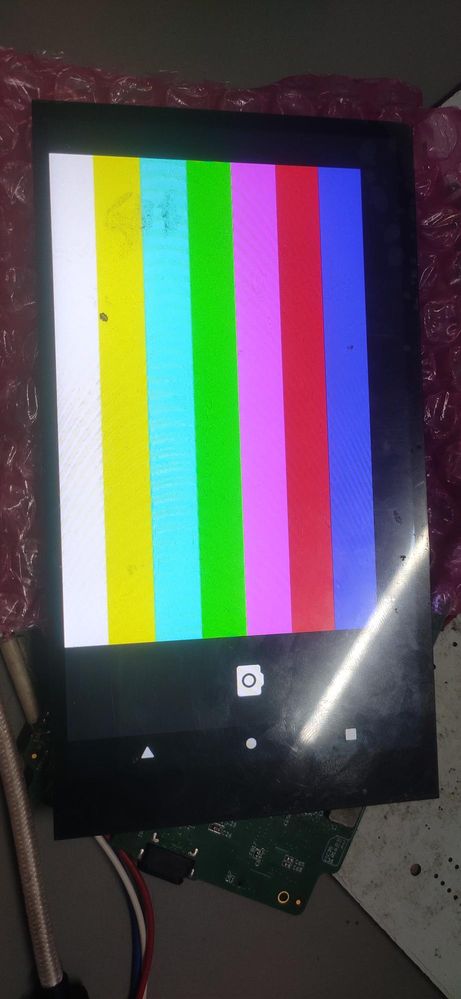
I have done Camera Test Pattern
Pattern testing is perfect .
I have register values {0x503d, 0x80, 0, 0},{0x4741, 0x00, 0, 0}
https://www.nxp.com.cn/docs/en/reference-manual/IMX_REFERENCE_MANUAL.pdf
There are different ov564 driver in the kernel. Please double check the driver you are using is proper or not. Please check the above manual Chapter 6.1.2. For i.MX 8M, select > OmniVision ov5640 camera support (MXC_CAMERA_OV5640_V2) and OmniVision ov5640 camera support using MIPI (MXC_CAMERA_OV5640_MIPI_V2).
You may try to run Linux to test the camera first. make sure the camera is working well on the board.
Connection is proper.
It have AXT connectors.
Is there any other solution for this.
So, I could solve this Problem
Thanks
Deepak Beniya
It seems is like the hardware connection between camera and the board is not good. Please double check the connection.