
- Forums
- Product Forums
- General Purpose MicrocontrollersGeneral Purpose Microcontrollers
- i.MX Forumsi.MX Forums
- QorIQ Processing PlatformsQorIQ Processing Platforms
- Identification and SecurityIdentification and Security
- Power ManagementPower Management
- Wireless ConnectivityWireless Connectivity
- RFID / NFCRFID / NFC
- Advanced AnalogAdvanced Analog
- Neural Processing UnitsNeural Processing Units
- MCX Microcontrollers
- S32G
- S32K
- S32V
- MPC5xxx
- Other NXP Products
- S12 / MagniV Microcontrollers
- Powertrain and Electrification Analog Drivers
- Sensors
- Vybrid Processors
- Digital Signal Controllers
- 8-bit Microcontrollers
- ColdFire/68K Microcontrollers and Processors
- PowerQUICC Processors
- OSBDM and TBDML
- S32M
- S32Z/E
-
- Solution Forums
- Software Forums
- MCUXpresso Software and ToolsMCUXpresso Software and Tools
- CodeWarriorCodeWarrior
- MQX Software SolutionsMQX Software Solutions
- Model-Based Design Toolbox (MBDT)Model-Based Design Toolbox (MBDT)
- FreeMASTER
- eIQ Machine Learning Software
- Embedded Software and Tools Clinic
- S32 SDK
- S32 Design Studio
- GUI Guider
- Zephyr Project
- Voice Technology
- Application Software Packs
- Secure Provisioning SDK (SPSDK)
- Processor Expert Software
- Generative AI & LLMs
-
- Topics
- Mobile Robotics - Drones and RoversMobile Robotics - Drones and Rovers
- NXP Training ContentNXP Training Content
- University ProgramsUniversity Programs
- Rapid IoT
- NXP Designs
- SafeAssure-Community
- OSS Security & Maintenance
- Using Our Community
-
- Cloud Lab Forums
-
- Knowledge Bases
- ARM Microcontrollers
- i.MX Processors
- Identification and Security
- Model-Based Design Toolbox (MBDT)
- QorIQ Processing Platforms
- S32 Automotive Processing Platform
- Wireless Connectivity
- CodeWarrior
- MCUXpresso Suite of Software and Tools
- MQX Software Solutions
- RFID / NFC
- Advanced Analog
- Neural Processing Units
-
- NXP Tech Blogs
- Home
- :
- Translated Content
- :
- Multi Source Translation Content
- :
- 1635822_en-US
1635822_en-US
- RSS フィードを購読する
- 新着としてマーク
- 既読としてマーク
- ブックマーク
- 購読
- 印刷用ページ
- 不適切なコンテンツを報告
1635822_en-US
1635822_en-US
Looking at the console messages, it feels like the flashloader has signed successfully and downloaded and jumped to the chip, I don't know why it won't connect. I'm using a combination of core and backplane boards, and switching to a core board that doesn't have HAB turned on, it downloads fine, which means there's nothing wrong with the flashloader itself. Opening the automatically generated bd file signed for the flashloader, I don't see any problems, so I'm looking for help.
The console information is as follows:
executing: D:\AEMBED\rt1052\soft\NXP-MCUBootUtility-master\tools\sdphost\win\sdphost -t 50000 -p COM22,115200 -j -- error-status
toolStatus: 0
commandOutput: {
   "command" : "error-status",
   "response" : [ 4042322160 ],
   "status" : {
      "description" : "305411090 (0x12343412) HAB enabled.",
      "value" : 305411090
   }
}

Executing: D:\AEMBED\rt1052\soft\NXP-MCUBootUtility-master\tools\sdphost\win\sdphost -t 50000 -p COM22,115200 -j -- read-register 1075790864 32 4 D:\AEMBED\rt1052\soft\NXP-MCUBootUtility-master\tools\sdphost\win\vectors\readReg.dat
toolStatus: 0
commandOutput: {
   "command" : "read-register",
   "response" : [],
   "status" : {
      "description" : "305411090 (0x12343412) HAB enabled.",
      "value" : 305411090
   }
}

Executing: D:\AEMBED\rt1052\soft\NXP-MCUBootUtility-master\tools\sdphost\win\sdphost -t 50000 -p COM22,115200 -j -- read-register 1075790880 32 4 D:\AEMBED\rt1052\soft\NXP-MCUBootUtility-master\tools\sdphost\win\vectors\readReg.dat
toolStatus: 0
commandOutput: {
   "command" : "read-register",
   "response" : [],
   "status" : {
      "description" : "305411090 (0x12343412) HAB enabled.",
      "value" : 305411090
   }
}

Executing: D:\AEMBED\rt1052\soft\NXP-MCUBootUtility-master\tools\sdphost\win\sdphost -t 50000 -p COM22,115200 -j -- read-register 1074757636 32 4 D:\AEMBED\rt1052\soft\NXP-MCUBootUtility-master\tools\sdphost\win\vectors\readReg.dat
toolStatus: 0
commandOutput: {
   "command" : "read-register",
   "response" : [],
   "status" : {
      "description" : "305411090 (0x12343412) HAB enabled.",
      "value" : 305411090
   }
}

Executing: D:\AEMBED\rt1052\soft\NXP-MCUBootUtility-master\tools\sdphost\win\sdphost -t 50000 -p COM22,115200 -j -- read-register 1074757660 32 4 D:\AEMBED\rt1052\soft\NXP-MCUBootUtility-master\tools\sdphost\win\vectors\readReg.dat
toolStatus: 0
commandOutput: {
   "command" : "read-register",
   "response" : [],
   "status" : {
      "description" : "305411090 (0x12343412) HAB enabled.",
      "value" : 305411090
   }
}

Executing: D:\AEMBED\rt1052\soft\NXP-MCUBootUtility-master\tools\sdphost\win\sdphost -t 50000 -p COM22,115200 -j -- read-register 1074757660 32 4 D:\AEMBED\rt1052\soft\NXP-MCUBootUtility-master\tools\sdphost\win\vectors\readReg.dat
toolStatus: 0
commandOutput: {
   "command" : "read-register",
   "response" : [],
   "status" : {
      "description" : "305411090 (0x12343412) HAB enabled.",
      "value" : 305411090
   }
}


D:\AEMBED\rt1052\soft\NXP-MCUBootUtility-master\tools\elftosb4\win>"D:\AEMBED\rt1052\soft\NXP-MCUBootUtility-master\tools\elftosb4\win\elftosb.exe" -f imx -V -c "D:\AEMBED\rt1052\soft\NXP-MCUBootUtility-master\gen\bd_file\imx_flashloader_gen.bd" -o "D:\AEMBED\rt1052\soft\NXP-MCUBootUtility-master\gen\bootable_image\ivt_flashloader_signed.bin" "D:\AEMBED\rt1052\soft\NXP-MCUBootUtility-master\src\targets\MIMXRT1052\flashloader.srec"
CSF Processed successfully and signed data available in csf.bin
        Section: 0x14
        Section: 0x15
        Section: 0x16
        Section: 0x18
        Section: 0x19
        Section: 0x1a
        Section: 0x1f
        Section: 0x21
iMX bootable image generated successfully

Executing: D:\AEMBED\rt1052\soft\NXP-MCUBootUtility-master\tools\sdphost\win\sdphost -t 50000 -p COM22,115200 -j -- write-file 539001344 D:\AEMBED\rt1052\soft\NXP-MCUBootUtility-master\gen\bootable_image\ivt_flashloader_signed.bin
toolStatus: 0
commandOutput: {
   "command" : "write-file",
   "response" : [ 3351091 ],
   "status" : {
      "description" : "305411090 (0x12343412) HAB enabled.",
      "value" : 305411090
   }
}
The automatically generated bd file is as follows
options {
    flags = 0x08;
    startAddress = 0x20208200;
    ivtOffset = 0x0;
    initialLoadSize = 0x200;
    entryPointAddress = 0x2021b26d;
}

sources {
    elfFile = extern(0);
}

constants {
    SEC_CSF_HEADER              = 20;
    SEC_CSF_INSTALL_SRK         = 21;
    SEC_CSF_INSTALL_CSFK        = 22;
    SEC_CSF_INSTALL_NOCAK       = 23;
    SEC_CSF_AUTHENTICATE_CSF    = 24;
    SEC_CSF_INSTALL_KEY         = 25;
    SEC_CSF_AUTHENTICATE_DATA   = 26;
    SEC_CSF_INSTALL_SECRET_KEY  = 27;
    SEC_CSF_DECRYPT_DATA        = 28;
    SEC_NOP                     = 29;
    SEC_SET_MID                 = 30;
    SEC_SET_ENGINE              = 31;
    SEC_INIT                    = 32;
    SEC_UNLOCK                  = 33;
}

section (SEC_CSF_HEADER;
    Header_Version="4.2",
    Header_HashAlgorithm="sha256",
    Header_Engine="DCP",
    Header_EngineConfiguration=0,
    Header_CertificateFormat="x509",
    Header_SignatureFormat="CMS"
    )
{
}

section (SEC_CSF_INSTALL_SRK;
    InstallSRK_Table="../../../gen/hab_cert/SRK_1_2_3_4_table.bin",
    InstallSRK_SourceIndex=0
    )
{
}

section (SEC_CSF_INSTALL_CSFK;
    InstallCSFK_File="../../cst/crts/CSF1_1_sha256_2048_65537_v3_usr_crt.pem",
    InstallCSFK_CertificateFormat="x509"
    )
{
}

section (SEC_CSF_AUTHENTICATE_CSF)
{
}

section (SEC_CSF_INSTALL_KEY;
    InstallKey_File="../../cst/crts/IMG1_1_sha256_2048_65537_v3_usr_crt.pem",
    InstallKey_VerificationIndex=0,
    InstallKey_TargetIndex=2)
{
}

section (SEC_CSF_AUTHENTICATE_DATA;
    AuthenticateData_VerificationIndex=2,
    AuthenticateData_Engine="DCP",
    AuthenticateData_EngineConfiguration=0)
{
}

section (SEC_SET_ENGINE;
    SetEngine_HashAlgorithm = "sha256",
    SetEngine_Engine = "DCP",
    SetEngine_EngineConfiguration = "0")
{
}

section (SEC_UNLOCK;
    Unlock_Engine = "SNVS",
    Unlock_features = "ZMK WRITE"
    )
{
}
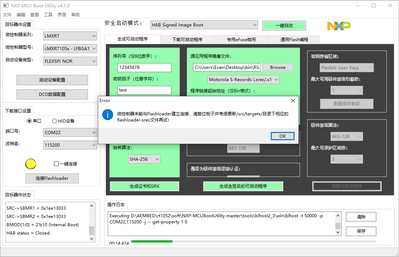
A screenshot of the nxp-mcu bootutility error report is shown below:
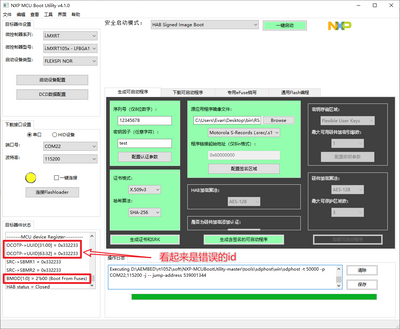
But in reality, the keys are configured with BMOD[1:0]=2'b01 (serial downloader)
More often than not, the boot mode is recognized as BMOD[1:0]=2'b00 (boot from fuse)
Rarely will it be BMOD[1:0]=2'b10 (internal boot)
And then the recognized UUIDs look out of whack as well
Very strange, never recognizes the boot mode as BMOD[1:0]=2'b01 (serial downloader)
ps: switching to a core board with no HAB configured recognizes it properly every time as BMOD[1:0]=2'b01 (serial downloader)
NXP Technical Support:
Hello!
I am experiencing the same problem. Now, downloading the program with KEIL is OK, but, it won't run. The development board model number is: MIMXRT1064-EVK. the console information is as follows:
Executing: D:\TP161PCB\MCUBootUtility\NXP-MCUBootUtility-3.5.0\tools\sdphost\win\sdphost -t 50000 -p COM8,115200 -j -- error- status
toolStatus: 0
commandOutput: {
" command ": "error-status ",
" response ": [ 4042322160 ],
" status ": {
" description ": " 305411090 (0x12343412) HAB enabled. ",
"value ": 305411090
}
}
Executing: D:\TP161PCB\MCUBootUtility\NXP-MCUBootUtility-3.5.0\tools\sdphost\win\sdphost -t 50000 -p COM8,115200 -j -- read-register 1075790864 32 4 D:\TP161PCB\MCUBootUtility\NXP-MCUBootUtility-3.5.0\tools\sdphost\win\vectors\readReg.dat
toolStatus: 0
commandOutput: {
"command ": "read-register ",
" response ": [],
" status ": {
" description ": "305411090 (0x12343412) HAB enabled. ",
"value ": 305411090
}
}
Executing: D:\TP161PCB\MCUBootUtility\NXP-MCUBootUtility-3.5.0\tools\sdphost\win\sdphost -t 50000 -p COM8,115200 -j -- read-register 1075790880 32 4 D:\TP161PCB\MCUBootUtility\NXP-MCUBootUtility-3.5.0\tools\sdphost\win\vectors\readReg.dat
toolStatus: 0
commandOutput: {
"command ": "read-register ",
" response ": [],
" status ": {
" description ": "305411090 (0x12343412) HAB enabled. ",
"value ": 305411090
}
}
Executing: D:\TP161PCB\MCUBootUtility\NXP-MCUBootUtility-3.5.0\tools\sdphost\win\sdphost -t 50000 -p COM8,115200 -j -- read-register 1074757636 32 4 D:\TP161PCB\MCUBootUtility\NXP-MCUBootUtility-3.5.0\tools\sdphost\win\vectors\readReg.dat
toolStatus: 0
commandOutput: {
"command ": "read-register ",
" response ": [],
" status ": {
" description ": "305411090 (0x12343412) HAB enabled. ",
"value ": 305411090
}
}
Executing: D:\TP161PCB\MCUBootUtility\NXP-MCUBootUtility-3.5.0\tools\sdphost\win\sdphost -t 50000 -p COM8,115200 -j -- read-register 1074757660 32 4 D:\TP161PCB\MCUBootUtility\NXP-MCUBootUtility-3.5.0\tools\sdphost\win\vectors\readReg.dat
toolStatus: 0
commandOutput: {
"command ": "read-register ",
" response ": [],
" status ": {
" description ": "305411090 (0x12343412) HAB enabled. ",
"value ": 305411090
}
}
Executing: D:\TP161PCB\MCUBootUtility\NXP-MCUBootUtility-3.5.0\tools\sdphost\win\sdphost -t 50000 -p COM8,115200 -j -- read-register 1074757660 32 4 D:\TP161PCB\MCUBootUtility\NXP-MCUBootUtility-3.5.0\tools\sdphost\win\vectors\readReg.dat
toolStatus: 0
commandOutput: {
"command ": "read-register ",
" response ": [],
" status ": {
" description ": "305411090 (0x12343412) HAB enabled. ",
"value ": 305411090
}
}
D:\TP161PCB\MCUBootUtility\NXP-MCUBootUtility-3.5.0\tools\elftosb4\win >" D:\TP161PCB\MCUBootUtility\NXP-MCUBootUtility-3.5.0\tools\ elftosb4\win\elftosb.exe " -f imx -V -c "D:\TP161PCB\MCUBootUtility\NXP-MCUBootUtility-3.5.0\gen\bd_file\imx_flashloader_gen.bd " -o "D:\TP161PCB\MCUBootUtility\NXP-MCUBootUtility-3.5.0\gen\bootable_image\ivt_flashloader_signed.bin " "D:\TP161PCB\MCUBootUtility\NXP-MCUBootUtility-3.5.0\src\targets\MIMXRT1064\flashloader.srec "
CSF Processed successfully and signed data available in csf.bin
Section: 0x14
Section: 0x15
Section: 0x16
Section: 0x18
Section: 0x19
Section: 0x1a
Section: 0x1f
Section: 0x21
iMX bootable image generated successfully
Executing: D:\TP161PCB\MCUBootUtility\NXP-MCUBootUtility-3.5.0\tools\sdphost\win\sdphost -t 50000 -p COM8,115200 -j -- write-file 539001344 D:\TP161PCB\MCUBootUtility\NXP-MCUBootUtility-3.5.0\gen\bootable_image\ivt_flashloader_signed.bin
toolStatus: 0
commandOutput: {
"command ": "write-file ",
" response ": [ 2290649224 ],
" status ": {
" description ": "305411090 (0x12343412) HAB enabled. ",
"value ": 305411090
}
}
Executing: D:\TP161PCB\MCUBootUtility\NXP-MCUBootUtility-3.5.0\tools\sdphost\win\sdphost -t 50000 -p COM8,115200 -j -- jump-address 539001344
toolStatus: 0
commandOutput: {
" command ": "jump-address ",
" response ": [],
" status ": {
" description ": " 305411090 (0x12343412) HAB enabled. ",
"value ": 305411090
}
}
Executing: D:\TP161PCB\MCUBootUtility\NXP-MCUBootUtility-3.5.0\tools\blhost2_3\win\blhost -t 50000 -p COM8,115200 -j -- get-property 1 0
toolStatus: 1
commandOutput: {
" command ": "ping ",
" response ": [],
" status ": {
" description ": "10501 (0x2905) Invalid packet type. ",
"value ": 10501
}
}
Executing: D:\TP161PCB\MCUBootUtility\NXP-MCUBootUtility-3.5.0\tools\blhost2_3\win\blhost -t 50000 -p COM8,115200 -j -- get-property 1 0
toolStatus: 1
commandOutput: {
" command ": "ping ",
" response ": [],
" status ": {
" description ": "10501 (0x2905) Invalid packet type. ",
"value ": 10501
}
}
Executing: D:\TP161PCB\MCUBootUtility\NXP-MCUBootUtility-3.5.0\tools\blhost2_3\win\blhost -t 50000 -p COM8,115200 -j -- get-property 1 0
toolStatus: 1
commandOutput: {
" command ": "ping ",
" response ": [],
" status ": {
" description ": "10501 (0x2905) Invalid packet type. ",
"value ": 10501
}
}
Executing: D:\TP161PCB\MCUBootUtility\NXP-MCUBootUtility-3.5.0\tools\blhost2_3\win\blhost -t 50000 -p COM8,115200 -j -- get-property 1 0
Can you help me see what it is again?
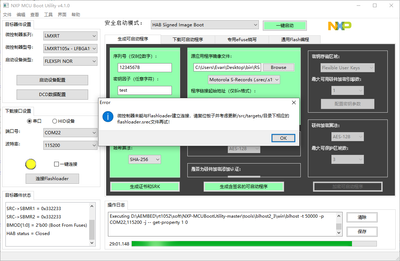
The full screenshot of the console and its contents are below:
xecuting: D:\AEMBED\rt1052\soft\NXP-MCUBootUtility-master\tools\sdphost\win\sdphost -t 50000 -p COM22,115200 -j -- error-status
toolStatus: 0
commandOutput: {
   "command" : "error-status",
   "response" : [ 4042322160 ],
   "status" : {
      "description" : "305411090 (0x12343412) HAB enabled.",
      "value" : 305411090
   }
}

Executing: D:\AEMBED\rt1052\soft\NXP-MCUBootUtility-master\tools\sdphost\win\sdphost -t 50000 -p COM22,115200 -j -- read-register 1075790864 32 4 D:\AEMBED\rt1052\soft\NXP-MCUBootUtility-master\tools\sdphost\win\vectors\readReg.dat
toolStatus: 0
commandOutput: {
   "command" : "read-register",
   "response" : [],
   "status" : {
      "description" : "305411090 (0x12343412) HAB enabled.",
      "value" : 305411090
   }
}

Executing: D:\AEMBED\rt1052\soft\NXP-MCUBootUtility-master\tools\sdphost\win\sdphost -t 50000 -p COM22,115200 -j -- read-register 1075790880 32 4 D:\AEMBED\rt1052\soft\NXP-MCUBootUtility-master\tools\sdphost\win\vectors\readReg.dat
toolStatus: 0
commandOutput: {
   "command" : "read-register",
   "response" : [],
   "status" : {
      "description" : "305411090 (0x12343412) HAB enabled.",
      "value" : 305411090
   }
}

Executing: D:\AEMBED\rt1052\soft\NXP-MCUBootUtility-master\tools\sdphost\win\sdphost -t 50000 -p COM22,115200 -j -- read-register 1074757636 32 4 D:\AEMBED\rt1052\soft\NXP-MCUBootUtility-master\tools\sdphost\win\vectors\readReg.dat
toolStatus: 0
commandOutput: {
   "command" : "read-register",
   "response" : [],
   "status" : {
      "description" : "305411090 (0x12343412) HAB enabled.",
      "value" : 305411090
   }
}

Executing: D:\AEMBED\rt1052\soft\NXP-MCUBootUtility-master\tools\sdphost\win\sdphost -t 50000 -p COM22,115200 -j -- read-register 1074757660 32 4 D:\AEMBED\rt1052\soft\NXP-MCUBootUtility-master\tools\sdphost\win\vectors\readReg.dat
toolStatus: 0
commandOutput: {
   "command" : "read-register",
   "response" : [],
   "status" : {
      "description" : "305411090 (0x12343412) HAB enabled.",
      "value" : 305411090
   }
}

Executing: D:\AEMBED\rt1052\soft\NXP-MCUBootUtility-master\tools\sdphost\win\sdphost -t 50000 -p COM22,115200 -j -- read-register 1074757660 32 4 D:\AEMBED\rt1052\soft\NXP-MCUBootUtility-master\tools\sdphost\win\vectors\readReg.dat
toolStatus: 0
commandOutput: {
   "command" : "read-register",
   "response" : [],
   "status" : {
      "description" : "305411090 (0x12343412) HAB enabled.",
      "value" : 305411090
   }
}


D:\AEMBED\rt1052\soft\NXP-MCUBootUtility-master\tools\elftosb4\win>"D:\AEMBED\rt1052\soft\NXP-MCUBootUtility-master\tools\elftosb4\win\elftosb.exe" -f imx -V -c "D:\AEMBED\rt1052\soft\NXP-MCUBootUtility-master\gen\bd_file\imx_flashloader_gen.bd" -o "D:\AEMBED\rt1052\soft\NXP-MCUBootUtility-master\gen\bootable_image\ivt_flashloader_signed.bin" "D:\AEMBED\rt1052\soft\NXP-MCUBootUtility-master\src\targets\MIMXRT1052\flashloader.srec"
CSF Processed successfully and signed data available in csf.bin
        Section: 0x14
        Section: 0x15
        Section: 0x16
        Section: 0x18
        Section: 0x19
        Section: 0x1a
        Section: 0x1f
        Section: 0x21
iMX bootable image generated successfully

Executing: D:\AEMBED\rt1052\soft\NXP-MCUBootUtility-master\tools\sdphost\win\sdphost -t 50000 -p COM22,115200 -j -- write-file 539001344 D:\AEMBED\rt1052\soft\NXP-MCUBootUtility-master\gen\bootable_image\ivt_flashloader_signed.bin
toolStatus: 0
commandOutput: {
   "command" : "write-file",
   "response" : [ 2290649224 ],
   "status" : {
      "description" : "305411090 (0x12343412) HAB enabled.",
      "value" : 305411090
   }
}

Executing: D:\AEMBED\rt1052\soft\NXP-MCUBootUtility-master\tools\sdphost\win\sdphost -t 50000 -p COM22,115200 -j -- jump-address 539001344
toolStatus: 0
commandOutput: {
   "command" : "jump-address",
   "response" : [],
   "status" : {
      "description" : "305411090 (0x12343412) HAB enabled.",
      "value" : 305411090
   }
}

Executing: D:\AEMBED\rt1052\soft\NXP-MCUBootUtility-master\tools\blhost2_3\win\blhost -t 50000 -p COM22,115200 -j -- get-property 1 0
toolStatus: 1
commandOutput: {
   "command" : "ping",
   "response" : [],
   "status" : {
      "description" : "10501 (0x2905) Invalid packet type.",
      "value" : 10501
   }
}

Executing: D:\AEMBED\rt1052\soft\NXP-MCUBootUtility-master\tools\blhost2_3\win\blhost -t 50000 -p COM22,115200 -j -- get-property 1 0
toolStatus: 1
commandOutput: {
   "command" : "ping",
   "response" : [],
   "status" : {
      "description" : "10501 (0x2905) Invalid packet type.",
      "value" : 10501
   }
}

Executing: D:\AEMBED\rt1052\soft\NXP-MCUBootUtility-master\tools\blhost2_3\win\blhost -t 50000 -p COM22,115200 -j -- get-property 1 0
toolStatus: 1
commandOutput: {
   "command" : "ping",
   "response" : [],
   "status" : {
      "description" : "10501 (0x2905) Invalid packet type.",
      "value" : 10501
   }
}

Executing: D:\AEMBED\rt1052\soft\NXP-MCUBootUtility-master\tools\blhost2_3\win\blhost -t 50000 -p COM22,115200 -j -- get-property 1 0
toolStatus: 1
commandOutput: {
   "command" : "ping",
   "response" : [],
   "status" : {
      "description" : "10501 (0x2905) Invalid packet type.",
      "value" : 10501
   }
}

Executing: D:\AEMBED\rt1052\soft\NXP-MCUBootUtility-master\tools\blhost2_3\win\blhost -t 50000 -p COM22,115200 -j -- get-property 1 0
toolStatus: 1
commandOutput: {
   "command" : "ping",
   "response" : [],
   "status" : {
      "description" : "10501 (0x2905) Invalid packet type.",
      "value" : 10501
   }
}
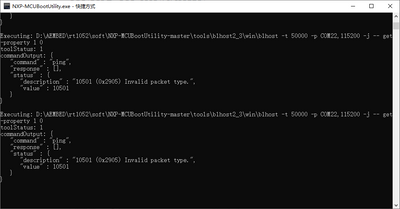
控制台命令截图不太完整,write-file 后面没有命令了吗?